> ## Documentation Index
> Fetch the complete documentation index at: https://docs.tenderly.co/llms.txt
> Use this file to discover all available pages before exploring further.
# Chainlink and Chronicle price feeds
> Inspect Chainlink and Chronicle price feeds: latest answer, deviation threshold, heartbeat, oracle round responses, SVR comparison, and feed configuration.
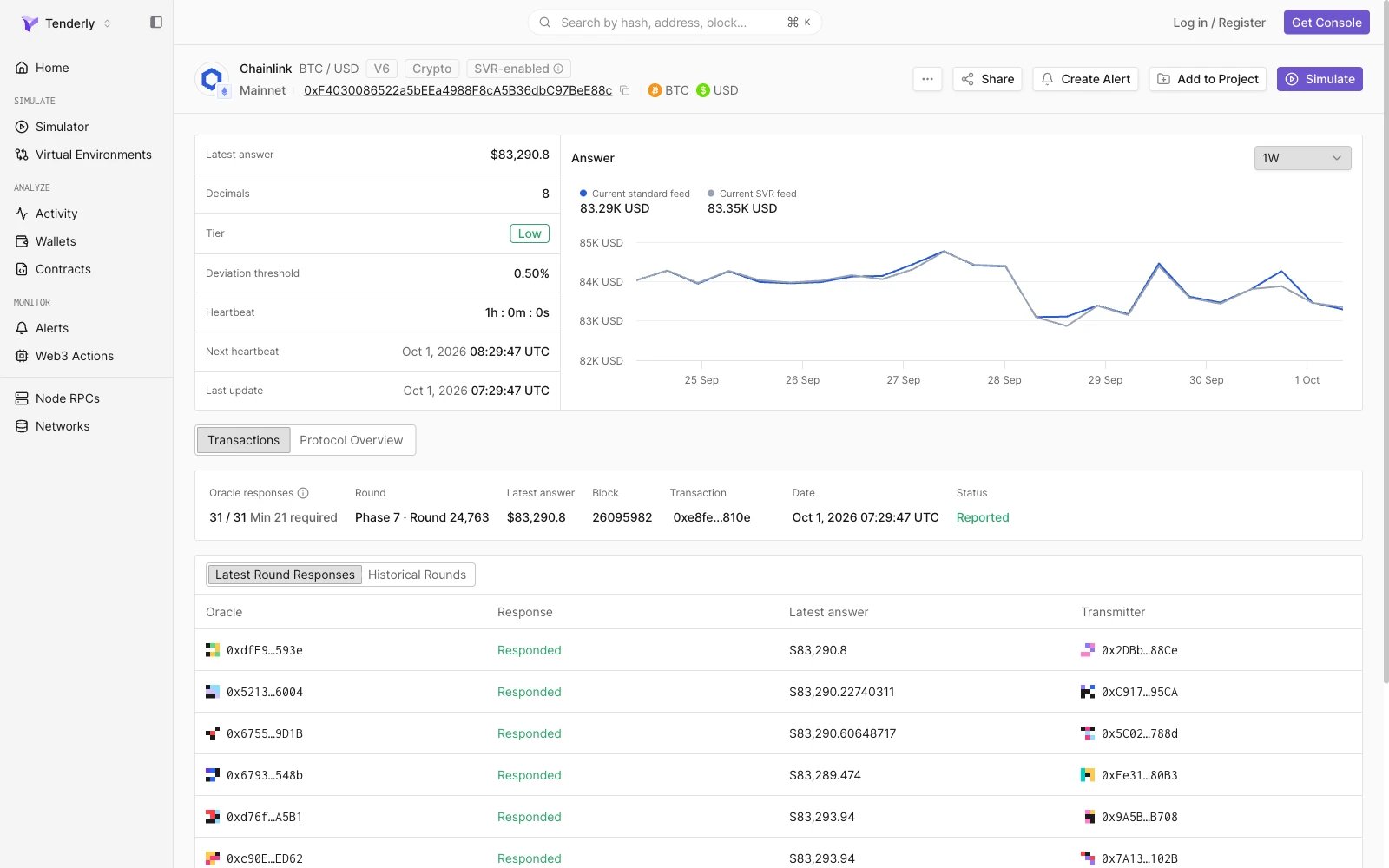
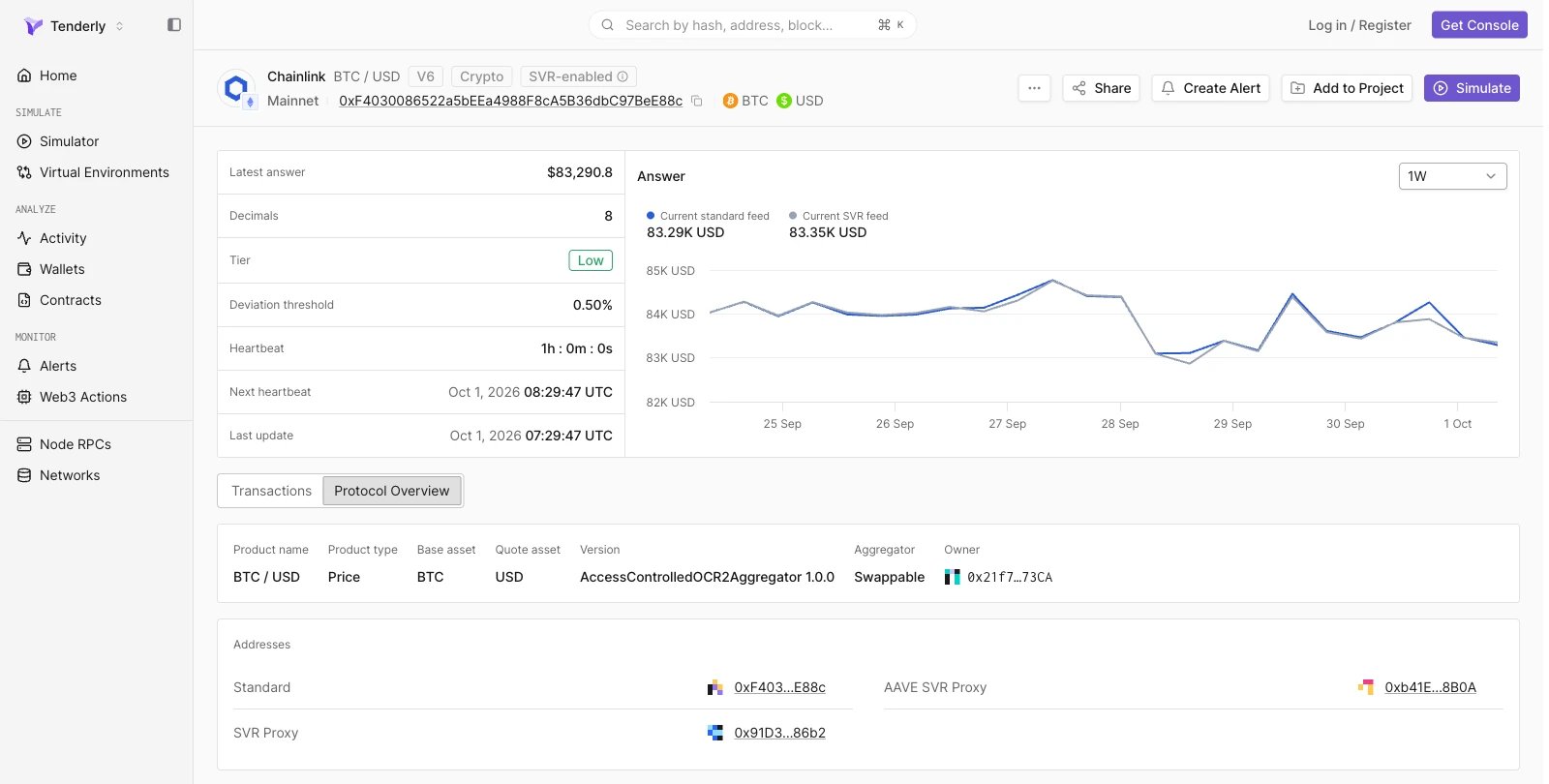
Tenderly recognizes Chainlink and Chronicle price feed contracts and renders a feed page for each one. The page shows the feed's current answer and update parameters, a chart of the reported price over time, the oracle responses behind each round, and the decoded feed configuration.
Supported feeds are Chainlink Data Feeds, including feeds with a Smart Value Recapture (SVR) variant, and Chronicle Scribe and Optimistic Scribe feeds. Open a Chainlink feed by its proxy address. Other Chainlink and Chronicle products, such as Proof of Reserve feeds, open the standard contract view.
On the contract page of a recognized feed, a link with the provider and pair (for example, **Chainlink BTC / USD**) appears next to the contract name and opens the feed page.
## Feed header
The header identifies the feed by provider and pair (for example, Chainlink BTC / USD), and shows the network, the feed address, and the base and quote assets. Tags next to the pair name show the proxy version on Chainlink feeds (for example, V6) and the feed's asset class (for example, Crypto). Chainlink feeds with an SVR variant show an **SVR-enabled** tag.
**Create Alert** opens a new [alert](/monitoring/alerts/introduction) rule with the feed address and network prefilled, and **Simulate** opens a new simulation in the [Simulator](/simulator-ui/overview) with the feed contract and network prefilled. Outside a project, both actions ask you to select a project first. **Add to Project** adds the feed contract to a project.
 ## Feed metrics
The left panel lists the feed's current state and update parameters:
| Metric | Description |
| - | - |
| Latest answer | Most recent price reported by the feed |
| Decimals | Number of decimals in the feed's answer |
| Tier | Market risk tier: **Low**, **Medium**, **High**, or **Very High** |
| Deviation threshold | Price change, as a percentage, that triggers a new update |
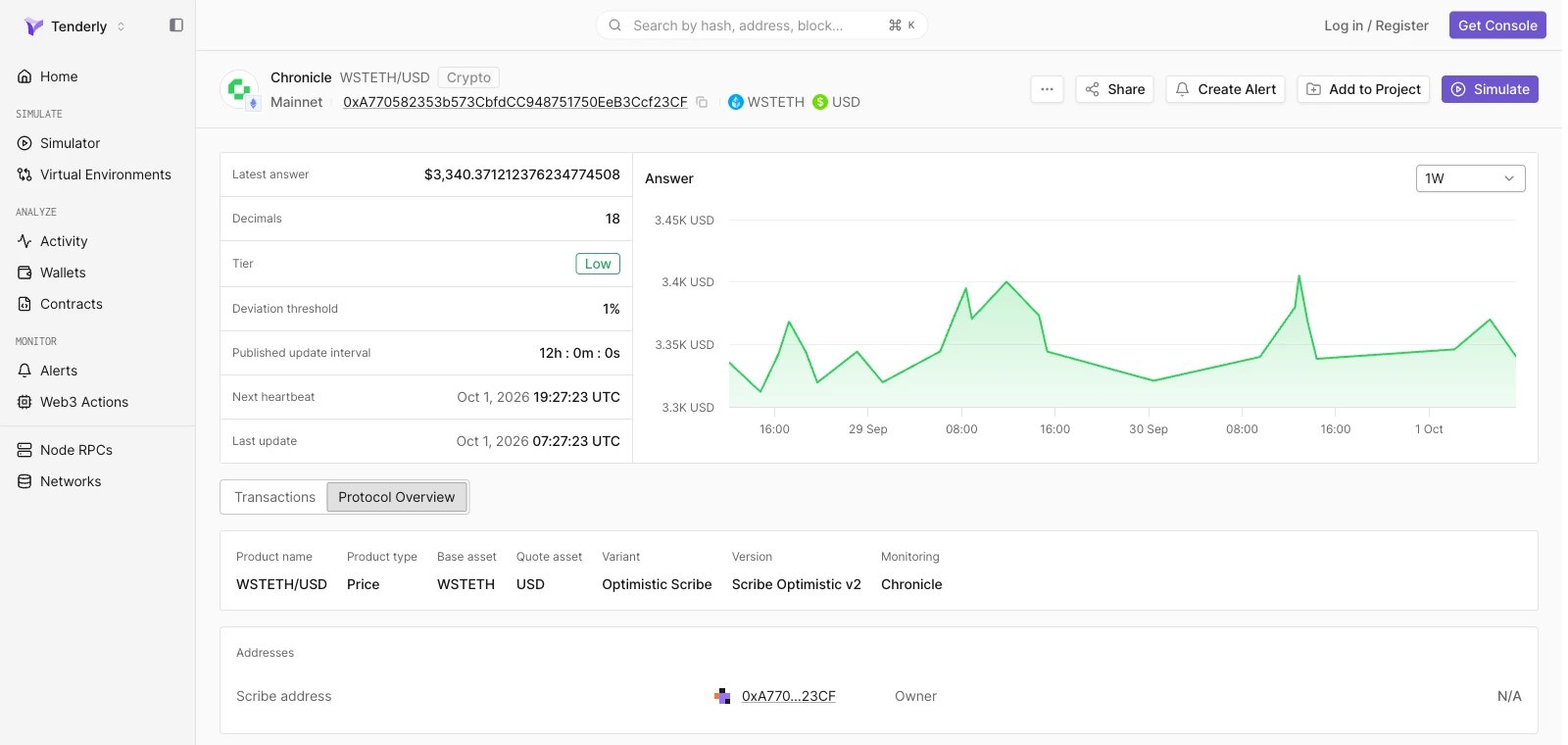
| Heartbeat | Maximum time between updates. Chronicle feeds show **Published update interval** |
| Next heartbeat | Time by which the next update is due if the price stays within the deviation threshold (last update plus heartbeat) |
| Last update | Time of the most recent update |
Tier, Deviation threshold, Heartbeat, and Next heartbeat appear when the provider publishes these values for the feed.
## Answer chart
Next to the metrics, the **Answer** chart plots the reported price over a selectable time range: **1D**, **1W** (default), or **1M**.
On Chainlink feeds, the chart samples the answer at up to 24 evenly spaced blocks in the range, so each point carries a block timestamp rather than a feed update time. On Chronicle feeds, the chart plots up to 24 finalized rounds. For exact update times, use [Historical Rounds](#historical-rounds).
### Compare standard and SVR feeds
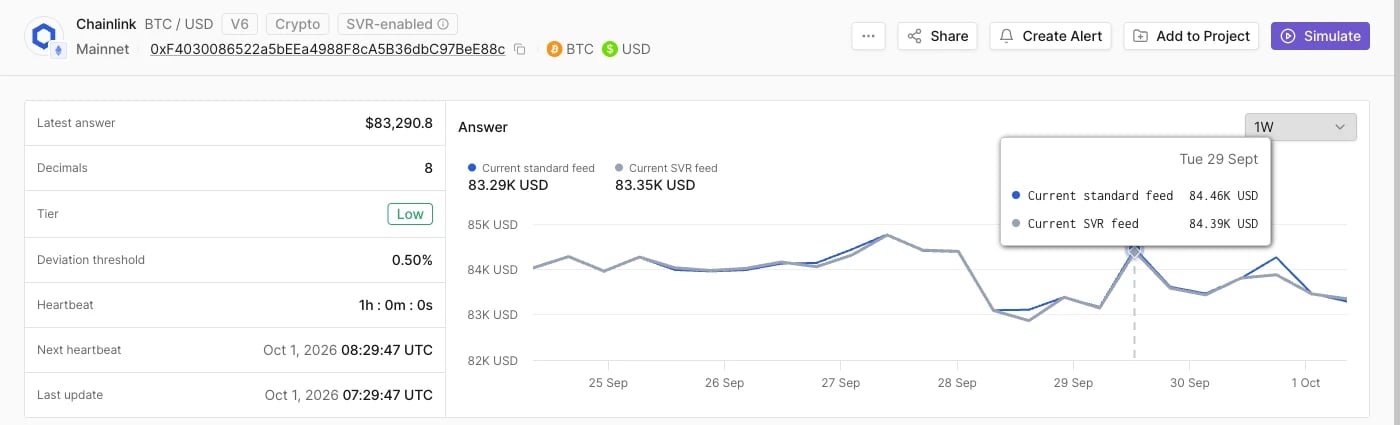
On SVR-enabled Chainlink feeds, the chart plots two series, **Current standard feed** and **Current SVR feed**, with the latest value of each above the chart. Hover any point to read both answers at that time and check that the SVR variant tracks the standard feed.
## Feed metrics
The left panel lists the feed's current state and update parameters:
| Metric | Description |
| - | - |
| Latest answer | Most recent price reported by the feed |
| Decimals | Number of decimals in the feed's answer |
| Tier | Market risk tier: **Low**, **Medium**, **High**, or **Very High** |
| Deviation threshold | Price change, as a percentage, that triggers a new update |
| Heartbeat | Maximum time between updates. Chronicle feeds show **Published update interval** |
| Next heartbeat | Time by which the next update is due if the price stays within the deviation threshold (last update plus heartbeat) |
| Last update | Time of the most recent update |
Tier, Deviation threshold, Heartbeat, and Next heartbeat appear when the provider publishes these values for the feed.
## Answer chart
Next to the metrics, the **Answer** chart plots the reported price over a selectable time range: **1D**, **1W** (default), or **1M**.
On Chainlink feeds, the chart samples the answer at up to 24 evenly spaced blocks in the range, so each point carries a block timestamp rather than a feed update time. On Chronicle feeds, the chart plots up to 24 finalized rounds. For exact update times, use [Historical Rounds](#historical-rounds).
### Compare standard and SVR feeds
On SVR-enabled Chainlink feeds, the chart plots two series, **Current standard feed** and **Current SVR feed**, with the latest value of each above the chart. Hover any point to read both answers at that time and check that the SVR variant tracks the standard feed.
 ## Transactions
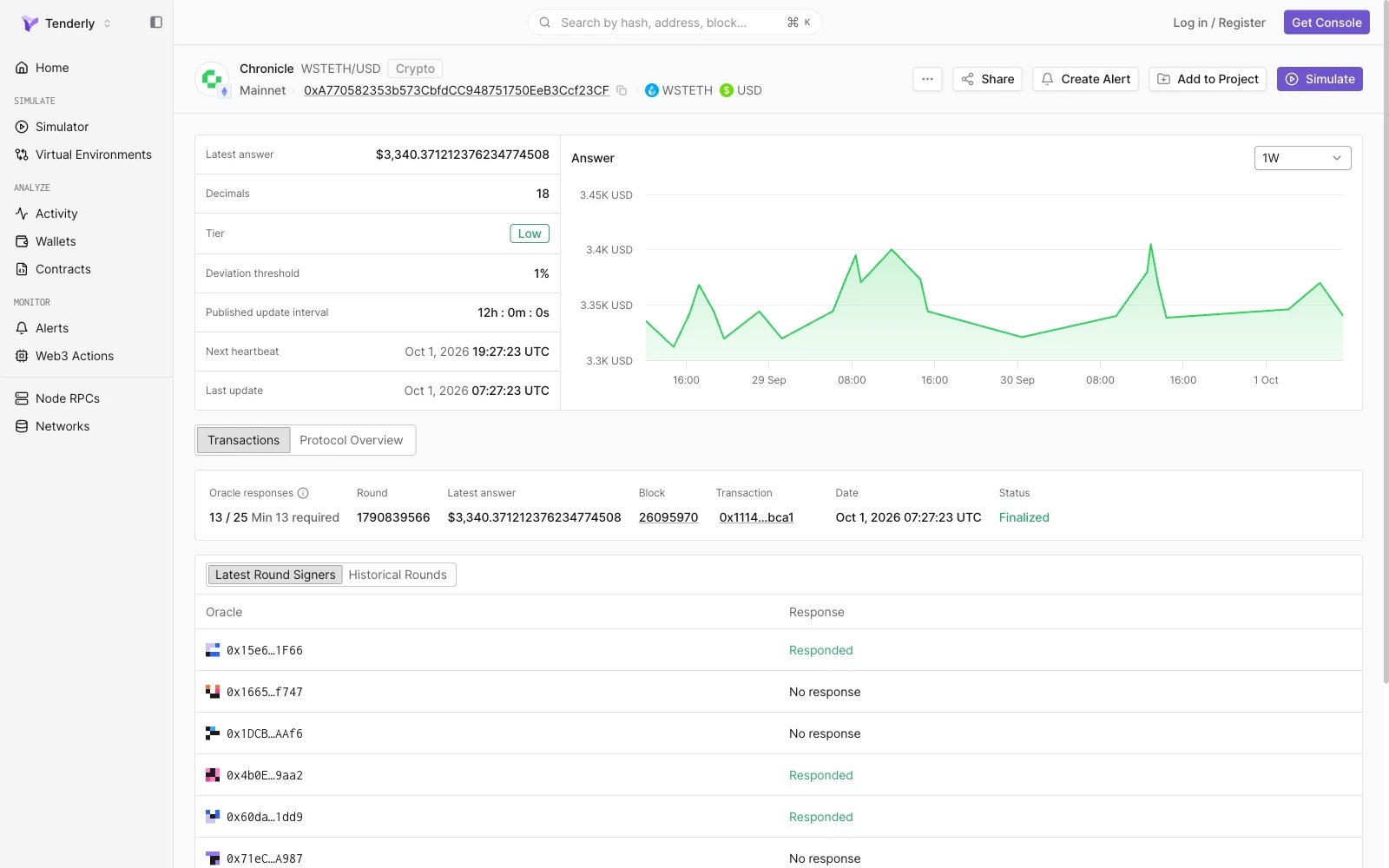
The Transactions tab shows the latest oracle round and the round history.
### Latest round
A summary card describes the most recent round:
| Field | Description |
| - | - |
| Oracle responses | Oracles that responded out of those configured (for example, `31 / 31`), followed by the minimum required for a valid round |
| Round | Round identifier. Chainlink rounds are shown as `Phase N · Round N` |
| Latest answer | Answer reported in the round |
| Block | Block that included the update, linked to the block page |
| Transaction | Transaction that submitted the update, linked to the transaction page |
| Date | Time of the update |
| Status | Round status, for example **Reported** on Chainlink or **Finalized** on Chronicle |
### Latest Round Responses
The table below the summary lists every oracle in the set with its response to the latest round, on one page without pagination.
* **Chainlink** (**Latest Round Responses**): **Oracle**, **Response**, **Latest answer** (the value that oracle reported), and **Transmitter** (the address that submitted the oracle's report).
* **Chronicle** (**Latest Round Signers**): **Oracle** and **Response**, for example **Responded** or **No response**.
## Transactions
The Transactions tab shows the latest oracle round and the round history.
### Latest round
A summary card describes the most recent round:
| Field | Description |
| - | - |
| Oracle responses | Oracles that responded out of those configured (for example, `31 / 31`), followed by the minimum required for a valid round |
| Round | Round identifier. Chainlink rounds are shown as `Phase N · Round N` |
| Latest answer | Answer reported in the round |
| Block | Block that included the update, linked to the block page |
| Transaction | Transaction that submitted the update, linked to the transaction page |
| Date | Time of the update |
| Status | Round status, for example **Reported** on Chainlink or **Finalized** on Chronicle |
### Latest Round Responses
The table below the summary lists every oracle in the set with its response to the latest round, on one page without pagination.
* **Chainlink** (**Latest Round Responses**): **Oracle**, **Response**, **Latest answer** (the value that oracle reported), and **Transmitter** (the address that submitted the oracle's report).
* **Chronicle** (**Latest Round Signers**): **Oracle** and **Response**, for example **Responded** or **No response**.
 ### Historical Rounds
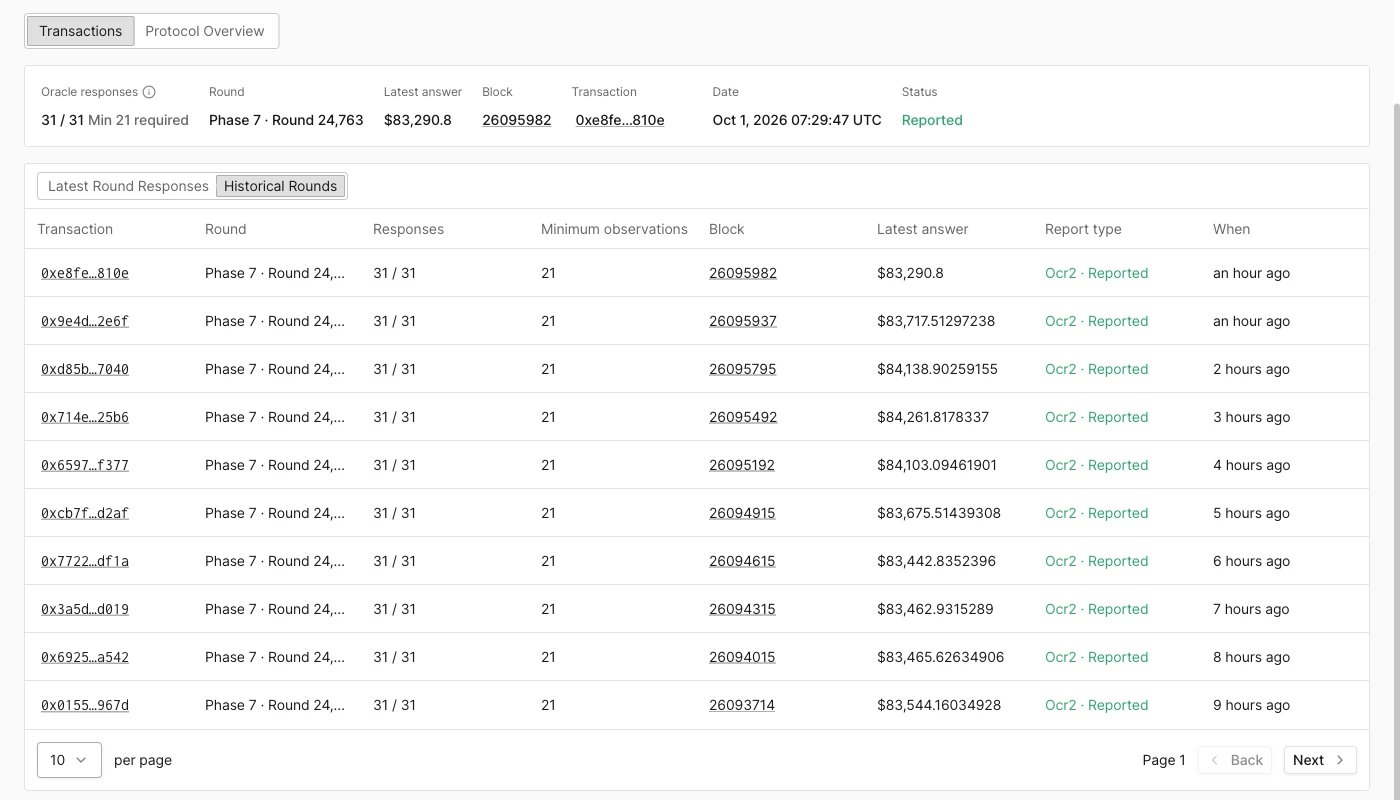
The **Historical Rounds** view lists previous rounds, newest first, 10 rounds per page. Use **Back** and **Next** to page through older rounds.
| Column | Description |
| - | - |
| Transaction | Transaction that submitted the update |
| Round | Round identifier |
| Responses | Oracles that responded out of those configured |
| Minimum observations | Minimum responses required for the round. Chronicle feeds show **Required signatures** |
| Block | Block that included the update |
| Latest answer | Answer reported in the round |
| Report type | Report format and round status, for example `Ocr2 · Reported` on Chainlink or `Standard · Finalized` on Chronicle |
| When | Time since the update |
Open a transaction hash to inspect the update in the [transaction view](/developer-explorer/overview).
### Historical Rounds
The **Historical Rounds** view lists previous rounds, newest first, 10 rounds per page. Use **Back** and **Next** to page through older rounds.
| Column | Description |
| - | - |
| Transaction | Transaction that submitted the update |
| Round | Round identifier |
| Responses | Oracles that responded out of those configured |
| Minimum observations | Minimum responses required for the round. Chronicle feeds show **Required signatures** |
| Block | Block that included the update |
| Latest answer | Answer reported in the round |
| Report type | Report format and round status, for example `Ocr2 · Reported` on Chainlink or `Standard · Finalized` on Chronicle |
| When | Time since the update |
Open a transaction hash to inspect the update in the [transaction view](/developer-explorer/overview).
 ### Optimistic Scribe round status
On Chronicle Optimistic Scribe feeds, an update must pass a challenge period before it is final. Rounds on these feeds have one of these statuses:
| Status | Meaning |
| - | - |
| Pending | The update is still inside its challenge period |
| Finalized | The challenge period passed, or a challenge failed, and the update can no longer be disputed |
| Challenged | The update was successfully challenged and invalidated |
| Dropped | The update was discarded before it finalized |
## Protocol Overview
The Protocol Overview tab shows the decoded configuration of the contract behind the feed in two panels, product information and **Addresses**. Addresses link to their contract pages.
### Chainlink
| Field | Description |
| - | - |
| Product name | Feed pair, for example BTC / USD |
| Product type | Feed type, for example Price |
| Base asset, Quote asset | Assets the feed prices |
| Version | Aggregator contract type and version, for example `AccessControlledOCR2Aggregator 1.0.0` |
| Aggregator | How the proxy points to its aggregator: **Swappable**, **Swap Pending**, or **Direct** |
| Owner | Owner address of the feed |
The **Addresses** panel lists the **Standard** feed and, on SVR-enabled feeds, the **SVR Proxy** and **AAVE SVR Proxy** addresses where they exist.
### Optimistic Scribe round status
On Chronicle Optimistic Scribe feeds, an update must pass a challenge period before it is final. Rounds on these feeds have one of these statuses:
| Status | Meaning |
| - | - |
| Pending | The update is still inside its challenge period |
| Finalized | The challenge period passed, or a challenge failed, and the update can no longer be disputed |
| Challenged | The update was successfully challenged and invalidated |
| Dropped | The update was discarded before it finalized |
## Protocol Overview
The Protocol Overview tab shows the decoded configuration of the contract behind the feed in two panels, product information and **Addresses**. Addresses link to their contract pages.
### Chainlink
| Field | Description |
| - | - |
| Product name | Feed pair, for example BTC / USD |
| Product type | Feed type, for example Price |
| Base asset, Quote asset | Assets the feed prices |
| Version | Aggregator contract type and version, for example `AccessControlledOCR2Aggregator 1.0.0` |
| Aggregator | How the proxy points to its aggregator: **Swappable**, **Swap Pending**, or **Direct** |
| Owner | Owner address of the feed |
The **Addresses** panel lists the **Standard** feed and, on SVR-enabled feeds, the **SVR Proxy** and **AAVE SVR Proxy** addresses where they exist.
 ### Chronicle
| Field | Description |
| - | - |
| Product name | Feed pair, for example WSTETH/USD |
| Product type | Feed type, for example Price |
| Base asset, Quote asset | Assets the feed prices |
| Variant | **Scribe** or **Optimistic Scribe** |
| Version | Scribe version, for example Scribe Optimistic v2 |
| Monitoring | Party that monitors the feed, for example Chronicle |
The **Addresses** panel lists the **Scribe address** and the feed **Owner**.
### Chronicle
| Field | Description |
| - | - |
| Product name | Feed pair, for example WSTETH/USD |
| Product type | Feed type, for example Price |
| Base asset, Quote asset | Assets the feed prices |
| Variant | **Scribe** or **Optimistic Scribe** |
| Version | Scribe version, for example Scribe Optimistic v2 |
| Monitoring | Party that monitors the feed, for example Chronicle |
The **Addresses** panel lists the **Scribe address** and the feed **Owner**.
 This documentation is built and hosted on [Mintlify](https://mintlify.com), a developer documentation platform.