> ## Documentation Index
> Fetch the complete documentation index at: https://docs.tenderly.co/llms.txt
> Use this file to discover all available pages before exploring further.
# Act 1: Local project setup
> Set up the scaffold-eth project locally, install the Tenderly CLI, and point Hardhat at your Virtual Environment RPC for the staging workshop.
Estimated time: 10 min
In this act, you'll configure the project locally.
## Prerequisites
### Clone
Go to this github repo and:
* Create a project from [this Github template](https://github.com/new?template_name=scaffold-eth-2\&template_owner=nvitorovic) in Github (needed for testing out the CI).
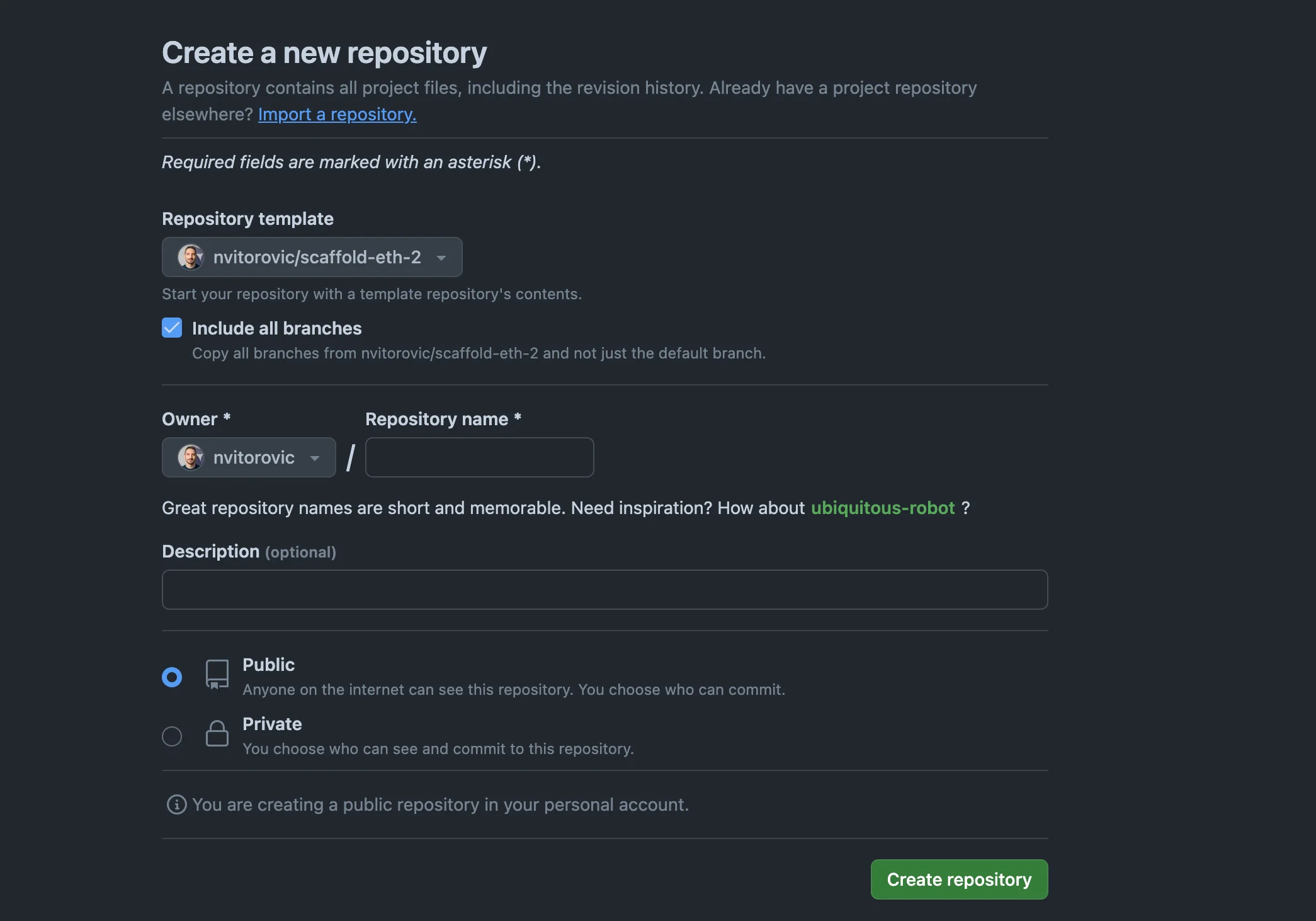 * Clone your fork:
```bash theme={"theme":{"light":"catppuccin-latte","dark":"catppuccin-mocha"}}
git clone YOUR REPO URL
yarn
```
### Libraries
* Node.js (`v 19+`)
* [Tenderly account](https://dashboard.tenderly.co/login)
* Install [Tenderly CLI](https://github.com/Tenderly/tenderly-cli?tab=readme-ov-file#installation)
* Run `tenderly login` and follow the instructions.
## Configure Tenderly
### Copy the Virtual Environment RPC
* Copy the network parameters snippet from Tenderly Dashboard **Virtual Environments > Integrate**
* Edit `packages/tenderly/tenderly.config.ts` and paste the copied object to `virtualNetworks.virtual_mainnet`
entry.
* Clone your fork:
```bash theme={"theme":{"light":"catppuccin-latte","dark":"catppuccin-mocha"}}
git clone YOUR REPO URL
yarn
```
### Libraries
* Node.js (`v 19+`)
* [Tenderly account](https://dashboard.tenderly.co/login)
* Install [Tenderly CLI](https://github.com/Tenderly/tenderly-cli?tab=readme-ov-file#installation)
* Run `tenderly login` and follow the instructions.
## Configure Tenderly
### Copy the Virtual Environment RPC
* Copy the network parameters snippet from Tenderly Dashboard **Virtual Environments > Integrate**
* Edit `packages/tenderly/tenderly.config.ts` and paste the copied object to `virtualNetworks.virtual_mainnet`
entry.
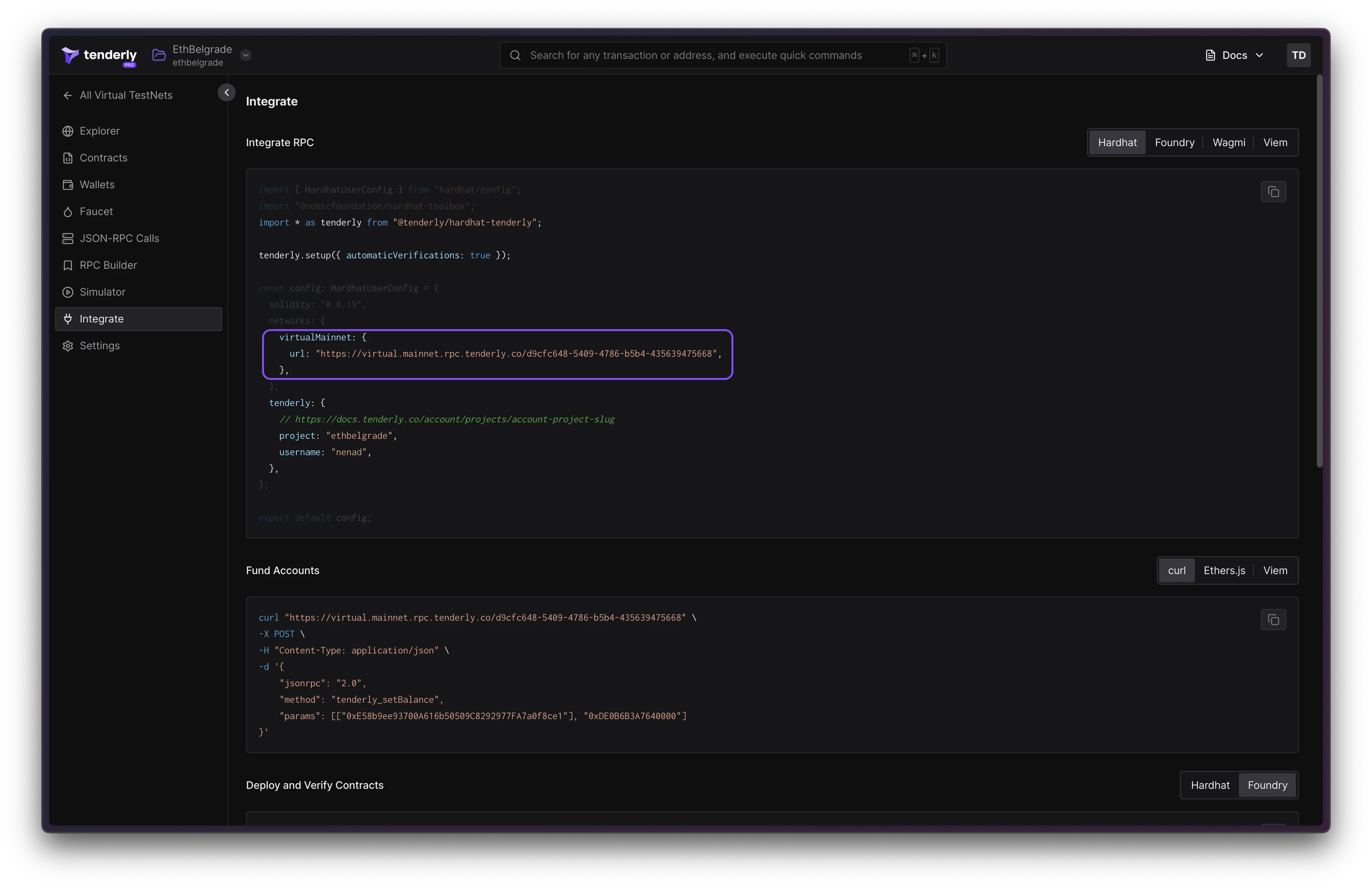 The file should look similar to this:
```ts showLineNumbers lines={10} theme={"theme":{"light":"catppuccin-latte","dark":"catppuccin-mocha"}}
type NetworkConfig = {
url: string,
chainId: number,
currency: string
}
export const virtualNetworks: {
[networkName: string]: NetworkConfig;
} = {
// KEEP virtual_mainnet as the network name
"virtual_mainnet": {
"url": "https://virtual.mainnet.rpc.tenderly.co/bdb874b8-678b-401b-af93-8b0f8a55e9cd",
"chainId": 73571,
"currency": "VIRT"
}
};
```
The file should look similar to this:
```ts showLineNumbers lines={10} theme={"theme":{"light":"catppuccin-latte","dark":"catppuccin-mocha"}}
type NetworkConfig = {
url: string,
chainId: number,
currency: string
}
export const virtualNetworks: {
[networkName: string]: NetworkConfig;
} = {
// KEEP virtual_mainnet as the network name
"virtual_mainnet": {
"url": "https://virtual.mainnet.rpc.tenderly.co/bdb874b8-678b-401b-af93-8b0f8a55e9cd",
"chainId": 73571,
"currency": "VIRT"
}
};
```