> ## Documentation Index
> Fetch the complete documentation index at: https://docs.tenderly.co/llms.txt
> Use this file to discover all available pages before exploring further.
# Creating staging environments
> Create staging environments on Virtual Environments to demo and QA your dapp against forked mainnet state, without real funds.
Estimated time: 10 min
In this act, you will:
* configure `packages/tenderly`
* use `stage:new` command to create an entire environment with multiple Virtual Environments
* use `stage:activate` to switch to the newly created environment
* connect hardhat and nextjs to the environment using `stage:connect:hardhat` and `stage:connect:nextjs`
* deploy contracts and interact with them
### Configure the tenderly package
Go to `packages/tenderly` create an `.env` file by copying the `.env.example`:
```bash theme={"theme":{"light":"catppuccin-latte","dark":"catppuccin-mocha"}}
cd packages/tenderly
cp .env.example .env
```
### Populate environment variables
Then, populate the placeholders with following values in `packages/tenderly/.env`:
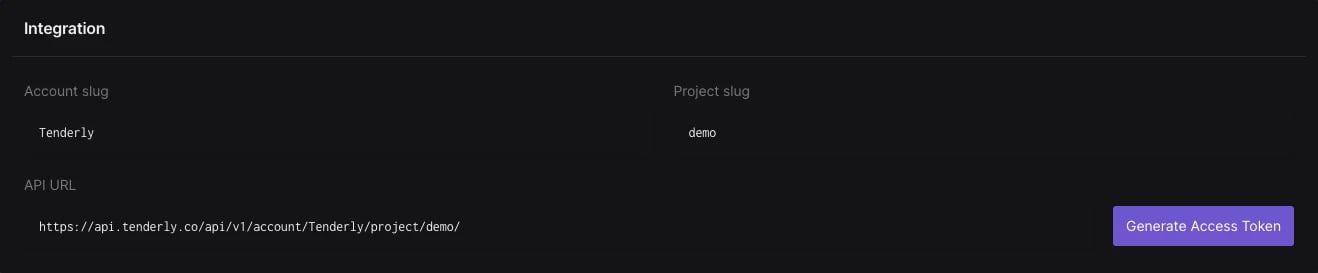
* `TENDERLY_ACCOUNT_ID` and `TENDERLY_PROJECT_ID` ([guide](/platform/account/projects/slug))
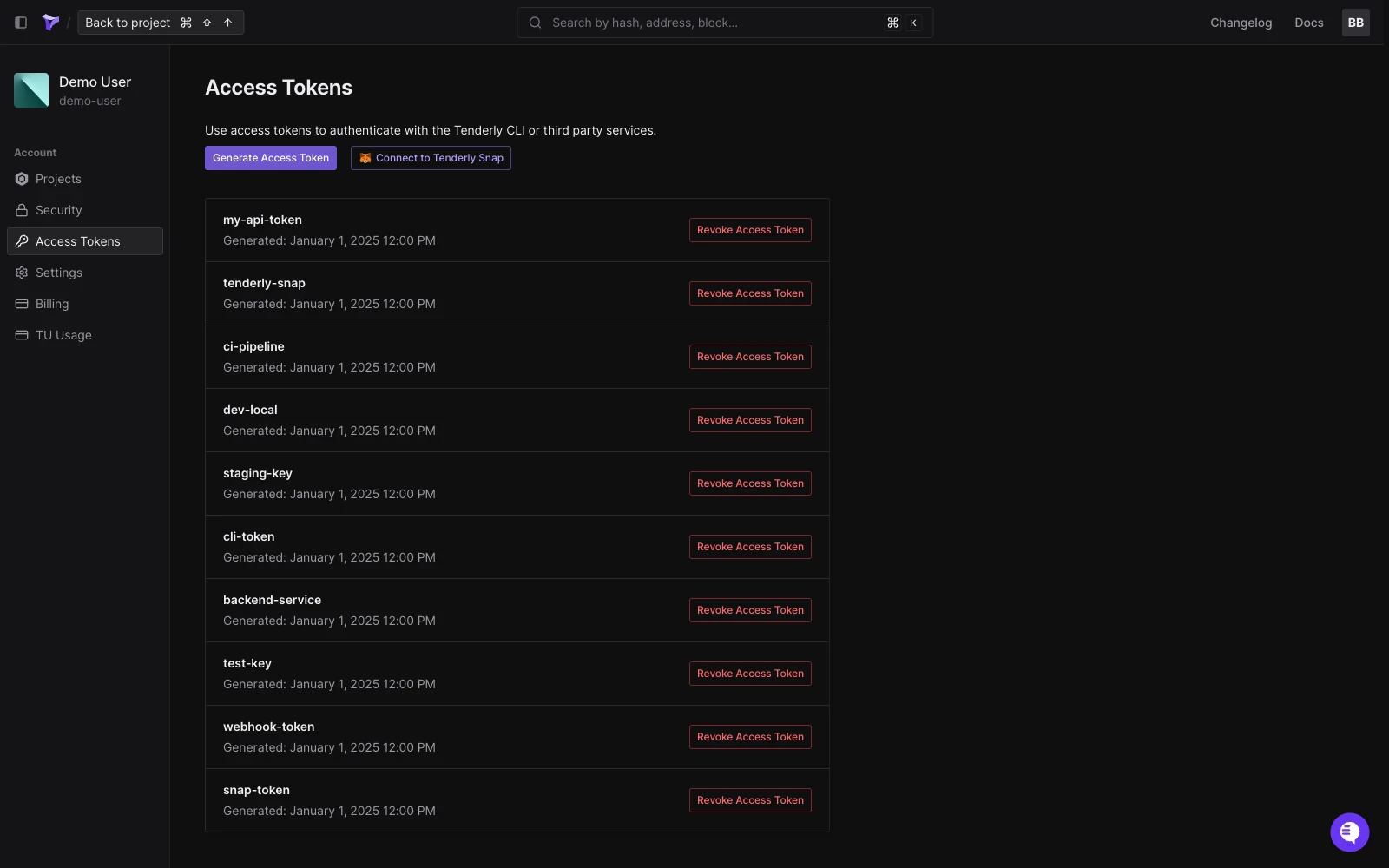
 * `TENDERLY_ACCESS_TOKEN` ([guide](/platform/account/projects/api-tokens)).
 ### Create a staging environment
From `packages/tenderly` run `npm run stage:new local 1 34443 8453`. This will create 3 Virtual Environments (from Mainnet, Mode, and Base).
```bash showLineNumbers theme={"theme":{"light":"catppuccin-latte","dark":"catppuccin-mocha"}}
cd packages/tenderly
npm run stage:new local 1 34443 8453
npm run stage:activate local
```
Then check:
* The file `tenderly/environments/local.json`
* The file `packages/tenderly/tenderly.config.ts`
* The list of Virtual Environments in your project
### Deploy contracts
Link hardhat with the active environment and deploy contracts:
```bash showLineNumbers theme={"theme":{"light":"catppuccin-latte","dark":"catppuccin-mocha"}}
cd packages/tenderly
npm run stage:connect:hardhat
cd ../hardhat
rm -rf deployments
npx hardhat deploy --network virtual_mainnet
```
Check the Explorer.
### Run the UI
Link hardhat with the active environment and deploy contracts:
```bash showLineNumbers theme={"theme":{"light":"catppuccin-latte","dark":"catppuccin-mocha"}}
cd packages/tenderly
npm run stage:connect:nextjs
cd ../nextjs
npm run dev
```
### Connect TheGraph
TheGraph is not really integrated, but just suppose it was
```bash showLineNumbers theme={"theme":{"light":"catppuccin-latte","dark":"catppuccin-mocha"}}
cd packages/tenderly
npm run stage:connect:thegraph
echo "Index it!"
```
### Interact
* Grab funds from the faucet
* Send a transaction
* Check the explorer
### Create a staging environment
From `packages/tenderly` run `npm run stage:new local 1 34443 8453`. This will create 3 Virtual Environments (from Mainnet, Mode, and Base).
```bash showLineNumbers theme={"theme":{"light":"catppuccin-latte","dark":"catppuccin-mocha"}}
cd packages/tenderly
npm run stage:new local 1 34443 8453
npm run stage:activate local
```
Then check:
* The file `tenderly/environments/local.json`
* The file `packages/tenderly/tenderly.config.ts`
* The list of Virtual Environments in your project
### Deploy contracts
Link hardhat with the active environment and deploy contracts:
```bash showLineNumbers theme={"theme":{"light":"catppuccin-latte","dark":"catppuccin-mocha"}}
cd packages/tenderly
npm run stage:connect:hardhat
cd ../hardhat
rm -rf deployments
npx hardhat deploy --network virtual_mainnet
```
Check the Explorer.
### Run the UI
Link hardhat with the active environment and deploy contracts:
```bash showLineNumbers theme={"theme":{"light":"catppuccin-latte","dark":"catppuccin-mocha"}}
cd packages/tenderly
npm run stage:connect:nextjs
cd ../nextjs
npm run dev
```
### Connect TheGraph
TheGraph is not really integrated, but just suppose it was
```bash showLineNumbers theme={"theme":{"light":"catppuccin-latte","dark":"catppuccin-mocha"}}
cd packages/tenderly
npm run stage:connect:thegraph
echo "Index it!"
```
### Interact
* Grab funds from the faucet
* Send a transaction
* Check the explorer