> ## Documentation Index
> Fetch the complete documentation index at: https://docs.tenderly.co/llms.txt
> Use this file to discover all available pages before exploring further.
# Gas Profiler
> एक interactive flame chart के साथ प्रति function gas consumption का breakdown करें, सबसे महँगी calls की पहचान करें, और Debugger में gas usage को optimize करें।
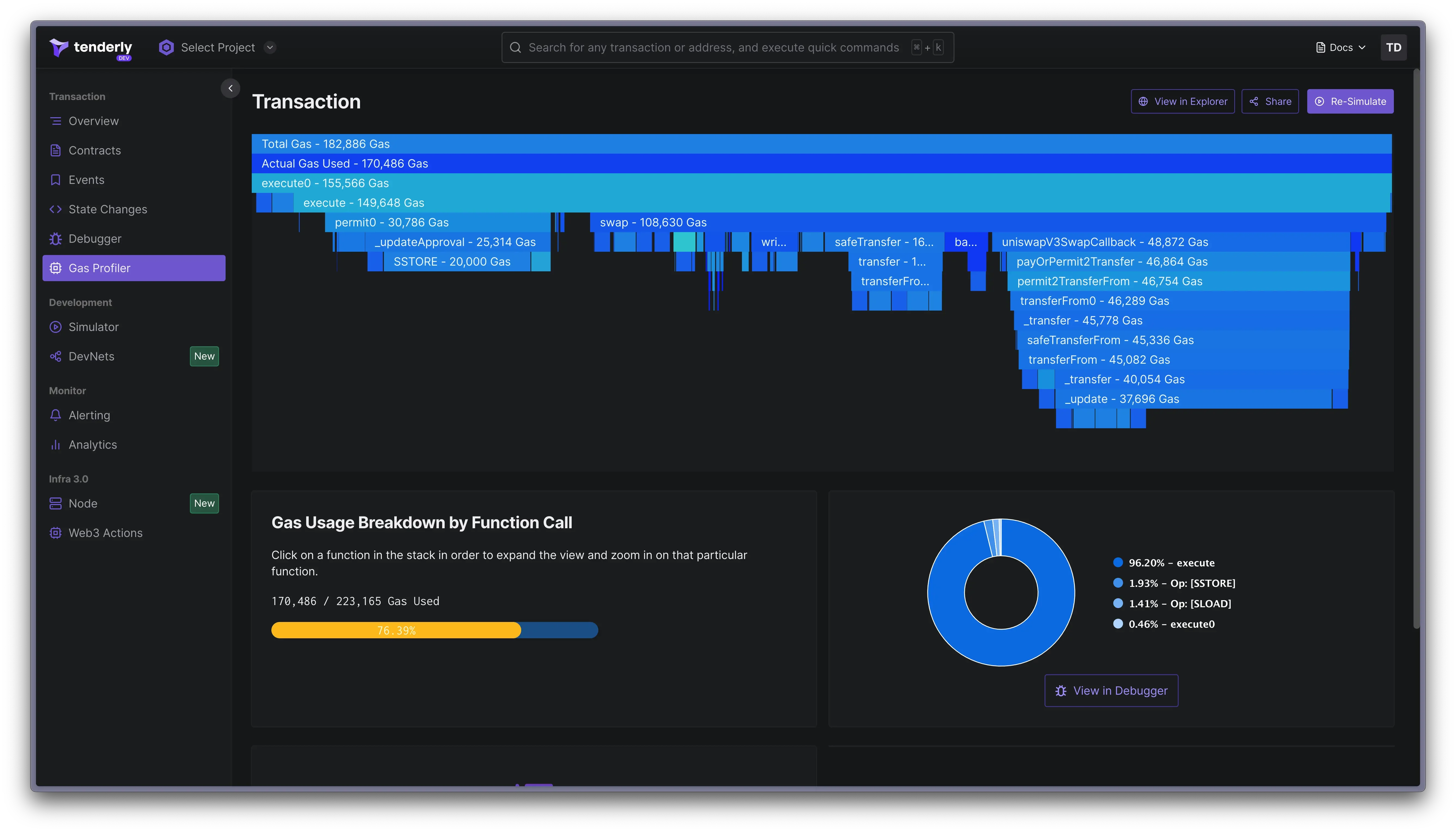
Gas Profiler आपको gas consumption का breakdown देता है, यह दिखाता है कि execution के दौरान contract के अंदर प्रत्येक function gas का उपयोग कैसे करता है। जब Debugger और Simulator के साथ combined किया जाता है, तो Gas Profiler Developer Explorer का मुख्य हिस्सा बनाता है।
 ## Gas Profiler के साथ शुरुआत करना
1. Transaction listing पृष्ठ से किसी भी transaction को खोलें। इस [example transaction](https://dashboard.tenderly.co/tx/1/0x1696cfc031695003b8a58f0379c7f111b34c7612a67681354dc57cb5853c5c63/gas-usage) को आज़माएँ।
2. Internal transactions सहित प्रत्येक called function के लिए विस्तृत gas usage breakdowns वाले एक interactive flame chart तक पहुँचने के लिए top menu में **Gas Profiler** पर navigate करें।
3. इसके gas usage का विस्तृत दृश्य प्रकट करने के लिए किसी भी function पर क्लिक करें।
4. गहरी अंतर्दृष्टि के लिए, execution के लिए ज़िम्मेदार Solidity file में code की सटीक line की पहचान करने के लिए [Debugger में transaction खोलें](/debugger/overview)।
## Gas Profiler के साथ शुरुआत करना
1. Transaction listing पृष्ठ से किसी भी transaction को खोलें। इस [example transaction](https://dashboard.tenderly.co/tx/1/0x1696cfc031695003b8a58f0379c7f111b34c7612a67681354dc57cb5853c5c63/gas-usage) को आज़माएँ।
2. Internal transactions सहित प्रत्येक called function के लिए विस्तृत gas usage breakdowns वाले एक interactive flame chart तक पहुँचने के लिए top menu में **Gas Profiler** पर navigate करें।
3. इसके gas usage का विस्तृत दृश्य प्रकट करने के लिए किसी भी function पर क्लिक करें।
4. गहरी अंतर्दृष्टि के लिए, execution के लिए ज़िम्मेदार Solidity file में code की सटीक line की पहचान करने के लिए [Debugger में transaction खोलें](/debugger/overview)।
 ### Gas usage को Optimize करना
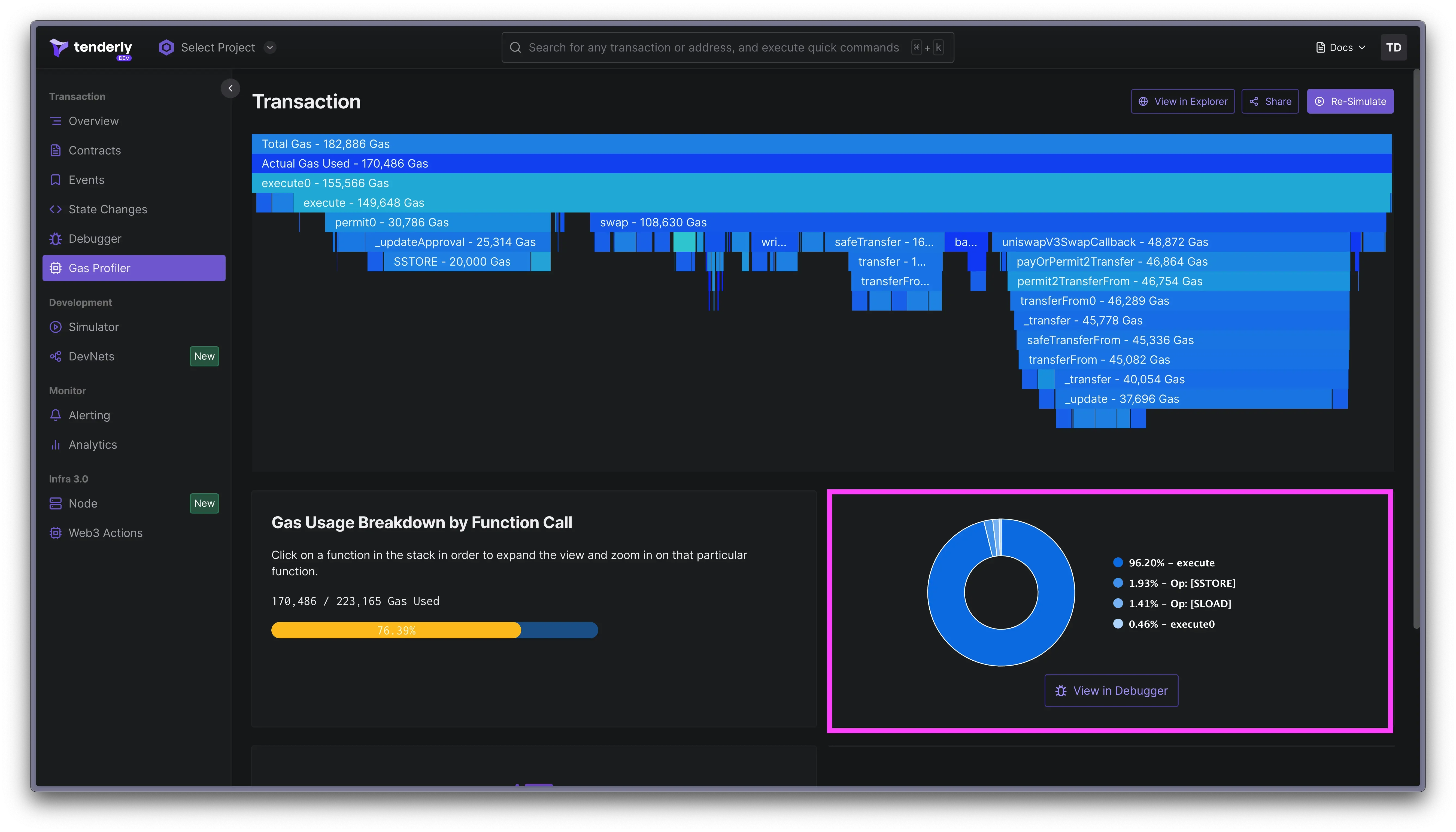
1. Flame chart में किसी function call पर क्लिक करने से निचले pane में विस्तृत gas usage जानकारी प्रदर्शित होती है।
2. यदि आपको संदेह है कि किसी function को gas optimization की आवश्यकता है, तो code में जाकर gas usage को कम करने के लिए इसे optimize करने के लिए **View in Debugger** बटन पर क्लिक करें।
3. यह सत्यापित करने के लिए कि परिवर्तन gas usage को कम करने में मदद करते हैं, आप बदले हुए code के साथ उसी transaction को simulate कर सकते हैं और gas profiling परिणाम की तुलना कर सकते हैं।
#### Total gas बनाम actual gas
**Total Gas** execution की समग्र gas लागत का प्रतिनिधित्व करता है, जिसमें सभी invoked opcodes से जुड़ी gas लागतों का योग शामिल होता है।
**Actual Gas** execution की शुद्ध gas लागत को दर्शाता है। जब `gas_price` से गुणा किया जाता है, तो यह wei में इस execution के लिए आपके द्वारा भुगतान की जाने वाली सटीक राशि प्रदान करता है।
Actual Gas की गणना के लिए formula: `actual_gas_used = total_gas - gas_refund`।
Blockchain उपयोगकर्ताओं को storage खाली करने के लिए पुरस्कार मिलते हैं, जो `SSTORE` invocations के लिए [gas refunds](https://github.com/wolflo/evm-opcodes/blob/main/gas.md#a0-3-gas-refunds) के रूप में प्रकट होते हैं जो प्रभावी रूप से मौजूदा संग्रहीत data को "delete" करते हैं। ये gas refunds Total Gas से घटाए जाते हैं, जिसके परिणामस्वरूप उपयोग की गई Actual Gas प्राप्त होती है।
### Gas usage को Optimize करना
1. Flame chart में किसी function call पर क्लिक करने से निचले pane में विस्तृत gas usage जानकारी प्रदर्शित होती है।
2. यदि आपको संदेह है कि किसी function को gas optimization की आवश्यकता है, तो code में जाकर gas usage को कम करने के लिए इसे optimize करने के लिए **View in Debugger** बटन पर क्लिक करें।
3. यह सत्यापित करने के लिए कि परिवर्तन gas usage को कम करने में मदद करते हैं, आप बदले हुए code के साथ उसी transaction को simulate कर सकते हैं और gas profiling परिणाम की तुलना कर सकते हैं।
#### Total gas बनाम actual gas
**Total Gas** execution की समग्र gas लागत का प्रतिनिधित्व करता है, जिसमें सभी invoked opcodes से जुड़ी gas लागतों का योग शामिल होता है।
**Actual Gas** execution की शुद्ध gas लागत को दर्शाता है। जब `gas_price` से गुणा किया जाता है, तो यह wei में इस execution के लिए आपके द्वारा भुगतान की जाने वाली सटीक राशि प्रदान करता है।
Actual Gas की गणना के लिए formula: `actual_gas_used = total_gas - gas_refund`।
Blockchain उपयोगकर्ताओं को storage खाली करने के लिए पुरस्कार मिलते हैं, जो `SSTORE` invocations के लिए [gas refunds](https://github.com/wolflo/evm-opcodes/blob/main/gas.md#a0-3-gas-refunds) के रूप में प्रकट होते हैं जो प्रभावी रूप से मौजूदा संग्रहीत data को "delete" करते हैं। ये gas refunds Total Gas से घटाए जाते हैं, जिसके परिणामस्वरूप उपयोग की गई Actual Gas प्राप्त होती है।