> ## Documentation Index
> Fetch the complete documentation index at: https://docs.tenderly.co/llms.txt
> Use this file to discover all available pages before exploring further.
# Chainlink और Chronicle price feeds
> Chainlink और Chronicle price feeds देखें: latest answer, deviation threshold, heartbeat, oracle responses, SVR तुलना, और feed configuration।
Tenderly Chainlink और Chronicle price feed contracts को पहचानता है और हर एक के लिए एक feed पेज render करता है। पेज feed का current answer और update parameters, समय के साथ reported price का chart, हर round के पीछे के oracle responses, और decoded feed configuration दिखाता है।
समर्थित feeds हैं Chainlink Data Feeds, जिनमें Smart Value Recapture (SVR) variant वाले feeds भी शामिल हैं, और Chronicle Scribe और Optimistic Scribe feeds। Chainlink feed उसके proxy address से खुलता है। Chainlink और Chronicle के अन्य products, जैसे Proof of Reserve feeds, standard contract view में खुलते हैं।
किसी पहचाने गए feed के contract पेज पर, contract नाम के पास provider और pair वाला एक link (उदाहरण के लिए, **Chainlink BTC / USD**) दिखता है, जो feed पेज खोलता है।
## Feed header
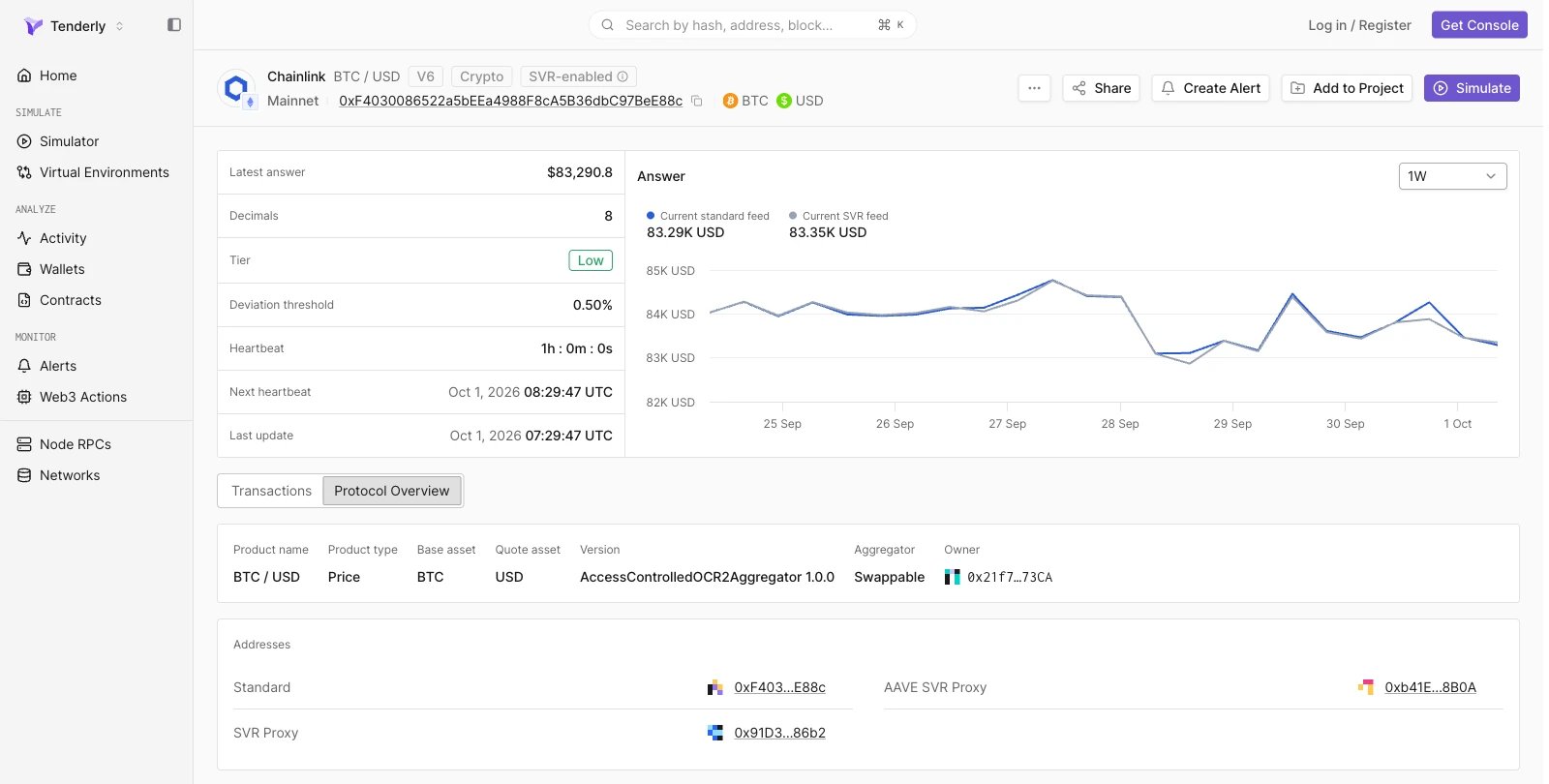
Header feed की पहचान provider और pair से करता है (उदाहरण के लिए, Chainlink BTC / USD), और network, feed address, तथा base और quote assets दिखाता है। Pair नाम के पास के tags Chainlink feeds पर proxy version (उदाहरण के लिए, V6) और feed की asset class (उदाहरण के लिए, Crypto) दिखाते हैं। SVR variant वाले Chainlink feeds पर **SVR-enabled** tag होता है।
**Create Alert** feed address और network पहले से भरे हुए एक नया [alert](/monitoring/alerts/introduction) rule खोलता है, और **Simulate** [Simulator](/simulator-ui/overview) में feed contract और network पहले से भरे हुए एक नया simulation खोलता है। Project के बाहर, दोनों actions पहले project चुनने के लिए कहते हैं। **Add to Project** feed contract को एक project में जोड़ता है।
 ## Feed metrics
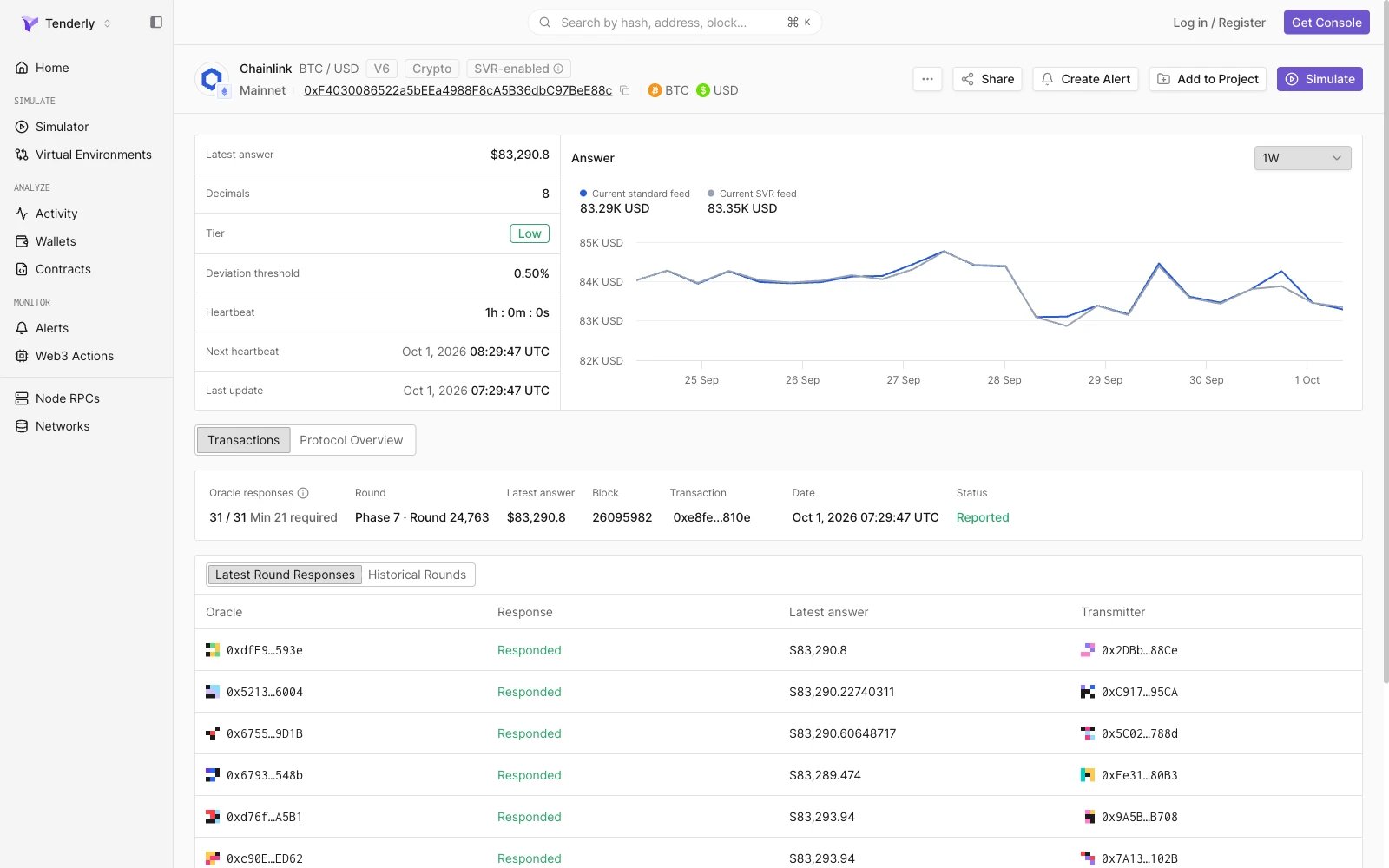
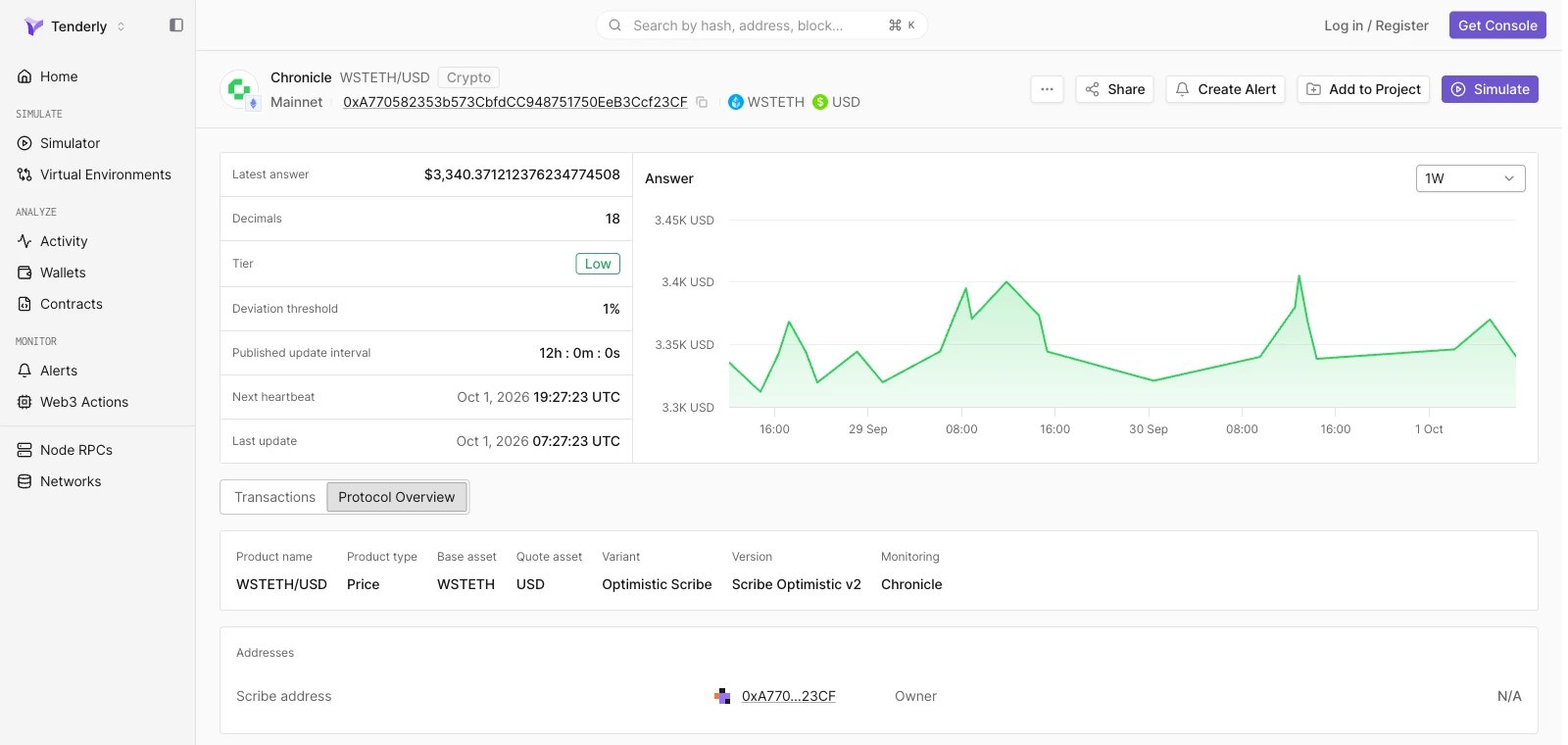
बायाँ panel feed की current state और update parameters सूचीबद्ध करता है:
| Metric | विवरण |
| - | - |
| Latest answer | Feed द्वारा reported सबसे हाल की price |
| Decimals | Feed के answer में decimals की संख्या |
| Tier | Market risk tier: **Low**, **Medium**, **High**, या **Very High** |
| Deviation threshold | Percentage में price बदलाव जो नया update trigger करता है |
| Heartbeat | Updates के बीच अधिकतम समय। Chronicle feeds **Published update interval** दिखाते हैं |
| Next heartbeat | वह समय जब तक अगला update होना चाहिए, अगर price deviation threshold के भीतर रहती है (last update और heartbeat का योग) |
| Last update | सबसे हाल के update का समय |
Tier, Deviation threshold, Heartbeat, और Next heartbeat तब दिखते हैं जब provider feed के लिए ये values publish करता है।
## Answer chart
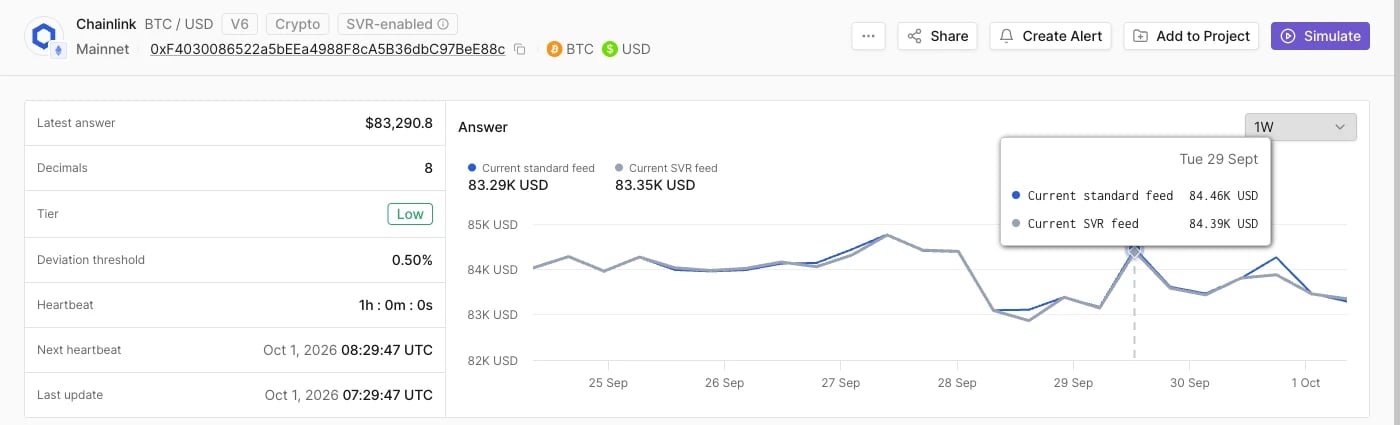
Metrics के पास, **Answer** chart चुनी गई time range में reported price plot करता है: **1D**, **1W** (default), या **1M**।
Chainlink feeds पर, chart range में अधिकतम 24 समान दूरी वाले blocks पर answer sample करता है, इसलिए हर point पर block timestamp होता है, feed update time नहीं। Chronicle feeds पर, chart अधिकतम 24 finalized rounds plot करता है। सटीक update times के लिए [Historical Rounds](#historical-rounds) का उपयोग करें।
### Standard और SVR feeds की तुलना
SVR-enabled Chainlink feeds पर, chart दो series plot करता है, **Current standard feed** और **Current SVR feed**, और chart के ऊपर हर एक की latest value दिखाता है। उस समय के दोनों answers पढ़ने और यह जाँचने के लिए कि SVR variant standard feed के साथ चल रहा है, किसी भी point पर hover करें।
## Feed metrics
बायाँ panel feed की current state और update parameters सूचीबद्ध करता है:
| Metric | विवरण |
| - | - |
| Latest answer | Feed द्वारा reported सबसे हाल की price |
| Decimals | Feed के answer में decimals की संख्या |
| Tier | Market risk tier: **Low**, **Medium**, **High**, या **Very High** |
| Deviation threshold | Percentage में price बदलाव जो नया update trigger करता है |
| Heartbeat | Updates के बीच अधिकतम समय। Chronicle feeds **Published update interval** दिखाते हैं |
| Next heartbeat | वह समय जब तक अगला update होना चाहिए, अगर price deviation threshold के भीतर रहती है (last update और heartbeat का योग) |
| Last update | सबसे हाल के update का समय |
Tier, Deviation threshold, Heartbeat, और Next heartbeat तब दिखते हैं जब provider feed के लिए ये values publish करता है।
## Answer chart
Metrics के पास, **Answer** chart चुनी गई time range में reported price plot करता है: **1D**, **1W** (default), या **1M**।
Chainlink feeds पर, chart range में अधिकतम 24 समान दूरी वाले blocks पर answer sample करता है, इसलिए हर point पर block timestamp होता है, feed update time नहीं। Chronicle feeds पर, chart अधिकतम 24 finalized rounds plot करता है। सटीक update times के लिए [Historical Rounds](#historical-rounds) का उपयोग करें।
### Standard और SVR feeds की तुलना
SVR-enabled Chainlink feeds पर, chart दो series plot करता है, **Current standard feed** और **Current SVR feed**, और chart के ऊपर हर एक की latest value दिखाता है। उस समय के दोनों answers पढ़ने और यह जाँचने के लिए कि SVR variant standard feed के साथ चल रहा है, किसी भी point पर hover करें।
 ## Transactions
Transactions tab latest oracle round और round history दिखाता है।
### Latest round
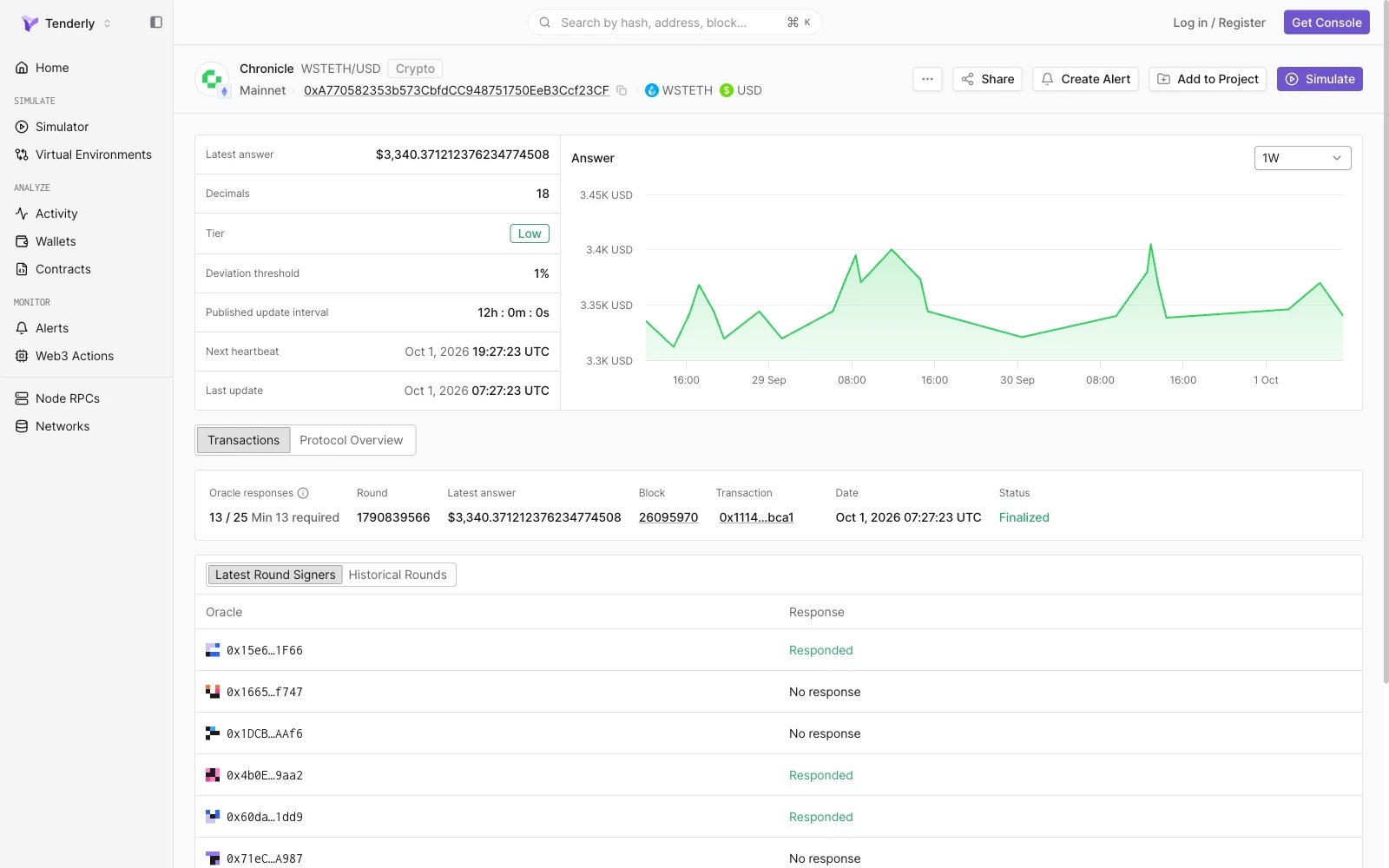
एक summary card सबसे हाल के round का वर्णन करता है:
| Field | विवरण |
| - | - |
| Oracle responses | Configured oracles में से जवाब देने वाले oracles (उदाहरण के लिए, `31 / 31`), उसके बाद valid round के लिए आवश्यक minimum |
| Round | Round identifier। Chainlink rounds `Phase N · Round N` के रूप में दिखते हैं |
| Latest answer | Round में reported answer |
| Block | वह block जिसमें update शामिल हुआ, block पेज से linked |
| Transaction | वह transaction जिसने update submit किया, transaction पेज से linked |
| Date | Update का समय |
| Status | Round status, उदाहरण के लिए Chainlink पर **Reported** या Chronicle पर **Finalized** |
### Latest round के oracle responses
Summary के नीचे की table set के हर oracle को latest round में उसके response के साथ, pagination के बिना एक ही पेज पर, सूचीबद्ध करती है।
* **Chainlink** (**Latest Round Responses**): **Oracle**, **Response**, **Latest answer** (उस oracle द्वारा reported value), और **Transmitter** (वह address जिसने oracle की report submit की)।
* **Chronicle** (**Latest Round Signers**): **Oracle** और **Response**, उदाहरण के लिए **Responded** या **No response**।
## Transactions
Transactions tab latest oracle round और round history दिखाता है।
### Latest round
एक summary card सबसे हाल के round का वर्णन करता है:
| Field | विवरण |
| - | - |
| Oracle responses | Configured oracles में से जवाब देने वाले oracles (उदाहरण के लिए, `31 / 31`), उसके बाद valid round के लिए आवश्यक minimum |
| Round | Round identifier। Chainlink rounds `Phase N · Round N` के रूप में दिखते हैं |
| Latest answer | Round में reported answer |
| Block | वह block जिसमें update शामिल हुआ, block पेज से linked |
| Transaction | वह transaction जिसने update submit किया, transaction पेज से linked |
| Date | Update का समय |
| Status | Round status, उदाहरण के लिए Chainlink पर **Reported** या Chronicle पर **Finalized** |
### Latest round के oracle responses
Summary के नीचे की table set के हर oracle को latest round में उसके response के साथ, pagination के बिना एक ही पेज पर, सूचीबद्ध करती है।
* **Chainlink** (**Latest Round Responses**): **Oracle**, **Response**, **Latest answer** (उस oracle द्वारा reported value), और **Transmitter** (वह address जिसने oracle की report submit की)।
* **Chronicle** (**Latest Round Signers**): **Oracle** और **Response**, उदाहरण के लिए **Responded** या **No response**।
 ### Historical Rounds
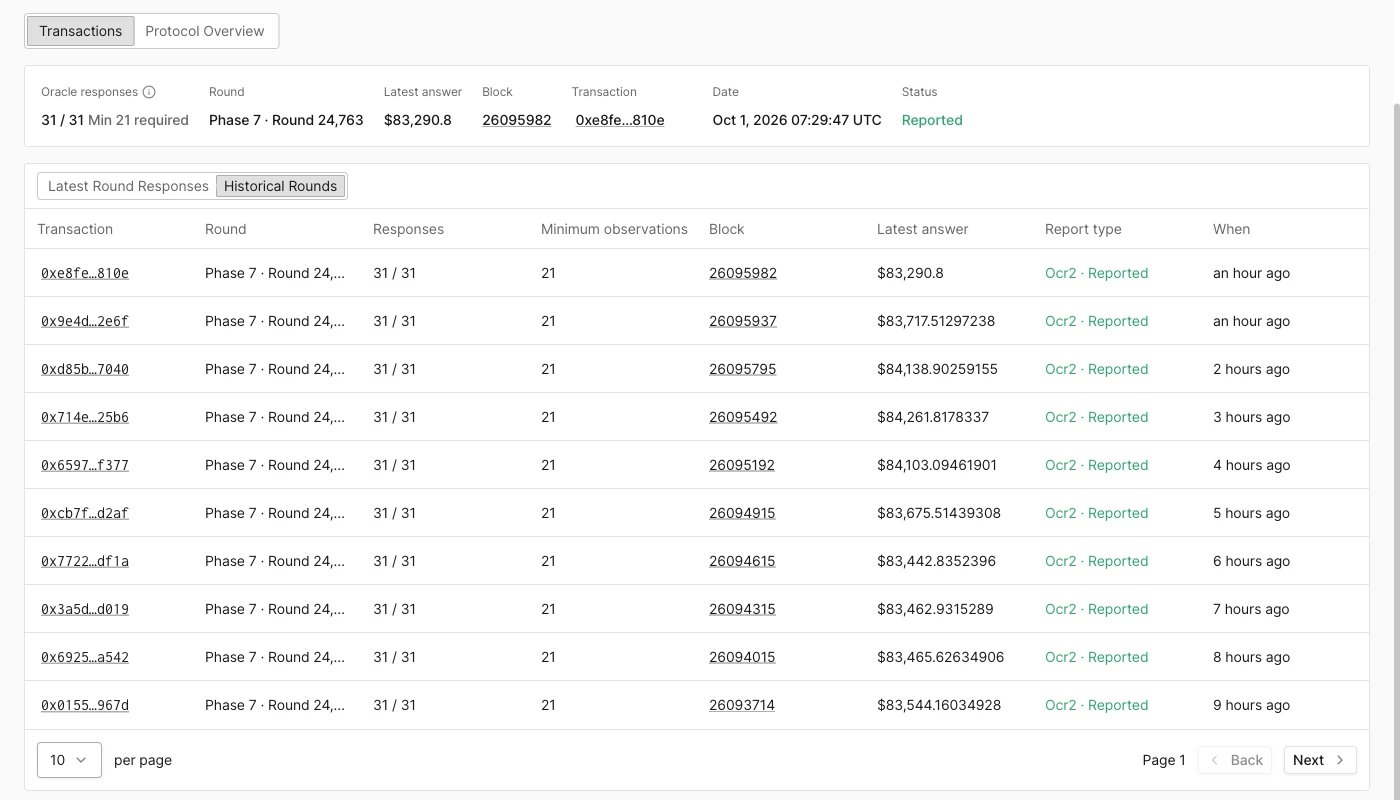
**Historical Rounds** view पिछले rounds को नए से पुराने क्रम में, प्रति पेज 10 rounds, सूचीबद्ध करता है। पुराने rounds देखने के लिए **Back** और **Next** का उपयोग करें।
| Column | विवरण |
| - | - |
| Transaction | वह transaction जिसने update submit किया |
| Round | Round identifier |
| Responses | Configured oracles में से जवाब देने वाले oracles |
| Minimum observations | Round के लिए आवश्यक minimum responses। Chronicle feeds **Required signatures** दिखाते हैं |
| Block | वह block जिसमें update शामिल हुआ |
| Latest answer | Round में reported answer |
| Report type | Report format और round status, उदाहरण के लिए Chainlink पर `Ocr2 · Reported` या Chronicle पर `Standard · Finalized` |
| When | Update के बाद बीता समय |
[Transaction view](/developer-explorer/overview) में update जाँचने के लिए transaction hash खोलें।
### Historical Rounds
**Historical Rounds** view पिछले rounds को नए से पुराने क्रम में, प्रति पेज 10 rounds, सूचीबद्ध करता है। पुराने rounds देखने के लिए **Back** और **Next** का उपयोग करें।
| Column | विवरण |
| - | - |
| Transaction | वह transaction जिसने update submit किया |
| Round | Round identifier |
| Responses | Configured oracles में से जवाब देने वाले oracles |
| Minimum observations | Round के लिए आवश्यक minimum responses। Chronicle feeds **Required signatures** दिखाते हैं |
| Block | वह block जिसमें update शामिल हुआ |
| Latest answer | Round में reported answer |
| Report type | Report format और round status, उदाहरण के लिए Chainlink पर `Ocr2 · Reported` या Chronicle पर `Standard · Finalized` |
| When | Update के बाद बीता समय |
[Transaction view](/developer-explorer/overview) में update जाँचने के लिए transaction hash खोलें।
 ### Optimistic Scribe round status
Chronicle Optimistic Scribe feeds पर, update को final होने से पहले एक challenge period पार करना होता है। इन feeds के rounds में इनमें से एक status होता है:
| Status | अर्थ |
| - | - |
| Pending | Update अभी भी अपने challenge period में है |
| Finalized | Challenge period बीत गया या challenge असफल रहा, और update पर अब विवाद नहीं किया जा सकता |
| Challenged | Update को सफलतापूर्वक challenge किया गया और अमान्य कर दिया गया |
| Dropped | Update को finalize होने से पहले हटा दिया गया |
## Protocol Overview
Protocol Overview tab feed के पीछे के contract की decoded configuration दो panels में दिखाता है, product information और **Addresses**। Addresses अपने contract पेजों से linked हैं।
### Chainlink
| Field | विवरण |
| - | - |
| Product name | Feed pair, उदाहरण के लिए BTC / USD |
| Product type | Feed type, उदाहरण के लिए Price |
| Base asset, Quote asset | वे assets जिनकी feed price देता है |
| Version | Aggregator contract type और version, उदाहरण के लिए `AccessControlledOCR2Aggregator 1.0.0` |
| Aggregator | Proxy अपने aggregator की ओर कैसे point करता है: **Swappable**, **Swap Pending**, या **Direct** |
| Owner | Feed का owner address |
**Addresses** panel **Standard** feed और, SVR-enabled feeds पर, मौजूद होने पर **SVR Proxy** और **AAVE SVR Proxy** addresses सूचीबद्ध करता है।
### Optimistic Scribe round status
Chronicle Optimistic Scribe feeds पर, update को final होने से पहले एक challenge period पार करना होता है। इन feeds के rounds में इनमें से एक status होता है:
| Status | अर्थ |
| - | - |
| Pending | Update अभी भी अपने challenge period में है |
| Finalized | Challenge period बीत गया या challenge असफल रहा, और update पर अब विवाद नहीं किया जा सकता |
| Challenged | Update को सफलतापूर्वक challenge किया गया और अमान्य कर दिया गया |
| Dropped | Update को finalize होने से पहले हटा दिया गया |
## Protocol Overview
Protocol Overview tab feed के पीछे के contract की decoded configuration दो panels में दिखाता है, product information और **Addresses**। Addresses अपने contract पेजों से linked हैं।
### Chainlink
| Field | विवरण |
| - | - |
| Product name | Feed pair, उदाहरण के लिए BTC / USD |
| Product type | Feed type, उदाहरण के लिए Price |
| Base asset, Quote asset | वे assets जिनकी feed price देता है |
| Version | Aggregator contract type और version, उदाहरण के लिए `AccessControlledOCR2Aggregator 1.0.0` |
| Aggregator | Proxy अपने aggregator की ओर कैसे point करता है: **Swappable**, **Swap Pending**, या **Direct** |
| Owner | Feed का owner address |
**Addresses** panel **Standard** feed और, SVR-enabled feeds पर, मौजूद होने पर **SVR Proxy** और **AAVE SVR Proxy** addresses सूचीबद्ध करता है।
 ### Chronicle
| Field | विवरण |
| - | - |
| Product name | Feed pair, उदाहरण के लिए WSTETH/USD |
| Product type | Feed type, उदाहरण के लिए Price |
| Base asset, Quote asset | वे assets जिनकी feed price देता है |
| Variant | **Scribe** या **Optimistic Scribe** |
| Version | Scribe version, उदाहरण के लिए Scribe Optimistic v2 |
| Monitoring | वह पक्ष जो feed को monitor करता है, उदाहरण के लिए Chronicle |
**Addresses** panel **Scribe address** और feed का **Owner** सूचीबद्ध करता है।
### Chronicle
| Field | विवरण |
| - | - |
| Product name | Feed pair, उदाहरण के लिए WSTETH/USD |
| Product type | Feed type, उदाहरण के लिए Price |
| Base asset, Quote asset | वे assets जिनकी feed price देता है |
| Variant | **Scribe** या **Optimistic Scribe** |
| Version | Scribe version, उदाहरण के लिए Scribe Optimistic v2 |
| Monitoring | वह पक्ष जो feed को monitor करता है, उदाहरण के लिए Chronicle |
**Addresses** panel **Scribe address** और feed का **Owner** सूचीबद्ध करता है।
 This documentation is built and hosted on [Mintlify](https://mintlify.com), a developer documentation platform.