> ## Documentation Index
> Fetch the complete documentation index at: https://docs.tenderly.co/llms.txt
> Use this file to discover all available pages before exploring further.
# Web3 Actions का परिचय
> custom JS/TS functions को deploy करें जो on-chain events में hook करते हैं, ताकि active monitoring, serverless dapp backends, और service integrations बनाए जा सकें।
Web3 Actions सशुल्क योजना पर उपलब्ध हैं। इन्हें अपने account के लिए सक्षम करने के लिए, [हमारी sales team से संपर्क करें](https://tenderly.co/contact-us)।
### Web3 Actions क्या हैं?
Web3 Actions smart contract और chain events के लिए programmable hooks हैं। वे आपके dapps के लिए serverless backends भी हो सकते हैं। एक Web3 Action एक नियमित TypeScript/JavaScript function है जो Tenderly infrastructure पर चलता है।
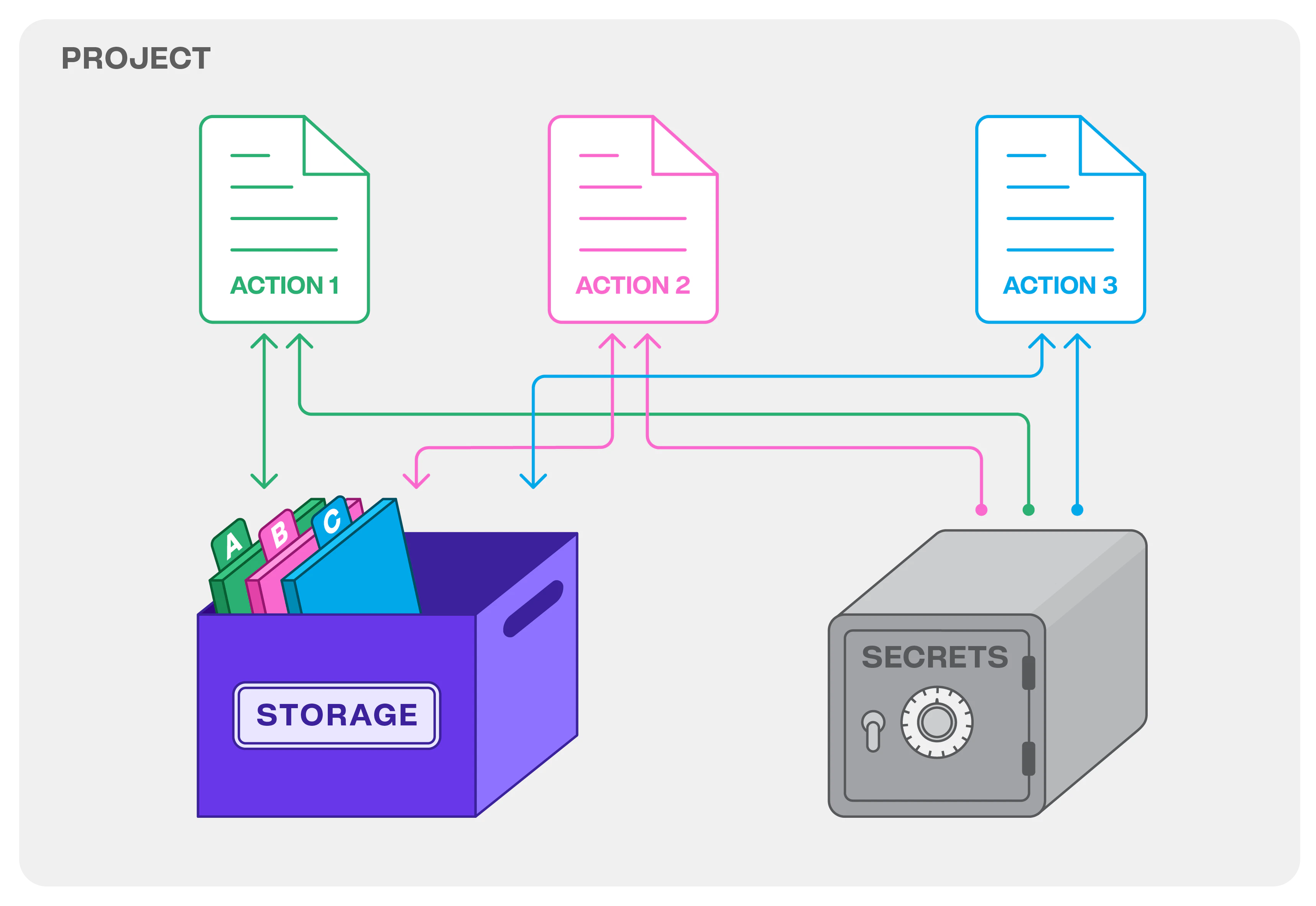
एक Web3 Action उस डेटा के लिए key-value storage के साथ आता है जिसे आपको persist करने की आवश्यकता होती है और API keys जैसी संवेदनशील जानकारी के लिए secrets management के साथ आता है। आप Web3 Actions को IFTTT/Zapier automation के Web3 संस्करण के निर्माण के लिए infrastructure के रूप में सोच सकते हैं, जो आपको अपने smart contracts, on-chain events, dapp frontends, APIs, और अन्य services को एक साथ जोड़ने की अनुमति देता है।
आपके द्वारा परिभाषित trigger नियमों के आधार पर, बाहरी on-chain या off-chain events आपके Web3 Action को trigger करेंगे और आपका JavaScript/TypeScript code event को तुरंत संभालेगा। Web3 Actions या तो **parallel mode** (default) या **sequential** में चलते हैं।
Parallel mode में, actions triggering के समय की तुलना में किसी विशेष क्रम के बिना निष्पादित होंगी। sequential mode में, actions triggering के क्रम में चलेंगी।
Web3 Actions के साथ, आप ऐसे systems बना सकते हैं जो आपको महत्वपूर्ण events के बारे में समय पर सूचित करते हैं। इस तरह, आप अपने dapp को UX और interactivity के मामले में सुधार सकते हैं और notifications के माध्यम से एकत्र या साझा की जा सकने वाली जानकारी की गहराई के माध्यम से अपने project को बढ़ा सकते हैं।
Web3 Actions के साथ क्या संभव है, इसका अंदाजा लगाने के लिए, यहाँ कुछ use cases दिए गए हैं:
* **महत्वपूर्ण transactions पर नज़र रखें**: Discord, Slack, या Telegram को संदेश भेजकर या इसे database पर पोस्ट करके किसी contract से emit किए गए events के लिए रीयल-टाइम(ish) data-rich notification system बनाएं।
* **जब कोई block mine होता है**: customized analytics और automation बनाने के लिए on-chain assets या gas prices में परिवर्तनों की निगरानी करें। फिर, data को एक बाहरी API पर पोस्ट करें।
* **webhook उजागर करें**: उपयोगकर्ताओं के inputs को संभालने वाला webhook उजागर करके अपने dapp को बढ़ाएँ।
* **आवधिक automation**: [Tenderly simulations](/simulator-ui/overview#simulating-a-transaction) का उपयोग करके transaction execution को समय-समय पर simulate करें और results को Slack पर भेजें और/या automation प्राप्त करने के लिए transaction को chain पर भी भेजें।
अधिक विचारों के लिए, [Web3 Actions और विभिन्न events के लिए Use cases](/monitoring/web3-actions/introduction#use-cases-for-web3-actions-and-different-events) अनुभाग देखें।
Web3 Actions rate-limited हैं। Web3 Actions के निष्पादन के लिए वर्तमान usage rate limit प्रति उपयोगकर्ता 100 executions/5 minutes है। कोई भी अतिरिक्त executions skip किए जाएंगे।
### Quickstart guides
browser या command line tools के माध्यम से Web3 Actions बनाना जल्दी शुरू करने के लिए इन guides का पालन करें।
Web3 Actions सेट अप करने के लिए आपको अपने functions के लिए JavaScript code लिखने की आवश्यकता होती है। Tenderly CLI का उपयोग करके अपने Web3 Actions का निर्माण करने में [yaml configuration file](/monitoring/web3-actions/references/project-structure#the-tenderlyyaml-file-structure) में triggers परिभाषित करना शामिल है। परिभाषित trigger और yaml configuration आपके project के codebase का एक अभिन्न अंग बन जाते हैं।
* [Tenderly Dashboard के माध्यम से Web3 Actions deploy करें](/monitoring/web3-actions/tutorials/deploy-via-dashboard): सीखें कि अपने browser में सीधे Web3 Actions कैसे सेट अप और deploy करें।
* [Tenderly CLI के माध्यम से Web3 Actions deploy करें](/monitoring/web3-actions/tutorials/deploy-via-cli): Tenderly CLI स्थापित करना, YAML configuration का उपयोग करके triggers परिभाषित करना, और command line के माध्यम से Web3 Actions को सेट अप और deploy करना सीखें।
transaction-related events द्वारा trigger होने वाले Web3 Actions सेट करने के लिए, आपको CLI-आधारित दृष्टिकोण का उपयोग करना होगा।
### Web3 Actions को समझना
संक्षेप में, Web3 Actions Tenderly को किसी विशिष्ट बाहरी event के होने के लिए listen करने और events होने पर आपका code चलाने का निर्देश देते हैं।
आपको एक पूर्व-परिभाषित बाहरी event से संबंधित एक **trigger specification** प्रदान करने की आवश्यकता है। एक Web3 Action को हर कुछ blocks पर trigger किया जा सकता है जैसे-जैसे वे mine होते हैं (block trigger), जब एक प्रासंगिक transaction निष्पादित होता है (transaction trigger), उसके द्वारा उजागर किए गए webhook के माध्यम से (webhook trigger), या विशिष्ट समय अंतराल पर (periodic trigger)।
जब event होता है, तो Tenderly आपके custom code (function) को निष्पादित करता है। यहाँ, monitoring सक्रिय हो जाती है। आप एक बाहरी API पर डेटा भेज सकते हैं, database में लिख सकते हैं, push notification या messaging services के माध्यम से data-rich message deliver कर सकते हैं, या यहाँ तक कि blockchain पर एक नया transaction भेज सकते हैं, कुछ उदाहरणों का उल्लेख करने के लिए।
आइए Web3 Actions के तीन मुख्य तत्वों से परिचित हों: **functions**, **events**, और **trigger specification**।
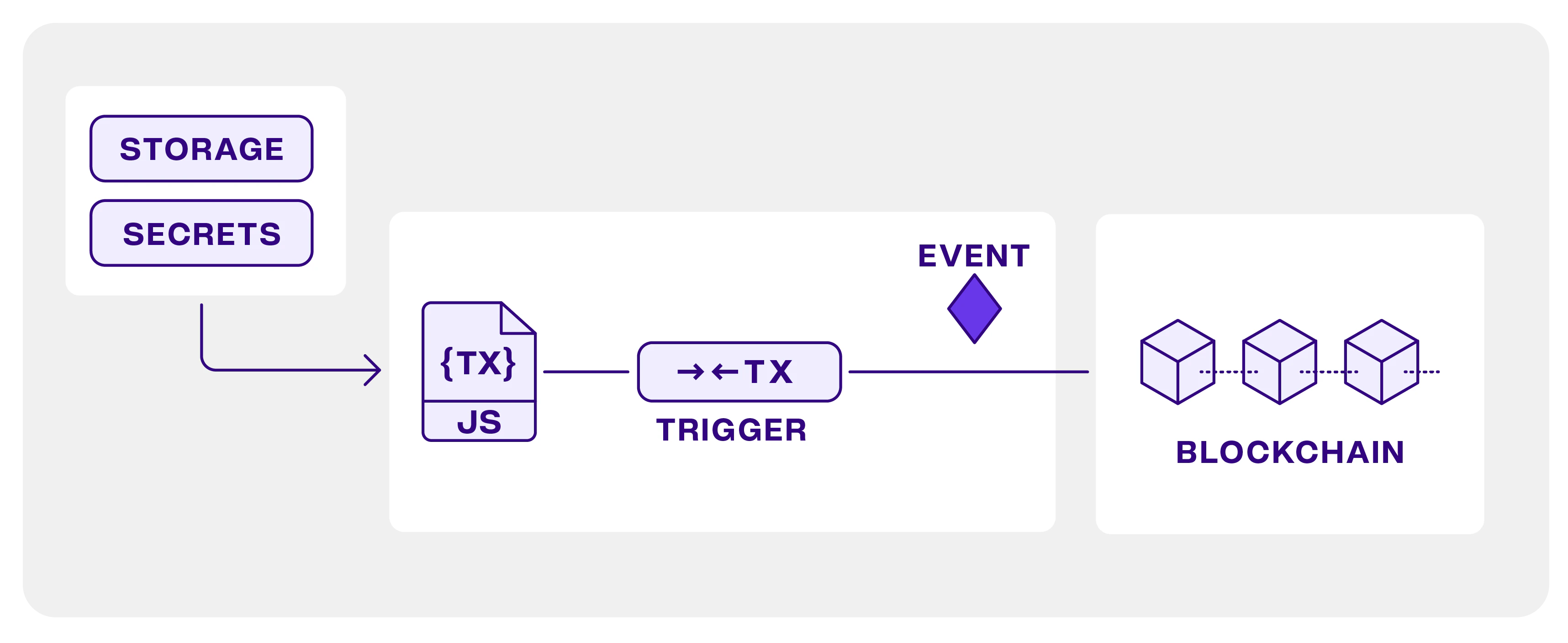 **Functions:** custom JavaScript या TypeScript code जिसे आप तब निष्पादित करना चाहते हैं जब आपके द्वारा निर्दिष्ट कोई बाहरी event होता है। Functions को Tenderly Dashboard के माध्यम से सीधे browser में या CLI का उपयोग करके (npm project के भीतर) लिखा जा सकता है। दोनों ही मामलों में, function परिभाषित करने वाली file से एक named export होना चाहिए।
**Events:** पूर्व-परिभाषित बाहरी events के instances जिन्हें आप एक trigger कॉन्फ़िगर करके listen कर सकते हैं। function event object को एक argument के रूप में प्राप्त करता है, event के बारे में डेटा को आपके function code के लिए उपलब्ध कराता है। ये समर्थित events हैं:
* **Block:** हर बार block mine होने पर एक function चलाएँ।
* **Periodic:** विशिष्ट अंतरालों पर एक function चलाएँ।
* **Webhook:** HTTP के माध्यम से Web3 Action को कॉल करें।
* **Transaction:** किसी विशिष्ट filter से मेल खाने वाले contract transactions पर react करें।
**Trigger specification:** एक schema या pattern जो आपके Web3 Action को listen करने वाले बाहरी events का वर्णन करता है।
Web3 Action बनाते समय, आपको trigger specification को उस function से link करना होता है जिसे आप चलाना चाहते हैं। जब Tenderly trigger में निर्दिष्ट event का पता लगाता है तो वह आपका custom code (function) निष्पादित करता है।
[Web3 Action Functions, Events, और Triggers](/monitoring/web3-actions/references/functions-events-triggers) को कैसे कॉन्फ़िगर करें, सीखें।
#### Web3 Actions Utilities
**Error reporting:** Tenderly Dashboard में एक overview जहाँ आप अपने Web3 Action के निष्पादन के दौरान हुई errors और incidents पा सकते हैं और असफल हुए इन्हें फिर से निष्पादित कर सकते हैं। [Web3 Actions में Error Handling](/monitoring/web3-actions/references/error-reporting) के बारे में अधिक जानें।
**Secrets:** API keys जैसे संवेदनशील डेटा को संग्रहीत करने का एक स्थान जो आपके code के अंदर से कॉल किए जाते हैं। यह जानकारी Tenderly Dashboard में संग्रहीत होती है और केवल आपके code से पढ़ी जा सकती है।
**Storage:** Project-wide key-value storage जिसका उपयोग आप consecutive runs के बीच data persist करने के लिए कर सकते हैं। आप Tenderly Dashboard के माध्यम से Storage से पढ़ और लिख सकते हैं। [Secrets कैसे प्रबंधित करें और Web3 Actions Storage का उपयोग करें](/monitoring/web3-actions/references/context) सीखें।
**Functions:** custom JavaScript या TypeScript code जिसे आप तब निष्पादित करना चाहते हैं जब आपके द्वारा निर्दिष्ट कोई बाहरी event होता है। Functions को Tenderly Dashboard के माध्यम से सीधे browser में या CLI का उपयोग करके (npm project के भीतर) लिखा जा सकता है। दोनों ही मामलों में, function परिभाषित करने वाली file से एक named export होना चाहिए।
**Events:** पूर्व-परिभाषित बाहरी events के instances जिन्हें आप एक trigger कॉन्फ़िगर करके listen कर सकते हैं। function event object को एक argument के रूप में प्राप्त करता है, event के बारे में डेटा को आपके function code के लिए उपलब्ध कराता है। ये समर्थित events हैं:
* **Block:** हर बार block mine होने पर एक function चलाएँ।
* **Periodic:** विशिष्ट अंतरालों पर एक function चलाएँ।
* **Webhook:** HTTP के माध्यम से Web3 Action को कॉल करें।
* **Transaction:** किसी विशिष्ट filter से मेल खाने वाले contract transactions पर react करें।
**Trigger specification:** एक schema या pattern जो आपके Web3 Action को listen करने वाले बाहरी events का वर्णन करता है।
Web3 Action बनाते समय, आपको trigger specification को उस function से link करना होता है जिसे आप चलाना चाहते हैं। जब Tenderly trigger में निर्दिष्ट event का पता लगाता है तो वह आपका custom code (function) निष्पादित करता है।
[Web3 Action Functions, Events, और Triggers](/monitoring/web3-actions/references/functions-events-triggers) को कैसे कॉन्फ़िगर करें, सीखें।
#### Web3 Actions Utilities
**Error reporting:** Tenderly Dashboard में एक overview जहाँ आप अपने Web3 Action के निष्पादन के दौरान हुई errors और incidents पा सकते हैं और असफल हुए इन्हें फिर से निष्पादित कर सकते हैं। [Web3 Actions में Error Handling](/monitoring/web3-actions/references/error-reporting) के बारे में अधिक जानें।
**Secrets:** API keys जैसे संवेदनशील डेटा को संग्रहीत करने का एक स्थान जो आपके code के अंदर से कॉल किए जाते हैं। यह जानकारी Tenderly Dashboard में संग्रहीत होती है और केवल आपके code से पढ़ी जा सकती है।
**Storage:** Project-wide key-value storage जिसका उपयोग आप consecutive runs के बीच data persist करने के लिए कर सकते हैं। आप Tenderly Dashboard के माध्यम से Storage से पढ़ और लिख सकते हैं। [Secrets कैसे प्रबंधित करें और Web3 Actions Storage का उपयोग करें](/monitoring/web3-actions/references/context) सीखें।
 #### local development और testing समर्थन
अपने Web3 Action functions लिखते समय जल्दी iterate करने के लिए, अन्वेषण करें कि कैसे `@tenderly/actions-test` npm package [action function code के परीक्षण और local development के लिए समर्थन](/monitoring/web3-actions/references/local-development) प्रदान करता है।
### Web3 Actions और विभिन्न events के लिए Use cases
नीचे प्रत्येक event type और उदाहरण use cases का एक संक्षिप्त अवलोकन है।
🧾 **Transaction event:** दिए गए criteria के set से मेल खाने वाले transaction event के लिए listen करता है, सफल या विफल transaction, value transfers, transaction द्वारा उपयोग की गई gas की एक विशेष मात्रा, emit हुआ event, और भी बहुत कुछ। [Transaction events](/monitoring/web3-actions/references/functions-events-triggers#transaction-event) के बारे में जानें।
उदाहरण use cases:
* transactions के होते ही उनके बारे में विशिष्ट data एकत्र करें और उन्हें Tenderly Storage में संग्रहीत करें।
* HTTP के माध्यम से किसी transaction के बारे में data को अन्य (Web2 या Web3) services पर भेजें।
* Discord जैसे अपने communication channels के माध्यम से चाहे गए या अनचाहे transactions के बारे में data-rich notifications भेजें।
* Web3 Action से ही chain पर transaction भेजें।
🔢 **Block event:** तब event के लिए listen करता है जब किसी चयनित network पर एक block mine होता है। [Block events](/monitoring/web3-actions/references/functions-events-triggers#block-event) के बारे में जानें।
उदाहरण use cases:
* customized analytics और automation बनाने के लिए on-chain assets में परिवर्तनों की निगरानी करें।
* हर कुछ blocks mine होने पर smart contract परिवर्तनों की निगरानी करें और जब कोई शर्त पूरी हो तो automation चलाएँ।
* gas prices की निगरानी करें और अपने operations को स्वचालित करें।
🪝 **Webhook event:** तब event के लिए listen करता है **जब** Webhook URL पर एक HTTP request पोस्ट किया जाता है (action एक WebHook उजागर करती है)। [Webhook events](/monitoring/web3-actions/references/functions-events-triggers#webhook-event) के बारे में जानें।
उदाहरण use cases:
* अपने dapp उपयोगकर्ताओं के input को संभालने वाला serverless backend बनाएँ।
* transactions या विशिष्ट smart contract परिवर्तनों के बारे में आपके अन्य Web3 Actions द्वारा एकत्र किया गया data पुनर्प्राप्त करें।
* आपका CI [परीक्षण के लिए आप जिन Virtual Environments का उपयोग करते हैं](/virtual-environments/overview) जैसे अन्य Tenderly resources को साफ करने या तैयार करने के लिए webhook को कॉल कर सकता है।
🕖 **Periodic event:** आपके द्वारा निर्दिष्ट समय अंतराल या CRON expression के गुजरने का प्रतिनिधित्व करने वाले event के लिए listen करता है। [Periodic events](/monitoring/web3-actions/references/functions-events-triggers#periodic-event) के बारे में जानें।
उदाहरण use cases:
* network से एकत्र किए गए और/या Web3 Action Storage में aggregated custom data के साथ आवधिक रूप से notifications भेजें।
* DAO proposal को simulate करें और Discord पर voting reminder भेजें।
* Tenderly simulations का उपयोग करके transaction execution को simulate करें और result Slack पर भेजें और/या automation प्राप्त करने के लिए transaction को on-chain भेजें।
* Tenderly infrastructure की आवधिक सफाई (उदाहरण के लिए, simulations जारी रखने से पहले Fork को Mainnet पर latest block की ओर point करें)।
### Web3 Actions tutorials
यदि आप एक पूर्ण tutorial चाहते हैं, तो यहाँ एक on-chain Tic-Tac-Toe game की निगरानी के लिए step-by-step guide है, सभी प्रासंगिक व्याख्याओं के साथ, game contract को deploy करने से लेकर एक move के बाद board प्रदर्शित करने तक।
Uniswap pair बनने पर Discord पर संदेश भेजने के लिए Web3 Action कैसे बनाएँ और Axios का उपयोग करके कुछ data प्राप्त करें, यह देखने के लिए, यह जगह है:
Tenderly Web3 Action में अपना खुद का सरल Oracle deploy करने के लिए, इस tutorial का अन्वेषण करें:
यह देखने के लिए कि कैसे एक Web3 Action multisig wallet को submit किए गए transaction को simulate करने के लिए Virtual Environments का उपयोग कर सकता है और simulation results के साथ Discord messages भेज सकता है, इसे आज़माएँ:
### संसाधन
यहाँ आप मुख्य building blocks और साथ के tools के बारे में सभी प्रासंगिक जानकारी पा सकते हैं:
Web3 Actions project structure और **tenderly.yaml** configuration file के सामान्य layout के बारे में विवरण पाएँ:
Web3 Actions के मुख्य components और **tenderly.yaml** में trigger configuration लिखने के बारे में विस्तृत जानकारी पाएँ:
Storage और Secrets का उपयोग करने के बारे में जानें:
Web3 Actions के local development और परीक्षण के लिए tools के बारे में जानें:
Tenderly Dashboard में Web3 Actions के विफल executions का निरीक्षण और प्रबंधन करने के लिए utilities के बारे में जानें:
Web3 Actions को कैसे संचालित करें सीखें: Web3 Actions को रोकना, upgrading करना, और manually चलाना:
#### local development और testing समर्थन
अपने Web3 Action functions लिखते समय जल्दी iterate करने के लिए, अन्वेषण करें कि कैसे `@tenderly/actions-test` npm package [action function code के परीक्षण और local development के लिए समर्थन](/monitoring/web3-actions/references/local-development) प्रदान करता है।
### Web3 Actions और विभिन्न events के लिए Use cases
नीचे प्रत्येक event type और उदाहरण use cases का एक संक्षिप्त अवलोकन है।
🧾 **Transaction event:** दिए गए criteria के set से मेल खाने वाले transaction event के लिए listen करता है, सफल या विफल transaction, value transfers, transaction द्वारा उपयोग की गई gas की एक विशेष मात्रा, emit हुआ event, और भी बहुत कुछ। [Transaction events](/monitoring/web3-actions/references/functions-events-triggers#transaction-event) के बारे में जानें।
उदाहरण use cases:
* transactions के होते ही उनके बारे में विशिष्ट data एकत्र करें और उन्हें Tenderly Storage में संग्रहीत करें।
* HTTP के माध्यम से किसी transaction के बारे में data को अन्य (Web2 या Web3) services पर भेजें।
* Discord जैसे अपने communication channels के माध्यम से चाहे गए या अनचाहे transactions के बारे में data-rich notifications भेजें।
* Web3 Action से ही chain पर transaction भेजें।
🔢 **Block event:** तब event के लिए listen करता है जब किसी चयनित network पर एक block mine होता है। [Block events](/monitoring/web3-actions/references/functions-events-triggers#block-event) के बारे में जानें।
उदाहरण use cases:
* customized analytics और automation बनाने के लिए on-chain assets में परिवर्तनों की निगरानी करें।
* हर कुछ blocks mine होने पर smart contract परिवर्तनों की निगरानी करें और जब कोई शर्त पूरी हो तो automation चलाएँ।
* gas prices की निगरानी करें और अपने operations को स्वचालित करें।
🪝 **Webhook event:** तब event के लिए listen करता है **जब** Webhook URL पर एक HTTP request पोस्ट किया जाता है (action एक WebHook उजागर करती है)। [Webhook events](/monitoring/web3-actions/references/functions-events-triggers#webhook-event) के बारे में जानें।
उदाहरण use cases:
* अपने dapp उपयोगकर्ताओं के input को संभालने वाला serverless backend बनाएँ।
* transactions या विशिष्ट smart contract परिवर्तनों के बारे में आपके अन्य Web3 Actions द्वारा एकत्र किया गया data पुनर्प्राप्त करें।
* आपका CI [परीक्षण के लिए आप जिन Virtual Environments का उपयोग करते हैं](/virtual-environments/overview) जैसे अन्य Tenderly resources को साफ करने या तैयार करने के लिए webhook को कॉल कर सकता है।
🕖 **Periodic event:** आपके द्वारा निर्दिष्ट समय अंतराल या CRON expression के गुजरने का प्रतिनिधित्व करने वाले event के लिए listen करता है। [Periodic events](/monitoring/web3-actions/references/functions-events-triggers#periodic-event) के बारे में जानें।
उदाहरण use cases:
* network से एकत्र किए गए और/या Web3 Action Storage में aggregated custom data के साथ आवधिक रूप से notifications भेजें।
* DAO proposal को simulate करें और Discord पर voting reminder भेजें।
* Tenderly simulations का उपयोग करके transaction execution को simulate करें और result Slack पर भेजें और/या automation प्राप्त करने के लिए transaction को on-chain भेजें।
* Tenderly infrastructure की आवधिक सफाई (उदाहरण के लिए, simulations जारी रखने से पहले Fork को Mainnet पर latest block की ओर point करें)।
### Web3 Actions tutorials
यदि आप एक पूर्ण tutorial चाहते हैं, तो यहाँ एक on-chain Tic-Tac-Toe game की निगरानी के लिए step-by-step guide है, सभी प्रासंगिक व्याख्याओं के साथ, game contract को deploy करने से लेकर एक move के बाद board प्रदर्शित करने तक।
Uniswap pair बनने पर Discord पर संदेश भेजने के लिए Web3 Action कैसे बनाएँ और Axios का उपयोग करके कुछ data प्राप्त करें, यह देखने के लिए, यह जगह है:
Tenderly Web3 Action में अपना खुद का सरल Oracle deploy करने के लिए, इस tutorial का अन्वेषण करें:
यह देखने के लिए कि कैसे एक Web3 Action multisig wallet को submit किए गए transaction को simulate करने के लिए Virtual Environments का उपयोग कर सकता है और simulation results के साथ Discord messages भेज सकता है, इसे आज़माएँ:
### संसाधन
यहाँ आप मुख्य building blocks और साथ के tools के बारे में सभी प्रासंगिक जानकारी पा सकते हैं:
Web3 Actions project structure और **tenderly.yaml** configuration file के सामान्य layout के बारे में विवरण पाएँ:
Web3 Actions के मुख्य components और **tenderly.yaml** में trigger configuration लिखने के बारे में विस्तृत जानकारी पाएँ:
Storage और Secrets का उपयोग करने के बारे में जानें:
Web3 Actions के local development और परीक्षण के लिए tools के बारे में जानें:
Tenderly Dashboard में Web3 Actions के विफल executions का निरीक्षण और प्रबंधन करने के लिए utilities के बारे में जानें:
Web3 Actions को कैसे संचालित करें सीखें: Web3 Actions को रोकना, upgrading करना, और manually चलाना: