> ## Documentation Index
> Fetch the complete documentation index at: https://docs.tenderly.co/llms.txt
> Use this file to discover all available pages before exploring further.
# Action Functions, Events, और Triggers
> Web3 Actions के मुख्य तत्वों का अन्वेषण करें, समर्थित events के लिए triggers कॉन्फ़िगर करें, और tenderly.yaml में triggers को action functions से link करें।
यह गाइड Web3 Actions की तीन मुख्य अवधारणाएँ प्रस्तुत करती है: **triggers, events, और functions**। आप सीखेंगे कि वे कैसे काम करते हैं और अपनी खुद की Web3 Actions बनाने के लिए उनका उपयोग कैसे करें।
Web3 Action बनाने वाले तीन मुख्य components हैं:
* **Functions:** custom JavaScript या TypeScript code जिसे आप तब निष्पादित करना चाहते हैं जब कोई बाहरी event होता है। यह आपकी automation का मुख्य है।
* **Triggers:** पूर्व-परिभाषित बाहरी events जिनके लिए आपकी Web3 Action listen करने के लिए कॉन्फ़िगर की गई है। जब event होता है, तो trigger Tenderly को आपका custom code (function) निष्पादित करने का निर्देश देता है।
* **Events (Trigger Types):** पूर्व-परिभाषित बाहरी events जिन्हें आप एक trigger सेट करके listen कर सकते हैं। जब event होता है, तो trigger आपके custom code (functions) को कॉल करेगा।
### Execution Types
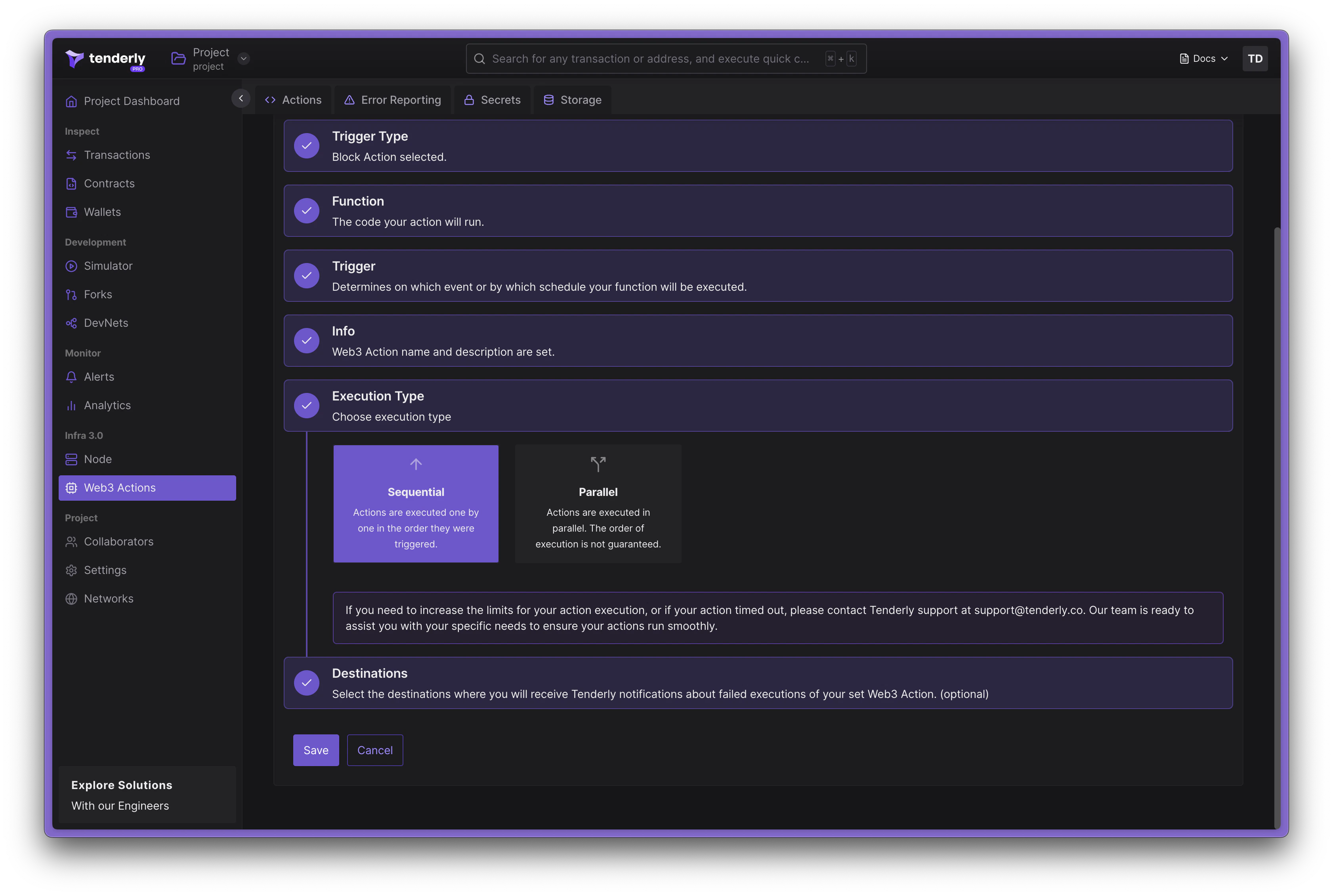
Tenderly में Web3 Actions को दो modes में निष्पादित किया जा सकता है: **Sequential** और **Parallel**।
 #### Sequential Execution
sequential execution में, actions एक-एक करके उस क्रम में निष्पादित होती हैं जिस क्रम में उन्हें invoke किया गया था। यह execution का default mode है। इस mode में, प्रत्येक action अपना execution शुरू करने से पहले पिछली action के पूरा होने की प्रतीक्षा करती है। यहाँ sequential execution के लिए action configuration का एक उदाहरण है:
```diff title="example" showLineNumbers theme={"theme":{"light":"catppuccin-latte","dark":"catppuccin-mocha"}}
our-org/our-cool-project:
runtime: v2
sources: actions
specs:
bestActionEver:
description: Does the best thing ever
+ execution_type: sequential
function: very/organized/file:bestActionEver
trigger:
...
```
#### Parallel Execution
parallel execution में, actions समानांतर में निष्पादित होती हैं, जिससे उच्च throughput होता है। इस mode में, execution के क्रम की गारंटी नहीं है और [action storage](/monitoring/web3-actions/references/context#storage) के साथ संभावित race conditions हो सकती हैं। यहाँ parallel execution के लिए action configuration का एक उदाहरण है:
```diff title="example" showLineNumbers theme={"theme":{"light":"catppuccin-latte","dark":"catppuccin-mocha"}}
our-org/our-cool-project:
runtime: v2
sources: actions
specs:
bestActionEver:
description: Does the best thing ever
+ execution_type: parallel
function: very/organized/file:bestActionEver
trigger:
...
```
### Action functions
Web3 Action functions मानक JavaScript या TypeScript functions के रूप में लिखे गए custom code को संदर्भित करते हैं, लेकिन उन्हें कुछ नियमों का पालन करना चाहिए।
* Functions asynchronous होने चाहिए, `Promise` return करते हुए
* Functions दो parameters स्वीकार करते हैं: `context` और `event`
* Functions को file से एक named export होना चाहिए
* Functions को *actions root* directory के तहत किसी भी file में रखा जा सकता है
[Web3 Actions project और file structure](/monitoring/web3-actions/references/project-structure) के बारे में जानें।
जब एक Web3 Action function deploy किया जाता है, तो Tenderly runtime invocation के दौरान निम्न arguments पास करेगा:
* `context` parameter जो [Storage और Secrets](/monitoring/web3-actions/references/context) तक पहुँच रखता है।
* `event` parameter जो *"अभी क्या हुआ?*" प्रश्न का उत्तर देने वाली जानकारी वाला एक object है। इस parameter में trigger type के लिए विशिष्ट data होता है जिसके लिए Web3 Action function listen कर रहा है। [बाहरी events के लिए triggers निर्दिष्ट करना](/monitoring/web3-actions/references/functions-events-triggers#specifying-triggers-for-external-events) अनुभाग बाहरी events के बारे में विस्तार से बताता है।
Web3 Action functions का निष्पादन 30 सेकंड तक सीमित है। यदि आपका function 30 सेकंड से अधिक समय लेता है, तो इसे समाप्त कर दिया जाएगा।
यहाँ TypeScript में लिखे गए Web3 Action function का एक उदाहरण है। `event` parameter समर्थित trigger types (events) में से कोई एक हो सकता है।
```typescript title="example.ts" showLineNumbers theme={"theme":{"light":"catppuccin-latte","dark":"catppuccin-mocha"}}
// File: actions/myCoolTsFile.ts
// importing ethers available in Tenderly Runtime
export const awesomeActionFunction: ActionFn = async (context: Context, event: Event) => {
// cast the event parameter to an appropriate type, based on the Trigger
// this function subscribed to.
// Of course, only one of these casts makes sense
const blockEvent = event as BlockEvent;
const periodicEvent = event as PeriodicEvent;
const transactionEvent = event as TransactionEvent;
const webhookEvent = event as WebhookEvent;
...
}
```
#### dashboard-आधारित actions के लिए उपलब्ध libraries
Tenderly runtime कई javascript libraries के साथ pre-bundled आता है जिन्हें आप Tenderly Dashboard के माध्यम से Web3 Actions बनाते समय import कर सकते हैं। उपलब्ध libraries में शामिल हैं:
* [Ethers.js](https://docs.ethers.io/v5/)
* [Bignumber.js](https://mikemcl.github.io/bignumber.js/)
* [Axios](https://axios-http.com/docs/intro)
* [Luxon](https://moment.github.io/luxon/#/?id=luxon)
इनमें से किसी भी libraries को import करने के लिए, `require()` function का उपयोग वैसे ही करें जैसे आप एक मानक npm-आधारित project के साथ करते (ES6 के बिना)।
Axios के लिए उदाहरण import इस तरह दिखता है:
```jsx title="example.jsx" showLineNumbers theme={"theme":{"light":"catppuccin-latte","dark":"catppuccin-mocha"}}
const axios = require('axios');
```
#### CLI-आधारित Web3 Actions के लिए npm libraries का उपयोग करना
Tenderly CLI द्वारा बनाया गया project वास्तव में एक npm module है। आप अपने *actions root* folder से किसी भी npm package को स्थापित कर सकते हैं।
### बाहरी events और trigger types
जब कोई बाहरी event होता है, तो यह *आपके custom code (functions) के निष्पादन को trigger करता है*। आप listen करने के लिए चार बाहरी events में से चुन सकते हैं:
* **Block event**: एक block किसी चयनित network पर mine होता है।
* **Periodic event:** यह trigger तब होता है जब कुछ समय अंतराल गुजरते हैं या CRON expressions के आधार पर।
* **Webhook event:** एक HTTP request webhook URL पर पोस्ट किया जाता है (Web3 Action एक webhook उजागर करता है)
* **Transaction event:** दिए गए filter criteria से मेल खाने वाला एक transaction किसी चयनित network पर निष्पादित होता है।
Web3 Action को परिभाषित करते समय, आप अपने project के लिए रुचि के बाहरी events पर प्रतिक्रिया करने वाले triggers को प्रभावी ढंग से परिभाषित कर रहे होंगे। trigger specification के संदर्भ में, हम **trigger type** शब्द का उपयोग करेंगे।
आपको प्रत्येक trigger type के लिए अलग functions लिखने चाहिए। विभिन्न trigger types के लिए एक ही function का उपयोग करने की अनुशंसा नहीं की जाती है।
### Web3 Action functions को events पर subscribe करना
JavaScript में अपने action function को परिभाषित करने के अलावा, आपको trigger configuration भी प्रदान करने की आवश्यकता है, जो Tenderly को बताता है कि **इसे क्या trigger करता है, वह बाहरी event जिस पर आपका function subscribe होता है।**
Tenderly Dashboard के माध्यम से Web3 Actions बनाते समय, UI में creation flow आपके लिए इस भाग को संभालेगा। [Dashboard Quickstart](/monitoring/web3-actions/tutorials/deploy-via-dashboard) guide पढ़ें।
code-आधारित Web3 Actions के साथ काम करते समय, functions और उनके triggers को `tenderly.yaml` file में परिभाषित किया जाना चाहिए, जो Tenderly CLI द्वारा उत्पन्न होती है। [CLI Quickstart](/monitoring/web3-actions/tutorials/deploy-via-cli) guide पढ़ें।
**उदाहरण**
नीचे दिए गए उदाहरण में, हम **bestActionEver** नामक Web3 Action घोषित कर रहे हैं और **actions/myCoolTsFile.ts** file से export किए गए **awesomeActionFunction** function का reference दे रहे हैं। यह वह function है जिसे Tenderly Web3 Action trigger होने पर कॉल करेगा। execution को **`execution_type`** के माध्यम से नियंत्रित किया जाता है, इस मामले में इसे `parallel` पर सेट किया गया है।
```yaml title="tenderly.yaml" showLineNumbers theme={"theme":{"light":"catppuccin-latte","dark":"catppuccin-mocha"}}
account_id: ""
actions:
our-cool-org/our-cool-project:
runtime: v1
sources: actions
specs:
bestActionEver:
execution_type: parallel # or sequential
description: Does the best thing ever
function: myCoolTsFile:awesomeActionFunction
trigger: # trigger declaration start
type: ... # type
... # configuration map (external event specific)
```
### बाहरी events के लिए triggers निर्दिष्ट करना
इस अनुभाग में, हम `trigger` declaration की जाँच करेंगे। tenderly.yaml file लिखने के बारे में अधिक जानकारी के लिए, [इस गाइड](/monitoring/web3-actions/references/project-structure#the-tenderlyyaml-file-structure) का reference लें।
trigger type और संबंधित configurations **tenderly.yaml** file में परिभाषित किए गए हैं। आपको पहले `trigger` object परिभाषित करना होगा, जिसमें दो अनिवार्य properties हैं:
* `type` property, जो trigger type निर्दिष्ट करता है, जो हो सकता है: `periodic | webhook | block | transaction`
* चयनित trigger type के लिए विशिष्ट configuration वाला एक object
नीचे प्रत्येक trigger type के लिए trigger-specific configurations का विस्तृत विवरण है।
### Periodic event
एक periodic event का उपयोग तब किया जाता है जब आप चाहते हैं कि आपकी Web3 Action विशिष्ट समय अंतराल पर trigger हो। यह **time** ले जाता है: invocation का समय।
```typescript title="example.ts" showLineNumbers theme={"theme":{"light":"catppuccin-latte","dark":"catppuccin-mocha"}}
type PeriodicEvent = {
time: Date;
};
```
trigger declaration में `periodic` type है। यह interval- या cron-आधारित हो सकता है:
```yaml title="trigger.yaml" showLineNumbers theme={"theme":{"light":"catppuccin-latte","dark":"catppuccin-mocha"}}
trigger:
type: periodic
periodic:
interval: 5m
```
`interval` property निम्न में से कोई भी मान ले सकती है: `5m | 10m | 15m | 30m | 1h | 3h | 6h | 12h | 1d`
यदि आपको अपने Web3 Action के निष्पादित होने पर अधिक granular नियंत्रण की आवश्यकता है, तो CRON-आधारित periodic trigger का उपयोग करें:
```yaml title="trigger.yaml" showLineNumbers theme={"theme":{"light":"catppuccin-latte","dark":"catppuccin-mocha"}}
trigger:
type: periodic
periodic:
cron: '5 */1 * * *'
```
`cron` property कोई भी मान्य [CRON string](https://crontab.guru/) हो सकती है।
### Webhook event
Webhook-आधारित Web3 Actions एक custom webhook URL उजागर करती हैं, जिससे उन्हें एक साधारण HTTP POST request का उपयोग करके बाहरी systems से trigger करना संभव हो जाता है।
संबंधित trigger type में दो properties होती हैं: invocation का **time** और कोई भी **payload** (एक JSON object)। Tenderly आपके payload पर कोई validation या inspections नहीं करता है।
```typescript title="example.ts" showLineNumbers theme={"theme":{"light":"catppuccin-latte","dark":"catppuccin-mocha"}}
type WebhookEvent = {
time: Date;
payload: any;
};
```
एक trigger configuration उदाहरण:
```yaml title="webhook-trigger.yaml" showLineNumbers theme={"theme":{"light":"catppuccin-latte","dark":"catppuccin-mocha"}}
trigger:
type: webhook
webhook:
authenticated: true
```
यदि `authenticated` को **true** पर सेट किया गया है, तो आपको Web3 Action चलाने में सक्षम होने के लिए `x-access-key` के value के रूप में अपनी request के साथ Tenderly Access Token शामिल करना होगा। आप Tenderly Dashboard में Web3 Action overview में उजागर किए गए webhook का cURL पा सकते हैं।
```bash title="example" showLineNumbers theme={"theme":{"light":"catppuccin-latte","dark":"catppuccin-mocha"}}
curl -X POST \
-H "x-access-key: $ACCESS_TOKEN" \
-H "Content-Type: application/json" \
https://api.tenderly.co/api/v1/actions/7acc7db2-00d6-4872-b2d2-d9430bd8fe7b/webhook \
-d '{"foo": "bar"}'
```
### Block event
block event का उपयोग तब किया जाता है जब आप एक या कई networks पर blocks के mining के लिए listen करना चाहते हैं। आप दो consecutive invocations के बीच mine किए गए blocks की संख्या निर्दिष्ट करके अपनी Web3 Action को "block-periodic" बना सकते हैं।
```typescript title="example.ts" showLineNumbers theme={"theme":{"light":"catppuccin-latte","dark":"catppuccin-mocha"}}
type BlockEvent = {
blockHash: string;
blockNumber: number;
network: string;
};
```
block trigger घोषित करते समय, आप निम्न properties निर्दिष्ट कर सकते हैं:
* `network`: [network IDs](/monitoring/web3-actions/references/functions-events-triggers) का एक single value या एक list जिसमें आप रुचि रखते हैं
* `blocks`: Web3 Action के दो consecutive executions के बीच mine किए गए blocks की संख्या। उदाहरण के लिए, प्रत्येक 100वें mine किए गए block पर Web3 Action निष्पादित करें।
```yaml title="block-trigger.yaml" showLineNumbers theme={"theme":{"light":"catppuccin-latte","dark":"catppuccin-mocha"}}
trigger:
type: block
block:
network:
- 1
- 8453
blocks: 100
```
### Transaction event
transaction trigger type आपको विशिष्ट transactions के लिए listen करने की अनुमति देता है क्योंकि वे on-chain निष्पादित होते हैं।
smart contract से transactions के लिए listen करने के लिए, smart contract को Tenderly Dashboard में verified और आपके project में जोड़ा जाना चाहिए। यदि ऐसा नहीं है तो CLI एक warning फेंकेगा।
आप रुचि के transactions पर zero in करने के लिए **filters** के रूप में विभिन्न शर्तें निर्दिष्ट कर सकते हैं। आपके custom code को `event` parameter के माध्यम से पास किए गए ठीक उसी transaction payload के साथ invoke किया जाएगा।
```typescript title="example.ts" showLineNumbers theme={"theme":{"light":"catppuccin-latte","dark":"catppuccin-mocha"}}
type TransactionEvent = {
blockHash: string;
blockNumber: number;
from: string;
hash: string;
network: string;
to?: string;
logs: Array<{
address: string;
data: string;
topics: string[];
}>;
input: string;
value: string;
nonce: string;
gas: string;
gasUsed: string;
cumulativeGasUsed: string;
gasPrice: string;
gasTipCap: string;
gasFeeCap: string;
transactionHash: string;
};
```
transaction events के लिए listen करते समय, आप निम्न सेटिंग्स भी निर्दिष्ट कर सकते हैं:
* **Transaction mining status**: `mined` (transaction mine हो गया है) या `confirmed10` (transaction वाले block के बाद से 10 blocks confirmed हैं)
* **Filters:** `filters` list का उपयोग करते हुए transaction payload से जुड़ी शर्तों की एक सूची। केवल वे transactions जो filters से मेल खाते हैं, आपके code के निष्पादन को trigger करेंगे।
#### transactions को filter करना
`filters` list आपको transaction properties का उपयोग करके triggering criteria परिभाषित करने की अनुमति देती है ताकि विशिष्ट transactions से मेल खा सकें।
list में प्रत्येक filter एक object है जहाँ **सभी fields AND-ed होते हैं**। मेल खाने के लिए filter में हर शर्त true होनी चाहिए। `filters` list स्वयं **OR-ed** है: एक transaction तब मेल खाता है जब यह list में **किसी भी एक filter** को संतुष्ट करता है।
```python theme={"theme":{"light":"catppuccin-latte","dark":"catppuccin-mocha"}}
match = anyOf(
(network AND status AND from AND eventEmitted), # Filter 1
(network AND to) # Filter 2
)
```
नीचे उन सभी उपलब्ध filters की सूची दी गई है जिन्हें आप उन transactions के लिए criteria बनाने के लिए संयोजित कर सकते हैं जो आपके Web3 Action के निष्पादन को trigger करेंगे।
#### Sequential Execution
sequential execution में, actions एक-एक करके उस क्रम में निष्पादित होती हैं जिस क्रम में उन्हें invoke किया गया था। यह execution का default mode है। इस mode में, प्रत्येक action अपना execution शुरू करने से पहले पिछली action के पूरा होने की प्रतीक्षा करती है। यहाँ sequential execution के लिए action configuration का एक उदाहरण है:
```diff title="example" showLineNumbers theme={"theme":{"light":"catppuccin-latte","dark":"catppuccin-mocha"}}
our-org/our-cool-project:
runtime: v2
sources: actions
specs:
bestActionEver:
description: Does the best thing ever
+ execution_type: sequential
function: very/organized/file:bestActionEver
trigger:
...
```
#### Parallel Execution
parallel execution में, actions समानांतर में निष्पादित होती हैं, जिससे उच्च throughput होता है। इस mode में, execution के क्रम की गारंटी नहीं है और [action storage](/monitoring/web3-actions/references/context#storage) के साथ संभावित race conditions हो सकती हैं। यहाँ parallel execution के लिए action configuration का एक उदाहरण है:
```diff title="example" showLineNumbers theme={"theme":{"light":"catppuccin-latte","dark":"catppuccin-mocha"}}
our-org/our-cool-project:
runtime: v2
sources: actions
specs:
bestActionEver:
description: Does the best thing ever
+ execution_type: parallel
function: very/organized/file:bestActionEver
trigger:
...
```
### Action functions
Web3 Action functions मानक JavaScript या TypeScript functions के रूप में लिखे गए custom code को संदर्भित करते हैं, लेकिन उन्हें कुछ नियमों का पालन करना चाहिए।
* Functions asynchronous होने चाहिए, `Promise` return करते हुए
* Functions दो parameters स्वीकार करते हैं: `context` और `event`
* Functions को file से एक named export होना चाहिए
* Functions को *actions root* directory के तहत किसी भी file में रखा जा सकता है
[Web3 Actions project और file structure](/monitoring/web3-actions/references/project-structure) के बारे में जानें।
जब एक Web3 Action function deploy किया जाता है, तो Tenderly runtime invocation के दौरान निम्न arguments पास करेगा:
* `context` parameter जो [Storage और Secrets](/monitoring/web3-actions/references/context) तक पहुँच रखता है।
* `event` parameter जो *"अभी क्या हुआ?*" प्रश्न का उत्तर देने वाली जानकारी वाला एक object है। इस parameter में trigger type के लिए विशिष्ट data होता है जिसके लिए Web3 Action function listen कर रहा है। [बाहरी events के लिए triggers निर्दिष्ट करना](/monitoring/web3-actions/references/functions-events-triggers#specifying-triggers-for-external-events) अनुभाग बाहरी events के बारे में विस्तार से बताता है।
Web3 Action functions का निष्पादन 30 सेकंड तक सीमित है। यदि आपका function 30 सेकंड से अधिक समय लेता है, तो इसे समाप्त कर दिया जाएगा।
यहाँ TypeScript में लिखे गए Web3 Action function का एक उदाहरण है। `event` parameter समर्थित trigger types (events) में से कोई एक हो सकता है।
```typescript title="example.ts" showLineNumbers theme={"theme":{"light":"catppuccin-latte","dark":"catppuccin-mocha"}}
// File: actions/myCoolTsFile.ts
// importing ethers available in Tenderly Runtime
export const awesomeActionFunction: ActionFn = async (context: Context, event: Event) => {
// cast the event parameter to an appropriate type, based on the Trigger
// this function subscribed to.
// Of course, only one of these casts makes sense
const blockEvent = event as BlockEvent;
const periodicEvent = event as PeriodicEvent;
const transactionEvent = event as TransactionEvent;
const webhookEvent = event as WebhookEvent;
...
}
```
#### dashboard-आधारित actions के लिए उपलब्ध libraries
Tenderly runtime कई javascript libraries के साथ pre-bundled आता है जिन्हें आप Tenderly Dashboard के माध्यम से Web3 Actions बनाते समय import कर सकते हैं। उपलब्ध libraries में शामिल हैं:
* [Ethers.js](https://docs.ethers.io/v5/)
* [Bignumber.js](https://mikemcl.github.io/bignumber.js/)
* [Axios](https://axios-http.com/docs/intro)
* [Luxon](https://moment.github.io/luxon/#/?id=luxon)
इनमें से किसी भी libraries को import करने के लिए, `require()` function का उपयोग वैसे ही करें जैसे आप एक मानक npm-आधारित project के साथ करते (ES6 के बिना)।
Axios के लिए उदाहरण import इस तरह दिखता है:
```jsx title="example.jsx" showLineNumbers theme={"theme":{"light":"catppuccin-latte","dark":"catppuccin-mocha"}}
const axios = require('axios');
```
#### CLI-आधारित Web3 Actions के लिए npm libraries का उपयोग करना
Tenderly CLI द्वारा बनाया गया project वास्तव में एक npm module है। आप अपने *actions root* folder से किसी भी npm package को स्थापित कर सकते हैं।
### बाहरी events और trigger types
जब कोई बाहरी event होता है, तो यह *आपके custom code (functions) के निष्पादन को trigger करता है*। आप listen करने के लिए चार बाहरी events में से चुन सकते हैं:
* **Block event**: एक block किसी चयनित network पर mine होता है।
* **Periodic event:** यह trigger तब होता है जब कुछ समय अंतराल गुजरते हैं या CRON expressions के आधार पर।
* **Webhook event:** एक HTTP request webhook URL पर पोस्ट किया जाता है (Web3 Action एक webhook उजागर करता है)
* **Transaction event:** दिए गए filter criteria से मेल खाने वाला एक transaction किसी चयनित network पर निष्पादित होता है।
Web3 Action को परिभाषित करते समय, आप अपने project के लिए रुचि के बाहरी events पर प्रतिक्रिया करने वाले triggers को प्रभावी ढंग से परिभाषित कर रहे होंगे। trigger specification के संदर्भ में, हम **trigger type** शब्द का उपयोग करेंगे।
आपको प्रत्येक trigger type के लिए अलग functions लिखने चाहिए। विभिन्न trigger types के लिए एक ही function का उपयोग करने की अनुशंसा नहीं की जाती है।
### Web3 Action functions को events पर subscribe करना
JavaScript में अपने action function को परिभाषित करने के अलावा, आपको trigger configuration भी प्रदान करने की आवश्यकता है, जो Tenderly को बताता है कि **इसे क्या trigger करता है, वह बाहरी event जिस पर आपका function subscribe होता है।**
Tenderly Dashboard के माध्यम से Web3 Actions बनाते समय, UI में creation flow आपके लिए इस भाग को संभालेगा। [Dashboard Quickstart](/monitoring/web3-actions/tutorials/deploy-via-dashboard) guide पढ़ें।
code-आधारित Web3 Actions के साथ काम करते समय, functions और उनके triggers को `tenderly.yaml` file में परिभाषित किया जाना चाहिए, जो Tenderly CLI द्वारा उत्पन्न होती है। [CLI Quickstart](/monitoring/web3-actions/tutorials/deploy-via-cli) guide पढ़ें।
**उदाहरण**
नीचे दिए गए उदाहरण में, हम **bestActionEver** नामक Web3 Action घोषित कर रहे हैं और **actions/myCoolTsFile.ts** file से export किए गए **awesomeActionFunction** function का reference दे रहे हैं। यह वह function है जिसे Tenderly Web3 Action trigger होने पर कॉल करेगा। execution को **`execution_type`** के माध्यम से नियंत्रित किया जाता है, इस मामले में इसे `parallel` पर सेट किया गया है।
```yaml title="tenderly.yaml" showLineNumbers theme={"theme":{"light":"catppuccin-latte","dark":"catppuccin-mocha"}}
account_id: ""
actions:
our-cool-org/our-cool-project:
runtime: v1
sources: actions
specs:
bestActionEver:
execution_type: parallel # or sequential
description: Does the best thing ever
function: myCoolTsFile:awesomeActionFunction
trigger: # trigger declaration start
type: ... # type
... # configuration map (external event specific)
```
### बाहरी events के लिए triggers निर्दिष्ट करना
इस अनुभाग में, हम `trigger` declaration की जाँच करेंगे। tenderly.yaml file लिखने के बारे में अधिक जानकारी के लिए, [इस गाइड](/monitoring/web3-actions/references/project-structure#the-tenderlyyaml-file-structure) का reference लें।
trigger type और संबंधित configurations **tenderly.yaml** file में परिभाषित किए गए हैं। आपको पहले `trigger` object परिभाषित करना होगा, जिसमें दो अनिवार्य properties हैं:
* `type` property, जो trigger type निर्दिष्ट करता है, जो हो सकता है: `periodic | webhook | block | transaction`
* चयनित trigger type के लिए विशिष्ट configuration वाला एक object
नीचे प्रत्येक trigger type के लिए trigger-specific configurations का विस्तृत विवरण है।
### Periodic event
एक periodic event का उपयोग तब किया जाता है जब आप चाहते हैं कि आपकी Web3 Action विशिष्ट समय अंतराल पर trigger हो। यह **time** ले जाता है: invocation का समय।
```typescript title="example.ts" showLineNumbers theme={"theme":{"light":"catppuccin-latte","dark":"catppuccin-mocha"}}
type PeriodicEvent = {
time: Date;
};
```
trigger declaration में `periodic` type है। यह interval- या cron-आधारित हो सकता है:
```yaml title="trigger.yaml" showLineNumbers theme={"theme":{"light":"catppuccin-latte","dark":"catppuccin-mocha"}}
trigger:
type: periodic
periodic:
interval: 5m
```
`interval` property निम्न में से कोई भी मान ले सकती है: `5m | 10m | 15m | 30m | 1h | 3h | 6h | 12h | 1d`
यदि आपको अपने Web3 Action के निष्पादित होने पर अधिक granular नियंत्रण की आवश्यकता है, तो CRON-आधारित periodic trigger का उपयोग करें:
```yaml title="trigger.yaml" showLineNumbers theme={"theme":{"light":"catppuccin-latte","dark":"catppuccin-mocha"}}
trigger:
type: periodic
periodic:
cron: '5 */1 * * *'
```
`cron` property कोई भी मान्य [CRON string](https://crontab.guru/) हो सकती है।
### Webhook event
Webhook-आधारित Web3 Actions एक custom webhook URL उजागर करती हैं, जिससे उन्हें एक साधारण HTTP POST request का उपयोग करके बाहरी systems से trigger करना संभव हो जाता है।
संबंधित trigger type में दो properties होती हैं: invocation का **time** और कोई भी **payload** (एक JSON object)। Tenderly आपके payload पर कोई validation या inspections नहीं करता है।
```typescript title="example.ts" showLineNumbers theme={"theme":{"light":"catppuccin-latte","dark":"catppuccin-mocha"}}
type WebhookEvent = {
time: Date;
payload: any;
};
```
एक trigger configuration उदाहरण:
```yaml title="webhook-trigger.yaml" showLineNumbers theme={"theme":{"light":"catppuccin-latte","dark":"catppuccin-mocha"}}
trigger:
type: webhook
webhook:
authenticated: true
```
यदि `authenticated` को **true** पर सेट किया गया है, तो आपको Web3 Action चलाने में सक्षम होने के लिए `x-access-key` के value के रूप में अपनी request के साथ Tenderly Access Token शामिल करना होगा। आप Tenderly Dashboard में Web3 Action overview में उजागर किए गए webhook का cURL पा सकते हैं।
```bash title="example" showLineNumbers theme={"theme":{"light":"catppuccin-latte","dark":"catppuccin-mocha"}}
curl -X POST \
-H "x-access-key: $ACCESS_TOKEN" \
-H "Content-Type: application/json" \
https://api.tenderly.co/api/v1/actions/7acc7db2-00d6-4872-b2d2-d9430bd8fe7b/webhook \
-d '{"foo": "bar"}'
```
### Block event
block event का उपयोग तब किया जाता है जब आप एक या कई networks पर blocks के mining के लिए listen करना चाहते हैं। आप दो consecutive invocations के बीच mine किए गए blocks की संख्या निर्दिष्ट करके अपनी Web3 Action को "block-periodic" बना सकते हैं।
```typescript title="example.ts" showLineNumbers theme={"theme":{"light":"catppuccin-latte","dark":"catppuccin-mocha"}}
type BlockEvent = {
blockHash: string;
blockNumber: number;
network: string;
};
```
block trigger घोषित करते समय, आप निम्न properties निर्दिष्ट कर सकते हैं:
* `network`: [network IDs](/monitoring/web3-actions/references/functions-events-triggers) का एक single value या एक list जिसमें आप रुचि रखते हैं
* `blocks`: Web3 Action के दो consecutive executions के बीच mine किए गए blocks की संख्या। उदाहरण के लिए, प्रत्येक 100वें mine किए गए block पर Web3 Action निष्पादित करें।
```yaml title="block-trigger.yaml" showLineNumbers theme={"theme":{"light":"catppuccin-latte","dark":"catppuccin-mocha"}}
trigger:
type: block
block:
network:
- 1
- 8453
blocks: 100
```
### Transaction event
transaction trigger type आपको विशिष्ट transactions के लिए listen करने की अनुमति देता है क्योंकि वे on-chain निष्पादित होते हैं।
smart contract से transactions के लिए listen करने के लिए, smart contract को Tenderly Dashboard में verified और आपके project में जोड़ा जाना चाहिए। यदि ऐसा नहीं है तो CLI एक warning फेंकेगा।
आप रुचि के transactions पर zero in करने के लिए **filters** के रूप में विभिन्न शर्तें निर्दिष्ट कर सकते हैं। आपके custom code को `event` parameter के माध्यम से पास किए गए ठीक उसी transaction payload के साथ invoke किया जाएगा।
```typescript title="example.ts" showLineNumbers theme={"theme":{"light":"catppuccin-latte","dark":"catppuccin-mocha"}}
type TransactionEvent = {
blockHash: string;
blockNumber: number;
from: string;
hash: string;
network: string;
to?: string;
logs: Array<{
address: string;
data: string;
topics: string[];
}>;
input: string;
value: string;
nonce: string;
gas: string;
gasUsed: string;
cumulativeGasUsed: string;
gasPrice: string;
gasTipCap: string;
gasFeeCap: string;
transactionHash: string;
};
```
transaction events के लिए listen करते समय, आप निम्न सेटिंग्स भी निर्दिष्ट कर सकते हैं:
* **Transaction mining status**: `mined` (transaction mine हो गया है) या `confirmed10` (transaction वाले block के बाद से 10 blocks confirmed हैं)
* **Filters:** `filters` list का उपयोग करते हुए transaction payload से जुड़ी शर्तों की एक सूची। केवल वे transactions जो filters से मेल खाते हैं, आपके code के निष्पादन को trigger करेंगे।
#### transactions को filter करना
`filters` list आपको transaction properties का उपयोग करके triggering criteria परिभाषित करने की अनुमति देती है ताकि विशिष्ट transactions से मेल खा सकें।
list में प्रत्येक filter एक object है जहाँ **सभी fields AND-ed होते हैं**। मेल खाने के लिए filter में हर शर्त true होनी चाहिए। `filters` list स्वयं **OR-ed** है: एक transaction तब मेल खाता है जब यह list में **किसी भी एक filter** को संतुष्ट करता है।
```python theme={"theme":{"light":"catppuccin-latte","dark":"catppuccin-mocha"}}
match = anyOf(
(network AND status AND from AND eventEmitted), # Filter 1
(network AND to) # Filter 2
)
```
नीचे उन सभी उपलब्ध filters की सूची दी गई है जिन्हें आप उन transactions के लिए criteria बनाने के लिए संयोजित कर सकते हैं जो आपके Web3 Action के निष्पादन को trigger करेंगे।
| Filter | विवरण |
| ------------------------------------------------------------- | ----------------------------------------------------------------------------------------------------------------------------------- |
| \*अनिवार्य / \*\*इनमें से कम से कम एक मौजूद होना चाहिए
| |
| network\* | वह network ID जहाँ से transaction उत्पन्न हुआ |
| status | transaction status: fail या success |
| from\*\* | transaction उत्पन्नकर्ता का address |
| to\*\* | transaction recipient का address |
| eventEmitted\*\* | एक विशिष्ट प्रकार का event, जो किसी विशेष contract द्वारा emit किया गया है |
| logEmitted\*\* | एक विशिष्ट contract द्वारा emit किए गए logs, raw log entry के prefix से मेल खाकर |
| function\*\* | दिए गए function को direct call। contracts के बीच internal calls पर लागू नहीं |
| ethBalance\*\* | एक account या contract जिसका ETH balance transaction time पर एक numeric शर्त को पूरा करता है |
| stateChanged\*\* | एक contract जिसका on-chain state variable transaction के दौरान बदला, वैकल्पिक value/percentage शर्तों के साथ |
| value | transaction के भीतर wei में transfer किया गया मान |
| gasUsed | transaction द्वारा wei में उपयोग की गई gas की मात्रा |
| gasLimit | transaction के लिए wei में सेट की गई gas limit |
| fee | wei में transaction fee |
| contract | transaction में शामिल एक smart contract (देखें contract filter) |
एक trigger में `network` और निम्न filters में से कम से कम एक होना चाहिए: `from`, `to`,
`function`, `eventEmitted`, `logEmitted`, `ethBalance`, या `stateChanged`
Ethereum mainnet या Base पर `0x236..fd62` को भेजे गए transaction का एक **उदाहरण**।
```yaml title="transaction-trigger.yaml" showLineNumbers theme={"theme":{"light":"catppuccin-latte","dark":"catppuccin-mocha"}}
failedTransactionToMyContract:
execution_type: parallel
description: When sent to my contract fails
function: observingTransactions:failedAttempts
trigger:
type: transaction
transaction:
status:
- mined
filters:
# Transaction must be from Ethereum mainnet
- network: 1
# Transaction must have failed
status: fail
# Transaction must have been sent to this address
to: 0x2364259ACD20Bd2A8dEfDc628f4099302449fd62
# Or from Base
- network: 8453
# Transaction must have failed
status: fail
# Transaction must have been sent to this address
to: 0x2364259ACD20Bd2A8dEfDc628f4099302449fd62
```
इस मामले में, हमें केवल उन transactions में रुचि है जो mined हैं, इन दो filters में से किसी एक से मेल खाते हैं:
* **Filter 1**: network 1 (Ethereum) AND status fail AND to `0x2364...fd62`
* **Filter 2**: network 8453 (Base) AND status fail AND to `0x2364...fd62`
चूंकि हमने किसी विशेष sender द्वारा filter नहीं किया, उल्लिखित recipient पर आने वाले सभी transactions Web3 Action के trigger होने में परिणाम देंगे।
#### transaction fields द्वारा transactions को filter करना
सामान्य transaction fields के बीच, आप विशिष्ट मानों वाली निम्नलिखित properties द्वारा filter कर सकते हैं।
* `from` - एक विशिष्ट sender पर filtering। एक single address या addresses की list (OR-ed) हो सकती है। वैकल्पिक।
* `to` - एक विशिष्ट receiver पर filtering। एक single address या addresses की list (OR-ed) हो सकती है। वैकल्पिक।
* `status` - transaction status पर filtering: `success` या `fail`। एक single value या list (OR-ed) हो सकती है। वैकल्पिक।
* `network` - network द्वारा filtering। एक single chain ID या chain IDs की list (OR-ed) हो सकती है। अनिवार्य।
* `contract.address` - केवल इस विशिष्ट address वाले contract से जुड़े transactions पर filtering। वैकल्पिक।
सभी address fields 0x-prefixed, 40 hex characters होने चाहिए (जैसे `0xf63c48626f874bf5604D3Ba9f4A85d5cE58f8019`)।
```yaml title="list-fields.yaml" showLineNumbers theme={"theme":{"light":"catppuccin-latte","dark":"catppuccin-mocha"}}
filters:
- network: # list of networks (OR-ed)
- 1
- 8453
status: # list of statuses (OR-ed)
- success
- fail
from: # list of sender addresses (OR-ed)
- 0x7ebB3Dca1C281b23D5B73175f10cA5A0a309B01F
- 0xD3a02149A236b2547Cc3C897Fb41C1a962f881AE
to: # list of recipient addresses (OR-ed)
- 0x003b3625cDcb5958E9709F4Ba8E340Cb0783DeaE
- 0x26997bd8473E0Dd0b37eB1711B7c1eE2354d78e4
```
आप relational operators का उपयोग करके exchanged value और gas से संबंधित numerics को भी query कर सकते हैं। निम्नलिखित सभी **wei** में हैं:
* `value`
* `gasUsed`
* `gasLimit`
* `fee`
Numeric fields या तो एक single comparison object या comparison objects की एक list स्वीकार करते हैं। जब एक list प्रदान की जाती है, तो comparisons OR-ed होते हैं। एक single comparison object के भीतर, सभी operators AND-ed होते हैं।
आप किसी भी सामान्य comparison operators का उपयोग कर सकते हैं: `eq`, `gte`, `gt`, `lt`, `lte`। आप comparison को negate करने के लिए `not` boolean flag का भी उपयोग कर सकते हैं।
| Operator | अर्थ |
| -------- | --------------------------------------------------------------------------------------------------------- |
| `eq` | बराबर |
| `gt` | से अधिक |
| `gte` | से अधिक या बराबर |
| `lt` | से कम |
| `lte` | से कम या बराबर |
| `not` | Boolean। comparison को negate करने के लिए `true` पर सेट करें (जैसे मेल तब जब value range में **नहीं** है) |
नीचे transaction payload में scalar values का उपयोग करके filters का प्रदर्शन करने वाले filter का एक उदाहरण दिया गया है।
```yaml title="numeric-filters.yaml" showLineNumbers theme={"theme":{"light":"catppuccin-latte","dark":"catppuccin-mocha"}}
filters:
- network: 1
to: 0x003b3625cDcb5958E9709F4Ba8E340Cb0783DeaE
# Single comparison object (operators AND-ed within)
value:
gte: 100
lte: 1000
# List of comparison objects (OR-ed between entries)
gasLimit:
- lt: 100
- gt: 1000
gasUsed:
eq: 9999
fee:
- lte: 100
- gte: 1000
```
comparison को negate करने के लिए `not` flag का उपयोग करना:
```yaml title="negated-comparison.yaml" showLineNumbers theme={"theme":{"light":"catppuccin-latte","dark":"catppuccin-mocha"}}
filters:
- network: 1
to: 0x003b3625cDcb5958E9709F4Ba8E340Cb0783DeaE
# Matches when value is NOT between 100 and 1000
value:
gte: 100
lte: 1000
not: true
```
#### emit किए गए EVM Events का उपयोग करके transactions को filter करना
transaction execution द्वारा emit किए गए EVM events के लिए listen करने के लिए Web3 Actions को कॉन्फ़िगर करना आपको इन events द्वारा logged महत्वपूर्ण परिवर्तनों पर react करने की अनुमति देता है। आप `eventEmitted` operator का उपयोग करके इसे प्राप्त कर सकते हैं, जो निम्न nested properties का समर्थन करता है:
* `contract` (अनिवार्य): event की उत्पत्ति निर्दिष्ट करने के लिए।
* `contract.address`: event emit करने वाले contract का address।
* `contract.invocation`: नियंत्रित करता है कि contract को कैसे कॉल किया गया: `direct`, `internal`, या `any` (default)। विवरण के लिए [contract filter](#filtering-transactions-involving-a-specific-contract) देखें।
* `name`: event का नाम (एक verified contract की आवश्यकता है)।
* `id`: event signature का topic hash (`name` का विकल्प)। unverified contracts के लिए उपयोगी जहाँ ABI उपलब्ध नहीं है। उदाहरण के लिए, `Transfer(address,address,uint256)` event का topic hash `0xddf252ad1be2c89b69c2b068fc378daa952ba7f163c4a11628f55a4df523b3ef` है।
* `not`: Boolean। पूरे event match को negate करने के लिए `true` पर सेट करें, parameters सहित (trigger तब जब event निर्दिष्ट parameters के साथ emit **नहीं** हुआ है)।
* `parameters`: decoded event argument values पर शर्तों की एक list। सभी शर्तें AND-ed हैं: हर शर्त मेल खानी चाहिए। प्रत्येक entry समर्थन करती है:
* `name` (आवश्यक): event argument का नाम।
* `string`: string comparison। exact match के लिए एक plain string स्वीकार करता है, या `exact` और `not` fields वाला object। विवरण के लिए [StringComparison](#shared-types) देखें।
* `int`: Integer comparison। numeric filters के समान operators (`eq`, `gt`, `gte`, `lt`, `lte`) का समर्थन करता है। एक single `int` block के भीतर सभी operators AND-ed हैं। संयुक्त शर्त को negate करने के लिए `not` flag का उपयोग करें। विवरण के लिए [IntComparison](#shared-types) देखें।
एक single `eventEmitted` entry के `parameters` के भीतर कोई OR नहीं है। सभी शर्तें AND-ed हैं।
एक ही parameter पर OR logic के लिए, कई `eventEmitted` entries का उपयोग करें (जो outer list में OR-ed हैं)।
`name` या `parameters` के साथ `eventEmitted` filter का उपयोग करने के लिए, contract को verified और Tenderly Dashboard में project में जोड़ा जाना चाहिए। unverified contracts के लिए `id` (topic hash) का उपयोग करें।
field reference पूरा करने के लिए, [EventFilter](#eventfilter-eventemitted) देखें।
नीचे एक Web3 Action का उदाहरण है जिसे तब invoke किया जाएगा जब Sepolia पर `0x418d..9d45` address पर smart contract निष्पादित होने पर `TxSubmission` या `TxConfirmation` event emit हो।
```yaml title="event-emitted-filter.yaml" showLineNumbers theme={"theme":{"light":"catppuccin-latte","dark":"catppuccin-mocha"}}
txSubmittedOrConfirmed:
description: When any of TxSubmission and TxConfirmation is emitted
execution_type: parallel
function: myCoolJsFile:myCoolFunction
trigger:
type: transaction
transaction:
status:
- mined
filters:
- network: 11155111
eventEmitted:
contract:
address: 0x418ebb95eaa40c119408143056cad984c6129d45
name: TxSubmission
- network: 11155111
eventEmitted:
contract:
address: 0x418ebb95eaa40c119408143056cad984c6129d45
name: TxConfirmation
```
यहाँ decoded event parameters द्वारा filtering का एक उदाहरण है। सभी parameter शर्तें AND-ed हैं:
```yaml title="event-parameters.yaml" showLineNumbers theme={"theme":{"light":"catppuccin-latte","dark":"catppuccin-mocha"}}
filters:
- network: 8453
eventEmitted:
contract:
address: 0x833589fcd6edb6e08f4c7c32d4f71b54bda02913
name: Transfer
parameters:
- name: from
string: "0x8F362C3dd5301Ce1b43ea3A278E3f12c1807C271"
- name: value
int:
gte: 1000000 # >= 1 USDC (6 decimals)
```
parameters पर negation के साथ numeric range:
```yaml title="negated-parameter.yaml" showLineNumbers theme={"theme":{"light":"catppuccin-latte","dark":"catppuccin-mocha"}}
filters:
- network: 1
eventEmitted:
contract:
address: 0x833589fcd6edb6e08f4c7c32d4f71b54bda02913
name: Transfer
parameters:
- name: value
int:
gte: 100
lte: 1000
not: true # matches when value < 100 OR value > 1000
```
parameters पर OR logic के लिए, कई `eventEmitted` entries का उपयोग करें:
```yaml title="event-parameter-or.yaml" showLineNumbers theme={"theme":{"light":"catppuccin-latte","dark":"catppuccin-mocha"}}
filters:
- network: 1
eventEmitted:
# Entry 1: value < 100
- contract:
address: 0x833589fcd6edb6e08f4c7c32d4f71b54bda02913
name: Transfer
parameters:
- name: value
int:
lt: 100
# Entry 2: value > 1000 (OR-ed with entry 1)
- contract:
address: 0x833589fcd6edb6e08f4c7c32d4f71b54bda02913
name: Transfer
parameters:
- name: value
int:
gt: 1000
```
पूरे match को negate करने के लिए event पर ही `not` का उपयोग करना:
```yaml title="negated-event.yaml" showLineNumbers theme={"theme":{"light":"catppuccin-latte","dark":"catppuccin-mocha"}}
filters:
- network: 1
eventEmitted:
contract:
address: 0x833589fcd6edb6e08f4c7c32d4f71b54bda02913
name: Transfer
parameters:
- name: from
string: "0x0000000000000000000000000000000000000000"
not: true # matches when no Transfer event from the zero address is found
```
#### emit किए गए logs द्वारा transactions को filter करना
EVM events के लिए listen करने का एक और तरीका उन्हें log topic द्वारा query करना है।
`logEmitted` filter एक single object या एक list (entries OR-ed हैं) हो सकता है। यह निम्न properties का समर्थन करता है:
* `startsWith` (अनिवार्य): transaction के log topics के विरुद्ध match करने के लिए topic values की एक list। प्रत्येक entry की तुलना case-insensitive तरीके से संबंधित topic से exact equality के आधार पर की जाती है। व्यवहार में ये पूर्ण 32-byte topic hashes (0x-prefixed, 64 hex chars) होते हैं, लेकिन field किसी भी मान्य hex string को स्वीकार करता है।
* `contract.address` (वैकल्पिक): logs का source। जब निर्दिष्ट किया जाता है, तो केवल इस contract से logs match किए जाते हैं।
* `matchAny`: Boolean। जब `true`, `startsWith` से **किसी भी एक** topic को match करना पर्याप्त है। जब `false` (default), सभी topics को match करना होगा।
* `not`: Boolean। पूरे log match को negate करने के लिए `true` पर सेट करें (trigger तब जब log emit **नहीं** होता)।
`logEmitted` का उपयोग करने से आप event topic prefix को raw रूप में events के लिए filter करने के लिए उपयोग कर सकते हैं।
यह उपयोगी है यदि आप unverified contract पर Web3 Action सेट कर रहे हैं।
पूर्ण field reference के लिए, [LogFilter](#logfilter-logemitted) देखें।
नीचे एक Web3 Action का उदाहरण है जिसे तब invoke किया जाएगा जब कोई transaction दिए गए prefixes से शुरू होने वाली log entries रखता है।
```yaml title="log-emitted-filter.yaml" showLineNumbers theme={"theme":{"light":"catppuccin-latte","dark":"catppuccin-mocha"}}
txEmittedSomeLogs:
description: When particular logs are emitted
function: observingTransactions:someLogsEmittedAction
execution_type: parallel
trigger:
type: transaction
transaction:
status:
- mined
filters:
- network: 11155111
logEmitted:
# Transaction must have emitted a log entry
contract:
address: 0x418ebb95eaa40c119408143056cad984c6129d45
startsWith:
# and topics of the log entry must start with either one of these
- 0xddf252ad1be2c89b69c2b068fc378daa952ba7f163c4a11628f55a4df523b3ef
- 0x0000000000000000000000000000000000000000000000000000000000000000
```
#### किसी विशिष्ट contract से जुड़े transactions को filter करना
अपने execution के दौरान किसी विशिष्ट contract को कॉल करने वाले transactions के लिए filter करने के लिए, आप वैकल्पिक `contract` filter का उपयोग कर सकते हैं।
`contract` filter निम्न properties का समर्थन करता है:
* `address`: contract का address।
* `invocation`: नियंत्रित करता है कि contract को कैसे कॉल किया गया। संभावित मान:
* `direct`: contract को transaction sender (EOA) द्वारा सीधे कॉल किया गया था। इसका उपयोग तब करें जब आप केवल contract पर top-level calls के बारे में परवाह करते हैं।
* `internal`: execution के दौरान किसी अन्य contract द्वारा contract को internally कॉल किया गया था (जैसे `CALL`, `DELEGATECALL`, या `STATICCALL` opcodes के माध्यम से)। इसका उपयोग यह पता लगाने के लिए करें कि आपका contract कब multi-contract interaction के हिस्से के रूप में invoke किया जाता है।
* `any`: direct और internal दोनों calls से मेल खाता है। यह default है।
`invocation` field हर जगह उपलब्ध है जहाँ `contract` object का उपयोग किया जाता है, [`eventEmitted`](#filtering-transactions-using-emitted-evm-events) filters के अंदर भी। उदाहरण के लिए, आप `eventEmitted` contract पर `invocation: internal` का उपयोग कर सकते हैं ताकि केवल internal calls के दौरान emit किए गए events से मेल खा सकें। schema के लिए [Contract](#shared-types) देखें।
`invocation` `logEmitted` पर समर्थित नहीं है। केवल `contract.address` का उपयोग log matching को restrict करने के लिए किया जाता है; invocation type को ignore किया जाता है।
नीचे दिए गए उदाहरण में, पहला filter Sepolia पर `0x2364...fd62` को भेजे गए किसी भी सफल transaction से मेल खाता है। दूसरा filter अधिक restrictive है: केवल वे transactions जो contract `0xad88...80d6` को internal call भी करते हैं, Web3 Action को trigger करेंगे।
```yaml title="contract-filter.yaml" showLineNumbers theme={"theme":{"light":"catppuccin-latte","dark":"catppuccin-mocha"}}
contractInvocationAction:
description: When my contract is called directly or internally
execution_type: parallel
function: observingTransactions:contractCalls
trigger:
type: transaction
transaction:
status:
- mined
filters:
# Any successful transaction sent to this address
- network: 11155111
status: success
to: 0x2364259ACD20Bd2A8dEfDc628f4099302449fd62
# Only transactions that internally call this contract
- network: 11155111
status: success
to: 0x2364259ACD20Bd2A8dEfDc628f4099302449fd62
contract:
address: 0xad881d3d06c7f168715b84b54f9d3e1ff27b80d6
invocation: internal
```
#### function call द्वारा transactions को filter करना
किसी विशिष्ट function को सीधे कॉल करने वाले transactions के लिए filter करने के लिए, आप वैकल्पिक `function` filter का उपयोग कर सकते हैं। इसके लिए contract के address `contract.address` और function के `name` या `signature` में से किसी एक की आवश्यकता है।
`function` filter निम्न properties का समर्थन करता है:
* `contract` (अनिवार्य): target contract निर्दिष्ट करने के लिए।
* `contract.address`: कॉल किए जा रहे contract का address।
* `contract.invocation`: नियंत्रित करता है कि function को कैसे कॉल किया जाना चाहिए: `any` (default, दोनों direct और internal), `direct` (केवल EOA-initiated), या `internal` (केवल sub-calls)। विवरण के लिए [contract filter](#filtering-transactions-involving-a-specific-contract) देखें।
* `name`: function का नाम (एक verified contract की आवश्यकता है)।
* `signature`: 4-byte function selector (जैसे `0xa9059cbb`)। unverified contracts के लिए उपयोगी जहाँ ABI उपलब्ध नहीं है।
* `not`: Boolean। पूरे function match को negate करने के लिए `true` पर सेट करें, parameters सहित (trigger तब जब function निर्दिष्ट parameters के साथ कॉल **नहीं** होता)।
* `parameters`: decoded function input argument values पर शर्तों की एक list। सभी शर्तें AND-ed हैं: हर शर्त मेल खानी चाहिए। प्रत्येक entry समर्थन करती है:
* `name` (आवश्यक): function argument का नाम।
* `string`: string comparison। exact match के लिए एक plain string स्वीकार करता है, या `exact` और `not` fields वाला object। विवरण के लिए [StringComparison](#shared-types) देखें।
* `int`: Integer comparison। numeric filters के समान operators (`eq`, `gt`, `gte`, `lt`, `lte`) का समर्थन करता है। एक single `int` block के भीतर सभी operators AND-ed हैं। संयुक्त शर्त को negate करने के लिए `not` flag का उपयोग करें। विवरण के लिए [IntComparison](#shared-types) देखें।
एक single `function` entry के `parameters` के भीतर कोई OR नहीं है। सभी शर्तें AND-ed हैं।
एक ही parameter पर OR logic के लिए, कई `function` entries का उपयोग करें (जो outer list में OR-ed हैं)।
`name` या `parameters` के साथ `function` filter का उपयोग करने के लिए, contract को verified और Tenderly Dashboard में project में जोड़ा जाना चाहिए। unverified contracts के लिए `signature` (4-byte selector) का उपयोग करें।
आप `function` को एक single object या list के रूप में निर्दिष्ट कर सकते हैं। जब एक list प्रदान की जाती है, तो entries OR-ed होती हैं। filter तब match होता है जब list में **कोई भी** function कॉल किया जाता है। पूर्ण field reference के लिए, [FunctionFilter](#functionfilter) देखें।
नीचे `0xad88...80d6` पर deploy किए गए contract के `verySpecialFunction` को किसी भी कॉल (direct या internal) पर प्रतिक्रिया देने वाले Web3 Action trigger का एक उदाहरण है।
```yaml title="function-filter.yaml" showLineNumbers theme={"theme":{"light":"catppuccin-latte","dark":"catppuccin-mocha"}}
failedTransactionToMyContract:
description: When sent to my contract fails
execution_type: parallel
function: observingTransactions:failedAttempts
trigger:
type: transaction
transaction:
status:
- mined
filters:
# Transaction must be from Ethereum mainnet
- network: 1
# Transaction must have failed
status: fail
function:
# the function verySpecialFunction must have been called (direct or internal)
name: verySpecialFunction
contract:
address: 0xad881d3d06c7f168715b84b54f9d3e1ff27b80d6
```
आप function selector द्वारा भी match कर सकते हैं और कई function entries का उपयोग कर सकते हैं:
```yaml title="function-selector.yaml" showLineNumbers theme={"theme":{"light":"catppuccin-latte","dark":"catppuccin-mocha"}}
filters:
- network: 1
function:
# Match by 4-byte selector (useful for unverified contracts)
- signature: "0xa9059cbb"
contract:
address: 0xad881d3d06c7f168715b84b54f9d3e1ff27b80d6
# Match by name (requires verified contract)
- name: approve
not: true # negate: trigger when approve is NOT called
contract:
address: 0xad881d3d06c7f168715b84b54f9d3e1ff27b80d6
```
यहाँ decoded function input parameters द्वारा filtering का एक उदाहरण है। सभी parameter शर्तें AND-ed हैं:
```yaml title="function-parameters.yaml" showLineNumbers theme={"theme":{"light":"catppuccin-latte","dark":"catppuccin-mocha"}}
filters:
- network: 1
function:
name: transfer
contract:
address: 0xA0b86991c6218b36c1d19D4a2e9Eb0cE3606eB48
parameters:
- name: to
string: "0x8F362C3dd5301Ce1b43ea3A278E3f12c1807C271"
- name: amount
int:
gte: 1000000 # >= 1 USDC (6 decimals)
```
String negation, trigger तब जब recipient किसी विशिष्ट address से **नहीं** है:
```yaml title="function-negated-string.yaml" showLineNumbers theme={"theme":{"light":"catppuccin-latte","dark":"catppuccin-mocha"}}
filters:
- network: 1
function:
name: transfer
contract:
address: 0xA0b86991c6218b36c1d19D4a2e9Eb0cE3606eB48
parameters:
- name: to
string:
exact: "0xa59a97Ab934aE02A1E0561ea0f4F6C275Fc148B4"
not: true # matches when 'to' is NOT this address
```
parameters पर negation के साथ numeric range:
```yaml title="function-negated-parameter.yaml" showLineNumbers theme={"theme":{"light":"catppuccin-latte","dark":"catppuccin-mocha"}}
filters:
- network: 1
function:
name: transfer
contract:
address: 0xA0b86991c6218b36c1d19D4a2e9Eb0cE3606eB48
parameters:
- name: amount
int:
gte: 100
lte: 1000
not: true # matches when amount < 100 OR amount > 1000
```
parameters पर OR logic के लिए, कई `function` entries का उपयोग करें:
```yaml title="function-parameter-or.yaml" showLineNumbers theme={"theme":{"light":"catppuccin-latte","dark":"catppuccin-mocha"}}
filters:
- network: 1
function:
# Entry 1: amount < 100
- name: transfer
contract:
address: 0xA0b86991c6218b36c1d19D4a2e9Eb0cE3606eB48
parameters:
- name: amount
int:
lt: 100
# Entry 2: amount > 1000 (OR-ed with entry 1)
- name: transfer
contract:
address: 0xA0b86991c6218b36c1d19D4a2e9Eb0cE3606eB48
parameters:
- name: amount
int:
gt: 1000
```
केवल internal calls से match करने के लिए, उदाहरण के लिए, एक `transfer` जो किसी router या flash-loan provider द्वारा trigger किया जाता है, न कि सीधे किसी उपयोगकर्ता द्वारा, `invocation: internal` सेट करें। यह उदाहरण केवल तब trigger करता है जब कोई अन्य contract USDC पर कम से कम 1,000 USDC के लिए `transfer` को internally कॉल करता है:
```yaml title="function-internal-with-params.yaml" showLineNumbers theme={"theme":{"light":"catppuccin-latte","dark":"catppuccin-mocha"}}
filters:
- network: 1
function:
name: transfer
contract:
address: 0xA0b86991c6218b36c1d19D4a2e9Eb0cE3606eB48
invocation: internal # sub-calls only — excludes direct EOA calls
parameters:
- name: amount
int:
gte: 1000000000 # >= 1,000 USDC (6 decimals)
```
#### ETH balance द्वारा transactions को filter करना
`ethBalance` filter आपकी Web3 Action को तब trigger करता है जब किसी account या contract का ETH balance किसी transaction के दौरान एक numeric शर्त को पूरा करता है। यह बड़े whale movements, protocol treasury thresholds, या wallet funding events की निगरानी के लिए उपयोगी है।
filter निम्न properties का समर्थन करता है:
* `address` (अनिवार्य): निगरानी करने के लिए account या contract address।
* `balanceCmp` (अनिवार्य): transaction time पर balance के विरुद्ध एक numeric comparison। [`BigIntComparison`](#shared-types) operators (`eq`, `gt`, `gte`, `lt`, `lte`) का उपयोग करता है। values **wei** में हैं और decimal strings (जैसे `"1000000000000000000"`) या `0x`-prefixed hex (जैसे `"0xde0b6b3a7640000"`) के रूप में प्रदान किए जा सकते हैं।
* `not` (वैकल्पिक): पूरे match को negate करने के लिए `true` पर सेट करें।
आप एक single `ethBalance` object या एक list प्रदान कर सकते हैं, entries OR-ed हैं।
पूर्ण field reference के लिए, [`EthBalanceFilter`](#ethbalancefilter-ethbalance) देखें।
**उदाहरण**: तब trigger करें जब किसी wallet का balance कम से कम 1 ETH तक पहुँच जाए:
```yaml title="eth-balance-filter.yaml" showLineNumbers theme={"theme":{"light":"catppuccin-latte","dark":"catppuccin-mocha"}}
balanceWatcher:
description: Alert when wallet reaches 1 ETH
function: watchers:onBalanceReached
trigger:
type: transaction
transaction:
status:
- mined
filters:
- network: 1
ethBalance:
address: "0xd8dA6BF26964aF9D7eEd9e03E53415D37aA96045" # vitalik.eth
balanceCmp:
gte: "1000000000000000000" # 1 ETH in wei
```
**उदाहरण**: एक filter में कई accounts की निगरानी (OR-ed):
```yaml title="eth-balance-multi.yaml" showLineNumbers theme={"theme":{"light":"catppuccin-latte","dark":"catppuccin-mocha"}}
filters:
- network: 1
ethBalance:
- address: "0xd8dA6BF26964aF9D7eEd9e03E53415D37aA96045" # vitalik.eth
balanceCmp:
gte: "1000000000000000000"
- address: "0xBE0eB53F46cd790Cd13851d5EFf43D12404d33E8" # Binance cold wallet
balanceCmp:
lte: "500000000000000000" # below 0.5 ETH
```
**उदाहरण**: range के भीतर balance:
```yaml title="eth-balance-range.yaml" showLineNumbers theme={"theme":{"light":"catppuccin-latte","dark":"catppuccin-mocha"}}
filters:
- network: 1
ethBalance:
address: "0xd8dA6BF26964aF9D7eEd9e03E53415D37aA96045" # vitalik.eth
balanceCmp:
gte: "1000000000000000000" # >= 1 ETH
lte: "2000000000000000000" # <= 2 ETH
```
**उदाहरण**: तब trigger करें जब किसी wallet का balance 1 ETH से **कम नहीं** है (यानी शर्त को negate करते हुए):
```yaml title="eth-balance-not.yaml" showLineNumbers theme={"theme":{"light":"catppuccin-latte","dark":"catppuccin-mocha"}}
filters:
- network: 1
ethBalance:
address: "0xd8dA6BF26964aF9D7eEd9e03E53415D37aA96045" # vitalik.eth
balanceCmp:
lt: "1000000000000000000" # < 1 ETH
not: true # negate: trigger when balance is NOT below 1 ETH
```
#### contract state changes द्वारा transactions को filter करना
`stateChanged` filter आपकी Web3 Action को तब trigger करता है जब किसी contract का state variable किसी transaction के दौरान बदलता है। आप किसी भी संयोजन पर match कर सकते हैं: क्या variable बिल्कुल बदला, एक विशिष्ट नया मान, एक percentage change, या एक raw storage slot key।
filter निम्न properties का समर्थन करता है:
* `address` (अनिवार्य जब तक `matchAny: true` न हो): देखने के लिए contract address।
* `matchAny` (वैकल्पिक): जब `true`, transaction में **किसी भी** contract पर state changes से मेल खाता है, `address` को omit किया जा सकता है। protocol-wide निगरानी के लिए उपयोगी।
* `params` (वैकल्पिक): state variable शर्तों की एक list। सभी entries AND-ed हैं। जब omit किया जाता है, तो filter निर्दिष्ट address पर किसी भी state change से मेल खाता है।
* `not` (वैकल्पिक): पूरे match को negate करने के लिए `true` पर सेट करें।
`params` में प्रत्येक entry की आवश्यकता है:
* `name` (अनिवार्य): state variable का नाम।
* कम से कम एक शर्त:
* `change: true`: तब match करता है जब variable का मान बिल्कुल बदला।
* `valueCmp` ([`BigIntComparison`](#shared-types)), तब match करता है जब नया मान एक numeric शर्त को पूरा करता है।
* `percentageCmp` ([`BigIntComparison`](#shared-types)), **signed** percentage change पर match करता है जिसकी गणना `(newValue - oldValue) * 100 / oldValue` के रूप में की जाती है। positive values का अर्थ है वृद्धि, negative values का अर्थ है कमी। उदाहरण के लिए, `gte: "10"` 10%+ की वृद्धि पर fire होता है; `lte: "-10"` 10%+ की कमी पर fire होता है। नोट: जब `oldValue` 0 है, तो percentage हमेशा 0 होता है, इसके बजाय `change: true` या `valueCmp` का उपयोग करें।
* `storageSlotKey`: raw storage slot key द्वारा match करता है (unverified contracts के लिए उपयोगी)।
पूर्ण field reference के लिए, [`StateChangedFilter`](#statechangedfilter-statechanged) देखें।
`name`-आधारित state variable matching का उपयोग करने के लिए, contract को verified और आपके project में Tenderly Dashboard में जोड़ा जाना चाहिए।
**उदाहरण**: तब trigger करें जब `totalSupply` बिल्कुल बदले:
```yaml title="state-changed-basic.yaml" showLineNumbers theme={"theme":{"light":"catppuccin-latte","dark":"catppuccin-mocha"}}
stateWatcher:
description: Alert on any totalSupply change
function: watchers:onStateChange
trigger:
type: transaction
transaction:
status:
- mined
filters:
- network: 1
stateChanged:
address: "0x6B175474E89094C44Da98b954EedeAC495271d0F" # DAI on mainnet
params:
- name: totalSupply
change: true
```
**उदाहरण**: तब trigger करें जब `totalSupply` एक threshold तक पहुँच जाए:
```yaml title="state-changed-value.yaml" showLineNumbers theme={"theme":{"light":"catppuccin-latte","dark":"catppuccin-mocha"}}
filters:
- network: 1
stateChanged:
address: "0x6B175474E89094C44Da98b954EedeAC495271d0F" # DAI on mainnet
params:
- name: totalSupply
valueCmp:
gte: "1000000000000000000000" # >= 1000 DAI (18 decimals)
```
**उदाहरण**: तब trigger करें जब `totalSupply` 50% या अधिक बढ़ जाए:
```yaml title="state-changed-percentage-increase.yaml" showLineNumbers theme={"theme":{"light":"catppuccin-latte","dark":"catppuccin-mocha"}}
filters:
- network: 1
stateChanged:
address: "0x6B175474E89094C44Da98b954EedeAC495271d0F" # DAI on mainnet
params:
- name: totalSupply
percentageCmp:
gte: "50" # positive = increase; fires when totalSupply grew by >= 50%
```
**उदाहरण**: तब trigger करें जब `totalSupply` 10% या अधिक घट जाए:
```yaml title="state-changed-percentage-decrease.yaml" showLineNumbers theme={"theme":{"light":"catppuccin-latte","dark":"catppuccin-mocha"}}
filters:
- network: 1
stateChanged:
address: "0x6B175474E89094C44Da98b954EedeAC495271d0F" # DAI on mainnet
params:
- name: totalSupply
percentageCmp:
lte: "-10" # negative = decrease; fires when totalSupply dropped by >= 10%
```
**उदाहरण**: कई param शर्तें AND-ed (`totalSupply` बदला AND नया मान एक floor से ऊपर है):
```yaml title="state-changed-multi-params.yaml" showLineNumbers theme={"theme":{"light":"catppuccin-latte","dark":"catppuccin-mocha"}}
filters:
- network: 1
stateChanged:
address: "0x6B175474E89094C44Da98b954EedeAC495271d0F" # DAI on mainnet
params:
- name: totalSupply
change: true
- name: totalSupply
valueCmp:
gte: "1000000000000000000000000" # new totalSupply still >= 1 million DAI
```
**उदाहरण**: raw storage slot key का उपयोग करते हुए एक विशिष्ट mapping slot (जैसे `balances[bob]`) देखें:
mappings के लिए, प्रति entry कोई named variable नहीं है, अपनी परवाह वाली key के लिए keccak256-derived slot के साथ `storageSlotKey` का उपयोग करें। storage slot `N` पर `mapping(address => uint256) balances` और key `addr` के लिए slot `keccak256(abi.encode(addr, N))` है।
```yaml title="state-changed-slot.yaml" showLineNumbers theme={"theme":{"light":"catppuccin-latte","dark":"catppuccin-mocha"}}
filters:
- network: 1
stateChanged:
address: "0x6B175474E89094C44Da98b954EedeAC495271d0F" # DAI on mainnet
params:
# slot = keccak256(abi.encode(bob_address, mapping_slot_index))
# compute this off-chain with ethers.js: ethers.solidityPackedKeccak256(["address", "uint256"], [bobAddress, slotIndex])
- storageSlotKey: "0x"
change: true
```
`storageSlotKey` दृष्टिकोण unverified contracts और किसी भी storage layout के लिए काम करता है, इसके लिए contract को verified या आपके Tenderly project में जोड़े जाने की आवश्यकता नहीं है।
**उदाहरण**: transaction में किसी भी contract की निगरानी के लिए `matchAny`:
```yaml title="state-changed-match-any.yaml" showLineNumbers theme={"theme":{"light":"catppuccin-latte","dark":"catppuccin-mocha"}}
filters:
- network: 1
function:
name: liquidate
contract:
address: 0xad881d3d06c7f168715b84b54f9d3e1ff27b80d6
stateChanged:
matchAny: true
params:
- name: collateralBalance
change: true
```
`stateChanged` और `ethBalance` को एक ही filter object में किसी भी अन्य filter के साथ जोड़ा जा सकता है, सभी fields AND-ed हैं। नीचे दिए गए उदाहरण सामान्य real-world combinations दिखाते हैं।
**उदाहरण**: `mint()` कॉल किया गया था AND `totalSupply` बदला (पुष्टि करें कि कॉल का on-chain प्रभाव था):
```yaml title="state-changed-with-function.yaml" showLineNumbers theme={"theme":{"light":"catppuccin-latte","dark":"catppuccin-mocha"}}
filters:
- network: 8453
function:
name: mint
contract:
address: "0x0232b6c44752020C645b65CAA68c139ab456Ec37"
stateChanged:
address: "0x0232b6c44752020C645b65CAA68c139ab456Ec37"
params:
- name: totalSupply
change: true
```
**उदाहरण**: `Transfer` event emit हुआ AND `paused` state बदला (transfer के दौरान ownership या pause flag toggle हुआ):
```yaml title="state-changed-with-event.yaml" showLineNumbers theme={"theme":{"light":"catppuccin-latte","dark":"catppuccin-mocha"}}
filters:
- network: 8453
eventEmitted:
contract:
address: "0x0232b6c44752020C645b65CAA68c139ab456Ec37"
name: Transfer
stateChanged:
address: "0x0232b6c44752020C645b65CAA68c139ab456Ec37"
params:
- name: paused
change: true
```
**उदाहरण**: contract पर कोई भी कॉल AND caller का ETH balance एक threshold से ऊपर है:
```yaml title="eth-balance-with-to.yaml" showLineNumbers theme={"theme":{"light":"catppuccin-latte","dark":"catppuccin-mocha"}}
filters:
- network: 8453
to: "0x0232b6c44752020C645b65CAA68c139ab456Ec37"
ethBalance:
address: "0x4786f86f7d9d1467928b3518f123ea4fb65f1500"
balanceCmp:
gte: "500000000000000" # caller has >= 0.0005 ETH
```
**उदाहरण**: तब trigger करें जब `togglePause()` कॉल किया गया था लेकिन `balances` **नहीं** बदला (यानी tx ने केवल paused flag को प्रभावित किया):
```yaml title="state-changed-not.yaml" showLineNumbers theme={"theme":{"light":"catppuccin-latte","dark":"catppuccin-mocha"}}
filters:
- network: 8453
to: "0x0232b6c44752020C645b65CAA68c139ab456Ec37"
stateChanged:
address: "0x0232b6c44752020C645b65CAA68c139ab456Ec37"
params:
- name: balances
change: true
not: true # negate: trigger when balances did NOT change
```
#### पूर्ण transaction trigger reference
निम्नलिखित annotated YAML block एक ही स्थान पर transaction triggers के लिए हर उपलब्ध field दिखाता है। अपने trigger configuration का निर्माण करते समय इसे एक quick reference के रूप में उपयोग करें। type definitions के लिए, नीचे [Trigger YAML schema reference](#trigger-yaml-schema-reference) देखें।
```yaml title="complete-reference.yaml" showLineNumbers theme={"theme":{"light":"catppuccin-latte","dark":"catppuccin-mocha"}}
trigger:
type: transaction
transaction:
status:
- mined # or confirmed10
# At least one filter must match (OR logic).
# Within a filter, all fields are AND-ed.
filters:
- network: 1 # mandatory (single or list)
status: success # fail | success (single or list)
from: "0xDB6Fd484cFA46eeB73c71165C6C004B50309BbE1" # single or list of addresses
to: "0x2364259ACD20Bd2A8dEfDc628f4099302449fd62" # single or list of addresses
# --- Contract filter ---
contract:
address: 0xad881d3d06c7f168715b84b54f9d3e1ff27b80d6
invocation: any # any | direct | internal
# --- Numeric comparisons (all in wei) ---
# Each can be a single object or a list (OR-ed between entries).
# Within a single object, all operators are AND-ed.
value:
gte: 1000000000000000000 # >= 1 ETH
not: false # set true to negate
gasUsed:
eq: 21000
gasLimit: # list form (OR-ed)
- lt: 100
- gt: 1000
fee:
- lte: 100
- gte: 1000
# --- Event filter (single object or list, OR-ed) ---
eventEmitted:
- contract:
address: 0x833589fcd6edb6e08f4c7c32d4f71b54bda02913
name: Transfer # match by event name (verified contract)
# id: "0xddf252..." # alternative: match by topic hash
not: false # negate entire event match
parameters: # filter by decoded event arguments (AND-ed)
- name: from
string: "0x8F362C3dd5301Ce1b43ea3A278E3f12c1807C271"
- name: value
int:
gte: 1000000 # >= 1 USDC (6 decimals)
# --- Log filter (single object or list, OR-ed) ---
logEmitted:
- startsWith:
- "0xddf252ad1be2c89b69c2b068fc378daa952ba7f163c4a11628f55a4df523b3ef"
contract:
address: 0x418ebb95eaa40c119408143056cad984c6129d45
matchAny: false # true = match any single topic
not: false # negate entire log match
# --- Function filter (single object or list, OR-ed) ---
function:
- name: transfer # match by name (verified contract)
contract:
address: 0xad881d3d06c7f168715b84b54f9d3e1ff27b80d6
invocation: any # any (default) | direct | internal
not: false # negate entire function + parameters match
parameters: # filter by decoded function arguments (AND-ed)
- name: to
string: "0x8F362C3dd5301Ce1b43ea3A278E3f12c1807C271" # short form
- name: from
string: # long form (with negation)
exact: "0xa59a97Ab934aE02A1E0561ea0f4F6C275Fc148B4"
not: true # negate this string match
- name: amount
int:
gte: 1000000 # >= 1 USDC (6 decimals)
# name and signature are mutually exclusive — each entry uses one or the other, not both
- signature: "0xa9059cbb" # match by 4-byte selector (0x + 8 hex chars)
not: true # negate this function match
contract:
address: 0xad881d3d06c7f168715b84b54f9d3e1ff27b80d6
# --- ETH balance filter (single object or list, OR-ed) ---
ethBalance:
address: "0xd8dA6BF26964aF9D7eEd9e03E53415D37aA96045" # vitalik.eth
balanceCmp:
gte: "1000000000000000000" # >= 1 ETH in wei (decimal or 0x-prefixed hex)
not: false # negate the balance match
# --- State changed filter (single object or list, OR-ed) ---
stateChanged:
address: "0x6B175474E89094C44Da98b954EedeAC495271d0F" # DAI on mainnet
matchAny: false # true = match any contract in the transaction
not: false # negate the entire state change match
params: # all entries AND-ed
- name: totalSupply # state variable name (verified contract)
change: true # matches when the value changed at all
- name: totalSupply
valueCmp: # BigIntComparison on the new value
gte: "1000"
- name: totalSupply
percentageCmp: # signed: (newVal-oldVal)*100/oldVal
gte: "50" # >= 50 means increased by >= 50%
# use lte: "-50" to match a decrease of >= 50%
```
### Trigger YAML schema reference
नीचे दिया गया schema trigger configuration द्वारा स्वीकृत हर field की संरचना और types का वर्णन करता है। अपने `tenderly.yaml` का निर्माण करते समय ऊपर [annotated example](#complete-transaction-trigger-reference) के साथ इसका उपयोग करें।
Notation: `?` = वैकल्पिक, `|` = में से एक, `[]` = list। "single or list" के रूप में चिह्नित fields या तो scalar value या YAML list स्वीकार करते हैं।
#### सभी trigger types
```yaml title="schema.yaml" theme={"theme":{"light":"catppuccin-latte","dark":"catppuccin-mocha"}}
trigger:
type: periodic | webhook | block | transaction
periodic: # when type = periodic
interval: string? # "5m" | "10m" | "15m" | "30m" | "1h" | "3h" | "6h" | "12h" | "1d"
cron: string? # standard cron expression (mutually exclusive with interval)
webhook: # when type = webhook
authenticated: bool? # default: true
block: # when type = block
network: Network # single chain ID or list of chain IDs
blocks: int # run every N blocks (must be > 0)
transaction: # when type = transaction
status: TransactionStatus[] # "mined" | "confirmed10"
filters: TransactionFilter[] # at least one filter required
```
#### TransactionFilter
```yaml title="schema.yaml" theme={"theme":{"light":"catppuccin-latte","dark":"catppuccin-mocha"}}
# All fields within a filter are AND-ed.
# Multiple filters in the list are OR-ed.
TransactionFilter:
network: Network # required. single chain ID or list (OR-ed)
status: Status # optional. single or list: "success" | "fail" (OR-ed)
from: Address # optional. single or list of addresses (OR-ed)
to: Address # optional. single or list of addresses (OR-ed)
value: IntComparison # optional. single object or list (OR-ed)
gasUsed: IntComparison # optional. single object or list (OR-ed)
gasLimit: IntComparison # optional. single object or list (OR-ed)
fee: IntComparison # optional. single object or list (OR-ed)
contract: Contract # optional. shared default — applied to function/eventEmitted that omit their own contract
function: FunctionFilter # optional. single object or list (OR-ed)
eventEmitted: EventFilter # optional. single object or list (OR-ed)
logEmitted: LogFilter # optional. single object or list (OR-ed)
ethBalance: EthBalanceFilter # optional. single object or list (OR-ed)
stateChanged: StateChangedFilter # optional. single object or list (OR-ed)
# constraint: at least one of from, to, function, eventEmitted, logEmitted, ethBalance, or stateChanged is required
```
प्रत्येक filter में `from`, `to`, `function`, `eventEmitted`, `logEmitted`, `ethBalance`, या `stateChanged` में से कम से कम एक मौजूद होना चाहिए।
top-level `contract` field filter के लिए shared default के रूप में कार्य करता है। यह किसी भी `function` या `eventEmitted` entry पर स्वचालित रूप से लागू होता है जो अपना खुद का contract निर्दिष्ट नहीं करता है, जिससे आप एक ही address को दोहराने से बच सकते हैं। यह `logEmitted` पर लागू **नहीं** होता है।
#### Shared types
```yaml title="schema.yaml" theme={"theme":{"light":"catppuccin-latte","dark":"catppuccin-mocha"}}
Address: string # 0x-prefixed, 40 hex characters (case-insensitive)
Network: int | int[] # chain ID(s)
Status: string | string[] # "success" | "fail"
Contract:
address: Address # required
invocation: string? # "any" (default) | "direct" | "internal"
IntComparison: # single object or list of objects (OR-ed)
eq: int? # equal to
gt: int? # greater than
gte: int? # greater than or equal
lt: int? # less than
lte: int? # less than or equal
not: bool? # negate the combined condition
BigIntComparison: # used by ethBalance and stateChanged filters
# values are decimal strings ("1000000000000000000") or 0x-prefixed hex ("0xde0b6b3a7640000")
# for percentageCmp: signed value, (newVal-oldVal)*100/oldVal — positive=increase, negative=decrease
eq: string? # equal to
gt: string? # greater than
gte: string? # greater than or equal
lt: string? # less than
lte: string? # less than or equal
not: bool? # negate the combined condition
# at least one of eq, gt, gte, lt, lte must be set
StringComparison: # accepts a plain string OR an object
# Short form: string: "0xdead..." → exact match, not = false
# Long form: string: { exact: "0xdead...", not: true }
exact: string? # exact match (case-insensitive)
not: bool? # negate the match
```
#### FunctionFilter
```yaml title="schema.yaml" theme={"theme":{"light":"catppuccin-latte","dark":"catppuccin-mocha"}}
FunctionFilter: # single object or list (OR-ed)
contract: Contract # required
name: string? # function name (requires verified contract)
signature: string? # 4-byte selector, 0x-prefixed, 8 hex chars
not: bool? # negate entire function + parameters match
parameters: ParameterCondition[]?
# note: name and signature are mutually exclusive (use one or the other)
# note: parameters requires a verified contract (name must be set, not signature)
ParameterCondition: # all conditions in the list are AND-ed
name: string # required. function argument name
string: StringComparison? # string comparison (plain string or { exact, not })
int: IntComparison? # numeric comparison
```
#### EventFilter (eventEmitted)
```yaml title="schema.yaml" theme={"theme":{"light":"catppuccin-latte","dark":"catppuccin-mocha"}}
EventFilter: # single object or list (OR-ed)
contract: Contract # required
name: string? # event name (requires verified contract)
id: string? # topic hash, 0x-prefixed, 64 hex chars
not: bool? # negate entire event + parameters match
parameters: ParameterCondition[]?
# note: name and id are mutually exclusive (use one or the other)
# note: see ParameterCondition definition under FunctionFilter above
```
#### LogFilter (logEmitted)
```yaml title="schema.yaml" theme={"theme":{"light":"catppuccin-latte","dark":"catppuccin-mocha"}}
LogFilter: # single object or list (OR-ed)
startsWith: string[] # required. hex strings (typically 0x + 64 hex chars for full topic hashes)
contract: Contract? # optional. restrict to logs from this contract address
# note: invocation is not supported for logEmitted; only contract.address is used
matchAny: bool? # true = match any topic; false (default) = match all
not: bool? # negate entire log match
```
#### EthBalanceFilter (ethBalance)
```yaml title="schema.yaml" theme={"theme":{"light":"catppuccin-latte","dark":"catppuccin-mocha"}}
EthBalanceFilter: # single object or list (OR-ed)
address: Address # required. account or contract address to monitor
balanceCmp: BigIntComparison # required. condition on the ETH balance in wei
not: bool? # negate the balance match
```
#### StateChangedFilter (stateChanged)
```yaml title="schema.yaml" theme={"theme":{"light":"catppuccin-latte","dark":"catppuccin-mocha"}}
StateChangedFilter: # single object or list (OR-ed)
address: Address? # required unless matchAny = true
matchAny: bool? # true = match state changes on any contract in the transaction
params: StateChangedParamCondition[]? # optional. when omitted, matches any state change on address
not: bool? # negate the entire state change match
StateChangedParamCondition: # all entries in the params list are AND-ed
name: string # required. state variable name (verified contract)
# at least one of the following must be set:
change: bool? # true = matches when the variable changed at all
valueCmp: BigIntComparison? # condition on the new value
percentageCmp: BigIntComparison? # signed: (newVal-oldVal)*100/oldVal
# gte: "10" → increased by >= 10%
# lte: "-10" → decreased by >= 10%
# returns 0 when oldVal is 0; use valueCmp or change: true instead
storageSlotKey: string? # raw storage slot key (useful for unverified contracts)
```