> ## Documentation Index
> Fetch the complete documentation index at: https://docs.tenderly.co/llms.txt
> Use this file to discover all available pages before exploring further.
# Simulator UI
> Tenderly dashboard में decoded traces, gas estimates, balance changes, और cheatcodes के साथ single-transaction simulations या stateful bundles बनाएँ।
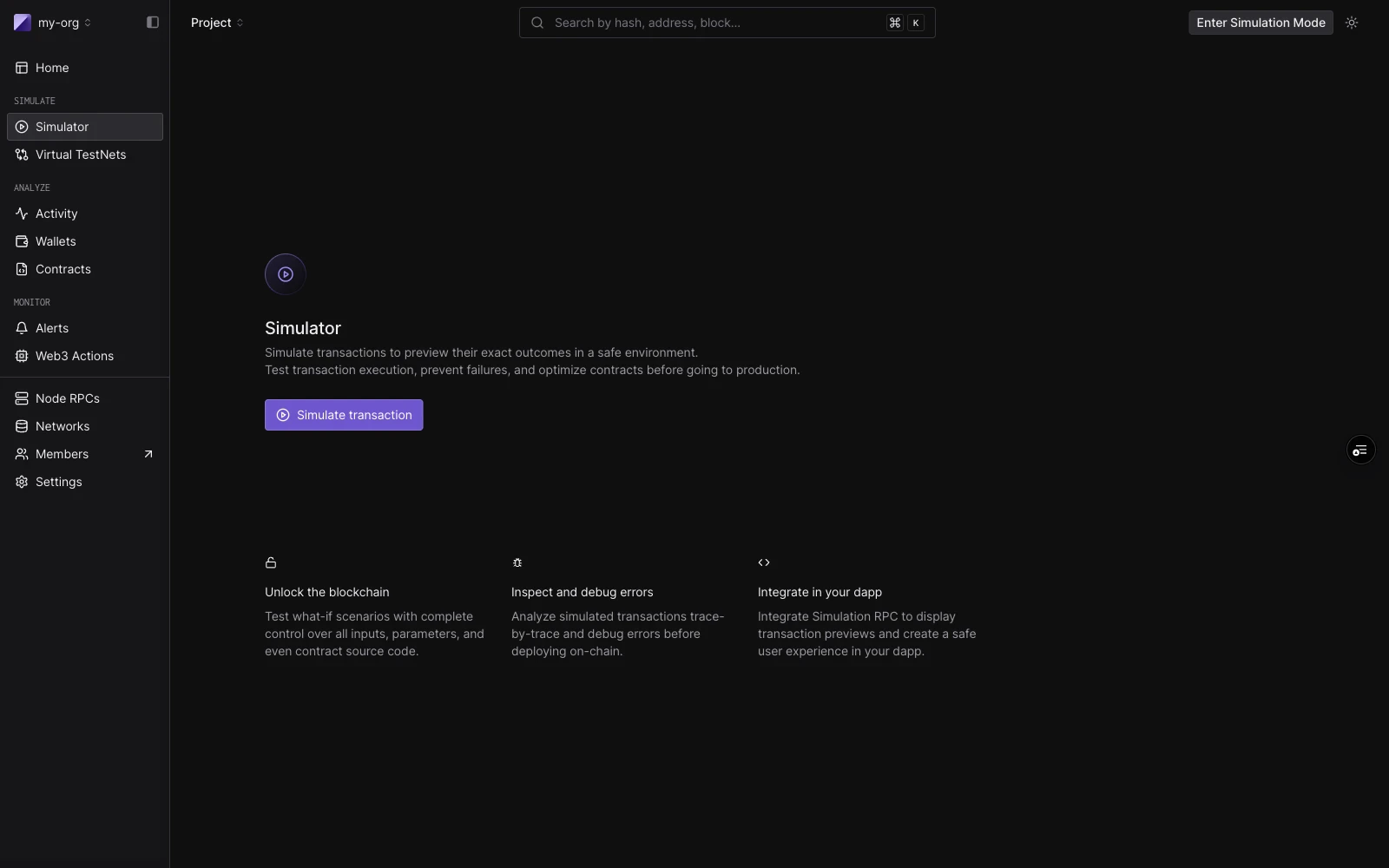 Tenderly Simulator आपको कुछ भी broadcast किए बिना live mainnet या testnet state के विरुद्ध transactions चलाने देता है। आप किसी भी sender के रूप में simulate कर सकते हैं, contract storage को override कर सकते हैं, addresses को fund कर सकते हैं, और block context में हेरफेर कर सकते हैं, यह सब dashboard से।
builder वही है चाहे आप एक transaction चलाएँ या पाँच। एक **single simulation** एक-step bundle है। एक **[simulation bundle](/simulator-ui/simulation-bundles)** पाँच तक steps है जो state साझा करते हैं: प्रत्येक step उससे पहले वाले step द्वारा किए गए state परिवर्तनों को देखता है।
## Layout
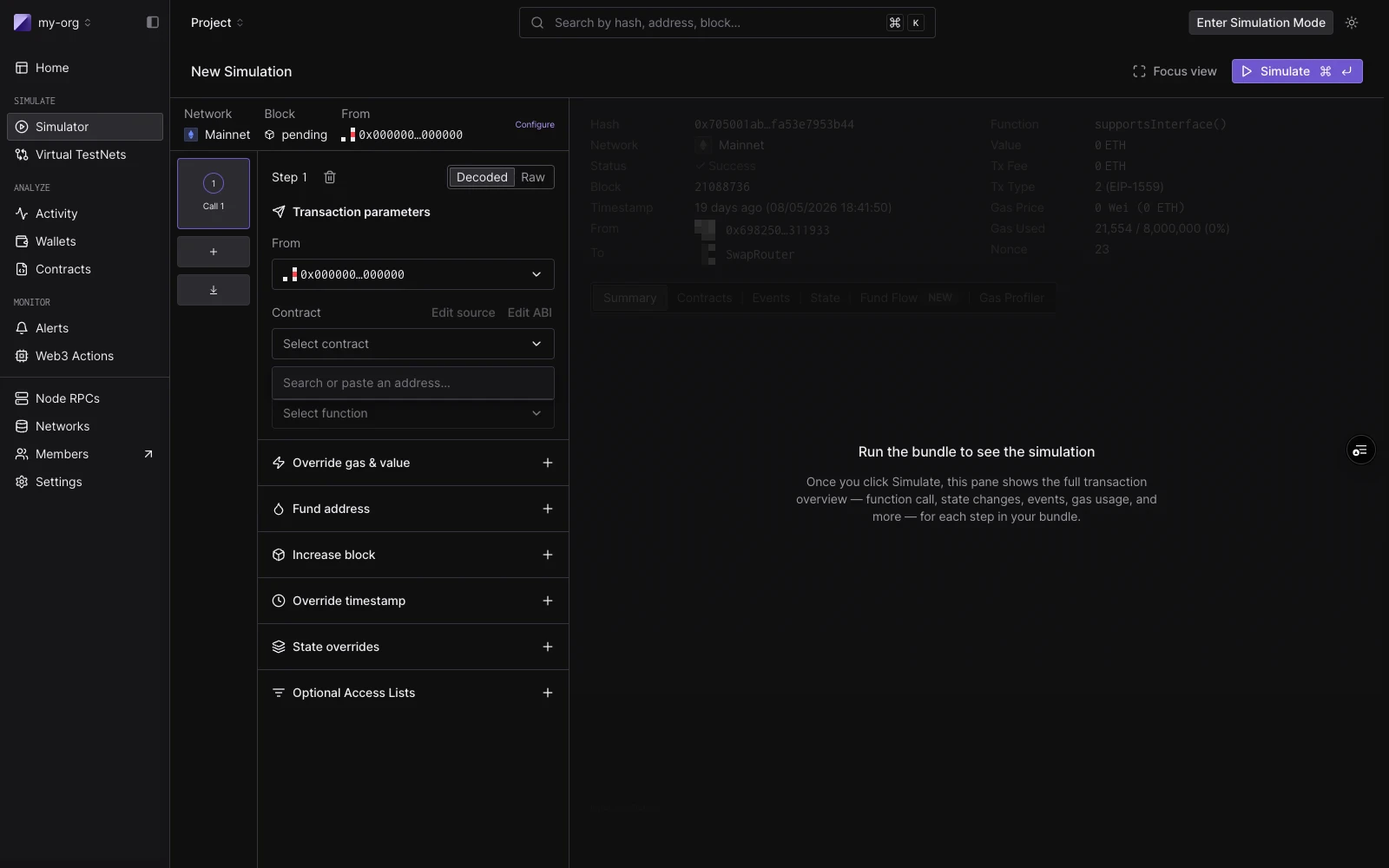
builder में तीन क्षेत्र हैं:
**Session strip** शीर्ष पर चलती है। इसमें defaults होते हैं जो हर step पर लागू होते हैं: Network, Block (डिफ़ॉल्ट `Pending`), और एक default From address। default gas, gas price, और value सेट करने के लिए **Configure** पर क्लिक करें।
**Bundle rail** बायाँ column है। प्रत्येक step card एक step number, एक label (contract चुनने तक `New call`, फिर `ContractName · functionName`), और run के बाद एक status badge दिखाता है। एक step पर focus करने के लिए क्लिक करें। पुनर्क्रमित करने के लिए ड्रैग करें। एक step जोड़ने के लिए `C`, steps के बीच जाने के लिए `J`/`K`, और focus mode टॉगल करने के लिए `F` का उपयोग करें।
**Focused step view** दायाँ column है। चलाने से पहले, यह step editor दिखाता है। चलाने के बाद, यह उस step का परिणाम दिखाता है: decoded output, gas used, events, state परिवर्तन, और token transfers।
## Single simulations
एक single simulation चलाने के लिए, डिफ़ॉल्ट रूप से खुलने वाले एक step के साथ काम करें।
**Decoded mode** आपको नाम से contract और function चुनने देता है:
| Field | Notes |
| -------------- | ---------------------------------------------------------------------------------------------------------------------- |
| **From** | session From पर डिफ़ॉल्ट। प्रति step override करें। |
| **Contract** | Project contracts पहले सामने आते हैं। नाम, symbol, या address द्वारा public contracts और top tokens से भी मेल खाता है। |
| **Function** | non-event, non-constructor methods पर फ़िल्टर किया गया। |
| **Parameters** | प्रति ABI argument एक typed input। |
**Raw mode** एक target address और सीधे `0x`-prefixed hex payload लेता है। यह उपयोगी है जब आपके पास किसी मौजूदा transaction से calldata हो या मैन्युअल encode हो।
चलाने के लिए **Simulate** पर क्लिक करें (या `⌘↵` दबाएँ)। दायाँ पैनल परिणाम से भर जाता है: function call सारांश, gas used, decoded output, और Events, State Changes, Fund Flow, और Gas Profiler के लिए tabs।
आप एक मौजूदा transaction से भी शुरू कर सकते हैं: इसके inputs को builder में load करने के लिए किसी भी transaction detail पेज पर **Re-Simulate** पर क्लिक करें। simulation डिफ़ॉल्ट रूप से मूल के block और timestamp पर चलता है।
पूर्व-भरे form को साझा करने के लिए (उदाहरण के लिए CI या test report से), पेज header में **Copy draft link** पर क्लिक करें, या link स्वयं बनाएँ। [Prefill the Simulator with a draft link](/simulator-ui/draft-links) देखें।
## Simulation bundles
एक bundle **पाँच steps** तक क्रम में चलता है, state साझा करता है। एक bundle का उपयोग तब करें जब एक transaction का परिणाम पिछले पर निर्भर करता है, उदाहरण के लिए, एक approval जो बाद के transfer को सक्षम करता है। Steps rail में जोड़े और पुनर्क्रमित किए जाते हैं, प्रत्येक के अपने From override और cheatcodes के साथ, और पूरा bundle **Simulate** के एक क्लिक से execute होता है।
बनाने, पुनर्क्रमित करने, result badges, और simulation इतिहास में bundles कैसे दिखाई देते हैं, इसके लिए [Simulation Bundles](/simulator-ui/simulation-bundles) देखें।
Tenderly Simulator आपको कुछ भी broadcast किए बिना live mainnet या testnet state के विरुद्ध transactions चलाने देता है। आप किसी भी sender के रूप में simulate कर सकते हैं, contract storage को override कर सकते हैं, addresses को fund कर सकते हैं, और block context में हेरफेर कर सकते हैं, यह सब dashboard से।
builder वही है चाहे आप एक transaction चलाएँ या पाँच। एक **single simulation** एक-step bundle है। एक **[simulation bundle](/simulator-ui/simulation-bundles)** पाँच तक steps है जो state साझा करते हैं: प्रत्येक step उससे पहले वाले step द्वारा किए गए state परिवर्तनों को देखता है।
## Layout
builder में तीन क्षेत्र हैं:
**Session strip** शीर्ष पर चलती है। इसमें defaults होते हैं जो हर step पर लागू होते हैं: Network, Block (डिफ़ॉल्ट `Pending`), और एक default From address। default gas, gas price, और value सेट करने के लिए **Configure** पर क्लिक करें।
**Bundle rail** बायाँ column है। प्रत्येक step card एक step number, एक label (contract चुनने तक `New call`, फिर `ContractName · functionName`), और run के बाद एक status badge दिखाता है। एक step पर focus करने के लिए क्लिक करें। पुनर्क्रमित करने के लिए ड्रैग करें। एक step जोड़ने के लिए `C`, steps के बीच जाने के लिए `J`/`K`, और focus mode टॉगल करने के लिए `F` का उपयोग करें।
**Focused step view** दायाँ column है। चलाने से पहले, यह step editor दिखाता है। चलाने के बाद, यह उस step का परिणाम दिखाता है: decoded output, gas used, events, state परिवर्तन, और token transfers।
## Single simulations
एक single simulation चलाने के लिए, डिफ़ॉल्ट रूप से खुलने वाले एक step के साथ काम करें।
**Decoded mode** आपको नाम से contract और function चुनने देता है:
| Field | Notes |
| -------------- | ---------------------------------------------------------------------------------------------------------------------- |
| **From** | session From पर डिफ़ॉल्ट। प्रति step override करें। |
| **Contract** | Project contracts पहले सामने आते हैं। नाम, symbol, या address द्वारा public contracts और top tokens से भी मेल खाता है। |
| **Function** | non-event, non-constructor methods पर फ़िल्टर किया गया। |
| **Parameters** | प्रति ABI argument एक typed input। |
**Raw mode** एक target address और सीधे `0x`-prefixed hex payload लेता है। यह उपयोगी है जब आपके पास किसी मौजूदा transaction से calldata हो या मैन्युअल encode हो।
चलाने के लिए **Simulate** पर क्लिक करें (या `⌘↵` दबाएँ)। दायाँ पैनल परिणाम से भर जाता है: function call सारांश, gas used, decoded output, और Events, State Changes, Fund Flow, और Gas Profiler के लिए tabs।
आप एक मौजूदा transaction से भी शुरू कर सकते हैं: इसके inputs को builder में load करने के लिए किसी भी transaction detail पेज पर **Re-Simulate** पर क्लिक करें। simulation डिफ़ॉल्ट रूप से मूल के block और timestamp पर चलता है।
पूर्व-भरे form को साझा करने के लिए (उदाहरण के लिए CI या test report से), पेज header में **Copy draft link** पर क्लिक करें, या link स्वयं बनाएँ। [Prefill the Simulator with a draft link](/simulator-ui/draft-links) देखें।
## Simulation bundles
एक bundle **पाँच steps** तक क्रम में चलता है, state साझा करता है। एक bundle का उपयोग तब करें जब एक transaction का परिणाम पिछले पर निर्भर करता है, उदाहरण के लिए, एक approval जो बाद के transfer को सक्षम करता है। Steps rail में जोड़े और पुनर्क्रमित किए जाते हैं, प्रत्येक के अपने From override और cheatcodes के साथ, और पूरा bundle **Simulate** के एक क्लिक से execute होता है।
बनाने, पुनर्क्रमित करने, result badges, और simulation इतिहास में bundles कैसे दिखाई देते हैं, इसके लिए [Simulation Bundles](/simulator-ui/simulation-bundles) देखें।
 ## Cheatcodes
प्रत्येक step में cheatcodes का एक सेट होता है (add-ons जो step execute होने से ठीक पहले चलते हैं)। वे single simulations (step-स्तर controls के रूप में) और bundle में प्रत्येक step दोनों पर लागू होते हैं।
| Cheatcode | यह क्या करता है |
| ------------------------- | -------------------------------------------------------------------------------------------------------------------- |
| **Override gas & value** | इस step के लिए एक custom gas limit और ETH value सेट करें। |
| **Fund address** | इस step के चलने से पहले किसी भी address को token balances के साथ credit करें। प्रति step कई entries जोड़ें। |
| **Increase block** | इस step से पहले block number को एक निश्चित मात्रा से आगे बढ़ाएँ। |
| **Override timestamp** | इस step के लिए एक custom block timestamp सेट करें। |
| **State overrides** | इस step से पहले contract storage slots, balance, या bytecode को override करें। कई contracts के लिए overrides जोड़ें। |
| **Optional Access Lists** | multi-contract calls पर gas दक्षता के लिए एक EIP-2930 access list संलग्न करें। |
## Cheatcodes
प्रत्येक step में cheatcodes का एक सेट होता है (add-ons जो step execute होने से ठीक पहले चलते हैं)। वे single simulations (step-स्तर controls के रूप में) और bundle में प्रत्येक step दोनों पर लागू होते हैं।
| Cheatcode | यह क्या करता है |
| ------------------------- | -------------------------------------------------------------------------------------------------------------------- |
| **Override gas & value** | इस step के लिए एक custom gas limit और ETH value सेट करें। |
| **Fund address** | इस step के चलने से पहले किसी भी address को token balances के साथ credit करें। प्रति step कई entries जोड़ें। |
| **Increase block** | इस step से पहले block number को एक निश्चित मात्रा से आगे बढ़ाएँ। |
| **Override timestamp** | इस step के लिए एक custom block timestamp सेट करें। |
| **State overrides** | इस step से पहले contract storage slots, balance, या bytecode को override करें। कई contracts के लिए overrides जोड़ें। |
| **Optional Access Lists** | multi-contract calls पर gas दक्षता के लिए एक EIP-2930 access list संलग्न करें। |
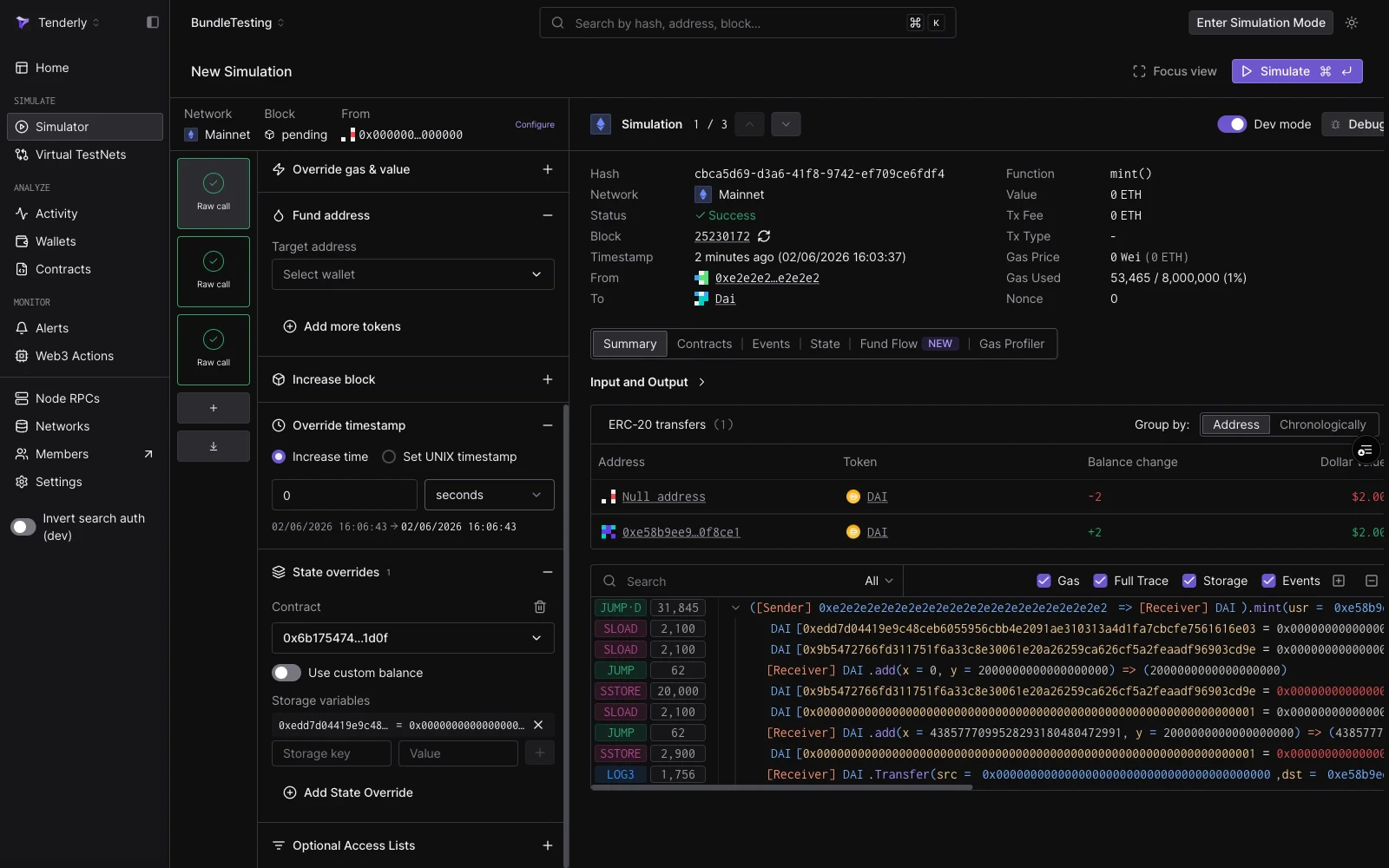 storage slot गणना सहित state overrides के विस्तृत walkthrough के लिए, [Simulation with State Overrides](/simulator-ui/state-overrides) देखें।
## यह भी देखें
* [Simulation Bundles](/simulator-ui/simulation-bundles): shared state के साथ multi-step simulations, 3-step DAI mint, approve, और transferFrom गाइड सहित।
* [Simulation Mode](/simulator-ui/simulation-mode): persistent wallet impersonation जो आपके साथ dashboard में चलता है और runs में state जमा करता है।
* [Simulation with State Overrides](/simulator-ui/state-overrides): storage, balance, और bytecode को override कैसे करें।
* [Simulation Parameters](/simulator-ui/parameters): session defaults, block और transaction index selection, From addresses, और cheatcode fields के लिए पूर्ण reference।
* [Prefill the Simulator with a draft link](/simulator-ui/draft-links): CI या tooling से साझा करने के लिए, पूर्व-भरे form के साथ Simulator खोलने वाला एक base64url URL बनाएँ।
* [Editing Contract Source](/simulator-ui/editing-contract-source): संशोधित source code के विरुद्ध simulation चलाकर एक bug fix का परीक्षण करें।
* [Bundled Simulations (API)](/simulations/bundled-simulations): `simulate-bundle` endpoint के माध्यम से bundles को programmatically चलाएँ।
* [Virtual Environments](/virtual-environments/overview): जब आपको एक stateless bundle के बजाय एक पूर्ण persistent RPC environment की आवश्यकता हो।
storage slot गणना सहित state overrides के विस्तृत walkthrough के लिए, [Simulation with State Overrides](/simulator-ui/state-overrides) देखें।
## यह भी देखें
* [Simulation Bundles](/simulator-ui/simulation-bundles): shared state के साथ multi-step simulations, 3-step DAI mint, approve, और transferFrom गाइड सहित।
* [Simulation Mode](/simulator-ui/simulation-mode): persistent wallet impersonation जो आपके साथ dashboard में चलता है और runs में state जमा करता है।
* [Simulation with State Overrides](/simulator-ui/state-overrides): storage, balance, और bytecode को override कैसे करें।
* [Simulation Parameters](/simulator-ui/parameters): session defaults, block और transaction index selection, From addresses, और cheatcode fields के लिए पूर्ण reference।
* [Prefill the Simulator with a draft link](/simulator-ui/draft-links): CI या tooling से साझा करने के लिए, पूर्व-भरे form के साथ Simulator खोलने वाला एक base64url URL बनाएँ।
* [Editing Contract Source](/simulator-ui/editing-contract-source): संशोधित source code के विरुद्ध simulation चलाकर एक bug fix का परीक्षण करें।
* [Bundled Simulations (API)](/simulations/bundled-simulations): `simulate-bundle` endpoint के माध्यम से bundles को programmatically चलाएँ।
* [Virtual Environments](/virtual-environments/overview): जब आपको एक stateless bundle के बजाय एक पूर्ण persistent RPC environment की आवश्यकता हो।