> ## Documentation Index
> Fetch the complete documentation index at: https://docs.tenderly.co/llms.txt
> Use this file to discover all available pages before exploring further.
# Simulation Parameters
> simulation builder में प्रत्येक input के लिए reference: session defaults, block और transaction index, sender addresses, step fields, और per-step cheatcodes।
simulation builder अपने inputs को तीन surfaces में विभाजित करता है:
* शीर्ष पर strip में **Session defaults** हर step पर लागू होते हैं: Network, Block, और default From address। इन्हें edit करने के लिए **Configure** पर क्लिक करें।
* **Step fields** call को परिभाषित करते हैं: sender, target contract, function, और arguments।
* Step fields के नीचे **Cheatcodes** step चलने से ठीक पहले execution environment को संशोधित करते हैं।
समग्र builder layout (session strip, bundle rail, focused step view) के लिए, [Simulator UI overview](/simulator-ui/overview#layout) देखें।
## Session defaults
defaults पैनल खोलने के लिए session strip में **Configure** पर क्लिक करें। यहाँ सेट किए गए values bundle में हर नए step पर लागू होते हैं।
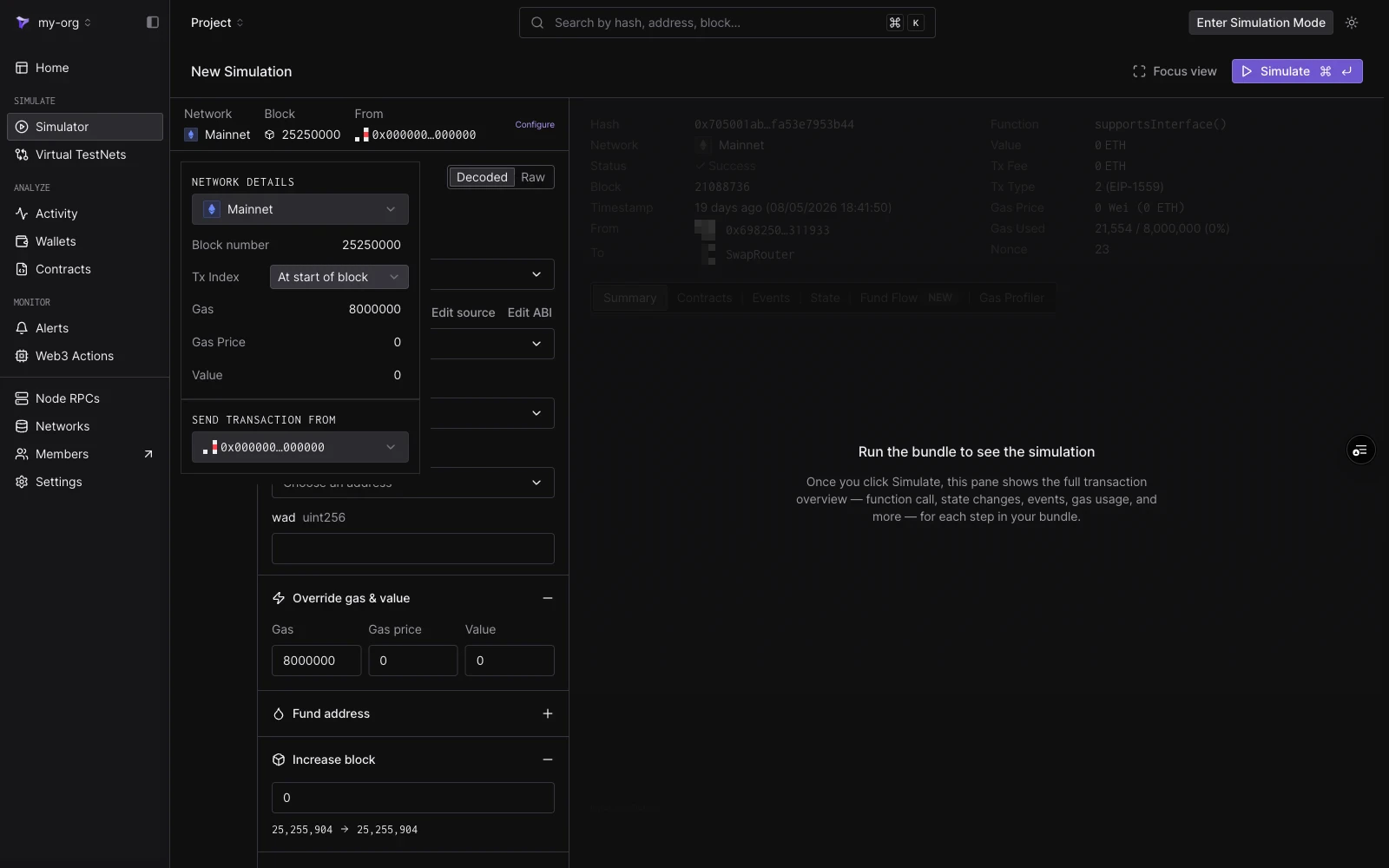 | Field | Notes |
| ------------------------- | ---------------------------------------------------------------------------------------------------- |
| **Network** | वह network जिसकी state के विरुद्ध simulation चलता है। |
| **Block number** | `Pending` पर डिफ़ॉल्ट। simulation को एक ऐतिहासिक block पर pin करने के लिए एक block number टाइप करें। |
| **Tx Index** | pinned block के भीतर transaction की position। एक block pin होने के बाद ही उपलब्ध। |
| **Gas** | प्रत्येक step के लिए Default gas limit। `8000000` पर डिफ़ॉल्ट। |
| **Gas Price** | Wei में Default gas price। |
| **Value** | प्रत्येक step के साथ भेजा गया Default ETH value। |
| **Send transaction from** | नए steps के लिए Default From address। |
### Pending बनाम historical block
**pending block** पर simulate करने के लिए **Block number** खाली छोड़ दें। Tenderly bundle को नवीनतम उपलब्ध network state के विरुद्ध execute करता है, जैसे कि यह अगले block में शामिल किया गया हो।
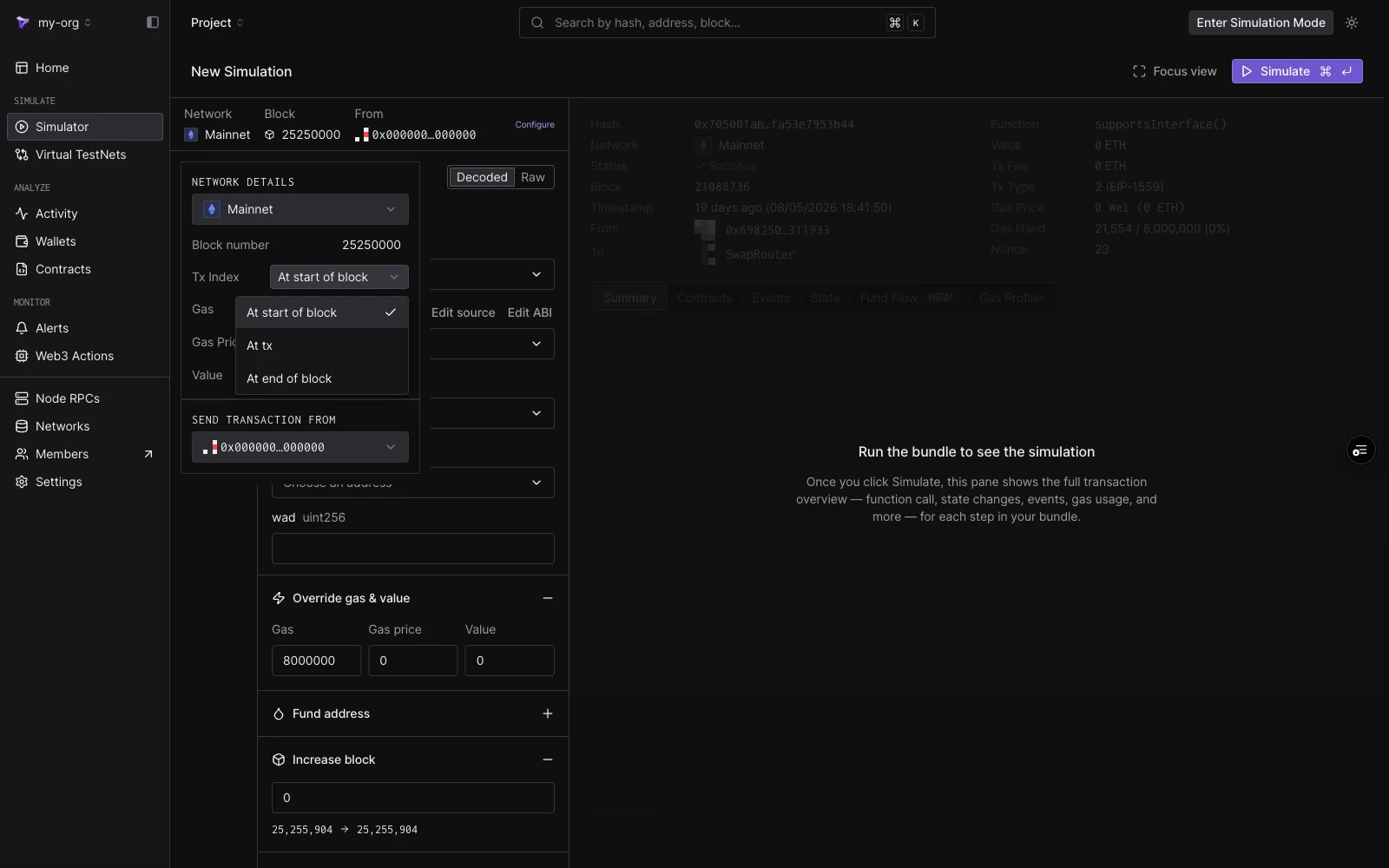
एक **historical block** पर simulate करने के लिए एक block number टाइप करें। bundle तब उस block पर chain state के विरुद्ध execute होता है, network की शुरुआत तक जाने वाले किसी भी block पर। एक block pinned होने के साथ, **Tx Index** नियंत्रित करता है कि block में कहाँ simulation execute होता है:
| विकल्प | अर्थ |
| --------------------- | -------------------------------------------------------------------------------------------------- |
| **At start of block** | block के किसी भी transaction से पहले execute करें। |
| **At tx** | एक विशिष्ट transaction index पर execute करें। input दिखाता है कि block में कितने transactions हैं। |
| **At end of block** | block के सभी transactions के बाद execute करें। |
| Field | Notes |
| ------------------------- | ---------------------------------------------------------------------------------------------------- |
| **Network** | वह network जिसकी state के विरुद्ध simulation चलता है। |
| **Block number** | `Pending` पर डिफ़ॉल्ट। simulation को एक ऐतिहासिक block पर pin करने के लिए एक block number टाइप करें। |
| **Tx Index** | pinned block के भीतर transaction की position। एक block pin होने के बाद ही उपलब्ध। |
| **Gas** | प्रत्येक step के लिए Default gas limit। `8000000` पर डिफ़ॉल्ट। |
| **Gas Price** | Wei में Default gas price। |
| **Value** | प्रत्येक step के साथ भेजा गया Default ETH value। |
| **Send transaction from** | नए steps के लिए Default From address। |
### Pending बनाम historical block
**pending block** पर simulate करने के लिए **Block number** खाली छोड़ दें। Tenderly bundle को नवीनतम उपलब्ध network state के विरुद्ध execute करता है, जैसे कि यह अगले block में शामिल किया गया हो।
एक **historical block** पर simulate करने के लिए एक block number टाइप करें। bundle तब उस block पर chain state के विरुद्ध execute होता है, network की शुरुआत तक जाने वाले किसी भी block पर। एक block pinned होने के साथ, **Tx Index** नियंत्रित करता है कि block में कहाँ simulation execute होता है:
| विकल्प | अर्थ |
| --------------------- | -------------------------------------------------------------------------------------------------- |
| **At start of block** | block के किसी भी transaction से पहले execute करें। |
| **At tx** | एक विशिष्ट transaction index पर execute करें। input दिखाता है कि block में कितने transactions हैं। |
| **At end of block** | block के सभी transactions के बाद execute करें। |
 ## From addresses
Simulations को किसी private keys या signatures की आवश्यकता नहीं होती है, इसलिए कोई भी address sender के रूप में कार्य कर सकता है। From dropdown प्रदान करता है:
* **zero address** (`0x0000…0000`), डिफ़ॉल्ट sender।
* चयनित network पर आपके **project wallets**, "Selected network" के तहत समूहित। network बदलने से बदल जाता है कि कौन से wallets दिखाई देते हैं।
* कोई भी address जिसे आप dropdown के शीर्ष पर input में **paste या search** करते हैं।
## From addresses
Simulations को किसी private keys या signatures की आवश्यकता नहीं होती है, इसलिए कोई भी address sender के रूप में कार्य कर सकता है। From dropdown प्रदान करता है:
* **zero address** (`0x0000…0000`), डिफ़ॉल्ट sender।
* चयनित network पर आपके **project wallets**, "Selected network" के तहत समूहित। network बदलने से बदल जाता है कि कौन से wallets दिखाई देते हैं।
* कोई भी address जिसे आप dropdown के शीर्ष पर input में **paste या search** करते हैं।
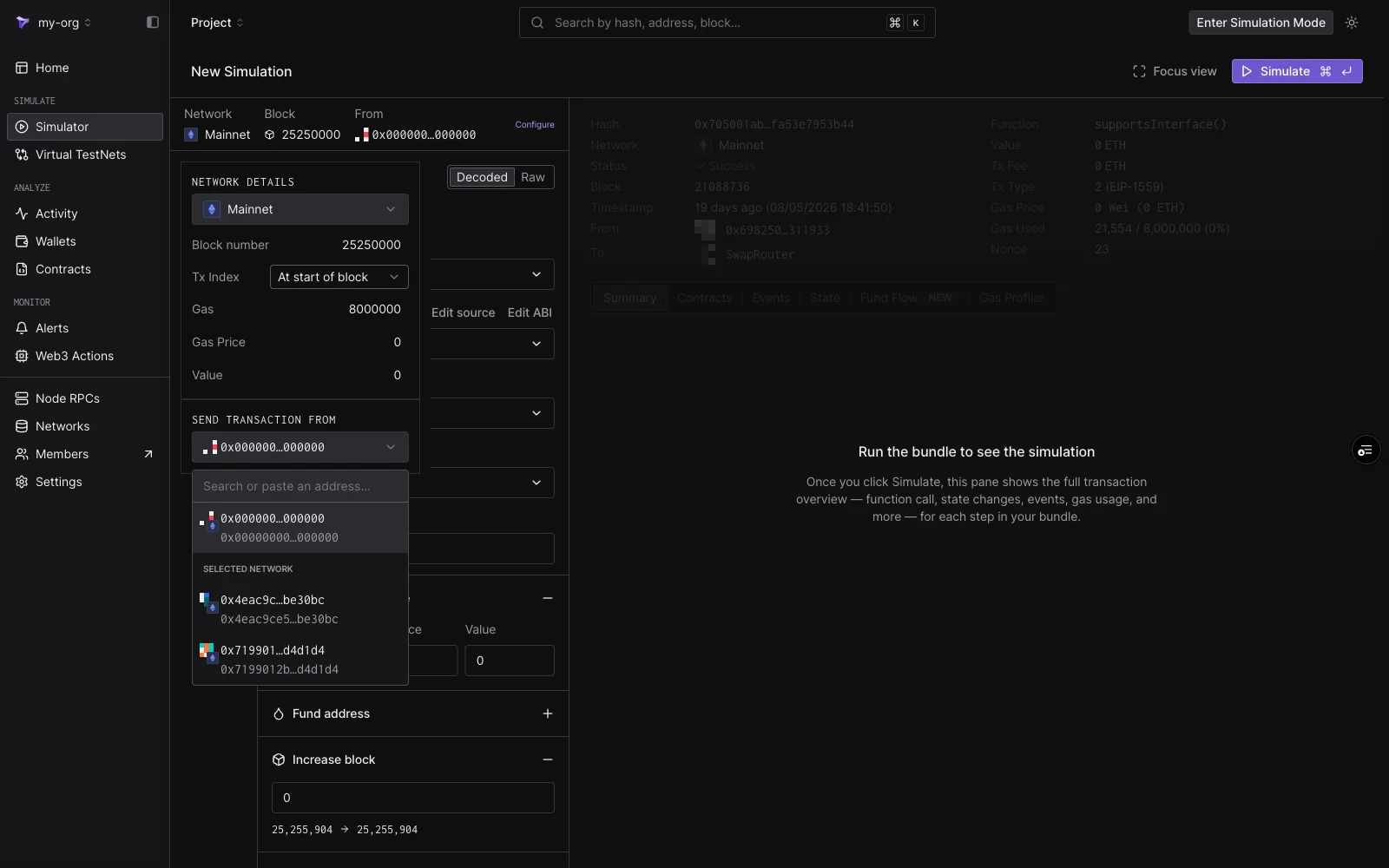 Configure पैनल में सेट किया गया address नए steps के लिए डिफ़ॉल्ट है। प्रत्येक step का step editor में अपना **From** field भी होता है, इसलिए एक bundle में अलग-अलग steps अलग-अलग senders का उपयोग कर सकते हैं।
## Step fields
प्रत्येक step **Decoded** या **Raw** mode में बनाया जाता है, step editor के शीर्ष पर toggle किया जाता है।
Configure पैनल में सेट किया गया address नए steps के लिए डिफ़ॉल्ट है। प्रत्येक step का step editor में अपना **From** field भी होता है, इसलिए एक bundle में अलग-अलग steps अलग-अलग senders का उपयोग कर सकते हैं।
## Step fields
प्रत्येक step **Decoded** या **Raw** mode में बनाया जाता है, step editor के शीर्ष पर toggle किया जाता है।
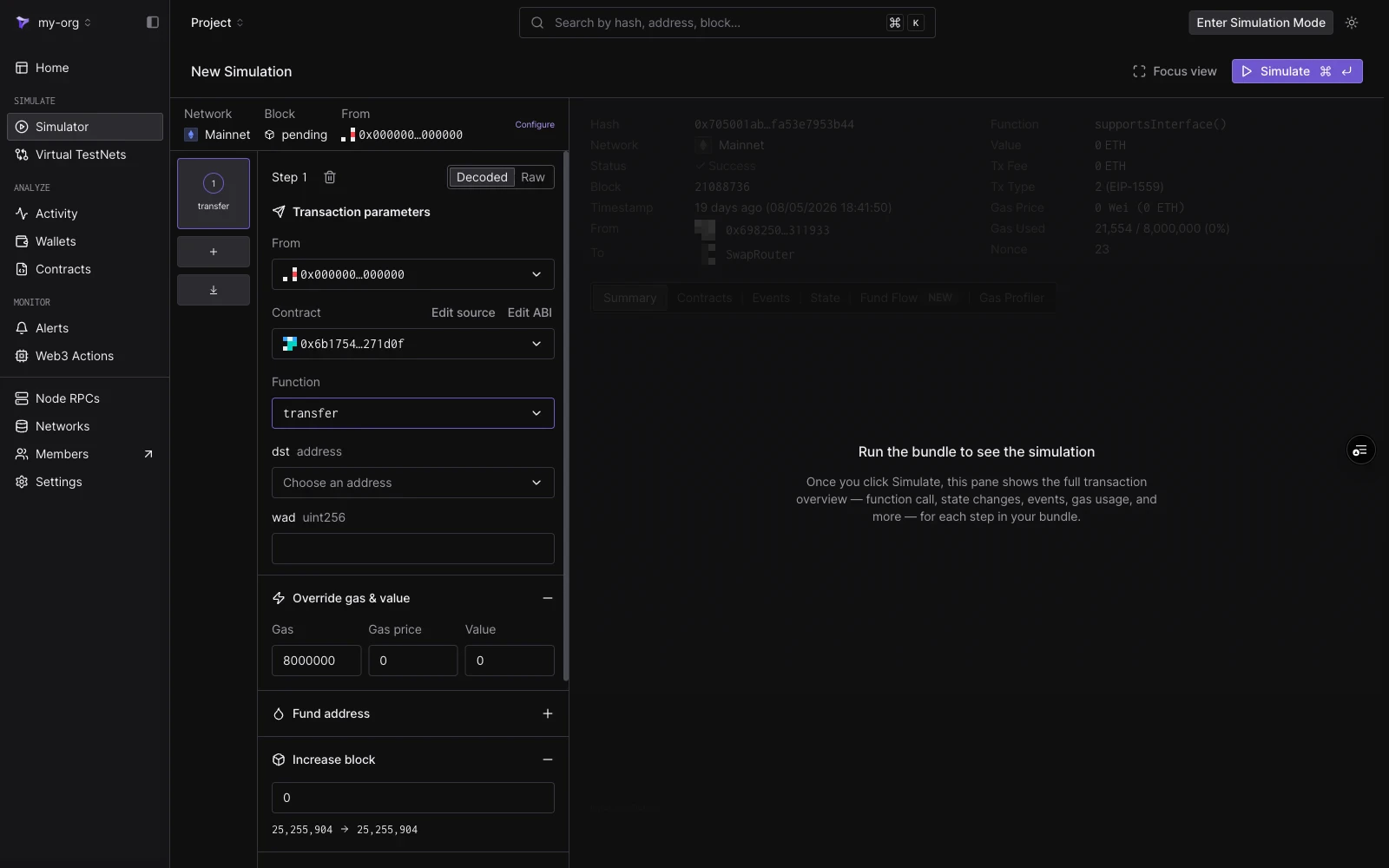 **Decoded mode** contract के ABI से call बनाता है:
| Field | Notes |
| ------------- | ----------------------------------------------------------------------------------------------------------------------------------------------------------------------------------------------------------------------------------------------------------------------------- |
| **From** | step का sender। session From पर डिफ़ॉल्ट। |
| **Contract** | Project contracts पहले सामने आते हैं; नाम, symbol, या address द्वारा public contracts और top tokens से भी मेल खाता है। एक बार चयनित होने के बाद, **Edit source** और **Edit ABI** उपलब्ध हो जाते हैं ([Editing Contract Source](/simulator-ui/editing-contract-source) देखें)। |
| **Function** | non-event, non-constructor methods पर फ़िल्टर किया गया। |
| **Arguments** | प्रति ABI argument एक typed input। Address arguments को एक address picker मिलता है; value arguments को सादे inputs मिलते हैं। |
**Raw mode** एक target address और सीधे `0x`-prefixed hex payload लेता है। इसका उपयोग तब करें जब आपके पास पहले से किसी मौजूदा transaction से calldata हो या मैन्युअल encode हो।
## Cheatcodes
प्रत्येक step में छह cheatcode sections होते हैं। वे step execute होने से ठीक पहले चलते हैं और केवल उस step के दायरे में होते हैं।
### Override gas & value
session defaults को override करते हुए, इस step के लिए एक custom **Gas** limit, **Gas price**, और **Value** सेट करें।
### Fund address
step चलने से पहले किसी भी address को token balances के साथ credit करें। प्रत्येक entry एक **Target address**, एक **token** (symbol, नाम, या address द्वारा searchable), और एक amount लेता है। कई tokens को fund करने के लिए **Add more tokens** पर क्लिक करें, और अन्य addresses के लिए आगे की entries जोड़ें।
इसके बजाय एक address का native balance सेट करने के लिए, [State overrides](#state-overrides) में custom balance switch का उपयोग करें।
### Increase block
step execute होने से पहले block number को एक offset से आगे बढ़ाएँ। section वर्तमान block और परिणामी block दिखाता है। जो contracts `block.number` पढ़ते हैं वे बढ़े हुए value को देखते हैं।
### Override timestamp
step जिस block timestamp के साथ execute होता है उसे दो modes में से एक में सेट करें:
* **Increase time**: घड़ी को एक राशि और unit (सेकंड, मिनट, और इसी तरह) से आगे बढ़ाएँ।
* **Set UNIX timestamp**: एक absolute timestamp पर जाएँ।
section परिणामी दिनांक और समय का पूर्वावलोकन करता है। जो contracts `block.timestamp` पढ़ते हैं वे overridden value देखते हैं।
### State overrides
step चलने से पहले contract state को override करें। प्रत्येक override एक contract को target करता है (step के target पर डिफ़ॉल्ट) और समर्थन करता है:
* **Use custom balance**: contract का native balance सेट करें।
* **Storage variables**: व्यक्तिगत storage slots के लिए key और value pairs, अधिक slots के लिए **Add storage override** के साथ।
एक ही step में अतिरिक्त contracts को override करने के लिए **Add State Override** पर क्लिक करें। storage slot गणना सहित एक walkthrough के लिए, [Simulation with State Overrides](/simulator-ui/state-overrides) देखें।
### Optional Access Lists
step में एक [EIP-2930](https://eips.ethereum.org/EIPS/eip-2930) access list संलग्न करें। transaction जिन contracts और storage keys को touch करता है उनकी घोषणा करने से कई contracts में फैले calls पर इसकी gas लागत कम हो सकती है। addresses को एक-एक करके जोड़ें या सूची को JSON के रूप में import करें।
## एक शुरुआती बिंदु save करना
Simulations stateless हैं: प्रत्येक run configured block से शुरू होता है। एक persistent environment के रूप में एक संशोधित state (overrides, funded accounts, advanced timestamps) रखने के लिए जिसके विरुद्ध आप transactions करते रह सकते हैं, [Virtual Environments](/virtual-environments/overview) का उपयोग करें।
**Decoded mode** contract के ABI से call बनाता है:
| Field | Notes |
| ------------- | ----------------------------------------------------------------------------------------------------------------------------------------------------------------------------------------------------------------------------------------------------------------------------- |
| **From** | step का sender। session From पर डिफ़ॉल्ट। |
| **Contract** | Project contracts पहले सामने आते हैं; नाम, symbol, या address द्वारा public contracts और top tokens से भी मेल खाता है। एक बार चयनित होने के बाद, **Edit source** और **Edit ABI** उपलब्ध हो जाते हैं ([Editing Contract Source](/simulator-ui/editing-contract-source) देखें)। |
| **Function** | non-event, non-constructor methods पर फ़िल्टर किया गया। |
| **Arguments** | प्रति ABI argument एक typed input। Address arguments को एक address picker मिलता है; value arguments को सादे inputs मिलते हैं। |
**Raw mode** एक target address और सीधे `0x`-prefixed hex payload लेता है। इसका उपयोग तब करें जब आपके पास पहले से किसी मौजूदा transaction से calldata हो या मैन्युअल encode हो।
## Cheatcodes
प्रत्येक step में छह cheatcode sections होते हैं। वे step execute होने से ठीक पहले चलते हैं और केवल उस step के दायरे में होते हैं।
### Override gas & value
session defaults को override करते हुए, इस step के लिए एक custom **Gas** limit, **Gas price**, और **Value** सेट करें।
### Fund address
step चलने से पहले किसी भी address को token balances के साथ credit करें। प्रत्येक entry एक **Target address**, एक **token** (symbol, नाम, या address द्वारा searchable), और एक amount लेता है। कई tokens को fund करने के लिए **Add more tokens** पर क्लिक करें, और अन्य addresses के लिए आगे की entries जोड़ें।
इसके बजाय एक address का native balance सेट करने के लिए, [State overrides](#state-overrides) में custom balance switch का उपयोग करें।
### Increase block
step execute होने से पहले block number को एक offset से आगे बढ़ाएँ। section वर्तमान block और परिणामी block दिखाता है। जो contracts `block.number` पढ़ते हैं वे बढ़े हुए value को देखते हैं।
### Override timestamp
step जिस block timestamp के साथ execute होता है उसे दो modes में से एक में सेट करें:
* **Increase time**: घड़ी को एक राशि और unit (सेकंड, मिनट, और इसी तरह) से आगे बढ़ाएँ।
* **Set UNIX timestamp**: एक absolute timestamp पर जाएँ।
section परिणामी दिनांक और समय का पूर्वावलोकन करता है। जो contracts `block.timestamp` पढ़ते हैं वे overridden value देखते हैं।
### State overrides
step चलने से पहले contract state को override करें। प्रत्येक override एक contract को target करता है (step के target पर डिफ़ॉल्ट) और समर्थन करता है:
* **Use custom balance**: contract का native balance सेट करें।
* **Storage variables**: व्यक्तिगत storage slots के लिए key और value pairs, अधिक slots के लिए **Add storage override** के साथ।
एक ही step में अतिरिक्त contracts को override करने के लिए **Add State Override** पर क्लिक करें। storage slot गणना सहित एक walkthrough के लिए, [Simulation with State Overrides](/simulator-ui/state-overrides) देखें।
### Optional Access Lists
step में एक [EIP-2930](https://eips.ethereum.org/EIPS/eip-2930) access list संलग्न करें। transaction जिन contracts और storage keys को touch करता है उनकी घोषणा करने से कई contracts में फैले calls पर इसकी gas लागत कम हो सकती है। addresses को एक-एक करके जोड़ें या सूची को JSON के रूप में import करें।
## एक शुरुआती बिंदु save करना
Simulations stateless हैं: प्रत्येक run configured block से शुरू होता है। एक persistent environment के रूप में एक संशोधित state (overrides, funded accounts, advanced timestamps) रखने के लिए जिसके विरुद्ध आप transactions करते रह सकते हैं, [Virtual Environments](/virtual-environments/overview) का उपयोग करें।