> ## Documentation Index
> Fetch the complete documentation index at: https://docs.tenderly.co/llms.txt
> Use this file to discover all available pages before exploring further.
# Public link से simulation साझा करें
> Executed Tenderly simulation को link वाले किसी भी व्यक्ति के लिए देखने योग्य बनाएँ, public URL कॉपी करें, और dashboard या API से public access बंद करें।
Simulation साझा करने से उसका result पेज (call trace, events, state changes, fund flow, और gas profile) एक public URL के माध्यम से देखा जा सकता है। देखने वालों को Tenderly account की आवश्यकता नहीं होती। ऐसा [Simulator](/simulator-ui/overview) setup साझा करने के लिए जिसे प्राप्तकर्ता स्वयं चलाए, इसके बजाय [draft link](/simulator-ui/draft-links) का उपयोग करें।
## Dashboard से simulation साझा करें
**Simulator** में, list से कोई simulation खोलें, या एक नया simulation चलाएँ।
**Simulation** title के बगल में **Share** पर क्लिक करें। जब तक simulation private है, **Share** पर एक lock icon दिखता है।
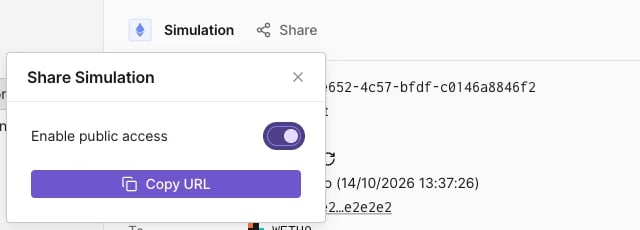
**Enable public access** चालू करें, फिर **Copy URL** पर क्लिक करें।
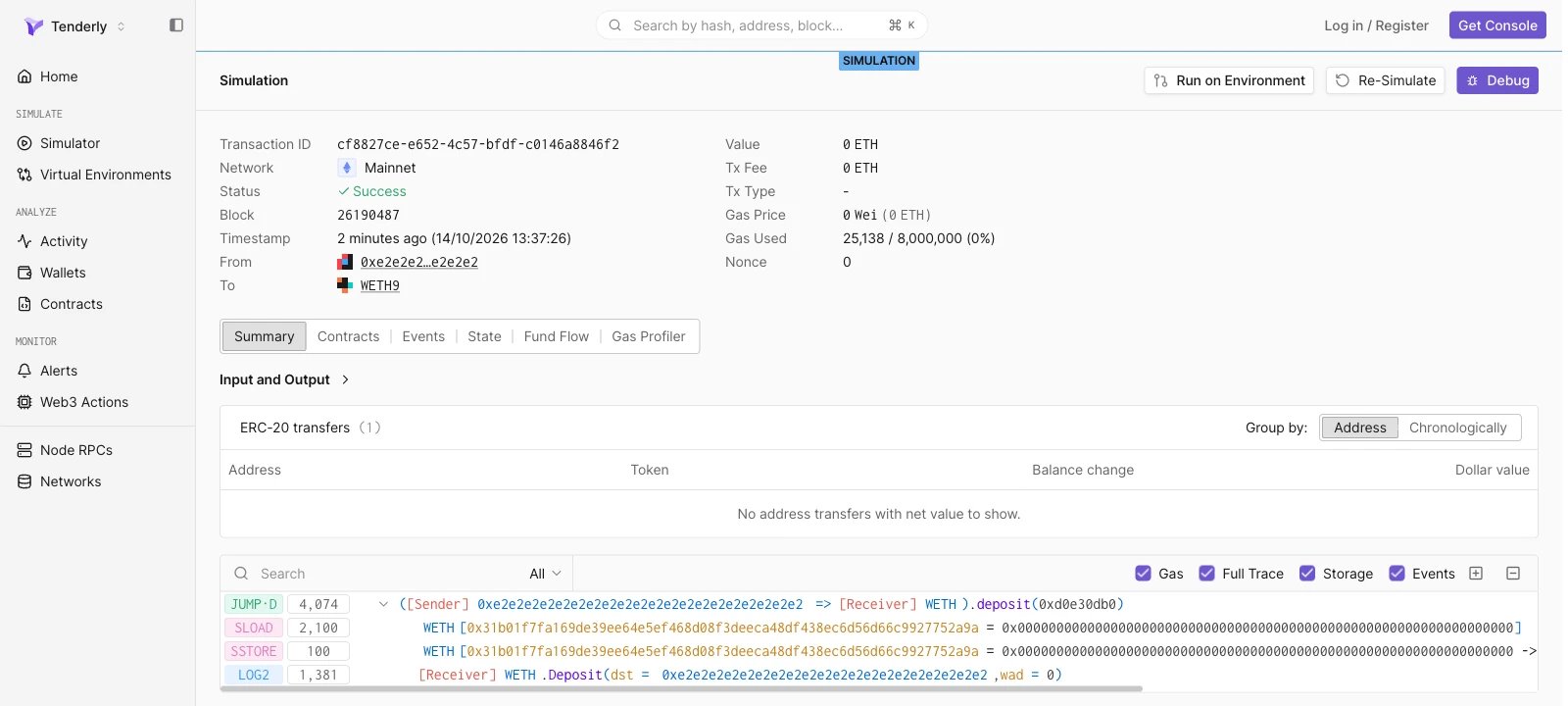
 कॉपी किया गया URL `https://www.tdly.co/shared/simulation/` रूप का होता है और `https://dashboard.tenderly.co/shared/simulation/` पर redirect करता है। Signed-out viewers को **SIMULATION** label के तहत पूरा result पेज दिखता है।
 ## Simulation साझा करना बंद करें
**Share** पर क्लिक करें और **Enable public access** बंद करें। इसके बाद link खोलने वाले किसी भी व्यक्ति को "Sorry, you don't have access to this page." दिखता है।
## API से simulation साझा करें
[Enable simulation sharing](/api-reference/simulator/enable-simulation-sharing) और [Disable simulation sharing](/api-reference/simulator/disable-simulation-sharing) endpoints से public access सक्षम और अक्षम करें। दोनों path में simulation ID लेते हैं, इनमें कोई request body नहीं होती, और सफल होने पर `204 No Content` लौटाते हैं।
```bash title="share-simulation.sh" theme={"theme":{"light":"catppuccin-latte","dark":"catppuccin-mocha"}}
curl -X POST \
"https://api.tenderly.co/api/v1/account/$TENDERLY_ACCOUNT_SLUG/project/$TENDERLY_PROJECT_SLUG/simulations/$SIMULATION_ID/share" \
-H "X-Access-Key: $TENDERLY_ACCESS_KEY"
```
साझा करना बंद करने के लिए, वही request `/unshare` path पर भेजें। Public URL `https://www.tdly.co/shared/simulation/$SIMULATION_ID` है।
This documentation is built and hosted on [Mintlify](https://mintlify.com), a developer documentation platform.
## Simulation साझा करना बंद करें
**Share** पर क्लिक करें और **Enable public access** बंद करें। इसके बाद link खोलने वाले किसी भी व्यक्ति को "Sorry, you don't have access to this page." दिखता है।
## API से simulation साझा करें
[Enable simulation sharing](/api-reference/simulator/enable-simulation-sharing) और [Disable simulation sharing](/api-reference/simulator/disable-simulation-sharing) endpoints से public access सक्षम और अक्षम करें। दोनों path में simulation ID लेते हैं, इनमें कोई request body नहीं होती, और सफल होने पर `204 No Content` लौटाते हैं।
```bash title="share-simulation.sh" theme={"theme":{"light":"catppuccin-latte","dark":"catppuccin-mocha"}}
curl -X POST \
"https://api.tenderly.co/api/v1/account/$TENDERLY_ACCOUNT_SLUG/project/$TENDERLY_PROJECT_SLUG/simulations/$SIMULATION_ID/share" \
-H "X-Access-Key: $TENDERLY_ACCESS_KEY"
```
साझा करना बंद करने के लिए, वही request `/unshare` path पर भेजें। Public URL `https://www.tdly.co/shared/simulation/$SIMULATION_ID` है।
This documentation is built and hosted on [Mintlify](https://mintlify.com), a developer documentation platform.