> ## Documentation Index
> Fetch the complete documentation index at: https://docs.tenderly.co/llms.txt
> Use this file to discover all available pages before exploring further.
# कस्टम RPC मेथड्स
> Virtual Environments के लिए नेटवर्क कस्टमाइज़ेशन RPC मेथड्स (चीटकोड्स), जो state, balances, nonces और block history में बदलाव करने की सुविधा देते हैं।
आप विशेष RPC मेथड्स का उपयोग करके अपने Virtual Environment को पूरी तरह नियंत्रित कर सकते हैं। ये मेथड्स **Admin RPC** के माध्यम से उपलब्ध होते हैं, जिसे आप Dashboard से कॉपी कर सकते हैं।
ये आपको नेटवर्क state जैसे account balances, block numbers, और storage में बदलाव करने की अनुमति देते हैं, ताकि आपकी विकास आवश्यकताएं पूरी हो सकें।
इन RPC मेथड्स के कॉल्स को वर्चुअल `TenderlyCheatcodes` कॉन्ट्रैक्ट के कॉल के रूप में दर्शाया जाता है।
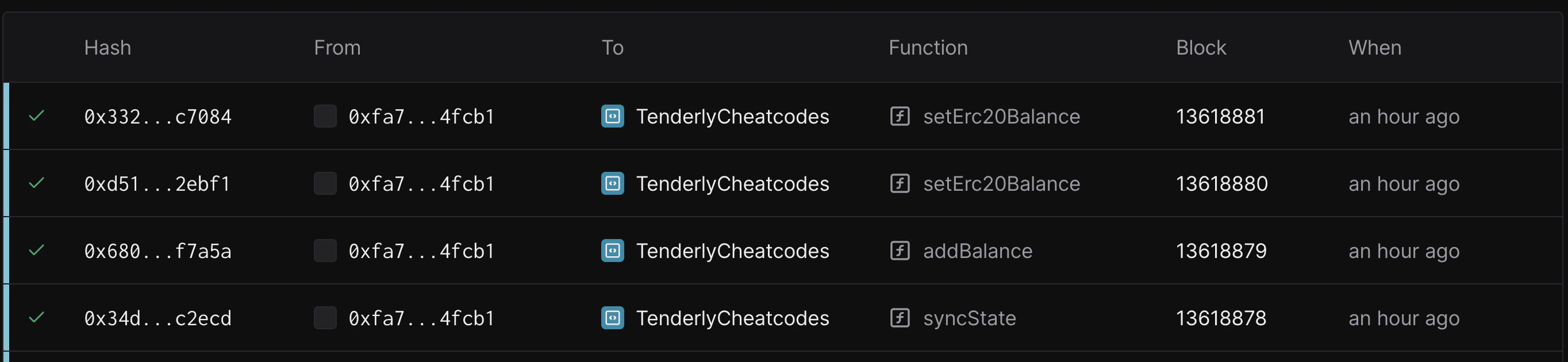 यहाँ सूचीबद्ध विशेष RPC मेथड्स केवल तभी काम करेंगे जब उन्हें Admin RPC के माध्यम से कॉल किया जाए।
**नेटवर्क कस्टमाइज़ेशन**
* [evm\_increaseTime](#evm_increasetime)
* [evm\_setNextBlockTimestamp](#evm_setnextblocktimestamp)
* [tenderly\_setNextBlockTimestamp](#tenderly_setNextBlockTimestamp)
* [evm\_increaseBlocks](#evm_increaseblocks)
* [evm\_mine](#evm-mine)
**Send transaction**
* [eth\_sendTransaction](#eth_sendtransaction)
* [eth\_createAccessList](#eth_createaccesslist)
* [evm\_getLatest](#evm_getlatest)
**Unlimited faucet**
* [tenderly\_setBalance](#tenderly_setbalance)
* [tenderly\_addBalance](#tenderly_addbalance)
* [tenderly\_setErc20Balance](#tenderly_seterc20balance)
* [tenderly\_addErc20Balance](#tenderly_adderc20balance)
* [tenderly\_setMaxErc20Balance](#tenderly_setmaxerc20balance)
**Storage manipulation**
* [tenderly\_setStorageAt](#tenderly_setstorageat)
**State revert**
* [evm\_snapshot](#evm_snapshot)
* [evm\_revert](#evm_revert)
**Network Mirror Mode sync control**
* [tenderly\_startSync](#tenderly_startsync)
* [tenderly\_stopSync](#tenderly_stopsync)
* [tenderly\_syncNext](#tenderly_syncnext)
* [tenderly\_revertSync](#tenderly_revertsync)
* [tenderly\_getSyncStatus](#tenderly_getsyncstatus)
### `evm_increaseTime`
ब्लॉकचेन के समय को एक निर्दिष्ट मात्रा से आगे बढ़ाता है और नए timestamp के साथ एक खाली block बनाता है।
`eth_call` और `eth_sendRawTransaction` को बाद के कॉल्स उनके लक्षित `blockNumber` के आधार पर अलग-अलग `block.timestamp` मान प्राप्त करेंगे:
* `pending` block के लिए: `current_time + time_increase` लौटाता है।
यह अगले mine किए जाने वाले block के अपेक्षित timestamp को दर्शाता है।
* `latest` block के लिए: `time_of_evm_increaseTimestamp_call + time_increase` लौटाता है। यह उस खाली block का timestamp है जो `evm_increaseTimestamp` को कॉल करते समय बनाया गया था।
**Parameters**
* `QUANTITY` - hex-encoded `time_increase` सेकंडों की संख्या जितनी आगे बढ़ना है
**Returns**
* `DATA` - नए बनाए गए block का 32-byte block hash
**Example request**
```json title="example.json" showLineNumbers theme={"theme":{"light":"catppuccin-latte","dark":"catppuccin-mocha"}}
{
"jsonrpc": "2.0",
"method": "evm_increaseTime",
"params": ["0x15180"],
"id": "1234"
}
```
**Example response**
```json title="example.json" showLineNumbers theme={"theme":{"light":"catppuccin-latte","dark":"catppuccin-mocha"}}
{
"jsonrpc": "2.0",
"result": "0x51e0a03f19e0c154b16363086aa6bbf22ad4582b0515b0a3a00519015f06246f",
"id": "1234"
}
```
### `evm_setNextBlockTimestamp`
वर्तमान समय को निर्दिष्ट timestamp पर सेट करता है, और दिए गए timestamp के साथ एक खाली block बनाता है।
`eth_call` और `eth_sendRawTransaction` को बाद के कॉल्स उनके लक्षित `blockNumber` के आधार पर अलग-अलग `block.timestamp` मान लौटाएंगे:
* `pending` block के लिए: `specified_timestamp + time_since_evmSetNextBlockTimestamp_call` लौटाता है। यह सेट किया गया timestamp और मेथड कॉल होने के बाद बीता हुआ समय दर्शाता है।
* `latest` block के लिए: `specified_timestamp` लौटाता है। यह उस खाली block का timestamp है जो `evm_setNextBlockTimestamp` को कॉल करते समय बनाया गया था।
**Parameters**
* `QUANTITY` - hex-encoded `specified_timestamp` जो epoch timestamp (सेकंड में) दर्शाता है
**Returns**
* `QUANTITY` - integer (epoch timestamp) जो अगले block के लिए सेट किया गया है
**Example request**
```json title="example.json" showLineNumbers theme={"theme":{"light":"catppuccin-latte","dark":"catppuccin-mocha"}}
{
"jsonrpc": "2.0",
"method": "evm_setNextBlockTimestamp",
"params": ["1750074671"],
"id": "1234"
}
```
**Example response**
```json title="example.json" showLineNumbers theme={"theme":{"light":"catppuccin-latte","dark":"catppuccin-mocha"}}
{
"jsonrpc": "2.0",
"result": 1750074671,
"id": "1234"
}
```
### `tenderly_setNextBlockTimestamp`
एक खाली block बनाए बिना वर्तमान समय को दिए गए timestamp पर सेट करता है।
`eth_call` और `eth_sendRawTransaction` को बाद के कॉल्स उनके लक्षित `blockNumber` के आधार पर अलग-अलग `block.timestamp` मान लौटाएंगे:
* `pending` block के लिए: `specified_timestamp + time_since_tenderly_setNextBlockTimestamp` लौटाता है। यह सेट किया गया timestamp और मेथड कॉल होने के बाद बीता हुआ समय दर्शाता है।
* `latest` block के लिए: सबसे हाल ही में बनाए गए block का timestamp लौटाता है।
**Parameters**
* `QUANTITY` - hex-encoded `specified_timestamp` जो epoch timestamp (सेकंड में) दर्शाता है
**Returns**
* `QUANTITY` - integer (epoch timestamp) जो अगले block के लिए सेट किया गया है
**Example request**
```json title="example.json" showLineNumbers theme={"theme":{"light":"catppuccin-latte","dark":"catppuccin-mocha"}}
{
"jsonrpc": "2.0",
"method": "evm_setNextBlockTimestamp",
"params": ["1750074671"],
"id": "1234"
}
```
**Example response**
```json title="example.json" showLineNumbers theme={"theme":{"light":"catppuccin-latte","dark":"catppuccin-mocha"}}
{
"jsonrpc": "2.0",
"result": 1750074671,
"id": "1234"
}
```
### `evm_increaseBlocks`
कई blocks को छोड़ता है और नए block number के साथ एक नया block उत्पन्न करता है।
**Parameters**
* `QUANTITY` - hex-encoded छोड़े जाने वाले blocks की संख्या
**Returns**
* `DATA` - नए बनाए गए block का 32-byte block hash
**Example request**
```json title="example.json" showLineNumbers theme={"theme":{"light":"catppuccin-latte","dark":"catppuccin-mocha"}}
{
"jsonrpc": "2.0",
"method": "evm_increaseBlocks",
"params": ["0x20"],
"id": "1234"
}
```
**Example response**
```json title="example.json" showLineNumbers theme={"theme":{"light":"catppuccin-latte","dark":"catppuccin-mocha"}}
{
"jsonrpc": "2.0",
"result": "0x51e0a03f19e0c154b16363086aa6bbf22ad4582b0515b0a3a00519015f06246f",
"id": "1234"
}
```
### `eth_sendTransaction`
एक unsigned transaction सबमिट करता है।
**Parameters**
1. **Transaction** - transaction object
* `from`: `DATA`, 20 Bytes - वह address जिससे transaction भेजा जाता है।
* `to`: `DATA`, 20 Bytes - (वैकल्पिक, नया कॉन्ट्रैक्ट बनाते समय छोड़ दिया जाता है) वह address जिस पर transaction भेजा जाता है।
* `gas`: `QUANTITY` - (वैकल्पिक) transaction execution के लिए प्रदान की गई gas का integer। यह अप्रयुक्त gas लौटाएगा।
* `gasPrice`: `QUANTITY` - (वैकल्पिक) प्रत्येक paid gas के लिए उपयोग किए गए `gasPrice` का integer।
* `value`: `QUANTITY` - (वैकल्पिक) इस transaction के साथ भेजी गई value का integer।
* `data`: `DATA` - (वैकल्पिक) कॉन्ट्रैक्ट का compiled code अथवा invoke की गई method signature और encoded parameters का hash।
```json title="example.json" showLineNumbers theme={"theme":{"light":"catppuccin-latte","dark":"catppuccin-mocha"}}
{
"id": 0,
"jsonrpc": "2.0",
"method": "eth_sendTransaction",
"params": [
{
"from": "0xDC6bDc37B2714eE601734cf55A05625C9e512461",
"to": "0xff39a3e734fe363e631441f6d24c7539240c2628",
"value": "0x0",
"data": "0x2e7700f0"
}
]
}
```
**RESULT**: Transaction hash `STRING` 32 byte hex value
### `eth_createAccessList`
उन access tuples को लौटाता है जिन्हें transaction छूएगा।
**Parameters**
* `SendTransactionObject` - transaction object (वही जो eth\_sendTransaction को प्रदान किया जाता है)
* `BlockNumber` - block number parameter
**Returns**
* `AccessList` - transaction द्वारा छुए गए access tuples का एक array
**Example request**
```json title="example.json" showLineNumbers theme={"theme":{"light":"catppuccin-latte","dark":"catppuccin-mocha"}}
{
"jsonrpc": "2.0",
"method": "eth_getAccessList",
"params": [
{
"from": "0x7ed8dff35e6fef1a6c1f95423cd8a64e22687aac",
"to": "0x6b175474e89094c44da98b954eedeac495271d0f",
"gas": "0x76c00",
"gasPrice": "0x0",
"value": "0x0",
"data": "0xa9059cbb0000000000000000000000005eddecc908575e1adcf857d8be380b9b7e5f658300000000000000000000000000000000000000000000000228813d891ab86000"
},
"latest"
],
"id": "1234"
}
```
**Example response**
```json title="example.json" showLineNumbers theme={"theme":{"light":"catppuccin-latte","dark":"catppuccin-mocha"}}
{
"jsonrpc": "2.0",
"result": [
{
"address": "0x7ed8dff35e6fef1a6c1f95423cd8a64e22687aac"
},
{
"address": "0x6b175474e89094c44da98b954eedeac495271d0f",
"storage_keys": [
"0x5051a693fd89be4fee1466db5a0684c1868dc09405da86e3d13004a803e302ec"
]
},
{
"address": "0xc8f595e2084db484f8a80109101d58625223b7c9"
}
],
"id": 1234
}
```
### `evm_getLatest`
नेटवर्क Virtual Environment पर नवीनतम transaction ID प्राप्त करता है।
**Parameters**
**Returns**
* `DATA` - नवीनतम Virtual Environment transaction का UUID
**Example request**
```json title="example.json" showLineNumbers theme={"theme":{"light":"catppuccin-latte","dark":"catppuccin-mocha"}}
{
"jsonrpc": "2.0",
"method": "evm_getLatest",
"params": [],
"id": "1234"
}
```
**Example response**
```json title="example.json" showLineNumbers theme={"theme":{"light":"catppuccin-latte","dark":"catppuccin-mocha"}}
{
"jsonrpc": "2.0",
"result": "4a05d7ed-f66c-471a-899d-d6d843b8e790",
"id": "1234"
}
```
### `tenderly_setBalance`
एक account या accounts के balance को संशोधित करता है।
**Parameters**
* `ADDRESS/ADDRESSES` - एक string या account addresses का array
* `AMOUNT` - hex-encoded amount जो wei में हो
**Returns**
* `DATA` - नए बनाए गए transaction का 32-byte block hash
**Example request**
```json title="example.json" showLineNumbers theme={"theme":{"light":"catppuccin-latte","dark":"catppuccin-mocha"}}
{
"jsonrpc": "2.0",
"method": "tenderly_setBalance",
"params": [["0x0d2026b3EE6eC71FC6746ADb6311F6d3Ba1C000B", "0xf39Fd6e51aad88F6F4ce6aB8827279cffFb92266"], "0xDE0B6B3A7640000"],
"id": "1234"
}
```
OR
```json title="example.json" showLineNumbers theme={"theme":{"light":"catppuccin-latte","dark":"catppuccin-mocha"}}
{
"jsonrpc": "2.0",
"method": "tenderly_setBalance",
"params": ["0x0d2026b3EE6eC71FC6746ADb6311F6d3Ba1C000B", "0xDE0B6B3A7640000"],
"id": "1234"
}
```
**Example response**
```json title="example.json" showLineNumbers theme={"theme":{"light":"catppuccin-latte","dark":"catppuccin-mocha"}}
{
"jsonrpc": "2.0",
"result": "0xc5b2c658f5fa236c598a6e7fbf7f21413dc42e2a41dd982eb772b30707cba2eb",
"id": "1234"
}
```
### `tenderly_addBalance`
प्रदान किए गए account या accounts में balance जोड़ता है।
**Parameters**
* `ADDRESS/ADDRESSES` - एक string या account addresses का array
* `AMOUNT` - hex-encoded amount जो wei में हो
**Returns**
* `DATA` - नए बनाए गए transaction का 32-byte block hash
**Example request**
```json title="example.json" showLineNumbers theme={"theme":{"light":"catppuccin-latte","dark":"catppuccin-mocha"}}
{
"jsonrpc": "2.0",
"method": "tenderly_addBalance",
"params": [["0x0d2026b3EE6eC71FC6746ADb6311F6d3Ba1C000B"], "0xDE0B6B3A7640000"],
"id": "1234"
}
```
OR
```json title="example.json" showLineNumbers theme={"theme":{"light":"catppuccin-latte","dark":"catppuccin-mocha"}}
{
"jsonrpc": "2.0",
"method": "tenderly_addBalance",
"params": ["0x0d2026b3EE6eC71FC6746ADb6311F6d3Ba1C000B", "0xDE0B6B3A7640000"],
"id": "1234"
}
```
**Example response**
```json title="example.json" showLineNumbers theme={"theme":{"light":"catppuccin-latte","dark":"catppuccin-mocha"}}
{
"jsonrpc": "2.0",
"result": "0xc5b2c658f5fa236c598a6e7fbf7f21413dc42e2a41dd982eb772b30707cba2eb",
"id": "1234"
}
```
### `tenderly_setErc20Balance`
प्रदान किए गए erc20 कॉन्ट्रैक्ट पर wallet के लिए token balance सेट करता है।
`tenderly_setErc20Balance` नए balance को सीधे token कॉन्ट्रैक्ट के storage में लिखता है और **ERC-20 `Transfer` event उत्सर्जित नहीं करता है**। यदि आपका downstream tooling (indexers, subgraphs, accounting) balances ट्रैक करने के लिए `Transfer` events पर निर्भर है, तो इसके बजाय [`tenderly_addErc20Balance`](#tenderly_adderc20balance) का उपयोग करें, यह प्रत्येक funded account के लिए एक synthetic `Transfer` log उत्सर्जित करता है।
**Parameters**
* `TOKEN_ADDRESS` - ERC20 कॉन्ट्रैक्ट का address
* `WALLET` - उस wallet का address जिसे टॉप-अप किया जाएगा
* `VALUE` - 32-byte hash जो tokens के **wei** मान को दर्शाता है
**Returns**
`DATA` - नए बनाए गए transaction का 32-byte hash (storage override transaction के माध्यम से commit होता है)
**Example request**
```json title="example.json" showLineNumbers theme={"theme":{"light":"catppuccin-latte","dark":"catppuccin-mocha"}}
{
"jsonrpc": "2.0",
"method": "tenderly_setErc20Balance",
"params": [
"0xA0b86991c6218b36c1d19D4a2e9Eb0cE3606eB48",
"0x40BdB4497614bAe1A67061EE20AAdE3c2067AC9e",
"0xDE0B6B3A7640000"
],
"id": 3640
}
```
**Example response**
```json title="example.json" showLineNumbers theme={"theme":{"light":"catppuccin-latte","dark":"catppuccin-mocha"}}
{
"id": 3640,
"jsonrpc": "2.0",
"result": "0x8a84686634729c57532b9ffa4e632e241b2de5c880c771c5c214d5e7ec465b1c"
}
```
### `tenderly_addErc20Balance`
प्रदान किए गए ERC-20 कॉन्ट्रैक्ट पर एक या अधिक wallets में निर्दिष्ट मात्रा में tokens जोड़ता है। [`tenderly_setErc20Balance`](#tenderly_seterc20balance) के विपरीत, यह मेथड प्रत्येक funded account के लिए **एक synthetic `Transfer` event उत्सर्जित करता है**, जिससे indexers, subgraphs, और logs से balances को मिलाने वाला कोई भी tooling परिणामी state के साथ सिंक में रहता है।
उत्सर्जित log में मानक ERC-20 `Transfer(address,address,uint256)` topic होता है, transaction sender को `from` address और funded wallet को `to` address के रूप में उपयोग करता है, और data field में जोड़ी गई `amount` वहन करता है।
**Parameters**
* `TOKEN_ADDRESS` - ERC-20 कॉन्ट्रैक्ट का address
* `WALLETS` - wallet addresses का array जो tokens प्राप्त करेंगे
* `VALUE` - 32-byte hash जो प्रत्येक wallet में जोड़ी जाने वाली tokens की **wei** राशि को दर्शाता है
**Returns**
`DATA` - नए बनाए गए transaction का 32-byte hash (storage override transaction के माध्यम से commit होता है)
**Example request**
```json title="example.json" showLineNumbers theme={"theme":{"light":"catppuccin-latte","dark":"catppuccin-mocha"}}
{
"jsonrpc": "2.0",
"method": "tenderly_addErc20Balance",
"params": [
"0xA0b86991c6218b36c1d19D4a2e9Eb0cE3606eB48",
[
"0x40BdB4497614bAe1A67061EE20AAdE3c2067AC9e",
"0xBd8DaA414Fda8a8A129F7035e7496759C5aF8570"
],
"0xDE0B6B3A7640000"
],
"id": 3641
}
```
**Example response**
```json title="example.json" showLineNumbers theme={"theme":{"light":"catppuccin-latte","dark":"catppuccin-mocha"}}
{
"id": 3641,
"jsonrpc": "2.0",
"result": "0x8a84686634729c57532b9ffa4e632e241b2de5c880c771c5c214d5e7ec465b1d"
}
```
### `tenderly_setMaxErc20Balance`
प्रदान किए गए erc20 कॉन्ट्रैक्ट पर wallet address को अधिकतम संभव token balance से टॉप-अप करता है (मुख्य रूप से उन tokens के लिए जिनमें साधारण balance mapping नहीं होता है)।
`tenderly_setErc20Balance` की तरह, यह मेथड सीधे storage में लिखता है और **ERC-20 `Transfer` event उत्सर्जित नहीं करता है**। जब आपको indexers या log-आधारित tooling को balance परिवर्तन उठाने की आवश्यकता हो, तो [`tenderly_addErc20Balance`](#tenderly_adderc20balance) का उपयोग करें।
**Parameters**
* `YIELD_TOKEN_ADDRESS` - ERC20 कॉन्ट्रैक्ट का address
* `WALLET` - उस wallet का address जिसे टॉप-अप किया जाएगा
**Returns**
`DATA` - नए बनाए गए transaction का 32-byte hash (storage override transaction के माध्यम से commit होता है)
**Example request**
```json title="example.json" showLineNumbers theme={"theme":{"light":"catppuccin-latte","dark":"catppuccin-mocha"}}
{
"id": 0,
"jsonrpc": "2.0",
"method": "tenderly_setMaxErc20Balance",
"params": [
"0xae7ab96520DE3A18E5e111B5EaAb095312D7fE84",
"0xb5f45E52649123117C175B2016Ed3fCd26f9bE06"
]
}
```
**Example response**
```json title="example.json" showLineNumbers theme={"theme":{"light":"catppuccin-latte","dark":"catppuccin-mocha"}}
{
"id": 0,
"jsonrpc": "2.0",
"result": "0x8fb202d4612be9f6e96b955b4e5bd002cde4d79bec8a6d1b7d35976f124636a4"
}
```
### `tenderly_setStorageAt`
प्रदान किए गए slot पर प्रदान किए गए address का storage सेट करता है।
**Parameters**
* `ADDRESS` - वह address जहाँ storage को override किया जाएगा
* `SLOT` - 32-byte hash जो storage slot key दर्शाता है
* `VALUE` - 32-byte hash जो key `slot` पर value दर्शाता है
**Returns**
* `DATA` - नए बनाए गए transaction का 32-byte hash (storage override transaction के माध्यम से commit होता है)
**Example request**
```json title="example.json" showLineNumbers theme={"theme":{"light":"catppuccin-latte","dark":"catppuccin-mocha"}}
{
"jsonrpc": "2.0",
"method": "tenderly_setStorageAt",
"params": [
"0x3Df2f692132f55b97cc9DA04A1fFFEA82F5d710b",
"0x8111de210bcfef10861a4ab6df0f4838296bd61d5a8f02dca283ed3b72a47bba",
"0x0000000000000000000000000000000000000000000000000000000000000000"
],
"id": "1"
}
```
**Example response**
```json title="example.json" showLineNumbers theme={"theme":{"light":"catppuccin-latte","dark":"catppuccin-mocha"}}
{
"jsonrpc": "2.0",
"result": "0xc5b2c658f5fa236c598a6e7fbf7f21413dc42e2a41dd982eb772b30707cba2eb",
"id": "1234"
}
```
### `evm_snapshot`
एक snapshot ID लौटाता है जो आपको Virtual Environment को पिछले बिंदु पर वापस लाने की अनुमति देता है (`evm_getLatest` से मिले block `hash` के समान)।
**Parameters**
**Returns**
1. `DATA` - Virtual Environment द्वारा उत्पादित नवीनतम block का hash (Snapshot ID)
**Example request**
```json title="example.json" showLineNumbers theme={"theme":{"light":"catppuccin-latte","dark":"catppuccin-mocha"}}
{
"jsonrpc": "2.0",
"method": "evm_snapshot",
"params": [],
"id": "1234"
}
```
**Example response**
```json title="example.json" showLineNumbers theme={"theme":{"light":"catppuccin-latte","dark":"catppuccin-mocha"}}
{
"jsonrpc": "2.0",
"result": "0xfdb5a15fe652e0f47e4312df749f8cc1769d5e70f0bf3f26a4e231bb6a550f8d",
"id": "1234"
}
```
### `evm_revert`
Virtual Environment के state को पिछले snapshot पर वापस लाता है।
एकल `evm_revert` अधिकतम 2000 blocks तक वापस रोल कर सकता है। यदि snapshot उससे भी पीछे है, तो कॉल `revert operation is limited to maximum 2000 blocks` error के साथ विफल हो जाता है। अतीत में 2000 blocks से अधिक पीछे के बिंदु पर वापस जाने के लिए, इसके बजाय [Virtual Environment को लक्षित ऐतिहासिक block पर clone करें](/virtual-environments/develop/revert-state#clone-at-a-historical-block)।
**Parameters**
* `DATA` - snapshot का ID
**Returns**
* `BOOLEAN` - operation success flag
**Example request**
```json title="example.json" showLineNumbers theme={"theme":{"light":"catppuccin-latte","dark":"catppuccin-mocha"}}
{
"jsonrpc": "2.0",
"method": "evm_revert",
"params": ["0xfdb5a15fe652e0f47e4312df749f8cc1769d5e70f0bf3f26a4e231bb6a550f8d"],
"id": "1234"
}
```
**Example response**
```json title="example.json" showLineNumbers theme={"theme":{"light":"catppuccin-latte","dark":"catppuccin-mocha"}}
{
"jsonrpc": "2.0",
"result": true,
"id": "1234"
}
```
## Network Mirror Mode sync control
निम्नलिखित मेथड्स [Network Mirror Mode](/virtual-environments/network-mirror-mode) को नियंत्रित करते हैं, वे Virtual Environment और उसके parent network के बीच continuous sync को शुरू, बंद, step, rewind, और निरीक्षण करते हैं।
जब Network Mirror Mode sync **सक्रिय** होता है, तो अन्य Admin RPC चीटकोड्स (उदाहरण के लिए `tenderly_setBalance`, `tenderly_setStorageAt`, `tenderly_sendBlock`) अक्षम रहते हैं। यदि आपको उन्हें तुरंत प्रभावी करने की आवश्यकता है, तो पहले [`tenderly_stopSync`](#tenderly_stopsync) से sync को रोकें।
### `tenderly_startSync`
Virtual Environment और उसके parent network के बीच continuous sync शुरू करता है। नए parent-network blocks को उत्पादित होते ही अवशोषित कर लिया जाता है, और Virtual Environment के mempool में मौजूद कोई भी transactions (FIFO क्रम में) अगले synced block के आगे जोड़ दिए जाते हैं।
**Parameters**
कोई नहीं।
**Returns**
* `BOOLEAN` - `true` यदि sync शुरू हुआ
**Example request**
```json title="example.json" showLineNumbers theme={"theme":{"light":"catppuccin-latte","dark":"catppuccin-mocha"}}
{
"jsonrpc": "2.0",
"method": "tenderly_startSync",
"params": [],
"id": "1234"
}
```
**Example response**
```json title="example.json" showLineNumbers theme={"theme":{"light":"catppuccin-latte","dark":"catppuccin-mocha"}}
{
"jsonrpc": "2.0",
"result": true,
"id": "1234"
}
```
### `tenderly_stopSync`
किसी भी चल रहे sync को रोकता है। Virtual Environment अपने वर्तमान block पर रहता है; आप `tenderly_startSync` के साथ फिर से शुरू कर सकते हैं या `tenderly_syncNext` के साथ मैन्युअल रूप से आगे बढ़ सकते हैं। जब Mirror Mode सक्रिय हो तो अन्य Admin RPC चीटकोड्स कॉल करने से पहले इसका उपयोग करें।
**Parameters**
कोई नहीं।
**Returns**
* `BOOLEAN` - `true` यदि sync रुक गया (या पहले से रुका हुआ था)
**Example request**
```json title="example.json" showLineNumbers theme={"theme":{"light":"catppuccin-latte","dark":"catppuccin-mocha"}}
{
"jsonrpc": "2.0",
"method": "tenderly_stopSync",
"params": [],
"id": "1234"
}
```
**Example response**
```json title="example.json" showLineNumbers theme={"theme":{"light":"catppuccin-latte","dark":"catppuccin-mocha"}}
{
"jsonrpc": "2.0",
"result": true,
"id": "1234"
}
```
### `tenderly_syncNext`
Virtual Environment पर अगले एकल parent-network block को sync करता है। कोई भी pending Virtual Environment transactions FIFO क्रम में उस block के आगे जोड़ दिए जाते हैं। एक बार में एक block sync करके step करने के लिए उपयोगी।
**Parameters**
कोई नहीं।
**Returns**
* `DATA` - नए synced block का 32-byte block hash
**Example request**
```json title="example.json" showLineNumbers theme={"theme":{"light":"catppuccin-latte","dark":"catppuccin-mocha"}}
{
"jsonrpc": "2.0",
"method": "tenderly_syncNext",
"params": [],
"id": "1234"
}
```
**Example response**
```json title="example.json" showLineNumbers theme={"theme":{"light":"catppuccin-latte","dark":"catppuccin-mocha"}}
{
"jsonrpc": "2.0",
"result": "0x51e0a03f19e0c154b16363086aa6bbf22ad4582b0515b0a3a00519015f06246f",
"id": "1234"
}
```
### `tenderly_revertSync`
Virtual Environment को N synced blocks से पीछे ले जाता है, जिससे उनके Virtual Environment state पर प्रभाव को पूर्ववत किया जाता है। डिफ़ॉल्ट 10 blocks है। Mirror-Mode Virtual Environment को parent network के इतिहास के पहले के बिंदु पर वापस step करने के लिए इसका उपयोग करें।
**Parameters**
* `QUANTITY` *(वैकल्पिक)* - hex-encoded blocks की संख्या जिन्हें rewind करना है। डिफ़ॉल्ट `0xa` (10) है।
**Returns**
* `DATA` - उस block का 32-byte block hash जिस पर Virtual Environment अब स्थित है
**Example request**
```json title="example.json" showLineNumbers theme={"theme":{"light":"catppuccin-latte","dark":"catppuccin-mocha"}}
{
"jsonrpc": "2.0",
"method": "tenderly_revertSync",
"params": ["0xa"],
"id": "1234"
}
```
**Example response**
```json title="example.json" showLineNumbers theme={"theme":{"light":"catppuccin-latte","dark":"catppuccin-mocha"}}
{
"jsonrpc": "2.0",
"result": "0xfdb5a15fe652e0f47e4312df749f8cc1769d5e70f0bf3f26a4e231bb6a550f8d",
"id": "1234"
}
```
### `tenderly_getSyncStatus`
Virtual Environment की वर्तमान sync state लौटाता है, जिसमें यह भी शामिल है कि क्या sync सक्रिय है, यह parent network से कितना पीछे है, और नवीनतम synced block कौन-सा है।
**Parameters**
कोई नहीं।
**Returns**
* `OBJECT` - निम्न fields के साथ sync status:
* `active` - `BOOLEAN`, `true` यदि sync वर्तमान में चल रहा है
* `lag` - `QUANTITY`, blocks की संख्या जितनी Virtual Environment parent network से पीछे है
* `latestSyncedBlock` - `QUANTITY`, Virtual Environment पर synced नवीनतम block का block number
* `parentLatestBlock` - `QUANTITY`, parent network पर नवीनतम block का block number
**Example request**
```json title="example.json" showLineNumbers theme={"theme":{"light":"catppuccin-latte","dark":"catppuccin-mocha"}}
{
"jsonrpc": "2.0",
"method": "tenderly_getSyncStatus",
"params": [],
"id": "1234"
}
```
**Example response**
```json title="example.json" showLineNumbers theme={"theme":{"light":"catppuccin-latte","dark":"catppuccin-mocha"}}
{
"jsonrpc": "2.0",
"result": {
"active": true,
"lag": 0,
"latestSyncedBlock": 22845130,
"parentLatestBlock": 22845130
},
"id": "1234"
}
```
यहाँ सूचीबद्ध विशेष RPC मेथड्स केवल तभी काम करेंगे जब उन्हें Admin RPC के माध्यम से कॉल किया जाए।
**नेटवर्क कस्टमाइज़ेशन**
* [evm\_increaseTime](#evm_increasetime)
* [evm\_setNextBlockTimestamp](#evm_setnextblocktimestamp)
* [tenderly\_setNextBlockTimestamp](#tenderly_setNextBlockTimestamp)
* [evm\_increaseBlocks](#evm_increaseblocks)
* [evm\_mine](#evm-mine)
**Send transaction**
* [eth\_sendTransaction](#eth_sendtransaction)
* [eth\_createAccessList](#eth_createaccesslist)
* [evm\_getLatest](#evm_getlatest)
**Unlimited faucet**
* [tenderly\_setBalance](#tenderly_setbalance)
* [tenderly\_addBalance](#tenderly_addbalance)
* [tenderly\_setErc20Balance](#tenderly_seterc20balance)
* [tenderly\_addErc20Balance](#tenderly_adderc20balance)
* [tenderly\_setMaxErc20Balance](#tenderly_setmaxerc20balance)
**Storage manipulation**
* [tenderly\_setStorageAt](#tenderly_setstorageat)
**State revert**
* [evm\_snapshot](#evm_snapshot)
* [evm\_revert](#evm_revert)
**Network Mirror Mode sync control**
* [tenderly\_startSync](#tenderly_startsync)
* [tenderly\_stopSync](#tenderly_stopsync)
* [tenderly\_syncNext](#tenderly_syncnext)
* [tenderly\_revertSync](#tenderly_revertsync)
* [tenderly\_getSyncStatus](#tenderly_getsyncstatus)
### `evm_increaseTime`
ब्लॉकचेन के समय को एक निर्दिष्ट मात्रा से आगे बढ़ाता है और नए timestamp के साथ एक खाली block बनाता है।
`eth_call` और `eth_sendRawTransaction` को बाद के कॉल्स उनके लक्षित `blockNumber` के आधार पर अलग-अलग `block.timestamp` मान प्राप्त करेंगे:
* `pending` block के लिए: `current_time + time_increase` लौटाता है।
यह अगले mine किए जाने वाले block के अपेक्षित timestamp को दर्शाता है।
* `latest` block के लिए: `time_of_evm_increaseTimestamp_call + time_increase` लौटाता है। यह उस खाली block का timestamp है जो `evm_increaseTimestamp` को कॉल करते समय बनाया गया था।
**Parameters**
* `QUANTITY` - hex-encoded `time_increase` सेकंडों की संख्या जितनी आगे बढ़ना है
**Returns**
* `DATA` - नए बनाए गए block का 32-byte block hash
**Example request**
```json title="example.json" showLineNumbers theme={"theme":{"light":"catppuccin-latte","dark":"catppuccin-mocha"}}
{
"jsonrpc": "2.0",
"method": "evm_increaseTime",
"params": ["0x15180"],
"id": "1234"
}
```
**Example response**
```json title="example.json" showLineNumbers theme={"theme":{"light":"catppuccin-latte","dark":"catppuccin-mocha"}}
{
"jsonrpc": "2.0",
"result": "0x51e0a03f19e0c154b16363086aa6bbf22ad4582b0515b0a3a00519015f06246f",
"id": "1234"
}
```
### `evm_setNextBlockTimestamp`
वर्तमान समय को निर्दिष्ट timestamp पर सेट करता है, और दिए गए timestamp के साथ एक खाली block बनाता है।
`eth_call` और `eth_sendRawTransaction` को बाद के कॉल्स उनके लक्षित `blockNumber` के आधार पर अलग-अलग `block.timestamp` मान लौटाएंगे:
* `pending` block के लिए: `specified_timestamp + time_since_evmSetNextBlockTimestamp_call` लौटाता है। यह सेट किया गया timestamp और मेथड कॉल होने के बाद बीता हुआ समय दर्शाता है।
* `latest` block के लिए: `specified_timestamp` लौटाता है। यह उस खाली block का timestamp है जो `evm_setNextBlockTimestamp` को कॉल करते समय बनाया गया था।
**Parameters**
* `QUANTITY` - hex-encoded `specified_timestamp` जो epoch timestamp (सेकंड में) दर्शाता है
**Returns**
* `QUANTITY` - integer (epoch timestamp) जो अगले block के लिए सेट किया गया है
**Example request**
```json title="example.json" showLineNumbers theme={"theme":{"light":"catppuccin-latte","dark":"catppuccin-mocha"}}
{
"jsonrpc": "2.0",
"method": "evm_setNextBlockTimestamp",
"params": ["1750074671"],
"id": "1234"
}
```
**Example response**
```json title="example.json" showLineNumbers theme={"theme":{"light":"catppuccin-latte","dark":"catppuccin-mocha"}}
{
"jsonrpc": "2.0",
"result": 1750074671,
"id": "1234"
}
```
### `tenderly_setNextBlockTimestamp`
एक खाली block बनाए बिना वर्तमान समय को दिए गए timestamp पर सेट करता है।
`eth_call` और `eth_sendRawTransaction` को बाद के कॉल्स उनके लक्षित `blockNumber` के आधार पर अलग-अलग `block.timestamp` मान लौटाएंगे:
* `pending` block के लिए: `specified_timestamp + time_since_tenderly_setNextBlockTimestamp` लौटाता है। यह सेट किया गया timestamp और मेथड कॉल होने के बाद बीता हुआ समय दर्शाता है।
* `latest` block के लिए: सबसे हाल ही में बनाए गए block का timestamp लौटाता है।
**Parameters**
* `QUANTITY` - hex-encoded `specified_timestamp` जो epoch timestamp (सेकंड में) दर्शाता है
**Returns**
* `QUANTITY` - integer (epoch timestamp) जो अगले block के लिए सेट किया गया है
**Example request**
```json title="example.json" showLineNumbers theme={"theme":{"light":"catppuccin-latte","dark":"catppuccin-mocha"}}
{
"jsonrpc": "2.0",
"method": "evm_setNextBlockTimestamp",
"params": ["1750074671"],
"id": "1234"
}
```
**Example response**
```json title="example.json" showLineNumbers theme={"theme":{"light":"catppuccin-latte","dark":"catppuccin-mocha"}}
{
"jsonrpc": "2.0",
"result": 1750074671,
"id": "1234"
}
```
### `evm_increaseBlocks`
कई blocks को छोड़ता है और नए block number के साथ एक नया block उत्पन्न करता है।
**Parameters**
* `QUANTITY` - hex-encoded छोड़े जाने वाले blocks की संख्या
**Returns**
* `DATA` - नए बनाए गए block का 32-byte block hash
**Example request**
```json title="example.json" showLineNumbers theme={"theme":{"light":"catppuccin-latte","dark":"catppuccin-mocha"}}
{
"jsonrpc": "2.0",
"method": "evm_increaseBlocks",
"params": ["0x20"],
"id": "1234"
}
```
**Example response**
```json title="example.json" showLineNumbers theme={"theme":{"light":"catppuccin-latte","dark":"catppuccin-mocha"}}
{
"jsonrpc": "2.0",
"result": "0x51e0a03f19e0c154b16363086aa6bbf22ad4582b0515b0a3a00519015f06246f",
"id": "1234"
}
```
### `eth_sendTransaction`
एक unsigned transaction सबमिट करता है।
**Parameters**
1. **Transaction** - transaction object
* `from`: `DATA`, 20 Bytes - वह address जिससे transaction भेजा जाता है।
* `to`: `DATA`, 20 Bytes - (वैकल्पिक, नया कॉन्ट्रैक्ट बनाते समय छोड़ दिया जाता है) वह address जिस पर transaction भेजा जाता है।
* `gas`: `QUANTITY` - (वैकल्पिक) transaction execution के लिए प्रदान की गई gas का integer। यह अप्रयुक्त gas लौटाएगा।
* `gasPrice`: `QUANTITY` - (वैकल्पिक) प्रत्येक paid gas के लिए उपयोग किए गए `gasPrice` का integer।
* `value`: `QUANTITY` - (वैकल्पिक) इस transaction के साथ भेजी गई value का integer।
* `data`: `DATA` - (वैकल्पिक) कॉन्ट्रैक्ट का compiled code अथवा invoke की गई method signature और encoded parameters का hash।
```json title="example.json" showLineNumbers theme={"theme":{"light":"catppuccin-latte","dark":"catppuccin-mocha"}}
{
"id": 0,
"jsonrpc": "2.0",
"method": "eth_sendTransaction",
"params": [
{
"from": "0xDC6bDc37B2714eE601734cf55A05625C9e512461",
"to": "0xff39a3e734fe363e631441f6d24c7539240c2628",
"value": "0x0",
"data": "0x2e7700f0"
}
]
}
```
**RESULT**: Transaction hash `STRING` 32 byte hex value
### `eth_createAccessList`
उन access tuples को लौटाता है जिन्हें transaction छूएगा।
**Parameters**
* `SendTransactionObject` - transaction object (वही जो eth\_sendTransaction को प्रदान किया जाता है)
* `BlockNumber` - block number parameter
**Returns**
* `AccessList` - transaction द्वारा छुए गए access tuples का एक array
**Example request**
```json title="example.json" showLineNumbers theme={"theme":{"light":"catppuccin-latte","dark":"catppuccin-mocha"}}
{
"jsonrpc": "2.0",
"method": "eth_getAccessList",
"params": [
{
"from": "0x7ed8dff35e6fef1a6c1f95423cd8a64e22687aac",
"to": "0x6b175474e89094c44da98b954eedeac495271d0f",
"gas": "0x76c00",
"gasPrice": "0x0",
"value": "0x0",
"data": "0xa9059cbb0000000000000000000000005eddecc908575e1adcf857d8be380b9b7e5f658300000000000000000000000000000000000000000000000228813d891ab86000"
},
"latest"
],
"id": "1234"
}
```
**Example response**
```json title="example.json" showLineNumbers theme={"theme":{"light":"catppuccin-latte","dark":"catppuccin-mocha"}}
{
"jsonrpc": "2.0",
"result": [
{
"address": "0x7ed8dff35e6fef1a6c1f95423cd8a64e22687aac"
},
{
"address": "0x6b175474e89094c44da98b954eedeac495271d0f",
"storage_keys": [
"0x5051a693fd89be4fee1466db5a0684c1868dc09405da86e3d13004a803e302ec"
]
},
{
"address": "0xc8f595e2084db484f8a80109101d58625223b7c9"
}
],
"id": 1234
}
```
### `evm_getLatest`
नेटवर्क Virtual Environment पर नवीनतम transaction ID प्राप्त करता है।
**Parameters**
**Returns**
* `DATA` - नवीनतम Virtual Environment transaction का UUID
**Example request**
```json title="example.json" showLineNumbers theme={"theme":{"light":"catppuccin-latte","dark":"catppuccin-mocha"}}
{
"jsonrpc": "2.0",
"method": "evm_getLatest",
"params": [],
"id": "1234"
}
```
**Example response**
```json title="example.json" showLineNumbers theme={"theme":{"light":"catppuccin-latte","dark":"catppuccin-mocha"}}
{
"jsonrpc": "2.0",
"result": "4a05d7ed-f66c-471a-899d-d6d843b8e790",
"id": "1234"
}
```
### `tenderly_setBalance`
एक account या accounts के balance को संशोधित करता है।
**Parameters**
* `ADDRESS/ADDRESSES` - एक string या account addresses का array
* `AMOUNT` - hex-encoded amount जो wei में हो
**Returns**
* `DATA` - नए बनाए गए transaction का 32-byte block hash
**Example request**
```json title="example.json" showLineNumbers theme={"theme":{"light":"catppuccin-latte","dark":"catppuccin-mocha"}}
{
"jsonrpc": "2.0",
"method": "tenderly_setBalance",
"params": [["0x0d2026b3EE6eC71FC6746ADb6311F6d3Ba1C000B", "0xf39Fd6e51aad88F6F4ce6aB8827279cffFb92266"], "0xDE0B6B3A7640000"],
"id": "1234"
}
```
OR
```json title="example.json" showLineNumbers theme={"theme":{"light":"catppuccin-latte","dark":"catppuccin-mocha"}}
{
"jsonrpc": "2.0",
"method": "tenderly_setBalance",
"params": ["0x0d2026b3EE6eC71FC6746ADb6311F6d3Ba1C000B", "0xDE0B6B3A7640000"],
"id": "1234"
}
```
**Example response**
```json title="example.json" showLineNumbers theme={"theme":{"light":"catppuccin-latte","dark":"catppuccin-mocha"}}
{
"jsonrpc": "2.0",
"result": "0xc5b2c658f5fa236c598a6e7fbf7f21413dc42e2a41dd982eb772b30707cba2eb",
"id": "1234"
}
```
### `tenderly_addBalance`
प्रदान किए गए account या accounts में balance जोड़ता है।
**Parameters**
* `ADDRESS/ADDRESSES` - एक string या account addresses का array
* `AMOUNT` - hex-encoded amount जो wei में हो
**Returns**
* `DATA` - नए बनाए गए transaction का 32-byte block hash
**Example request**
```json title="example.json" showLineNumbers theme={"theme":{"light":"catppuccin-latte","dark":"catppuccin-mocha"}}
{
"jsonrpc": "2.0",
"method": "tenderly_addBalance",
"params": [["0x0d2026b3EE6eC71FC6746ADb6311F6d3Ba1C000B"], "0xDE0B6B3A7640000"],
"id": "1234"
}
```
OR
```json title="example.json" showLineNumbers theme={"theme":{"light":"catppuccin-latte","dark":"catppuccin-mocha"}}
{
"jsonrpc": "2.0",
"method": "tenderly_addBalance",
"params": ["0x0d2026b3EE6eC71FC6746ADb6311F6d3Ba1C000B", "0xDE0B6B3A7640000"],
"id": "1234"
}
```
**Example response**
```json title="example.json" showLineNumbers theme={"theme":{"light":"catppuccin-latte","dark":"catppuccin-mocha"}}
{
"jsonrpc": "2.0",
"result": "0xc5b2c658f5fa236c598a6e7fbf7f21413dc42e2a41dd982eb772b30707cba2eb",
"id": "1234"
}
```
### `tenderly_setErc20Balance`
प्रदान किए गए erc20 कॉन्ट्रैक्ट पर wallet के लिए token balance सेट करता है।
`tenderly_setErc20Balance` नए balance को सीधे token कॉन्ट्रैक्ट के storage में लिखता है और **ERC-20 `Transfer` event उत्सर्जित नहीं करता है**। यदि आपका downstream tooling (indexers, subgraphs, accounting) balances ट्रैक करने के लिए `Transfer` events पर निर्भर है, तो इसके बजाय [`tenderly_addErc20Balance`](#tenderly_adderc20balance) का उपयोग करें, यह प्रत्येक funded account के लिए एक synthetic `Transfer` log उत्सर्जित करता है।
**Parameters**
* `TOKEN_ADDRESS` - ERC20 कॉन्ट्रैक्ट का address
* `WALLET` - उस wallet का address जिसे टॉप-अप किया जाएगा
* `VALUE` - 32-byte hash जो tokens के **wei** मान को दर्शाता है
**Returns**
`DATA` - नए बनाए गए transaction का 32-byte hash (storage override transaction के माध्यम से commit होता है)
**Example request**
```json title="example.json" showLineNumbers theme={"theme":{"light":"catppuccin-latte","dark":"catppuccin-mocha"}}
{
"jsonrpc": "2.0",
"method": "tenderly_setErc20Balance",
"params": [
"0xA0b86991c6218b36c1d19D4a2e9Eb0cE3606eB48",
"0x40BdB4497614bAe1A67061EE20AAdE3c2067AC9e",
"0xDE0B6B3A7640000"
],
"id": 3640
}
```
**Example response**
```json title="example.json" showLineNumbers theme={"theme":{"light":"catppuccin-latte","dark":"catppuccin-mocha"}}
{
"id": 3640,
"jsonrpc": "2.0",
"result": "0x8a84686634729c57532b9ffa4e632e241b2de5c880c771c5c214d5e7ec465b1c"
}
```
### `tenderly_addErc20Balance`
प्रदान किए गए ERC-20 कॉन्ट्रैक्ट पर एक या अधिक wallets में निर्दिष्ट मात्रा में tokens जोड़ता है। [`tenderly_setErc20Balance`](#tenderly_seterc20balance) के विपरीत, यह मेथड प्रत्येक funded account के लिए **एक synthetic `Transfer` event उत्सर्जित करता है**, जिससे indexers, subgraphs, और logs से balances को मिलाने वाला कोई भी tooling परिणामी state के साथ सिंक में रहता है।
उत्सर्जित log में मानक ERC-20 `Transfer(address,address,uint256)` topic होता है, transaction sender को `from` address और funded wallet को `to` address के रूप में उपयोग करता है, और data field में जोड़ी गई `amount` वहन करता है।
**Parameters**
* `TOKEN_ADDRESS` - ERC-20 कॉन्ट्रैक्ट का address
* `WALLETS` - wallet addresses का array जो tokens प्राप्त करेंगे
* `VALUE` - 32-byte hash जो प्रत्येक wallet में जोड़ी जाने वाली tokens की **wei** राशि को दर्शाता है
**Returns**
`DATA` - नए बनाए गए transaction का 32-byte hash (storage override transaction के माध्यम से commit होता है)
**Example request**
```json title="example.json" showLineNumbers theme={"theme":{"light":"catppuccin-latte","dark":"catppuccin-mocha"}}
{
"jsonrpc": "2.0",
"method": "tenderly_addErc20Balance",
"params": [
"0xA0b86991c6218b36c1d19D4a2e9Eb0cE3606eB48",
[
"0x40BdB4497614bAe1A67061EE20AAdE3c2067AC9e",
"0xBd8DaA414Fda8a8A129F7035e7496759C5aF8570"
],
"0xDE0B6B3A7640000"
],
"id": 3641
}
```
**Example response**
```json title="example.json" showLineNumbers theme={"theme":{"light":"catppuccin-latte","dark":"catppuccin-mocha"}}
{
"id": 3641,
"jsonrpc": "2.0",
"result": "0x8a84686634729c57532b9ffa4e632e241b2de5c880c771c5c214d5e7ec465b1d"
}
```
### `tenderly_setMaxErc20Balance`
प्रदान किए गए erc20 कॉन्ट्रैक्ट पर wallet address को अधिकतम संभव token balance से टॉप-अप करता है (मुख्य रूप से उन tokens के लिए जिनमें साधारण balance mapping नहीं होता है)।
`tenderly_setErc20Balance` की तरह, यह मेथड सीधे storage में लिखता है और **ERC-20 `Transfer` event उत्सर्जित नहीं करता है**। जब आपको indexers या log-आधारित tooling को balance परिवर्तन उठाने की आवश्यकता हो, तो [`tenderly_addErc20Balance`](#tenderly_adderc20balance) का उपयोग करें।
**Parameters**
* `YIELD_TOKEN_ADDRESS` - ERC20 कॉन्ट्रैक्ट का address
* `WALLET` - उस wallet का address जिसे टॉप-अप किया जाएगा
**Returns**
`DATA` - नए बनाए गए transaction का 32-byte hash (storage override transaction के माध्यम से commit होता है)
**Example request**
```json title="example.json" showLineNumbers theme={"theme":{"light":"catppuccin-latte","dark":"catppuccin-mocha"}}
{
"id": 0,
"jsonrpc": "2.0",
"method": "tenderly_setMaxErc20Balance",
"params": [
"0xae7ab96520DE3A18E5e111B5EaAb095312D7fE84",
"0xb5f45E52649123117C175B2016Ed3fCd26f9bE06"
]
}
```
**Example response**
```json title="example.json" showLineNumbers theme={"theme":{"light":"catppuccin-latte","dark":"catppuccin-mocha"}}
{
"id": 0,
"jsonrpc": "2.0",
"result": "0x8fb202d4612be9f6e96b955b4e5bd002cde4d79bec8a6d1b7d35976f124636a4"
}
```
### `tenderly_setStorageAt`
प्रदान किए गए slot पर प्रदान किए गए address का storage सेट करता है।
**Parameters**
* `ADDRESS` - वह address जहाँ storage को override किया जाएगा
* `SLOT` - 32-byte hash जो storage slot key दर्शाता है
* `VALUE` - 32-byte hash जो key `slot` पर value दर्शाता है
**Returns**
* `DATA` - नए बनाए गए transaction का 32-byte hash (storage override transaction के माध्यम से commit होता है)
**Example request**
```json title="example.json" showLineNumbers theme={"theme":{"light":"catppuccin-latte","dark":"catppuccin-mocha"}}
{
"jsonrpc": "2.0",
"method": "tenderly_setStorageAt",
"params": [
"0x3Df2f692132f55b97cc9DA04A1fFFEA82F5d710b",
"0x8111de210bcfef10861a4ab6df0f4838296bd61d5a8f02dca283ed3b72a47bba",
"0x0000000000000000000000000000000000000000000000000000000000000000"
],
"id": "1"
}
```
**Example response**
```json title="example.json" showLineNumbers theme={"theme":{"light":"catppuccin-latte","dark":"catppuccin-mocha"}}
{
"jsonrpc": "2.0",
"result": "0xc5b2c658f5fa236c598a6e7fbf7f21413dc42e2a41dd982eb772b30707cba2eb",
"id": "1234"
}
```
### `evm_snapshot`
एक snapshot ID लौटाता है जो आपको Virtual Environment को पिछले बिंदु पर वापस लाने की अनुमति देता है (`evm_getLatest` से मिले block `hash` के समान)।
**Parameters**
**Returns**
1. `DATA` - Virtual Environment द्वारा उत्पादित नवीनतम block का hash (Snapshot ID)
**Example request**
```json title="example.json" showLineNumbers theme={"theme":{"light":"catppuccin-latte","dark":"catppuccin-mocha"}}
{
"jsonrpc": "2.0",
"method": "evm_snapshot",
"params": [],
"id": "1234"
}
```
**Example response**
```json title="example.json" showLineNumbers theme={"theme":{"light":"catppuccin-latte","dark":"catppuccin-mocha"}}
{
"jsonrpc": "2.0",
"result": "0xfdb5a15fe652e0f47e4312df749f8cc1769d5e70f0bf3f26a4e231bb6a550f8d",
"id": "1234"
}
```
### `evm_revert`
Virtual Environment के state को पिछले snapshot पर वापस लाता है।
एकल `evm_revert` अधिकतम 2000 blocks तक वापस रोल कर सकता है। यदि snapshot उससे भी पीछे है, तो कॉल `revert operation is limited to maximum 2000 blocks` error के साथ विफल हो जाता है। अतीत में 2000 blocks से अधिक पीछे के बिंदु पर वापस जाने के लिए, इसके बजाय [Virtual Environment को लक्षित ऐतिहासिक block पर clone करें](/virtual-environments/develop/revert-state#clone-at-a-historical-block)।
**Parameters**
* `DATA` - snapshot का ID
**Returns**
* `BOOLEAN` - operation success flag
**Example request**
```json title="example.json" showLineNumbers theme={"theme":{"light":"catppuccin-latte","dark":"catppuccin-mocha"}}
{
"jsonrpc": "2.0",
"method": "evm_revert",
"params": ["0xfdb5a15fe652e0f47e4312df749f8cc1769d5e70f0bf3f26a4e231bb6a550f8d"],
"id": "1234"
}
```
**Example response**
```json title="example.json" showLineNumbers theme={"theme":{"light":"catppuccin-latte","dark":"catppuccin-mocha"}}
{
"jsonrpc": "2.0",
"result": true,
"id": "1234"
}
```
## Network Mirror Mode sync control
निम्नलिखित मेथड्स [Network Mirror Mode](/virtual-environments/network-mirror-mode) को नियंत्रित करते हैं, वे Virtual Environment और उसके parent network के बीच continuous sync को शुरू, बंद, step, rewind, और निरीक्षण करते हैं।
जब Network Mirror Mode sync **सक्रिय** होता है, तो अन्य Admin RPC चीटकोड्स (उदाहरण के लिए `tenderly_setBalance`, `tenderly_setStorageAt`, `tenderly_sendBlock`) अक्षम रहते हैं। यदि आपको उन्हें तुरंत प्रभावी करने की आवश्यकता है, तो पहले [`tenderly_stopSync`](#tenderly_stopsync) से sync को रोकें।
### `tenderly_startSync`
Virtual Environment और उसके parent network के बीच continuous sync शुरू करता है। नए parent-network blocks को उत्पादित होते ही अवशोषित कर लिया जाता है, और Virtual Environment के mempool में मौजूद कोई भी transactions (FIFO क्रम में) अगले synced block के आगे जोड़ दिए जाते हैं।
**Parameters**
कोई नहीं।
**Returns**
* `BOOLEAN` - `true` यदि sync शुरू हुआ
**Example request**
```json title="example.json" showLineNumbers theme={"theme":{"light":"catppuccin-latte","dark":"catppuccin-mocha"}}
{
"jsonrpc": "2.0",
"method": "tenderly_startSync",
"params": [],
"id": "1234"
}
```
**Example response**
```json title="example.json" showLineNumbers theme={"theme":{"light":"catppuccin-latte","dark":"catppuccin-mocha"}}
{
"jsonrpc": "2.0",
"result": true,
"id": "1234"
}
```
### `tenderly_stopSync`
किसी भी चल रहे sync को रोकता है। Virtual Environment अपने वर्तमान block पर रहता है; आप `tenderly_startSync` के साथ फिर से शुरू कर सकते हैं या `tenderly_syncNext` के साथ मैन्युअल रूप से आगे बढ़ सकते हैं। जब Mirror Mode सक्रिय हो तो अन्य Admin RPC चीटकोड्स कॉल करने से पहले इसका उपयोग करें।
**Parameters**
कोई नहीं।
**Returns**
* `BOOLEAN` - `true` यदि sync रुक गया (या पहले से रुका हुआ था)
**Example request**
```json title="example.json" showLineNumbers theme={"theme":{"light":"catppuccin-latte","dark":"catppuccin-mocha"}}
{
"jsonrpc": "2.0",
"method": "tenderly_stopSync",
"params": [],
"id": "1234"
}
```
**Example response**
```json title="example.json" showLineNumbers theme={"theme":{"light":"catppuccin-latte","dark":"catppuccin-mocha"}}
{
"jsonrpc": "2.0",
"result": true,
"id": "1234"
}
```
### `tenderly_syncNext`
Virtual Environment पर अगले एकल parent-network block को sync करता है। कोई भी pending Virtual Environment transactions FIFO क्रम में उस block के आगे जोड़ दिए जाते हैं। एक बार में एक block sync करके step करने के लिए उपयोगी।
**Parameters**
कोई नहीं।
**Returns**
* `DATA` - नए synced block का 32-byte block hash
**Example request**
```json title="example.json" showLineNumbers theme={"theme":{"light":"catppuccin-latte","dark":"catppuccin-mocha"}}
{
"jsonrpc": "2.0",
"method": "tenderly_syncNext",
"params": [],
"id": "1234"
}
```
**Example response**
```json title="example.json" showLineNumbers theme={"theme":{"light":"catppuccin-latte","dark":"catppuccin-mocha"}}
{
"jsonrpc": "2.0",
"result": "0x51e0a03f19e0c154b16363086aa6bbf22ad4582b0515b0a3a00519015f06246f",
"id": "1234"
}
```
### `tenderly_revertSync`
Virtual Environment को N synced blocks से पीछे ले जाता है, जिससे उनके Virtual Environment state पर प्रभाव को पूर्ववत किया जाता है। डिफ़ॉल्ट 10 blocks है। Mirror-Mode Virtual Environment को parent network के इतिहास के पहले के बिंदु पर वापस step करने के लिए इसका उपयोग करें।
**Parameters**
* `QUANTITY` *(वैकल्पिक)* - hex-encoded blocks की संख्या जिन्हें rewind करना है। डिफ़ॉल्ट `0xa` (10) है।
**Returns**
* `DATA` - उस block का 32-byte block hash जिस पर Virtual Environment अब स्थित है
**Example request**
```json title="example.json" showLineNumbers theme={"theme":{"light":"catppuccin-latte","dark":"catppuccin-mocha"}}
{
"jsonrpc": "2.0",
"method": "tenderly_revertSync",
"params": ["0xa"],
"id": "1234"
}
```
**Example response**
```json title="example.json" showLineNumbers theme={"theme":{"light":"catppuccin-latte","dark":"catppuccin-mocha"}}
{
"jsonrpc": "2.0",
"result": "0xfdb5a15fe652e0f47e4312df749f8cc1769d5e70f0bf3f26a4e231bb6a550f8d",
"id": "1234"
}
```
### `tenderly_getSyncStatus`
Virtual Environment की वर्तमान sync state लौटाता है, जिसमें यह भी शामिल है कि क्या sync सक्रिय है, यह parent network से कितना पीछे है, और नवीनतम synced block कौन-सा है।
**Parameters**
कोई नहीं।
**Returns**
* `OBJECT` - निम्न fields के साथ sync status:
* `active` - `BOOLEAN`, `true` यदि sync वर्तमान में चल रहा है
* `lag` - `QUANTITY`, blocks की संख्या जितनी Virtual Environment parent network से पीछे है
* `latestSyncedBlock` - `QUANTITY`, Virtual Environment पर synced नवीनतम block का block number
* `parentLatestBlock` - `QUANTITY`, parent network पर नवीनतम block का block number
**Example request**
```json title="example.json" showLineNumbers theme={"theme":{"light":"catppuccin-latte","dark":"catppuccin-mocha"}}
{
"jsonrpc": "2.0",
"method": "tenderly_getSyncStatus",
"params": [],
"id": "1234"
}
```
**Example response**
```json title="example.json" showLineNumbers theme={"theme":{"light":"catppuccin-latte","dark":"catppuccin-mocha"}}
{
"jsonrpc": "2.0",
"result": {
"active": true,
"lag": 0,
"latestSyncedBlock": 22845130,
"parentLatestBlock": 22845130
},
"id": "1234"
}
```