> ## Documentation Index
> Fetch the complete documentation index at: https://docs.tenderly.co/llms.txt
> Use this file to discover all available pages before exploring further.
# Virtual Environment dashboard संदर्भ
> Tenderly Virtual Environment dashboard में हर button, tab, और action क्या करता है: Fork, Revert, Mine, Configure next block, Fund, Share, और Settings।
यह पेज एक [Virtual Environment](/virtual-environments/overview) के dashboard view के controls की सूची देता है। हर entry उस गाइड से link करती है जो संबंधित task को कवर करती है।
## Header के actions
Virtual Environment के हर tab के ऊपर वाले header में ये actions होते हैं।
 | Action | यह क्या करता है |
| - | - |
| **Share** | इस Virtual Environment के dashboard पेज का link clipboard में कॉपी करता है। |
| **Fund** | **Fund** dialog खोलता है: एक token और एक wallet चुनें, फिर **Fund wallet** पर क्लिक करें। **Faucet** tab के समान। देखें [Unlimited Faucet](/virtual-environments/unlimited-faucet)। |
| **Fork** | **Fork Virtual Environment** dialog खोलता है, जो वर्तमान state पर उसी configuration के साथ एक copy बनाता है। देखें [Virtual Environment को fork करें](/virtual-environments/develop/fork-testnet)। |
| **Send** | Simulator को **Send transaction** mode में खोलता है: transaction Virtual Environment पर execute होता है और उसके state changes बने रहते हैं। देखें [Transactions simulate करें](/virtual-environments/interact/simulate-transactions)। |
| **Simulate** (**Send** के बगल वाला menu) | Simulator को **Simulate transaction** mode में खोलता है, जो state को अपरिवर्तित छोड़ता है। |
| **Mine** | एक नया block mine करता है। |
| **Configure next block** (**Mine** के बगल वाला menu) | अगले block का block count और timestamp सेट करता है, फिर उसे अभी या अगले transaction के साथ mine करता है। देखें [Dashboard से अगला block configure करें](/virtual-environments/develop/timestamps#configure-the-next-block-from-the-dashboard)। |
## Sidebar के tabs
| Tab | सामग्री |
| - | - |
| **Home** | Integrate Virtual RPC card, setup steps, Network Mirror, Bridge, और Contracts summary cards, और attached networks की table। देखें [Home](#home)। |
| **Activity** | Virtual Environment पर executed transactions, **Transactions** और **Mempool** view के साथ। देखें [Activity](#activity)। |
| **Faucet** | किसी wallet को native currency या ERC-20 tokens से fund करें। देखें [Unlimited Faucet](/virtual-environments/unlimited-faucet)। |
| **Network Sync** | Network Mirror mode में बनाए गए Virtual Environments के लिए sync controls और sync log। देखें [Network Mirror Mode](/virtual-environments/network-mirror-mode)। |
| **Simulator** | Virtual Environment के state के विरुद्ध transactions बनाएँ, simulate करें, या भेजें। देखें [Transactions simulate करें](/virtual-environments/interact/simulate-transactions)। |
| **Bridge** | Multichain Virtual Environments के लिए bridge relay। देखें [Bridges](/virtual-environments/multichain/bridges)। |
| **Contracts** | Virtual Environment पर deployed contracts, **Import Contract** और **Verification Guides** के साथ। देखें [Contracts deploy और verify करें](/virtual-environments/develop/deploy-contracts)। |
| **Wallets** | Virtual Environment पर आपके द्वारा watch किए जाने वाले wallets, **Import Wallet** के साथ। |
| **JSON-RPC Calls** | Virtual Environment को भेजे गए RPC requests का log, filters के साथ। |
| **RPC Builder** | Virtual Environment द्वारा समर्थित RPC methods का catalog, जिसमें `tenderly_simulateTransaction`, `tenderly_setBalance`, और `tenderly_configureNextBlock` शामिल हैं, एक request builder के साथ। Call बनाने के लिए **New Request** का उपयोग करें; favorite और recent requests बाएँ column में सूचीबद्ध होते हैं। देखें [Admin RPC](/virtual-environments/admin-rpc)। |
| **Integrate** | **RPC endpoints**, **CI/CD**, और **Staging** के लिए setup snippets: एक Foundry या Hardhat RPC configuration और verification flags के साथ एक deploy command। **Copy prompt** एक setup prompt कॉपी करता है जिसे AI coding agent में paste किया जा सकता है। |
| **Usage** | आपके organization का usage पेज खोलता है। |
| **Settings** | Display name, advanced options, और deletion। देखें [Settings](#settings)। |
## Home
**Home** के शीर्ष पर **Integrate Virtual RPC** card **Admin RPC** और **Public RPC** URLs और chain ID दिखाता है, साथ में Multichain Virtual Environments के लिए एक network selector और एक protocol selector। इसके actions:
* **Public explorer**: [public explorer](/virtual-environments/explorer#public-explorer) खोलता है।
* **Configure**: **Settings** खोलता है।
* **Copy integration prompt**: AI coding agent के लिए एक setup prompt कॉपी करता है।
**Home** के निचले भाग में networks table हर attached network को उसके chain ID, override chain ID, network mode, forked block number, और latest block number के साथ सूचीबद्ध करती है। हर row के अंत में मौजूद menu उस network के लिए **Public Explorer**, **View Logs**, **View Usage**, और **View Transactions** खोलता है।
## Activity
| Control | यह क्या करता है |
| - | - |
| **Transactions** / **Mempool** | Executed transactions और pending transactions के बीच switch करता है। |
| **Filter** | Transaction list को filter करता है। |
| **EVM reverts** | `evm_revert` या dashboard revert से हटाए गए transactions को list में दिखाता है। देखें [Virtual Environment state को revert करें](/virtual-environments/develop/revert-state#reverted-transactions-in-activity)। |
| Refresh और interval selector | List को reload करता है, और सेट करता है कि list कितनी बार अपने आप reload हो। |
List में ये columns होते हैं: Network, Status, Function, When, Block, Hash, From, To, Gas used, Gas price, और Block timestamp। Transaction पेज खोलने के लिए किसी row पर क्लिक करें।
## Transaction पेज
| Action | यह क्या करता है |
| - | - |
| **Share** | इस Virtual Environment के dashboard पेज का link clipboard में कॉपी करता है। |
| **Fund** | **Fund** dialog खोलता है: एक token और एक wallet चुनें, फिर **Fund wallet** पर क्लिक करें। **Faucet** tab के समान। देखें [Unlimited Faucet](/virtual-environments/unlimited-faucet)। |
| **Fork** | **Fork Virtual Environment** dialog खोलता है, जो वर्तमान state पर उसी configuration के साथ एक copy बनाता है। देखें [Virtual Environment को fork करें](/virtual-environments/develop/fork-testnet)। |
| **Send** | Simulator को **Send transaction** mode में खोलता है: transaction Virtual Environment पर execute होता है और उसके state changes बने रहते हैं। देखें [Transactions simulate करें](/virtual-environments/interact/simulate-transactions)। |
| **Simulate** (**Send** के बगल वाला menu) | Simulator को **Simulate transaction** mode में खोलता है, जो state को अपरिवर्तित छोड़ता है। |
| **Mine** | एक नया block mine करता है। |
| **Configure next block** (**Mine** के बगल वाला menu) | अगले block का block count और timestamp सेट करता है, फिर उसे अभी या अगले transaction के साथ mine करता है। देखें [Dashboard से अगला block configure करें](/virtual-environments/develop/timestamps#configure-the-next-block-from-the-dashboard)। |
## Sidebar के tabs
| Tab | सामग्री |
| - | - |
| **Home** | Integrate Virtual RPC card, setup steps, Network Mirror, Bridge, और Contracts summary cards, और attached networks की table। देखें [Home](#home)। |
| **Activity** | Virtual Environment पर executed transactions, **Transactions** और **Mempool** view के साथ। देखें [Activity](#activity)। |
| **Faucet** | किसी wallet को native currency या ERC-20 tokens से fund करें। देखें [Unlimited Faucet](/virtual-environments/unlimited-faucet)। |
| **Network Sync** | Network Mirror mode में बनाए गए Virtual Environments के लिए sync controls और sync log। देखें [Network Mirror Mode](/virtual-environments/network-mirror-mode)। |
| **Simulator** | Virtual Environment के state के विरुद्ध transactions बनाएँ, simulate करें, या भेजें। देखें [Transactions simulate करें](/virtual-environments/interact/simulate-transactions)। |
| **Bridge** | Multichain Virtual Environments के लिए bridge relay। देखें [Bridges](/virtual-environments/multichain/bridges)। |
| **Contracts** | Virtual Environment पर deployed contracts, **Import Contract** और **Verification Guides** के साथ। देखें [Contracts deploy और verify करें](/virtual-environments/develop/deploy-contracts)। |
| **Wallets** | Virtual Environment पर आपके द्वारा watch किए जाने वाले wallets, **Import Wallet** के साथ। |
| **JSON-RPC Calls** | Virtual Environment को भेजे गए RPC requests का log, filters के साथ। |
| **RPC Builder** | Virtual Environment द्वारा समर्थित RPC methods का catalog, जिसमें `tenderly_simulateTransaction`, `tenderly_setBalance`, और `tenderly_configureNextBlock` शामिल हैं, एक request builder के साथ। Call बनाने के लिए **New Request** का उपयोग करें; favorite और recent requests बाएँ column में सूचीबद्ध होते हैं। देखें [Admin RPC](/virtual-environments/admin-rpc)। |
| **Integrate** | **RPC endpoints**, **CI/CD**, और **Staging** के लिए setup snippets: एक Foundry या Hardhat RPC configuration और verification flags के साथ एक deploy command। **Copy prompt** एक setup prompt कॉपी करता है जिसे AI coding agent में paste किया जा सकता है। |
| **Usage** | आपके organization का usage पेज खोलता है। |
| **Settings** | Display name, advanced options, और deletion। देखें [Settings](#settings)। |
## Home
**Home** के शीर्ष पर **Integrate Virtual RPC** card **Admin RPC** और **Public RPC** URLs और chain ID दिखाता है, साथ में Multichain Virtual Environments के लिए एक network selector और एक protocol selector। इसके actions:
* **Public explorer**: [public explorer](/virtual-environments/explorer#public-explorer) खोलता है।
* **Configure**: **Settings** खोलता है।
* **Copy integration prompt**: AI coding agent के लिए एक setup prompt कॉपी करता है।
**Home** के निचले भाग में networks table हर attached network को उसके chain ID, override chain ID, network mode, forked block number, और latest block number के साथ सूचीबद्ध करती है। हर row के अंत में मौजूद menu उस network के लिए **Public Explorer**, **View Logs**, **View Usage**, और **View Transactions** खोलता है।
## Activity
| Control | यह क्या करता है |
| - | - |
| **Transactions** / **Mempool** | Executed transactions और pending transactions के बीच switch करता है। |
| **Filter** | Transaction list को filter करता है। |
| **EVM reverts** | `evm_revert` या dashboard revert से हटाए गए transactions को list में दिखाता है। देखें [Virtual Environment state को revert करें](/virtual-environments/develop/revert-state#reverted-transactions-in-activity)। |
| Refresh और interval selector | List को reload करता है, और सेट करता है कि list कितनी बार अपने आप reload हो। |
List में ये columns होते हैं: Network, Status, Function, When, Block, Hash, From, To, Gas used, Gas price, और Block timestamp। Transaction पेज खोलने के लिए किसी row पर क्लिक करें।
## Transaction पेज
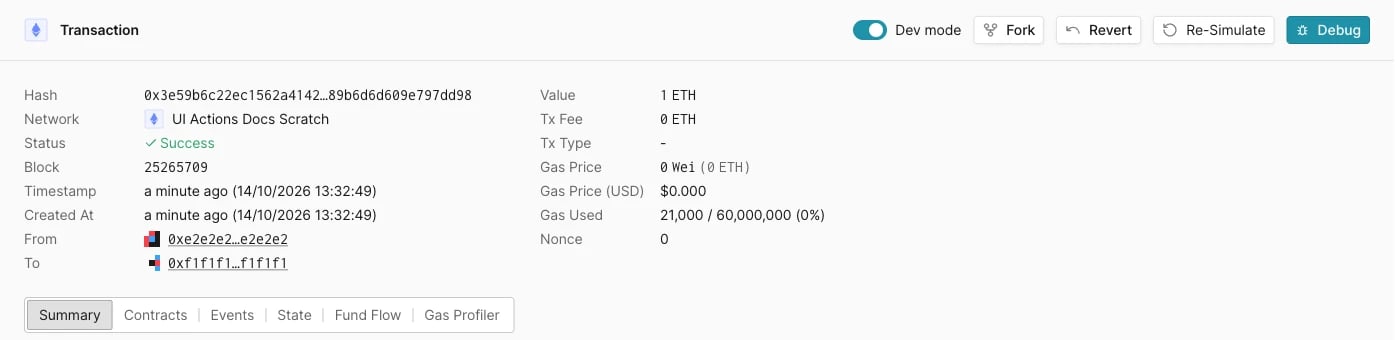 | Action | यह क्या करता है |
| - | - |
| **Dev mode** | On: **Summary**, **Contracts**, **Events**, **State**, **Fund Flow**, और **Gas Profiler** tabs और call trace दिखाता है। Off: केवल transaction details और asset transfers दिखाता है। |
| **Fork** | एक नया Virtual Environment बनाता है जिसमें इस transaction तक के (इसे शामिल करते हुए) transactions होते हैं। देखें [ऐतिहासिक block पर fork करें](/virtual-environments/develop/revert-state#fork-at-a-historical-block)। |
| **Revert** | केवल latest block वाले transaction पर दिखाई देता है। उस block और उसके state changes को हटाता है। देखें [Dashboard से latest block को revert करें](/virtual-environments/develop/revert-state#revert-the-latest-block-from-the-dashboard)। |
| **Re-Simulate** | Simulator को इस transaction के parameters से prefilled करके खोलता है। |
| **Debug** | Transaction को [Debugger](/virtual-environments/develop/debug-transactions) में खोलता है। |
## Settings
| Section | Option | यह क्या करता है |
| - | - | - |
| General | **Display Name** | Dashboard में दिखाया जाने वाला नाम। |
| Advanced | **Network mode** | Read-only: **Fork**, **State only sync**, या **Network mirror**। Mode निर्माण के समय सेट होता है। देखें [Network sync modes](/virtual-environments/overview#network-sync-modes)। |
| Advanced | **Bridge** | Cross-network bridge सक्षम करता है। देखें [Bridges](/virtual-environments/multichain/bridges)। |
| Advanced | **Public Explorer** और **Contract visibility** | Public explorer सक्षम करता है और सेट करता है कि यह contract source का कितना हिस्सा दिखाए। देखें [Explorer](/virtual-environments/explorer#public-explorer)। |
| Advanced | **Named RPC URL** | RPC URL से एक fixed नाम जोड़ता है। देखें [Named RPC URLs](/virtual-environments/named-rpc-urls)। |
| Advanced | **Region** | वह region जो RPC endpoints को serve करता है। |
| Danger Zone | **Delete** | Virtual Environment को हटाता है। |
बदलाव लागू करने के लिए **Advanced** section के नीचे वाले button पर क्लिक करें।
This documentation is built and hosted on [Mintlify](https://mintlify.com), a developer documentation platform.
| Action | यह क्या करता है |
| - | - |
| **Dev mode** | On: **Summary**, **Contracts**, **Events**, **State**, **Fund Flow**, और **Gas Profiler** tabs और call trace दिखाता है। Off: केवल transaction details और asset transfers दिखाता है। |
| **Fork** | एक नया Virtual Environment बनाता है जिसमें इस transaction तक के (इसे शामिल करते हुए) transactions होते हैं। देखें [ऐतिहासिक block पर fork करें](/virtual-environments/develop/revert-state#fork-at-a-historical-block)। |
| **Revert** | केवल latest block वाले transaction पर दिखाई देता है। उस block और उसके state changes को हटाता है। देखें [Dashboard से latest block को revert करें](/virtual-environments/develop/revert-state#revert-the-latest-block-from-the-dashboard)। |
| **Re-Simulate** | Simulator को इस transaction के parameters से prefilled करके खोलता है। |
| **Debug** | Transaction को [Debugger](/virtual-environments/develop/debug-transactions) में खोलता है। |
## Settings
| Section | Option | यह क्या करता है |
| - | - | - |
| General | **Display Name** | Dashboard में दिखाया जाने वाला नाम। |
| Advanced | **Network mode** | Read-only: **Fork**, **State only sync**, या **Network mirror**। Mode निर्माण के समय सेट होता है। देखें [Network sync modes](/virtual-environments/overview#network-sync-modes)। |
| Advanced | **Bridge** | Cross-network bridge सक्षम करता है। देखें [Bridges](/virtual-environments/multichain/bridges)। |
| Advanced | **Public Explorer** और **Contract visibility** | Public explorer सक्षम करता है और सेट करता है कि यह contract source का कितना हिस्सा दिखाए। देखें [Explorer](/virtual-environments/explorer#public-explorer)। |
| Advanced | **Named RPC URL** | RPC URL से एक fixed नाम जोड़ता है। देखें [Named RPC URLs](/virtual-environments/named-rpc-urls)। |
| Advanced | **Region** | वह region जो RPC endpoints को serve करता है। |
| Danger Zone | **Delete** | Virtual Environment को हटाता है। |
बदलाव लागू करने के लिए **Advanced** section के नीचे वाले button पर क्लिक करें।
This documentation is built and hosted on [Mintlify](https://mintlify.com), a developer documentation platform.