> ## Documentation Index
> Fetch the complete documentation index at: https://docs.tenderly.co/llms.txt
> Use this file to discover all available pages before exploring further.
# Action Functions, Events, and Triggers
> Explore Web3 Actions core elements, configure triggers for supported events, and link triggers to action functions in tenderly.yaml.
This guide presents the three core concepts of Web3 Actions: **triggers, events, and functions**. You’ll learn how they work and how to use them to build your own Web3 Actions.
The three core components that make up a Web3 Action are:
* **Functions:** Custom JavaScript or TypeScript code you want to execute when an external event occurs. This is the core of your automation.
* **Triggers:** Pre-defined external events that your Web3 Action is configured to listen for. When the event occurs, the trigger instructs Tenderly to execute your custom code (function).
* **Events (Trigger Types):** Pre-defined external events that you can listen for by setting a trigger. When the event occurs, the trigger will call your custom code (functions).
### Execution Types
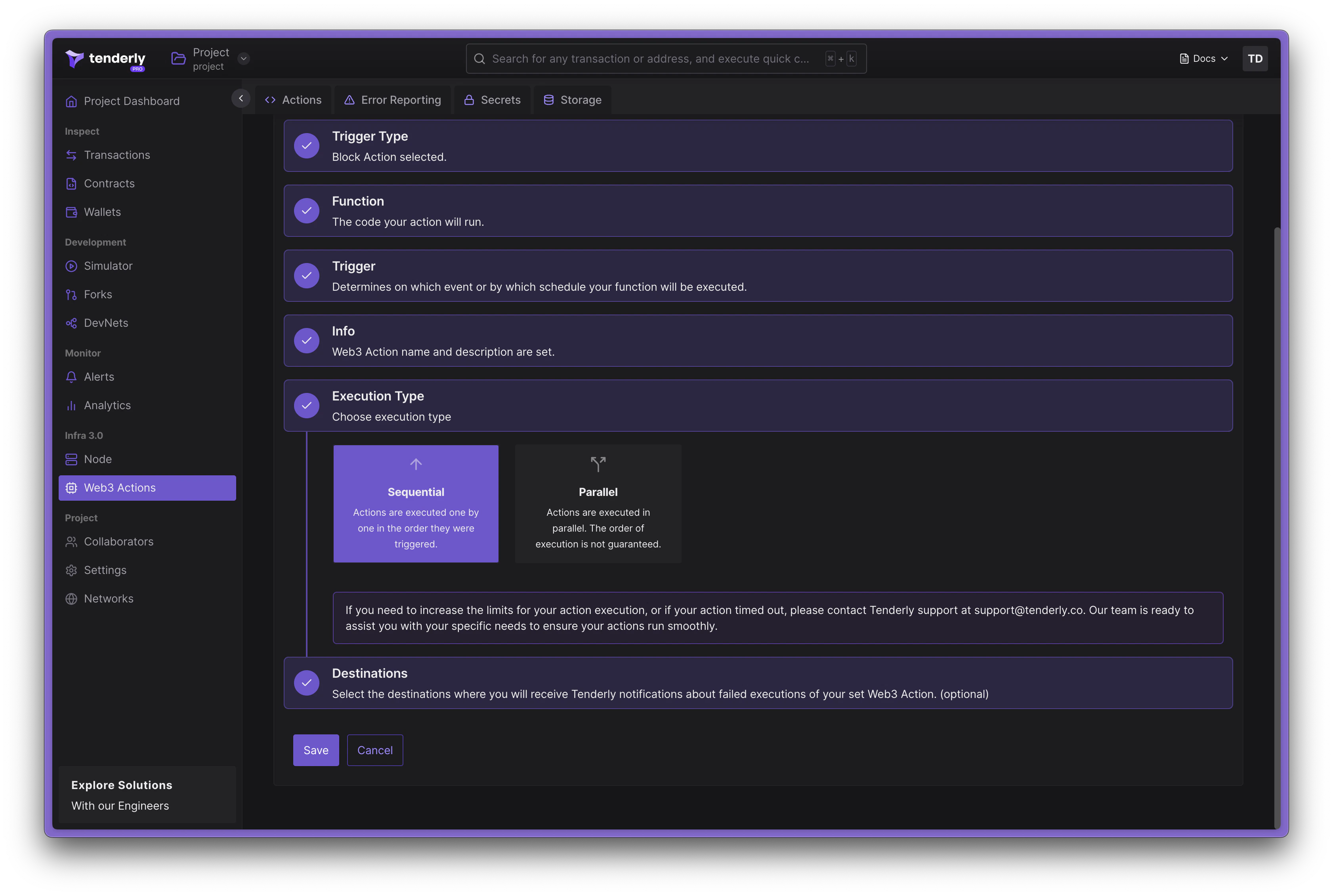
Web3 Actions in Tenderly can be executed in two modes: **Sequential** and **Parallel**.
`execution_type` only applies to **block** and **transaction** triggers. **Periodic** and **webhook** triggers always run in parallel, and any `execution_type` set on them is ignored.
 #### Sequential Execution
In sequential execution, actions are executed one by one in the order they were invoked. This is the default mode of execution. In this mode, each action waits for the previous action to complete before it begins execution. Here's an example of an action configuration for a sequential execution:
```diff title="example" showLineNumbers theme={"theme":{"light":"catppuccin-latte","dark":"catppuccin-mocha"}}
our-org/our-cool-project:
runtime: v2
sources: actions
specs:
bestActionEver:
description: Does the best thing ever
+ execution_type: sequential
function: very/organized/file:bestActionEver
trigger:
...
```
#### Parallel Execution
In parallel execution, actions are executed in parallel, which leads to higher throughput. In this mode, the order of execution is not guaranteed and there may be possible race conditions with [action storage](/monitoring/web3-actions/references/context#storage). Here's an example of an action configuration for a parallel execution:
```diff title="example" showLineNumbers theme={"theme":{"light":"catppuccin-latte","dark":"catppuccin-mocha"}}
our-org/our-cool-project:
runtime: v2
sources: actions
specs:
bestActionEver:
description: Does the best thing ever
+ execution_type: parallel
function: very/organized/file:bestActionEver
trigger:
...
```
### Action functions
Web3 Action functions refer to the custom code written as standard JavaScript or TypeScript functions, but they must adhere to some rules.
* Functions must be asynchronous, returning `Promise`
* Functions accept two parameters: `context` and `event`
* Functions must be a named export from the file
* Functions can be placed in any file under the *actions root* directory
Learn about the [Web3 Actions project and file structure](/monitoring/web3-actions/references/project-structure).
When a Web3 Action function is deployed, the Tenderly runtime will pass the following arguments during invocation:
* The `context` parameter that holds access to [Storage and Secrets](/monitoring/web3-actions/references/context).
* The `event` parameter that is an object with information answering the question *“what just happened?*”. This parameter contains data specific to the trigger type the Web3 Action function is listening for. The section [Specifying triggers for external events](/monitoring/web3-actions/references/functions-events-triggers#specifying-triggers-for-external-events) goes into detail about external events.
The execution of Web3 Action functions is limited to 30 seconds. If your function takes longer
than 30 seconds to execute, it will be terminated.
Here’s an example of a Web3 Action function written in TypeScript. The `event` parameter can be any one of the supported trigger types (events).
```typescript title="example.ts" showLineNumbers theme={"theme":{"light":"catppuccin-latte","dark":"catppuccin-mocha"}}
// File: actions/myCoolTsFile.ts
// importing ethers available in Tenderly Runtime
export const awesomeActionFunction: ActionFn = async (context: Context, event: Event) => {
// cast the event parameter to an appropriate type, based on the Trigger
// this function subscribed to.
// Of course, only one of these casts makes sense
const blockEvent = event as BlockEvent;
const periodicEvent = event as PeriodicEvent;
const transactionEvent = event as TransactionEvent;
const webhookEvent = event as WebhookEvent;
...
}
```
#### Available libraries for dashboard-based actions
The Tenderly runtime comes pre-bundled with several javascript libraries that you can import when creating Web3 Actions via the Tenderly Dashboard. Available libraries include:
* [Ethers.js](https://docs.ethers.io/v5/)
* [Bignumber.js](https://mikemcl.github.io/bignumber.js/)
* [Axios](https://axios-http.com/docs/intro)
* [Luxon](https://moment.github.io/luxon/#/?id=luxon)
To import any of these libraries, use the `require()` function as you would with a standard npm-based project (without ES6).
Example import for Axios looks like this:
```jsx title="example.jsx" showLineNumbers theme={"theme":{"light":"catppuccin-latte","dark":"catppuccin-mocha"}}
const axios = require('axios');
```
#### Using npm libraries for CLI-based Web3 Actions
The project created by Tenderly CLI is in fact an npm module. You can install any npm package from your *actions root* folder.
### External events and trigger types
When an external event happens, it *triggers the execution of your custom code* (functions). You can choose between four external events to listen for:
* **Block event**: A block is mined on a selected network.
* **Periodic event:** This trigger happens when certain time intervals pass or based on CRON expressions.
* **Webhook event:** An HTTP request is posted to the webhook URL (the Web3 Action exposes a webhook)
* **Transaction event:** A transaction matching given filter criteria is executed on a selected network.
When defining a Web3 Action, you'll be effectively defining triggers that react to external events of interest for your project. In the context of trigger specification, we'll be using the term **trigger type**.
You should write separate functions for each trigger type. Using the same function for different
trigger types is not recommended.
### Subscribing Web3 Action functions to events
In addition to defining your action function in JavaScript, you also need to provide the trigger configuration, which tells Tenderly **what triggers it, the external event your function subscribes to.**
When creating Web3 Actions via the Tenderly Dashboard, the creation flow in the UI will handle this part for you. Read the [Dashboard Quickstart](/monitoring/web3-actions/tutorials/deploy-via-dashboard) guide.
When working with code-based Web3 Actions, functions and their triggers must be defined in the `tenderly.yaml` file, which is generated by Tenderly CLI. Read the [CLI Quickstart](/monitoring/web3-actions/tutorials/deploy-via-cli) guide.
**Example**
In the example below, we’re declaring a Web3 Action called **bestActionEver** and referencing the function **awesomeActionFunction** that is exported from the **actions/myCoolTsFile.ts** file. This is the function that Tenderly will call when the Web3 Action gets triggered. The execution is controlled via **`execution_type`**, in this case it's set to `parallel`.
```yaml title="tenderly.yaml" showLineNumbers theme={"theme":{"light":"catppuccin-latte","dark":"catppuccin-mocha"}}
account_id: ""
actions:
our-cool-org/our-cool-project:
runtime: v1
sources: actions
specs:
bestActionEver:
execution_type: parallel # or sequential
description: Does the best thing ever
function: myCoolTsFile:awesomeActionFunction
trigger: # trigger declaration start
type: ... # type
... # configuration map (external event specific)
```
### Specifying triggers for external events
In this section, we’ll examine the `trigger` declaration. For more information on writing tenderly.yaml file, reference [this guide](/monitoring/web3-actions/references/project-structure#the-tenderlyyaml-file-structure).
The trigger type and corresponding configurations are defined in the **tenderly.yaml** file. You first must define the `trigger` object, which has two mandatory properties:
* The `type` property, that specifies the trigger type, which can be: `periodic | webhook | block | transaction`
* An object with a configuration specific to the selected trigger type
Below is a detailed explanation of the trigger-specific configurations for each trigger type.
### Periodic event
A periodic event is used when you want your Web3 Action to be triggered at specific time intervals. It carries **time**: the time of invocation.
```typescript title="example.ts" showLineNumbers theme={"theme":{"light":"catppuccin-latte","dark":"catppuccin-mocha"}}
type PeriodicEvent = {
time: Date;
};
```
The trigger declaration has the `periodic` type. It can be interval- or cron-based:
```yaml title="trigger.yaml" showLineNumbers theme={"theme":{"light":"catppuccin-latte","dark":"catppuccin-mocha"}}
trigger:
type: periodic
periodic:
interval: 5m
```
The `interval` property can take any of the following values: `5m | 10m | 15m | 30m | 1h | 3h | 6h | 12h | 1d`
Use the CRON-based periodic trigger if you need more granular control over when your Web3 Action gets executed:
```yaml title="trigger.yaml" showLineNumbers theme={"theme":{"light":"catppuccin-latte","dark":"catppuccin-mocha"}}
trigger:
type: periodic
periodic:
cron: '5 */1 * * *'
```
The `cron` property can be any valid [CRON string](https://crontab.guru/).
### Webhook event
Webhook-based Web3 Actions expose a custom webhook URL, making it possible to trigger them from external systems using a simple HTTP POST request.
The corresponding trigger type holds two properties: the **time** of invocation and any **payload** (a JSON object). Tenderly doesn't perform any validation or inspections on your payload.
```typescript title="example.ts" showLineNumbers theme={"theme":{"light":"catppuccin-latte","dark":"catppuccin-mocha"}}
type WebhookEvent = {
time: Date;
payload: any;
};
```
A trigger configuration example:
```yaml title="webhook-trigger.yaml" showLineNumbers theme={"theme":{"light":"catppuccin-latte","dark":"catppuccin-mocha"}}
trigger:
type: webhook
webhook:
authenticated: true
```
If `authenticated` is set to **true**, you must include the Tenderly Access Token with your request to be able to run the Web3 Action as the value of `x-access-key`. You can find the cURL of the exposed webhook in the Web3 Action overview in the Tenderly Dashboard.
```bash title="example" showLineNumbers theme={"theme":{"light":"catppuccin-latte","dark":"catppuccin-mocha"}}
curl -X POST \
-H "x-access-key: $ACCESS_TOKEN" \
-H "Content-Type: application/json" \
https://api.tenderly.co/api/v1/actions/7acc7db2-00d6-4872-b2d2-d9430bd8fe7b/webhook \
-d '{"foo": "bar"}'
```
### Block event
The block event is used when you want to listen for the mining of blocks on one or several networks. You can make your Web3 Action "block-periodic" by specifying the number of mined blocks between two consecutive invocations.
```typescript title="example.ts" showLineNumbers theme={"theme":{"light":"catppuccin-latte","dark":"catppuccin-mocha"}}
type BlockEvent = {
blockHash: string;
blockNumber: number;
network: string;
};
```
When declaring the block trigger, you can specify the following properties:
* `network`: a single value or a list of [network IDs](/monitoring/web3-actions/references/functions-events-triggers) you’re interested in
* `blocks`: the number of mined blocks between two consecutive executions of the Web3 Action. For example, execute the Web3 Action on every 100th block mined.
```yaml title="block-trigger.yaml" showLineNumbers theme={"theme":{"light":"catppuccin-latte","dark":"catppuccin-mocha"}}
trigger:
type: block
block:
network:
- 1
- 8453
blocks: 100
```
### Transaction event
The transaction trigger type allows you to listen for specific transactions as they get executed on-chain.
To listen for transactions from a smart contract, the smart contract must be verified and added to
your project in the Tenderly Dashboard. The CLI will throw a warning if this is not the case.
You can specify different conditions in the form of **filters** to zero in on transactions of interest. Your custom code will be invoked with that exact transaction payload passed through the `event` parameter.
```typescript title="example.ts" showLineNumbers theme={"theme":{"light":"catppuccin-latte","dark":"catppuccin-mocha"}}
type TransactionEvent = {
blockHash: string;
blockNumber: number;
from: string;
hash: string;
network: string;
to?: string;
logs: Array<{
address: string;
data: string;
topics: string[];
}>;
input: string;
value: string;
nonce: string;
gas: string;
gasUsed: string;
cumulativeGasUsed: string;
gasPrice: string;
gasTipCap: string;
gasFeeCap: string;
transactionHash: string;
};
```
When listening for transaction events, you can also specify the following settings:
* **Transaction mining status**: `mined` (the transaction has been mined) or `confirmed10` (10 blocks are confirmed since the block that contains the transaction)
* **Filters:** A list of conditions involving transaction payload using the `filters` list. Only transactions that match filters will trigger the execution of your code.
#### Filtering transactions
The `filters` list allows you to define triggering criteria using transaction properties to match specific transactions.
Each filter in the list is an object where **all fields are AND-ed together**. Every condition in the filter must be true for it to match. The `filters` list itself is **OR-ed**: a transaction matches if it satisfies **any single filter** in the list.
```python theme={"theme":{"light":"catppuccin-latte","dark":"catppuccin-mocha"}}
match = anyOf(
(network AND status AND from AND eventEmitted), # Filter 1
(network AND to) # Filter 2
)
```
Below is a list of all available filters you can combine to build criteria for transactions that will trigger the execution of your Web3 Action.
#### Sequential Execution
In sequential execution, actions are executed one by one in the order they were invoked. This is the default mode of execution. In this mode, each action waits for the previous action to complete before it begins execution. Here's an example of an action configuration for a sequential execution:
```diff title="example" showLineNumbers theme={"theme":{"light":"catppuccin-latte","dark":"catppuccin-mocha"}}
our-org/our-cool-project:
runtime: v2
sources: actions
specs:
bestActionEver:
description: Does the best thing ever
+ execution_type: sequential
function: very/organized/file:bestActionEver
trigger:
...
```
#### Parallel Execution
In parallel execution, actions are executed in parallel, which leads to higher throughput. In this mode, the order of execution is not guaranteed and there may be possible race conditions with [action storage](/monitoring/web3-actions/references/context#storage). Here's an example of an action configuration for a parallel execution:
```diff title="example" showLineNumbers theme={"theme":{"light":"catppuccin-latte","dark":"catppuccin-mocha"}}
our-org/our-cool-project:
runtime: v2
sources: actions
specs:
bestActionEver:
description: Does the best thing ever
+ execution_type: parallel
function: very/organized/file:bestActionEver
trigger:
...
```
### Action functions
Web3 Action functions refer to the custom code written as standard JavaScript or TypeScript functions, but they must adhere to some rules.
* Functions must be asynchronous, returning `Promise`
* Functions accept two parameters: `context` and `event`
* Functions must be a named export from the file
* Functions can be placed in any file under the *actions root* directory
Learn about the [Web3 Actions project and file structure](/monitoring/web3-actions/references/project-structure).
When a Web3 Action function is deployed, the Tenderly runtime will pass the following arguments during invocation:
* The `context` parameter that holds access to [Storage and Secrets](/monitoring/web3-actions/references/context).
* The `event` parameter that is an object with information answering the question *“what just happened?*”. This parameter contains data specific to the trigger type the Web3 Action function is listening for. The section [Specifying triggers for external events](/monitoring/web3-actions/references/functions-events-triggers#specifying-triggers-for-external-events) goes into detail about external events.
The execution of Web3 Action functions is limited to 30 seconds. If your function takes longer
than 30 seconds to execute, it will be terminated.
Here’s an example of a Web3 Action function written in TypeScript. The `event` parameter can be any one of the supported trigger types (events).
```typescript title="example.ts" showLineNumbers theme={"theme":{"light":"catppuccin-latte","dark":"catppuccin-mocha"}}
// File: actions/myCoolTsFile.ts
// importing ethers available in Tenderly Runtime
export const awesomeActionFunction: ActionFn = async (context: Context, event: Event) => {
// cast the event parameter to an appropriate type, based on the Trigger
// this function subscribed to.
// Of course, only one of these casts makes sense
const blockEvent = event as BlockEvent;
const periodicEvent = event as PeriodicEvent;
const transactionEvent = event as TransactionEvent;
const webhookEvent = event as WebhookEvent;
...
}
```
#### Available libraries for dashboard-based actions
The Tenderly runtime comes pre-bundled with several javascript libraries that you can import when creating Web3 Actions via the Tenderly Dashboard. Available libraries include:
* [Ethers.js](https://docs.ethers.io/v5/)
* [Bignumber.js](https://mikemcl.github.io/bignumber.js/)
* [Axios](https://axios-http.com/docs/intro)
* [Luxon](https://moment.github.io/luxon/#/?id=luxon)
To import any of these libraries, use the `require()` function as you would with a standard npm-based project (without ES6).
Example import for Axios looks like this:
```jsx title="example.jsx" showLineNumbers theme={"theme":{"light":"catppuccin-latte","dark":"catppuccin-mocha"}}
const axios = require('axios');
```
#### Using npm libraries for CLI-based Web3 Actions
The project created by Tenderly CLI is in fact an npm module. You can install any npm package from your *actions root* folder.
### External events and trigger types
When an external event happens, it *triggers the execution of your custom code* (functions). You can choose between four external events to listen for:
* **Block event**: A block is mined on a selected network.
* **Periodic event:** This trigger happens when certain time intervals pass or based on CRON expressions.
* **Webhook event:** An HTTP request is posted to the webhook URL (the Web3 Action exposes a webhook)
* **Transaction event:** A transaction matching given filter criteria is executed on a selected network.
When defining a Web3 Action, you'll be effectively defining triggers that react to external events of interest for your project. In the context of trigger specification, we'll be using the term **trigger type**.
You should write separate functions for each trigger type. Using the same function for different
trigger types is not recommended.
### Subscribing Web3 Action functions to events
In addition to defining your action function in JavaScript, you also need to provide the trigger configuration, which tells Tenderly **what triggers it, the external event your function subscribes to.**
When creating Web3 Actions via the Tenderly Dashboard, the creation flow in the UI will handle this part for you. Read the [Dashboard Quickstart](/monitoring/web3-actions/tutorials/deploy-via-dashboard) guide.
When working with code-based Web3 Actions, functions and their triggers must be defined in the `tenderly.yaml` file, which is generated by Tenderly CLI. Read the [CLI Quickstart](/monitoring/web3-actions/tutorials/deploy-via-cli) guide.
**Example**
In the example below, we’re declaring a Web3 Action called **bestActionEver** and referencing the function **awesomeActionFunction** that is exported from the **actions/myCoolTsFile.ts** file. This is the function that Tenderly will call when the Web3 Action gets triggered. The execution is controlled via **`execution_type`**, in this case it's set to `parallel`.
```yaml title="tenderly.yaml" showLineNumbers theme={"theme":{"light":"catppuccin-latte","dark":"catppuccin-mocha"}}
account_id: ""
actions:
our-cool-org/our-cool-project:
runtime: v1
sources: actions
specs:
bestActionEver:
execution_type: parallel # or sequential
description: Does the best thing ever
function: myCoolTsFile:awesomeActionFunction
trigger: # trigger declaration start
type: ... # type
... # configuration map (external event specific)
```
### Specifying triggers for external events
In this section, we’ll examine the `trigger` declaration. For more information on writing tenderly.yaml file, reference [this guide](/monitoring/web3-actions/references/project-structure#the-tenderlyyaml-file-structure).
The trigger type and corresponding configurations are defined in the **tenderly.yaml** file. You first must define the `trigger` object, which has two mandatory properties:
* The `type` property, that specifies the trigger type, which can be: `periodic | webhook | block | transaction`
* An object with a configuration specific to the selected trigger type
Below is a detailed explanation of the trigger-specific configurations for each trigger type.
### Periodic event
A periodic event is used when you want your Web3 Action to be triggered at specific time intervals. It carries **time**: the time of invocation.
```typescript title="example.ts" showLineNumbers theme={"theme":{"light":"catppuccin-latte","dark":"catppuccin-mocha"}}
type PeriodicEvent = {
time: Date;
};
```
The trigger declaration has the `periodic` type. It can be interval- or cron-based:
```yaml title="trigger.yaml" showLineNumbers theme={"theme":{"light":"catppuccin-latte","dark":"catppuccin-mocha"}}
trigger:
type: periodic
periodic:
interval: 5m
```
The `interval` property can take any of the following values: `5m | 10m | 15m | 30m | 1h | 3h | 6h | 12h | 1d`
Use the CRON-based periodic trigger if you need more granular control over when your Web3 Action gets executed:
```yaml title="trigger.yaml" showLineNumbers theme={"theme":{"light":"catppuccin-latte","dark":"catppuccin-mocha"}}
trigger:
type: periodic
periodic:
cron: '5 */1 * * *'
```
The `cron` property can be any valid [CRON string](https://crontab.guru/).
### Webhook event
Webhook-based Web3 Actions expose a custom webhook URL, making it possible to trigger them from external systems using a simple HTTP POST request.
The corresponding trigger type holds two properties: the **time** of invocation and any **payload** (a JSON object). Tenderly doesn't perform any validation or inspections on your payload.
```typescript title="example.ts" showLineNumbers theme={"theme":{"light":"catppuccin-latte","dark":"catppuccin-mocha"}}
type WebhookEvent = {
time: Date;
payload: any;
};
```
A trigger configuration example:
```yaml title="webhook-trigger.yaml" showLineNumbers theme={"theme":{"light":"catppuccin-latte","dark":"catppuccin-mocha"}}
trigger:
type: webhook
webhook:
authenticated: true
```
If `authenticated` is set to **true**, you must include the Tenderly Access Token with your request to be able to run the Web3 Action as the value of `x-access-key`. You can find the cURL of the exposed webhook in the Web3 Action overview in the Tenderly Dashboard.
```bash title="example" showLineNumbers theme={"theme":{"light":"catppuccin-latte","dark":"catppuccin-mocha"}}
curl -X POST \
-H "x-access-key: $ACCESS_TOKEN" \
-H "Content-Type: application/json" \
https://api.tenderly.co/api/v1/actions/7acc7db2-00d6-4872-b2d2-d9430bd8fe7b/webhook \
-d '{"foo": "bar"}'
```
### Block event
The block event is used when you want to listen for the mining of blocks on one or several networks. You can make your Web3 Action "block-periodic" by specifying the number of mined blocks between two consecutive invocations.
```typescript title="example.ts" showLineNumbers theme={"theme":{"light":"catppuccin-latte","dark":"catppuccin-mocha"}}
type BlockEvent = {
blockHash: string;
blockNumber: number;
network: string;
};
```
When declaring the block trigger, you can specify the following properties:
* `network`: a single value or a list of [network IDs](/monitoring/web3-actions/references/functions-events-triggers) you’re interested in
* `blocks`: the number of mined blocks between two consecutive executions of the Web3 Action. For example, execute the Web3 Action on every 100th block mined.
```yaml title="block-trigger.yaml" showLineNumbers theme={"theme":{"light":"catppuccin-latte","dark":"catppuccin-mocha"}}
trigger:
type: block
block:
network:
- 1
- 8453
blocks: 100
```
### Transaction event
The transaction trigger type allows you to listen for specific transactions as they get executed on-chain.
To listen for transactions from a smart contract, the smart contract must be verified and added to
your project in the Tenderly Dashboard. The CLI will throw a warning if this is not the case.
You can specify different conditions in the form of **filters** to zero in on transactions of interest. Your custom code will be invoked with that exact transaction payload passed through the `event` parameter.
```typescript title="example.ts" showLineNumbers theme={"theme":{"light":"catppuccin-latte","dark":"catppuccin-mocha"}}
type TransactionEvent = {
blockHash: string;
blockNumber: number;
from: string;
hash: string;
network: string;
to?: string;
logs: Array<{
address: string;
data: string;
topics: string[];
}>;
input: string;
value: string;
nonce: string;
gas: string;
gasUsed: string;
cumulativeGasUsed: string;
gasPrice: string;
gasTipCap: string;
gasFeeCap: string;
transactionHash: string;
};
```
When listening for transaction events, you can also specify the following settings:
* **Transaction mining status**: `mined` (the transaction has been mined) or `confirmed10` (10 blocks are confirmed since the block that contains the transaction)
* **Filters:** A list of conditions involving transaction payload using the `filters` list. Only transactions that match filters will trigger the execution of your code.
#### Filtering transactions
The `filters` list allows you to define triggering criteria using transaction properties to match specific transactions.
Each filter in the list is an object where **all fields are AND-ed together**. Every condition in the filter must be true for it to match. The `filters` list itself is **OR-ed**: a transaction matches if it satisfies **any single filter** in the list.
```python theme={"theme":{"light":"catppuccin-latte","dark":"catppuccin-mocha"}}
match = anyOf(
(network AND status AND from AND eventEmitted), # Filter 1
(network AND to) # Filter 2
)
```
Below is a list of all available filters you can combine to build criteria for transactions that will trigger the execution of your Web3 Action.
| Filter | Description |
| -------------------------------------------------------------- | -------------------------------------------------------------------------------------------------------------------------------------- |
| \*mandatory / \*\*at least one of these must be present
| |
| network\* | The network ID from which the transaction originated |
| status | The transaction status: fail or success |
| from\*\* | The address of the transaction originator |
| to\*\* | The address of the transaction recipient |
| eventEmitted\*\* | An event of a specific type, emitted by a particular contract |
| logEmitted\*\* | Logs emitted by a particular contract, by matching the prefix of the raw log entry |
| function\*\* | Direct call to the given function. Not applicable to internal calls between the contracts |
| ethBalance\*\* | An account or contract whose ETH balance meets a numeric condition at transaction time |
| stateChanged\*\* | A contract whose on-chain state variable changed during the transaction, with optional value/percentage conditions |
| value | The value that is transferred within the transaction in wei |
| gasUsed | The amount of gas used by the transaction in wei |
| gasLimit | The gas limit set for the transaction in wei |
| fee | The transaction fee in wei |
| contract | A smart contract involved in the transaction (see contract filter) |
A trigger must contain `network` and at least one of the following filters: `from`, `to`,
`function`, `eventEmitted`, `logEmitted`, `ethBalance`, or `stateChanged`
An **example** of a transaction on Ethereum mainnet or Base sent to `0x236..fd62`.
```yaml title="transaction-trigger.yaml" showLineNumbers theme={"theme":{"light":"catppuccin-latte","dark":"catppuccin-mocha"}}
failedTransactionToMyContract:
execution_type: parallel
description: When sent to my contract fails
function: observingTransactions:failedAttempts
trigger:
type: transaction
transaction:
status:
- mined
filters:
# Transaction must be from Ethereum mainnet
- network: 1
# Transaction must have failed
status: fail
# Transaction must have been sent to this address
to: 0x2364259ACD20Bd2A8dEfDc628f4099302449fd62
# Or from Base
- network: 8453
# Transaction must have failed
status: fail
# Transaction must have been sent to this address
to: 0x2364259ACD20Bd2A8dEfDc628f4099302449fd62
```
In this case, we're interested only in transactions that are mined, matching either of these two filters:
* **Filter 1**: network 1 (Ethereum) AND status fail AND to `0x2364...fd62`
* **Filter 2**: network 8453 (Base) AND status fail AND to `0x2364...fd62`
Since we didn't filter by any particular sender, all transactions coming to the mentioned recipient will result in the Web3 Action being triggered.
#### Filtering transactions by transaction fields
Among the common transaction fields, you can filter by the following properties having specific values.
* `from` - filtering on a specific sender. Can be a single address or a list of addresses (OR-ed). Optional.
* `to` - filtering on a specific receiver. Can be a single address or a list of addresses (OR-ed). Optional.
* `status` - filtering on transaction status: `success` or `fail`. Can be a single value or a list (OR-ed). Optional.
* `network` - filtering by network. Can be a single chain ID or a list of chain IDs (OR-ed). Mandatory.
* `contract.address` - filtering only transactions involving the contract with this specific address. Optional.
All address fields must be 0x-prefixed, 40 hex characters (e.g. `0xf63c48626f874bf5604D3Ba9f4A85d5cE58f8019`).
```yaml title="list-fields.yaml" showLineNumbers theme={"theme":{"light":"catppuccin-latte","dark":"catppuccin-mocha"}}
filters:
- network: # list of networks (OR-ed)
- 1
- 8453
status: # list of statuses (OR-ed)
- success
- fail
from: # list of sender addresses (OR-ed)
- 0x7ebB3Dca1C281b23D5B73175f10cA5A0a309B01F
- 0xD3a02149A236b2547Cc3C897Fb41C1a962f881AE
to: # list of recipient addresses (OR-ed)
- 0x003b3625cDcb5958E9709F4Ba8E340Cb0783DeaE
- 0x26997bd8473E0Dd0b37eB1711B7c1eE2354d78e4
```
You can also query numerics related to exchanged value and gas, using relational operators. All of the following are in **wei**:
* `value`
* `gasUsed`
* `gasLimit`
* `fee`
Numeric fields accept either a single comparison object or a list of comparison objects. When a list is provided, comparisons are OR-ed. Within a single comparison object, all operators are AND-ed.
You can use any of the common comparison operators: `eq`, `gte`, `gt`, `lt`, `lte`. You can also use the `not` boolean flag to negate a comparison.
| Operator | Meaning |
| -------- | ------------------------------------------------------------------------------------------- |
| `eq` | Equal to |
| `gt` | Greater than |
| `gte` | Greater than or equal to |
| `lt` | Less than |
| `lte` | Less than or equal to |
| `not` | Boolean. Set to `true` to negate the comparison (e.g. match when value is **not** in range) |
Below is an example of a filter demonstrating filters using scalar values in the transaction payload.
```yaml title="numeric-filters.yaml" showLineNumbers theme={"theme":{"light":"catppuccin-latte","dark":"catppuccin-mocha"}}
filters:
- network: 1
to: 0x003b3625cDcb5958E9709F4Ba8E340Cb0783DeaE
# Single comparison object (operators AND-ed within)
value:
gte: 100
lte: 1000
# List of comparison objects (OR-ed between entries)
gasLimit:
- lt: 100
- gt: 1000
gasUsed:
eq: 9999
fee:
- lte: 100
- gte: 1000
```
Using the `not` flag to negate a comparison:
```yaml title="negated-comparison.yaml" showLineNumbers theme={"theme":{"light":"catppuccin-latte","dark":"catppuccin-mocha"}}
filters:
- network: 1
to: 0x003b3625cDcb5958E9709F4Ba8E340Cb0783DeaE
# Matches when value is NOT between 100 and 1000
value:
gte: 100
lte: 1000
not: true
```
#### Filtering transactions using emitted EVM Events
Configuring Web3 Actions to listen for EVM events emitted by a transaction execution allows you to respond to significant changes logged by these events. You can achieve this by using the `eventEmitted` operator, which supports the following nested properties:
* `contract` (mandatory): To specify the origin of the event.
* `contract.address`: The address of the contract that emitted the event.
* `contract.invocation`: Controls how the contract was called: `direct`, `internal`, or `any` (default). See [contract filter](#filtering-transactions-involving-a-specific-contract) for details.
* `name`: The name of the event (requires a verified contract).
* `id`: The topic hash of the event signature (alternative to `name`). Useful for unverified contracts where the ABI is not available. For example, the `Transfer(address,address,uint256)` event has the topic hash `0xddf252ad1be2c89b69c2b068fc378daa952ba7f163c4a11628f55a4df523b3ef`.
* `not`: Boolean. Set to `true` to negate the entire event match, including parameters (trigger when the event is **not** emitted with the specified parameters).
* `parameters`: A list of conditions on decoded event argument values. All conditions are AND-ed: every condition must match. Each entry supports:
* `name` (required): The name of the event argument.
* `string`: String comparison. Accepts a plain string for exact match, or an object with `exact` and `not` fields. See [StringComparison](#shared-types) for details.
* `int`: Integer comparison. Supports the same operators as numeric filters (`eq`, `gt`, `gte`, `lt`, `lte`). All operators within a single `int` block are AND-ed. Use the `not` flag to negate the combined condition. See [IntComparison](#shared-types) for details.
There is no OR within a single `eventEmitted` entry's `parameters`. All conditions are AND-ed.
For OR logic on the same parameter, use multiple `eventEmitted` entries (which are OR-ed in the outer list).
To use the `eventEmitted` filter with `name` or `parameters`, the contract must be verified and added to the project in the
Tenderly Dashboard. Use `id` (topic hash) for unverified contracts.
For the complete field reference, see [EventFilter](#eventfilter-eventemitted).
Below is an example of a Web3 Action that will be invoked when either `TxSubmission` or `TxConfirmation` event is emitted when the smart contract is executed at the address `0x418d..9d45` on Sepolia.
```yaml title="event-emitted-filter.yaml" showLineNumbers theme={"theme":{"light":"catppuccin-latte","dark":"catppuccin-mocha"}}
txSubmittedOrConfirmed:
description: When any of TxSubmission and TxConfirmation is emitted
execution_type: parallel
function: myCoolJsFile:myCoolFunction
trigger:
type: transaction
transaction:
status:
- mined
filters:
- network: 11155111
eventEmitted:
contract:
address: 0x418ebb95eaa40c119408143056cad984c6129d45
name: TxSubmission
- network: 11155111
eventEmitted:
contract:
address: 0x418ebb95eaa40c119408143056cad984c6129d45
name: TxConfirmation
```
Here is an example filtering by decoded event parameters. All parameter conditions are AND-ed:
```yaml title="event-parameters.yaml" showLineNumbers theme={"theme":{"light":"catppuccin-latte","dark":"catppuccin-mocha"}}
filters:
- network: 8453
eventEmitted:
contract:
address: 0x833589fcd6edb6e08f4c7c32d4f71b54bda02913
name: Transfer
parameters:
- name: from
string: "0x8F362C3dd5301Ce1b43ea3A278E3f12c1807C271"
- name: value
int:
gte: 1000000 # >= 1 USDC (6 decimals)
```
Numeric range with negation on parameters:
```yaml title="negated-parameter.yaml" showLineNumbers theme={"theme":{"light":"catppuccin-latte","dark":"catppuccin-mocha"}}
filters:
- network: 1
eventEmitted:
contract:
address: 0x833589fcd6edb6e08f4c7c32d4f71b54bda02913
name: Transfer
parameters:
- name: value
int:
gte: 100
lte: 1000
not: true # matches when value < 100 OR value > 1000
```
For OR logic on parameters, use multiple `eventEmitted` entries:
```yaml title="event-parameter-or.yaml" showLineNumbers theme={"theme":{"light":"catppuccin-latte","dark":"catppuccin-mocha"}}
filters:
- network: 1
eventEmitted:
# Entry 1: value < 100
- contract:
address: 0x833589fcd6edb6e08f4c7c32d4f71b54bda02913
name: Transfer
parameters:
- name: value
int:
lt: 100
# Entry 2: value > 1000 (OR-ed with entry 1)
- contract:
address: 0x833589fcd6edb6e08f4c7c32d4f71b54bda02913
name: Transfer
parameters:
- name: value
int:
gt: 1000
```
Using `not` on the event itself to negate the entire match:
```yaml title="negated-event.yaml" showLineNumbers theme={"theme":{"light":"catppuccin-latte","dark":"catppuccin-mocha"}}
filters:
- network: 1
eventEmitted:
contract:
address: 0x833589fcd6edb6e08f4c7c32d4f71b54bda02913
name: Transfer
parameters:
- name: from
string: "0x0000000000000000000000000000000000000000"
not: true # matches when no Transfer event from the zero address is found
```
#### Filtering transactions by emitted logs
Another way to listen for EVM events is to query them by the log topic.
The `logEmitted` filter can be a single object or a list (entries are OR-ed). It supports the following properties:
* `startsWith` (mandatory): A list of topic values to match against the transaction’s log topics. Each entry is compared by exact equality (case-insensitive) to the corresponding topic. In practice these are full 32-byte topic hashes (0x-prefixed, 64 hex chars), but the field accepts any valid hex string.
* `contract.address` (optional): The source of the logs. When specified, only logs from this contract are matched.
* `matchAny`: Boolean. When `true`, matching **any single** topic from `startsWith` is sufficient. When `false` (default), all topics must match.
* `not`: Boolean. Set to `true` to negate the entire log match (trigger when the log is **not** emitted).
Using `logEmitted` enables you to use the event topic prefix in its raw form to filter for events.
This is useful if you’re setting up a Web3 Action on an unverified contract.
For the complete field reference, see [LogFilter](#logfilter-logemitted).
Below is an example of a Web3 Action that will be invoked when a transaction contains log entries starting with the given prefixes.
```yaml title="log-emitted-filter.yaml" showLineNumbers theme={"theme":{"light":"catppuccin-latte","dark":"catppuccin-mocha"}}
txEmittedSomeLogs:
description: When particular logs are emitted
function: observingTransactions:someLogsEmittedAction
execution_type: parallel
trigger:
type: transaction
transaction:
status:
- mined
filters:
- network: 11155111
logEmitted:
# Transaction must have emitted a log entry
contract:
address: 0x418ebb95eaa40c119408143056cad984c6129d45
startsWith:
# and topics of the log entry must start with either one of these
- 0xddf252ad1be2c89b69c2b068fc378daa952ba7f163c4a11628f55a4df523b3ef
- 0x0000000000000000000000000000000000000000000000000000000000000000
```
#### Filtering transactions involving a specific contract
To filter for transactions that call a specific contract during their execution, you can use the optional `contract` filter.
The `contract` filter supports the following properties:
* `address`: The address of the contract.
* `invocation`: Controls how the contract was called. Possible values:
* `direct`: the contract was called directly by the transaction sender (EOA). Use this when you only care about top-level calls to the contract.
* `internal`: the contract was called internally by another contract during execution (e.g. via `CALL`, `DELEGATECALL`, or `STATICCALL` opcodes). Use this to detect when your contract is invoked as part of a multi-contract interaction.
* `any`: matches both direct and internal calls. This is the default.
The `invocation` field is available wherever a `contract` object is used, including inside [`eventEmitted`](#filtering-transactions-using-emitted-evm-events) filters. For example, you can use `invocation: internal` on an `eventEmitted` contract to only match events emitted during internal calls. See [Contract](#shared-types) for the schema.
`invocation` is not supported on `logEmitted`. Only `contract.address` is used to restrict log matching; the invocation type is ignored.
In the example below, the first filter matches any successful transaction sent to `0x2364...fd62` on Sepolia. The second filter is more restrictive: only transactions that also involve an internal call to contract `0xad88...80d6` will trigger the Web3 Action.
```yaml title="contract-filter.yaml" showLineNumbers theme={"theme":{"light":"catppuccin-latte","dark":"catppuccin-mocha"}}
contractInvocationAction:
description: When my contract is called directly or internally
execution_type: parallel
function: observingTransactions:contractCalls
trigger:
type: transaction
transaction:
status:
- mined
filters:
# Any successful transaction sent to this address
- network: 11155111
status: success
to: 0x2364259ACD20Bd2A8dEfDc628f4099302449fd62
# Only transactions that internally call this contract
- network: 11155111
status: success
to: 0x2364259ACD20Bd2A8dEfDc628f4099302449fd62
contract:
address: 0xad881d3d06c7f168715b84b54f9d3e1ff27b80d6
invocation: internal
```
#### Filtering transactions by function call
To filter for transactions that directly call a specific function, you can use the optional `function` filter. It requires the address of the contract `contract.address` and either the `name` or `signature` of the function.
The `function` filter supports the following properties:
* `contract` (mandatory): To specify the target contract.
* `contract.address`: The address of the contract being called.
* `contract.invocation`: Controls how the function must be called: `any` (default, both direct and internal), `direct` (EOA-initiated only), or `internal` (sub-calls only). See [contract filter](#filtering-transactions-involving-a-specific-contract) for details.
* `name`: The name of the function (requires a verified contract).
* `signature`: The 4-byte function selector (e.g. `0xa9059cbb`). Useful for unverified contracts where the ABI is not available.
* `not`: Boolean. Set to `true` to negate the entire function match, including parameters (trigger when the function is **not** called with the specified parameters).
* `parameters`: A list of conditions on decoded function input argument values. All conditions are AND-ed: every condition must match. Each entry supports:
* `name` (required): The name of the function argument.
* `string`: String comparison. Accepts a plain string for exact match, or an object with `exact` and `not` fields. See [StringComparison](#shared-types) for details.
* `int`: Integer comparison. Supports the same operators as numeric filters (`eq`, `gt`, `gte`, `lt`, `lte`). All operators within a single `int` block are AND-ed. Use the `not` flag to negate the combined condition. See [IntComparison](#shared-types) for details.
There is no OR within a single `function` entry’s `parameters`. All conditions are AND-ed.
For OR logic on the same parameter, use multiple `function` entries (which are OR-ed in the outer list).
To use the `function` filter with `name` or `parameters`, the contract must be verified and added to the project in the
Tenderly Dashboard. Use `signature` (4-byte selector) for unverified contracts.
You can specify `function` as a single object or as a list. When a list is provided, entries are OR-ed. The filter matches if **any** function in the list is called. For the complete field reference, see [FunctionFilter](#functionfilter).
Below is an example of a Web3 Action trigger responding to any call (direct or internal) to the `verySpecialFunction` of the contract deployed at `0xad88...80d6`.
```yaml title="function-filter.yaml" showLineNumbers theme={"theme":{"light":"catppuccin-latte","dark":"catppuccin-mocha"}}
failedTransactionToMyContract:
description: When sent to my contract fails
execution_type: parallel
function: observingTransactions:failedAttempts
trigger:
type: transaction
transaction:
status:
- mined
filters:
# Transaction must be from Ethereum mainnet
- network: 1
# Transaction must have failed
status: fail
function:
# the function verySpecialFunction must have been called (direct or internal)
name: verySpecialFunction
contract:
address: 0xad881d3d06c7f168715b84b54f9d3e1ff27b80d6
```
You can also match by function selector and use multiple function entries:
```yaml title="function-selector.yaml" showLineNumbers theme={"theme":{"light":"catppuccin-latte","dark":"catppuccin-mocha"}}
filters:
- network: 1
function:
# Match by 4-byte selector (useful for unverified contracts)
- signature: "0xa9059cbb"
contract:
address: 0xad881d3d06c7f168715b84b54f9d3e1ff27b80d6
# Match by name (requires verified contract)
- name: approve
not: true # negate: trigger when approve is NOT called
contract:
address: 0xad881d3d06c7f168715b84b54f9d3e1ff27b80d6
```
Here is an example filtering by decoded function input parameters. All parameter conditions are AND-ed:
```yaml title="function-parameters.yaml" showLineNumbers theme={"theme":{"light":"catppuccin-latte","dark":"catppuccin-mocha"}}
filters:
- network: 1
function:
name: transfer
contract:
address: 0xA0b86991c6218b36c1d19D4a2e9Eb0cE3606eB48
parameters:
- name: to
string: "0x8F362C3dd5301Ce1b43ea3A278E3f12c1807C271"
- name: amount
int:
gte: 1000000 # >= 1 USDC (6 decimals)
```
String negation, trigger when the recipient is **not** a specific address:
```yaml title="function-negated-string.yaml" showLineNumbers theme={"theme":{"light":"catppuccin-latte","dark":"catppuccin-mocha"}}
filters:
- network: 1
function:
name: transfer
contract:
address: 0xA0b86991c6218b36c1d19D4a2e9Eb0cE3606eB48
parameters:
- name: to
string:
exact: "0xa59a97Ab934aE02A1E0561ea0f4F6C275Fc148B4"
not: true # matches when 'to' is NOT this address
```
Numeric range with negation on parameters:
```yaml title="function-negated-parameter.yaml" showLineNumbers theme={"theme":{"light":"catppuccin-latte","dark":"catppuccin-mocha"}}
filters:
- network: 1
function:
name: transfer
contract:
address: 0xA0b86991c6218b36c1d19D4a2e9Eb0cE3606eB48
parameters:
- name: amount
int:
gte: 100
lte: 1000
not: true # matches when amount < 100 OR amount > 1000
```
For OR logic on parameters, use multiple `function` entries:
```yaml title="function-parameter-or.yaml" showLineNumbers theme={"theme":{"light":"catppuccin-latte","dark":"catppuccin-mocha"}}
filters:
- network: 1
function:
# Entry 1: amount < 100
- name: transfer
contract:
address: 0xA0b86991c6218b36c1d19D4a2e9Eb0cE3606eB48
parameters:
- name: amount
int:
lt: 100
# Entry 2: amount > 1000 (OR-ed with entry 1)
- name: transfer
contract:
address: 0xA0b86991c6218b36c1d19D4a2e9Eb0cE3606eB48
parameters:
- name: amount
int:
gt: 1000
```
To match only internal calls, for example, a `transfer` triggered by a router or flash-loan provider rather than directly by a user, set `invocation: internal`. This example triggers only when another contract internally calls `transfer` on USDC for at least 1,000 USDC:
```yaml title="function-internal-with-params.yaml" showLineNumbers theme={"theme":{"light":"catppuccin-latte","dark":"catppuccin-mocha"}}
filters:
- network: 1
function:
name: transfer
contract:
address: 0xA0b86991c6218b36c1d19D4a2e9Eb0cE3606eB48
invocation: internal # sub-calls only — excludes direct EOA calls
parameters:
- name: amount
int:
gte: 1000000000 # >= 1,000 USDC (6 decimals)
```
#### Filtering transactions by ETH balance
The `ethBalance` filter triggers your Web3 Action when an account or contract's ETH balance meets a numeric condition during a transaction. This is useful for monitoring large whale movements, protocol treasury thresholds, or wallet funding events.
The filter supports the following properties:
* `address` (mandatory): The account or contract address to monitor.
* `balanceCmp` (mandatory): A numeric comparison against the balance at transaction time. Uses [`BigIntComparison`](#shared-types) operators (`eq`, `gt`, `gte`, `lt`, `lte`). Values are in **wei** and can be provided as decimal strings (e.g. `"1000000000000000000"`) or `0x`-prefixed hex (e.g. `"0xde0b6b3a7640000"`).
* `not` (optional): Set to `true` to negate the entire match.
You can provide a single `ethBalance` object or a list, entries are OR-ed.
For the complete field reference, see [`EthBalanceFilter`](#ethbalancefilter-ethbalance).
**Example**: trigger when a wallet's balance reaches at least 1 ETH:
```yaml title="eth-balance-filter.yaml" showLineNumbers theme={"theme":{"light":"catppuccin-latte","dark":"catppuccin-mocha"}}
balanceWatcher:
description: Alert when wallet reaches 1 ETH
function: watchers:onBalanceReached
trigger:
type: transaction
transaction:
status:
- mined
filters:
- network: 1
ethBalance:
address: "0xd8dA6BF26964aF9D7eEd9e03E53415D37aA96045" # vitalik.eth
balanceCmp:
gte: "1000000000000000000" # 1 ETH in wei
```
**Example**: multiple accounts monitored in one filter (OR-ed):
```yaml title="eth-balance-multi.yaml" showLineNumbers theme={"theme":{"light":"catppuccin-latte","dark":"catppuccin-mocha"}}
filters:
- network: 1
ethBalance:
- address: "0xd8dA6BF26964aF9D7eEd9e03E53415D37aA96045" # vitalik.eth
balanceCmp:
gte: "1000000000000000000"
- address: "0xBE0eB53F46cd790Cd13851d5EFf43D12404d33E8" # Binance cold wallet
balanceCmp:
lte: "500000000000000000" # below 0.5 ETH
```
**Example**: balance within a range:
```yaml title="eth-balance-range.yaml" showLineNumbers theme={"theme":{"light":"catppuccin-latte","dark":"catppuccin-mocha"}}
filters:
- network: 1
ethBalance:
address: "0xd8dA6BF26964aF9D7eEd9e03E53415D37aA96045" # vitalik.eth
balanceCmp:
gte: "1000000000000000000" # >= 1 ETH
lte: "2000000000000000000" # <= 2 ETH
```
**Example**: trigger when a wallet's balance is **not** below 1 ETH (i.e. negating the condition):
```yaml title="eth-balance-not.yaml" showLineNumbers theme={"theme":{"light":"catppuccin-latte","dark":"catppuccin-mocha"}}
filters:
- network: 1
ethBalance:
address: "0xd8dA6BF26964aF9D7eEd9e03E53415D37aA96045" # vitalik.eth
balanceCmp:
lt: "1000000000000000000" # < 1 ETH
not: true # negate: trigger when balance is NOT below 1 ETH
```
#### Filtering transactions by contract state changes
The `stateChanged` filter triggers your Web3 Action when a contract's state variable changes during a transaction. You can match on any combination of: whether the variable changed at all, a specific new value, a percentage change, or a raw storage slot key.
The filter supports the following properties:
* `address` (mandatory unless `matchAny: true`): The contract address to watch.
* `matchAny` (optional): When `true`, matches state changes on **any** contract in the transaction, `address` can be omitted. Useful for protocol-wide monitoring.
* `params` (optional): A list of state variable conditions. All entries are AND-ed. When omitted, the filter matches any state change on the specified address.
* `not` (optional): Set to `true` to negate the entire match.
Each entry in `params` requires:
* `name` (mandatory): The name of the state variable.
* At least one condition:
* `change: true`: matches when the variable's value changed at all.
* `valueCmp` ([`BigIntComparison`](#shared-types)), matches when the new value meets a numeric condition.
* `percentageCmp` ([`BigIntComparison`](#shared-types)), matches on the **signed** percentage change computed as `(newValue - oldValue) * 100 / oldValue`. Positive values mean an increase, negative values mean a decrease. For example, `gte: "10"` fires on increases of 10%+; `lte: "-10"` fires on decreases of 10%+. Note: when `oldValue` is 0, the percentage is always 0, use `change: true` or `valueCmp` instead.
* `storageSlotKey`: matches by raw storage slot key (useful for unverified contracts).
For the complete field reference, see [`StateChangedFilter`](#statechangedfilter-statechanged).
To use `name`-based state variable matching, the contract must be verified and added to your project
in the Tenderly Dashboard.
**Example**: trigger when `totalSupply` changes at all:
```yaml title="state-changed-basic.yaml" showLineNumbers theme={"theme":{"light":"catppuccin-latte","dark":"catppuccin-mocha"}}
stateWatcher:
description: Alert on any totalSupply change
function: watchers:onStateChange
trigger:
type: transaction
transaction:
status:
- mined
filters:
- network: 1
stateChanged:
address: "0x6B175474E89094C44Da98b954EedeAC495271d0F" # DAI on mainnet
params:
- name: totalSupply
change: true
```
**Example**: trigger when `totalSupply` reaches a threshold:
```yaml title="state-changed-value.yaml" showLineNumbers theme={"theme":{"light":"catppuccin-latte","dark":"catppuccin-mocha"}}
filters:
- network: 1
stateChanged:
address: "0x6B175474E89094C44Da98b954EedeAC495271d0F" # DAI on mainnet
params:
- name: totalSupply
valueCmp:
gte: "1000000000000000000000" # >= 1000 DAI (18 decimals)
```
**Example**: trigger when `totalSupply` increases by 50% or more:
```yaml title="state-changed-percentage-increase.yaml" showLineNumbers theme={"theme":{"light":"catppuccin-latte","dark":"catppuccin-mocha"}}
filters:
- network: 1
stateChanged:
address: "0x6B175474E89094C44Da98b954EedeAC495271d0F" # DAI on mainnet
params:
- name: totalSupply
percentageCmp:
gte: "50" # positive = increase; fires when totalSupply grew by >= 50%
```
**Example**: trigger when `totalSupply` decreases by 10% or more:
```yaml title="state-changed-percentage-decrease.yaml" showLineNumbers theme={"theme":{"light":"catppuccin-latte","dark":"catppuccin-mocha"}}
filters:
- network: 1
stateChanged:
address: "0x6B175474E89094C44Da98b954EedeAC495271d0F" # DAI on mainnet
params:
- name: totalSupply
percentageCmp:
lte: "-10" # negative = decrease; fires when totalSupply dropped by >= 10%
```
**Example**: multiple param conditions AND-ed (`totalSupply` changed AND new value is above a floor):
```yaml title="state-changed-multi-params.yaml" showLineNumbers theme={"theme":{"light":"catppuccin-latte","dark":"catppuccin-mocha"}}
filters:
- network: 1
stateChanged:
address: "0x6B175474E89094C44Da98b954EedeAC495271d0F" # DAI on mainnet
params:
- name: totalSupply
change: true
- name: totalSupply
valueCmp:
gte: "1000000000000000000000000" # new totalSupply still >= 1 million DAI
```
**Example**: watch a specific mapping slot (e.g. `balances[bob]`) using a raw storage slot key:
For mappings, there is no named variable per entry, use `storageSlotKey` with the keccak256-derived slot for the key you care about. The slot for `mapping(address => uint256) balances` at storage slot `N` and key `addr` is `keccak256(abi.encode(addr, N))`.
```yaml title="state-changed-slot.yaml" showLineNumbers theme={"theme":{"light":"catppuccin-latte","dark":"catppuccin-mocha"}}
filters:
- network: 1
stateChanged:
address: "0x6B175474E89094C44Da98b954EedeAC495271d0F" # DAI on mainnet
params:
# slot = keccak256(abi.encode(bob_address, mapping_slot_index))
# compute this off-chain with ethers.js: ethers.solidityPackedKeccak256(["address", "uint256"], [bobAddress, slotIndex])
- storageSlotKey: "0x"
change: true
```
The `storageSlotKey` approach works for unverified contracts and any storage layout, it does not require the contract to be verified or added to your Tenderly project.
**Example**: `matchAny` to monitor any contract in the transaction:
```yaml title="state-changed-match-any.yaml" showLineNumbers theme={"theme":{"light":"catppuccin-latte","dark":"catppuccin-mocha"}}
filters:
- network: 1
function:
name: liquidate
contract:
address: 0xad881d3d06c7f168715b84b54f9d3e1ff27b80d6
stateChanged:
matchAny: true
params:
- name: collateralBalance
change: true
```
`stateChanged` and `ethBalance` can be combined with any other filter in the same filter object, all fields are AND-ed. The examples below show common real-world combinations.
**Example**: `mint()` was called AND `totalSupply` changed (confirm the call had on-chain effect):
```yaml title="state-changed-with-function.yaml" showLineNumbers theme={"theme":{"light":"catppuccin-latte","dark":"catppuccin-mocha"}}
filters:
- network: 8453
function:
name: mint
contract:
address: "0x0232b6c44752020C645b65CAA68c139ab456Ec37"
stateChanged:
address: "0x0232b6c44752020C645b65CAA68c139ab456Ec37"
params:
- name: totalSupply
change: true
```
**Example**: `Transfer` event emitted AND `paused` state changed (ownership or pause flag toggled during a transfer):
```yaml title="state-changed-with-event.yaml" showLineNumbers theme={"theme":{"light":"catppuccin-latte","dark":"catppuccin-mocha"}}
filters:
- network: 8453
eventEmitted:
contract:
address: "0x0232b6c44752020C645b65CAA68c139ab456Ec37"
name: Transfer
stateChanged:
address: "0x0232b6c44752020C645b65CAA68c139ab456Ec37"
params:
- name: paused
change: true
```
**Example**: any call to a contract AND the caller's ETH balance is above a threshold:
```yaml title="eth-balance-with-to.yaml" showLineNumbers theme={"theme":{"light":"catppuccin-latte","dark":"catppuccin-mocha"}}
filters:
- network: 8453
to: "0x0232b6c44752020C645b65CAA68c139ab456Ec37"
ethBalance:
address: "0x4786f86f7d9d1467928b3518f123ea4fb65f1500"
balanceCmp:
gte: "500000000000000" # caller has >= 0.0005 ETH
```
**Example**: trigger when `togglePause()` was called but `balances` did **not** change (i.e. the tx affected only the paused flag):
```yaml title="state-changed-not.yaml" showLineNumbers theme={"theme":{"light":"catppuccin-latte","dark":"catppuccin-mocha"}}
filters:
- network: 8453
to: "0x0232b6c44752020C645b65CAA68c139ab456Ec37"
stateChanged:
address: "0x0232b6c44752020C645b65CAA68c139ab456Ec37"
params:
- name: balances
change: true
not: true # negate: trigger when balances did NOT change
```
#### Complete transaction trigger reference
The following annotated YAML block shows every available field for transaction triggers in one place. Use it as a quick reference when building your trigger configuration. For type definitions, see the [Trigger YAML schema reference](#trigger-yaml-schema-reference) below.
```yaml title="complete-reference.yaml" showLineNumbers theme={"theme":{"light":"catppuccin-latte","dark":"catppuccin-mocha"}}
trigger:
type: transaction
transaction:
status:
- mined # or confirmed10
# At least one filter must match (OR logic).
# Within a filter, all fields are AND-ed.
filters:
- network: 1 # mandatory (single or list)
status: success # fail | success (single or list)
from: "0xDB6Fd484cFA46eeB73c71165C6C004B50309BbE1" # single or list of addresses
to: "0x2364259ACD20Bd2A8dEfDc628f4099302449fd62" # single or list of addresses
# --- Contract filter ---
contract:
address: 0xad881d3d06c7f168715b84b54f9d3e1ff27b80d6
invocation: any # any | direct | internal
# --- Numeric comparisons (all in wei) ---
# Each can be a single object or a list (OR-ed between entries).
# Within a single object, all operators are AND-ed.
value:
gte: 1000000000000000000 # >= 1 ETH
not: false # set true to negate
gasUsed:
eq: 21000
gasLimit: # list form (OR-ed)
- lt: 100
- gt: 1000
fee:
- lte: 100
- gte: 1000
# --- Event filter (single object or list, OR-ed) ---
eventEmitted:
- contract:
address: 0x833589fcd6edb6e08f4c7c32d4f71b54bda02913
name: Transfer # match by event name (verified contract)
# id: "0xddf252..." # alternative: match by topic hash
not: false # negate entire event match
parameters: # filter by decoded event arguments (AND-ed)
- name: from
string: "0x8F362C3dd5301Ce1b43ea3A278E3f12c1807C271"
- name: value
int:
gte: 1000000 # >= 1 USDC (6 decimals)
# --- Log filter (single object or list, OR-ed) ---
logEmitted:
- startsWith:
- "0xddf252ad1be2c89b69c2b068fc378daa952ba7f163c4a11628f55a4df523b3ef"
contract:
address: 0x418ebb95eaa40c119408143056cad984c6129d45
matchAny: false # true = match any single topic
not: false # negate entire log match
# --- Function filter (single object or list, OR-ed) ---
function:
- name: transfer # match by name (verified contract)
contract:
address: 0xad881d3d06c7f168715b84b54f9d3e1ff27b80d6
invocation: any # any (default) | direct | internal
not: false # negate entire function + parameters match
parameters: # filter by decoded function arguments (AND-ed)
- name: to
string: "0x8F362C3dd5301Ce1b43ea3A278E3f12c1807C271" # short form
- name: from
string: # long form (with negation)
exact: "0xa59a97Ab934aE02A1E0561ea0f4F6C275Fc148B4"
not: true # negate this string match
- name: amount
int:
gte: 1000000 # >= 1 USDC (6 decimals)
# name and signature are mutually exclusive — each entry uses one or the other, not both
- signature: "0xa9059cbb" # match by 4-byte selector (0x + 8 hex chars)
not: true # negate this function match
contract:
address: 0xad881d3d06c7f168715b84b54f9d3e1ff27b80d6
# --- ETH balance filter (single object or list, OR-ed) ---
ethBalance:
address: "0xd8dA6BF26964aF9D7eEd9e03E53415D37aA96045" # vitalik.eth
balanceCmp:
gte: "1000000000000000000" # >= 1 ETH in wei (decimal or 0x-prefixed hex)
not: false # negate the balance match
# --- State changed filter (single object or list, OR-ed) ---
stateChanged:
address: "0x6B175474E89094C44Da98b954EedeAC495271d0F" # DAI on mainnet
matchAny: false # true = match any contract in the transaction
not: false # negate the entire state change match
params: # all entries AND-ed
- name: totalSupply # state variable name (verified contract)
change: true # matches when the value changed at all
- name: totalSupply
valueCmp: # BigIntComparison on the new value
gte: "1000"
- name: totalSupply
percentageCmp: # signed: (newVal-oldVal)*100/oldVal
gte: "50" # >= 50 means increased by >= 50%
# use lte: "-50" to match a decrease of >= 50%
```
### Trigger YAML schema reference
The schema below describes the structure and types of every field accepted by the trigger configuration. Use it alongside the [annotated example](#complete-transaction-trigger-reference) above when building your `tenderly.yaml`.
Notation: `?` = optional, `|` = one of, `[]` = list. Fields marked "single or list" accept either a scalar value or a YAML list.
#### All trigger types
```yaml title="schema.yaml" theme={"theme":{"light":"catppuccin-latte","dark":"catppuccin-mocha"}}
trigger:
type: periodic | webhook | block | transaction
periodic: # when type = periodic
interval: string? # "5m" | "10m" | "15m" | "30m" | "1h" | "3h" | "6h" | "12h" | "1d"
cron: string? # standard cron expression (mutually exclusive with interval)
webhook: # when type = webhook
authenticated: bool? # default: true
block: # when type = block
network: Network # single chain ID or list of chain IDs
blocks: int # run every N blocks (must be > 0)
transaction: # when type = transaction
status: TransactionStatus[] # "mined" | "confirmed10"
filters: TransactionFilter[] # at least one filter required
```
#### TransactionFilter
```yaml title="schema.yaml" theme={"theme":{"light":"catppuccin-latte","dark":"catppuccin-mocha"}}
# All fields within a filter are AND-ed.
# Multiple filters in the list are OR-ed.
TransactionFilter:
network: Network # required. single chain ID or list (OR-ed)
status: Status # optional. single or list: "success" | "fail" (OR-ed)
from: Address # optional. single or list of addresses (OR-ed)
to: Address # optional. single or list of addresses (OR-ed)
value: IntComparison # optional. single object or list (OR-ed)
gasUsed: IntComparison # optional. single object or list (OR-ed)
gasLimit: IntComparison # optional. single object or list (OR-ed)
fee: IntComparison # optional. single object or list (OR-ed)
contract: Contract # optional. shared default — applied to function/eventEmitted that omit their own contract
function: FunctionFilter # optional. single object or list (OR-ed)
eventEmitted: EventFilter # optional. single object or list (OR-ed)
logEmitted: LogFilter # optional. single object or list (OR-ed)
ethBalance: EthBalanceFilter # optional. single object or list (OR-ed)
stateChanged: StateChangedFilter # optional. single object or list (OR-ed)
# constraint: at least one of from, to, function, eventEmitted, logEmitted, ethBalance, or stateChanged is required
```
At least one of `from`, `to`, `function`, `eventEmitted`, `logEmitted`, `ethBalance`, or `stateChanged` must be present in each filter.
The top-level `contract` field acts as a shared default for the filter. It is automatically applied to any `function` or `eventEmitted` entry that does not specify its own contract, letting you avoid repeating the same address. It does **not** apply to `logEmitted`.
#### Shared types
```yaml title="schema.yaml" theme={"theme":{"light":"catppuccin-latte","dark":"catppuccin-mocha"}}
Address: string # 0x-prefixed, 40 hex characters (case-insensitive)
Network: int | int[] # chain ID(s)
Status: string | string[] # "success" | "fail"
Contract:
address: Address # required
invocation: string? # "any" (default) | "direct" | "internal"
IntComparison: # single object or list of objects (OR-ed)
eq: int? # equal to
gt: int? # greater than
gte: int? # greater than or equal
lt: int? # less than
lte: int? # less than or equal
not: bool? # negate the combined condition
BigIntComparison: # used by ethBalance and stateChanged filters
# values are decimal strings ("1000000000000000000") or 0x-prefixed hex ("0xde0b6b3a7640000")
# for percentageCmp: signed value, (newVal-oldVal)*100/oldVal — positive=increase, negative=decrease
eq: string? # equal to
gt: string? # greater than
gte: string? # greater than or equal
lt: string? # less than
lte: string? # less than or equal
not: bool? # negate the combined condition
# at least one of eq, gt, gte, lt, lte must be set
StringComparison: # accepts a plain string OR an object
# Short form: string: "0xdead..." → exact match, not = false
# Long form: string: { exact: "0xdead...", not: true }
exact: string? # exact match (case-insensitive)
not: bool? # negate the match
```
#### FunctionFilter
```yaml title="schema.yaml" theme={"theme":{"light":"catppuccin-latte","dark":"catppuccin-mocha"}}
FunctionFilter: # single object or list (OR-ed)
contract: Contract # required
name: string? # function name (requires verified contract)
signature: string? # 4-byte selector, 0x-prefixed, 8 hex chars
not: bool? # negate entire function + parameters match
parameters: ParameterCondition[]?
# note: name and signature are mutually exclusive (use one or the other)
# note: parameters requires a verified contract (name must be set, not signature)
ParameterCondition: # all conditions in the list are AND-ed
name: string # required. function argument name
string: StringComparison? # string comparison (plain string or { exact, not })
int: IntComparison? # numeric comparison
```
#### EventFilter (eventEmitted)
```yaml title="schema.yaml" theme={"theme":{"light":"catppuccin-latte","dark":"catppuccin-mocha"}}
EventFilter: # single object or list (OR-ed)
contract: Contract # required
name: string? # event name (requires verified contract)
id: string? # topic hash, 0x-prefixed, 64 hex chars
not: bool? # negate entire event + parameters match
parameters: ParameterCondition[]?
# note: name and id are mutually exclusive (use one or the other)
# note: see ParameterCondition definition under FunctionFilter above
```
#### LogFilter (logEmitted)
```yaml title="schema.yaml" theme={"theme":{"light":"catppuccin-latte","dark":"catppuccin-mocha"}}
LogFilter: # single object or list (OR-ed)
startsWith: string[] # required. hex strings (typically 0x + 64 hex chars for full topic hashes)
contract: Contract? # optional. restrict to logs from this contract address
# note: invocation is not supported for logEmitted; only contract.address is used
matchAny: bool? # true = match any topic; false (default) = match all
not: bool? # negate entire log match
```
#### EthBalanceFilter (ethBalance)
```yaml title="schema.yaml" theme={"theme":{"light":"catppuccin-latte","dark":"catppuccin-mocha"}}
EthBalanceFilter: # single object or list (OR-ed)
address: Address # required. account or contract address to monitor
balanceCmp: BigIntComparison # required. condition on the ETH balance in wei
not: bool? # negate the balance match
```
#### StateChangedFilter (stateChanged)
```yaml title="schema.yaml" theme={"theme":{"light":"catppuccin-latte","dark":"catppuccin-mocha"}}
StateChangedFilter: # single object or list (OR-ed)
address: Address? # required unless matchAny = true
matchAny: bool? # true = match state changes on any contract in the transaction
params: StateChangedParamCondition[]? # optional. when omitted, matches any state change on address
not: bool? # negate the entire state change match
StateChangedParamCondition: # all entries in the params list are AND-ed
name: string # required. state variable name (verified contract)
# at least one of the following must be set:
change: bool? # true = matches when the variable changed at all
valueCmp: BigIntComparison? # condition on the new value
percentageCmp: BigIntComparison? # signed: (newVal-oldVal)*100/oldVal
# gte: "10" → increased by >= 10%
# lte: "-10" → decreased by >= 10%
# returns 0 when oldVal is 0; use valueCmp or change: true instead
storageSlotKey: string? # raw storage slot key (useful for unverified contracts)
```