> ## Documentation Index
> Fetch the complete documentation index at: https://docs.tenderly.co/llms.txt
> Use this file to discover all available pages before exploring further.
# Modular Monitoring with Web3Actions
> Build a modular monitoring system with Web3 Actions and Alerts to track onchain events, process traces, and deliver webhook notifications.
This guide demonstrates how to build a flexible monitoring system that can track any on-chain event, process transaction data, and deliver real-time notifications through webhooks. By combining powerful trigger criterias of Tenderly's Alert system with Web3Actions, you'll create a modular monitoring infrastructure that can adapt to any blockchain monitoring need, from simple event tracking to complex multi-contract interactions.
This guide assumes you have a Tenderly account and basic familiarity with Web3Actions and blockchain events.
## Prerequisites
Before starting, ensure you have:
* [Node.js](https://nodejs.org/) (**v20** currently supported as latest version)
* [Tenderly CLI](https://github.com/Tenderly/tenderly-cli) installed
* A webhook endpoint for receiving data
* Basic understanding of TypeScript
## System Setup
### Create Alert
* **Alert Type:** We'll set it up as **Successful Transaction**. You can find detailed steps [here](/monitoring/alerts/types#successful-transaction)
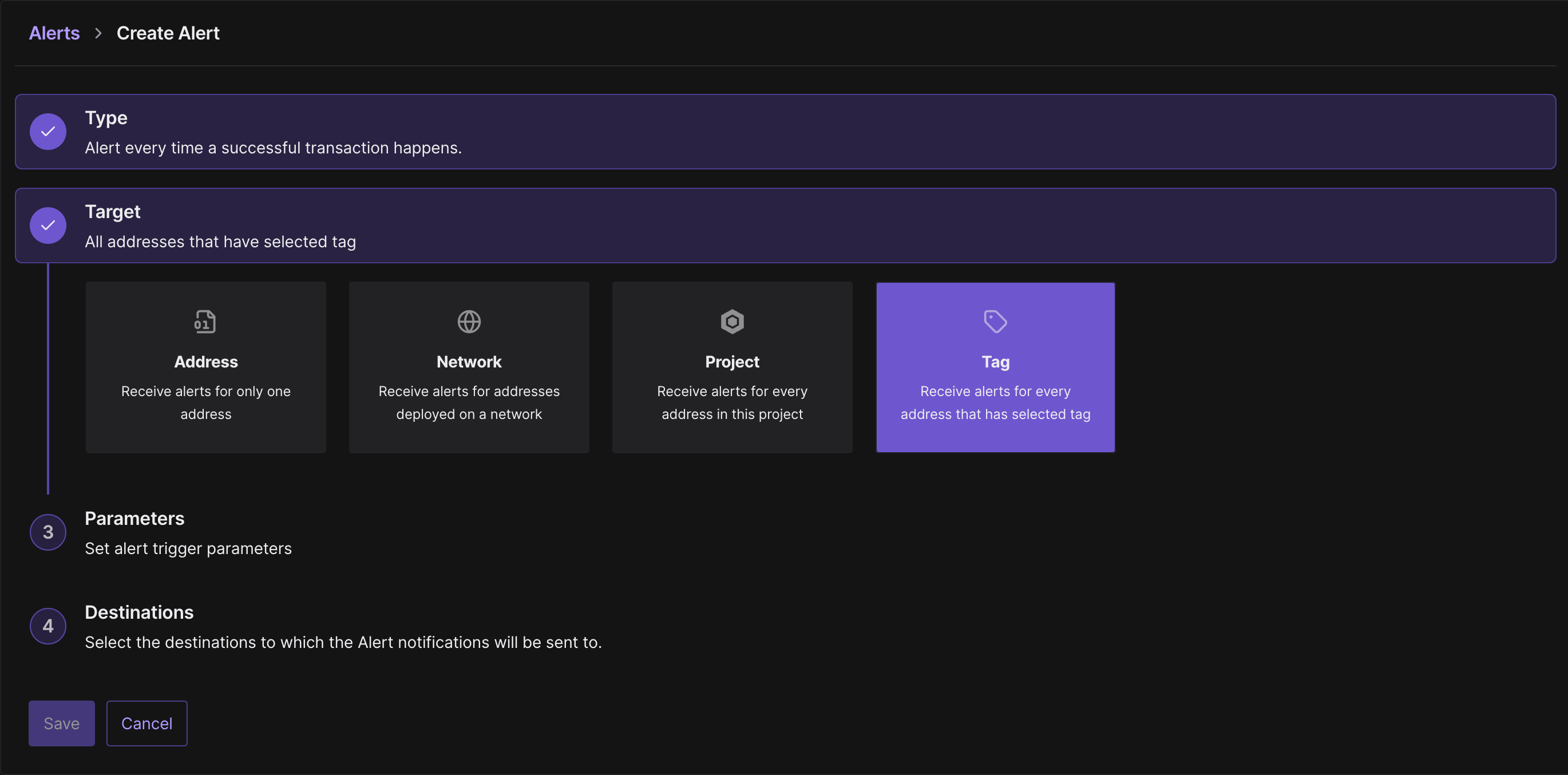
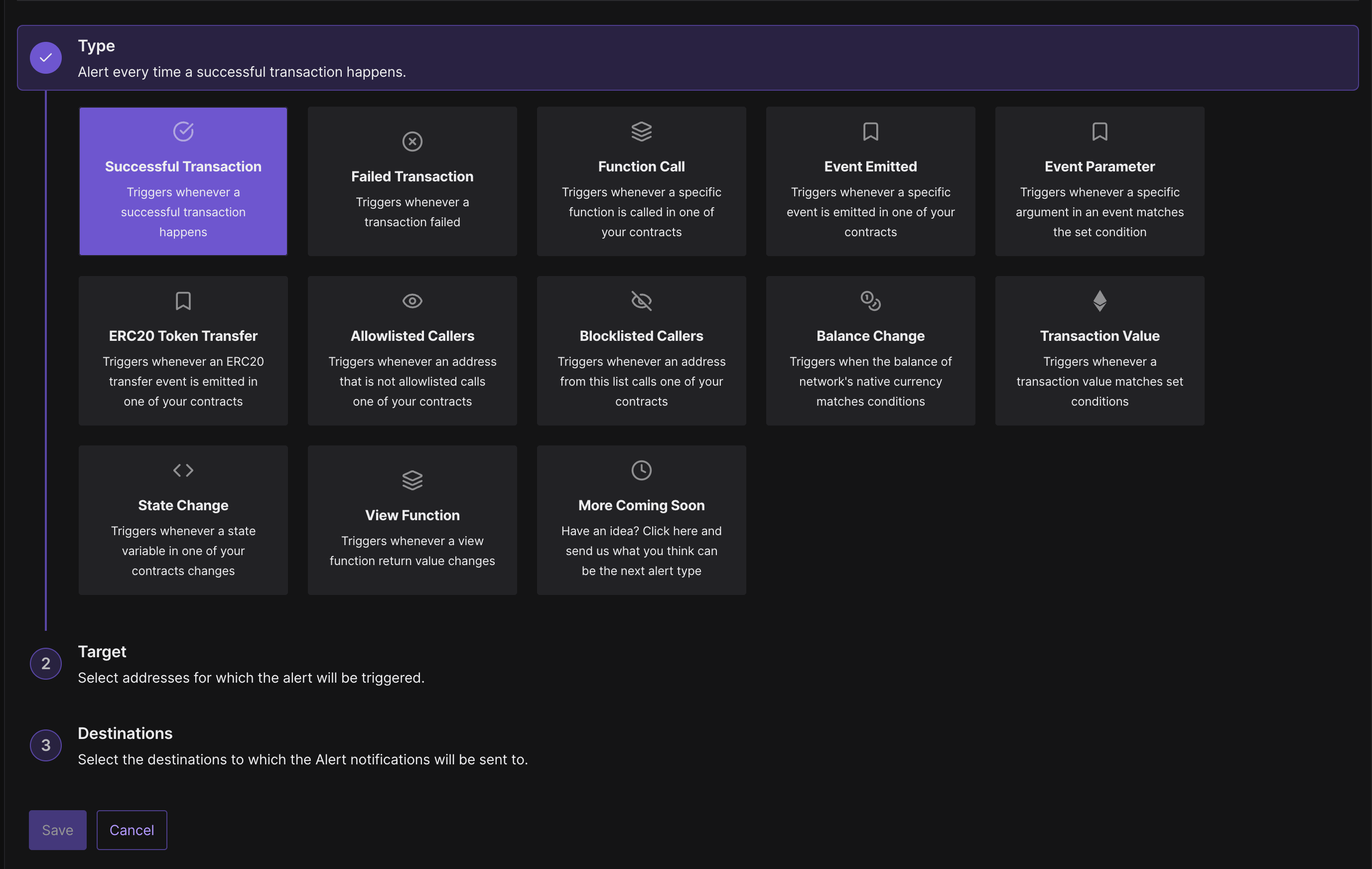 * **Alert Target:** As a target we'll use **Tag** which let us monitor all contracts and wallets labeled with the specific tag. You can check here how to add **Tag** for [contract](/developer-explorer/contracts#adding-tags-to-contracts) or [wallet](/developer-explorer/wallets#adding-tags-to-wallets).
 * **Alert Parameter:** Choose **Tag** from the dropdown that holds contracts we want to monitor
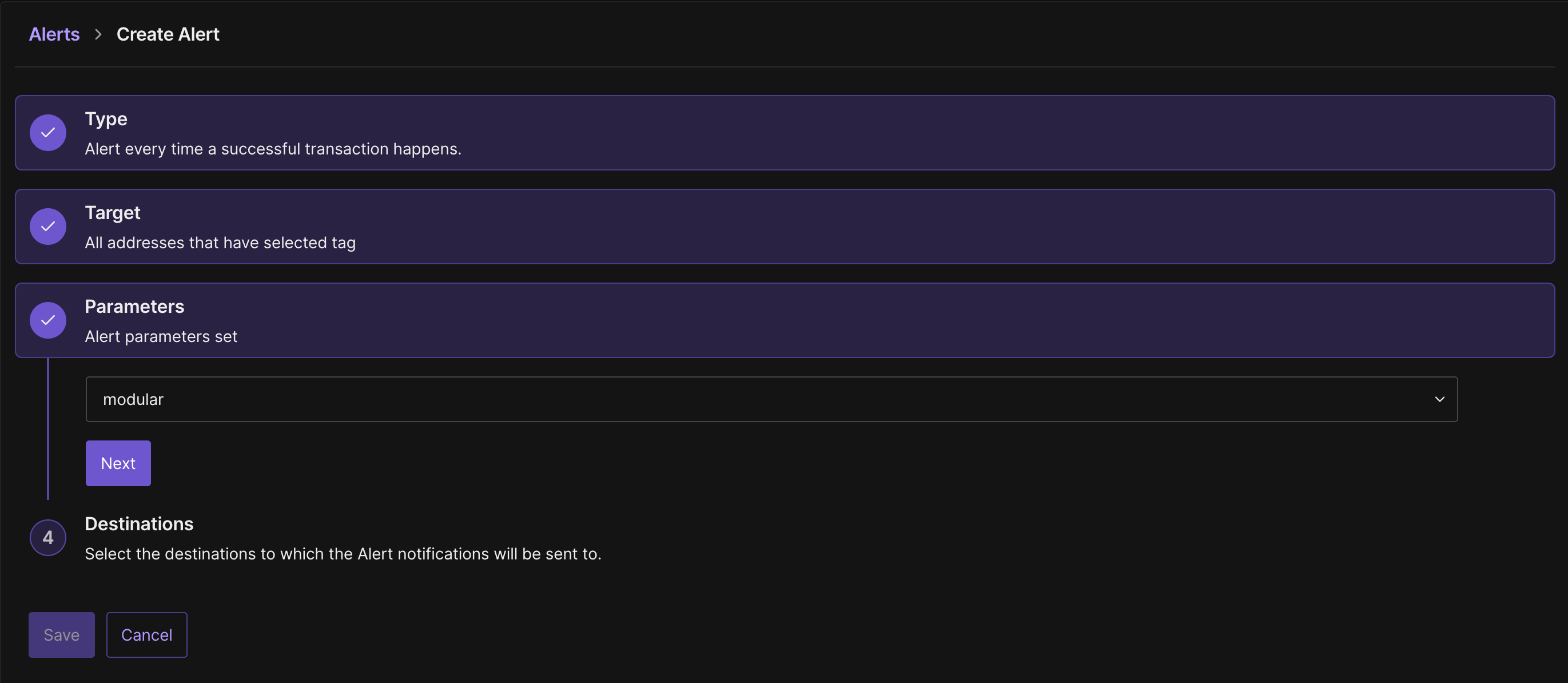 * **Alert Destination:** For now you can setup whatever you want, in the next phase we'll set up Web3Action to be Destination for this Alert
### Install Dependencies
* Clone the repo. You can find link to the template [here](https://github.com/Tenderly/flexible-monitoring-solution)
* Once you've cloned the repo, run the following command inside CLI:
```bash theme={"theme":{"light":"catppuccin-latte","dark":"catppuccin-mocha"}}
cd actions && npm install
```
### Configure Environment Variables
Set up these [Secrets](/monitoring/web3-actions/references/context#secrets) in your Tenderly Web3Action:
```env showLineNumbers theme={"theme":{"light":"catppuccin-latte","dark":"catppuccin-mocha"}}
WEBHOOK_URL =
BEARER =
ACCOUNT_SLUG =
PROJECT_SLUG =
EVENT_NAME =
```
### Configure tenderly.yaml
Your `tenderly.yaml` should look like this:
```yaml showLineNumbers theme={"theme":{"light":"catppuccin-latte","dark":"catppuccin-mocha"}}
account_id: ""
actions:
/:
runtime: v2
sources: actions
specs:
example:
description: "Event tracking system"
function: example:modularFn
trigger:
type: alert
alert: { }
execution_type: parallel
project_slug: ""
```
Be sure to replace the placeholders with following values:
* `YOUR_ACCOUNT_ID`: Your account ID you can get following [this guide](/platform/account/projects/slug).
* `PROJECT_SLUG`: Your project slug you can get following [this guide](/platform/account/projects/slug).
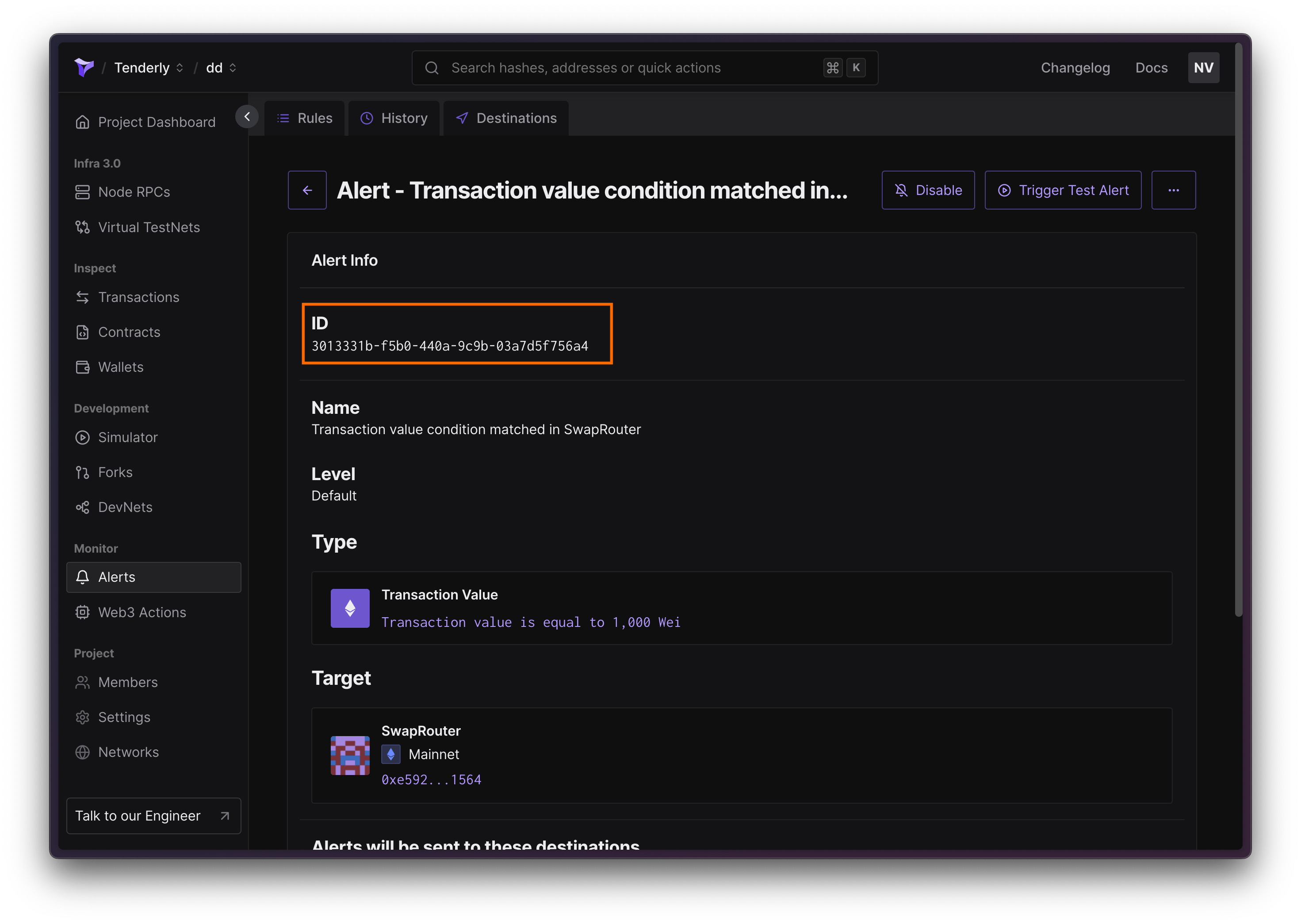
* `YOUR_ALERT_ID`: The ID of alert you've created in the previous step. You can find the ID in the dashboard.
* **Alert Destination:** For now you can setup whatever you want, in the next phase we'll set up Web3Action to be Destination for this Alert
### Install Dependencies
* Clone the repo. You can find link to the template [here](https://github.com/Tenderly/flexible-monitoring-solution)
* Once you've cloned the repo, run the following command inside CLI:
```bash theme={"theme":{"light":"catppuccin-latte","dark":"catppuccin-mocha"}}
cd actions && npm install
```
### Configure Environment Variables
Set up these [Secrets](/monitoring/web3-actions/references/context#secrets) in your Tenderly Web3Action:
```env showLineNumbers theme={"theme":{"light":"catppuccin-latte","dark":"catppuccin-mocha"}}
WEBHOOK_URL =
BEARER =
ACCOUNT_SLUG =
PROJECT_SLUG =
EVENT_NAME =
```
### Configure tenderly.yaml
Your `tenderly.yaml` should look like this:
```yaml showLineNumbers theme={"theme":{"light":"catppuccin-latte","dark":"catppuccin-mocha"}}
account_id: ""
actions:
/:
runtime: v2
sources: actions
specs:
example:
description: "Event tracking system"
function: example:modularFn
trigger:
type: alert
alert: { }
execution_type: parallel
project_slug: ""
```
Be sure to replace the placeholders with following values:
* `YOUR_ACCOUNT_ID`: Your account ID you can get following [this guide](/platform/account/projects/slug).
* `PROJECT_SLUG`: Your project slug you can get following [this guide](/platform/account/projects/slug).
* `YOUR_ALERT_ID`: The ID of alert you've created in the previous step. You can find the ID in the dashboard.
 ### Deploy your Web3 Action
Run the following command to deploy your Web3 Action:
```bash theme={"theme":{"light":"catppuccin-latte","dark":"catppuccin-mocha"}}
tenderly actions deploy
```
## Core Components
### Transaction Processing
The system begins by processing transaction information:
```typescript showLineNumbers theme={"theme":{"light":"catppuccin-latte","dark":"catppuccin-mocha"}}
export const modularFn = async (context: Context, transactionEvent: TransactionEvent) => {
const txHash = transactionEvent.hash;
const txNetwork = transactionEvent.network;
const blockHash = transactionEvent.blockHash;
const blockNumber = transactionEvent.blockNumber;
const WEBHOOK_URL = await context.secrets.get("WEBHOOK_URL");
const BEARER = await context.secrets.get("BEARER");
const ACCOUNT_SLUG = await context.secrets.get("ACCOUNT_SLUG");
const PROJECT_SLUG = await context.secrets.get("PROJECT_SLUG");
const EVENT_NAME = await context.secrets.get("EVENT_NAME");
if (!EVENT_NAME) {
throw new Error("EVENT_NAME not found in environment variables");
}
const url = `https://api.tenderly.co/api/v1/public-contract/${txNetwork}/trace/${txHash}`;
const traceResponse = await axios.get(url, {
headers: {
authorization: BEARER,
},
});
const traceData = traceResponse.data;
```
This component:
* Captures transaction hash and network
* Retrieves transaction traces via Tenderly API
* Processes block information
### Contract Information Retrieval
Contract information (names and ABIs) are fetched using the [Contracts API](/api-reference).
```typescript showLineNumbers theme={"theme":{"light":"catppuccin-latte","dark":"catppuccin-mocha"}}
const fetchContractName = async (addr: string) => {
const contractEndpoint = `https://api.tenderly.co/api/v1/account/${ACCOUNT_SLUG}/project/${PROJECT_SLUG}/contract/${txNetwork}/${addr}`;
try {
const contractResponse = await axios.get(contractEndpoint, {headers: {'Authorization': BEARER}});
return contractResponse.data.contract.contract_name;
} catch (error) {
console.error(`Error fetching contract name from endpoint for ${addr}:`, error);
}
};
const fetchContractAbi = async (addr: string) => {
const contractEndpoint = `https://api.tenderly.co/api/v1/account/${ACCOUNT_SLUG}/project/${PROJECT_SLUG}/contract/${txNetwork}/${addr}`;
try {
const contractResponse = await axios.get(contractEndpoint, {headers: {'Authorization': BEARER}});
return contractResponse.data.contract.data.abi;
} catch (error) {
console.error(`Error fetching contract ABI from endpoint for ${addr}:`, error);
}
};
```
### Event Processing
Event processing is handled through specialized functions:
```typescript showLineNumbers theme={"theme":{"light":"catppuccin-latte","dark":"catppuccin-mocha"}}
const extractEventAddresses = (logs: any[]): string[] =>
Array.from(new Set(
logs
.filter(log => log.name === EVENT_NAME)
.map(log => log.raw.address)
));
const extractEventDetails = (logs: any[]) => {
return logs
.filter(log => log.name === EVENT_NAME)
.map(log => {
const result: { [key: string]: string } = {
name: log.name
};
log.inputs.forEach((input: any) => {
const name = input.soltype.name;
const value = input.value.toString();
result[name] = value;
});
return result;
});
};
```
This section:
* Filters events by name
* Extracts event parameters
* Processes event addresses
## Webhook interaction
The system sends this structured data to your webhook using Axios:
```typescript showLineNumbers theme={"theme":{"light":"catppuccin-latte","dark":"catppuccin-mocha"}}
{
hash: string, // Transaction hash
transaction: object, // Full transaction event
blockHash: string, // Block hash
blockNumber: number, // Block number
matchReasons: Array<{ // Event details
name: string,
[parameterName: string]: string
}>,
sentinel: { // Contract information
contractName: string,
abi: object
},
traceData: object, // Transaction trace data
addresses: string[] // Involved addresses
}
```
## Troubleshooting
Common issues and solutions:
1. **Missing Events**
* Verify EVENT\_NAME matches contract events exactly
* Check alert configuration in Tenderly dashboard
* Review transaction logs for event emission
2. **API Errors**
* Validate BEARER token permissions
* Check API endpoint availability
* Verify network configuration
3. **Webhook Issues**
* Confirm WEBHOOK\_URL accessibility
* Check payload format matches expectations
* Monitor webhook endpoint logs
### Deploy your Web3 Action
Run the following command to deploy your Web3 Action:
```bash theme={"theme":{"light":"catppuccin-latte","dark":"catppuccin-mocha"}}
tenderly actions deploy
```
## Core Components
### Transaction Processing
The system begins by processing transaction information:
```typescript showLineNumbers theme={"theme":{"light":"catppuccin-latte","dark":"catppuccin-mocha"}}
export const modularFn = async (context: Context, transactionEvent: TransactionEvent) => {
const txHash = transactionEvent.hash;
const txNetwork = transactionEvent.network;
const blockHash = transactionEvent.blockHash;
const blockNumber = transactionEvent.blockNumber;
const WEBHOOK_URL = await context.secrets.get("WEBHOOK_URL");
const BEARER = await context.secrets.get("BEARER");
const ACCOUNT_SLUG = await context.secrets.get("ACCOUNT_SLUG");
const PROJECT_SLUG = await context.secrets.get("PROJECT_SLUG");
const EVENT_NAME = await context.secrets.get("EVENT_NAME");
if (!EVENT_NAME) {
throw new Error("EVENT_NAME not found in environment variables");
}
const url = `https://api.tenderly.co/api/v1/public-contract/${txNetwork}/trace/${txHash}`;
const traceResponse = await axios.get(url, {
headers: {
authorization: BEARER,
},
});
const traceData = traceResponse.data;
```
This component:
* Captures transaction hash and network
* Retrieves transaction traces via Tenderly API
* Processes block information
### Contract Information Retrieval
Contract information (names and ABIs) are fetched using the [Contracts API](/api-reference).
```typescript showLineNumbers theme={"theme":{"light":"catppuccin-latte","dark":"catppuccin-mocha"}}
const fetchContractName = async (addr: string) => {
const contractEndpoint = `https://api.tenderly.co/api/v1/account/${ACCOUNT_SLUG}/project/${PROJECT_SLUG}/contract/${txNetwork}/${addr}`;
try {
const contractResponse = await axios.get(contractEndpoint, {headers: {'Authorization': BEARER}});
return contractResponse.data.contract.contract_name;
} catch (error) {
console.error(`Error fetching contract name from endpoint for ${addr}:`, error);
}
};
const fetchContractAbi = async (addr: string) => {
const contractEndpoint = `https://api.tenderly.co/api/v1/account/${ACCOUNT_SLUG}/project/${PROJECT_SLUG}/contract/${txNetwork}/${addr}`;
try {
const contractResponse = await axios.get(contractEndpoint, {headers: {'Authorization': BEARER}});
return contractResponse.data.contract.data.abi;
} catch (error) {
console.error(`Error fetching contract ABI from endpoint for ${addr}:`, error);
}
};
```
### Event Processing
Event processing is handled through specialized functions:
```typescript showLineNumbers theme={"theme":{"light":"catppuccin-latte","dark":"catppuccin-mocha"}}
const extractEventAddresses = (logs: any[]): string[] =>
Array.from(new Set(
logs
.filter(log => log.name === EVENT_NAME)
.map(log => log.raw.address)
));
const extractEventDetails = (logs: any[]) => {
return logs
.filter(log => log.name === EVENT_NAME)
.map(log => {
const result: { [key: string]: string } = {
name: log.name
};
log.inputs.forEach((input: any) => {
const name = input.soltype.name;
const value = input.value.toString();
result[name] = value;
});
return result;
});
};
```
This section:
* Filters events by name
* Extracts event parameters
* Processes event addresses
## Webhook interaction
The system sends this structured data to your webhook using Axios:
```typescript showLineNumbers theme={"theme":{"light":"catppuccin-latte","dark":"catppuccin-mocha"}}
{
hash: string, // Transaction hash
transaction: object, // Full transaction event
blockHash: string, // Block hash
blockNumber: number, // Block number
matchReasons: Array<{ // Event details
name: string,
[parameterName: string]: string
}>,
sentinel: { // Contract information
contractName: string,
abi: object
},
traceData: object, // Transaction trace data
addresses: string[] // Involved addresses
}
```
## Troubleshooting
Common issues and solutions:
1. **Missing Events**
* Verify EVENT\_NAME matches contract events exactly
* Check alert configuration in Tenderly dashboard
* Review transaction logs for event emission
2. **API Errors**
* Validate BEARER token permissions
* Check API endpoint availability
* Verify network configuration
3. **Webhook Issues**
* Confirm WEBHOOK\_URL accessibility
* Check payload format matches expectations
* Monitor webhook endpoint logs