> ## Documentation Index
> Fetch the complete documentation index at: https://docs.tenderly.co/llms.txt
> Use this file to discover all available pages before exploring further.
# Node RPC
> Access 80+ EVM networks over JSON-RPC and WebSocket with Tenderly Node RPC. Send, simulate, and trace transactions and read chain data, no node to run.
Node RPC is a fast and reliable production node that enables access to over 80 blockchain networks via RPC. It allows you to send transactions, deploy smart contracts, query blockchain data or other operations without having to run your own node or manage infrastructure.
Node RPC is available on the paid plan. To enable it for your account, [contact our sales team](https://tenderly.co/contact-us).
Node RPC supports:
* Multi-regional infrastructure (EU & US) ensuring location-independent low latency
* Access through `http` and [WebSocket](#websockets) protocols
* [Request batching](#batching-json-rpc-requests)
* Building custom RPC methods through [Node Extensions](#node-extensions)
* Access to Tenderly's development tooling
 ## Custom RPC methods
In addition to supporting standard EVM methods, Node RPC exposes Tenderly's custom RPC methods in the `tenderly_` namespace.
Simulation, gas estimation, and tracing methods are documented on dedicated pages:
* [`tenderly_simulateTransaction`](/node-rpc/guides/simulate-json-rpc) to simulate the outcome of a transaction before signing.
* [`tenderly_estimateGas`](/node-rpc/guides/simulate-json-rpc#tenderly_estimategas) to get an exact gas estimate for a transaction.
* [`tenderly_simulateBundle`](/node-rpc/guides/simulate-bundle-json-rpc) to simulate multiple transactions in a single request.
* [`tenderly_estimateGasBundle`](/node-rpc/guides/simulate-bundle-json-rpc#tenderly_estimategasbundle) to get exact gas estimates for a bundle of transactions.
* [`tenderly_traceTransaction`](/node-rpc/guides/trace-json-rpc) to get a decoded trace of an existing transaction.
Decoding and signature lookup methods are available in the [RPC reference](/node-rpc/rpc-reference):
* [`tenderly_decodeInput`](/node-rpc/rpc-reference?network=ethereum-mainnet\&method=tenderly_decodeInput) to heuristically decode external function calls.
* [`tenderly_decodeError`](/node-rpc/rpc-reference?network=ethereum-mainnet\&method=tenderly_decodeError) to heuristically decode custom errors.
* [`tenderly_decodeEvent`](/node-rpc/rpc-reference?network=ethereum-mainnet\&method=tenderly_decodeEvent) to heuristically decode emitted events.
* [`tenderly_functionSignatures`](/node-rpc/rpc-reference?network=ethereum-mainnet\&method=tenderly_functionSignatures) to retrieve function interface based on 4-byte function selector.
* [`tenderly_errorSignatures`](/node-rpc/rpc-reference?network=ethereum-mainnet\&method=tenderly_errorSignatures) to retrieve event interface based on 4-byte selector.
* [`tenderly_eventSignature`](/node-rpc/rpc-reference?network=ethereum-mainnet\&method=tenderly_eventSignature) to retrieve event interface based on 32-byte event signature.
## Managing Node RPCs
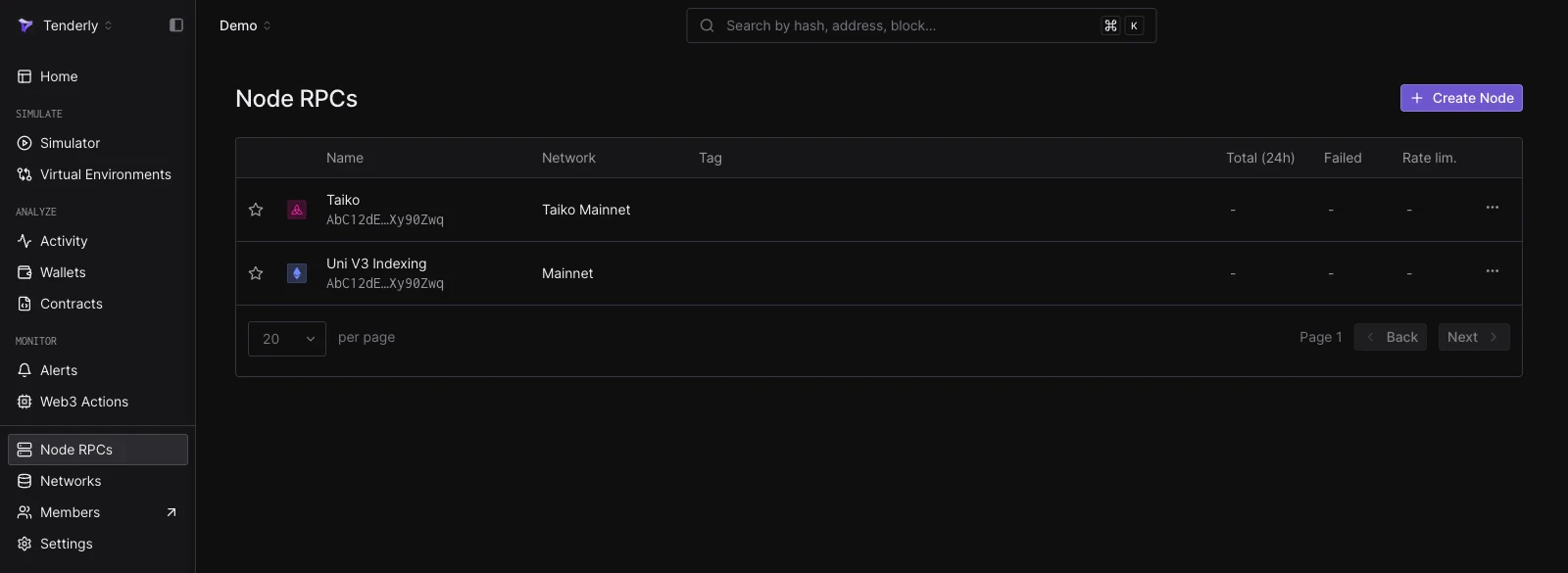
Log into the Dashboard and [go to the Node RPCs page](https://dashboard.tenderly.co/register?redirectTo=gateways) where you can create new Node RPCs and manage existing ones.
### Creating a Node RPC
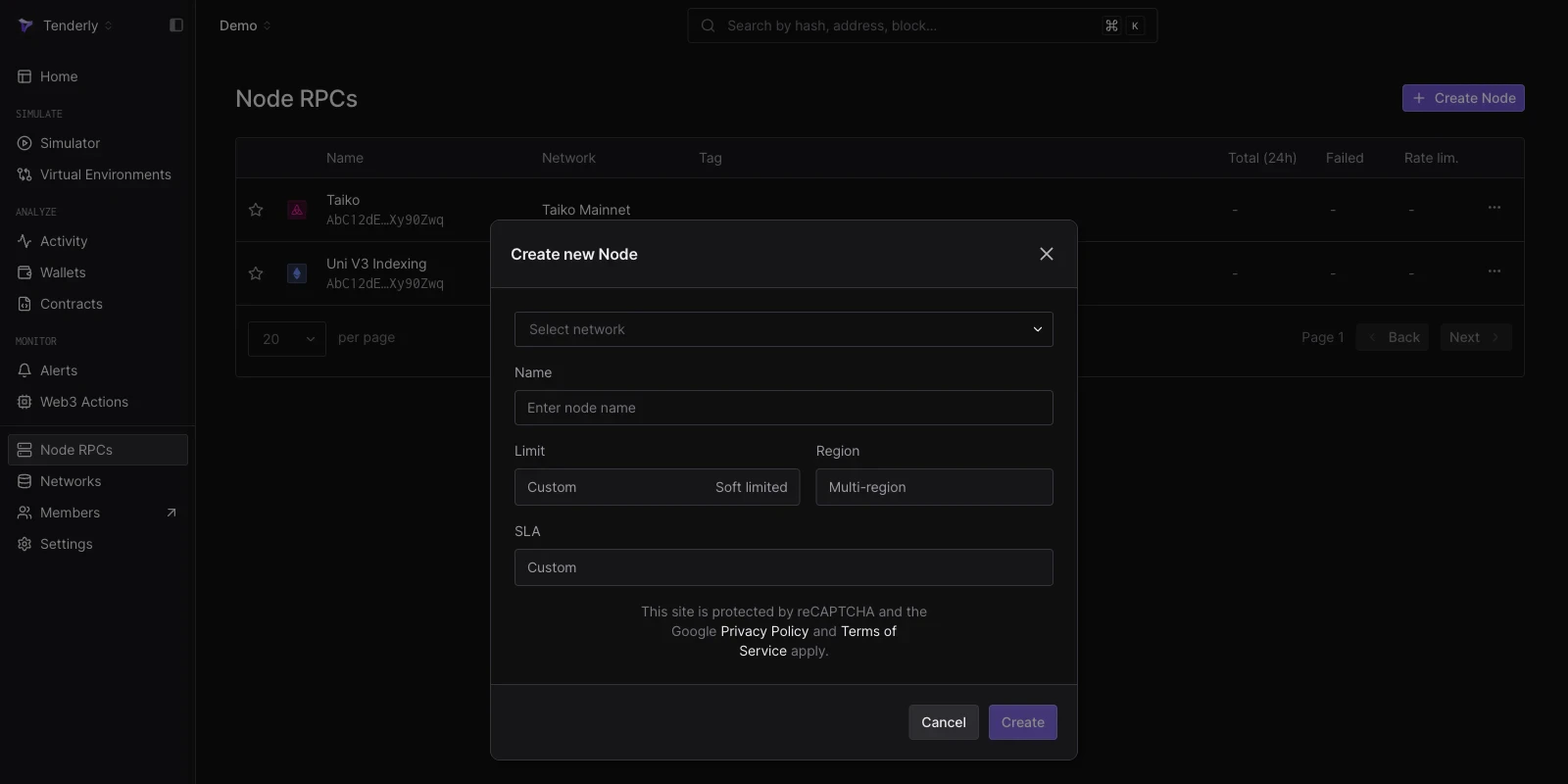
To create a new Node RPC, follow these steps:
* Click the **Create Node** button
* Choose the network you want to access
* Provide a name for the Node
* Click **Create**
Each Node you create will have a unique URL.
## Custom RPC methods
In addition to supporting standard EVM methods, Node RPC exposes Tenderly's custom RPC methods in the `tenderly_` namespace.
Simulation, gas estimation, and tracing methods are documented on dedicated pages:
* [`tenderly_simulateTransaction`](/node-rpc/guides/simulate-json-rpc) to simulate the outcome of a transaction before signing.
* [`tenderly_estimateGas`](/node-rpc/guides/simulate-json-rpc#tenderly_estimategas) to get an exact gas estimate for a transaction.
* [`tenderly_simulateBundle`](/node-rpc/guides/simulate-bundle-json-rpc) to simulate multiple transactions in a single request.
* [`tenderly_estimateGasBundle`](/node-rpc/guides/simulate-bundle-json-rpc#tenderly_estimategasbundle) to get exact gas estimates for a bundle of transactions.
* [`tenderly_traceTransaction`](/node-rpc/guides/trace-json-rpc) to get a decoded trace of an existing transaction.
Decoding and signature lookup methods are available in the [RPC reference](/node-rpc/rpc-reference):
* [`tenderly_decodeInput`](/node-rpc/rpc-reference?network=ethereum-mainnet\&method=tenderly_decodeInput) to heuristically decode external function calls.
* [`tenderly_decodeError`](/node-rpc/rpc-reference?network=ethereum-mainnet\&method=tenderly_decodeError) to heuristically decode custom errors.
* [`tenderly_decodeEvent`](/node-rpc/rpc-reference?network=ethereum-mainnet\&method=tenderly_decodeEvent) to heuristically decode emitted events.
* [`tenderly_functionSignatures`](/node-rpc/rpc-reference?network=ethereum-mainnet\&method=tenderly_functionSignatures) to retrieve function interface based on 4-byte function selector.
* [`tenderly_errorSignatures`](/node-rpc/rpc-reference?network=ethereum-mainnet\&method=tenderly_errorSignatures) to retrieve event interface based on 4-byte selector.
* [`tenderly_eventSignature`](/node-rpc/rpc-reference?network=ethereum-mainnet\&method=tenderly_eventSignature) to retrieve event interface based on 32-byte event signature.
## Managing Node RPCs
Log into the Dashboard and [go to the Node RPCs page](https://dashboard.tenderly.co/register?redirectTo=gateways) where you can create new Node RPCs and manage existing ones.
### Creating a Node RPC
To create a new Node RPC, follow these steps:
* Click the **Create Node** button
* Choose the network you want to access
* Provide a name for the Node
* Click **Create**
Each Node you create will have a unique URL.
 ### Configuring Node RPCs
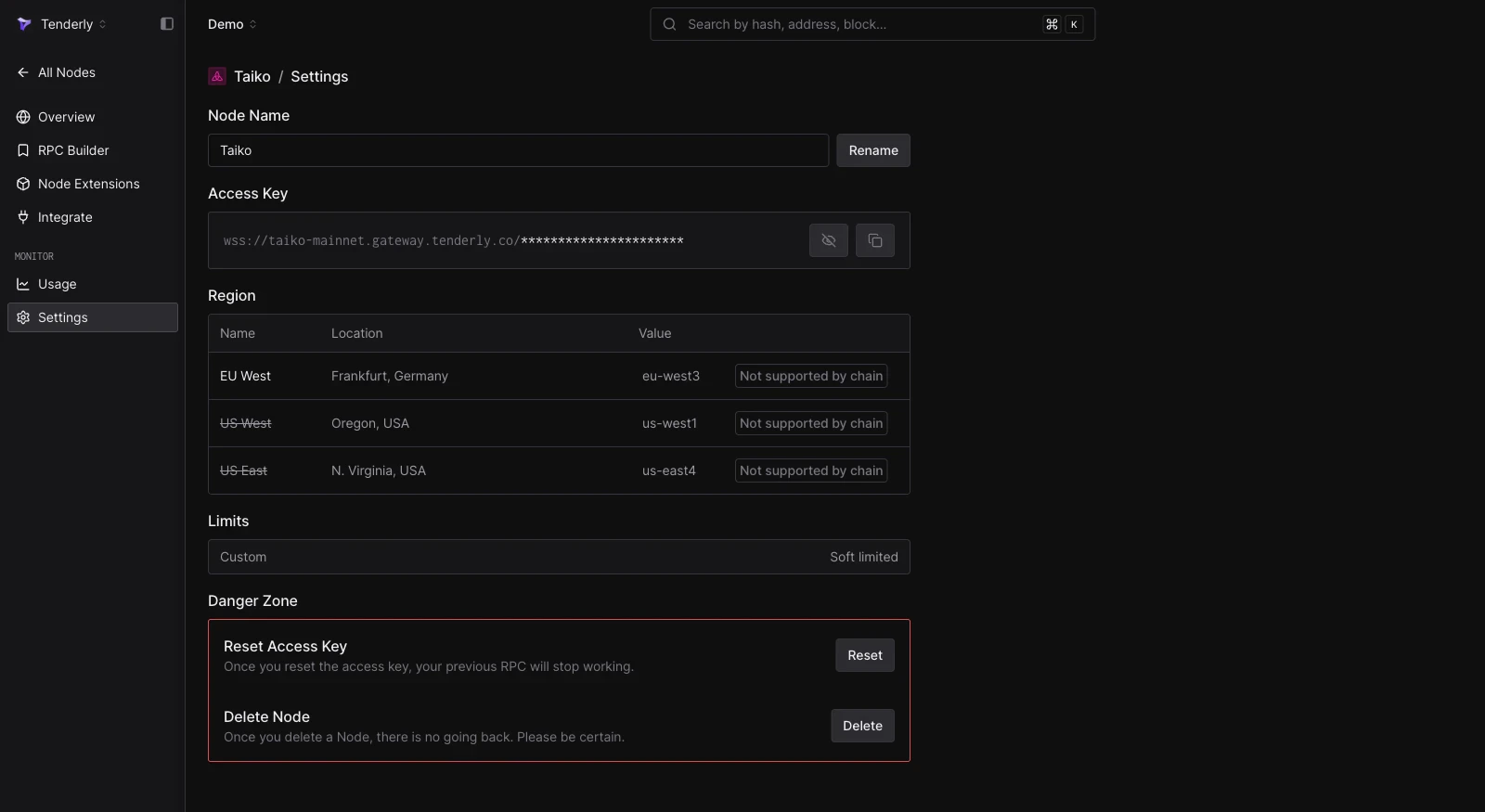
Once the Node RPC has been created, you can configure it in the **Settings**. From there, you can:
* Reset the Node RPC URL
* Change the Node name
* Delete the Node
### Configuring Node RPCs
Once the Node RPC has been created, you can configure it in the **Settings**. From there, you can:
* Reset the Node RPC URL
* Change the Node name
* Delete the Node
 ### Add Node RPC to MetaMask
Add the Node RPC to your MetaMask wallet with a single click. Open the node's **Overview** page, click the **Add to Wallet** button, and confirm the action in MetaMask.
Click **Approve** in MetaMask to add Node RPC.
### Add Node RPC to MetaMask
Add the Node RPC to your MetaMask wallet with a single click. Open the node's **Overview** page, click the **Add to Wallet** button, and confirm the action in MetaMask.
Click **Approve** in MetaMask to add Node RPC.
 ## WebSockets
Node RPC is accessible over WebSocket (`wss://`) in addition to HTTPS. A WebSocket connection is persistent and bidirectional, and is required for the subscription methods `eth_subscribe` and `eth_unsubscribe`.
To get the WebSocket endpoint, open the node's **Overview** page in the [Dashboard](https://dashboard.tenderly.co/?redirectTo=gateways) and copy the **WSS** URL.
## WebSockets
Node RPC is accessible over WebSocket (`wss://`) in addition to HTTPS. A WebSocket connection is persistent and bidirectional, and is required for the subscription methods `eth_subscribe` and `eth_unsubscribe`.
To get the WebSocket endpoint, open the node's **Overview** page in the [Dashboard](https://dashboard.tenderly.co/?redirectTo=gateways) and copy the **WSS** URL.
 You can test the connection with the `wscat` command-line tool:
```bash title="example" showLineNumbers theme={"theme":{"light":"catppuccin-latte","dark":"catppuccin-mocha"}}
wscat -c wss://mainnet.gateway.tenderly.co/$TENDERLY_NODE_ACCESS_KEY
```
Once connected, send JSON-RPC requests over the socket and receive responses in real time:
```json title="request.json" showLineNumbers theme={"theme":{"light":"catppuccin-latte","dark":"catppuccin-mocha"}}
{"jsonrpc":"2.0","id":1,"method":"eth_blockNumber","params":[]}
```
```json title="response.json" showLineNumbers theme={"theme":{"light":"catppuccin-latte","dark":"catppuccin-mocha"}}
{"jsonrpc":"2.0","id":1,"result":"0x657330"}
```
## Batching JSON-RPC requests
JSON-RPC request batching allows you to send several JSON-RPC method invocations within a single HTTPS call. A batch request consists of an array of individual JSON-RPC requests, and the response is an array of results in the order corresponding to each request from the batch.
You can use batching:
* **directly**, by sending an HTTPS request that contains an array of individual JSON-RPC calls,
* **[using Ethers](/node-rpc/libraries/ethers)**, by instantiating a **`JsonRpcBatchProvider`**,
* **[using Viem](/node-rpc/libraries/viem)**, by configuring the **`batch`** parameter when creating a client via **`createPublicClient`**.
If a particular request fails, the batch request still returns a `200 OK` HTTP status, and the response object corresponding to the failing JSON-RPC call carries the error.
Request batching is supported over `HTTPS` only. There is no batching support over `WSS`. Each request inside a batch is counted and charged individually; see [Node RPC pricing](/node-rpc/pricing).
```bash title="batch-call.sh" showLineNumbers theme={"theme":{"light":"catppuccin-latte","dark":"catppuccin-mocha"}}
curl https://mainnet.gateway.tenderly.co/$TENDERLY_NODE_ACCESS_KEY \
-X POST \
-H "Content-Type: application/json" \
-d '[
{"jsonrpc": "2.0", "id": 1, "method": "eth_blockNumber", "params": []},
{"jsonrpc": "2.0", "id": 2, "method": "eth_gasPrice", "params": []},
{"jsonrpc": "2.0", "id": 3, "method": "eth_getBalance", "params": ["0xd8da6bf26964af9d7eed9e03e53415d37aa96045", "latest"]}
]'
```
With Viem, batching is configured at the client level:
```js title="batch-calls.ts" showLineNumbers theme={"theme":{"light":"catppuccin-latte","dark":"catppuccin-mocha"}}
const client = createPublicClient({
chain: mainnet,
transport: http(
`https://mainnet.gateway.tenderly.co/${process.env.TENDERLY_NODE_ACCESS_KEY}`,
{
batch: true,
}
),
});
const [blockNumber, balance, ensName] = await Promise.all([
client.getBlockNumber(),
client.getBalance({ address: "0xd2135CfB216b74109775236E36d4b433F1DF507B" }),
client.getEnsName({ address: "0xd2135CfB216b74109775236E36d4b433F1DF507B" }),
]);
```
## RPC Request Builder
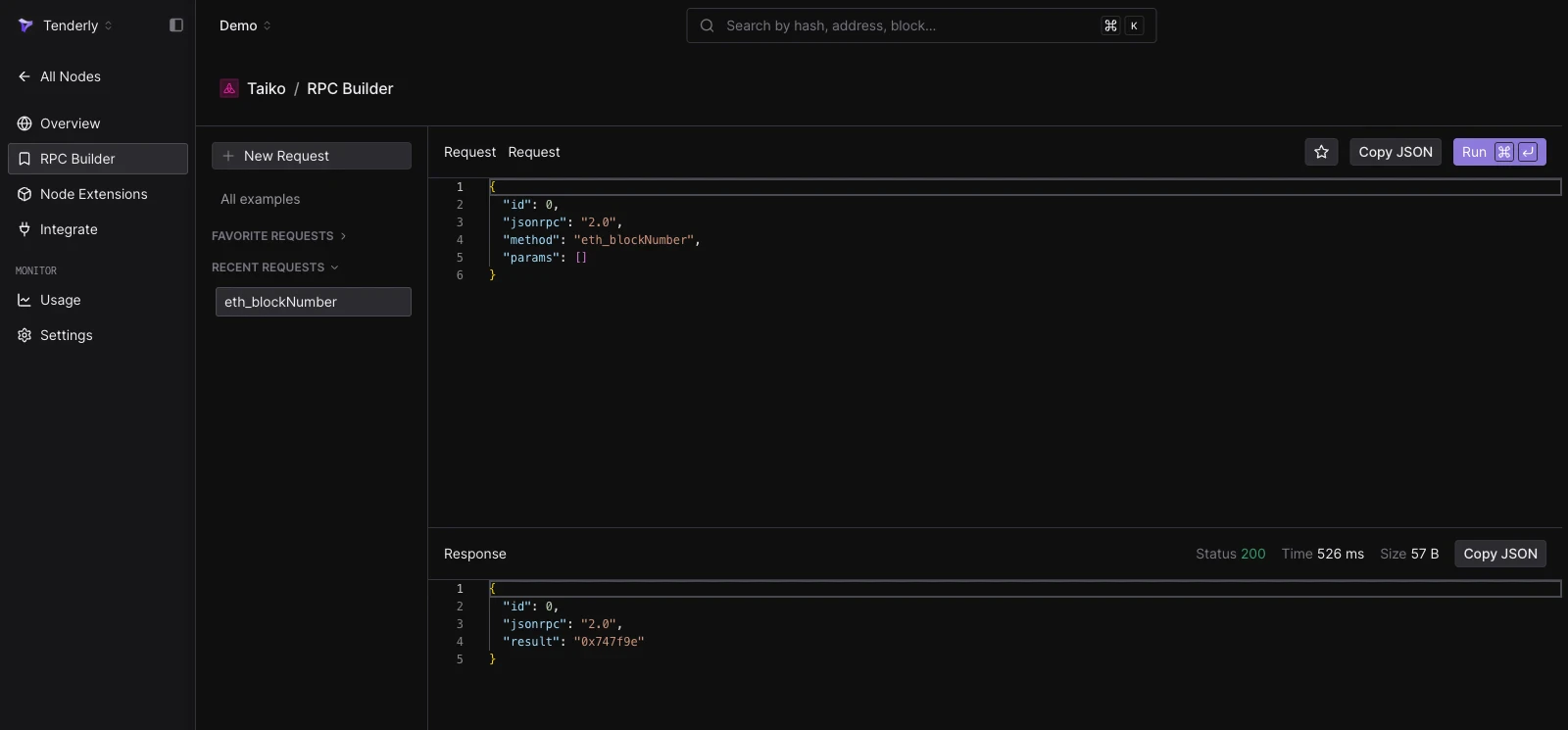
The RPC Request Builder lets you execute any of the supported RPC methods from your browser. Each request is sent directly to Node RPC. The Builder also allows you to use existing collections or create your own requests.
Check out the list of all supported RPC methods in the [RPC reference](/node-rpc/rpc-reference).
You can test the connection with the `wscat` command-line tool:
```bash title="example" showLineNumbers theme={"theme":{"light":"catppuccin-latte","dark":"catppuccin-mocha"}}
wscat -c wss://mainnet.gateway.tenderly.co/$TENDERLY_NODE_ACCESS_KEY
```
Once connected, send JSON-RPC requests over the socket and receive responses in real time:
```json title="request.json" showLineNumbers theme={"theme":{"light":"catppuccin-latte","dark":"catppuccin-mocha"}}
{"jsonrpc":"2.0","id":1,"method":"eth_blockNumber","params":[]}
```
```json title="response.json" showLineNumbers theme={"theme":{"light":"catppuccin-latte","dark":"catppuccin-mocha"}}
{"jsonrpc":"2.0","id":1,"result":"0x657330"}
```
## Batching JSON-RPC requests
JSON-RPC request batching allows you to send several JSON-RPC method invocations within a single HTTPS call. A batch request consists of an array of individual JSON-RPC requests, and the response is an array of results in the order corresponding to each request from the batch.
You can use batching:
* **directly**, by sending an HTTPS request that contains an array of individual JSON-RPC calls,
* **[using Ethers](/node-rpc/libraries/ethers)**, by instantiating a **`JsonRpcBatchProvider`**,
* **[using Viem](/node-rpc/libraries/viem)**, by configuring the **`batch`** parameter when creating a client via **`createPublicClient`**.
If a particular request fails, the batch request still returns a `200 OK` HTTP status, and the response object corresponding to the failing JSON-RPC call carries the error.
Request batching is supported over `HTTPS` only. There is no batching support over `WSS`. Each request inside a batch is counted and charged individually; see [Node RPC pricing](/node-rpc/pricing).
```bash title="batch-call.sh" showLineNumbers theme={"theme":{"light":"catppuccin-latte","dark":"catppuccin-mocha"}}
curl https://mainnet.gateway.tenderly.co/$TENDERLY_NODE_ACCESS_KEY \
-X POST \
-H "Content-Type: application/json" \
-d '[
{"jsonrpc": "2.0", "id": 1, "method": "eth_blockNumber", "params": []},
{"jsonrpc": "2.0", "id": 2, "method": "eth_gasPrice", "params": []},
{"jsonrpc": "2.0", "id": 3, "method": "eth_getBalance", "params": ["0xd8da6bf26964af9d7eed9e03e53415d37aa96045", "latest"]}
]'
```
With Viem, batching is configured at the client level:
```js title="batch-calls.ts" showLineNumbers theme={"theme":{"light":"catppuccin-latte","dark":"catppuccin-mocha"}}
const client = createPublicClient({
chain: mainnet,
transport: http(
`https://mainnet.gateway.tenderly.co/${process.env.TENDERLY_NODE_ACCESS_KEY}`,
{
batch: true,
}
),
});
const [blockNumber, balance, ensName] = await Promise.all([
client.getBlockNumber(),
client.getBalance({ address: "0xd2135CfB216b74109775236E36d4b433F1DF507B" }),
client.getEnsName({ address: "0xd2135CfB216b74109775236E36d4b433F1DF507B" }),
]);
```
## RPC Request Builder
The RPC Request Builder lets you execute any of the supported RPC methods from your browser. Each request is sent directly to Node RPC. The Builder also allows you to use existing collections or create your own requests.
Check out the list of all supported RPC methods in the [RPC reference](/node-rpc/rpc-reference).
 ## Node Extensions
Node Extensions allow you to extend the functionality of Node RPC with custom RPC methods tailored to your dapp, protocol, or specific needs using JavaScript or TypeScript. RPC methods built as Node Extensions have the **`extension_`** prefix and are executed through Node RPC.
## Node Extensions
Node Extensions allow you to extend the functionality of Node RPC with custom RPC methods tailored to your dapp, protocol, or specific needs using JavaScript or TypeScript. RPC methods built as Node Extensions have the **`extension_`** prefix and are executed through Node RPC.
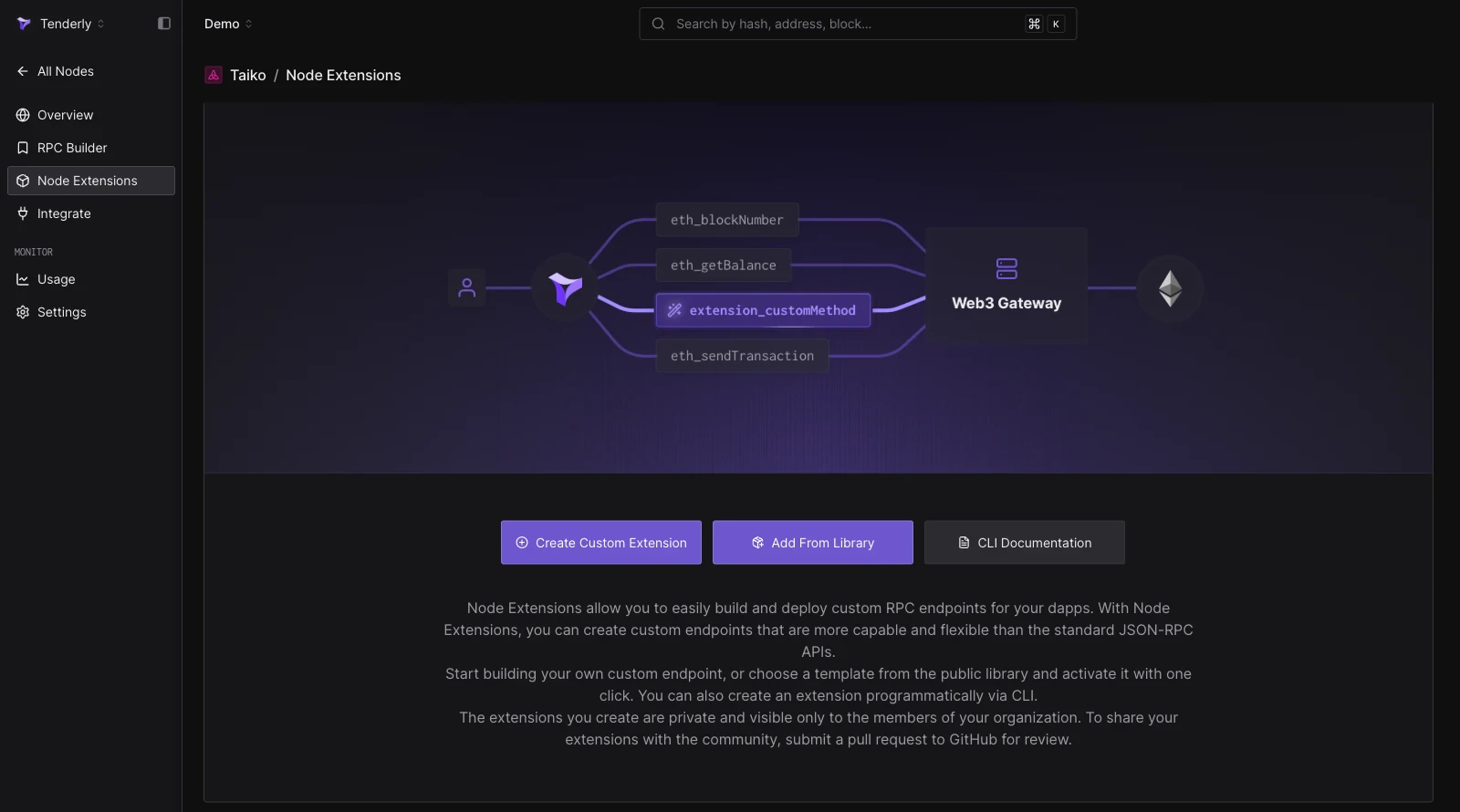 You can create a Node Extension in several ways from the **Node Extensions** tab in the [Dashboard](https://dashboard.tenderly.co/register?redirectTo=node-extensions):
* **Build from scratch**: click **Create Custom Extension**, name the RPC method, and write the JavaScript/TypeScript function executed on each call.
* **Repurpose a Web3 Action**: reuse the source code of an existing [Web3 Action](/monitoring/web3-actions/introduction) with a non-authenticated webhook trigger as the extension's function.
* **Deploy from the library**: click **Add From Library** to activate a ready-made extension from the [public Node Extensions library](https://github.com/Tenderly/node-extensions-library). Library extensions cannot be edited.
* **Deploy via the CLI**: define extensions in `tenderly.yaml` with `tenderly node-extensions init` and ship them with `tenderly node-extensions deploy` using the [Tenderly CLI](https://github.com/Tenderly/tenderly-cli).
If your extension uses API keys or other sensitive values, store them as [Web3 Action Secrets](/monitoring/web3-actions/references/context#secrets) and read them in code with `await context.secrets.get('API_KEY')`. Use the **Test** button on an extension to send a JSON-RPC payload to it and preview the request and response.
## Resources
Get started with Node RPC or continue learning about how it works with these resources.
Simulate transactions and get exact gas estimates via JSON-RPC.
See the detailed list of supported RPC methods on Node RPC.
Check out the full list of networks supported on Node RPC.
Understand billing based on compute power used to execute RPC methods.
You can create a Node Extension in several ways from the **Node Extensions** tab in the [Dashboard](https://dashboard.tenderly.co/register?redirectTo=node-extensions):
* **Build from scratch**: click **Create Custom Extension**, name the RPC method, and write the JavaScript/TypeScript function executed on each call.
* **Repurpose a Web3 Action**: reuse the source code of an existing [Web3 Action](/monitoring/web3-actions/introduction) with a non-authenticated webhook trigger as the extension's function.
* **Deploy from the library**: click **Add From Library** to activate a ready-made extension from the [public Node Extensions library](https://github.com/Tenderly/node-extensions-library). Library extensions cannot be edited.
* **Deploy via the CLI**: define extensions in `tenderly.yaml` with `tenderly node-extensions init` and ship them with `tenderly node-extensions deploy` using the [Tenderly CLI](https://github.com/Tenderly/tenderly-cli).
If your extension uses API keys or other sensitive values, store them as [Web3 Action Secrets](/monitoring/web3-actions/references/context#secrets) and read them in code with `await context.secrets.get('API_KEY')`. Use the **Test** button on an extension to send a JSON-RPC payload to it and preview the request and response.
## Resources
Get started with Node RPC or continue learning about how it works with these resources.
Simulate transactions and get exact gas estimates via JSON-RPC.
See the detailed list of supported RPC methods on Node RPC.
Check out the full list of networks supported on Node RPC.
Understand billing based on compute power used to execute RPC methods.