> ## Documentation Index
> Fetch the complete documentation index at: https://docs.tenderly.co/llms.txt
> Use this file to discover all available pages before exploring further.
# Activity Logs
> View an audit trail of login, security, membership, project, and billing events in your Tenderly organization, filter them, and export them to CSV.
Activity Logs give organization owners a searchable audit trail of events across the organization: logins, membership and permission changes, project changes, billing changes, and changes to access credentials such as tokens and secrets.
Activity Logs are available only to the organization owners.
## Accessing Activity Logs
On the [Organizations](/platform/account/organizations/overview) page, select **Activity Logs** in the sidebar.
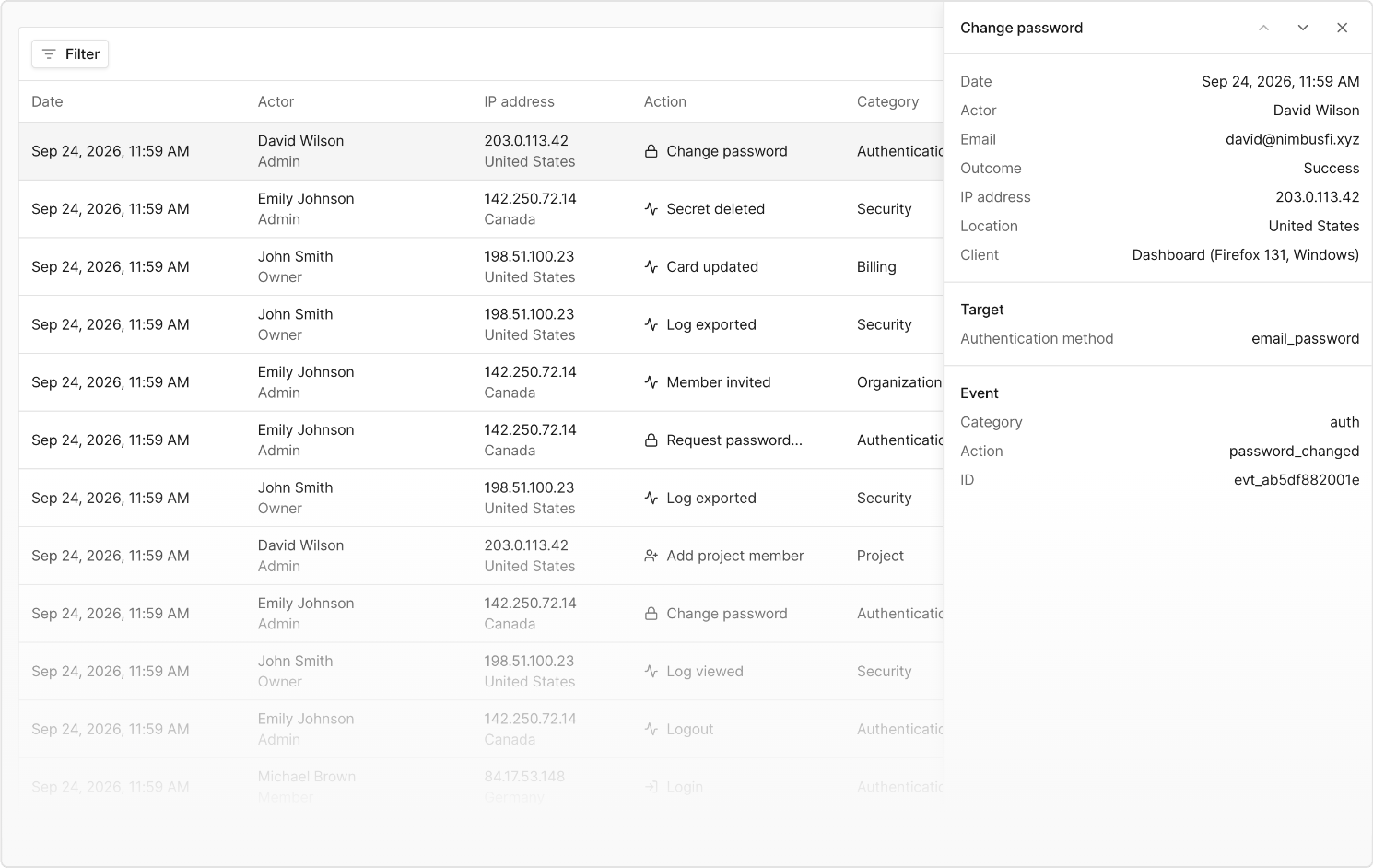 The logs cover every project in the organization.
## Reading the table
Each row shows:
| Column | Description |
| ---------- | ----------------------------------------------------------------------------------------------------- |
| Date | When the event occurred |
| Actor | The user (with role) or access token (with name) that triggered the event |
| IP address | The originating IP, with country shown when available |
| Action | A short label and icon for the event; failed or denied events show a red **Failed** or **Denied** tag |
| Category | The area of the product the event belongs to (Auth, Security, Organization, Project, Billing) |
| Details | A plain-language summary, for example "Josh Smith created project mainnet-monitors" |
Click a row to open the details panel, which includes the outcome, error (if any), IP and location, client type (dashboard, API, MCP, or agent), target resource, project, and a before/after view of any changed fields. Use the arrow keys or the panel's **Next**/**Previous** controls to step through events without closing the panel.
## Filtering and pagination
Filter by project, date range, actor, actor type (user, access token, or unauthenticated), action, category, and status. Filter values are populated from your organization's actual history, so departed members and revoked tokens remain filterable.
Activity Logs started recording on September 25, 2026, the day this feature launched - events from before that date aren't available. The date range filter and the table's footer both note this start date.
Your filters and the selected event are reflected in the URL, so a view can be bookmarked or shared and survives a page reload.
Choose 10, 20, 50, or 100 rows per page.
## Exporting logs
Use **Export CSV** to download the currently filtered log. For exports larger than the platform's row limit, you'll be offered a background export instead - the file is emailed as a download link to your account email once it's ready.
## Tracked actions
Activity Logs currently track events in these categories:
* **Auth** - login, logout, password changed, password reset requested
* **Security** - access token created or revoked, secret set or deleted, audit log viewed or exported
* **Organization** - member added, removed, or invited, member permissions changed, organization name changed
* **Project** - created, deleted, or transferred, member added or removed
* **Billing** - plan changed, subscription cancelled, card added or updated
Activity Logs cover access and account custody - who can act, what credentials exist, and whether the organization or its projects and subscription still exist. Changes to the contents of a project, such as alerts, Virtual Environments, nodes, contracts, and wallets, aren't included here.
The logs cover every project in the organization.
## Reading the table
Each row shows:
| Column | Description |
| ---------- | ----------------------------------------------------------------------------------------------------- |
| Date | When the event occurred |
| Actor | The user (with role) or access token (with name) that triggered the event |
| IP address | The originating IP, with country shown when available |
| Action | A short label and icon for the event; failed or denied events show a red **Failed** or **Denied** tag |
| Category | The area of the product the event belongs to (Auth, Security, Organization, Project, Billing) |
| Details | A plain-language summary, for example "Josh Smith created project mainnet-monitors" |
Click a row to open the details panel, which includes the outcome, error (if any), IP and location, client type (dashboard, API, MCP, or agent), target resource, project, and a before/after view of any changed fields. Use the arrow keys or the panel's **Next**/**Previous** controls to step through events without closing the panel.
## Filtering and pagination
Filter by project, date range, actor, actor type (user, access token, or unauthenticated), action, category, and status. Filter values are populated from your organization's actual history, so departed members and revoked tokens remain filterable.
Activity Logs started recording on September 25, 2026, the day this feature launched - events from before that date aren't available. The date range filter and the table's footer both note this start date.
Your filters and the selected event are reflected in the URL, so a view can be bookmarked or shared and survives a page reload.
Choose 10, 20, 50, or 100 rows per page.
## Exporting logs
Use **Export CSV** to download the currently filtered log. For exports larger than the platform's row limit, you'll be offered a background export instead - the file is emailed as a download link to your account email once it's ready.
## Tracked actions
Activity Logs currently track events in these categories:
* **Auth** - login, logout, password changed, password reset requested
* **Security** - access token created or revoked, secret set or deleted, audit log viewed or exported
* **Organization** - member added, removed, or invited, member permissions changed, organization name changed
* **Project** - created, deleted, or transferred, member added or removed
* **Billing** - plan changed, subscription cancelled, card added or updated
Activity Logs cover access and account custody - who can act, what credentials exist, and whether the organization or its projects and subscription still exist. Changes to the contents of a project, such as alerts, Virtual Environments, nodes, contracts, and wallets, aren't included here.