> ## Documentation Index
> Fetch the complete documentation index at: https://docs.tenderly.co/llms.txt
> Use this file to discover all available pages before exploring further.
# Simulate a Token Mint, Approve, and TransferFrom Bundle
> Simulate a 3-step bundle that mints DAI, approves a spender, and transfers tokens, with shared state across steps for testing multi-transaction flows.
This guide builds a 3-step simulation bundle that exercises the classic ERC-20 approval flow: mint tokens to a holder, approve a spender, then let the spender call `transferFrom`. Each step depends on state that the previous step creates, which is why a bundle is the right tool here.
## Why a bundle?
Simulating each transaction in isolation breaks down:
* **Mint alone**: you can verify the mint logic, but the holder address has no tokens on mainnet.
* **Approve alone**: the simulation needs the holder to actually have a balance to approve from.
* **TransferFrom alone**: requires both the balance and the approval to be in place.
A Sim Bundle runs all three in sequence, sharing the resulting state. Step 2 sees the minted balance from step 1. Step 3 sees the approval from step 2.
## The three transactions
All three transactions target the DAI contract on Ethereum mainnet (`0x6b175474e89094c44da98b954eedeac495271d0f`).
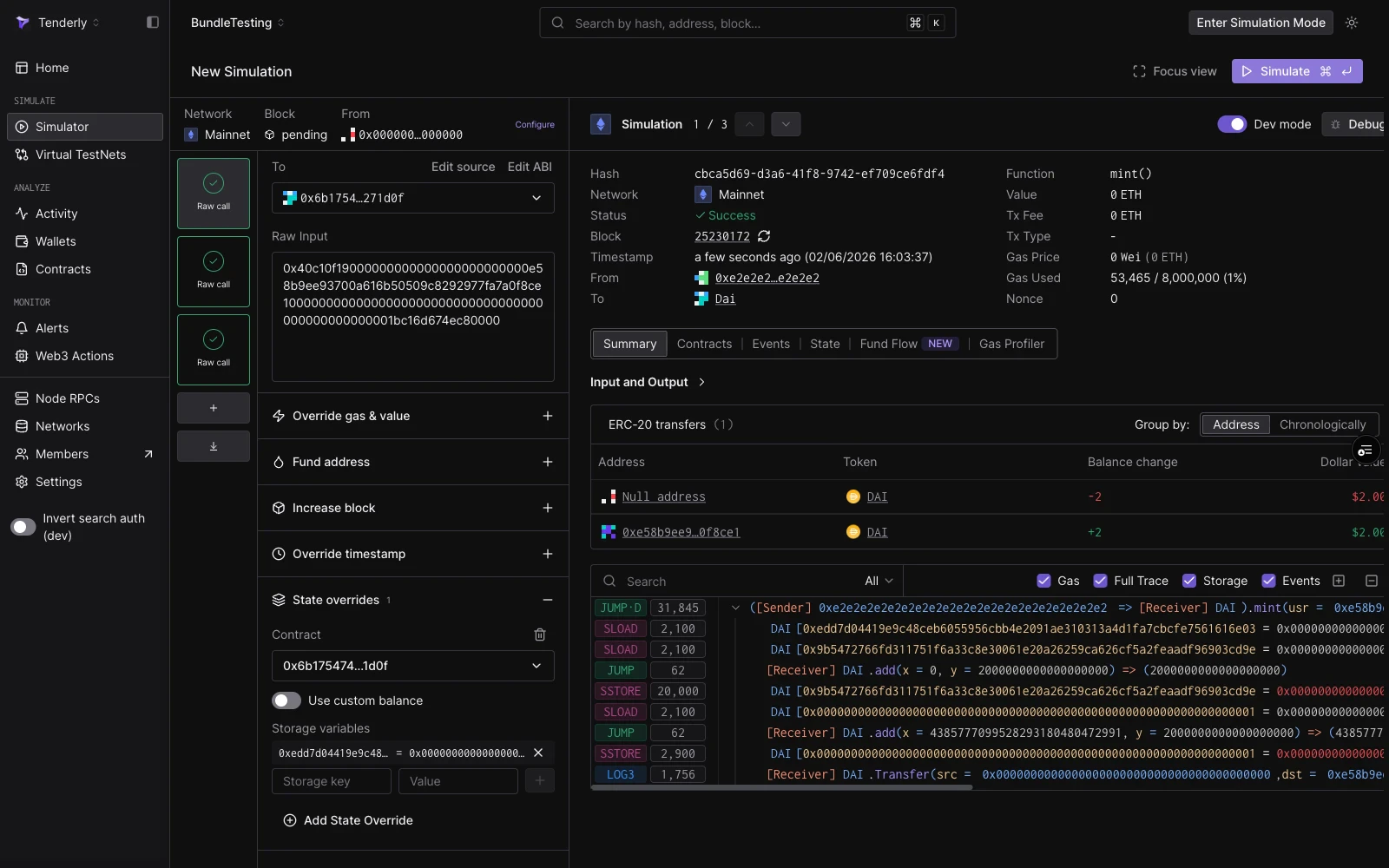
### Step 1: Mint 2 DAI
```bash theme={"theme":{"light":"catppuccin-latte","dark":"catppuccin-mocha"}}
From: 0xe2e2e2e2e2e2e2e2e2e2e2e2e2e2e2e2e2e2e2e2 (fake ward)
To: 0x6b175474e89094c44da98b954eedeac495271d0f (DAI)
Input: 0x40c10f19
000000000000000000000000e58b9ee93700a616b50509c8292977fa7a0f8ce1 (recipient)
0000000000000000000000000000000000000000000000001bc16d674ec80000 (2 DAI)
```
DAI's `mint` function is guarded by a `wards` mapping: only addresses registered as wards can call it. The fake ward (`0xe2e2...e2`) is not a ward on mainnet. To make this step succeed, add a **state override** that sets the ward storage slot for that address to `1`:
| Field | Value |
| ----------- | -------------------------------------------------------------------- |
| Contract | `0x6b175474e89094c44da98b954eedeac495271d0f` |
| Storage key | `0xedd7d04419e9c48ceb6055956cbb4e2091ae310313a4d1fa7cbcfe7561616e03` |
| Value | `0x0000000000000000000000000000000000000000000000000000000000000001` |
The storage key is `keccak256(abi.encode(wardAddress, 0))`, the standard Solidity mapping slot for `wards[fakeWardAddress]` at storage position `0`.
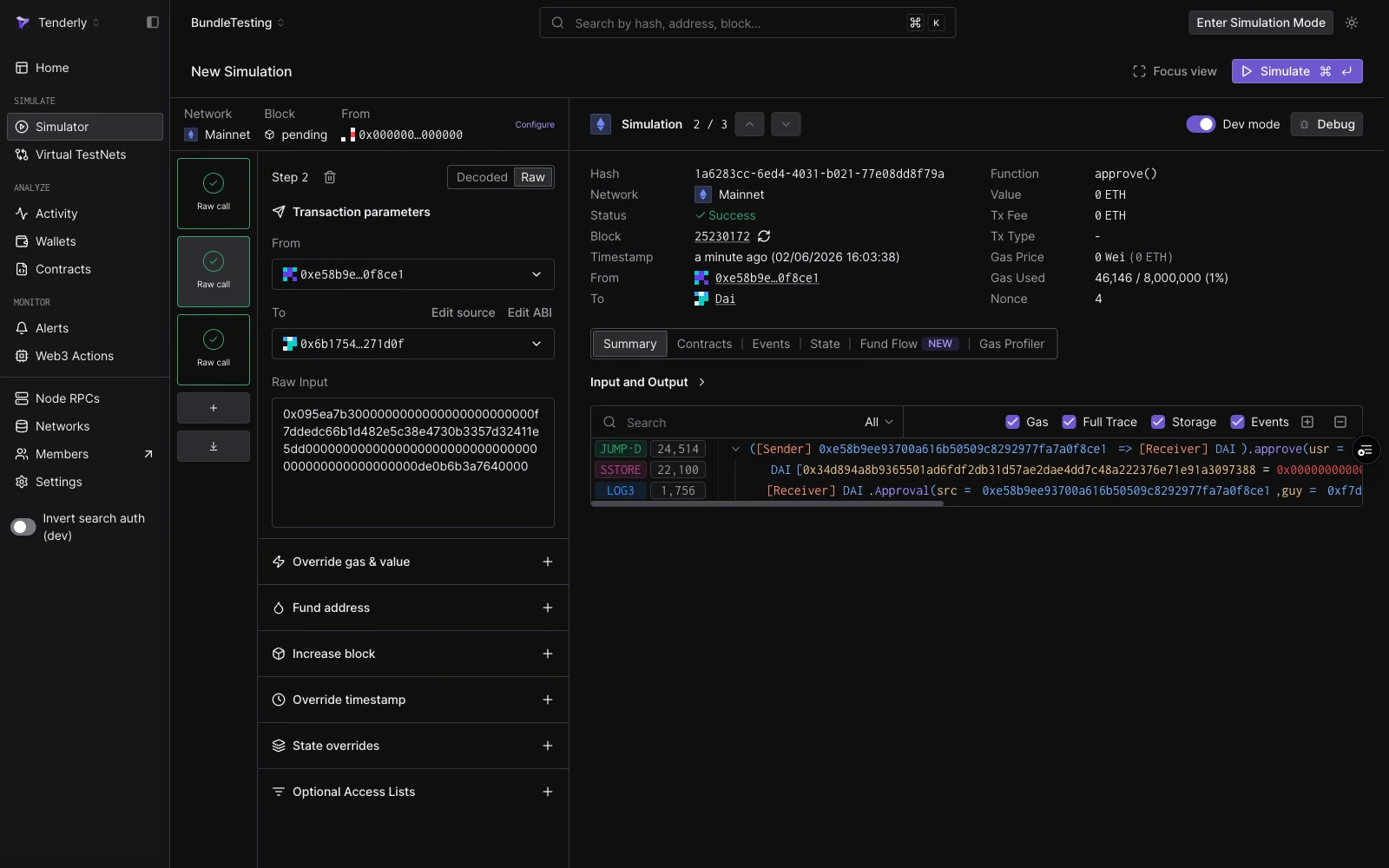
### Step 2: Approve 1 DAI
```bash theme={"theme":{"light":"catppuccin-latte","dark":"catppuccin-mocha"}}
From: 0xe58b9ee93700a616b50509c8292977fa7a0f8ce1 (token holder from step 1)
To: 0x6b175474e89094c44da98b954eedeac495271d0f (DAI)
Input: 0x095ea7b3
000000000000000000000000f7ddedc66b1d482e5c38e4730b3357d32411e5dd (spender)
0000000000000000000000000000000000000000000000000de0b6b3a7640000 (1 DAI)
```
The holder approves a spender to pull up to 1 DAI. This step works because step 1 already credited 2 DAI to the holder's balance in the shared state stream.
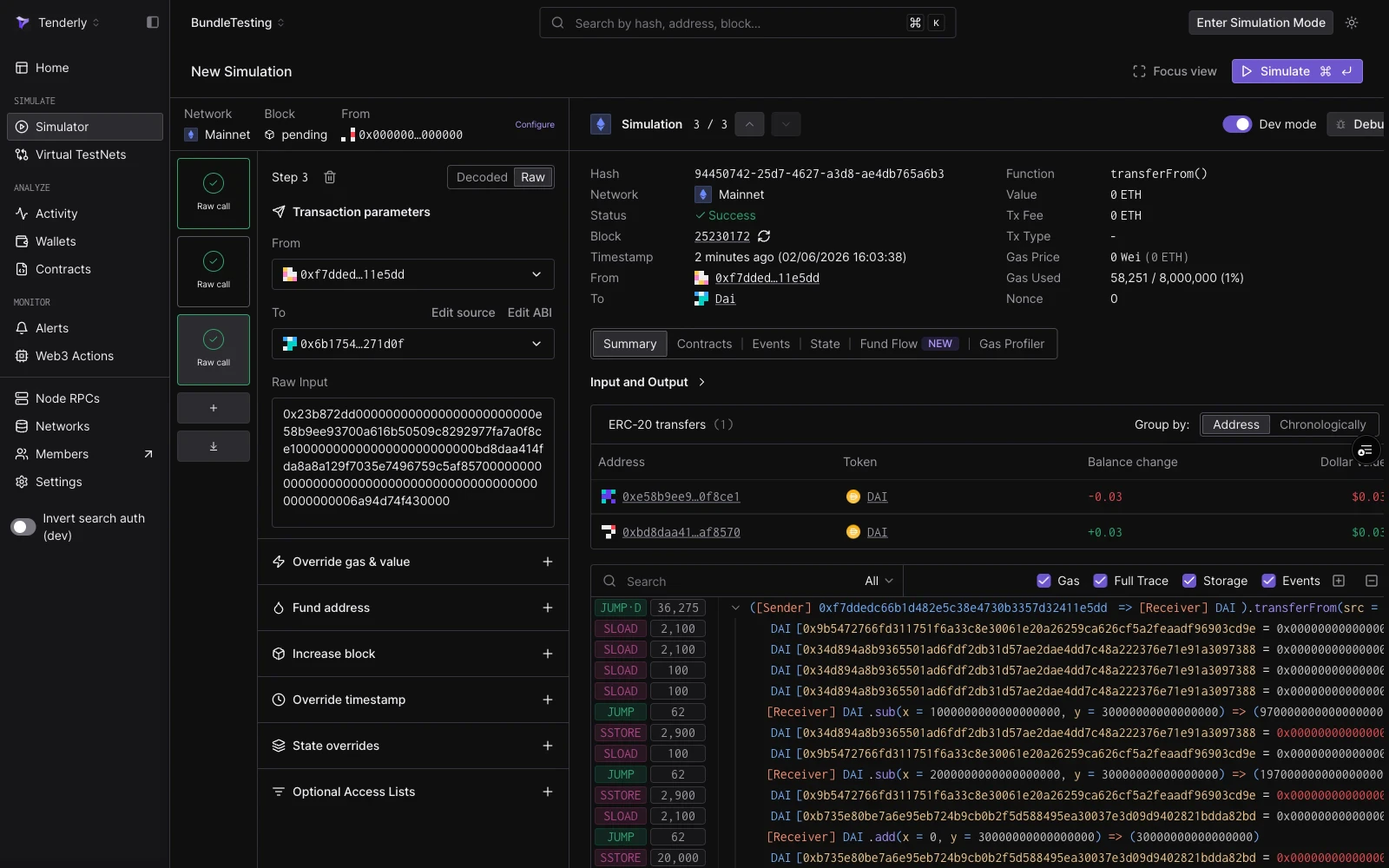
### Step 3: TransferFrom 0.03 DAI
```bash theme={"theme":{"light":"catppuccin-latte","dark":"catppuccin-mocha"}}
From: 0xf7ddedc66b1d482e5c38e4730b3357d32411e5dd (approved spender)
To: 0x6b175474e89094c44da98b954eedeac495271d0f (DAI)
Input: 0x23b872dd
000000000000000000000000e58b9ee93700a616b50509c8292977fa7a0f8ce1 (sender / token holder)
000000000000000000000000bd8daa414fda8a8a129f7035e7496759c5af8570 (recipient)
000000000000000000000000000000000000000000000000006a94d74f430000 (0.03 DAI)
```
The spender moves 0.03 DAI from the holder to a recipient. This works because step 2 granted the allowance, which is only visible inside the bundle's state stream, not on-chain.
## Run via the Simulator UI
Go to **Simulator** in the left navigation, then click **New Simulation**. The bundle builder opens with one empty step.
The session strip runs across the top. Set **Network** to **Mainnet** and leave **Block** as **Pending**.
Switch the step to **Raw** mode. Set:
* **From**: `0xe2e2e2e2e2e2e2e2e2e2e2e2e2e2e2e2e2e2e2e2`
* **To**: `0x6b175474e89094c44da98b954eedeac495271d0f`
* **Calldata**: `0x40c10f19000000000000000000000000e58b9ee93700a616b50509c8292977fa7a0f8ce10000000000000000000000000000000000000000000000001bc16d674ec80000`
Then expand **State overrides**, add the DAI contract, and enter the ward storage slot and value from the table above. Click **Add storage override** to commit the slot.
 Click **+ Add function call** in the bundle rail. Switch the new step to **Raw** mode. Set:
* **From**: `0xe58b9ee93700a616b50509c8292977fa7a0f8ce1`
* **To**: `0x6b175474e89094c44da98b954eedeac495271d0f`
* **Calldata**: `0x095ea7b3000000000000000000000000f7ddedc66b1d482e5c38e4730b3357d32411e5dd0000000000000000000000000000000000000000000000000de0b6b3a7640000`
Add another step. Switch to **Raw** mode. Set:
* **From**: `0xf7ddedc66b1d482e5c38e4730b3357d32411e5dd`
* **To**: `0x6b175474e89094c44da98b954eedeac495271d0f`
* **Calldata**: `0x23b872dd000000000000000000000000e58b9ee93700a616b50509c8292977fa7a0f8ce1000000000000000000000000bd8daa414fda8a8a129f7035e7496759c5af8570000000000000000000000000000000000000000000000000006a94d74f430000`
Click **Simulate** (or press `⌘↵`). All three steps execute in sequence. Click each step in the rail to inspect its decoded output, gas used, events, and token transfers.
Click **+ Add function call** in the bundle rail. Switch the new step to **Raw** mode. Set:
* **From**: `0xe58b9ee93700a616b50509c8292977fa7a0f8ce1`
* **To**: `0x6b175474e89094c44da98b954eedeac495271d0f`
* **Calldata**: `0x095ea7b3000000000000000000000000f7ddedc66b1d482e5c38e4730b3357d32411e5dd0000000000000000000000000000000000000000000000000de0b6b3a7640000`
Add another step. Switch to **Raw** mode. Set:
* **From**: `0xf7ddedc66b1d482e5c38e4730b3357d32411e5dd`
* **To**: `0x6b175474e89094c44da98b954eedeac495271d0f`
* **Calldata**: `0x23b872dd000000000000000000000000e58b9ee93700a616b50509c8292977fa7a0f8ce1000000000000000000000000bd8daa414fda8a8a129f7035e7496759c5af8570000000000000000000000000000000000000000000000000006a94d74f430000`
Click **Simulate** (or press `⌘↵`). All three steps execute in sequence. Click each step in the rail to inspect its decoded output, gas used, events, and token transfers.
 ## Run via the Simulation API
Use the `simulate-bundle` endpoint to run the same sequence programmatically. Replace `{accountSlug}` and `{projectSlug}` with your values.
```bash theme={"theme":{"light":"catppuccin-latte","dark":"catppuccin-mocha"}}
curl --request POST \
--url https://api.tenderly.co/api/v1/account/{accountSlug}/project/{projectSlug}/simulate-bundle \
--header 'Content-Type: application/json' \
--header 'X-Access-Key: ' \
--data '{
"simulations": [
{
"network_id": "1",
"save": true,
"save_if_fails": true,
"simulation_type": "full",
"from": "0xe2e2e2e2e2e2e2e2e2e2e2e2e2e2e2e2e2e2e2e2",
"to": "0x6b175474e89094c44da98b954eedeac495271d0f",
"input": "0x40c10f19000000000000000000000000e58b9ee93700a616b50509c8292977fa7a0f8ce10000000000000000000000000000000000000000000000001bc16d674ec80000",
"state_objects": {
"0x6b175474e89094c44da98b954eedeac495271d0f": {
"storage": {
"0xedd7d04419e9c48ceb6055956cbb4e2091ae310313a4d1fa7cbcfe7561616e03": "0x0000000000000000000000000000000000000000000000000000000000000001"
}
}
}
},
{
"network_id": "1",
"save": true,
"save_if_fails": true,
"simulation_type": "full",
"from": "0xe58b9ee93700a616b50509c8292977fa7a0f8ce1",
"to": "0x6b175474e89094c44da98b954eedeac495271d0f",
"input": "0x095ea7b3000000000000000000000000f7ddedc66b1d482e5c38e4730b3357d32411e5dd0000000000000000000000000000000000000000000000000de0b6b3a7640000"
},
{
"network_id": "1",
"save": true,
"save_if_fails": true,
"simulation_type": "full",
"from": "0xf7ddedc66b1d482e5c38e4730b3357d32411e5dd",
"to": "0x6b175474e89094c44da98b954eedeac495271d0f",
"input": "0x23b872dd000000000000000000000000e58b9ee93700a616b50509c8292977fa7a0f8ce1000000000000000000000000bd8daa414fda8a8a129f7035e7496759c5af8570000000000000000000000000000000000000000000000000006a94d74f430000"
}
]
}'
```
The response is an array of three simulation results, one per step. Each entry contains `status`, `gasUsed`, decoded `logs`, a `trace`, `assetChanges`, and `balanceChanges`.
A successful run shows `"status": true` for all three steps. If a step reverts (for example, because the state override is missing from step 1), the API returns all results up to and including the failing step, and subsequent steps are not run.
## What to look for in the results
| Step | Key signals |
| ------------ | --------------------------------------------------------------------------------------------------------------------------------------------------------------------------------------------------------------- |
| Mint | `assetChanges` entry with `"type": "Mint"` and 2 DAI credited to the holder. `Transfer` event from the zero address. |
| Approve | `Approval` event in `logs`. No asset changes (approvals don't move tokens). |
| TransferFrom | `assetChanges` entry with `"type": "Transfer"` and 0.03 DAI moving from holder to recipient. `Transfer` event in `logs`. `balanceChanges` showing negative delta for the holder and positive for the recipient. |
## Next steps
* [Bundled Simulations (API reference)](/simulations/bundled-simulations): full endpoint documentation and response schema.
* [State overrides](/simulations/state-overrides): how to override storage, balance, and bytecode in simulations.
* [Simulator UI](/simulator-ui/overview): layout reference and keyboard shortcuts for the bundle builder.
## Run via the Simulation API
Use the `simulate-bundle` endpoint to run the same sequence programmatically. Replace `{accountSlug}` and `{projectSlug}` with your values.
```bash theme={"theme":{"light":"catppuccin-latte","dark":"catppuccin-mocha"}}
curl --request POST \
--url https://api.tenderly.co/api/v1/account/{accountSlug}/project/{projectSlug}/simulate-bundle \
--header 'Content-Type: application/json' \
--header 'X-Access-Key: ' \
--data '{
"simulations": [
{
"network_id": "1",
"save": true,
"save_if_fails": true,
"simulation_type": "full",
"from": "0xe2e2e2e2e2e2e2e2e2e2e2e2e2e2e2e2e2e2e2e2",
"to": "0x6b175474e89094c44da98b954eedeac495271d0f",
"input": "0x40c10f19000000000000000000000000e58b9ee93700a616b50509c8292977fa7a0f8ce10000000000000000000000000000000000000000000000001bc16d674ec80000",
"state_objects": {
"0x6b175474e89094c44da98b954eedeac495271d0f": {
"storage": {
"0xedd7d04419e9c48ceb6055956cbb4e2091ae310313a4d1fa7cbcfe7561616e03": "0x0000000000000000000000000000000000000000000000000000000000000001"
}
}
}
},
{
"network_id": "1",
"save": true,
"save_if_fails": true,
"simulation_type": "full",
"from": "0xe58b9ee93700a616b50509c8292977fa7a0f8ce1",
"to": "0x6b175474e89094c44da98b954eedeac495271d0f",
"input": "0x095ea7b3000000000000000000000000f7ddedc66b1d482e5c38e4730b3357d32411e5dd0000000000000000000000000000000000000000000000000de0b6b3a7640000"
},
{
"network_id": "1",
"save": true,
"save_if_fails": true,
"simulation_type": "full",
"from": "0xf7ddedc66b1d482e5c38e4730b3357d32411e5dd",
"to": "0x6b175474e89094c44da98b954eedeac495271d0f",
"input": "0x23b872dd000000000000000000000000e58b9ee93700a616b50509c8292977fa7a0f8ce1000000000000000000000000bd8daa414fda8a8a129f7035e7496759c5af8570000000000000000000000000000000000000000000000000006a94d74f430000"
}
]
}'
```
The response is an array of three simulation results, one per step. Each entry contains `status`, `gasUsed`, decoded `logs`, a `trace`, `assetChanges`, and `balanceChanges`.
A successful run shows `"status": true` for all three steps. If a step reverts (for example, because the state override is missing from step 1), the API returns all results up to and including the failing step, and subsequent steps are not run.
## What to look for in the results
| Step | Key signals |
| ------------ | --------------------------------------------------------------------------------------------------------------------------------------------------------------------------------------------------------------- |
| Mint | `assetChanges` entry with `"type": "Mint"` and 2 DAI credited to the holder. `Transfer` event from the zero address. |
| Approve | `Approval` event in `logs`. No asset changes (approvals don't move tokens). |
| TransferFrom | `assetChanges` entry with `"type": "Transfer"` and 0.03 DAI moving from holder to recipient. `Transfer` event in `logs`. `balanceChanges` showing negative delta for the holder and positive for the recipient. |
## Next steps
* [Bundled Simulations (API reference)](/simulations/bundled-simulations): full endpoint documentation and response schema.
* [State overrides](/simulations/state-overrides): how to override storage, balance, and bytecode in simulations.
* [Simulator UI](/simulator-ui/overview): layout reference and keyboard shortcuts for the bundle builder.