> ## Documentation Index
> Fetch the complete documentation index at: https://docs.tenderly.co/llms.txt
> Use this file to discover all available pages before exploring further.
# Editing Contract Source
> Edit contract source code, compiler settings, or the ABI inline while building a simulation, and run the modified code against live network state.
Once you select a contract in a simulation step in the [Simulator UI](/simulator-ui/overview), two buttons appear next to the **Contract** field: **Edit source** and **Edit ABI**. They let you change what code the simulation executes without touching the deployed contract, so you can test a bug fix, tweak a parameter, or try new logic against live production state before deploying anything.
The same controls are available when you re-simulate: clicking **Re-Simulate** on a transaction detail page loads its inputs into the builder, where you can edit the source and run again.
## Edit source
Click **Edit source** to open the source editor.
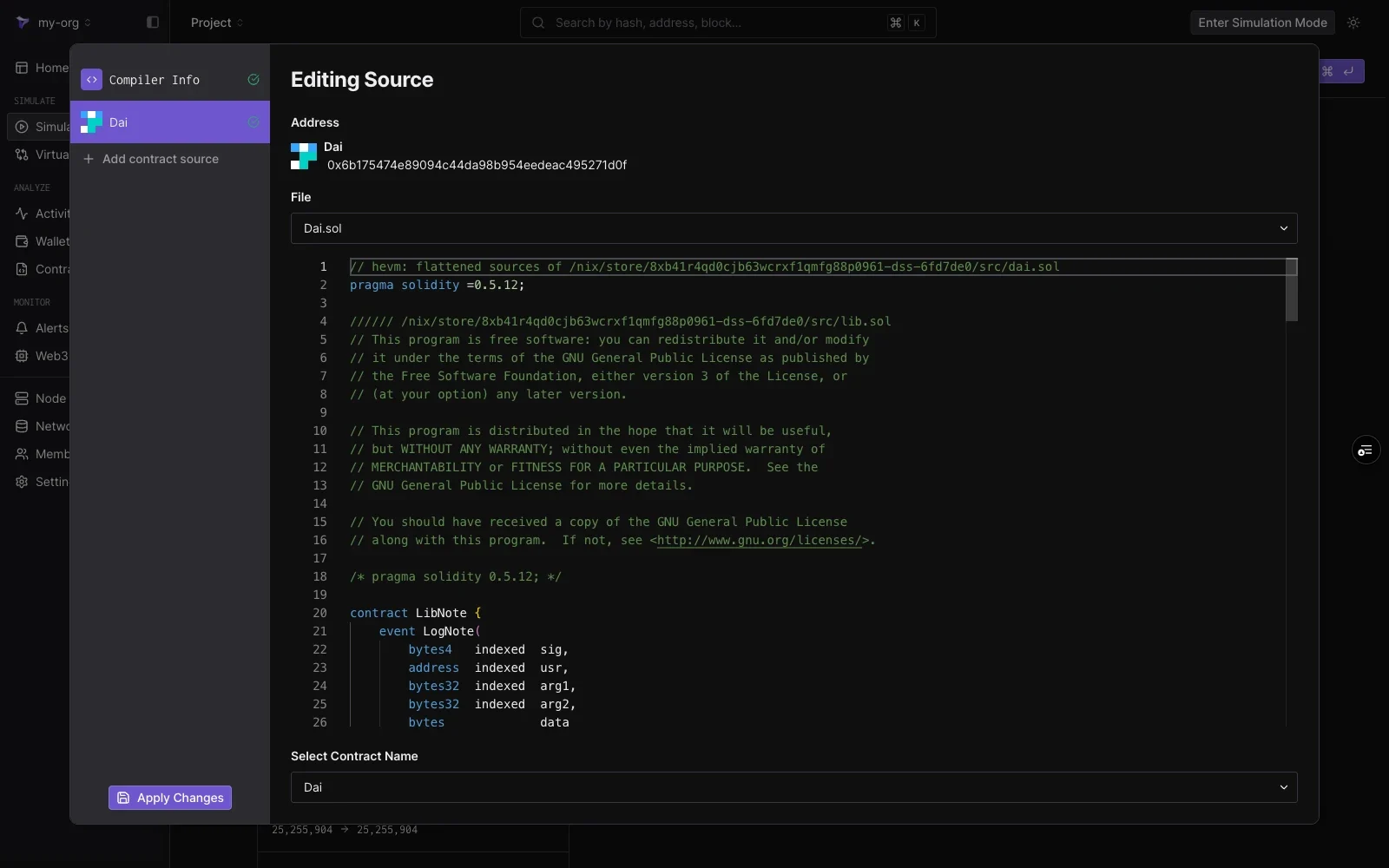 The editing pane shows:
| Element | Notes |
| ------------------------ | ----------------------------------------------------------------- |
| **Address** | The address whose code you are editing. |
| **File** | Dropdown to switch between source files for multi-file contracts. |
| **Editor** | The full source, editable line by line. |
| **Select Contract Name** | Which contract in the file is deployed at the address. |
Edits apply only to your simulation. The deployed contract and other project members' simulations are unaffected.
Click **Apply Changes** in the bottom-left corner to save the edits, then run the simulation. The step executes the modified code with the rest of the network state untouched.
### Compiler settings
Select **Compiler Info** in the left panel to adjust how the edited source is compiled:
The editing pane shows:
| Element | Notes |
| ------------------------ | ----------------------------------------------------------------- |
| **Address** | The address whose code you are editing. |
| **File** | Dropdown to switch between source files for multi-file contracts. |
| **Editor** | The full source, editable line by line. |
| **Select Contract Name** | Which contract in the file is deployed at the address. |
Edits apply only to your simulation. The deployed contract and other project members' simulations are unaffected.
Click **Apply Changes** in the bottom-left corner to save the edits, then run the simulation. The step executes the modified code with the rest of the network state untouched.
### Compiler settings
Select **Compiler Info** in the left panel to adjust how the edited source is compiled:
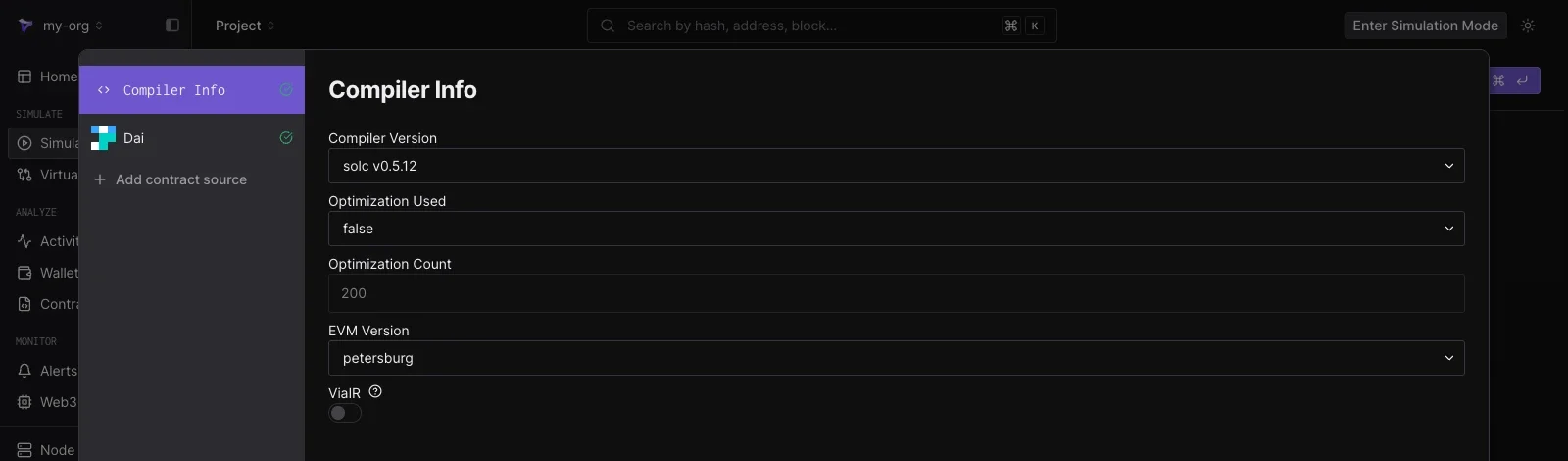 * **Compiler Version**
* **Optimization Used** and **Optimization Count**
* **EVM Version**
* **ViaIR**
The settings load from the contract's verification metadata, so a plain edit-and-run needs no compiler changes.
### Add contract source
Click **Add contract source** in the left panel to edit additional contracts in the same simulation. Enter the address of any deployed contract and its source loads as another entry in the list. This lets one simulation run modified code for several contracts at once, for example a router and the pool it calls into.
## Edit ABI
Click **Edit ABI** to open a JSON editor over the ABI the builder uses to decode functions and encode your inputs.
* **Compiler Version**
* **Optimization Used** and **Optimization Count**
* **EVM Version**
* **ViaIR**
The settings load from the contract's verification metadata, so a plain edit-and-run needs no compiler changes.
### Add contract source
Click **Add contract source** in the left panel to edit additional contracts in the same simulation. Enter the address of any deployed contract and its source loads as another entry in the list. This lets one simulation run modified code for several contracts at once, for example a router and the pool it calls into.
## Edit ABI
Click **Edit ABI** to open a JSON editor over the ABI the builder uses to decode functions and encode your inputs.
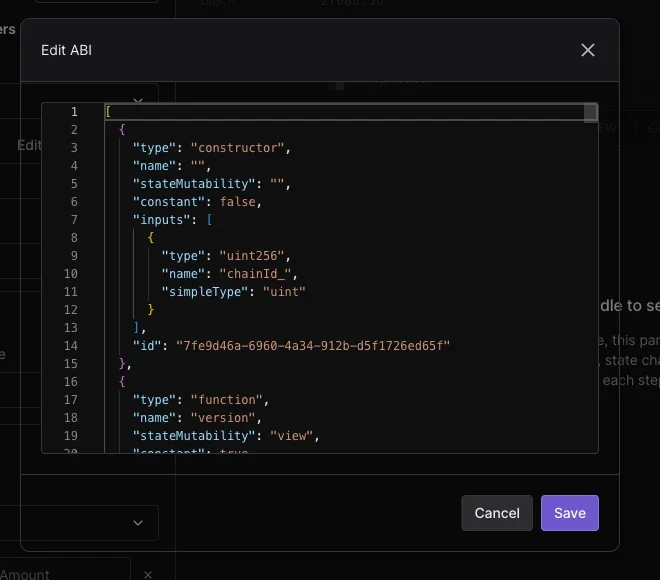 Editing the ABI is useful when a contract is unverified or its interface differs from the published ABI: paste or adjust the JSON, click **Save**, and the **Function** dropdown and argument fields follow the updated definition. For how those inputs map to a simulation, see [simulation parameters](/simulator-ui/parameters).