> ## Documentation Index
> Fetch the complete documentation index at: https://docs.tenderly.co/llms.txt
> Use this file to discover all available pages before exploring further.
# Simulation Parameters
> Reference for every input in the simulation builder: session defaults, block and transaction index, sender addresses, step fields, and per-step cheatcodes.
The simulation builder splits its inputs across three surfaces:
* **Session defaults** in the strip at the top apply to every step: Network, Block, and the default From address. Click **Configure** to edit them.
* **Step fields** define the call itself: sender, target contract, function, and arguments.
* **Cheatcodes** below the step fields modify the execution environment immediately before the step runs.
For the overall builder layout (session strip, bundle rail, focused step view), see the [Simulator UI overview](/simulator-ui/overview#layout).
## Session defaults
Click **Configure** in the session strip to open the defaults panel. Values set here apply to every new step in the bundle.
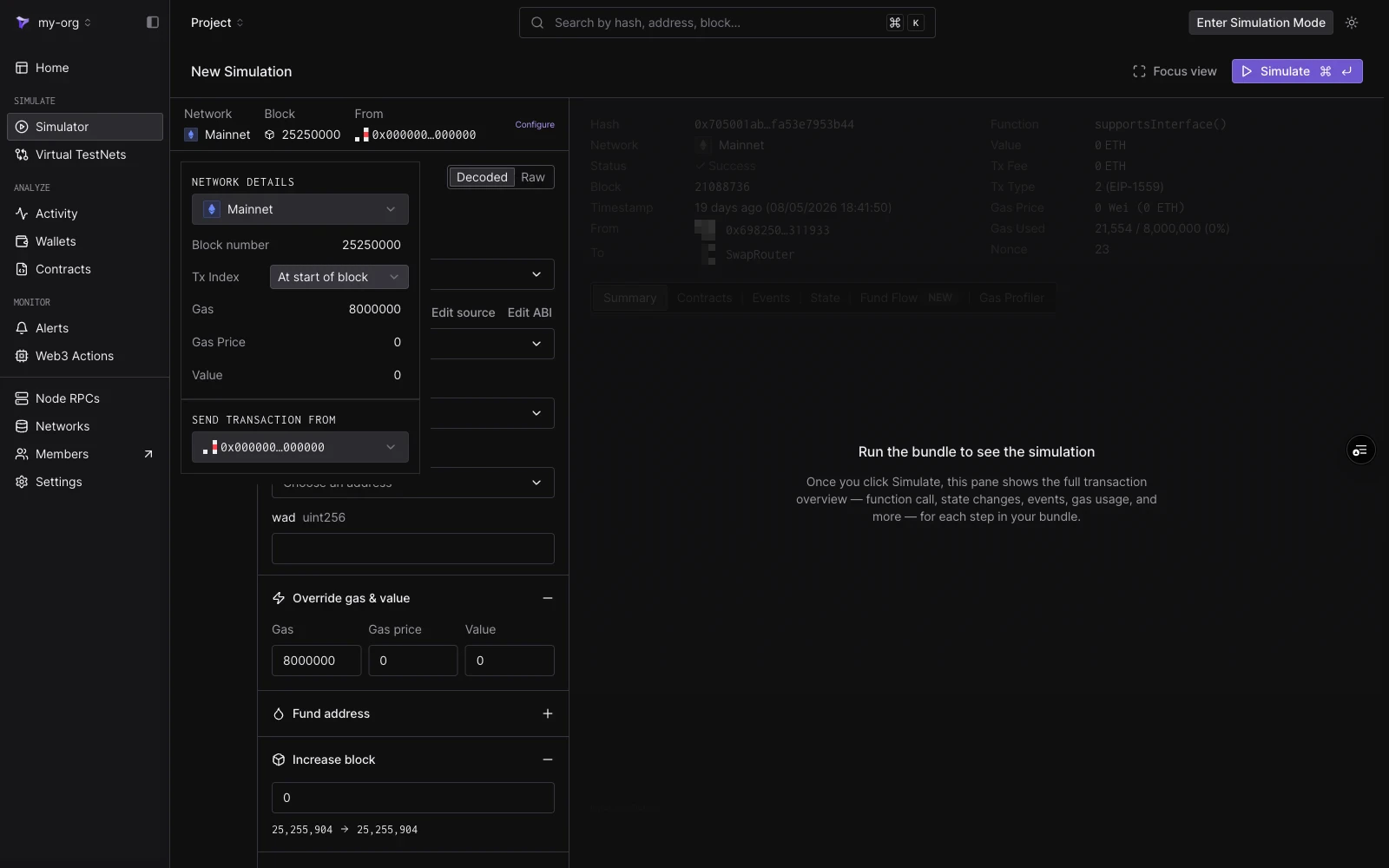 | Field | Notes |
| ------------------------- | ------------------------------------------------------------------------------------------ |
| **Network** | The network whose state the simulation runs against. |
| **Block number** | Defaults to `Pending`. Type a block number to pin the simulation to a historical block. |
| **Tx Index** | The transaction's position within the pinned block. Only available once a block is pinned. |
| **Gas** | Default gas limit for each step. Defaults to `8000000`. |
| **Gas Price** | Default gas price in Wei. |
| **Value** | Default ETH value sent with each step. |
| **Send transaction from** | Default From address for new steps. |
### Pending vs historical block
Leave **Block number** empty to simulate on the **pending block**. Tenderly executes the bundle against the latest available network state, as if it were included in the next block.
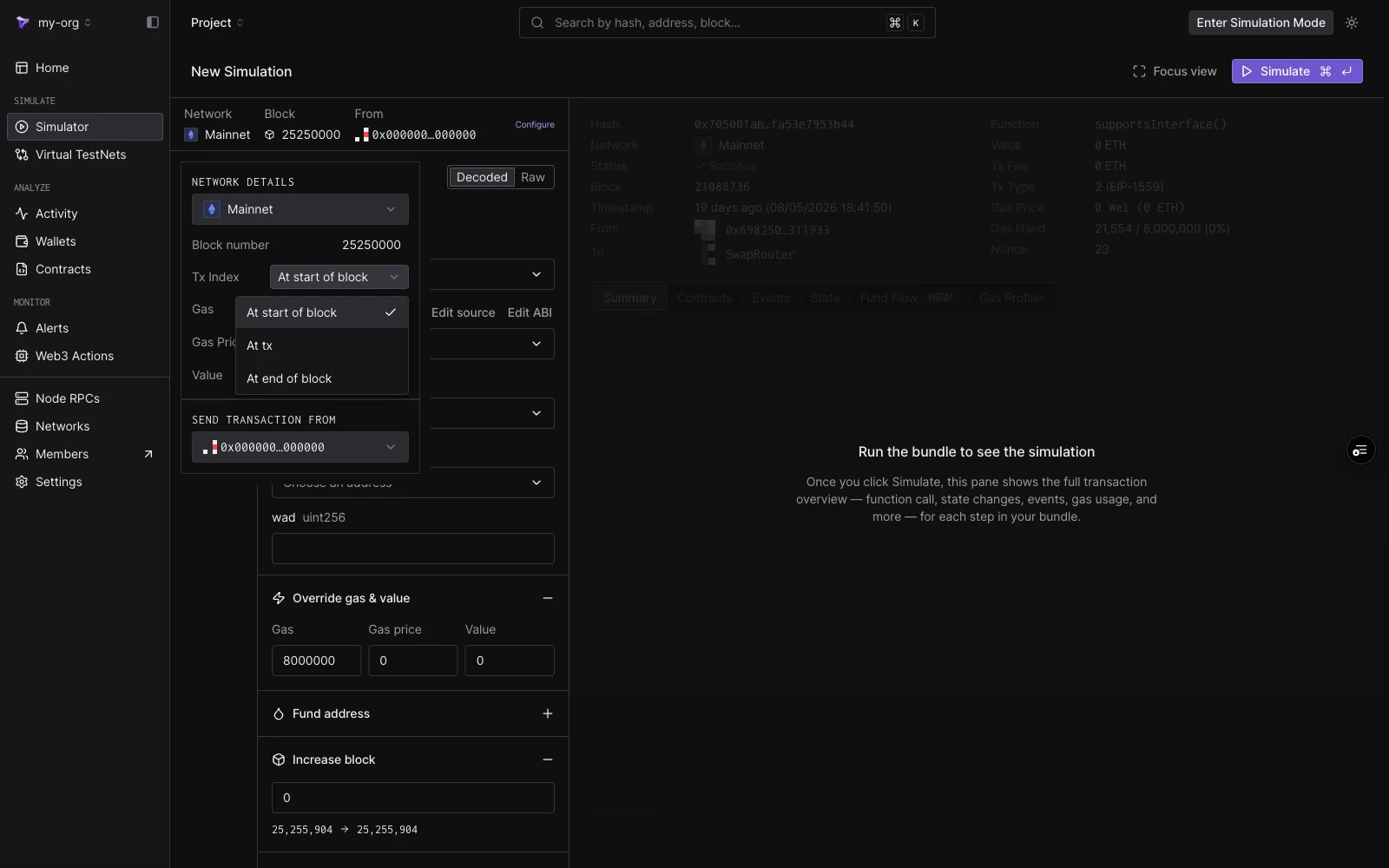
Type a block number to simulate on a **historical block**. The bundle then executes against the chain state as it was at that block, on any block going back to the start of the network. With a block pinned, **Tx Index** controls where in the block the simulation executes:
| Option | Meaning |
| --------------------- | -------------------------------------------------------------------------------------------------- |
| **At start of block** | Execute before any of the block's transactions. |
| **At tx** | Execute at a specific transaction index. The input shows how many transactions the block contains. |
| **At end of block** | Execute after all of the block's transactions. |
| Field | Notes |
| ------------------------- | ------------------------------------------------------------------------------------------ |
| **Network** | The network whose state the simulation runs against. |
| **Block number** | Defaults to `Pending`. Type a block number to pin the simulation to a historical block. |
| **Tx Index** | The transaction's position within the pinned block. Only available once a block is pinned. |
| **Gas** | Default gas limit for each step. Defaults to `8000000`. |
| **Gas Price** | Default gas price in Wei. |
| **Value** | Default ETH value sent with each step. |
| **Send transaction from** | Default From address for new steps. |
### Pending vs historical block
Leave **Block number** empty to simulate on the **pending block**. Tenderly executes the bundle against the latest available network state, as if it were included in the next block.
Type a block number to simulate on a **historical block**. The bundle then executes against the chain state as it was at that block, on any block going back to the start of the network. With a block pinned, **Tx Index** controls where in the block the simulation executes:
| Option | Meaning |
| --------------------- | -------------------------------------------------------------------------------------------------- |
| **At start of block** | Execute before any of the block's transactions. |
| **At tx** | Execute at a specific transaction index. The input shows how many transactions the block contains. |
| **At end of block** | Execute after all of the block's transactions. |
 ## From addresses
Simulations need no private keys or signatures, so any address can act as the sender. The From dropdown offers:
* The **zero address** (`0x0000…0000`), the default sender.
* Your **project wallets** on the selected network, grouped under "Selected network". Changing the network changes which wallets appear.
* Any address you **paste or search** in the input at the top of the dropdown.
## From addresses
Simulations need no private keys or signatures, so any address can act as the sender. The From dropdown offers:
* The **zero address** (`0x0000…0000`), the default sender.
* Your **project wallets** on the selected network, grouped under "Selected network". Changing the network changes which wallets appear.
* Any address you **paste or search** in the input at the top of the dropdown.
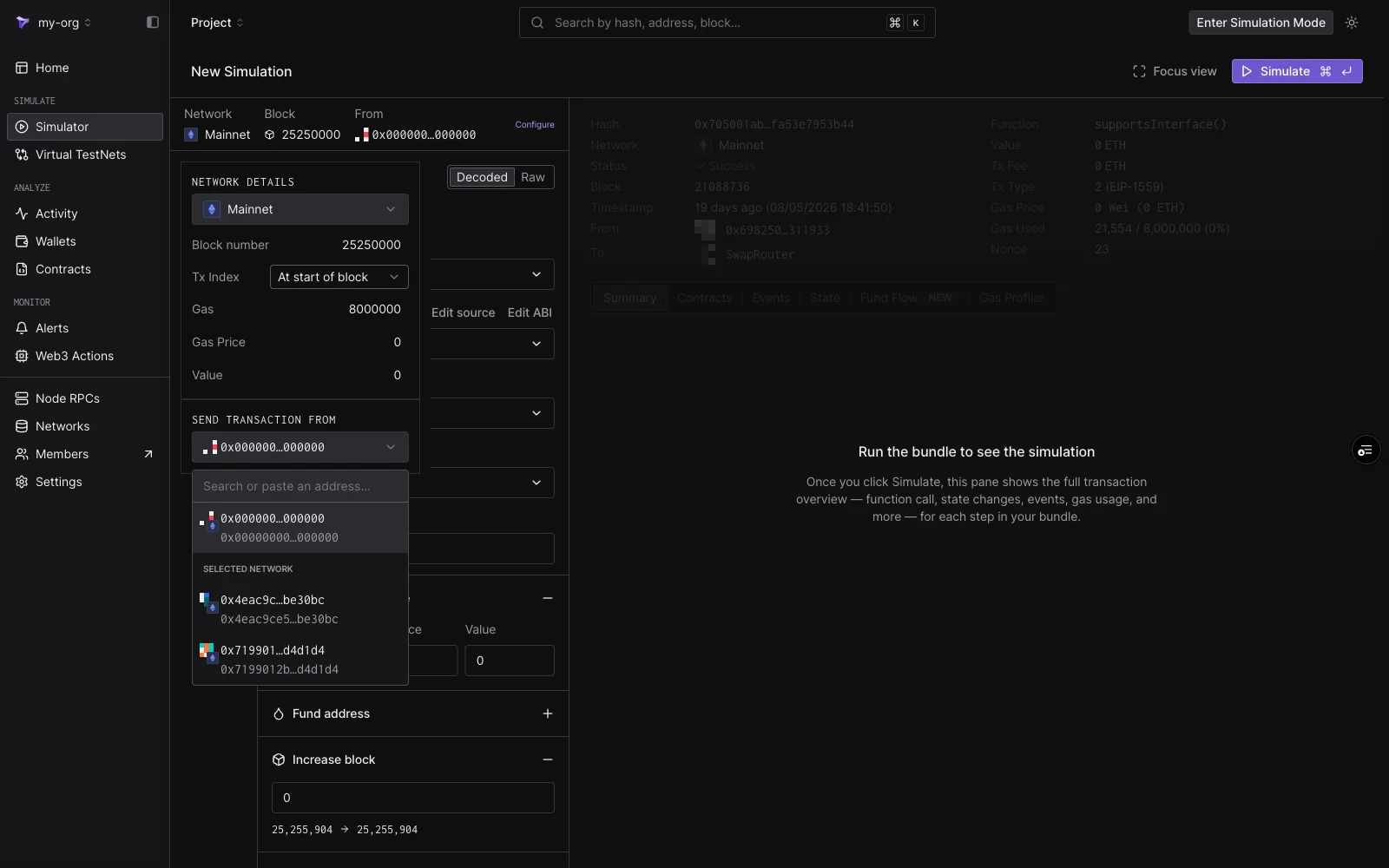 The address set in the Configure panel is the default for new steps. Each step also has its own **From** field in the step editor, so different steps in a bundle can use different senders.
## Step fields
Each step is built in **Decoded** or **Raw** mode, toggled at the top of the step editor.
The address set in the Configure panel is the default for new steps. Each step also has its own **From** field in the step editor, so different steps in a bundle can use different senders.
## Step fields
Each step is built in **Decoded** or **Raw** mode, toggled at the top of the step editor.
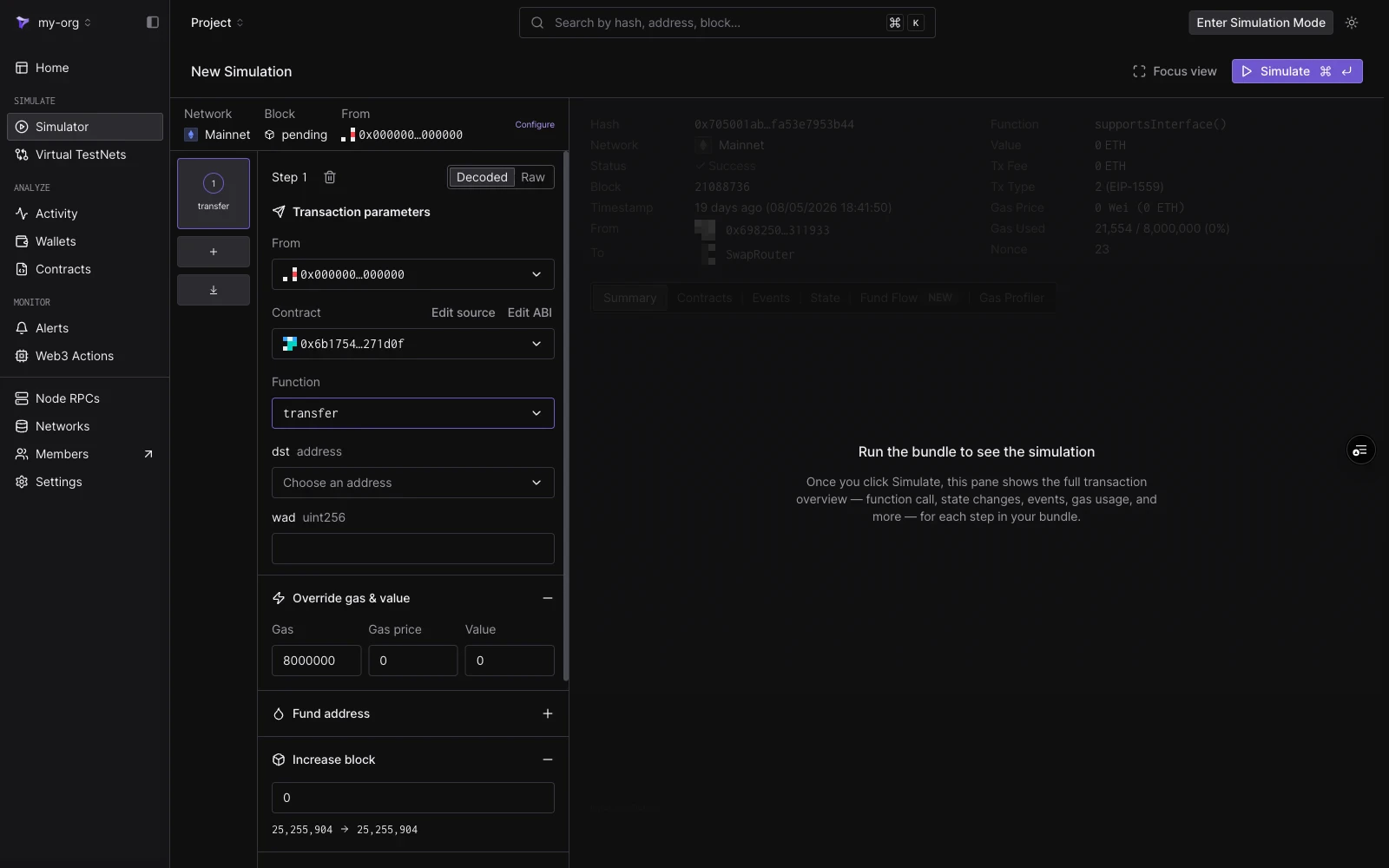 **Decoded mode** builds the call from the contract's ABI:
| Field | Notes |
| ------------- | --------------------------------------------------------------------------------------------------------------------------------------------------------------------------------------------------------------------------------------------------- |
| **From** | The step's sender. Defaults to the session From. |
| **Contract** | Project contracts surface first; also matches public contracts and top tokens by name, symbol, or address. Once selected, **Edit source** and **Edit ABI** become available (see [Editing Contract Source](/simulator-ui/editing-contract-source)). |
| **Function** | Filtered to non-event, non-constructor methods. |
| **Arguments** | One typed input per ABI argument. Address arguments get an address picker; value arguments get plain inputs. |
**Raw mode** takes a target address and a `0x`-prefixed hex payload directly. Use it when you already have calldata from an existing transaction or a manual encode.
## Cheatcodes
Each step carries six cheatcode sections. They run immediately before the step executes and are scoped to that step only.
### Override gas & value
Set a custom **Gas** limit, **Gas price**, and **Value** for this step, overriding the session defaults.
### Fund address
Credit any address with token balances before the step runs. Each entry takes a **Target address**, a **token** (searchable by symbol, name, or address), and an amount. Click **Add more tokens** to fund multiple tokens, and add further entries for other addresses.
To set an address's native balance instead, use the custom balance switch in [State overrides](#state-overrides).
### Increase block
Advance the block number by an offset before the step executes. The section shows the current block and the resulting block. Contracts that read `block.number` see the increased value.
### Override timestamp
Set the block timestamp the step executes with, in one of two modes:
* **Increase time**: advance the clock by an amount and unit (seconds, minutes, and so on).
* **Set UNIX timestamp**: jump to an absolute timestamp.
The section previews the resulting date and time. Contracts that read `block.timestamp` see the overridden value.
### State overrides
Override contract state before the step runs. Each override targets one contract (defaulting to the step's target) and supports:
* **Use custom balance**: set the contract's native balance.
* **Storage variables**: key and value pairs for individual storage slots, with **Add storage override** for more slots.
Click **Add State Override** to override additional contracts in the same step. For a walkthrough including storage slot calculation, see [Simulation with State Overrides](/simulator-ui/state-overrides).
### Optional Access Lists
Attach an [EIP-2930](https://eips.ethereum.org/EIPS/eip-2930) access list to the step. Announcing the contracts and storage keys the transaction touches can lower its gas cost on calls spanning many contracts. Add addresses one by one or import the list as JSON.
## Saving a starting point
Simulations are stateless: each run starts from the configured block. To keep a modified state (overrides, funded accounts, advanced timestamps) as a persistent environment you can keep transacting against, use [Virtual Environments](/virtual-environments/overview).
**Decoded mode** builds the call from the contract's ABI:
| Field | Notes |
| ------------- | --------------------------------------------------------------------------------------------------------------------------------------------------------------------------------------------------------------------------------------------------- |
| **From** | The step's sender. Defaults to the session From. |
| **Contract** | Project contracts surface first; also matches public contracts and top tokens by name, symbol, or address. Once selected, **Edit source** and **Edit ABI** become available (see [Editing Contract Source](/simulator-ui/editing-contract-source)). |
| **Function** | Filtered to non-event, non-constructor methods. |
| **Arguments** | One typed input per ABI argument. Address arguments get an address picker; value arguments get plain inputs. |
**Raw mode** takes a target address and a `0x`-prefixed hex payload directly. Use it when you already have calldata from an existing transaction or a manual encode.
## Cheatcodes
Each step carries six cheatcode sections. They run immediately before the step executes and are scoped to that step only.
### Override gas & value
Set a custom **Gas** limit, **Gas price**, and **Value** for this step, overriding the session defaults.
### Fund address
Credit any address with token balances before the step runs. Each entry takes a **Target address**, a **token** (searchable by symbol, name, or address), and an amount. Click **Add more tokens** to fund multiple tokens, and add further entries for other addresses.
To set an address's native balance instead, use the custom balance switch in [State overrides](#state-overrides).
### Increase block
Advance the block number by an offset before the step executes. The section shows the current block and the resulting block. Contracts that read `block.number` see the increased value.
### Override timestamp
Set the block timestamp the step executes with, in one of two modes:
* **Increase time**: advance the clock by an amount and unit (seconds, minutes, and so on).
* **Set UNIX timestamp**: jump to an absolute timestamp.
The section previews the resulting date and time. Contracts that read `block.timestamp` see the overridden value.
### State overrides
Override contract state before the step runs. Each override targets one contract (defaulting to the step's target) and supports:
* **Use custom balance**: set the contract's native balance.
* **Storage variables**: key and value pairs for individual storage slots, with **Add storage override** for more slots.
Click **Add State Override** to override additional contracts in the same step. For a walkthrough including storage slot calculation, see [Simulation with State Overrides](/simulator-ui/state-overrides).
### Optional Access Lists
Attach an [EIP-2930](https://eips.ethereum.org/EIPS/eip-2930) access list to the step. Announcing the contracts and storage keys the transaction touches can lower its gas cost on calls spanning many contracts. Add addresses one by one or import the list as JSON.
## Saving a starting point
Simulations are stateless: each run starts from the configured block. To keep a modified state (overrides, funded accounts, advanced timestamps) as a persistent environment you can keep transacting against, use [Virtual Environments](/virtual-environments/overview).