> ## Documentation Index
> Fetch the complete documentation index at: https://docs.tenderly.co/llms.txt
> Use this file to discover all available pages before exploring further.
# Foundry and Github Actions
> Set up a CI/CD pipeline on Virtual Environments with the Tenderly GitHub Action to test and stage Solidity smart contracts using Foundry.
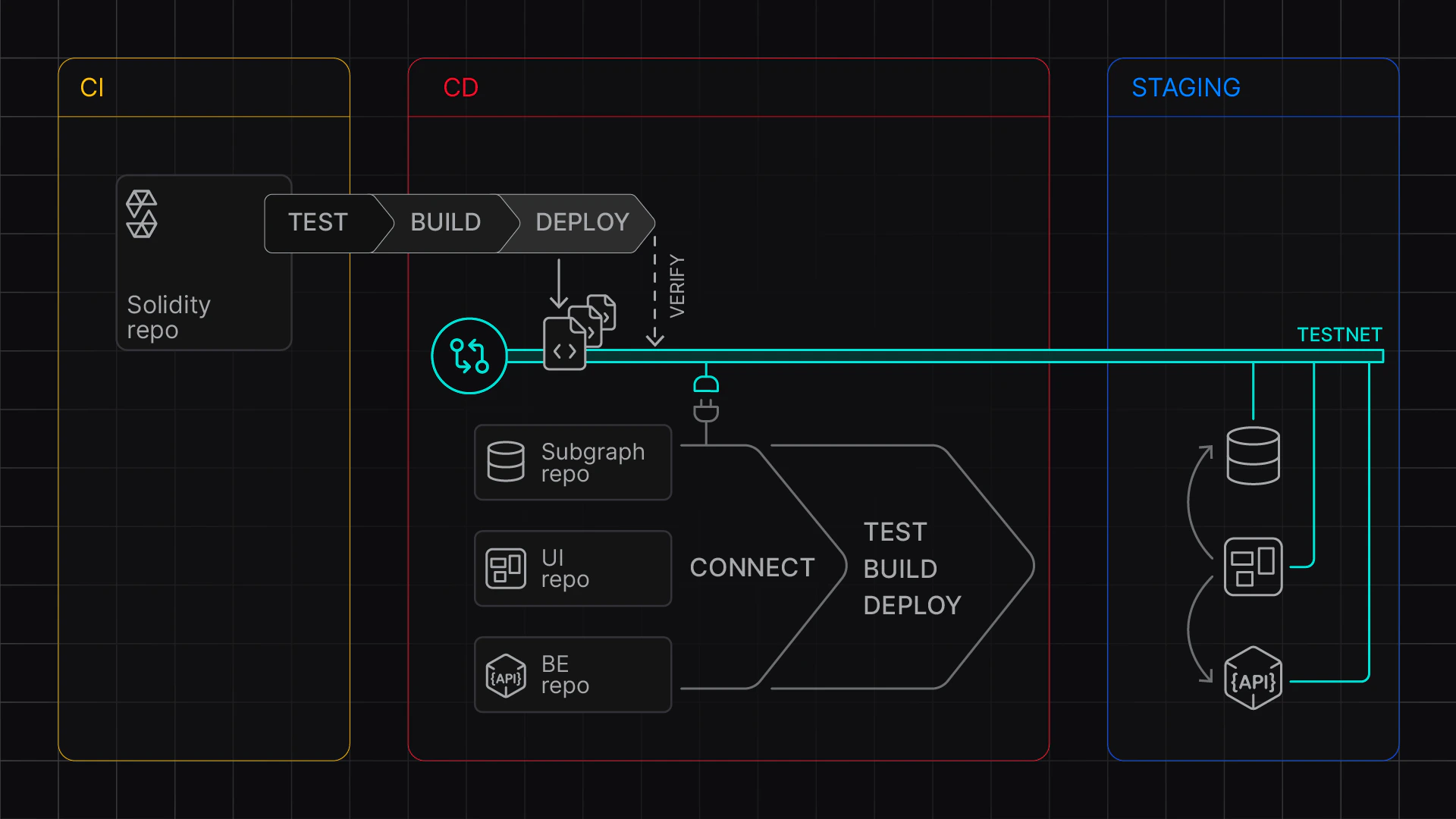
Learn how to configure a GitHub Action to set up a continuous integration and continuous deployment pipeline (CI/CD) with Foundry on Tenderly [Virtual Environments](/virtual-environments/overview).
Use the [Tenderly Virtual Environment Setup](https://github.com/marketplace/actions/tenderly-virtual-testnet-setup) action to enable automated builds to test and stage your contracts. This approach enables:
* **CI/CD Integration**: Run tests against forked networks and set up staging environments
* **Multi-Network Testing**: Provision multiple networks in a single step
* **Automated Deployments**: Deploy and verify contracts with complete deployment logs
* **Artifact Collection**: Track deployments across networks with structured logs
In this guide, you need to complete two stages:
1. Local setup: Set up Foundry to create and test out the workflow file
2. GitHub setup: Set up a GitHub Action, configure GitHub secrets and variables, and test the build
For reference, use this example project:
 ## Stage 1: Local Setup
First, create a workflow file with the necessary settings.
### Create the Workflow File
In your foundry project, create a new `workflows` directory and `ci-cd.yaml`:
```bash theme={"theme":{"light":"catppuccin-latte","dark":"catppuccin-mocha"}}
mkdir -p .github/workflows
touch .github/workflows/ci-cd.yaml
```
Next, paste the following configuration to `ci-cd.yaml` that sets up two jobs:
* **`test`** job to run Foundry tests
* **`deploy`** job to deploy contracts to a staging Virtual Environment
This sample workflow file:
* Uses `tenderly/vnet-github-action` to provision Virtual Environments based on a given `network_id` (Mainnet and Base), with custom `chain_id`
* Uses `update_foundry_config_and_build` to modify `foundry.toml` with the correct chain ID (especially important if you're using a custom `chain_id`), and passes verification information.
* Funds the `DEPLOYER_WALLET_ADDRESS` EOA with 100 ETH, using `set_wallet_balance`
* Deploys the contracts on the Virtual Environment
* Collects deployment information to `$BUILD_OUTPUT_FILE_1` and `$BUILD_OUTPUT_FILE_8453`, respectively, using foundry's `--json` option
* Pushes captured deployment information to the repository
The `mode` argument for `Tenderly/vnet-github-action` takes values `CI` and `CD`.
* The `CD` mode keeps the Virtual Environment active and you can work with deployed contracts.
* The `CI` mode pauses the Virtual Environment after the step completes. You'll be able to inspect transactions but won't be able to send further RPC requests.
```yaml title='ci-cd.yaml' showLineNumbers lines={24-25, 32-34, 38, 43, 49, 69} theme={"theme":{"light":"catppuccin-latte","dark":"catppuccin-mocha"}}
name: Foundry CI/CD
on:
push:
pull_request:
env:
TENDERLY_ACCESS_KEY: ${{ secrets.TENDERLY_ACCESS_KEY }}
DEPLOYER_WALLET_ADDRESS: ${{ vars.DEPLOYER_WALLET_ADDRESS }}
DEBUG: tenderly/vnet-github-action@v1.0.14
jobs:
deploy:
runs-on: ubuntu-latest
defaults:
run:
working-directory: ./examples/foundry
permissions:
contents: write
steps:
- uses: actions/checkout@v4
with:
submodules: recursive
- name: Setup Virtual Environment
uses: tenderly/vnet-github-action@v1.0.14
with:
mode: CD
access_key: ${{ secrets.TENDERLY_ACCESS_KEY }}
project_name: ${{ vars.TENDERLY_PROJECT_NAME }}
account_name: ${{ vars.TENDERLY_ACCOUNT_NAME }}
testnet_name: "Staging"
network_id: |
1
8453
chain_id_prefix: 7357
public_explorer: true
verification_visibility: 'src'
push_on_complete: true
- name: Install Foundry
uses: foundry-rs/foundry-toolchain@v1
- name: Fund Deployer Account on Mainnet
run: |
source ../../fixtures/load-fixtures.sh
update_foundry_config_and_build $TENDERLY_ACCESS_KEY $TENDERLY_FOUNDRY_VERIFICATION_URL_1 $TENDERLY_CHAIN_ID_1
set_wallet_balance $TENDERLY_ADMIN_RPC_URL_1 ${{ vars.DEPLOYER_WALLET_ADDRESS }} $HUNDRED_ETH
- name: Deploy Contracts Mainnet
run: |
forge build --sizes
forge script script/Counter.s.sol \
--private-key ${{ secrets.DEPLOYER_PRIVATE_KEY }} \
--rpc-url ${{ env.TENDERLY_PUBLIC_RPC_URL_1 }} \
--verifier-url ${{ env.TENDERLY_FOUNDRY_VERIFICATION_URL_1 }} \
--etherscan-api-key $TENDERLY_ACCESS_KEY \
--slow \
--broadcast \
--verify \
--json > $BUILD_OUTPUT_FILE_1
- name: Fund Deployer Account on Base
run: |
source ../../fixtures/load-fixtures.sh
update_foundry_config_and_build $TENDERLY_ACCESS_KEY $TENDERLY_FOUNDRY_VERIFICATION_URL_8453 $TENDERLY_CHAIN_ID_8453
set_wallet_balance $TENDERLY_ADMIN_RPC_URL_8453 ${{ vars.DEPLOYER_WALLET_ADDRESS }} $HUNDRED_ETH
- name: Deploy Contracts Base
working-directory: ./examples/foundry
run: |
forge script script/Counter.s.sol \
--private-key ${{ secrets.DEPLOYER_PRIVATE_KEY }} \
--rpc-url ${{ env.TENDERLY_PUBLIC_RPC_URL_8453 }} \
--verifier-url ${{ env.TENDERLY_FOUNDRY_VERIFICATION_URL_8453 }} \
--etherscan-api-key $TENDERLY_ACCESS_KEY \
--slow \
--broadcast \
--verify \
--json > $BUILD_OUTPUT_FILE_8453
```
### Configure Foundry
Create or update your `foundry.toml` configuration file. To use automatic contract verification, you must have the `unknown_chain` entry with `key`, `chain`, and `url`.
When using Virtual Environments from your local machine, replace the \`chain = 0\` with the chain ID of the Virtual Environment you connected to.
```toml showLineNumbers title="foundry.toml" lines={8-11} theme={"theme":{"light":"catppuccin-latte","dark":"catppuccin-mocha"}}
[profile.default]
src = "src"
out = "out"
libs = ["lib"]
cbor_metadata = true
# See more config options https://github.com/foundry-rs/foundry/blob/master/crates/config/README.md#all-options
[etherscan]
## placeholders must be replaced with key ("string"), chain_id (number, non-quoted), and tenderly_foundry_verification_url ("string")
unknown_chain = { key = "$TENDERLY_ACCESS_KEY", chain = 0, url = "$TENDERLY_FOUNDRY_VERIFICATION_URL" }
```
### Prepare Environment Variables
For local testing, set up an `.env` file with the following variables:
```dotenv showLineNumbers theme={"theme":{"light":"catppuccin-latte","dark":"catppuccin-mocha"}}
# Access parameters
TENDERLY_ACCESS_KEY=...
TENDERLY_PROJECT_NAME=...
TENDERLY_ACCOUNT_NAME=...
# Deployment parameters
DEPLOYER_PRIVATE_KEY=...
DEPLOYER_WALLET_ADDRESS=...
```
Required variables:
* `TENDERLY_ACCESS_KEY`: Your [Tenderly access key](/platform/account/projects/api-tokens)
* `TENDERLY_ACCOUNT_NAME` and `TENDERLY_PROJECT_NAME`: Your [account and project names](/platform/account/projects/api-tokens)
* `DEPLOYER_PRIVATE_KEY`: Private key for the deployment wallet
* `DEPLOYER_WALLET_ADDRESS`: Address corresponding to the private key
### Add fixtures script
Add the following `fixtures.sh` to your repository to be able to fund accounts and adapt `foundry.toml` easily.
This file exposes:
* `set_wallet_balance` function to top up the balance (RPC\_URL WALLET\_ADDRESS BALANCE\_HEX)
* `update_foundry_config_and_build` function to replace the placeholders in `foundry.toml`
* `HUNDRED_ETH` the wei value corresponding to 100 ETH
```bash theme={"theme":{"light":"catppuccin-latte","dark":"catppuccin-mocha"}}
#!/bin/bash
set_wallet_balance() {
if [ "$#" -ne 3 ]; then
echo "Usage: set_wallet_balance RPC_URL WALLET_ADDRESS BALANCE_HEX"
return 1
fi
local rpc_url="$1"
local wallet_address="$2"
local balance_hex="$3"
curl --location "$rpc_url" \
--header 'Content-Type: application/json' \
--data "{
\"jsonrpc\": \"2.0\",
\"method\": \"tenderly_setBalance\",
\"params\": [\"$wallet_address\", \"$balance_hex\"],
\"id\": \"1\"
}"
}
update_foundry_config_and_build() {
if [ "$#" -ne 3 ]; then
echo "Usage: update_foundry_config_and_build ACCESS_KEY VERIFICATION_URL CHAIN_ID"
return 1
fi
local access_key="$1"
local verification_url="$2"
local chain_id="$3"
# Create temporary file and update foundry.toml
sed -e "s|\${TENDERLY_ACCESS_KEY}|$access_key|g" \
-e "s|\${TENDERLY_FOUNDRY_VERIFICATION_URL}|$verification_url|g" \
-e "s/\(unknown_chain[[:space:]]*=[[:space:]]*{[^}]*chain[[:space:]]*=[[:space:]]*\)[0-9][0-9]*/\1$chain_id/g" \
foundry.toml > foundry.toml.tmp && mv foundry.toml.tmp foundry.toml
}
# Export constant
HUNDRED_ETH="0xDE0B6B3A7640000"
export HUNDRED_ETH
```
The github action exposes RPC links and verification URLs via different environment variables:
| Variable | Description |
| ------------------------------------------------ | ---------------------------------------------------------------------------- |
| `TENDERLY_TESTNET_ID_{network_id}` | Virtual Environment UUID, uniquely identifying it within Tenderly |
| `TENDERLY_ADMIN_RPC_URL_{network_id}` | [Admin RPC](/virtual-environments/admin-rpc) endpoint with cheatcode methods |
| `TENDERLY_PUBLIC_RPC_URL_{network_id}` | Public RPC endpoint |
| `TENDERLY_CHAIN_ID_{network_id}` | Chain ID |
| `TENDERLY_TESTNET_SLUG_{network_id}` | Unique Virtual Environment slug |
| `TENDERLY_FOUNDRY_VERIFICATION_URL_{network_id}` | [Foundry verification](/contract-verification/foundry#verifier-url) URL |
| `BUILD_OUTPUT_FILE_{network_id}` | Build output file path |
### Test the Github Action Locally
You can test your GitHub Action locally using [Act](https://github.com/nektos/act) without pushing to GitHub.
Use the **`.env`** file to populate GitHub secrets and environment variables as follows:
```bash theme={"theme":{"light":"catppuccin-latte","dark":"catppuccin-mocha"}}
act --secret-file .env --var-file .env
```
## Stage 2: Github Setup
After confirming your local setup works, configure your GitHub repository using the following steps.
### Configure Secrets and Variables
Set up the following GitHub secrets and variables:
**Secrets:**
* `TENDERLY_ACCESS_KEY`: the Tenderly Access Key
* `DEPLOYER_PRIVATE_KEY`: the private key for the deployer EOA
**Variables:**
* `TENDERLY_PROJECT_NAME`: the Tenderly project name
* `TENDERLY_ACCOUNT_NAME`: the project's owner's name
* `DEPLOYER_WALLET_ADDRESS`: the deployer EOA
You can achieve this via the [GitHub UI](https://docs.github.com/en/actions/how-tos/write-workflows/choose-what-workflows-do/use-variables#creating-configuration-variables-for-a-repository) or using the `gh` command line:
```bash theme={"theme":{"light":"catppuccin-latte","dark":"catppuccin-mocha"}}
# Load environment variables
source .env
# Set variables
gh variable set TENDERLY_PROJECT_NAME --body ${TENDERLY_PROJECT_NAME}
gh variable set TENDERLY_ACCOUNT_NAME --body ${TENDERLY_ACCOUNT_NAME}
gh variable set DEPLOYER_WALLET_ADDRESS --body ${DEPLOYER_WALLET_ADDRESS}
# Set secrets
gh secret set TENDERLY_ACCESS_KEY --body ${TENDERLY_ACCESS_KEY}
gh secret set DEPLOYER_PRIVATE_KEY --body ${DEPLOYER_PRIVATE_KEY}
```
### Push the Updates
Finally, commit and push your changes:
```bash theme={"theme":{"light":"catppuccin-latte","dark":"catppuccin-mocha"}}
git add .
git commit -m "Add CI/CD workflow for Foundry"
git push
```
### Check your action
Go go your Github repository and check Actions tab. Congrats, you ran your CI/CD workflow with Virtual Environments and Foundry. After
### Get the RPC link
To get the RPC link, go to **Tenderly dashboard > Virtual Environments** and find your CD Virtual Environment.
## Next steps
* Explore the [Foundry example](https://github.com/Tenderly/vnet-github-action/tree/main/examples/foundry) on Github.
* Explore the [Hardhat example](https://github.com/Tenderly/vnet-github-action/tree/main/examples/hardhat-ignition) on Github.
* Use the [balance fixtures](https://github.com/Tenderly/vnet-github-action/blob/main/fixtures/load-fixtures.sh).
## Stage 1: Local Setup
First, create a workflow file with the necessary settings.
### Create the Workflow File
In your foundry project, create a new `workflows` directory and `ci-cd.yaml`:
```bash theme={"theme":{"light":"catppuccin-latte","dark":"catppuccin-mocha"}}
mkdir -p .github/workflows
touch .github/workflows/ci-cd.yaml
```
Next, paste the following configuration to `ci-cd.yaml` that sets up two jobs:
* **`test`** job to run Foundry tests
* **`deploy`** job to deploy contracts to a staging Virtual Environment
This sample workflow file:
* Uses `tenderly/vnet-github-action` to provision Virtual Environments based on a given `network_id` (Mainnet and Base), with custom `chain_id`
* Uses `update_foundry_config_and_build` to modify `foundry.toml` with the correct chain ID (especially important if you're using a custom `chain_id`), and passes verification information.
* Funds the `DEPLOYER_WALLET_ADDRESS` EOA with 100 ETH, using `set_wallet_balance`
* Deploys the contracts on the Virtual Environment
* Collects deployment information to `$BUILD_OUTPUT_FILE_1` and `$BUILD_OUTPUT_FILE_8453`, respectively, using foundry's `--json` option
* Pushes captured deployment information to the repository
The `mode` argument for `Tenderly/vnet-github-action` takes values `CI` and `CD`.
* The `CD` mode keeps the Virtual Environment active and you can work with deployed contracts.
* The `CI` mode pauses the Virtual Environment after the step completes. You'll be able to inspect transactions but won't be able to send further RPC requests.
```yaml title='ci-cd.yaml' showLineNumbers lines={24-25, 32-34, 38, 43, 49, 69} theme={"theme":{"light":"catppuccin-latte","dark":"catppuccin-mocha"}}
name: Foundry CI/CD
on:
push:
pull_request:
env:
TENDERLY_ACCESS_KEY: ${{ secrets.TENDERLY_ACCESS_KEY }}
DEPLOYER_WALLET_ADDRESS: ${{ vars.DEPLOYER_WALLET_ADDRESS }}
DEBUG: tenderly/vnet-github-action@v1.0.14
jobs:
deploy:
runs-on: ubuntu-latest
defaults:
run:
working-directory: ./examples/foundry
permissions:
contents: write
steps:
- uses: actions/checkout@v4
with:
submodules: recursive
- name: Setup Virtual Environment
uses: tenderly/vnet-github-action@v1.0.14
with:
mode: CD
access_key: ${{ secrets.TENDERLY_ACCESS_KEY }}
project_name: ${{ vars.TENDERLY_PROJECT_NAME }}
account_name: ${{ vars.TENDERLY_ACCOUNT_NAME }}
testnet_name: "Staging"
network_id: |
1
8453
chain_id_prefix: 7357
public_explorer: true
verification_visibility: 'src'
push_on_complete: true
- name: Install Foundry
uses: foundry-rs/foundry-toolchain@v1
- name: Fund Deployer Account on Mainnet
run: |
source ../../fixtures/load-fixtures.sh
update_foundry_config_and_build $TENDERLY_ACCESS_KEY $TENDERLY_FOUNDRY_VERIFICATION_URL_1 $TENDERLY_CHAIN_ID_1
set_wallet_balance $TENDERLY_ADMIN_RPC_URL_1 ${{ vars.DEPLOYER_WALLET_ADDRESS }} $HUNDRED_ETH
- name: Deploy Contracts Mainnet
run: |
forge build --sizes
forge script script/Counter.s.sol \
--private-key ${{ secrets.DEPLOYER_PRIVATE_KEY }} \
--rpc-url ${{ env.TENDERLY_PUBLIC_RPC_URL_1 }} \
--verifier-url ${{ env.TENDERLY_FOUNDRY_VERIFICATION_URL_1 }} \
--etherscan-api-key $TENDERLY_ACCESS_KEY \
--slow \
--broadcast \
--verify \
--json > $BUILD_OUTPUT_FILE_1
- name: Fund Deployer Account on Base
run: |
source ../../fixtures/load-fixtures.sh
update_foundry_config_and_build $TENDERLY_ACCESS_KEY $TENDERLY_FOUNDRY_VERIFICATION_URL_8453 $TENDERLY_CHAIN_ID_8453
set_wallet_balance $TENDERLY_ADMIN_RPC_URL_8453 ${{ vars.DEPLOYER_WALLET_ADDRESS }} $HUNDRED_ETH
- name: Deploy Contracts Base
working-directory: ./examples/foundry
run: |
forge script script/Counter.s.sol \
--private-key ${{ secrets.DEPLOYER_PRIVATE_KEY }} \
--rpc-url ${{ env.TENDERLY_PUBLIC_RPC_URL_8453 }} \
--verifier-url ${{ env.TENDERLY_FOUNDRY_VERIFICATION_URL_8453 }} \
--etherscan-api-key $TENDERLY_ACCESS_KEY \
--slow \
--broadcast \
--verify \
--json > $BUILD_OUTPUT_FILE_8453
```
### Configure Foundry
Create or update your `foundry.toml` configuration file. To use automatic contract verification, you must have the `unknown_chain` entry with `key`, `chain`, and `url`.
When using Virtual Environments from your local machine, replace the \`chain = 0\` with the chain ID of the Virtual Environment you connected to.
```toml showLineNumbers title="foundry.toml" lines={8-11} theme={"theme":{"light":"catppuccin-latte","dark":"catppuccin-mocha"}}
[profile.default]
src = "src"
out = "out"
libs = ["lib"]
cbor_metadata = true
# See more config options https://github.com/foundry-rs/foundry/blob/master/crates/config/README.md#all-options
[etherscan]
## placeholders must be replaced with key ("string"), chain_id (number, non-quoted), and tenderly_foundry_verification_url ("string")
unknown_chain = { key = "$TENDERLY_ACCESS_KEY", chain = 0, url = "$TENDERLY_FOUNDRY_VERIFICATION_URL" }
```
### Prepare Environment Variables
For local testing, set up an `.env` file with the following variables:
```dotenv showLineNumbers theme={"theme":{"light":"catppuccin-latte","dark":"catppuccin-mocha"}}
# Access parameters
TENDERLY_ACCESS_KEY=...
TENDERLY_PROJECT_NAME=...
TENDERLY_ACCOUNT_NAME=...
# Deployment parameters
DEPLOYER_PRIVATE_KEY=...
DEPLOYER_WALLET_ADDRESS=...
```
Required variables:
* `TENDERLY_ACCESS_KEY`: Your [Tenderly access key](/platform/account/projects/api-tokens)
* `TENDERLY_ACCOUNT_NAME` and `TENDERLY_PROJECT_NAME`: Your [account and project names](/platform/account/projects/api-tokens)
* `DEPLOYER_PRIVATE_KEY`: Private key for the deployment wallet
* `DEPLOYER_WALLET_ADDRESS`: Address corresponding to the private key
### Add fixtures script
Add the following `fixtures.sh` to your repository to be able to fund accounts and adapt `foundry.toml` easily.
This file exposes:
* `set_wallet_balance` function to top up the balance (RPC\_URL WALLET\_ADDRESS BALANCE\_HEX)
* `update_foundry_config_and_build` function to replace the placeholders in `foundry.toml`
* `HUNDRED_ETH` the wei value corresponding to 100 ETH
```bash theme={"theme":{"light":"catppuccin-latte","dark":"catppuccin-mocha"}}
#!/bin/bash
set_wallet_balance() {
if [ "$#" -ne 3 ]; then
echo "Usage: set_wallet_balance RPC_URL WALLET_ADDRESS BALANCE_HEX"
return 1
fi
local rpc_url="$1"
local wallet_address="$2"
local balance_hex="$3"
curl --location "$rpc_url" \
--header 'Content-Type: application/json' \
--data "{
\"jsonrpc\": \"2.0\",
\"method\": \"tenderly_setBalance\",
\"params\": [\"$wallet_address\", \"$balance_hex\"],
\"id\": \"1\"
}"
}
update_foundry_config_and_build() {
if [ "$#" -ne 3 ]; then
echo "Usage: update_foundry_config_and_build ACCESS_KEY VERIFICATION_URL CHAIN_ID"
return 1
fi
local access_key="$1"
local verification_url="$2"
local chain_id="$3"
# Create temporary file and update foundry.toml
sed -e "s|\${TENDERLY_ACCESS_KEY}|$access_key|g" \
-e "s|\${TENDERLY_FOUNDRY_VERIFICATION_URL}|$verification_url|g" \
-e "s/\(unknown_chain[[:space:]]*=[[:space:]]*{[^}]*chain[[:space:]]*=[[:space:]]*\)[0-9][0-9]*/\1$chain_id/g" \
foundry.toml > foundry.toml.tmp && mv foundry.toml.tmp foundry.toml
}
# Export constant
HUNDRED_ETH="0xDE0B6B3A7640000"
export HUNDRED_ETH
```
The github action exposes RPC links and verification URLs via different environment variables:
| Variable | Description |
| ------------------------------------------------ | ---------------------------------------------------------------------------- |
| `TENDERLY_TESTNET_ID_{network_id}` | Virtual Environment UUID, uniquely identifying it within Tenderly |
| `TENDERLY_ADMIN_RPC_URL_{network_id}` | [Admin RPC](/virtual-environments/admin-rpc) endpoint with cheatcode methods |
| `TENDERLY_PUBLIC_RPC_URL_{network_id}` | Public RPC endpoint |
| `TENDERLY_CHAIN_ID_{network_id}` | Chain ID |
| `TENDERLY_TESTNET_SLUG_{network_id}` | Unique Virtual Environment slug |
| `TENDERLY_FOUNDRY_VERIFICATION_URL_{network_id}` | [Foundry verification](/contract-verification/foundry#verifier-url) URL |
| `BUILD_OUTPUT_FILE_{network_id}` | Build output file path |
### Test the Github Action Locally
You can test your GitHub Action locally using [Act](https://github.com/nektos/act) without pushing to GitHub.
Use the **`.env`** file to populate GitHub secrets and environment variables as follows:
```bash theme={"theme":{"light":"catppuccin-latte","dark":"catppuccin-mocha"}}
act --secret-file .env --var-file .env
```
## Stage 2: Github Setup
After confirming your local setup works, configure your GitHub repository using the following steps.
### Configure Secrets and Variables
Set up the following GitHub secrets and variables:
**Secrets:**
* `TENDERLY_ACCESS_KEY`: the Tenderly Access Key
* `DEPLOYER_PRIVATE_KEY`: the private key for the deployer EOA
**Variables:**
* `TENDERLY_PROJECT_NAME`: the Tenderly project name
* `TENDERLY_ACCOUNT_NAME`: the project's owner's name
* `DEPLOYER_WALLET_ADDRESS`: the deployer EOA
You can achieve this via the [GitHub UI](https://docs.github.com/en/actions/how-tos/write-workflows/choose-what-workflows-do/use-variables#creating-configuration-variables-for-a-repository) or using the `gh` command line:
```bash theme={"theme":{"light":"catppuccin-latte","dark":"catppuccin-mocha"}}
# Load environment variables
source .env
# Set variables
gh variable set TENDERLY_PROJECT_NAME --body ${TENDERLY_PROJECT_NAME}
gh variable set TENDERLY_ACCOUNT_NAME --body ${TENDERLY_ACCOUNT_NAME}
gh variable set DEPLOYER_WALLET_ADDRESS --body ${DEPLOYER_WALLET_ADDRESS}
# Set secrets
gh secret set TENDERLY_ACCESS_KEY --body ${TENDERLY_ACCESS_KEY}
gh secret set DEPLOYER_PRIVATE_KEY --body ${DEPLOYER_PRIVATE_KEY}
```
### Push the Updates
Finally, commit and push your changes:
```bash theme={"theme":{"light":"catppuccin-latte","dark":"catppuccin-mocha"}}
git add .
git commit -m "Add CI/CD workflow for Foundry"
git push
```
### Check your action
Go go your Github repository and check Actions tab. Congrats, you ran your CI/CD workflow with Virtual Environments and Foundry. After
### Get the RPC link
To get the RPC link, go to **Tenderly dashboard > Virtual Environments** and find your CD Virtual Environment.
## Next steps
* Explore the [Foundry example](https://github.com/Tenderly/vnet-github-action/tree/main/examples/foundry) on Github.
* Explore the [Hardhat example](https://github.com/Tenderly/vnet-github-action/tree/main/examples/hardhat-ignition) on Github.
* Use the [balance fixtures](https://github.com/Tenderly/vnet-github-action/blob/main/fixtures/load-fixtures.sh).