> ## Documentation Index
> Fetch the complete documentation index at: https://docs.tenderly.co/llms.txt
> Use this file to discover all available pages before exploring further.
# Hardhat and Github Actions
> Use Tenderly Github action to set up Continuous Integration and Continuous Deployment (CI/CD) to test and stage Solidity smart contracts with Hardhat
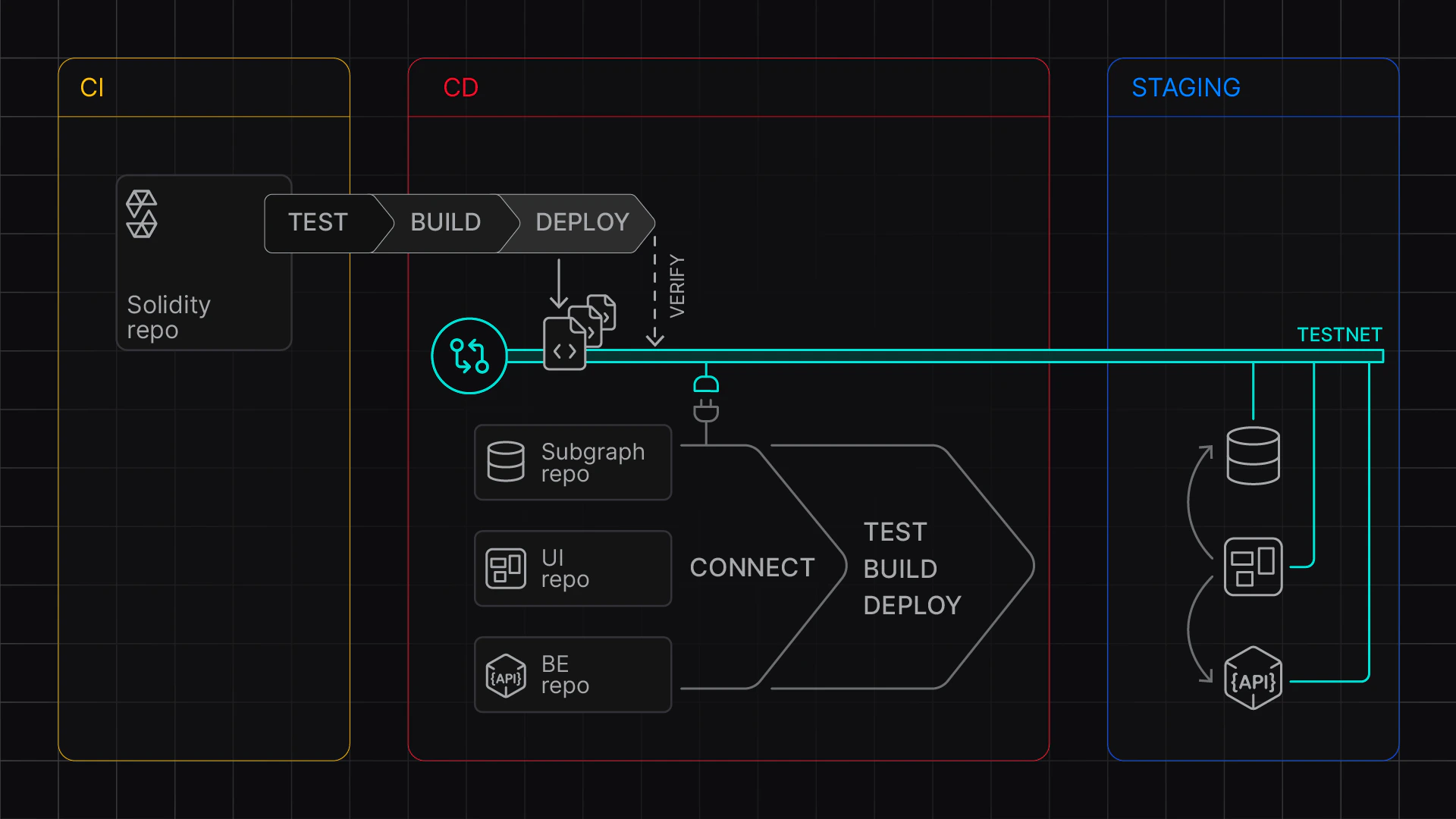
Learn how to configure a GitHub Action to set up a Continuous Integration and Continuous Deployment pipeline (CI/CD) with Hardhat on Tenderly Virtual Environments.
Use the [Tenderly Virtual Environment Setup](https://github.com/marketplace/actions/tenderly-virtual-testnet-setup) to enable automated builds that test and deploy your contracts across multiple networks. After successful testing, you can stage them for the rest of your team by deploying them to provisioned Virtual Environments.
In this guide, you need to complete two stages:
1. Local setup: Set up Hardhat and create and test the workflow file.
2. Github setup: Set up a GitHub Action, configure GitHub secrets and variables, and test the build.
For reference, use this example project:
This guide demonstrates a CI setup that relies on Hardhat-ignition. For `hardhat-verify` setup, the process and configuration are similar.
 ## Stage 1: Local setup
First, we'll install necessary dependencies and create a workflow file.
### Install dependencies
Make sure you have the following packages installed:
```bash theme={"theme":{"light":"catppuccin-latte","dark":"catppuccin-mocha"}}
npm install --save-dev @tenderly/hardhat-tenderly @nomicfoundation/hardhat-ignition
```
### Create the workflow file
To set up the GitHub Action, create a new workflow:
```bash theme={"theme":{"light":"catppuccin-latte","dark":"catppuccin-mocha"}}
mkdir -p .github/workflows
touch ci-cd.yaml
```
Next, paste the following yaml file that configures two jobs:
* **`test`** job to run hardhat tests using a single network for testing
* **`deploy`** job to deploy contracts to multiple networks (Mainnet and Base) after successful testing
The `mode` argument takes values `CI` and `CD`.
* The `CD` mode keeps the Virtual Environment active and you can work with deployed contracts.
* The `CI` mode pauses the Virtual Environment after the step completes. You'll be able to inspect transactions but won't be able to send further RPC requests.
```yaml showLineNumbers title="ci-cd.yaml" theme={"theme":{"light":"catppuccin-latte","dark":"catppuccin-mocha"}}
name: Hardhat CI/CD Multichain
on: [push, pull_request]
env:
## Needed available as env variables for hardhat.config.js
TENDERLY_PROJECT_NAME: ${{ vars.TENDERLY_PROJECT_NAME }}
TENDERLY_ACCOUNT_NAME: ${{ vars.TENDERLY_ACCOUNT_NAME }}
jobs:
test:
runs-on: ubuntu-latest
steps:
- uses: actions/checkout@v4
- name: Setup Node.js
uses: actions/setup-node@v4
with:
node-version: '20'
cache: 'npm'
- name: Setup Virtual Environment
uses: tenderly/vnet-github-action@v1.0.14
with:
mode: CI # pauses the Virtual Environment after deployment
access_key: ${{ secrets.TENDERLY_ACCESS_KEY }}
project_name: ${{ vars.TENDERLY_PROJECT_NAME }}
account_name: ${{ vars.TENDERLY_ACCOUNT_NAME }}
testnet_name: "Testing"
network_id: 1
chain_id_prefix: 7357
public_explorer: true
verification_visibility: 'src'
push_on_complete: true
- name: Install dependencies
run: npm install
working-directory: examples/hardhat-ignition
- name: Run Tests
run: npm run test:1
working-directory: examples/hardhat-ignition
deploy:
needs: test
runs-on: ubuntu-latest
permissions:
contents: write
steps:
- uses: actions/checkout@v4
- name: Setup Node.js
uses: actions/setup-node@v4
with:
node-version: '20'
cache: 'npm'
- name: Setup Virtual Environment
uses: tenderly/vnet-github-action@v1.0.14
with:
mode: CD
access_key: ${{ secrets.TENDERLY_ACCESS_KEY }}
project_name: ${{ vars.TENDERLY_PROJECT_NAME }}
account_name: ${{ vars.TENDERLY_ACCOUNT_NAME }}
testnet_name: "Staging"
network_id: |
1
8453
chain_id_prefix: ""
public_explorer: true
verification_visibility: 'src'
push_on_complete: true
- name: Install dependencies
run: npm install
working-directory: examples/hardhat-ignition
- name: Deploy Contracts Mainnet
run: npm run deploy:1 -- --deployment-id deploy-1-${BUILD_SLUG}
working-directory: examples/hardhat-ignition
- name: Deploy Contracts Base
run: npm run deploy:8453 -- --deployment-id deploy-8453-${BUILD_SLUG}
working-directory: examples/hardhat-ignition
```
### Prepare environment variables
For local testing, set up an `.env` file using this template:
```dotenv theme={"theme":{"light":"catppuccin-latte","dark":"catppuccin-mocha"}}
## Access parameters
TENDERLY_ACCESS_KEY=...
TENDERLY_PROJECT_NAME=...
TENDERLY_ACCOUNT_NAME=...
## Network-specific parameters (populated by the action in CI/CD)
TENDERLY_ADMIN_RPC_URL_1=... # Mainnet RPC
TENDERLY_ADMIN_RPC_URL_8453=... # Base RPC
TENDERLY_CHAIN_ID_1=... # Mainnet chain ID
TENDERLY_CHAIN_ID_8453=... # Base chain ID
```
Required variables:
* `TENDERLY_ACCESS_KEY`: Learn how to [get your access key](/platform/account/projects/api-tokens)
* `TENDERLY_ACCOUNT_NAME` and `TENDERLY_PROJECT_NAME`: Follow steps to [get your account and project name](/platform/account/projects/api-tokens)
### Configure Hardhat
Add the Virtual Environment configuration to `hardhat.config.ts`:
```typescript title='hardhat.config.ts' showLineNumbers theme={"theme":{"light":"catppuccin-latte","dark":"catppuccin-mocha"}}
dotenv.config();
const config: HardhatUserConfig = {
solidity: "0.8.27",
networks: {
mainnet: {
url: process.env.TENDERLY_ADMIN_RPC_URL_1,
chainId: parseInt(process.env.TENDERLY_CHAIN_ID_1 || "1")
},
base: {
url: process.env.TENDERLY_ADMIN_RPC_URL_8453,
chainId: parseInt(process.env.TENDERLY_CHAIN_ID_8453 || "8453")
}
},
etherscan: {
apiKey: {
mainnet: process.env.TENDERLY_ACCESS_KEY!,
base: process.env.TENDERLY_ACCESS_KEY!
},
customChains: [
{
network: "mainnet",
chainId: parseInt(process.env.TENDERLY_CHAIN_ID_1!),
urls: {
apiURL: `${process.env.TENDERLY_ADMIN_RPC_URL_1}/verify`,
browserURL: process.env.TENDERLY_ADMIN_RPC_URL_1!
}
},
{
network: "base",
chainId: parseInt(process.env.TENDERLY_CHAIN_ID_8453!),
urls: {
apiURL: `${process.env.TENDERLY_ADMIN_RPC_URL_8453}/verify`,
browserURL: process.env.TENDERLY_ADMIN_RPC_URL_8453!
}
}
]
},
tenderly: {
project: process.env.TENDERLY_PROJECT_NAME!,
username: process.env.TENDERLY_ACCOUNT_NAME!,
accessKey: process.env.TENDERLY_ACCESS_KEY!
},
sourcify: {
enabled: false
}
};
export default config;
```
### Add test and deploy scripts
Add the following scripts to your `package.json` for multi-network testing and deployment:
```json theme={"theme":{"light":"catppuccin-latte","dark":"catppuccin-mocha"}}
{
"scripts": {
"deploy:1": "npx hardhat ignition deploy ./ignition/modules/Counter.js --network mainnet",
"deploy:8453": "npx hardhat ignition deploy ./ignition/modules/Counter.js --network base",
"test:1": "npx hardhat test --network mainnet"
}
}
```
The deploy commands use the BUILD\_SLUG environment variable (provided by the action) to create unique deployment identifiers.
### Test the build locally
To test the build locally, run the following commands:
```bash theme={"theme":{"light":"catppuccin-latte","dark":"catppuccin-mocha"}}
# Test on mainnet fork
npx hardhat test:1
# Deploy to mainnet fork
npx hardhat deploy:1
# Deploy to Base fork
npx hardhat deploy:8453
```
### Test the Github Action locally
To test your action locally, you can use [Act](https://github.com/nektos/act):
```bash theme={"theme":{"light":"catppuccin-latte","dark":"catppuccin-mocha"}}
act --secret-file .env --var-file .env
```
## Stage 2: Github Setup
After successful local setup, proceed by configuring Github with environment variables and necessary secrets.
### Configure secrets and environment variables in GitHub
You must configure the following Github variables and secret:
**Variables:**
* `TENDERLY_PROJECT_NAME`
* `TENDERLY_ACCOUNT_NAME`
**Secrets:**
* `TENDERLY_ACCESS_KEY`
You can configure these via the [GitHub UI](https://docs.github.com/en/actions/how-tos/write-workflows/choose-what-workflows-do/use-variables#creating-configuration-variables-for-a-repository) or using the `gh` command line:
```bash theme={"theme":{"light":"catppuccin-latte","dark":"catppuccin-mocha"}}
source .env
gh variable set TENDERLY_PROJECT_NAME --body ${TENDERLY_PROJECT_NAME}
gh variable set TENDERLY_ACCOUNT_NAME --body ${TENDERLY_ACCOUNT_NAME}
gh secret set TENDERLY_ACCESS_KEY --body ${TENDERLY_ACCESS_KEY}
```
### Push the updates
To trigger the GitHub Action, push your changes:
```bash theme={"theme":{"light":"catppuccin-latte","dark":"catppuccin-mocha"}}
git add .
git commit -m "Add CI/CD workflow for multichain deployment"
git push
```
### Check your action
Go to your Github repository and check the Actions tab. You should see:
1. Test job running against the mainnet fork
2. Deploy job creating two Virtual Environments (mainnet and Base)
3. Deployment artifacts being pushed to the repository
### Get the RPC links
To get the RPC links for your deployed contracts:
1. Go to **Tenderly dashboard > Virtual Environments**
2. Find your CD Virtual Environments (one for mainnet fork, one for Base fork)
3. Click on each to get their respective RPC URLs
## Environment Variables Reference
The GitHub Action exposes the following network-specific variables:
| Variable | Description |
| -------------------------------------- | ----------------------------------------- |
| `TENDERLY_TESTNET_ID_{network_id}` | Virtual Environment UUID |
| `TENDERLY_ADMIN_RPC_URL_{network_id}` | Admin RPC endpoint with cheatcode methods |
| `TENDERLY_PUBLIC_RPC_URL_{network_id}` | Public RPC endpoint |
| `TENDERLY_CHAIN_ID_{network_id}` | Chain ID |
| `TENDERLY_TESTNET_SLUG_{network_id}` | Unique Virtual Environment slug |
| `BUILD_SLUG` | Unique identifier for the current build |
## Next steps
Explore other examples:
* [Hardhat with ethers-v6](https://github.com/Tenderly/vnet-github-action/tree/main/examples/hardhat)
* [Foundry setup](https://github.com/Tenderly/vnet-github-action/tree/main/examples/foundry)
* [Advanced deployment patterns](https://github.com/Tenderly/vnet-github-action/tree/main/examples/advanced)
## Stage 1: Local setup
First, we'll install necessary dependencies and create a workflow file.
### Install dependencies
Make sure you have the following packages installed:
```bash theme={"theme":{"light":"catppuccin-latte","dark":"catppuccin-mocha"}}
npm install --save-dev @tenderly/hardhat-tenderly @nomicfoundation/hardhat-ignition
```
### Create the workflow file
To set up the GitHub Action, create a new workflow:
```bash theme={"theme":{"light":"catppuccin-latte","dark":"catppuccin-mocha"}}
mkdir -p .github/workflows
touch ci-cd.yaml
```
Next, paste the following yaml file that configures two jobs:
* **`test`** job to run hardhat tests using a single network for testing
* **`deploy`** job to deploy contracts to multiple networks (Mainnet and Base) after successful testing
The `mode` argument takes values `CI` and `CD`.
* The `CD` mode keeps the Virtual Environment active and you can work with deployed contracts.
* The `CI` mode pauses the Virtual Environment after the step completes. You'll be able to inspect transactions but won't be able to send further RPC requests.
```yaml showLineNumbers title="ci-cd.yaml" theme={"theme":{"light":"catppuccin-latte","dark":"catppuccin-mocha"}}
name: Hardhat CI/CD Multichain
on: [push, pull_request]
env:
## Needed available as env variables for hardhat.config.js
TENDERLY_PROJECT_NAME: ${{ vars.TENDERLY_PROJECT_NAME }}
TENDERLY_ACCOUNT_NAME: ${{ vars.TENDERLY_ACCOUNT_NAME }}
jobs:
test:
runs-on: ubuntu-latest
steps:
- uses: actions/checkout@v4
- name: Setup Node.js
uses: actions/setup-node@v4
with:
node-version: '20'
cache: 'npm'
- name: Setup Virtual Environment
uses: tenderly/vnet-github-action@v1.0.14
with:
mode: CI # pauses the Virtual Environment after deployment
access_key: ${{ secrets.TENDERLY_ACCESS_KEY }}
project_name: ${{ vars.TENDERLY_PROJECT_NAME }}
account_name: ${{ vars.TENDERLY_ACCOUNT_NAME }}
testnet_name: "Testing"
network_id: 1
chain_id_prefix: 7357
public_explorer: true
verification_visibility: 'src'
push_on_complete: true
- name: Install dependencies
run: npm install
working-directory: examples/hardhat-ignition
- name: Run Tests
run: npm run test:1
working-directory: examples/hardhat-ignition
deploy:
needs: test
runs-on: ubuntu-latest
permissions:
contents: write
steps:
- uses: actions/checkout@v4
- name: Setup Node.js
uses: actions/setup-node@v4
with:
node-version: '20'
cache: 'npm'
- name: Setup Virtual Environment
uses: tenderly/vnet-github-action@v1.0.14
with:
mode: CD
access_key: ${{ secrets.TENDERLY_ACCESS_KEY }}
project_name: ${{ vars.TENDERLY_PROJECT_NAME }}
account_name: ${{ vars.TENDERLY_ACCOUNT_NAME }}
testnet_name: "Staging"
network_id: |
1
8453
chain_id_prefix: ""
public_explorer: true
verification_visibility: 'src'
push_on_complete: true
- name: Install dependencies
run: npm install
working-directory: examples/hardhat-ignition
- name: Deploy Contracts Mainnet
run: npm run deploy:1 -- --deployment-id deploy-1-${BUILD_SLUG}
working-directory: examples/hardhat-ignition
- name: Deploy Contracts Base
run: npm run deploy:8453 -- --deployment-id deploy-8453-${BUILD_SLUG}
working-directory: examples/hardhat-ignition
```
### Prepare environment variables
For local testing, set up an `.env` file using this template:
```dotenv theme={"theme":{"light":"catppuccin-latte","dark":"catppuccin-mocha"}}
## Access parameters
TENDERLY_ACCESS_KEY=...
TENDERLY_PROJECT_NAME=...
TENDERLY_ACCOUNT_NAME=...
## Network-specific parameters (populated by the action in CI/CD)
TENDERLY_ADMIN_RPC_URL_1=... # Mainnet RPC
TENDERLY_ADMIN_RPC_URL_8453=... # Base RPC
TENDERLY_CHAIN_ID_1=... # Mainnet chain ID
TENDERLY_CHAIN_ID_8453=... # Base chain ID
```
Required variables:
* `TENDERLY_ACCESS_KEY`: Learn how to [get your access key](/platform/account/projects/api-tokens)
* `TENDERLY_ACCOUNT_NAME` and `TENDERLY_PROJECT_NAME`: Follow steps to [get your account and project name](/platform/account/projects/api-tokens)
### Configure Hardhat
Add the Virtual Environment configuration to `hardhat.config.ts`:
```typescript title='hardhat.config.ts' showLineNumbers theme={"theme":{"light":"catppuccin-latte","dark":"catppuccin-mocha"}}
dotenv.config();
const config: HardhatUserConfig = {
solidity: "0.8.27",
networks: {
mainnet: {
url: process.env.TENDERLY_ADMIN_RPC_URL_1,
chainId: parseInt(process.env.TENDERLY_CHAIN_ID_1 || "1")
},
base: {
url: process.env.TENDERLY_ADMIN_RPC_URL_8453,
chainId: parseInt(process.env.TENDERLY_CHAIN_ID_8453 || "8453")
}
},
etherscan: {
apiKey: {
mainnet: process.env.TENDERLY_ACCESS_KEY!,
base: process.env.TENDERLY_ACCESS_KEY!
},
customChains: [
{
network: "mainnet",
chainId: parseInt(process.env.TENDERLY_CHAIN_ID_1!),
urls: {
apiURL: `${process.env.TENDERLY_ADMIN_RPC_URL_1}/verify`,
browserURL: process.env.TENDERLY_ADMIN_RPC_URL_1!
}
},
{
network: "base",
chainId: parseInt(process.env.TENDERLY_CHAIN_ID_8453!),
urls: {
apiURL: `${process.env.TENDERLY_ADMIN_RPC_URL_8453}/verify`,
browserURL: process.env.TENDERLY_ADMIN_RPC_URL_8453!
}
}
]
},
tenderly: {
project: process.env.TENDERLY_PROJECT_NAME!,
username: process.env.TENDERLY_ACCOUNT_NAME!,
accessKey: process.env.TENDERLY_ACCESS_KEY!
},
sourcify: {
enabled: false
}
};
export default config;
```
### Add test and deploy scripts
Add the following scripts to your `package.json` for multi-network testing and deployment:
```json theme={"theme":{"light":"catppuccin-latte","dark":"catppuccin-mocha"}}
{
"scripts": {
"deploy:1": "npx hardhat ignition deploy ./ignition/modules/Counter.js --network mainnet",
"deploy:8453": "npx hardhat ignition deploy ./ignition/modules/Counter.js --network base",
"test:1": "npx hardhat test --network mainnet"
}
}
```
The deploy commands use the BUILD\_SLUG environment variable (provided by the action) to create unique deployment identifiers.
### Test the build locally
To test the build locally, run the following commands:
```bash theme={"theme":{"light":"catppuccin-latte","dark":"catppuccin-mocha"}}
# Test on mainnet fork
npx hardhat test:1
# Deploy to mainnet fork
npx hardhat deploy:1
# Deploy to Base fork
npx hardhat deploy:8453
```
### Test the Github Action locally
To test your action locally, you can use [Act](https://github.com/nektos/act):
```bash theme={"theme":{"light":"catppuccin-latte","dark":"catppuccin-mocha"}}
act --secret-file .env --var-file .env
```
## Stage 2: Github Setup
After successful local setup, proceed by configuring Github with environment variables and necessary secrets.
### Configure secrets and environment variables in GitHub
You must configure the following Github variables and secret:
**Variables:**
* `TENDERLY_PROJECT_NAME`
* `TENDERLY_ACCOUNT_NAME`
**Secrets:**
* `TENDERLY_ACCESS_KEY`
You can configure these via the [GitHub UI](https://docs.github.com/en/actions/how-tos/write-workflows/choose-what-workflows-do/use-variables#creating-configuration-variables-for-a-repository) or using the `gh` command line:
```bash theme={"theme":{"light":"catppuccin-latte","dark":"catppuccin-mocha"}}
source .env
gh variable set TENDERLY_PROJECT_NAME --body ${TENDERLY_PROJECT_NAME}
gh variable set TENDERLY_ACCOUNT_NAME --body ${TENDERLY_ACCOUNT_NAME}
gh secret set TENDERLY_ACCESS_KEY --body ${TENDERLY_ACCESS_KEY}
```
### Push the updates
To trigger the GitHub Action, push your changes:
```bash theme={"theme":{"light":"catppuccin-latte","dark":"catppuccin-mocha"}}
git add .
git commit -m "Add CI/CD workflow for multichain deployment"
git push
```
### Check your action
Go to your Github repository and check the Actions tab. You should see:
1. Test job running against the mainnet fork
2. Deploy job creating two Virtual Environments (mainnet and Base)
3. Deployment artifacts being pushed to the repository
### Get the RPC links
To get the RPC links for your deployed contracts:
1. Go to **Tenderly dashboard > Virtual Environments**
2. Find your CD Virtual Environments (one for mainnet fork, one for Base fork)
3. Click on each to get their respective RPC URLs
## Environment Variables Reference
The GitHub Action exposes the following network-specific variables:
| Variable | Description |
| -------------------------------------- | ----------------------------------------- |
| `TENDERLY_TESTNET_ID_{network_id}` | Virtual Environment UUID |
| `TENDERLY_ADMIN_RPC_URL_{network_id}` | Admin RPC endpoint with cheatcode methods |
| `TENDERLY_PUBLIC_RPC_URL_{network_id}` | Public RPC endpoint |
| `TENDERLY_CHAIN_ID_{network_id}` | Chain ID |
| `TENDERLY_TESTNET_SLUG_{network_id}` | Unique Virtual Environment slug |
| `BUILD_SLUG` | Unique identifier for the current build |
## Next steps
Explore other examples:
* [Hardhat with ethers-v6](https://github.com/Tenderly/vnet-github-action/tree/main/examples/hardhat)
* [Foundry setup](https://github.com/Tenderly/vnet-github-action/tree/main/examples/foundry)
* [Advanced deployment patterns](https://github.com/Tenderly/vnet-github-action/tree/main/examples/advanced)