> ## Documentation Index
> Fetch the complete documentation index at: https://docs.tenderly.co/llms.txt
> Use this file to discover all available pages before exploring further.
# Staging Contracts
> Stage contracts in CI/CD by deploying to a Virtual Environment with Foundry, then share the RPC URL and contract addresses with your team.
Deploy the latest code and to Virtual Environments make it available for your team by sharing the RPC link and contract addresses.
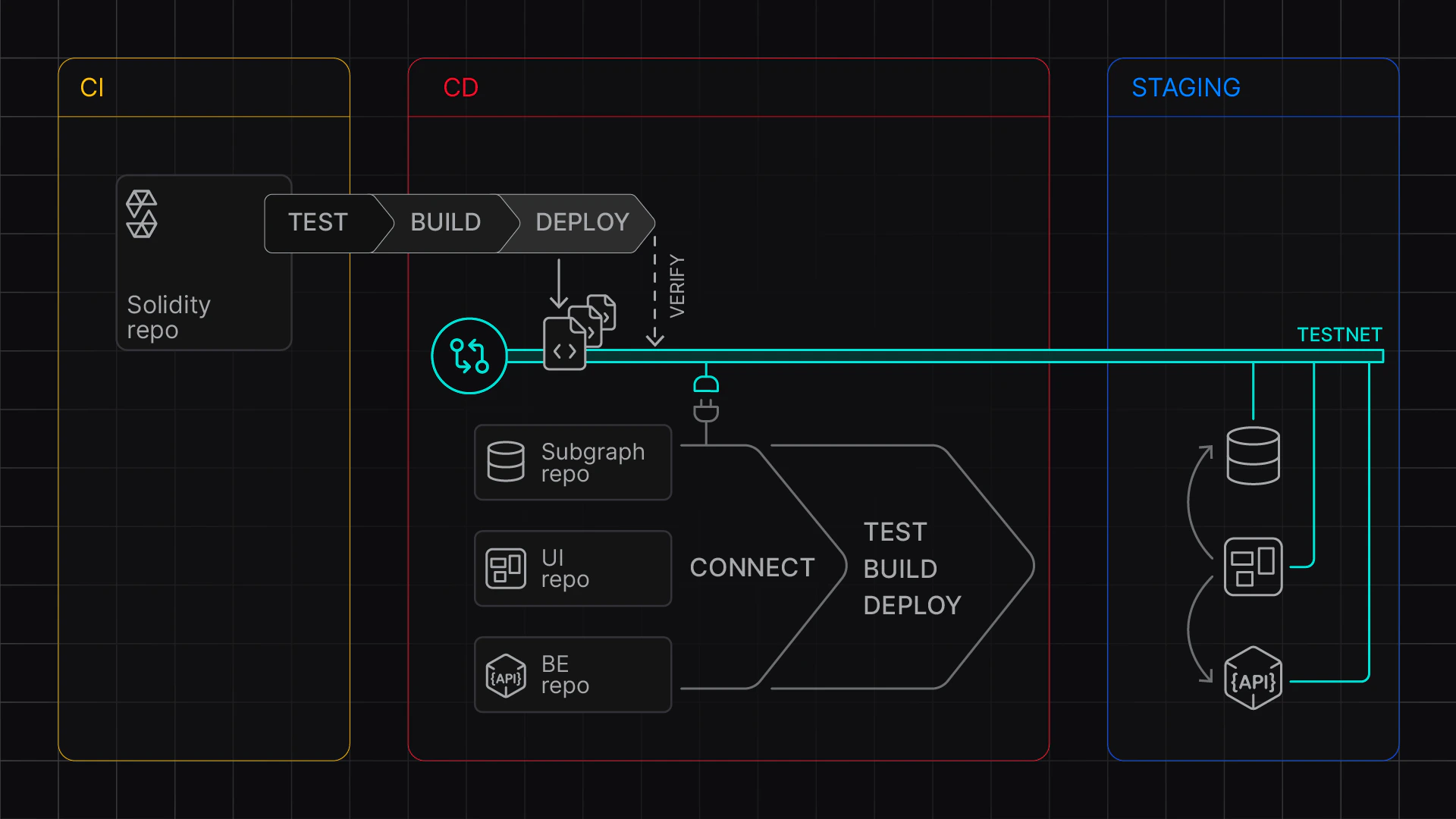 ### Create a Virtual Environment
Create a new Virtual Environment to stage your contracts, either by:
* Using the [Virtual Environments dashboard](/virtual-environments/quickstart#configure-your-virtual-environment)
* Using the [REST API](/virtual-environments/develop/create-virtual-environment-via-api)
### Set up environment variables
To create a Virtual Environment and then deploy and verify contracts, set up the following environment variables:
* **`TENDERLY_ACCOUNT_ID`** with your [account ID](/platform/account/projects/slug)
* **`TENDERLY_PROJECT`** with your [project (slug)](/platform/account/projects/slug)
* **`TENDERLY_ACCESS_KEY`** with
the [access key you've generated](/platform/account/projects/api-tokens)
* **`ORIGINAL_NETWORK_ID`** with the [ID of the network](/platform/supported-networks) you
want to base the Virtual Environment on
* **`FOUNDRY_REPO`** with the path to Foundry repo
* **`DEPLOYER_ADDRESS`** with the account you're deploying from
* Add other environment variables needed for the deployment scripts
```bash showLineNumbers title='.env' theme={"theme":{"light":"catppuccin-latte","dark":"catppuccin-mocha"}}
export TENDERLY_ACCOUNT_ID=
export TENDERLY_PROJECT=
export TENDERLY_ACCESS_KEY=
## TestNet Configuration
export TENDERLY_TESTNET_NAME=staging
export PURPOSE=development
export ORIGINAL_NETWORK_ID=1
export BLOCK_NUMBER=latest
## Custom Chain ID (Prefixed with 7357 - test)
export CHAIN_ID=7357$ORIGINAL_NETWORK_ID
## Public explorer verification visibility
## abi | full | none
export VERIFICATION_VISIBILITY=abi
# Foundry Repo (Absolute path only!)
export FOUNDRY_REPO=
## Deployer address
export DEPLOYER_ADDRESS=...
## Custom stuff needed for deployment scripts
## Add your custom stuff here
export ADMIN_ADDRESS=...
```
### Write your deployment commands
Edit `deploy-command.sh` and add commands to deploy your contracts. Note you'll have to add verification to your Foundry or Hardhat project; see [Deploy and verify contracts](/virtual-environments/develop/deploy-contracts).
For example:
```bash showLineNumbers title='deploy-command.sh' theme={"theme":{"light":"catppuccin-latte","dark":"catppuccin-mocha"}}
#!/bin/bash
cd $FOUNDRY_REPO
## TODO: Your deployment command here:
MAX_SEGMENT_COUNT=3
FOUNDRY_PROFILE=optimized \
forge script script/DeployCore.s.sol \
--broadcast \
--rpc-url $TENDERLY_VIRTUAL_TESTNET_RPC \
--sig "run(address)" \
--verify \
--verifier-url $VERIFICATION_URL \
$ADMIN_ADDRESS
```
### Stage contracts
Run the following commands that will:
* create a new Virtual Environment
* fund the **`$DEPLOYER_ADDRESS`** with test ETH using the Infinite faucet
* configure Foundry's **`foundry.toml`** for verification on your custom chain
* deploy your contracts
* and finally clean up `foundry.toml`
```bash showLineNumbers title='stage.sh' theme={"theme":{"light":"catppuccin-latte","dark":"catppuccin-mocha"}}
# create a testnet - or paste the Unlocked TestNet RPC URL
source src/contracts-staging/.env
cd src/contracts-staging
## Create a fresh testnet
export VIRTUAL_NETWORK_RPC_URL=$(./create-testnet.sh)
echo "Created a Virtual Environment at ${VIRTUAL_NETWORK_RPC_URL}"
### run the deployment
./deploy-to-testnet.sh
```
The RPC Link is shown in the output, and your contracts are deployed and verified on the Virtual Environment.
### Share the addresses
Collect the ABIs and addresses of deployed contracts and distribute them to your team, together with the Virtual Environment RPC.
### Create a Virtual Environment
Create a new Virtual Environment to stage your contracts, either by:
* Using the [Virtual Environments dashboard](/virtual-environments/quickstart#configure-your-virtual-environment)
* Using the [REST API](/virtual-environments/develop/create-virtual-environment-via-api)
### Set up environment variables
To create a Virtual Environment and then deploy and verify contracts, set up the following environment variables:
* **`TENDERLY_ACCOUNT_ID`** with your [account ID](/platform/account/projects/slug)
* **`TENDERLY_PROJECT`** with your [project (slug)](/platform/account/projects/slug)
* **`TENDERLY_ACCESS_KEY`** with
the [access key you've generated](/platform/account/projects/api-tokens)
* **`ORIGINAL_NETWORK_ID`** with the [ID of the network](/platform/supported-networks) you
want to base the Virtual Environment on
* **`FOUNDRY_REPO`** with the path to Foundry repo
* **`DEPLOYER_ADDRESS`** with the account you're deploying from
* Add other environment variables needed for the deployment scripts
```bash showLineNumbers title='.env' theme={"theme":{"light":"catppuccin-latte","dark":"catppuccin-mocha"}}
export TENDERLY_ACCOUNT_ID=
export TENDERLY_PROJECT=
export TENDERLY_ACCESS_KEY=
## TestNet Configuration
export TENDERLY_TESTNET_NAME=staging
export PURPOSE=development
export ORIGINAL_NETWORK_ID=1
export BLOCK_NUMBER=latest
## Custom Chain ID (Prefixed with 7357 - test)
export CHAIN_ID=7357$ORIGINAL_NETWORK_ID
## Public explorer verification visibility
## abi | full | none
export VERIFICATION_VISIBILITY=abi
# Foundry Repo (Absolute path only!)
export FOUNDRY_REPO=
## Deployer address
export DEPLOYER_ADDRESS=...
## Custom stuff needed for deployment scripts
## Add your custom stuff here
export ADMIN_ADDRESS=...
```
### Write your deployment commands
Edit `deploy-command.sh` and add commands to deploy your contracts. Note you'll have to add verification to your Foundry or Hardhat project; see [Deploy and verify contracts](/virtual-environments/develop/deploy-contracts).
For example:
```bash showLineNumbers title='deploy-command.sh' theme={"theme":{"light":"catppuccin-latte","dark":"catppuccin-mocha"}}
#!/bin/bash
cd $FOUNDRY_REPO
## TODO: Your deployment command here:
MAX_SEGMENT_COUNT=3
FOUNDRY_PROFILE=optimized \
forge script script/DeployCore.s.sol \
--broadcast \
--rpc-url $TENDERLY_VIRTUAL_TESTNET_RPC \
--sig "run(address)" \
--verify \
--verifier-url $VERIFICATION_URL \
$ADMIN_ADDRESS
```
### Stage contracts
Run the following commands that will:
* create a new Virtual Environment
* fund the **`$DEPLOYER_ADDRESS`** with test ETH using the Infinite faucet
* configure Foundry's **`foundry.toml`** for verification on your custom chain
* deploy your contracts
* and finally clean up `foundry.toml`
```bash showLineNumbers title='stage.sh' theme={"theme":{"light":"catppuccin-latte","dark":"catppuccin-mocha"}}
# create a testnet - or paste the Unlocked TestNet RPC URL
source src/contracts-staging/.env
cd src/contracts-staging
## Create a fresh testnet
export VIRTUAL_NETWORK_RPC_URL=$(./create-testnet.sh)
echo "Created a Virtual Environment at ${VIRTUAL_NETWORK_RPC_URL}"
### run the deployment
./deploy-to-testnet.sh
```
The RPC Link is shown in the output, and your contracts are deployed and verified on the Virtual Environment.
### Share the addresses
Collect the ABIs and addresses of deployed contracts and distribute them to your team, together with the Virtual Environment RPC.