> ## Documentation Index
> Fetch the complete documentation index at: https://docs.tenderly.co/llms.txt
> Use this file to discover all available pages before exploring further.
# Virtual Environment dashboard reference
> What each button, tab, and action in the Tenderly Virtual Environment dashboard does: Fork, Revert, Mine, Configure next block, Fund, Share, and Settings.
This page lists the controls in a [Virtual Environment](/virtual-environments/overview)'s dashboard view. Each entry links to the guide that covers the task.
## Header actions
The header above every tab of a Virtual Environment has these actions.
 | Action | What it does |
| - | - |
| **Share** | Copies the link to this Virtual Environment's dashboard page to the clipboard. |
| **Fund** | Opens the **Fund** dialog: select a token and a wallet, then click **Fund wallet**. Same as the **Faucet** tab. See [Unlimited Faucet](/virtual-environments/unlimited-faucet). |
| **Fork** | Opens the **Fork Virtual Environment** dialog, which creates a copy with the same configuration at the current state. See [Fork a Virtual Environment](/virtual-environments/develop/fork-testnet). |
| **Send** | Opens the Simulator in **Send transaction** mode: the transaction executes on the Virtual Environment and its state changes persist. See [Simulate transactions](/virtual-environments/interact/simulate-transactions). |
| **Simulate** (menu next to **Send**) | Opens the Simulator in **Simulate transaction** mode, which leaves state untouched. |
| **Mine** | Mines a new block. |
| **Configure next block** (menu next to **Mine**) | Sets the block count and timestamp of the next block, then mines it now or with the next transaction. See [Configure the next block from the dashboard](/virtual-environments/develop/timestamps#configure-the-next-block-from-the-dashboard). |
## Sidebar tabs
| Tab | Contents |
| - | - |
| **Home** | Integrate Virtual RPC card, setup steps, Network Mirror, Bridge, and Contracts summary cards, and the table of attached networks. See [Home](#home). |
| **Activity** | Transactions executed on the Virtual Environment, with a **Transactions** and a **Mempool** view. See [Activity](#activity). |
| **Faucet** | Fund a wallet with native currency or ERC-20 tokens. See [Unlimited Faucet](/virtual-environments/unlimited-faucet). |
| **Network Sync** | Sync controls and the sync log for Virtual Environments created in Network Mirror mode. See [Network Mirror Mode](/virtual-environments/network-mirror-mode). |
| **Simulator** | Build, simulate, or send transactions against the Virtual Environment's state. See [Simulate transactions](/virtual-environments/interact/simulate-transactions). |
| **Bridge** | Bridge relay for Multichain Virtual Environments. See [Bridges](/virtual-environments/multichain/bridges). |
| **Contracts** | Contracts deployed on the Virtual Environment, with **Import Contract** and **Verification Guides**. See [Deploy and verify contracts](/virtual-environments/develop/deploy-contracts). |
| **Wallets** | Wallets you watch on the Virtual Environment, with **Import Wallet**. |
| **JSON-RPC Calls** | Log of the RPC requests sent to the Virtual Environment, with filters. |
| **RPC Builder** | Catalog of the RPC methods the Virtual Environment supports, including `tenderly_simulateTransaction`, `tenderly_setBalance`, and `tenderly_configureNextBlock`, with a request builder. Use **New Request** to compose a call; favorite and recent requests are listed in the left column. See [Admin RPC](/virtual-environments/admin-rpc). |
| **Integrate** | Setup snippets for **RPC endpoints**, **CI/CD**, and **Staging**: a Foundry or Hardhat RPC configuration and a deploy command with verification flags. **Copy prompt** copies a setup prompt to paste into an AI coding agent. |
| **Usage** | Opens your organization's usage page. |
| **Settings** | Display name, advanced options, and deletion. See [Settings](#settings). |
## Home
The **Integrate Virtual RPC** card at the top of **Home** lists the **Admin RPC** and **Public RPC** URLs and the chain ID, with a network selector for Multichain Virtual Environments and a protocol selector. Its actions:
* **Public explorer**: opens the [public explorer](/virtual-environments/explorer#public-explorer).
* **Configure**: opens **Settings**.
* **Copy integration prompt**: copies a setup prompt for an AI coding agent.
The networks table at the bottom of **Home** lists each attached network with its chain ID, override chain ID, network mode, forked block number, and latest block number. The menu at the end of each row opens **Public Explorer**, **View Logs**, **View Usage**, and **View Transactions** for that network.
## Activity
| Control | What it does |
| - | - |
| **Transactions** / **Mempool** | Switches between executed transactions and pending ones. |
| **Filter** | Filters the transaction list. |
| **EVM reverts** | Shows transactions removed via `evm_revert` or a dashboard revert in the list. See [Revert Virtual Environment state](/virtual-environments/develop/revert-state#reverted-transactions-in-activity). |
| Refresh and interval selector | Reloads the list, and sets how often it reloads automatically. |
The list has these columns: Network, Status, Function, When, Block, Hash, From, To, Gas used, Gas price, and Block timestamp. Click a row to open the transaction page.
## Transaction page
| Action | What it does |
| - | - |
| **Share** | Copies the link to this Virtual Environment's dashboard page to the clipboard. |
| **Fund** | Opens the **Fund** dialog: select a token and a wallet, then click **Fund wallet**. Same as the **Faucet** tab. See [Unlimited Faucet](/virtual-environments/unlimited-faucet). |
| **Fork** | Opens the **Fork Virtual Environment** dialog, which creates a copy with the same configuration at the current state. See [Fork a Virtual Environment](/virtual-environments/develop/fork-testnet). |
| **Send** | Opens the Simulator in **Send transaction** mode: the transaction executes on the Virtual Environment and its state changes persist. See [Simulate transactions](/virtual-environments/interact/simulate-transactions). |
| **Simulate** (menu next to **Send**) | Opens the Simulator in **Simulate transaction** mode, which leaves state untouched. |
| **Mine** | Mines a new block. |
| **Configure next block** (menu next to **Mine**) | Sets the block count and timestamp of the next block, then mines it now or with the next transaction. See [Configure the next block from the dashboard](/virtual-environments/develop/timestamps#configure-the-next-block-from-the-dashboard). |
## Sidebar tabs
| Tab | Contents |
| - | - |
| **Home** | Integrate Virtual RPC card, setup steps, Network Mirror, Bridge, and Contracts summary cards, and the table of attached networks. See [Home](#home). |
| **Activity** | Transactions executed on the Virtual Environment, with a **Transactions** and a **Mempool** view. See [Activity](#activity). |
| **Faucet** | Fund a wallet with native currency or ERC-20 tokens. See [Unlimited Faucet](/virtual-environments/unlimited-faucet). |
| **Network Sync** | Sync controls and the sync log for Virtual Environments created in Network Mirror mode. See [Network Mirror Mode](/virtual-environments/network-mirror-mode). |
| **Simulator** | Build, simulate, or send transactions against the Virtual Environment's state. See [Simulate transactions](/virtual-environments/interact/simulate-transactions). |
| **Bridge** | Bridge relay for Multichain Virtual Environments. See [Bridges](/virtual-environments/multichain/bridges). |
| **Contracts** | Contracts deployed on the Virtual Environment, with **Import Contract** and **Verification Guides**. See [Deploy and verify contracts](/virtual-environments/develop/deploy-contracts). |
| **Wallets** | Wallets you watch on the Virtual Environment, with **Import Wallet**. |
| **JSON-RPC Calls** | Log of the RPC requests sent to the Virtual Environment, with filters. |
| **RPC Builder** | Catalog of the RPC methods the Virtual Environment supports, including `tenderly_simulateTransaction`, `tenderly_setBalance`, and `tenderly_configureNextBlock`, with a request builder. Use **New Request** to compose a call; favorite and recent requests are listed in the left column. See [Admin RPC](/virtual-environments/admin-rpc). |
| **Integrate** | Setup snippets for **RPC endpoints**, **CI/CD**, and **Staging**: a Foundry or Hardhat RPC configuration and a deploy command with verification flags. **Copy prompt** copies a setup prompt to paste into an AI coding agent. |
| **Usage** | Opens your organization's usage page. |
| **Settings** | Display name, advanced options, and deletion. See [Settings](#settings). |
## Home
The **Integrate Virtual RPC** card at the top of **Home** lists the **Admin RPC** and **Public RPC** URLs and the chain ID, with a network selector for Multichain Virtual Environments and a protocol selector. Its actions:
* **Public explorer**: opens the [public explorer](/virtual-environments/explorer#public-explorer).
* **Configure**: opens **Settings**.
* **Copy integration prompt**: copies a setup prompt for an AI coding agent.
The networks table at the bottom of **Home** lists each attached network with its chain ID, override chain ID, network mode, forked block number, and latest block number. The menu at the end of each row opens **Public Explorer**, **View Logs**, **View Usage**, and **View Transactions** for that network.
## Activity
| Control | What it does |
| - | - |
| **Transactions** / **Mempool** | Switches between executed transactions and pending ones. |
| **Filter** | Filters the transaction list. |
| **EVM reverts** | Shows transactions removed via `evm_revert` or a dashboard revert in the list. See [Revert Virtual Environment state](/virtual-environments/develop/revert-state#reverted-transactions-in-activity). |
| Refresh and interval selector | Reloads the list, and sets how often it reloads automatically. |
The list has these columns: Network, Status, Function, When, Block, Hash, From, To, Gas used, Gas price, and Block timestamp. Click a row to open the transaction page.
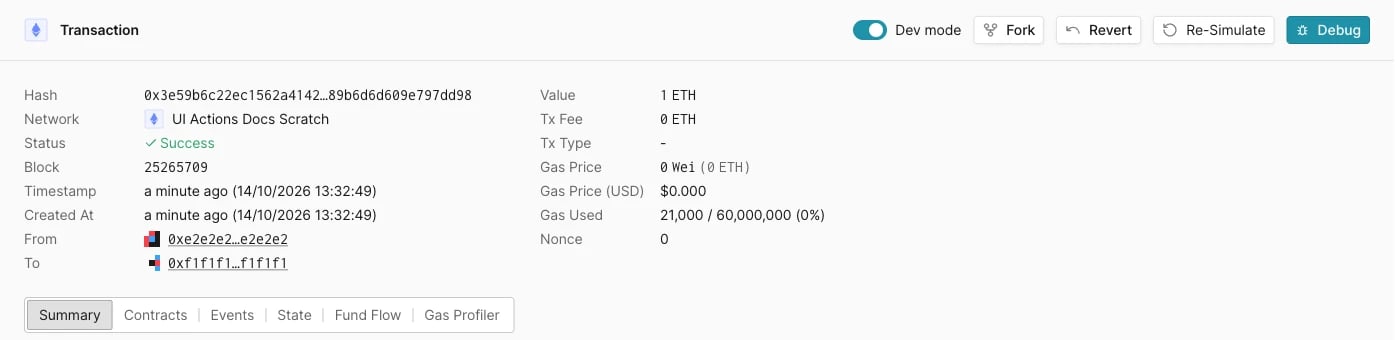
## Transaction page
 | Action | What it does |
| - | - |
| **Dev mode** | On: shows the **Summary**, **Contracts**, **Events**, **State**, **Fund Flow**, and **Gas Profiler** tabs and the call trace. Off: shows only the transaction details and asset transfers. |
| **Fork** | Creates a new Virtual Environment that contains the transactions up to and including this one. See [Fork at a historical block](/virtual-environments/develop/revert-state#fork-at-a-historical-block). |
| **Revert** | Shown only on the transaction in the latest block. Removes that block and its state changes. See [Revert the latest block from the dashboard](/virtual-environments/develop/revert-state#revert-the-latest-block-from-the-dashboard). |
| **Re-Simulate** | Opens the Simulator prefilled with this transaction's parameters. |
| **Debug** | Opens the transaction in [Debugger](/virtual-environments/develop/debug-transactions). |
## Settings
| Section | Option | What it does |
| - | - | - |
| General | **Display Name** | The name shown in the dashboard. |
| Advanced | **Network mode** | Read-only: **Fork**, **State only sync**, or **Network mirror**. The mode is set at creation. See [Network sync modes](/virtual-environments/overview#network-sync-modes). |
| Advanced | **Bridge** | Enables the cross-network bridge. See [Bridges](/virtual-environments/multichain/bridges). |
| Advanced | **Public Explorer** and **Contract visibility** | Enables the public explorer and sets how much contract source it shows. See [Explorer](/virtual-environments/explorer#public-explorer). |
| Advanced | **Named RPC URL** | Attaches a fixed name to the RPC URL. See [Named RPC URLs](/virtual-environments/named-rpc-urls). |
| Advanced | **Region** | The region that serves the RPC endpoints. |
| Danger Zone | **Delete** | Deletes the Virtual Environment. |
Click the button below the **Advanced** section to apply changes.
This documentation is built and hosted on [Mintlify](https://mintlify.com), a developer documentation platform.
| Action | What it does |
| - | - |
| **Dev mode** | On: shows the **Summary**, **Contracts**, **Events**, **State**, **Fund Flow**, and **Gas Profiler** tabs and the call trace. Off: shows only the transaction details and asset transfers. |
| **Fork** | Creates a new Virtual Environment that contains the transactions up to and including this one. See [Fork at a historical block](/virtual-environments/develop/revert-state#fork-at-a-historical-block). |
| **Revert** | Shown only on the transaction in the latest block. Removes that block and its state changes. See [Revert the latest block from the dashboard](/virtual-environments/develop/revert-state#revert-the-latest-block-from-the-dashboard). |
| **Re-Simulate** | Opens the Simulator prefilled with this transaction's parameters. |
| **Debug** | Opens the transaction in [Debugger](/virtual-environments/develop/debug-transactions). |
## Settings
| Section | Option | What it does |
| - | - | - |
| General | **Display Name** | The name shown in the dashboard. |
| Advanced | **Network mode** | Read-only: **Fork**, **State only sync**, or **Network mirror**. The mode is set at creation. See [Network sync modes](/virtual-environments/overview#network-sync-modes). |
| Advanced | **Bridge** | Enables the cross-network bridge. See [Bridges](/virtual-environments/multichain/bridges). |
| Advanced | **Public Explorer** and **Contract visibility** | Enables the public explorer and sets how much contract source it shows. See [Explorer](/virtual-environments/explorer#public-explorer). |
| Advanced | **Named RPC URL** | Attaches a fixed name to the RPC URL. See [Named RPC URLs](/virtual-environments/named-rpc-urls). |
| Advanced | **Region** | The region that serves the RPC endpoints. |
| Danger Zone | **Delete** | Deletes the Virtual Environment. |
Click the button below the **Advanced** section to apply changes.
This documentation is built and hosted on [Mintlify](https://mintlify.com), a developer documentation platform.