> ## Documentation Index
> Fetch the complete documentation index at: https://docs.tenderly.co/llms.txt
> Use this file to discover all available pages before exploring further.
# Revert State
> Revert a Virtual Environment to a previous state to re-run transactions and tests from a known checkpoint.
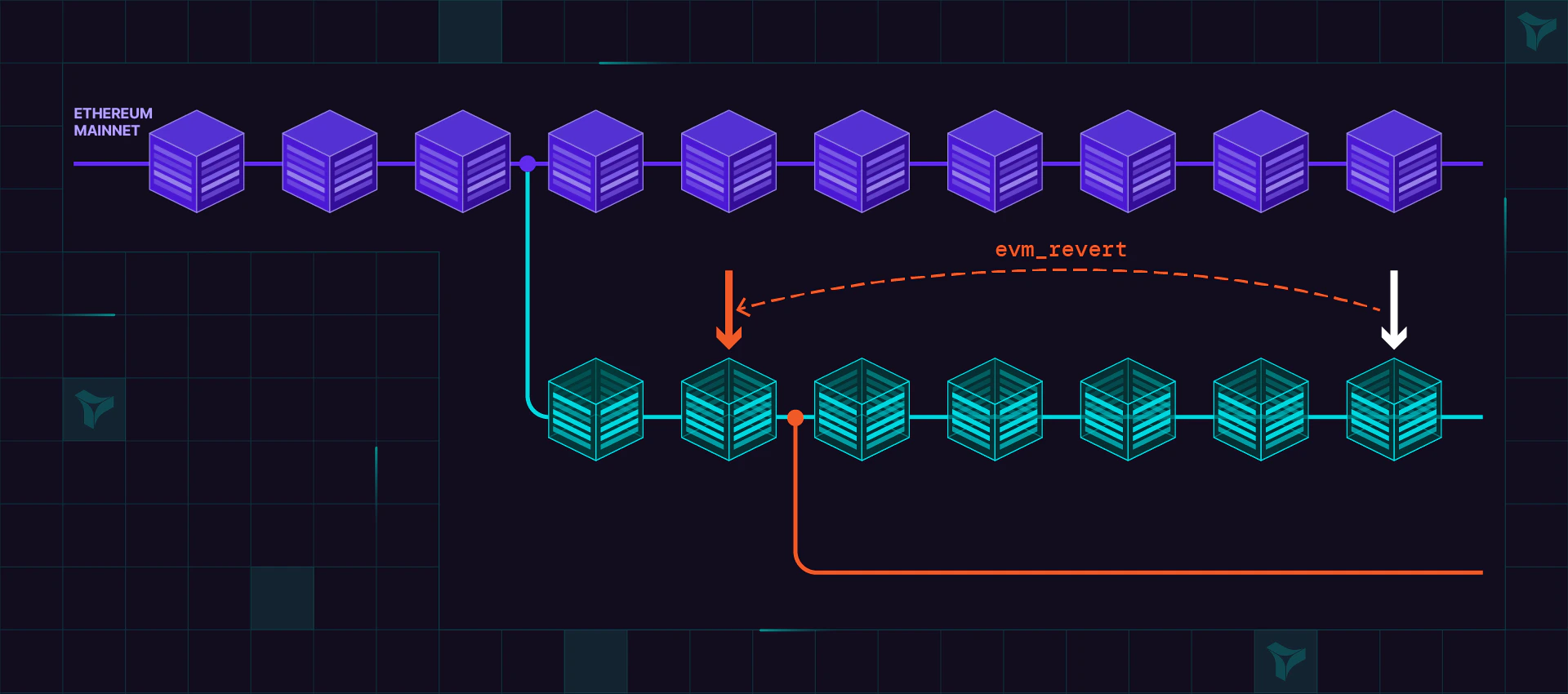
Reverting state can be helpful when testing contracts and protocols and you want to discard all state changes up to the snapshot position.
Instead of reverting state, consider [forking an existing Virtual Environment](/virtual-environments/develop/fork-testnet) instead, and do your testing on a disposable working copy.
 ## Reverting to a snapshot
### Create snapshot
Use [`evm_snapshot`](/virtual-environments/admin-rpc#evm_snapshot) to create a snapshot on the current block.
The method returns the snapshot ID you can use to revert.
```bash title="snapshot.sh" showLineNumbers theme={"theme":{"light":"catppuccin-latte","dark":"catppuccin-mocha"}}
TENDERLY_VIRTUAL_TESTNET_RPC= #...
SNAPSHOT_ID=$(curl $TENDERLY_VIRTUAL_TESTNET_RPC \
-X POST \
-H "Content-Type: application/json" \
-d '{
"jsonrpc": "2.0",
"method": "evm_snapshot",
"id": "1234"
}' \
| jq -r '.result')
```
### Revert
Use [`evm_revert`](/virtual-environments/admin-rpc#evm_revert) to back revert to previously created snapshot (`SNAPSHOT_ID`).
From this point onwards, all prior changes up to the snapshot will be discarded.
```bash title="revert.sh" showLineNumbers theme={"theme":{"light":"catppuccin-latte","dark":"catppuccin-mocha"}}
read -r -d '' REVERT_REQUEST <
## Revert distance limit
A single [`evm_revert`](/virtual-environments/admin-rpc#evm_revert) can roll back at most 2000 blocks. If the snapshot is more than 2000 blocks behind the current block, the call fails with:
```bash theme={"theme":{"light":"catppuccin-latte","dark":"catppuccin-mocha"}}
revert operation is limited to maximum 2000 blocks
```
This affects Virtual Environments that produce blocks continuously (for example, a scheduled job minting blocks), where the target snapshot can quickly fall outside the 2000-block window. To return to a point further back, clone the Virtual Environment at the target historical block instead of reverting.
## Clone at a historical block
To get a Virtual Environment whose state matches a specific past block, clone it at that block. The clone is a new, independent Virtual Environment forked at the chosen point, while the source is left untouched. There is no distance limit, so this is the way to reach a block more than 2000 blocks in the past.
In the dashboard, open the **Activity** tab and use the clone action on the transaction at the block you want to return to. The new Virtual Environment is created with state as of that transaction's block.
**Screenshot placeholder:** per-transaction clone action on the Activity tab.
Cloning at a historical block is also the right approach when you want to "fork at a specific block number." A [fork](/virtual-environments/develop/fork-testnet) always starts from the latest block, whereas a clone can target any historical block.
## Reverting to a snapshot
### Create snapshot
Use [`evm_snapshot`](/virtual-environments/admin-rpc#evm_snapshot) to create a snapshot on the current block.
The method returns the snapshot ID you can use to revert.
```bash title="snapshot.sh" showLineNumbers theme={"theme":{"light":"catppuccin-latte","dark":"catppuccin-mocha"}}
TENDERLY_VIRTUAL_TESTNET_RPC= #...
SNAPSHOT_ID=$(curl $TENDERLY_VIRTUAL_TESTNET_RPC \
-X POST \
-H "Content-Type: application/json" \
-d '{
"jsonrpc": "2.0",
"method": "evm_snapshot",
"id": "1234"
}' \
| jq -r '.result')
```
### Revert
Use [`evm_revert`](/virtual-environments/admin-rpc#evm_revert) to back revert to previously created snapshot (`SNAPSHOT_ID`).
From this point onwards, all prior changes up to the snapshot will be discarded.
```bash title="revert.sh" showLineNumbers theme={"theme":{"light":"catppuccin-latte","dark":"catppuccin-mocha"}}
read -r -d '' REVERT_REQUEST <
## Revert distance limit
A single [`evm_revert`](/virtual-environments/admin-rpc#evm_revert) can roll back at most 2000 blocks. If the snapshot is more than 2000 blocks behind the current block, the call fails with:
```bash theme={"theme":{"light":"catppuccin-latte","dark":"catppuccin-mocha"}}
revert operation is limited to maximum 2000 blocks
```
This affects Virtual Environments that produce blocks continuously (for example, a scheduled job minting blocks), where the target snapshot can quickly fall outside the 2000-block window. To return to a point further back, clone the Virtual Environment at the target historical block instead of reverting.
## Clone at a historical block
To get a Virtual Environment whose state matches a specific past block, clone it at that block. The clone is a new, independent Virtual Environment forked at the chosen point, while the source is left untouched. There is no distance limit, so this is the way to reach a block more than 2000 blocks in the past.
In the dashboard, open the **Activity** tab and use the clone action on the transaction at the block you want to return to. The new Virtual Environment is created with state as of that transaction's block.
**Screenshot placeholder:** per-transaction clone action on the Activity tab.
Cloning at a historical block is also the right approach when you want to "fork at a specific block number." A [fork](/virtual-environments/develop/fork-testnet) always starts from the latest block, whereas a clone can target any historical block.