> ## Documentation Index
> Fetch the complete documentation index at: https://docs.tenderly.co/llms.txt
> Use this file to discover all available pages before exploring further.
# Virtual Environment Explorer
> Browse Virtual Environment transactions privately, or enable the public explorer to share read-only contract and transaction access with external users.
[Virtual Environments](/virtual-environments/overview) offer two types of explorers: **private** and **public**. Each serves distinct visibility purposes for managing activity on your Virtual Environment and whether or not external users have access to your smart contracts through the explorer.
### Private explorer
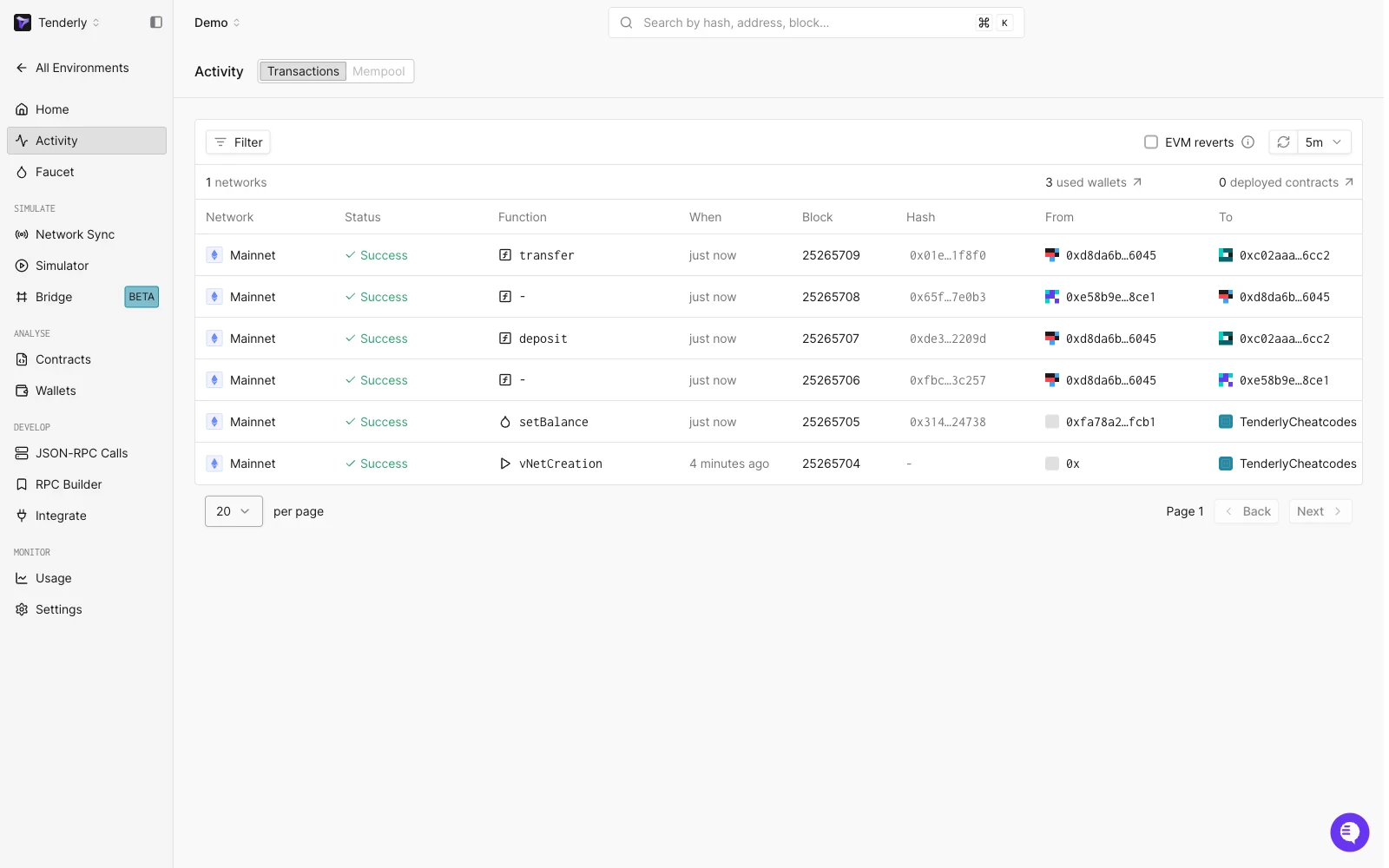 Accessible only to your team, the private explorer provides an overview of everything happening on your Virtual Environment:
* **Activity**: Overview of all the transactions executed on your Virtual Environment, with a **Transactions** and a **Mempool** view
* **Contracts**: Explorer for contracts you're monitoring (watched contracts) and contracts deployed on the Virtual Environment (virtual contracts)
* **Wallets**: Explorer for wallets you're monitoring (watched wallets) on your Virtual Environment
* **JSON-RPC Calls**: Explorer for all the RPC methods executed on your Virtual Environment
### Public explorer
Enabling the public explorer generates a public URL that you can share with anyone and allow them to view transactional activity on your Virtual Environment. A Tenderly account is not required to view a public explorer.
You can enable the public explorer with the **Public Explorer** option in the **Advanced** section of the Virtual Environment creation form, or at any point afterwards under **Settings** > **Advanced**.
To open the public explorer and get the public URL, click the **Public explorer** button with a 🌐 globe icon in the **Integrate Virtual RPC** section at the top of your Virtual Environment's **Home** view.
The public explorer can be disabled at any point. Go to **Settings** > **Advanced**, uncheck **Public Explorer**, and apply the change.
#### Contract visibility in public explorer
Accessible only to your team, the private explorer provides an overview of everything happening on your Virtual Environment:
* **Activity**: Overview of all the transactions executed on your Virtual Environment, with a **Transactions** and a **Mempool** view
* **Contracts**: Explorer for contracts you're monitoring (watched contracts) and contracts deployed on the Virtual Environment (virtual contracts)
* **Wallets**: Explorer for wallets you're monitoring (watched wallets) on your Virtual Environment
* **JSON-RPC Calls**: Explorer for all the RPC methods executed on your Virtual Environment
### Public explorer
Enabling the public explorer generates a public URL that you can share with anyone and allow them to view transactional activity on your Virtual Environment. A Tenderly account is not required to view a public explorer.
You can enable the public explorer with the **Public Explorer** option in the **Advanced** section of the Virtual Environment creation form, or at any point afterwards under **Settings** > **Advanced**.
To open the public explorer and get the public URL, click the **Public explorer** button with a 🌐 globe icon in the **Integrate Virtual RPC** section at the top of your Virtual Environment's **Home** view.
The public explorer can be disabled at any point. Go to **Settings** > **Advanced**, uncheck **Public Explorer**, and apply the change.
#### Contract visibility in public explorer
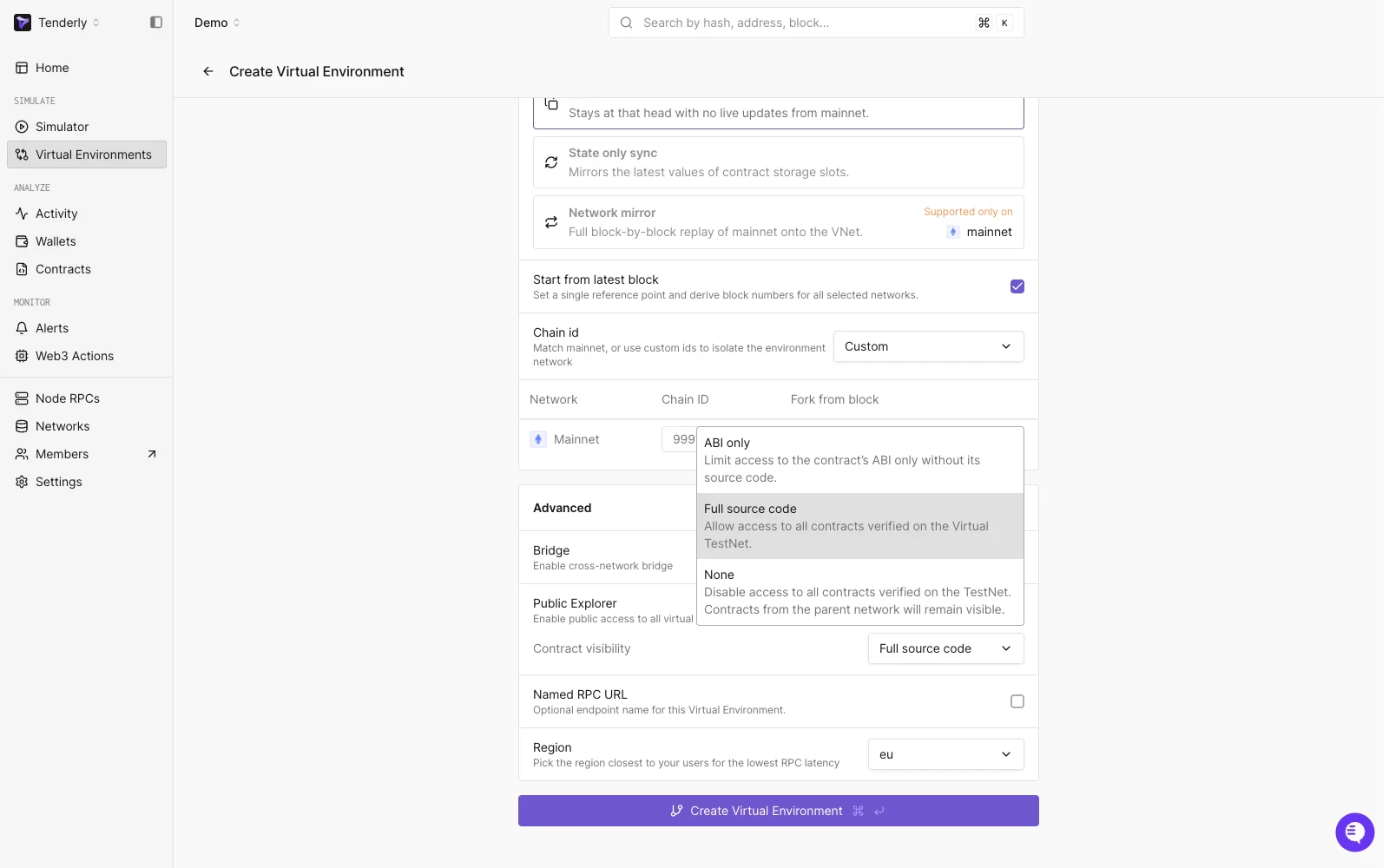 When you enable the public explorer, select the level of visibility for smart contracts on your Virtual Environment with the **Contract visibility** dropdown:
* **None**: No access is provided to contracts verified on the Virtual Environment; only publicly verified contracts from the parent network remain visible.
* **ABI only**: Only the ABI of your contracts is accessible but not the source code.
* **Full source code**: Allows complete visibility of all contracts verified on your Virtual Environment through the public explorer. See [deploy and verify contracts](/virtual-environments/develop/deploy-contracts) for how source code gets verified on a Virtual Environment.
You can change the contract visibility level at any time under **Settings** > **Advanced**.
When you enable the public explorer, select the level of visibility for smart contracts on your Virtual Environment with the **Contract visibility** dropdown:
* **None**: No access is provided to contracts verified on the Virtual Environment; only publicly verified contracts from the parent network remain visible.
* **ABI only**: Only the ABI of your contracts is accessible but not the source code.
* **Full source code**: Allows complete visibility of all contracts verified on your Virtual Environment through the public explorer. See [deploy and verify contracts](/virtual-environments/develop/deploy-contracts) for how source code gets verified on a Virtual Environment.
You can change the contract visibility level at any time under **Settings** > **Advanced**.