> ## Documentation Index
> Fetch the complete documentation index at: https://docs.tenderly.co/llms.txt
> Use this file to discover all available pages before exploring further.
# Named RPC URLs
> Attach a fixed, human-readable name to a Virtual Environment's RPC URL so CI/CD and local configs never change across re-forks.
By default, a Virtual Environment's RPC URL contains a randomly generated identifier that changes every time you create or re-fork the environment. A Named RPC URL replaces that identifier with a name you choose, so the URL stays constant across re-forks. This removes the need to update CI secrets, `.env` files, or hardcoded RPC URLs every time you spin up a fresh environment for a pull request, a local dev loop, or a staging deployment.
## RPC URL format
 Without a name, the identifier segment of the RPC URL is auto-generated, for example `https://virtual.mainnet.eu.rpc.tenderly.co/tenderly/demo/89e9b3-4bcd00`, and a new one is generated every time you re-fork.
With a name attached, the Public and Admin RPC URLs take this form instead:
| Endpoint | URL format | Notes |
| ---------- | -------------------------------------------------------------------------------------------- | --------------------------------------------------------------------------------------------------------------------------------------------------------------------- |
| Public RPC | `https://virtual.[NETWORK].[REGION].rpc.tenderly.co/[ACCOUNT]/[PROJECT]/[RPC_NAME]` | Standard JSON-RPC only, safe to share with external testers or embed in a dapp UI. |
| Admin RPC | `https://virtual.[NETWORK].[REGION].rpc.tenderly.co/[ACCOUNT]/[PROJECT]/[RPC_NAME]-[SUFFIX]` | `[SUFFIX]` is a random string Tenderly appends so the [cheatcode-enabled](/virtual-environments/admin-rpc) endpoint stays unguessable even though the name is public. |
`[REGION]` is `eu` or `us-east`, whichever you pick when assigning the name. `[RPC_NAME]` must be unique within your project. Once a name is attached, it, not the auto-generated identifier, is what stays fixed across re-forks.
## Assign a name when creating a Virtual Environment
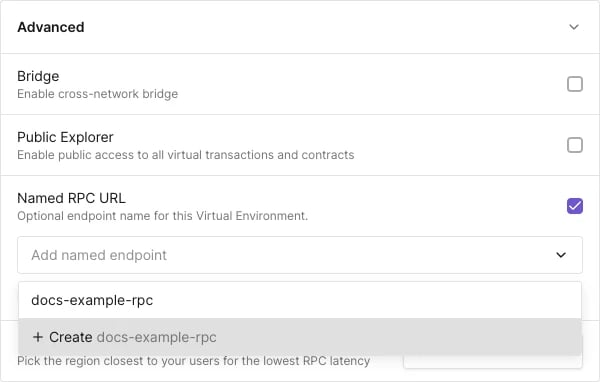
1. Start [creating a Virtual Environment](/virtual-environments/quickstart) and expand the **Advanced** section.
2. Enable **Named RPC URL**.
3. In **Add named endpoint**, type a new name and select **Create ``**, or pick an existing name from the list.
4. Click **Create Virtual Environment**.
The Admin and Public RPC URLs for the new environment are available on its **Home** page, under **Integrate Virtual RPC**.
Without a name, the identifier segment of the RPC URL is auto-generated, for example `https://virtual.mainnet.eu.rpc.tenderly.co/tenderly/demo/89e9b3-4bcd00`, and a new one is generated every time you re-fork.
With a name attached, the Public and Admin RPC URLs take this form instead:
| Endpoint | URL format | Notes |
| ---------- | -------------------------------------------------------------------------------------------- | --------------------------------------------------------------------------------------------------------------------------------------------------------------------- |
| Public RPC | `https://virtual.[NETWORK].[REGION].rpc.tenderly.co/[ACCOUNT]/[PROJECT]/[RPC_NAME]` | Standard JSON-RPC only, safe to share with external testers or embed in a dapp UI. |
| Admin RPC | `https://virtual.[NETWORK].[REGION].rpc.tenderly.co/[ACCOUNT]/[PROJECT]/[RPC_NAME]-[SUFFIX]` | `[SUFFIX]` is a random string Tenderly appends so the [cheatcode-enabled](/virtual-environments/admin-rpc) endpoint stays unguessable even though the name is public. |
`[REGION]` is `eu` or `us-east`, whichever you pick when assigning the name. `[RPC_NAME]` must be unique within your project. Once a name is attached, it, not the auto-generated identifier, is what stays fixed across re-forks.
## Assign a name when creating a Virtual Environment
1. Start [creating a Virtual Environment](/virtual-environments/quickstart) and expand the **Advanced** section.
2. Enable **Named RPC URL**.
3. In **Add named endpoint**, type a new name and select **Create ``**, or pick an existing name from the list.
4. Click **Create Virtual Environment**.
The Admin and Public RPC URLs for the new environment are available on its **Home** page, under **Integrate Virtual RPC**.
 ## Change or remove a name after creation
Open the Virtual Environment's **Settings** page. The **Named RPC URL** section there mirrors the one in the creation dialog:
* To reassign the environment to a different name, open the name picker and select another entry, or type a new name and select **Create ``**.
* To detach the name from this environment, disable **Named RPC URL** and save. The name itself is not deleted, it just becomes free to attach elsewhere.
## A name maps to one environment at a time
Attaching a name to a Virtual Environment is a one-to-one relationship. In the name picker, existing names that are already assigned elsewhere in the project are labeled **In use on another environment**. Selecting one of them attaches it to the current environment and detaches it from the environment that previously held it, so that environment's named RPC URL stops resolving there and instead routes to the current environment.
This makes swapping the target of a fixed RPC URL a single action: create the replacement environment, assign it the same name as the one you're retiring, and every script, CI pipeline, or dapp config pointed at that URL now resolves to the new environment without any changes on their end.
## Set a name via the REST API
Pass `rpcName` when creating an environment through the environment creation endpoint:
```bash title="environment-create-named.sh" theme={"theme":{"light":"catppuccin-latte","dark":"catppuccin-mocha"}}
curl --request POST \
--url https://api.tenderly.co/api/v1/account/me/project/project/environments \
--header 'Accept: application/json' \
--header 'Content-Type: application/json' \
--header "X-Access-Key: ${TENDERLY_ACCESS_KEY}" \
--data '{
"displayName": "My Staging Environment",
"rpcName": "my-staging-rpc",
"networkConfigs": [
{
"networkId": "1",
"chainConfigOverrides": { "chainId": "1" },
"blockNumber": "latest",
"region": "eu",
"explorerConfig": { "enabled": false, "contractVerificationVisibility": "bytecode" }
}
]
}'
```
Read the environment back through the [REST API reference](/virtual-environments/rest-api#get-an-environment) to get the resolved RPC URLs:
```bash theme={"theme":{"light":"catppuccin-latte","dark":"catppuccin-mocha"}}
curl --request GET \
--url https://api.tenderly.co/api/public/v1/account/me/project/project/environments/{environmentId} \
--header "X-Access-Key: ${TENDERLY_ACCESS_KEY}"
```
The `active_instance.vnets[].rpcs` array contains the named Admin and Public RPC URLs:
```json theme={"theme":{"light":"catppuccin-latte","dark":"catppuccin-mocha"}}
{
"rpcs": [
{ "name": "Admin RPC", "url": "https://virtual.mainnet.eu.rpc.tenderly.co/tenderly/project/my-staging-rpc-800896" },
{ "name": "Public RPC", "url": "https://virtual.mainnet.eu.rpc.tenderly.co/tenderly/project/my-staging-rpc" }
]
}
```
## See also
* [Quickstart](/virtual-environments/quickstart) for the full Virtual Environment creation flow.
* [Admin RPC](/virtual-environments/admin-rpc) for the cheatcodes available on the Admin RPC.
* [CI/CD with GitHub Actions](/virtual-environments/ci-cd/github-actions-foundry) for pipelines that create and tear down environments per pull request.
## Change or remove a name after creation
Open the Virtual Environment's **Settings** page. The **Named RPC URL** section there mirrors the one in the creation dialog:
* To reassign the environment to a different name, open the name picker and select another entry, or type a new name and select **Create ``**.
* To detach the name from this environment, disable **Named RPC URL** and save. The name itself is not deleted, it just becomes free to attach elsewhere.
## A name maps to one environment at a time
Attaching a name to a Virtual Environment is a one-to-one relationship. In the name picker, existing names that are already assigned elsewhere in the project are labeled **In use on another environment**. Selecting one of them attaches it to the current environment and detaches it from the environment that previously held it, so that environment's named RPC URL stops resolving there and instead routes to the current environment.
This makes swapping the target of a fixed RPC URL a single action: create the replacement environment, assign it the same name as the one you're retiring, and every script, CI pipeline, or dapp config pointed at that URL now resolves to the new environment without any changes on their end.
## Set a name via the REST API
Pass `rpcName` when creating an environment through the environment creation endpoint:
```bash title="environment-create-named.sh" theme={"theme":{"light":"catppuccin-latte","dark":"catppuccin-mocha"}}
curl --request POST \
--url https://api.tenderly.co/api/v1/account/me/project/project/environments \
--header 'Accept: application/json' \
--header 'Content-Type: application/json' \
--header "X-Access-Key: ${TENDERLY_ACCESS_KEY}" \
--data '{
"displayName": "My Staging Environment",
"rpcName": "my-staging-rpc",
"networkConfigs": [
{
"networkId": "1",
"chainConfigOverrides": { "chainId": "1" },
"blockNumber": "latest",
"region": "eu",
"explorerConfig": { "enabled": false, "contractVerificationVisibility": "bytecode" }
}
]
}'
```
Read the environment back through the [REST API reference](/virtual-environments/rest-api#get-an-environment) to get the resolved RPC URLs:
```bash theme={"theme":{"light":"catppuccin-latte","dark":"catppuccin-mocha"}}
curl --request GET \
--url https://api.tenderly.co/api/public/v1/account/me/project/project/environments/{environmentId} \
--header "X-Access-Key: ${TENDERLY_ACCESS_KEY}"
```
The `active_instance.vnets[].rpcs` array contains the named Admin and Public RPC URLs:
```json theme={"theme":{"light":"catppuccin-latte","dark":"catppuccin-mocha"}}
{
"rpcs": [
{ "name": "Admin RPC", "url": "https://virtual.mainnet.eu.rpc.tenderly.co/tenderly/project/my-staging-rpc-800896" },
{ "name": "Public RPC", "url": "https://virtual.mainnet.eu.rpc.tenderly.co/tenderly/project/my-staging-rpc" }
]
}
```
## See also
* [Quickstart](/virtual-environments/quickstart) for the full Virtual Environment creation flow.
* [Admin RPC](/virtual-environments/admin-rpc) for the cheatcodes available on the Admin RPC.
* [CI/CD with GitHub Actions](/virtual-environments/ci-cd/github-actions-foundry) for pipelines that create and tear down environments per pull request.