> ## Documentation Index
> Fetch the complete documentation index at: https://docs.tenderly.co/llms.txt
> Use this file to discover all available pages before exploring further.
# Network Mirror Mode
> Run a Virtual Environment that stays block-for-block in sync with a live network, with a visible mempool, time controls, and a state-drift lens.
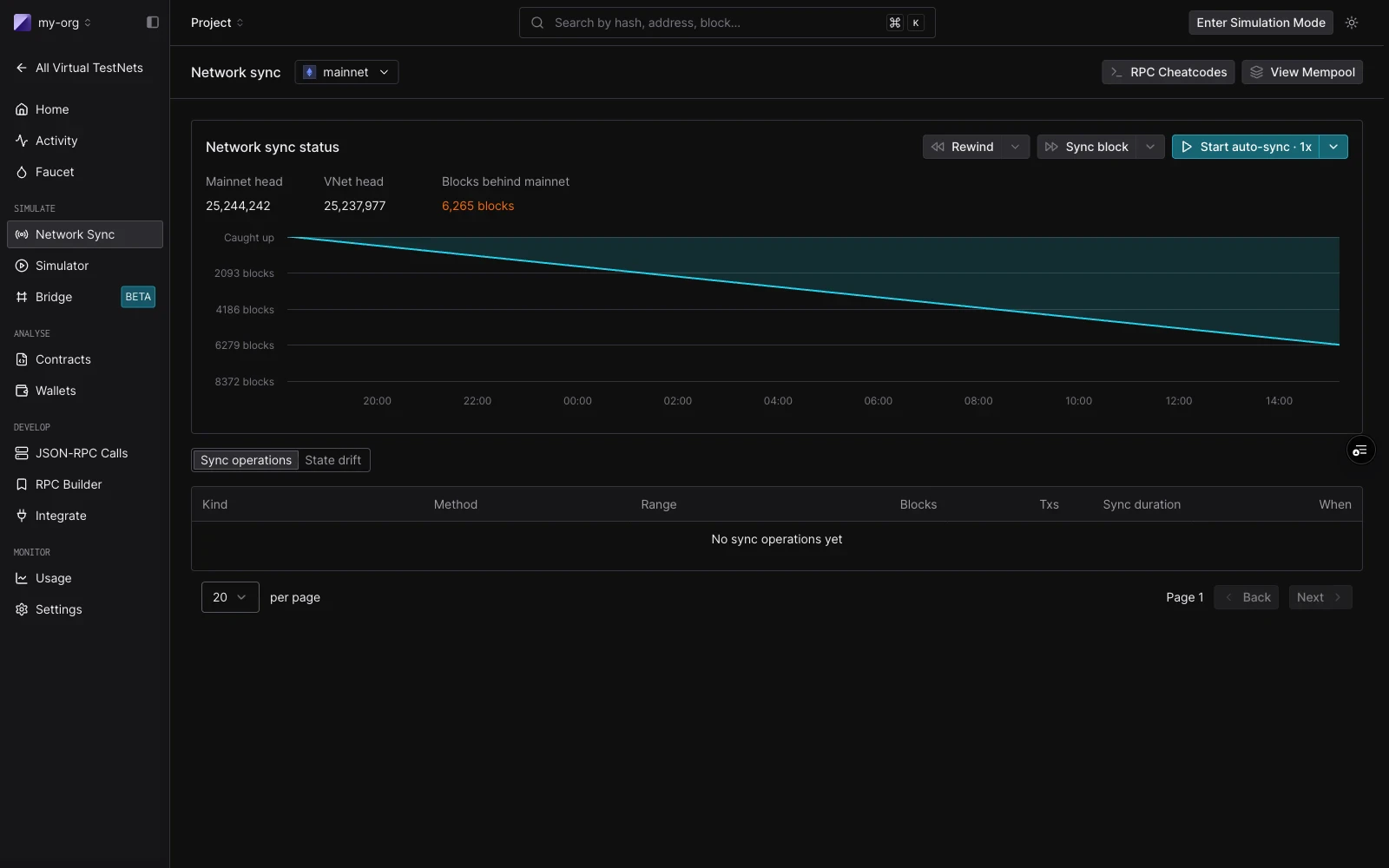
Network Mirror Mode keeps a Virtual Environment continuously aligned with its parent network. New mainnet blocks are absorbed into the Virtual Environment as they're produced, and a UI-visible mempool collects any transactions you submit. Your transactions are prepended to the next synced block in the order they arrive.
Network Mirror Mode is available on the paid plan. To enable it for your account, [contact our sales team](https://tenderly.co/contact-us).
 ## When to use it
Use Network Mirror Mode when you need to evaluate behavior against **live network conditions** rather than a frozen fork:
* Test how your contracts behave against today's oracle prices, pool reserves, or governance state.
* Stage a transaction and control when it executes relative to the next synced block.
* Pause the live network at a specific block to inspect state, then continue replaying.
* Compare your Virtual Environment's storage and balances against mainnet baselines over time.
If you need a frozen point-in-time fork, use a standard Virtual Environment. If you need real-time state without mempool semantics or block-for-block ticking, use [State Sync](/virtual-environments/state-sync).
## How sync works
A mainnet tick produces a Virtual Environment tick within roughly 12 seconds. Each tick brings in the next block's transactions and applies them on top of your Virtual Environment's current state.
Transactions you submit sit in the Virtual Environment's mempool until the next sync tick, at which point they're **prepended to the synced block in FIFO order**. Your transactions execute first; the synced mainnet transactions execute after them, against the resulting state.
A "live" indicator shows whether the Virtual Environment is keeping up:
| State | Meaning |
| ----------- | --------------------------------------- |
| Live | Tick active, lag of one block or less |
| Catching up | Tick active, lag greater than one block |
| Paused | Tick loop stopped |
## Time controls
The time-control strip lets you move the Virtual Environment's clock relative to mainnet. Each control maps directly to an RPC call you can also invoke from your own code:
| Control | RPC call | Behavior |
| ------- | ---------------------------------------------------------------------------- | ------------------------------------------ |
| Rewind | [`tenderly_revertSync`](/virtual-environments/admin-rpc#tenderly_revertsync) | Unwinds N blocks (default 10) |
| Play | [`tenderly_startSync`](/virtual-environments/admin-rpc#tenderly_startsync) | Resumes continuous sync from current block |
| Pause | [`tenderly_stopSync`](/virtual-environments/admin-rpc#tenderly_stopsync) | Stops the tick loop |
| Step | [`tenderly_syncNext`](/virtual-environments/admin-rpc#tenderly_syncnext) | Syncs the next block only |
The speed picker (`1×`, `2×`, `4×`, `realtime`) maps to the tick delay between sync calls (`12s`, `6s`, `3s`, and no delay respectively).
To check sync progress programmatically, use [`tenderly_getSyncStatus`](/virtual-environments/admin-rpc#tenderly_getsyncstatus).
## State drift lens
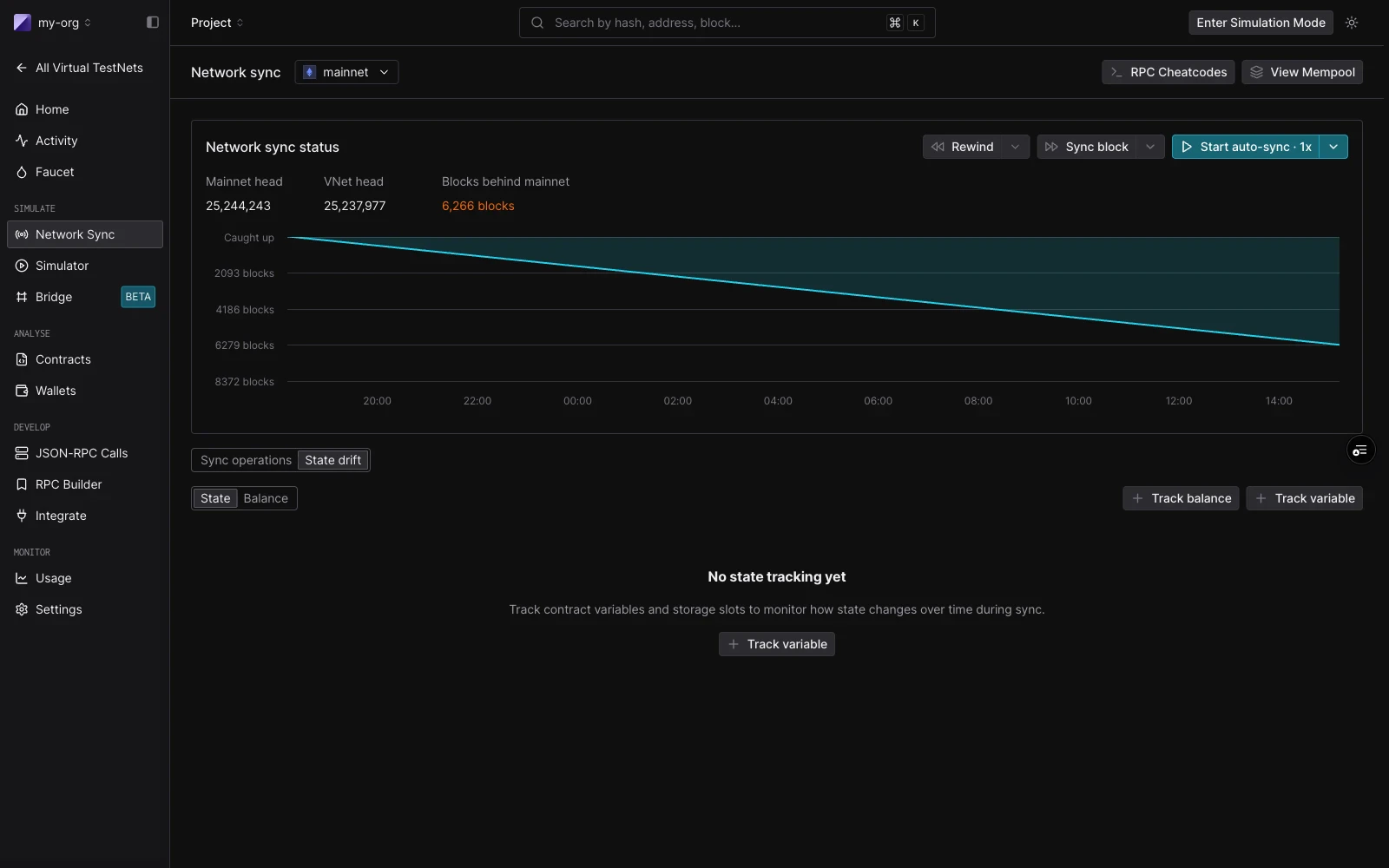
The State Drift lens shows where your Virtual Environment has diverged from mainnet. Useful for finding the contract or wallet your test actually moved.
Three sub-views share one surface:
| Sub-view | What it shows |
| -------- | --------------------------------------------- |
| State | Storage-slot drift per contract |
| Balance | Wallet and token-balance delta versus mainnet |
The lens is scoped to the contracts and wallets you're watching plus any contracts the current session has touched.
## When to use it
Use Network Mirror Mode when you need to evaluate behavior against **live network conditions** rather than a frozen fork:
* Test how your contracts behave against today's oracle prices, pool reserves, or governance state.
* Stage a transaction and control when it executes relative to the next synced block.
* Pause the live network at a specific block to inspect state, then continue replaying.
* Compare your Virtual Environment's storage and balances against mainnet baselines over time.
If you need a frozen point-in-time fork, use a standard Virtual Environment. If you need real-time state without mempool semantics or block-for-block ticking, use [State Sync](/virtual-environments/state-sync).
## How sync works
A mainnet tick produces a Virtual Environment tick within roughly 12 seconds. Each tick brings in the next block's transactions and applies them on top of your Virtual Environment's current state.
Transactions you submit sit in the Virtual Environment's mempool until the next sync tick, at which point they're **prepended to the synced block in FIFO order**. Your transactions execute first; the synced mainnet transactions execute after them, against the resulting state.
A "live" indicator shows whether the Virtual Environment is keeping up:
| State | Meaning |
| ----------- | --------------------------------------- |
| Live | Tick active, lag of one block or less |
| Catching up | Tick active, lag greater than one block |
| Paused | Tick loop stopped |
## Time controls
The time-control strip lets you move the Virtual Environment's clock relative to mainnet. Each control maps directly to an RPC call you can also invoke from your own code:
| Control | RPC call | Behavior |
| ------- | ---------------------------------------------------------------------------- | ------------------------------------------ |
| Rewind | [`tenderly_revertSync`](/virtual-environments/admin-rpc#tenderly_revertsync) | Unwinds N blocks (default 10) |
| Play | [`tenderly_startSync`](/virtual-environments/admin-rpc#tenderly_startsync) | Resumes continuous sync from current block |
| Pause | [`tenderly_stopSync`](/virtual-environments/admin-rpc#tenderly_stopsync) | Stops the tick loop |
| Step | [`tenderly_syncNext`](/virtual-environments/admin-rpc#tenderly_syncnext) | Syncs the next block only |
The speed picker (`1×`, `2×`, `4×`, `realtime`) maps to the tick delay between sync calls (`12s`, `6s`, `3s`, and no delay respectively).
To check sync progress programmatically, use [`tenderly_getSyncStatus`](/virtual-environments/admin-rpc#tenderly_getsyncstatus).
## State drift lens
The State Drift lens shows where your Virtual Environment has diverged from mainnet. Useful for finding the contract or wallet your test actually moved.
Three sub-views share one surface:
| Sub-view | What it shows |
| -------- | --------------------------------------------- |
| State | Storage-slot drift per contract |
| Balance | Wallet and token-balance delta versus mainnet |
The lens is scoped to the contracts and wallets you're watching plus any contracts the current session has touched.
 ## Block-context fidelity
Network Mirror Mode commits to one-to-one parity with the parent network on the dimensions that most often affect contract behavior:
* **Block-context alignment**: `block.timestamp`, `baseFee`, `coinbase`, and `prevrandao` reflect mainnet values.
* **Gas-market parity**: current mainnet gas pricing applies to transactions you submit.
* **Sub-tick latency**: a mainnet tick produces a Virtual Environment tick within roughly 12 seconds.
## Cheatcode behavior
Because Network Mirror Mode is continuously importing real blocks, some Admin RPC cheatcodes behave differently than on a standard Virtual Environment.
| Behavior | When the Virtual Environment is in Network Mirror Mode |
| ------------------------------------------------------------------------------------------------------- | ------------------------------------------------------------------------- |
| Admin RPC cheatcodes (`tenderly_setBalance`, `tenderly_setErc20Balance`, `tenderly_setStorageAt`, etc.) | **Disabled while live sync is active.** Pause sync to use them. |
| Solidity precompile cheatcodes | Work, but execute on the **next synced block boundary**, not immediately. |
| `tenderly_sendBlock` | Disabled while sync is active. |
| Initial empty block at Virtual Environment creation | Skipped. |
| Default 10 funded accounts at Virtual Environment creation | Not created. |
See the [Admin RPC reference](/virtual-environments/admin-rpc) for the full cheatcode list.
## Mode comparison
| | Standard Virtual Environment | [State Sync](/virtual-environments/state-sync) | Network Mirror Mode |
| ------------------------------------ | ------------------------------ | ---------------------------------------------- | -------------------------------------- |
| Initial state from parent network | Yes (snapshot) | Yes | Yes |
| Tracks new parent-network blocks | No | Per-slot, on read | Yes, block-for-block |
| User-visible mempool | No | No | Yes |
| Block-context matches parent network | No (independent clock) | No | Yes |
| Cheatcodes work over Admin RPC | Yes | Yes | Only when sync is paused |
| Time controls (rewind / play / step) | No | No | Yes |
| State drift lens | No | No | Yes |
| Good for | Frozen-point integration tests | Latest oracle values, pool state | Live network rehearsals, mempool tests |
## Known limitations
* **Single-network only.** Network Mirror Mode applies per Virtual Environment; combining it with multichain Virtual Environments isn't currently supported.
## See also
* [Admin RPC: sync methods](/virtual-environments/admin-rpc#tenderly_startsync)
* [State Sync](/virtual-environments/state-sync)
* [Multichain Virtual Environments](/virtual-environments/multichain/overview)
## Block-context fidelity
Network Mirror Mode commits to one-to-one parity with the parent network on the dimensions that most often affect contract behavior:
* **Block-context alignment**: `block.timestamp`, `baseFee`, `coinbase`, and `prevrandao` reflect mainnet values.
* **Gas-market parity**: current mainnet gas pricing applies to transactions you submit.
* **Sub-tick latency**: a mainnet tick produces a Virtual Environment tick within roughly 12 seconds.
## Cheatcode behavior
Because Network Mirror Mode is continuously importing real blocks, some Admin RPC cheatcodes behave differently than on a standard Virtual Environment.
| Behavior | When the Virtual Environment is in Network Mirror Mode |
| ------------------------------------------------------------------------------------------------------- | ------------------------------------------------------------------------- |
| Admin RPC cheatcodes (`tenderly_setBalance`, `tenderly_setErc20Balance`, `tenderly_setStorageAt`, etc.) | **Disabled while live sync is active.** Pause sync to use them. |
| Solidity precompile cheatcodes | Work, but execute on the **next synced block boundary**, not immediately. |
| `tenderly_sendBlock` | Disabled while sync is active. |
| Initial empty block at Virtual Environment creation | Skipped. |
| Default 10 funded accounts at Virtual Environment creation | Not created. |
See the [Admin RPC reference](/virtual-environments/admin-rpc) for the full cheatcode list.
## Mode comparison
| | Standard Virtual Environment | [State Sync](/virtual-environments/state-sync) | Network Mirror Mode |
| ------------------------------------ | ------------------------------ | ---------------------------------------------- | -------------------------------------- |
| Initial state from parent network | Yes (snapshot) | Yes | Yes |
| Tracks new parent-network blocks | No | Per-slot, on read | Yes, block-for-block |
| User-visible mempool | No | No | Yes |
| Block-context matches parent network | No (independent clock) | No | Yes |
| Cheatcodes work over Admin RPC | Yes | Yes | Only when sync is paused |
| Time controls (rewind / play / step) | No | No | Yes |
| State drift lens | No | No | Yes |
| Good for | Frozen-point integration tests | Latest oracle values, pool state | Live network rehearsals, mempool tests |
## Known limitations
* **Single-network only.** Network Mirror Mode applies per Virtual Environment; combining it with multichain Virtual Environments isn't currently supported.
## See also
* [Admin RPC: sync methods](/virtual-environments/admin-rpc#tenderly_startsync)
* [State Sync](/virtual-environments/state-sync)
* [Multichain Virtual Environments](/virtual-environments/multichain/overview)