> ## Documentation Index
> Fetch the complete documentation index at: https://docs.tenderly.co/llms.txt
> Use this file to discover all available pages before exploring further.
# State Sync
> Keep a Virtual Environment in real-time sync with its parent network using State Sync to read live oracle prices, pool data, and balances.
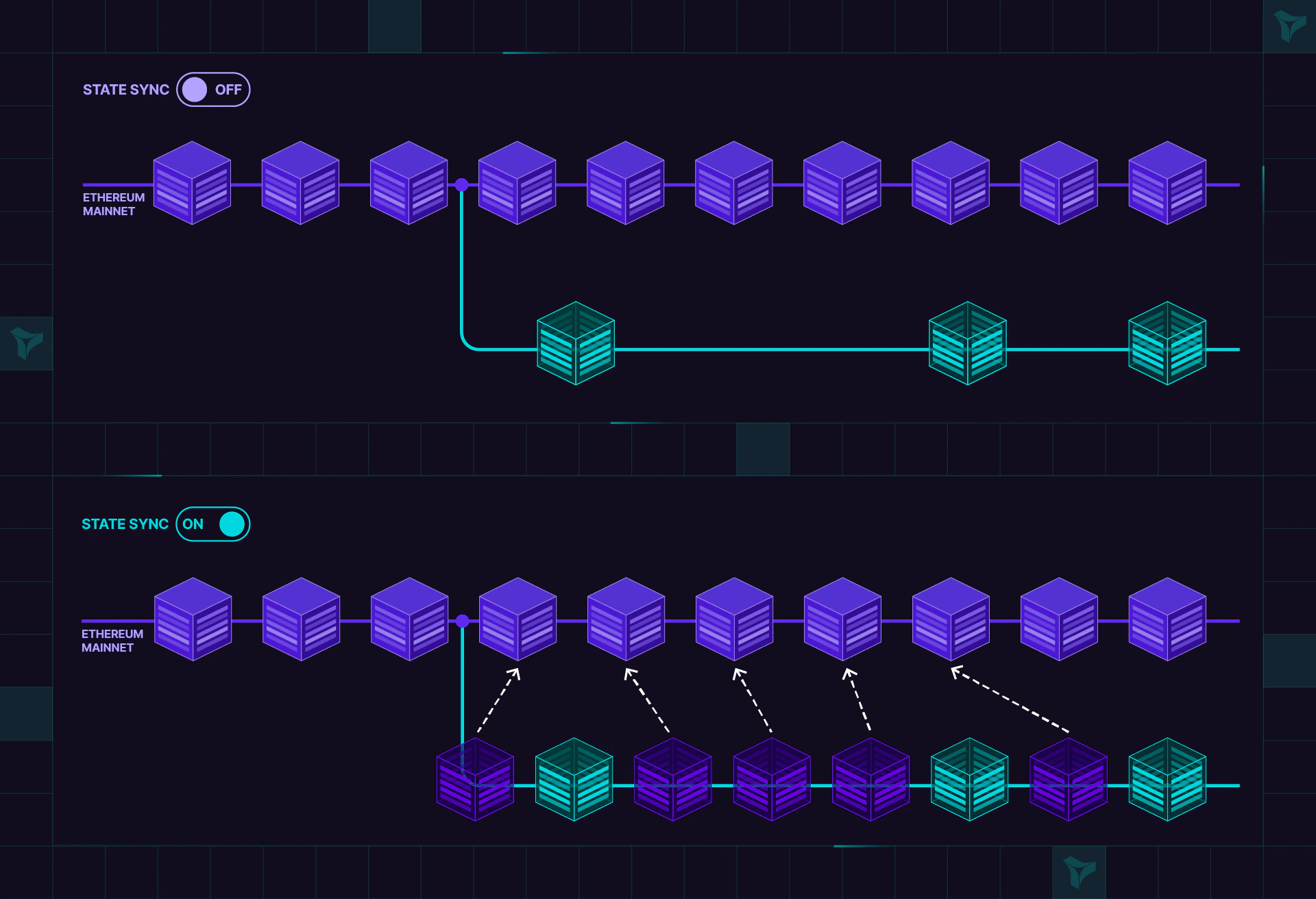
State Sync keeps your environment in real-time sync with the state of the parent network. This helps ensure you can access all blocks produced after the Virtual Environment has been created.
State Sync is available on the paid plan. To enable it for your account, [contact our sales team](https://tenderly.co/contact-us).
You enable State Sync when creating the Virtual Environment, by selecting the **State only sync** network sync mode.
The network sync mode is fixed at creation and stays the same for the entire life of the Virtual Environment. It cannot be turned on, off, or switched afterwards, from the dashboard or the API. To run with a different mode, create a new Virtual Environment.
Need block-for-block alignment with the parent network and a visible mempool? See [Network Mirror Mode](/virtual-environments/network-mirror-mode), it's a stronger guarantee than State Sync, with time controls and a state-drift lens for comparing your Virtual Environment against mainnet.
Behavior of mainnet contracts that cache `block.number` is unpredictable when running Virtual Environment transactions, since the [block number grows at different rates](#which-parent-network-state-does-latest-reflect) on mainnet and Virtual Environment.
## When to activate State Sync
This option is useful in several scenarios:
* Virtual Environment contracts and transactions can **access current Oracle values** that are present on the original chain.
* Access Uniswap pools from the Virtual Environments when testing contracts and building proof-of-concept transactions.
* Build a subgraph without stale data.
* Test the behavior and performance of your dapps and protocols in one-to-one correspondence with real network conditions
## How State Sync resolves write collisions
State sync enables you to access the latest values of storage slots and account balances on mainnet as they update. Upon writing to a particular storage slot on the Virtual Environment, synchronization stops for that slot, but remains active for all unmodified ones.
Here's state sync in more detail:
* The initial block number matches the latest block of the original chain at the time of creation.
* Each time you send a transaction to a Virtual Environment via `eth_sendTransaction` or `eth_sendRawTransaction`, a block is mined and block number increases by 1, independently of the original network.
* *Until writing to a variable* on Virtual Environment, the Virtual Environment tracks the current value from the original network.
* *After writing to a variable* on Virtual Environment of a contract (e.g., `C.X=100`), any subsequent read will yield that value (`100`).
* All *unmodified state variables* of a contract (`C.Y`) will reflect the value from the original network.
* Before a new block is mined on a Virtual Environment, the latest virtual block is synchronized with the latest block on the parent chain.
* Virtual Environment *mines a block after every state modification* (`sendTransaction`, `setBalance`, etc.).
* Block numbers on Virtual Environment and the original network will *change with different rates*.
 ## Which parent-network state does `latest` reflect?
On a State Sync Virtual Environment, `latest` account state (storage, balances, nonces, and contract code) reflects the most recently synced block of the parent network, plus any changes made by your own Virtual Environment transactions. Blocks are synced contiguously, so there are no gaps in the synced state.
The Virtual Environment's block height is not an indicator of state freshness. Blocks are mined only when the Virtual Environment processes a state modification, so its block number advances independently of the parent chain. A Virtual Environment whose head block is far behind the parent network's still serves the parent network's latest synced state at `latest`. To reason about staleness, compare against the synced parent state, not block numbers.
Synced state includes contract code. A contract deployed on the parent network after the Virtual Environment was created returns bytecode from `eth_getCode(address, "latest")` on the Virtual Environment, even though no deployment transaction, event logs, or blocks for it exist there. Reads pinned to an earlier block, such as `eth_getCode(address, "")`, still return the state as of that block.
Only state is synced. Parent-network transactions, event logs, and blocks never appear on the Virtual Environment; see [Why can't I see mainnet transactions with State Sync?](/troubleshooting/virtual-environments#why-can-t-i-see-mainnet-transactions-with-state-sy)
For better understanding, let's explore an example:
## Example
The example demonstrates the following:
* Virtual Environment (Virtual Sepolia) accesses the latest state from original network (Sepolia).
* After a Virtual Environment **`write`**, the modified variable detaches from its Sepolia counterpart.
You can find the example on Github:
Th example uses a modified [Counter contract](https://github.com/Tenderly/tenderly-examples/tree/master/virtual-environments-state-sync/contracts/src/Counter.sol), that contains a map of counters. It's deployed on Sepolia at `0xd01dF6d2354c5A869265dC9a9561E3544ac53262`. The [test script](https://github.com/Tenderly/tenderly-examples/tree/master/virtual-environments-state-sync/src/index.ts) will interact with both Sepolia and a Virtual Environment based on
Sepolia - `Virtual Sepolia`.
The script takes a random entry in the counter map, and then:
* Sets the value on Sepolia, then reads values on both Sepolia and Virtual Sepolia, showing that the same value is read back.
* Sets the value on Virtual Sepolia, then reads values on both Sepolia and Virtual Sepolia, showing that different values are read.
* Again sets the value on Sepolia, then reads values on both Sepolia and Virtual Sepolia, showing that the modification on Sepolia is invisible on its virtual counterpart.
### Create a Virtual Environment
Create a [new Virtual Environment](/virtual-environments/quickstart) based on Sepolia, using `735711155111` as
the custom Chain ID.
### Environment setup
Copy `.example.env` template and replace the following:
* **`TENDERLY_VIRTUAL_TESTNET_CHAIN_ID`** the chain ID of the Virtual Environment. Use `735711155111`
* **`TENDERLY_VIRTUAL_TESTNET_RPC_URL_SEPOLIA`** the RPC URL of the Virtual Environment
* **`PRIVATE_KEY`** for signing test transactions
```bash theme={"theme":{"light":"catppuccin-latte","dark":"catppuccin-mocha"}}
cp .example.env .env
vi .env # modify environment variables
```
```bash theme={"theme":{"light":"catppuccin-latte","dark":"catppuccin-mocha"}}
cd virtual-environments-state-sync
source .env
yarn install
npx ts-node src/index.ts
```
### Results
Key points to notice about **`write`** operations:
1. After writing to sepolia (`1`), both sepolia and virtualSepolia read value `1` - the latest state of the original
network.
2. After writing to Virtual Sepolia (`10`), reading from Sepolia gives the previously set value (`1`), and reading from
virtualSepolia gives the recently set value (`10`).
3. After writing to Sepolia again (`100`), reading from Sepolia gives the latest set value (`100`), and reading from
virtualSepolia gives the previously set value (`10`).
```bash theme={"theme":{"light":"catppuccin-latte","dark":"catppuccin-mocha"}}
Playing with Counter(0xd01dF6d2354c5A869265dC9a9561E3544ac53262).numbers[3788720642447205]
State:
sepolia: 0
virtualSepolia: 0
================================================================================================
Write: Counter(0xd01dF6d2354c5A869265dC9a9561E3544ac53262)@Sepolia.numbers[3788720642447205] = 1
Tx hash: 0xe57c5da70c68d55f86957f7a2fc2644670b032fe5f972b9e9ccc2774cd2ba352
State:
sepolia: 1
virtualSepolia: 1
================================================================================================
Write: Counter(0xd01dF6d2354c5A869265dC9a9561E3544ac53262)@Virtual Sepolia.numbers[3788720642447205] = 10
Tx hash: 0x56099d89c1d6fd001a1e9a0cecca13e13c04013b473acb6a48cd61a4b988696c
State:
sepolia: 1
virtualSepolia: 10
================================================================================================
Write: Counter(0xd01dF6d2354c5A869265dC9a9561E3544ac53262)@Sepolia.numbers[3788720642447205] = 100
Tx hash: 0xc3c37e912bfa4fca9b980339fa2c95dbef75d6c605f0df831ca985b0ef3b61ec
State:
sepolia: 100
virtualSepolia: 10
```
## Which parent-network state does `latest` reflect?
On a State Sync Virtual Environment, `latest` account state (storage, balances, nonces, and contract code) reflects the most recently synced block of the parent network, plus any changes made by your own Virtual Environment transactions. Blocks are synced contiguously, so there are no gaps in the synced state.
The Virtual Environment's block height is not an indicator of state freshness. Blocks are mined only when the Virtual Environment processes a state modification, so its block number advances independently of the parent chain. A Virtual Environment whose head block is far behind the parent network's still serves the parent network's latest synced state at `latest`. To reason about staleness, compare against the synced parent state, not block numbers.
Synced state includes contract code. A contract deployed on the parent network after the Virtual Environment was created returns bytecode from `eth_getCode(address, "latest")` on the Virtual Environment, even though no deployment transaction, event logs, or blocks for it exist there. Reads pinned to an earlier block, such as `eth_getCode(address, "")`, still return the state as of that block.
Only state is synced. Parent-network transactions, event logs, and blocks never appear on the Virtual Environment; see [Why can't I see mainnet transactions with State Sync?](/troubleshooting/virtual-environments#why-can-t-i-see-mainnet-transactions-with-state-sy)
For better understanding, let's explore an example:
## Example
The example demonstrates the following:
* Virtual Environment (Virtual Sepolia) accesses the latest state from original network (Sepolia).
* After a Virtual Environment **`write`**, the modified variable detaches from its Sepolia counterpart.
You can find the example on Github:
Th example uses a modified [Counter contract](https://github.com/Tenderly/tenderly-examples/tree/master/virtual-environments-state-sync/contracts/src/Counter.sol), that contains a map of counters. It's deployed on Sepolia at `0xd01dF6d2354c5A869265dC9a9561E3544ac53262`. The [test script](https://github.com/Tenderly/tenderly-examples/tree/master/virtual-environments-state-sync/src/index.ts) will interact with both Sepolia and a Virtual Environment based on
Sepolia - `Virtual Sepolia`.
The script takes a random entry in the counter map, and then:
* Sets the value on Sepolia, then reads values on both Sepolia and Virtual Sepolia, showing that the same value is read back.
* Sets the value on Virtual Sepolia, then reads values on both Sepolia and Virtual Sepolia, showing that different values are read.
* Again sets the value on Sepolia, then reads values on both Sepolia and Virtual Sepolia, showing that the modification on Sepolia is invisible on its virtual counterpart.
### Create a Virtual Environment
Create a [new Virtual Environment](/virtual-environments/quickstart) based on Sepolia, using `735711155111` as
the custom Chain ID.
### Environment setup
Copy `.example.env` template and replace the following:
* **`TENDERLY_VIRTUAL_TESTNET_CHAIN_ID`** the chain ID of the Virtual Environment. Use `735711155111`
* **`TENDERLY_VIRTUAL_TESTNET_RPC_URL_SEPOLIA`** the RPC URL of the Virtual Environment
* **`PRIVATE_KEY`** for signing test transactions
```bash theme={"theme":{"light":"catppuccin-latte","dark":"catppuccin-mocha"}}
cp .example.env .env
vi .env # modify environment variables
```
```bash theme={"theme":{"light":"catppuccin-latte","dark":"catppuccin-mocha"}}
cd virtual-environments-state-sync
source .env
yarn install
npx ts-node src/index.ts
```
### Results
Key points to notice about **`write`** operations:
1. After writing to sepolia (`1`), both sepolia and virtualSepolia read value `1` - the latest state of the original
network.
2. After writing to Virtual Sepolia (`10`), reading from Sepolia gives the previously set value (`1`), and reading from
virtualSepolia gives the recently set value (`10`).
3. After writing to Sepolia again (`100`), reading from Sepolia gives the latest set value (`100`), and reading from
virtualSepolia gives the previously set value (`10`).
```bash theme={"theme":{"light":"catppuccin-latte","dark":"catppuccin-mocha"}}
Playing with Counter(0xd01dF6d2354c5A869265dC9a9561E3544ac53262).numbers[3788720642447205]
State:
sepolia: 0
virtualSepolia: 0
================================================================================================
Write: Counter(0xd01dF6d2354c5A869265dC9a9561E3544ac53262)@Sepolia.numbers[3788720642447205] = 1
Tx hash: 0xe57c5da70c68d55f86957f7a2fc2644670b032fe5f972b9e9ccc2774cd2ba352
State:
sepolia: 1
virtualSepolia: 1
================================================================================================
Write: Counter(0xd01dF6d2354c5A869265dC9a9561E3544ac53262)@Virtual Sepolia.numbers[3788720642447205] = 10
Tx hash: 0x56099d89c1d6fd001a1e9a0cecca13e13c04013b473acb6a48cd61a4b988696c
State:
sepolia: 1
virtualSepolia: 10
================================================================================================
Write: Counter(0xd01dF6d2354c5A869265dC9a9561E3544ac53262)@Sepolia.numbers[3788720642447205] = 100
Tx hash: 0xc3c37e912bfa4fca9b980339fa2c95dbef75d6c605f0df831ca985b0ef3b61ec
State:
sepolia: 100
virtualSepolia: 10
```