> ## Documentation Index
> Fetch the complete documentation index at: https://docs.tenderly.co/llms.txt
> Use this file to discover all available pages before exploring further.
# Action 函数、事件和触发器
> 探索 Web3 Actions 的核心元素,为支持的事件配置触发器,并在 tenderly.yaml 中将触发器与 action 函数关联。
本指南介绍 Web3 Actions 的三个核心概念: **触发器、事件和函数**。您将了解它们的工作原理,以及如何使用它们构建自己的 Web3 Actions。
组成 Web3 Action 的三个核心组件是:
* **函数(Functions):** 您希望在外部事件发生时执行的自定义 JavaScript 或 TypeScript 代码。这是自动化的核心。
* **触发器(Triggers):** 预定义的外部事件,您的 Web3 Action 会配置为监听它们。当事件发生时,触发器指示 Tenderly 执行您的自定义代码(函数)。
* **事件(Events,触发器类型):** 预定义的外部事件,您可以通过设置触发器来监听。当事件发生时,触发器会调用您的自定义代码(函数)。
### 执行类型
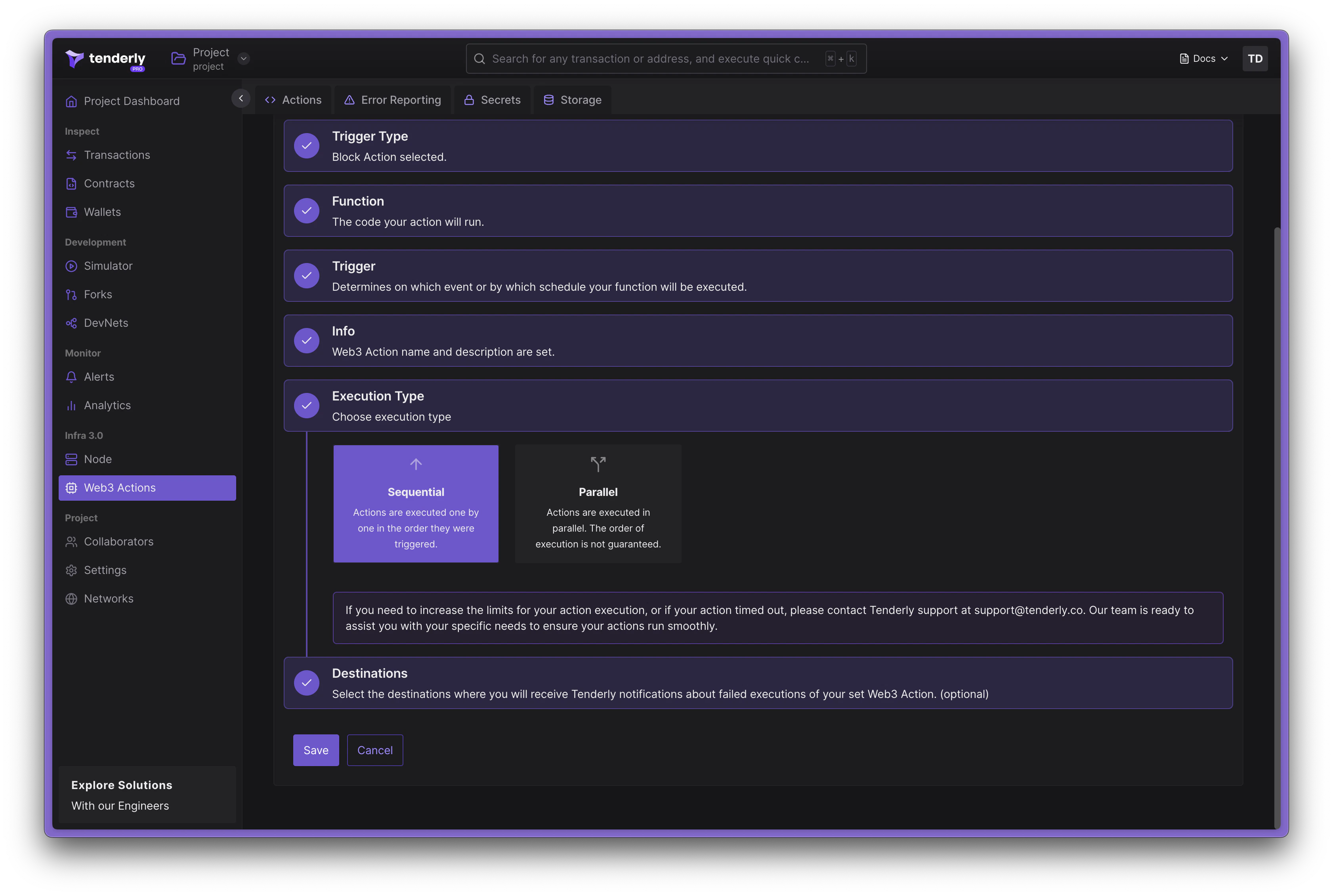
Tenderly 中的 Web3 Actions 可以以两种模式执行: **Sequential(顺序)** 和 **Parallel(并行)**。
 #### Sequential 执行
在顺序执行模式下,actions 按其被调用的顺序逐一执行。这是默认的执行模式。在此模式下,每个 action 会等待前一个 action 完成后才开始执行。以下是顺序执行的 action 配置示例:
```diff title="example" showLineNumbers theme={"theme":{"light":"catppuccin-latte","dark":"catppuccin-mocha"}}
our-org/our-cool-project:
runtime: v2
sources: actions
specs:
bestActionEver:
description: Does the best thing ever
+ execution_type: sequential
function: very/organized/file:bestActionEver
trigger:
...
```
#### Parallel 执行
在并行执行模式下,actions 并行执行,从而带来更高的吞吐量。在此模式下,执行顺序无法保证,并且可能与 [action 存储](/monitoring/web3-actions/references/context#storage) 之间出现竞态条件。以下是并行执行的 action 配置示例:
```diff title="example" showLineNumbers theme={"theme":{"light":"catppuccin-latte","dark":"catppuccin-mocha"}}
our-org/our-cool-project:
runtime: v2
sources: actions
specs:
bestActionEver:
description: Does the best thing ever
+ execution_type: parallel
function: very/organized/file:bestActionEver
trigger:
...
```
### Action 函数
Web3 Action 函数指的是以标准 JavaScript 或 TypeScript 函数形式编写的自定义代码,但它们必须遵守一些规则。
* 函数必须是异步的,返回 `Promise`
* 函数接受两个参数:`context` 和 `event`
* 函数必须是文件的具名导出
* 函数可以放在 *actions root* 目录下的任何文件中
了解 [Web3 Actions 项目和文件结构](/monitoring/web3-actions/references/project-structure)。
在部署 Web3 Action 函数时,Tenderly 运行时会在调用期间传入以下参数:
* `context` 参数,包含对 [Storage 和 Secrets](/monitoring/web3-actions/references/context) 的访问。
* `event` 参数,它是一个包含回答 *"刚刚发生了什么?"* 相关信息的对象。此参数包含特定于 Web3 Action 函数所监听触发器类型的数据。 [外部事件的触发器规范](/monitoring/web3-actions/references/functions-events-triggers#specifying-triggers-for-external-events) 部分详细介绍了外部事件。
Web3 Action 函数的执行限制为 30 秒。如果您的函数执行时间超过
30 秒,将被终止。
以下是用 TypeScript 编写的 Web3 Action 函数示例。`event` 参数可以是任意一种支持的触发器类型(事件)。
```typescript title="example.ts" showLineNumbers theme={"theme":{"light":"catppuccin-latte","dark":"catppuccin-mocha"}}
// File: actions/myCoolTsFile.ts
// importing ethers available in Tenderly Runtime
export const awesomeActionFunction: ActionFn = async (context: Context, event: Event) => {
// cast the event parameter to an appropriate type, based on the Trigger
// this function subscribed to.
// Of course, only one of these casts makes sense
const blockEvent = event as BlockEvent;
const periodicEvent = event as PeriodicEvent;
const transactionEvent = event as TransactionEvent;
const webhookEvent = event as WebhookEvent;
...
}
```
#### Dashboard 版 actions 可用的库
Tenderly 运行时预先打包了若干 JavaScript 库,您可以在通过 Tenderly Dashboard 创建 Web3 Actions 时导入使用。可用的库包括:
* [Ethers.js](https://docs.ethers.io/v5/)
* [Bignumber.js](https://mikemcl.github.io/bignumber.js/)
* [Axios](https://axios-http.com/docs/intro)
* [Luxon](https://moment.github.io/luxon/#/?id=luxon)
要导入这些库中的任何一个,请像在标准基于 npm 的项目中一样使用 `require()` 函数(不使用 ES6)。
Axios 的示例导入如下所示:
```jsx title="example.jsx" showLineNumbers theme={"theme":{"light":"catppuccin-latte","dark":"catppuccin-mocha"}}
const axios = require('axios');
```
#### 对基于 CLI 的 Web3 Actions 使用 npm 库
Tenderly CLI 创建的项目实际上是一个 npm 模块。您可以从 *actions root* 目录中安装任何 npm 包。
### 外部事件和触发器类型
当外部事件发生时,它 *触发您的自定义代码(函数)执行*。您可以在四种要监听的外部事件之间选择:
* **Block 事件**:在所选网络上有新区块被打包。
* **Periodic 事件:** 此触发器在一定时间间隔或基于 CRON 表达式的时间发生。
* **Webhook 事件:** HTTP 请求被发送到 webhook URL(Web3 Action 暴露 webhook)
* **Transaction 事件:** 在所选网络上执行了匹配给定过滤条件的事务。
在定义 Web3 Action 时,您实际上是在定义响应您项目感兴趣的外部事件的触发器。在触发器规范的上下文中,我们将使用术语 **触发器类型(trigger type)**。
您应为每种触发器类型编写单独的函数。不建议对不同的
触发器类型使用相同的函数。
### 将 Web3 Action 函数订阅到事件
除了在 JavaScript 中定义您的 action 函数之外,您还需要提供触发器配置,它告诉 Tenderly **是什么触发它,即您的函数订阅的外部事件。**
通过 Tenderly Dashboard 创建 Web3 Actions 时,UI 中的创建流程将为您处理此部分。阅读 [Dashboard 快速入门](/monitoring/web3-actions/tutorials/deploy-via-dashboard) 指南。
在处理基于代码的 Web3 Actions 时,函数及其触发器必须在由 Tenderly CLI 生成的 `tenderly.yaml` 文件中定义。阅读 [CLI 快速入门](/monitoring/web3-actions/tutorials/deploy-via-cli) 指南。
**示例**
在下面的示例中,我们声明了一个名为 **bestActionEver** 的 Web3 Action,并引用从 **actions/myCoolTsFile.ts** 文件导出的函数 **awesomeActionFunction**。这是当 Web3 Action 被触发时 Tenderly 将调用的函数。执行通过 **`execution_type`** 控制,在此示例中被设置为 `parallel`。
```yaml title="tenderly.yaml" showLineNumbers theme={"theme":{"light":"catppuccin-latte","dark":"catppuccin-mocha"}}
account_id: ""
actions:
our-cool-org/our-cool-project:
runtime: v1
sources: actions
specs:
bestActionEver:
execution_type: parallel # or sequential
description: Does the best thing ever
function: myCoolTsFile:awesomeActionFunction
trigger: # trigger declaration start
type: ... # type
... # configuration map (external event specific)
```
### 为外部事件指定触发器
在本节中,我们将检查 `trigger` 声明。有关编写 tenderly.yaml 文件的更多信息,请参考 [本指南](/monitoring/web3-actions/references/project-structure#the-tenderlyyaml-file-structure)。
触发器类型和相应的配置在 **tenderly.yaml** 文件中定义。您必须首先定义 `trigger` 对象,它有两个必填属性:
* `type` 属性,指定触发器类型,可以是:`periodic | webhook | block | transaction`
* 一个包含所选触发器类型特定配置的对象
以下是每种触发器类型的特定配置的详细说明。
### Periodic 事件
当您希望 Web3 Action 在特定时间间隔被触发时,可以使用 periodic 事件。它携带 **time**:调用时间。
```typescript title="example.ts" showLineNumbers theme={"theme":{"light":"catppuccin-latte","dark":"catppuccin-mocha"}}
type PeriodicEvent = {
time: Date;
};
```
触发器声明的类型为 `periodic`。可以基于间隔或 cron:
```yaml title="trigger.yaml" showLineNumbers theme={"theme":{"light":"catppuccin-latte","dark":"catppuccin-mocha"}}
trigger:
type: periodic
periodic:
interval: 5m
```
`interval` 属性可以取以下任意值:`5m | 10m | 15m | 30m | 1h | 3h | 6h | 12h | 1d`
如果您需要对 Web3 Action 的执行时间进行更精细的控制,请使用基于 CRON 的 periodic 触发器:
```yaml title="trigger.yaml" showLineNumbers theme={"theme":{"light":"catppuccin-latte","dark":"catppuccin-mocha"}}
trigger:
type: periodic
periodic:
cron: '5 */1 * * *'
```
`cron` 属性可以是任何有效的 [CRON 字符串](https://crontab.guru/)。
### Webhook 事件
基于 Webhook 的 Web3 Actions 暴露一个自定义 webhook URL,使外部系统能够通过简单的 HTTP POST 请求触发它们。
对应的触发器类型包含两个属性: 调用的 **time** 和任意 **payload**(JSON 对象)。Tenderly 不会对您的负载执行任何验证或检查。
```typescript title="example.ts" showLineNumbers theme={"theme":{"light":"catppuccin-latte","dark":"catppuccin-mocha"}}
type WebhookEvent = {
time: Date;
payload: any;
};
```
触发器配置示例:
```yaml title="webhook-trigger.yaml" showLineNumbers theme={"theme":{"light":"catppuccin-latte","dark":"catppuccin-mocha"}}
trigger:
type: webhook
webhook:
authenticated: true
```
如果 `authenticated` 设置为 **true**,您必须在请求中包含 Tenderly Access Token 作为 `x-access-key` 的值才能运行 Web3 Action。您可以在 Tenderly Dashboard 中的 Web3 Action 概览中找到所暴露 webhook 的 cURL。
```bash title="example" showLineNumbers theme={"theme":{"light":"catppuccin-latte","dark":"catppuccin-mocha"}}
curl -X POST \
-H "x-access-key: $ACCESS_TOKEN" \
-H "Content-Type: application/json" \
https://api.tenderly.co/api/v1/actions/7acc7db2-00d6-4872-b2d2-d9430bd8fe7b/webhook \
-d '{"foo": "bar"}'
```
### Block 事件
当您希望监听一个或多个网络上的区块被打包时,可以使用 block 事件。您可以通过指定两次连续调用之间被打包的区块数量,让您的 Web3 Action "按块周期化"。
```typescript title="example.ts" showLineNumbers theme={"theme":{"light":"catppuccin-latte","dark":"catppuccin-mocha"}}
type BlockEvent = {
blockHash: string;
blockNumber: number;
network: string;
};
```
在声明 block 触发器时,您可以指定以下属性:
* `network`:您感兴趣的 [网络 ID](/monitoring/web3-actions/references/functions-events-triggers) 的单个值或列表
* `blocks`:Web3 Action 两次连续执行之间被打包的区块数量。例如,每 100 个被打包的区块执行一次 Web3 Action。
```yaml title="block-trigger.yaml" showLineNumbers theme={"theme":{"light":"catppuccin-latte","dark":"catppuccin-mocha"}}
trigger:
type: block
block:
network:
- 1
- 8453
blocks: 100
```
### Transaction 事件
transaction 触发器类型允许您监听在链上执行的特定事务。
要监听来自智能合约的事务,智能合约必须已经过验证并添加到
Tenderly Dashboard 中的您的项目。如果不是这样,CLI 会抛出警告。
您可以以 **filters** 的形式指定不同的条件,以聚焦感兴趣的事务。您的自定义代码将以精确的事务负载通过 `event` 参数被调用。
```typescript title="example.ts" showLineNumbers theme={"theme":{"light":"catppuccin-latte","dark":"catppuccin-mocha"}}
type TransactionEvent = {
blockHash: string;
blockNumber: number;
from: string;
hash: string;
network: string;
to?: string;
logs: Array<{
address: string;
data: string;
topics: string[];
}>;
input: string;
value: string;
nonce: string;
gas: string;
gasUsed: string;
cumulativeGasUsed: string;
gasPrice: string;
gasTipCap: string;
gasFeeCap: string;
transactionHash: string;
};
```
监听 transaction 事件时,您还可以指定以下设置:
* **事务打包状态**:`mined`(事务已被打包)或 `confirmed10`(自包含该事务的区块以来已确认 10 个区块)
* **Filters:** 使用 `filters` 列表定义的一组涉及事务负载的条件。只有匹配 filters 的事务才会触发您的代码执行。
#### 过滤事务
`filters` 列表允许您使用事务属性定义触发条件以匹配特定事务。
列表中的每个 filter 都是一个对象,其中 **所有字段都是 AND 关系**。filter 中的每个条件都必须为真时才能匹配。`filters` 列表本身是 **OR 关系**:只要事务满足列表中 **任意一个 filter**,就会匹配。
```python theme={"theme":{"light":"catppuccin-latte","dark":"catppuccin-mocha"}}
match = anyOf(
(network AND status AND from AND eventEmitted), # Filter 1
(network AND to) # Filter 2
)
```
以下是您可以组合以构建触发 Web3 Action 执行条件的所有可用 filter 列表。
#### Sequential 执行
在顺序执行模式下,actions 按其被调用的顺序逐一执行。这是默认的执行模式。在此模式下,每个 action 会等待前一个 action 完成后才开始执行。以下是顺序执行的 action 配置示例:
```diff title="example" showLineNumbers theme={"theme":{"light":"catppuccin-latte","dark":"catppuccin-mocha"}}
our-org/our-cool-project:
runtime: v2
sources: actions
specs:
bestActionEver:
description: Does the best thing ever
+ execution_type: sequential
function: very/organized/file:bestActionEver
trigger:
...
```
#### Parallel 执行
在并行执行模式下,actions 并行执行,从而带来更高的吞吐量。在此模式下,执行顺序无法保证,并且可能与 [action 存储](/monitoring/web3-actions/references/context#storage) 之间出现竞态条件。以下是并行执行的 action 配置示例:
```diff title="example" showLineNumbers theme={"theme":{"light":"catppuccin-latte","dark":"catppuccin-mocha"}}
our-org/our-cool-project:
runtime: v2
sources: actions
specs:
bestActionEver:
description: Does the best thing ever
+ execution_type: parallel
function: very/organized/file:bestActionEver
trigger:
...
```
### Action 函数
Web3 Action 函数指的是以标准 JavaScript 或 TypeScript 函数形式编写的自定义代码,但它们必须遵守一些规则。
* 函数必须是异步的,返回 `Promise`
* 函数接受两个参数:`context` 和 `event`
* 函数必须是文件的具名导出
* 函数可以放在 *actions root* 目录下的任何文件中
了解 [Web3 Actions 项目和文件结构](/monitoring/web3-actions/references/project-structure)。
在部署 Web3 Action 函数时,Tenderly 运行时会在调用期间传入以下参数:
* `context` 参数,包含对 [Storage 和 Secrets](/monitoring/web3-actions/references/context) 的访问。
* `event` 参数,它是一个包含回答 *"刚刚发生了什么?"* 相关信息的对象。此参数包含特定于 Web3 Action 函数所监听触发器类型的数据。 [外部事件的触发器规范](/monitoring/web3-actions/references/functions-events-triggers#specifying-triggers-for-external-events) 部分详细介绍了外部事件。
Web3 Action 函数的执行限制为 30 秒。如果您的函数执行时间超过
30 秒,将被终止。
以下是用 TypeScript 编写的 Web3 Action 函数示例。`event` 参数可以是任意一种支持的触发器类型(事件)。
```typescript title="example.ts" showLineNumbers theme={"theme":{"light":"catppuccin-latte","dark":"catppuccin-mocha"}}
// File: actions/myCoolTsFile.ts
// importing ethers available in Tenderly Runtime
export const awesomeActionFunction: ActionFn = async (context: Context, event: Event) => {
// cast the event parameter to an appropriate type, based on the Trigger
// this function subscribed to.
// Of course, only one of these casts makes sense
const blockEvent = event as BlockEvent;
const periodicEvent = event as PeriodicEvent;
const transactionEvent = event as TransactionEvent;
const webhookEvent = event as WebhookEvent;
...
}
```
#### Dashboard 版 actions 可用的库
Tenderly 运行时预先打包了若干 JavaScript 库,您可以在通过 Tenderly Dashboard 创建 Web3 Actions 时导入使用。可用的库包括:
* [Ethers.js](https://docs.ethers.io/v5/)
* [Bignumber.js](https://mikemcl.github.io/bignumber.js/)
* [Axios](https://axios-http.com/docs/intro)
* [Luxon](https://moment.github.io/luxon/#/?id=luxon)
要导入这些库中的任何一个,请像在标准基于 npm 的项目中一样使用 `require()` 函数(不使用 ES6)。
Axios 的示例导入如下所示:
```jsx title="example.jsx" showLineNumbers theme={"theme":{"light":"catppuccin-latte","dark":"catppuccin-mocha"}}
const axios = require('axios');
```
#### 对基于 CLI 的 Web3 Actions 使用 npm 库
Tenderly CLI 创建的项目实际上是一个 npm 模块。您可以从 *actions root* 目录中安装任何 npm 包。
### 外部事件和触发器类型
当外部事件发生时,它 *触发您的自定义代码(函数)执行*。您可以在四种要监听的外部事件之间选择:
* **Block 事件**:在所选网络上有新区块被打包。
* **Periodic 事件:** 此触发器在一定时间间隔或基于 CRON 表达式的时间发生。
* **Webhook 事件:** HTTP 请求被发送到 webhook URL(Web3 Action 暴露 webhook)
* **Transaction 事件:** 在所选网络上执行了匹配给定过滤条件的事务。
在定义 Web3 Action 时,您实际上是在定义响应您项目感兴趣的外部事件的触发器。在触发器规范的上下文中,我们将使用术语 **触发器类型(trigger type)**。
您应为每种触发器类型编写单独的函数。不建议对不同的
触发器类型使用相同的函数。
### 将 Web3 Action 函数订阅到事件
除了在 JavaScript 中定义您的 action 函数之外,您还需要提供触发器配置,它告诉 Tenderly **是什么触发它,即您的函数订阅的外部事件。**
通过 Tenderly Dashboard 创建 Web3 Actions 时,UI 中的创建流程将为您处理此部分。阅读 [Dashboard 快速入门](/monitoring/web3-actions/tutorials/deploy-via-dashboard) 指南。
在处理基于代码的 Web3 Actions 时,函数及其触发器必须在由 Tenderly CLI 生成的 `tenderly.yaml` 文件中定义。阅读 [CLI 快速入门](/monitoring/web3-actions/tutorials/deploy-via-cli) 指南。
**示例**
在下面的示例中,我们声明了一个名为 **bestActionEver** 的 Web3 Action,并引用从 **actions/myCoolTsFile.ts** 文件导出的函数 **awesomeActionFunction**。这是当 Web3 Action 被触发时 Tenderly 将调用的函数。执行通过 **`execution_type`** 控制,在此示例中被设置为 `parallel`。
```yaml title="tenderly.yaml" showLineNumbers theme={"theme":{"light":"catppuccin-latte","dark":"catppuccin-mocha"}}
account_id: ""
actions:
our-cool-org/our-cool-project:
runtime: v1
sources: actions
specs:
bestActionEver:
execution_type: parallel # or sequential
description: Does the best thing ever
function: myCoolTsFile:awesomeActionFunction
trigger: # trigger declaration start
type: ... # type
... # configuration map (external event specific)
```
### 为外部事件指定触发器
在本节中,我们将检查 `trigger` 声明。有关编写 tenderly.yaml 文件的更多信息,请参考 [本指南](/monitoring/web3-actions/references/project-structure#the-tenderlyyaml-file-structure)。
触发器类型和相应的配置在 **tenderly.yaml** 文件中定义。您必须首先定义 `trigger` 对象,它有两个必填属性:
* `type` 属性,指定触发器类型,可以是:`periodic | webhook | block | transaction`
* 一个包含所选触发器类型特定配置的对象
以下是每种触发器类型的特定配置的详细说明。
### Periodic 事件
当您希望 Web3 Action 在特定时间间隔被触发时,可以使用 periodic 事件。它携带 **time**:调用时间。
```typescript title="example.ts" showLineNumbers theme={"theme":{"light":"catppuccin-latte","dark":"catppuccin-mocha"}}
type PeriodicEvent = {
time: Date;
};
```
触发器声明的类型为 `periodic`。可以基于间隔或 cron:
```yaml title="trigger.yaml" showLineNumbers theme={"theme":{"light":"catppuccin-latte","dark":"catppuccin-mocha"}}
trigger:
type: periodic
periodic:
interval: 5m
```
`interval` 属性可以取以下任意值:`5m | 10m | 15m | 30m | 1h | 3h | 6h | 12h | 1d`
如果您需要对 Web3 Action 的执行时间进行更精细的控制,请使用基于 CRON 的 periodic 触发器:
```yaml title="trigger.yaml" showLineNumbers theme={"theme":{"light":"catppuccin-latte","dark":"catppuccin-mocha"}}
trigger:
type: periodic
periodic:
cron: '5 */1 * * *'
```
`cron` 属性可以是任何有效的 [CRON 字符串](https://crontab.guru/)。
### Webhook 事件
基于 Webhook 的 Web3 Actions 暴露一个自定义 webhook URL,使外部系统能够通过简单的 HTTP POST 请求触发它们。
对应的触发器类型包含两个属性: 调用的 **time** 和任意 **payload**(JSON 对象)。Tenderly 不会对您的负载执行任何验证或检查。
```typescript title="example.ts" showLineNumbers theme={"theme":{"light":"catppuccin-latte","dark":"catppuccin-mocha"}}
type WebhookEvent = {
time: Date;
payload: any;
};
```
触发器配置示例:
```yaml title="webhook-trigger.yaml" showLineNumbers theme={"theme":{"light":"catppuccin-latte","dark":"catppuccin-mocha"}}
trigger:
type: webhook
webhook:
authenticated: true
```
如果 `authenticated` 设置为 **true**,您必须在请求中包含 Tenderly Access Token 作为 `x-access-key` 的值才能运行 Web3 Action。您可以在 Tenderly Dashboard 中的 Web3 Action 概览中找到所暴露 webhook 的 cURL。
```bash title="example" showLineNumbers theme={"theme":{"light":"catppuccin-latte","dark":"catppuccin-mocha"}}
curl -X POST \
-H "x-access-key: $ACCESS_TOKEN" \
-H "Content-Type: application/json" \
https://api.tenderly.co/api/v1/actions/7acc7db2-00d6-4872-b2d2-d9430bd8fe7b/webhook \
-d '{"foo": "bar"}'
```
### Block 事件
当您希望监听一个或多个网络上的区块被打包时,可以使用 block 事件。您可以通过指定两次连续调用之间被打包的区块数量,让您的 Web3 Action "按块周期化"。
```typescript title="example.ts" showLineNumbers theme={"theme":{"light":"catppuccin-latte","dark":"catppuccin-mocha"}}
type BlockEvent = {
blockHash: string;
blockNumber: number;
network: string;
};
```
在声明 block 触发器时,您可以指定以下属性:
* `network`:您感兴趣的 [网络 ID](/monitoring/web3-actions/references/functions-events-triggers) 的单个值或列表
* `blocks`:Web3 Action 两次连续执行之间被打包的区块数量。例如,每 100 个被打包的区块执行一次 Web3 Action。
```yaml title="block-trigger.yaml" showLineNumbers theme={"theme":{"light":"catppuccin-latte","dark":"catppuccin-mocha"}}
trigger:
type: block
block:
network:
- 1
- 8453
blocks: 100
```
### Transaction 事件
transaction 触发器类型允许您监听在链上执行的特定事务。
要监听来自智能合约的事务,智能合约必须已经过验证并添加到
Tenderly Dashboard 中的您的项目。如果不是这样,CLI 会抛出警告。
您可以以 **filters** 的形式指定不同的条件,以聚焦感兴趣的事务。您的自定义代码将以精确的事务负载通过 `event` 参数被调用。
```typescript title="example.ts" showLineNumbers theme={"theme":{"light":"catppuccin-latte","dark":"catppuccin-mocha"}}
type TransactionEvent = {
blockHash: string;
blockNumber: number;
from: string;
hash: string;
network: string;
to?: string;
logs: Array<{
address: string;
data: string;
topics: string[];
}>;
input: string;
value: string;
nonce: string;
gas: string;
gasUsed: string;
cumulativeGasUsed: string;
gasPrice: string;
gasTipCap: string;
gasFeeCap: string;
transactionHash: string;
};
```
监听 transaction 事件时,您还可以指定以下设置:
* **事务打包状态**:`mined`(事务已被打包)或 `confirmed10`(自包含该事务的区块以来已确认 10 个区块)
* **Filters:** 使用 `filters` 列表定义的一组涉及事务负载的条件。只有匹配 filters 的事务才会触发您的代码执行。
#### 过滤事务
`filters` 列表允许您使用事务属性定义触发条件以匹配特定事务。
列表中的每个 filter 都是一个对象,其中 **所有字段都是 AND 关系**。filter 中的每个条件都必须为真时才能匹配。`filters` 列表本身是 **OR 关系**:只要事务满足列表中 **任意一个 filter**,就会匹配。
```python theme={"theme":{"light":"catppuccin-latte","dark":"catppuccin-mocha"}}
match = anyOf(
(network AND status AND from AND eventEmitted), # Filter 1
(network AND to) # Filter 2
)
```
以下是您可以组合以构建触发 Web3 Action 执行条件的所有可用 filter 列表。
| Filter | 描述 |
| ---------------------------- | ------------------------------------------------------------------------------------------------- |
| \*必填 / \*\*以下至少一个必须出现
| |
| network\* | 事务来源的网络 ID |
| status | 事务状态:fail 或 success |
| from\*\* | 事务发起者的地址 |
| to\*\* | 事务接收者的地址 |
| eventEmitted\*\* | 由特定合约发出的特定类型的事件 |
| logEmitted\*\* | 由特定合约发出的日志,通过匹配原始日志条目的前缀 |
| function\*\* | 对给定函数的直接调用。不适用于合约之间的内部调用 |
| ethBalance\*\* | 在事务时其 ETH 余额满足某数值条件的账户或合约 |
| stateChanged\*\* | 在事务期间其链上状态变量发生变化的合约,具有可选的值/百分比条件 |
| value | 在事务中转账的价值(以 wei 计) |
| gasUsed | 事务使用的 gas 数量(以 wei 计) |
| gasLimit | 为事务设置的 gas 上限(以 wei 计) |
| fee | 事务费用(以 wei 计) |
| contract | 事务涉及的智能合约(参见 contract filter) |
一个 trigger 必须包含 `network` 和以下 filter 之一:`from`、`to`、
`function`、`eventEmitted`、`logEmitted`、`ethBalance` 或 `stateChanged`
**示例**:在 Ethereum 主网或 Base 上发送到 `0x236..fd62` 的事务。
```yaml title="transaction-trigger.yaml" showLineNumbers theme={"theme":{"light":"catppuccin-latte","dark":"catppuccin-mocha"}}
failedTransactionToMyContract:
execution_type: parallel
description: When sent to my contract fails
function: observingTransactions:failedAttempts
trigger:
type: transaction
transaction:
status:
- mined
filters:
# Transaction must be from Ethereum mainnet
- network: 1
# Transaction must have failed
status: fail
# Transaction must have been sent to this address
to: 0x2364259ACD20Bd2A8dEfDc628f4099302449fd62
# Or from Base
- network: 8453
# Transaction must have failed
status: fail
# Transaction must have been sent to this address
to: 0x2364259ACD20Bd2A8dEfDc628f4099302449fd62
```
在这种情况下,我们只对被打包且匹配以下两个 filter 中任一个的事务感兴趣:
* **Filter 1**:network 1(Ethereum)AND status fail AND to `0x2364...fd62`
* **Filter 2**:network 8453(Base)AND status fail AND to `0x2364...fd62`
由于我们没有按特定发件人过滤,所有发送到上述接收者的事务都会触发 Web3 Action。
#### 按事务字段过滤事务
在常见的事务字段中,您可以按以下具有特定值的属性进行过滤。
* `from` — 按特定发件人过滤。可以是单个地址或地址列表(OR 关系)。可选。
* `to` — 按特定接收者过滤。可以是单个地址或地址列表(OR 关系)。可选。
* `status` — 按事务状态过滤:`success` 或 `fail`。可以是单个值或列表(OR 关系)。可选。
* `network` — 按网络过滤。可以是单个链 ID 或链 ID 列表(OR 关系)。必填。
* `contract.address` — 仅过滤涉及此特定地址合约的事务。可选。
所有地址字段必须以 0x 为前缀,40 个十六进制字符(例如 `0xf63c48626f874bf5604D3Ba9f4A85d5cE58f8019`)。
```yaml title="list-fields.yaml" showLineNumbers theme={"theme":{"light":"catppuccin-latte","dark":"catppuccin-mocha"}}
filters:
- network: # list of networks (OR-ed)
- 1
- 8453
status: # list of statuses (OR-ed)
- success
- fail
from: # list of sender addresses (OR-ed)
- 0x7ebB3Dca1C281b23D5B73175f10cA5A0a309B01F
- 0xD3a02149A236b2547Cc3C897Fb41C1a962f881AE
to: # list of recipient addresses (OR-ed)
- 0x003b3625cDcb5958E9709F4Ba8E340Cb0783DeaE
- 0x26997bd8473E0Dd0b37eB1711B7c1eE2354d78e4
```
您还可以使用关系运算符查询与交换价值和 gas 相关的数值。以下所有值均以 **wei** 为单位:
* `value`
* `gasUsed`
* `gasLimit`
* `fee`
数值字段接受单个比较对象或比较对象列表。当提供列表时,比较是 OR 关系。在单个比较对象内,所有运算符都是 AND 关系。
您可以使用任何常见的比较运算符:`eq`、`gte`、`gt`、`lt`、`lte`。您还可以使用 `not` 布尔标志对比较进行取反。
| 运算符 | 含义 |
| ----- | ---------------------------------------- |
| `eq` | 等于 |
| `gt` | 大于 |
| `gte` | 大于等于 |
| `lt` | 小于 |
| `lte` | 小于等于 |
| `not` | 布尔值。设为 `true` 以取反比较(例如,当值 **不** 在范围内时匹配) |
以下是一个展示使用事务负载中标量值的 filter 示例。
```yaml title="numeric-filters.yaml" showLineNumbers theme={"theme":{"light":"catppuccin-latte","dark":"catppuccin-mocha"}}
filters:
- network: 1
to: 0x003b3625cDcb5958E9709F4Ba8E340Cb0783DeaE
# Single comparison object (operators AND-ed within)
value:
gte: 100
lte: 1000
# List of comparison objects (OR-ed between entries)
gasLimit:
- lt: 100
- gt: 1000
gasUsed:
eq: 9999
fee:
- lte: 100
- gte: 1000
```
使用 `not` 标志取反比较:
```yaml title="negated-comparison.yaml" showLineNumbers theme={"theme":{"light":"catppuccin-latte","dark":"catppuccin-mocha"}}
filters:
- network: 1
to: 0x003b3625cDcb5958E9709F4Ba8E340Cb0783DeaE
# Matches when value is NOT between 100 and 1000
value:
gte: 100
lte: 1000
not: true
```
#### 使用发出的 EVM 事件过滤事务
将 Web3 Actions 配置为监听由事务执行发出的 EVM 事件,允许您对这些事件记录的重要变化作出响应。您可以通过使用 `eventEmitted` 运算符实现这一点,它支持以下嵌套属性:
* `contract`(必填):指定事件的来源。
* `contract.address`:发出该事件的合约的地址。
* `contract.invocation`:控制合约如何被调用:`direct`、`internal` 或 `any`(默认)。有关详情,请参见 [contract filter](#filtering-transactions-involving-a-specific-contract)。
* `name`:事件的名称(需要已验证的合约)。
* `id`:事件签名的 topic 哈希(作为 `name` 的替代方案)。对于 ABI 不可用的未验证合约很有用。例如,`Transfer(address,address,uint256)` 事件的 topic 哈希是 `0xddf252ad1be2c89b69c2b068fc378daa952ba7f163c4a11628f55a4df523b3ef`。
* `not`:布尔值。设为 `true` 以对整个事件匹配(包括参数)取反(当未使用指定参数发出该事件时触发)。
* `parameters`:解码后事件参数值的条件列表。所有条件都是 AND 关系:每个条件都必须匹配。每个条目支持:
* `name`(必填):事件参数的名称。
* `string`:字符串比较。接受用于精确匹配的普通字符串,或包含 `exact` 和 `not` 字段的对象。有关详情,请参见 [StringComparison](#shared-types)。
* `int`:整数比较。支持与数值 filter 相同的运算符(`eq`、`gt`、`gte`、`lt`、`lte`)。单个 `int` 块内的所有运算符都是 AND 关系。使用 `not` 标志对组合条件取反。有关详情,请参见 [IntComparison](#shared-types)。
单个 `eventEmitted` 条目的 `parameters` 内没有 OR 关系。所有条件都是 AND 关系。
要对同一参数使用 OR 逻辑,请使用多个 `eventEmitted` 条目(它们在外层列表中是 OR 关系)。
要将 `eventEmitted` filter 与 `name` 或 `parameters` 结合使用,合约必须已验证并添加到
Tenderly Dashboard 中的项目。对未验证的合约使用 `id`(topic 哈希)。
有关字段的完整参考,请参见 [EventFilter](#eventfilter-eventemitted)。
以下是一个 Web3 Action 示例,当智能合约在 Sepolia 上的 `0x418d..9d45` 地址执行时发出 `TxSubmission` 或 `TxConfirmation` 事件之一时将被调用。
```yaml title="event-emitted-filter.yaml" showLineNumbers theme={"theme":{"light":"catppuccin-latte","dark":"catppuccin-mocha"}}
txSubmittedOrConfirmed:
description: When any of TxSubmission and TxConfirmation is emitted
execution_type: parallel
function: myCoolJsFile:myCoolFunction
trigger:
type: transaction
transaction:
status:
- mined
filters:
- network: 11155111
eventEmitted:
contract:
address: 0x418ebb95eaa40c119408143056cad984c6129d45
name: TxSubmission
- network: 11155111
eventEmitted:
contract:
address: 0x418ebb95eaa40c119408143056cad984c6129d45
name: TxConfirmation
```
以下是按解码后事件参数过滤的示例。所有参数条件都是 AND 关系:
```yaml title="event-parameters.yaml" showLineNumbers theme={"theme":{"light":"catppuccin-latte","dark":"catppuccin-mocha"}}
filters:
- network: 8453
eventEmitted:
contract:
address: 0x833589fcd6edb6e08f4c7c32d4f71b54bda02913
name: Transfer
parameters:
- name: from
string: "0x8F362C3dd5301Ce1b43ea3A278E3f12c1807C271"
- name: value
int:
gte: 1000000 # >= 1 USDC (6 decimals)
```
对参数使用带取反的数值范围:
```yaml title="negated-parameter.yaml" showLineNumbers theme={"theme":{"light":"catppuccin-latte","dark":"catppuccin-mocha"}}
filters:
- network: 1
eventEmitted:
contract:
address: 0x833589fcd6edb6e08f4c7c32d4f71b54bda02913
name: Transfer
parameters:
- name: value
int:
gte: 100
lte: 1000
not: true # matches when value < 100 OR value > 1000
```
对参数使用 OR 逻辑,请使用多个 `eventEmitted` 条目:
```yaml title="event-parameter-or.yaml" showLineNumbers theme={"theme":{"light":"catppuccin-latte","dark":"catppuccin-mocha"}}
filters:
- network: 1
eventEmitted:
# Entry 1: value < 100
- contract:
address: 0x833589fcd6edb6e08f4c7c32d4f71b54bda02913
name: Transfer
parameters:
- name: value
int:
lt: 100
# Entry 2: value > 1000 (OR-ed with entry 1)
- contract:
address: 0x833589fcd6edb6e08f4c7c32d4f71b54bda02913
name: Transfer
parameters:
- name: value
int:
gt: 1000
```
在事件本身上使用 `not` 以取反整个匹配:
```yaml title="negated-event.yaml" showLineNumbers theme={"theme":{"light":"catppuccin-latte","dark":"catppuccin-mocha"}}
filters:
- network: 1
eventEmitted:
contract:
address: 0x833589fcd6edb6e08f4c7c32d4f71b54bda02913
name: Transfer
parameters:
- name: from
string: "0x0000000000000000000000000000000000000000"
not: true # matches when no Transfer event from the zero address is found
```
#### 按发出的日志过滤事务
监听 EVM 事件的另一种方式是按日志 topic 查询。
`logEmitted` filter 可以是单个对象或列表(条目是 OR 关系)。它支持以下属性:
* `startsWith`(必填):与事务日志 topic 匹配的 topic 值列表。每个条目通过精确相等(不区分大小写)与相应的 topic 进行比较。实际上这些是完整的 32 字节 topic 哈希(以 0x 为前缀,64 个十六进制字符),但该字段接受任何有效的十六进制字符串。
* `contract.address`(可选):日志的来源。指定时,只匹配来自此合约的日志。
* `matchAny`:布尔值。当 `true` 时,匹配 `startsWith` 中 **任意一个** topic 就足够了。当 `false`(默认)时,所有 topic 都必须匹配。
* `not`:布尔值。设为 `true` 以取反整个日志匹配(当未发出该日志时触发)。
使用 `logEmitted` 使您能够以其原始形式使用事件 topic 前缀来过滤事件。
如果您在未验证的合约上设置 Web3 Action,这将非常有用。
有关字段的完整参考,请参见 [LogFilter](#logfilter-logemitted)。
以下是一个 Web3 Action 示例,当事务包含以给定前缀开头的日志条目时将被调用。
```yaml title="log-emitted-filter.yaml" showLineNumbers theme={"theme":{"light":"catppuccin-latte","dark":"catppuccin-mocha"}}
txEmittedSomeLogs:
description: When particular logs are emitted
function: observingTransactions:someLogsEmittedAction
execution_type: parallel
trigger:
type: transaction
transaction:
status:
- mined
filters:
- network: 11155111
logEmitted:
# Transaction must have emitted a log entry
contract:
address: 0x418ebb95eaa40c119408143056cad984c6129d45
startsWith:
# and topics of the log entry must start with either one of these
- 0xddf252ad1be2c89b69c2b068fc378daa952ba7f163c4a11628f55a4df523b3ef
- 0x0000000000000000000000000000000000000000000000000000000000000000
```
#### 过滤涉及特定合约的事务
要过滤在执行期间调用特定合约的事务,您可以使用可选的 `contract` filter。
`contract` filter 支持以下属性:
* `address`:合约的地址。
* `invocation`:控制合约如何被调用。可能的值:
* `direct`:合约被事务发送者(EOA)直接调用。仅关注对该合约的顶层调用时使用。
* `internal`:合约在执行过程中被另一个合约内部调用(例如通过 `CALL`、`DELEGATECALL` 或 `STATICCALL` opcode)。用于检测您的合约作为多合约交互一部分被调用时的情况。
* `any`:匹配 direct 和 internal 两种调用。这是默认值。
`invocation` 字段在使用 `contract` 对象的任何位置都可用,包括 [`eventEmitted`](#filtering-transactions-using-emitted-evm-events) filter 内部。例如,您可以在 `eventEmitted` 合约上使用 `invocation: internal`,只匹配在内部调用期间发出的事件。有关 schema,请参见 [Contract](#shared-types)。
`logEmitted` 不支持 `invocation`。仅使用 `contract.address` 限制日志匹配;invocation 类型被忽略。
在下面的示例中,第一个 filter 匹配 Sepolia 上发送到 `0x2364...fd62` 的任何成功事务。第二个 filter 更严格:只有还涉及对合约 `0xad88...80d6` 的内部调用的事务才会触发 Web3 Action。
```yaml title="contract-filter.yaml" showLineNumbers theme={"theme":{"light":"catppuccin-latte","dark":"catppuccin-mocha"}}
contractInvocationAction:
description: When my contract is called directly or internally
execution_type: parallel
function: observingTransactions:contractCalls
trigger:
type: transaction
transaction:
status:
- mined
filters:
# Any successful transaction sent to this address
- network: 11155111
status: success
to: 0x2364259ACD20Bd2A8dEfDc628f4099302449fd62
# Only transactions that internally call this contract
- network: 11155111
status: success
to: 0x2364259ACD20Bd2A8dEfDc628f4099302449fd62
contract:
address: 0xad881d3d06c7f168715b84b54f9d3e1ff27b80d6
invocation: internal
```
#### 按函数调用过滤事务
要过滤直接调用特定函数的事务,您可以使用可选的 `function` filter。它需要合约的地址 `contract.address` 以及函数的 `name` 或 `signature`。
`function` filter 支持以下属性:
* `contract`(必填):指定目标合约。
* `contract.address`:被调用合约的地址。
* `contract.invocation`:控制函数必须如何被调用:`any`(默认,包括 direct 和 internal)、`direct`(仅由 EOA 发起)或 `internal`(仅子调用)。有关详情,请参见 [contract filter](#filtering-transactions-involving-a-specific-contract)。
* `name`:函数的名称(需要已验证的合约)。
* `signature`:4 字节函数选择器(例如 `0xa9059cbb`)。对于 ABI 不可用的未验证合约很有用。
* `not`:布尔值。设为 `true` 以对整个函数匹配(包括参数)取反(当未使用指定参数调用该函数时触发)。
* `parameters`:解码后函数输入参数值的条件列表。所有条件都是 AND 关系:每个条件都必须匹配。每个条目支持:
* `name`(必填):函数参数的名称。
* `string`:字符串比较。接受用于精确匹配的普通字符串,或包含 `exact` 和 `not` 字段的对象。有关详情,请参见 [StringComparison](#shared-types)。
* `int`:整数比较。支持与数值 filter 相同的运算符(`eq`、`gt`、`gte`、`lt`、`lte`)。单个 `int` 块内的所有运算符都是 AND 关系。使用 `not` 标志对组合条件取反。有关详情,请参见 [IntComparison](#shared-types)。
单个 `function` 条目的 `parameters` 内没有 OR 关系。所有条件都是 AND 关系。
要对同一参数使用 OR 逻辑,请使用多个 `function` 条目(它们在外层列表中是 OR 关系)。
要将 `function` filter 与 `name` 或 `parameters` 结合使用,合约必须已验证并添加到
Tenderly Dashboard 中的项目。对未验证的合约使用 `signature`(4 字节选择器)。
您可以将 `function` 指定为单个对象或列表。当提供列表时,条目是 OR 关系。如果列表中 **任何一个** 函数被调用,filter 就匹配。有关字段的完整参考,请参见 [FunctionFilter](#functionfilter)。
以下是一个 Web3 Action 触发器示例,响应对部署在 `0xad88...80d6` 的合约 `verySpecialFunction` 的任何调用(direct 或 internal)。
```yaml title="function-filter.yaml" showLineNumbers theme={"theme":{"light":"catppuccin-latte","dark":"catppuccin-mocha"}}
failedTransactionToMyContract:
description: When sent to my contract fails
execution_type: parallel
function: observingTransactions:failedAttempts
trigger:
type: transaction
transaction:
status:
- mined
filters:
# Transaction must be from Ethereum mainnet
- network: 1
# Transaction must have failed
status: fail
function:
# the function verySpecialFunction must have been called (direct or internal)
name: verySpecialFunction
contract:
address: 0xad881d3d06c7f168715b84b54f9d3e1ff27b80d6
```
您还可以按函数选择器匹配,并使用多个 function 条目:
```yaml title="function-selector.yaml" showLineNumbers theme={"theme":{"light":"catppuccin-latte","dark":"catppuccin-mocha"}}
filters:
- network: 1
function:
# Match by 4-byte selector (useful for unverified contracts)
- signature: "0xa9059cbb"
contract:
address: 0xad881d3d06c7f168715b84b54f9d3e1ff27b80d6
# Match by name (requires verified contract)
- name: approve
not: true # negate: trigger when approve is NOT called
contract:
address: 0xad881d3d06c7f168715b84b54f9d3e1ff27b80d6
```
以下是按解码后函数输入参数过滤的示例。所有参数条件都是 AND 关系:
```yaml title="function-parameters.yaml" showLineNumbers theme={"theme":{"light":"catppuccin-latte","dark":"catppuccin-mocha"}}
filters:
- network: 1
function:
name: transfer
contract:
address: 0xA0b86991c6218b36c1d19D4a2e9Eb0cE3606eB48
parameters:
- name: to
string: "0x8F362C3dd5301Ce1b43ea3A278E3f12c1807C271"
- name: amount
int:
gte: 1000000 # >= 1 USDC (6 decimals)
```
字符串取反,当接收者 **不是** 特定地址时触发:
```yaml title="function-negated-string.yaml" showLineNumbers theme={"theme":{"light":"catppuccin-latte","dark":"catppuccin-mocha"}}
filters:
- network: 1
function:
name: transfer
contract:
address: 0xA0b86991c6218b36c1d19D4a2e9Eb0cE3606eB48
parameters:
- name: to
string:
exact: "0xa59a97Ab934aE02A1E0561ea0f4F6C275Fc148B4"
not: true # matches when 'to' is NOT this address
```
对参数使用带取反的数值范围:
```yaml title="function-negated-parameter.yaml" showLineNumbers theme={"theme":{"light":"catppuccin-latte","dark":"catppuccin-mocha"}}
filters:
- network: 1
function:
name: transfer
contract:
address: 0xA0b86991c6218b36c1d19D4a2e9Eb0cE3606eB48
parameters:
- name: amount
int:
gte: 100
lte: 1000
not: true # matches when amount < 100 OR amount > 1000
```
对参数使用 OR 逻辑,请使用多个 `function` 条目:
```yaml title="function-parameter-or.yaml" showLineNumbers theme={"theme":{"light":"catppuccin-latte","dark":"catppuccin-mocha"}}
filters:
- network: 1
function:
# Entry 1: amount < 100
- name: transfer
contract:
address: 0xA0b86991c6218b36c1d19D4a2e9Eb0cE3606eB48
parameters:
- name: amount
int:
lt: 100
# Entry 2: amount > 1000 (OR-ed with entry 1)
- name: transfer
contract:
address: 0xA0b86991c6218b36c1d19D4a2e9Eb0cE3606eB48
parameters:
- name: amount
int:
gt: 1000
```
要仅匹配内部调用,例如由路由器或闪电贷提供者触发的 `transfer` 而不是用户直接调用,设置 `invocation: internal`。此示例仅在另一个合约在 USDC 上内部调用 `transfer` 至少 1,000 USDC 时触发:
```yaml title="function-internal-with-params.yaml" showLineNumbers theme={"theme":{"light":"catppuccin-latte","dark":"catppuccin-mocha"}}
filters:
- network: 1
function:
name: transfer
contract:
address: 0xA0b86991c6218b36c1d19D4a2e9Eb0cE3606eB48
invocation: internal # sub-calls only — excludes direct EOA calls
parameters:
- name: amount
int:
gte: 1000000000 # >= 1,000 USDC (6 decimals)
```
#### 按 ETH 余额过滤事务
`ethBalance` filter 在事务期间账户或合约的 ETH 余额满足数值条件时触发您的 Web3 Action。这对于监控大型鲸鱼动态、协议金库阈值或钱包充值事件很有用。
filter 支持以下属性:
* `address`(必填):要监控的账户或合约地址。
* `balanceCmp`(必填):与事务时余额的数值比较。使用 [`BigIntComparison`](#shared-types) 运算符(`eq`、`gt`、`gte`、`lt`、`lte`)。值以 **wei** 为单位,可以以十进制字符串(例如 `"1000000000000000000"`)或 `0x` 前缀的十六进制(例如 `"0xde0b6b3a7640000"`)提供。
* `not`(可选):设为 `true` 以取反整个匹配。
您可以提供单个 `ethBalance` 对象或列表,条目是 OR 关系。
有关字段的完整参考,请参见 [`EthBalanceFilter`](#ethbalancefilter-ethbalance)。
**示例**:当钱包余额至少达到 1 ETH 时触发:
```yaml title="eth-balance-filter.yaml" showLineNumbers theme={"theme":{"light":"catppuccin-latte","dark":"catppuccin-mocha"}}
balanceWatcher:
description: Alert when wallet reaches 1 ETH
function: watchers:onBalanceReached
trigger:
type: transaction
transaction:
status:
- mined
filters:
- network: 1
ethBalance:
address: "0xd8dA6BF26964aF9D7eEd9e03E53415D37aA96045" # vitalik.eth
balanceCmp:
gte: "1000000000000000000" # 1 ETH in wei
```
**示例**:在一个 filter 中监控多个账户(OR 关系):
```yaml title="eth-balance-multi.yaml" showLineNumbers theme={"theme":{"light":"catppuccin-latte","dark":"catppuccin-mocha"}}
filters:
- network: 1
ethBalance:
- address: "0xd8dA6BF26964aF9D7eEd9e03E53415D37aA96045" # vitalik.eth
balanceCmp:
gte: "1000000000000000000"
- address: "0xBE0eB53F46cd790Cd13851d5EFf43D12404d33E8" # Binance cold wallet
balanceCmp:
lte: "500000000000000000" # below 0.5 ETH
```
**示例**:余额在某个范围内:
```yaml title="eth-balance-range.yaml" showLineNumbers theme={"theme":{"light":"catppuccin-latte","dark":"catppuccin-mocha"}}
filters:
- network: 1
ethBalance:
address: "0xd8dA6BF26964aF9D7eEd9e03E53415D37aA96045" # vitalik.eth
balanceCmp:
gte: "1000000000000000000" # >= 1 ETH
lte: "2000000000000000000" # <= 2 ETH
```
**示例**:当钱包余额 **不** 低于 1 ETH 时触发(即取反条件):
```yaml title="eth-balance-not.yaml" showLineNumbers theme={"theme":{"light":"catppuccin-latte","dark":"catppuccin-mocha"}}
filters:
- network: 1
ethBalance:
address: "0xd8dA6BF26964aF9D7eEd9e03E53415D37aA96045" # vitalik.eth
balanceCmp:
lt: "1000000000000000000" # < 1 ETH
not: true # negate: trigger when balance is NOT below 1 ETH
```
#### 按合约状态变化过滤事务
`stateChanged` filter 在事务期间合约状态变量发生变化时触发您的 Web3 Action。您可以在以下任何组合上匹配:变量是否发生变化、特定的新值、百分比变化或原始存储槽键。
filter 支持以下属性:
* `address`(除非 `matchAny: true`,否则必填):要监视的合约地址。
* `matchAny`(可选):当 `true` 时,匹配事务中 **任何** 合约的状态变化,`address` 可以省略。对协议范围的监控很有用。
* `params`(可选):状态变量条件列表。所有条目都是 AND 关系。省略时,filter 匹配指定地址上的任何状态变化。
* `not`(可选):设为 `true` 以取反整个匹配。
`params` 中的每个条目需要:
* `name`(必填):状态变量的名称。
* 至少一个条件:
* `change: true`:当变量的值发生变化时匹配。
* `valueCmp`([`BigIntComparison`](#shared-types)),当新值满足数值条件时匹配。
* `percentageCmp`([`BigIntComparison`](#shared-types)),匹配按 `(newValue - oldValue) * 100 / oldValue` 计算的 **带符号** 百分比变化。正值表示增加,负值表示减少。例如,`gte: "10"` 在增加 10%+ 时触发;`lte: "-10"` 在减少 10%+ 时触发。注意:当 `oldValue` 为 0 时,百分比始终为 0,请改用 `change: true` 或 `valueCmp`。
* `storageSlotKey`:按原始存储槽键匹配(对未验证的合约很有用)。
有关字段的完整参考,请参见 [`StateChangedFilter`](#statechangedfilter-statechanged)。
要使用基于 `name` 的状态变量匹配,合约必须已验证并添加到您在 Tenderly Dashboard 的项目中。
**示例**:当 `totalSupply` 发生任何变化时触发:
```yaml title="state-changed-basic.yaml" showLineNumbers theme={"theme":{"light":"catppuccin-latte","dark":"catppuccin-mocha"}}
stateWatcher:
description: Alert on any totalSupply change
function: watchers:onStateChange
trigger:
type: transaction
transaction:
status:
- mined
filters:
- network: 1
stateChanged:
address: "0x6B175474E89094C44Da98b954EedeAC495271d0F" # DAI on mainnet
params:
- name: totalSupply
change: true
```
**示例**:当 `totalSupply` 达到阈值时触发:
```yaml title="state-changed-value.yaml" showLineNumbers theme={"theme":{"light":"catppuccin-latte","dark":"catppuccin-mocha"}}
filters:
- network: 1
stateChanged:
address: "0x6B175474E89094C44Da98b954EedeAC495271d0F" # DAI on mainnet
params:
- name: totalSupply
valueCmp:
gte: "1000000000000000000000" # >= 1000 DAI (18 decimals)
```
**示例**:当 `totalSupply` 增加 50% 或以上时触发:
```yaml title="state-changed-percentage-increase.yaml" showLineNumbers theme={"theme":{"light":"catppuccin-latte","dark":"catppuccin-mocha"}}
filters:
- network: 1
stateChanged:
address: "0x6B175474E89094C44Da98b954EedeAC495271d0F" # DAI on mainnet
params:
- name: totalSupply
percentageCmp:
gte: "50" # positive = increase; fires when totalSupply grew by >= 50%
```
**示例**:当 `totalSupply` 减少 10% 或以上时触发:
```yaml title="state-changed-percentage-decrease.yaml" showLineNumbers theme={"theme":{"light":"catppuccin-latte","dark":"catppuccin-mocha"}}
filters:
- network: 1
stateChanged:
address: "0x6B175474E89094C44Da98b954EedeAC495271d0F" # DAI on mainnet
params:
- name: totalSupply
percentageCmp:
lte: "-10" # negative = decrease; fires when totalSupply dropped by >= 10%
```
**示例**:多个参数条件 AND 关系(`totalSupply` 发生变化 AND 新值高于某个下限):
```yaml title="state-changed-multi-params.yaml" showLineNumbers theme={"theme":{"light":"catppuccin-latte","dark":"catppuccin-mocha"}}
filters:
- network: 1
stateChanged:
address: "0x6B175474E89094C44Da98b954EedeAC495271d0F" # DAI on mainnet
params:
- name: totalSupply
change: true
- name: totalSupply
valueCmp:
gte: "1000000000000000000000000" # new totalSupply still >= 1 million DAI
```
**示例**:使用原始存储槽键监视特定映射槽(例如 `balances[bob]`):
对于映射,没有按条目命名的变量,请对您关心的键使用 `storageSlotKey` 和 keccak256 派生的槽。对于 `mapping(address => uint256) balances` 在存储槽 `N` 和键 `addr` 上的槽是 `keccak256(abi.encode(addr, N))`。
```yaml title="state-changed-slot.yaml" showLineNumbers theme={"theme":{"light":"catppuccin-latte","dark":"catppuccin-mocha"}}
filters:
- network: 1
stateChanged:
address: "0x6B175474E89094C44Da98b954EedeAC495271d0F" # DAI on mainnet
params:
# slot = keccak256(abi.encode(bob_address, mapping_slot_index))
# compute this off-chain with ethers.js: ethers.solidityPackedKeccak256(["address", "uint256"], [bobAddress, slotIndex])
- storageSlotKey: "0x"
change: true
```
`storageSlotKey` 方法适用于未验证的合约和任何存储布局,它不要求合约被验证或添加到您的 Tenderly 项目中。
**示例**:使用 `matchAny` 监视事务中的任何合约:
```yaml title="state-changed-match-any.yaml" showLineNumbers theme={"theme":{"light":"catppuccin-latte","dark":"catppuccin-mocha"}}
filters:
- network: 1
function:
name: liquidate
contract:
address: 0xad881d3d06c7f168715b84b54f9d3e1ff27b80d6
stateChanged:
matchAny: true
params:
- name: collateralBalance
change: true
```
`stateChanged` 和 `ethBalance` 可以在同一 filter 对象中与任何其他 filter 结合,所有字段都是 AND 关系。以下示例展示了常见的实际组合。
**示例**:`mint()` 被调用 AND `totalSupply` 发生变化(确认该调用产生了链上效果):
```yaml title="state-changed-with-function.yaml" showLineNumbers theme={"theme":{"light":"catppuccin-latte","dark":"catppuccin-mocha"}}
filters:
- network: 8453
function:
name: mint
contract:
address: "0x0232b6c44752020C645b65CAA68c139ab456Ec37"
stateChanged:
address: "0x0232b6c44752020C645b65CAA68c139ab456Ec37"
params:
- name: totalSupply
change: true
```
**示例**:`Transfer` 事件被发出 AND `paused` 状态发生变化(在转账期间所有权或暂停标志被切换):
```yaml title="state-changed-with-event.yaml" showLineNumbers theme={"theme":{"light":"catppuccin-latte","dark":"catppuccin-mocha"}}
filters:
- network: 8453
eventEmitted:
contract:
address: "0x0232b6c44752020C645b65CAA68c139ab456Ec37"
name: Transfer
stateChanged:
address: "0x0232b6c44752020C645b65CAA68c139ab456Ec37"
params:
- name: paused
change: true
```
**示例**:对合约的任何调用 AND 调用者的 ETH 余额高于阈值:
```yaml title="eth-balance-with-to.yaml" showLineNumbers theme={"theme":{"light":"catppuccin-latte","dark":"catppuccin-mocha"}}
filters:
- network: 8453
to: "0x0232b6c44752020C645b65CAA68c139ab456Ec37"
ethBalance:
address: "0x4786f86f7d9d1467928b3518f123ea4fb65f1500"
balanceCmp:
gte: "500000000000000" # caller has >= 0.0005 ETH
```
**示例**:当 `togglePause()` 被调用但 `balances` **没有** 变化时触发(即事务仅影响了 paused 标志):
```yaml title="state-changed-not.yaml" showLineNumbers theme={"theme":{"light":"catppuccin-latte","dark":"catppuccin-mocha"}}
filters:
- network: 8453
to: "0x0232b6c44752020C645b65CAA68c139ab456Ec37"
stateChanged:
address: "0x0232b6c44752020C645b65CAA68c139ab456Ec37"
params:
- name: balances
change: true
not: true # negate: trigger when balances did NOT change
```
#### 完整的 transaction 触发器参考
以下带注释的 YAML 块在一处展示了 transaction 触发器的每个可用字段。在构建您的触发器配置时,请将其用作快速参考。有关类型定义,请参见下面的 [Trigger YAML schema 参考](#trigger-yaml-schema-reference)。
```yaml title="complete-reference.yaml" showLineNumbers theme={"theme":{"light":"catppuccin-latte","dark":"catppuccin-mocha"}}
trigger:
type: transaction
transaction:
status:
- mined # or confirmed10
# At least one filter must match (OR logic).
# Within a filter, all fields are AND-ed.
filters:
- network: 1 # mandatory (single or list)
status: success # fail | success (single or list)
from: "0xDB6Fd484cFA46eeB73c71165C6C004B50309BbE1" # single or list of addresses
to: "0x2364259ACD20Bd2A8dEfDc628f4099302449fd62" # single or list of addresses
# --- Contract filter ---
contract:
address: 0xad881d3d06c7f168715b84b54f9d3e1ff27b80d6
invocation: any # any | direct | internal
# --- Numeric comparisons (all in wei) ---
# Each can be a single object or a list (OR-ed between entries).
# Within a single object, all operators are AND-ed.
value:
gte: 1000000000000000000 # >= 1 ETH
not: false # set true to negate
gasUsed:
eq: 21000
gasLimit: # list form (OR-ed)
- lt: 100
- gt: 1000
fee:
- lte: 100
- gte: 1000
# --- Event filter (single object or list, OR-ed) ---
eventEmitted:
- contract:
address: 0x833589fcd6edb6e08f4c7c32d4f71b54bda02913
name: Transfer # match by event name (verified contract)
# id: "0xddf252..." # alternative: match by topic hash
not: false # negate entire event match
parameters: # filter by decoded event arguments (AND-ed)
- name: from
string: "0x8F362C3dd5301Ce1b43ea3A278E3f12c1807C271"
- name: value
int:
gte: 1000000 # >= 1 USDC (6 decimals)
# --- Log filter (single object or list, OR-ed) ---
logEmitted:
- startsWith:
- "0xddf252ad1be2c89b69c2b068fc378daa952ba7f163c4a11628f55a4df523b3ef"
contract:
address: 0x418ebb95eaa40c119408143056cad984c6129d45
matchAny: false # true = match any single topic
not: false # negate entire log match
# --- Function filter (single object or list, OR-ed) ---
function:
- name: transfer # match by name (verified contract)
contract:
address: 0xad881d3d06c7f168715b84b54f9d3e1ff27b80d6
invocation: any # any (default) | direct | internal
not: false # negate entire function + parameters match
parameters: # filter by decoded function arguments (AND-ed)
- name: to
string: "0x8F362C3dd5301Ce1b43ea3A278E3f12c1807C271" # short form
- name: from
string: # long form (with negation)
exact: "0xa59a97Ab934aE02A1E0561ea0f4F6C275Fc148B4"
not: true # negate this string match
- name: amount
int:
gte: 1000000 # >= 1 USDC (6 decimals)
# name and signature are mutually exclusive — each entry uses one or the other, not both
- signature: "0xa9059cbb" # match by 4-byte selector (0x + 8 hex chars)
not: true # negate this function match
contract:
address: 0xad881d3d06c7f168715b84b54f9d3e1ff27b80d6
# --- ETH balance filter (single object or list, OR-ed) ---
ethBalance:
address: "0xd8dA6BF26964aF9D7eEd9e03E53415D37aA96045" # vitalik.eth
balanceCmp:
gte: "1000000000000000000" # >= 1 ETH in wei (decimal or 0x-prefixed hex)
not: false # negate the balance match
# --- State changed filter (single object or list, OR-ed) ---
stateChanged:
address: "0x6B175474E89094C44Da98b954EedeAC495271d0F" # DAI on mainnet
matchAny: false # true = match any contract in the transaction
not: false # negate the entire state change match
params: # all entries AND-ed
- name: totalSupply # state variable name (verified contract)
change: true # matches when the value changed at all
- name: totalSupply
valueCmp: # BigIntComparison on the new value
gte: "1000"
- name: totalSupply
percentageCmp: # signed: (newVal-oldVal)*100/oldVal
gte: "50" # >= 50 means increased by >= 50%
# use lte: "-50" to match a decrease of >= 50%
```
### Trigger YAML schema 参考
下面的 schema 描述了触发器配置接受的每个字段的结构和类型。在构建您的 `tenderly.yaml` 时,请与上面的 [带注释示例](#complete-transaction-trigger-reference) 一起使用。
约定:`?` = 可选,`|` = 之一,`[]` = 列表。标记为 "single or list" 的字段接受标量值或 YAML 列表。
#### 所有触发器类型
```yaml title="schema.yaml" theme={"theme":{"light":"catppuccin-latte","dark":"catppuccin-mocha"}}
trigger:
type: periodic | webhook | block | transaction
periodic: # when type = periodic
interval: string? # "5m" | "10m" | "15m" | "30m" | "1h" | "3h" | "6h" | "12h" | "1d"
cron: string? # standard cron expression (mutually exclusive with interval)
webhook: # when type = webhook
authenticated: bool? # default: true
block: # when type = block
network: Network # single chain ID or list of chain IDs
blocks: int # run every N blocks (must be > 0)
transaction: # when type = transaction
status: TransactionStatus[] # "mined" | "confirmed10"
filters: TransactionFilter[] # at least one filter required
```
#### TransactionFilter
```yaml title="schema.yaml" theme={"theme":{"light":"catppuccin-latte","dark":"catppuccin-mocha"}}
# All fields within a filter are AND-ed.
# Multiple filters in the list are OR-ed.
TransactionFilter:
network: Network # required. single chain ID or list (OR-ed)
status: Status # optional. single or list: "success" | "fail" (OR-ed)
from: Address # optional. single or list of addresses (OR-ed)
to: Address # optional. single or list of addresses (OR-ed)
value: IntComparison # optional. single object or list (OR-ed)
gasUsed: IntComparison # optional. single object or list (OR-ed)
gasLimit: IntComparison # optional. single object or list (OR-ed)
fee: IntComparison # optional. single object or list (OR-ed)
contract: Contract # optional. shared default — applied to function/eventEmitted that omit their own contract
function: FunctionFilter # optional. single object or list (OR-ed)
eventEmitted: EventFilter # optional. single object or list (OR-ed)
logEmitted: LogFilter # optional. single object or list (OR-ed)
ethBalance: EthBalanceFilter # optional. single object or list (OR-ed)
stateChanged: StateChangedFilter # optional. single object or list (OR-ed)
# constraint: at least one of from, to, function, eventEmitted, logEmitted, ethBalance, or stateChanged is required
```
每个 filter 中必须至少存在 `from`、`to`、`function`、`eventEmitted`、`logEmitted`、`ethBalance` 或 `stateChanged` 之一。
顶层的 `contract` 字段充当 filter 的共享默认值。它会自动应用于任何未指定自身合约的 `function` 或 `eventEmitted` 条目,让您避免重复相同的地址。它 **不适用** 于 `logEmitted`。
#### 共享类型
```yaml title="schema.yaml" theme={"theme":{"light":"catppuccin-latte","dark":"catppuccin-mocha"}}
Address: string # 0x-prefixed, 40 hex characters (case-insensitive)
Network: int | int[] # chain ID(s)
Status: string | string[] # "success" | "fail"
Contract:
address: Address # required
invocation: string? # "any" (default) | "direct" | "internal"
IntComparison: # single object or list of objects (OR-ed)
eq: int? # equal to
gt: int? # greater than
gte: int? # greater than or equal
lt: int? # less than
lte: int? # less than or equal
not: bool? # negate the combined condition
BigIntComparison: # used by ethBalance and stateChanged filters
# values are decimal strings ("1000000000000000000") or 0x-prefixed hex ("0xde0b6b3a7640000")
# for percentageCmp: signed value, (newVal-oldVal)*100/oldVal — positive=increase, negative=decrease
eq: string? # equal to
gt: string? # greater than
gte: string? # greater than or equal
lt: string? # less than
lte: string? # less than or equal
not: bool? # negate the combined condition
# at least one of eq, gt, gte, lt, lte must be set
StringComparison: # accepts a plain string OR an object
# Short form: string: "0xdead..." → exact match, not = false
# Long form: string: { exact: "0xdead...", not: true }
exact: string? # exact match (case-insensitive)
not: bool? # negate the match
```
#### FunctionFilter
```yaml title="schema.yaml" theme={"theme":{"light":"catppuccin-latte","dark":"catppuccin-mocha"}}
FunctionFilter: # single object or list (OR-ed)
contract: Contract # required
name: string? # function name (requires verified contract)
signature: string? # 4-byte selector, 0x-prefixed, 8 hex chars
not: bool? # negate entire function + parameters match
parameters: ParameterCondition[]?
# note: name and signature are mutually exclusive (use one or the other)
# note: parameters requires a verified contract (name must be set, not signature)
ParameterCondition: # all conditions in the list are AND-ed
name: string # required. function argument name
string: StringComparison? # string comparison (plain string or { exact, not })
int: IntComparison? # numeric comparison
```
#### EventFilter (eventEmitted)
```yaml title="schema.yaml" theme={"theme":{"light":"catppuccin-latte","dark":"catppuccin-mocha"}}
EventFilter: # single object or list (OR-ed)
contract: Contract # required
name: string? # event name (requires verified contract)
id: string? # topic hash, 0x-prefixed, 64 hex chars
not: bool? # negate entire event + parameters match
parameters: ParameterCondition[]?
# note: name and id are mutually exclusive (use one or the other)
# note: see ParameterCondition definition under FunctionFilter above
```
#### LogFilter (logEmitted)
```yaml title="schema.yaml" theme={"theme":{"light":"catppuccin-latte","dark":"catppuccin-mocha"}}
LogFilter: # single object or list (OR-ed)
startsWith: string[] # required. hex strings (typically 0x + 64 hex chars for full topic hashes)
contract: Contract? # optional. restrict to logs from this contract address
# note: invocation is not supported for logEmitted; only contract.address is used
matchAny: bool? # true = match any topic; false (default) = match all
not: bool? # negate entire log match
```
#### EthBalanceFilter (ethBalance)
```yaml title="schema.yaml" theme={"theme":{"light":"catppuccin-latte","dark":"catppuccin-mocha"}}
EthBalanceFilter: # single object or list (OR-ed)
address: Address # required. account or contract address to monitor
balanceCmp: BigIntComparison # required. condition on the ETH balance in wei
not: bool? # negate the balance match
```
#### StateChangedFilter (stateChanged)
```yaml title="schema.yaml" theme={"theme":{"light":"catppuccin-latte","dark":"catppuccin-mocha"}}
StateChangedFilter: # single object or list (OR-ed)
address: Address? # required unless matchAny = true
matchAny: bool? # true = match state changes on any contract in the transaction
params: StateChangedParamCondition[]? # optional. when omitted, matches any state change on address
not: bool? # negate the entire state change match
StateChangedParamCondition: # all entries in the params list are AND-ed
name: string # required. state variable name (verified contract)
# at least one of the following must be set:
change: bool? # true = matches when the variable changed at all
valueCmp: BigIntComparison? # condition on the new value
percentageCmp: BigIntComparison? # signed: (newVal-oldVal)*100/oldVal
# gte: "10" → increased by >= 10%
# lte: "-10" → decreased by >= 10%
# returns 0 when oldVal is 0; use valueCmp or change: true instead
storageSlotKey: string? # raw storage slot key (useful for unverified contracts)
```