> ## Documentation Index
> Fetch the complete documentation index at: https://docs.tenderly.co/llms.txt
> Use this file to discover all available pages before exploring further.
# 编辑合约源码
> 在构建模拟时内联编辑合约源代码、编译器设置或 ABI,并针对实时网络状态运行修改后的代码。
在 [Simulator UI](/simulator-ui/overview) 中的模拟步骤里选择合约后,**Contract** 字段旁会出现两个按钮:**Edit source** 和 **Edit ABI**。它们让您可以更改模拟执行的代码,而无需触及已部署的合约,这样您就可以在部署前,针对实时生产状态测试 bug 修复、调整参数或尝试新逻辑。
在您重新模拟时,同样的控件也可用:在交易详情页点击 **Re-Simulate** 会将其输入加载到构建器中,您可以在其中编辑源码并再次运行。
## Edit source
点击 **Edit source** 打开源码编辑器。
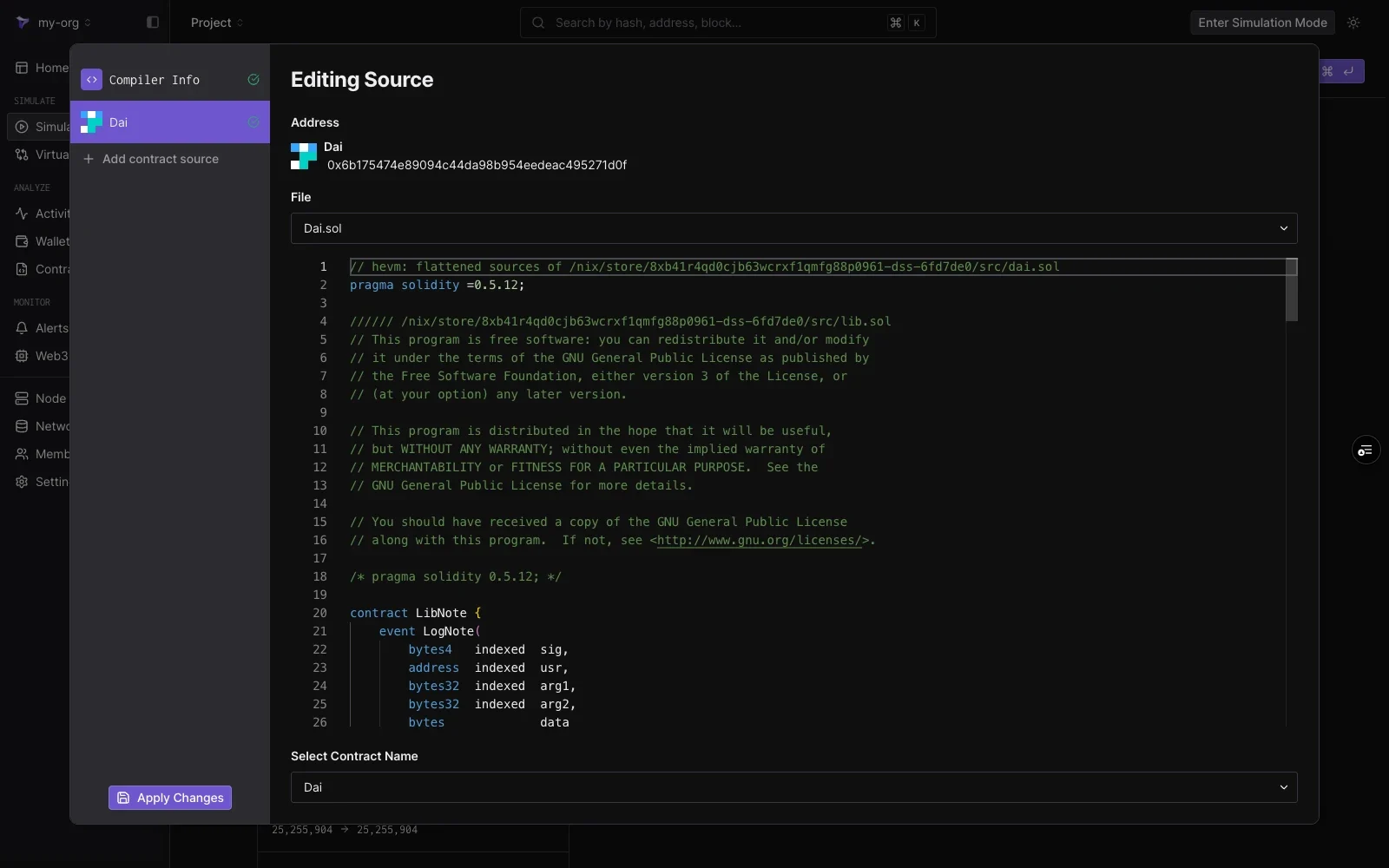 编辑窗格显示:
| 元素 | 说明 |
| ------------------------ | ----------------------- |
| **Address** | 您正在编辑其代码的地址。 |
| **File** | 用于在多文件合约的源码文件之间切换的下拉菜单。 |
| **Editor** | 完整的源码,可以逐行编辑。 |
| **Select Contract Name** | 部署在该地址的文件中的哪个合约。 |
编辑仅适用于您的模拟。已部署的合约和其他项目成员的模拟不受影响。
点击左下角的 **Apply Changes** 保存编辑,然后运行模拟。该步骤将执行修改后的代码,网络的其余状态保持不变。
### 编译器设置
在左侧面板中选择 **Compiler Info**,调整编辑后的源码如何编译:
编辑窗格显示:
| 元素 | 说明 |
| ------------------------ | ----------------------- |
| **Address** | 您正在编辑其代码的地址。 |
| **File** | 用于在多文件合约的源码文件之间切换的下拉菜单。 |
| **Editor** | 完整的源码,可以逐行编辑。 |
| **Select Contract Name** | 部署在该地址的文件中的哪个合约。 |
编辑仅适用于您的模拟。已部署的合约和其他项目成员的模拟不受影响。
点击左下角的 **Apply Changes** 保存编辑,然后运行模拟。该步骤将执行修改后的代码,网络的其余状态保持不变。
### 编译器设置
在左侧面板中选择 **Compiler Info**,调整编辑后的源码如何编译:
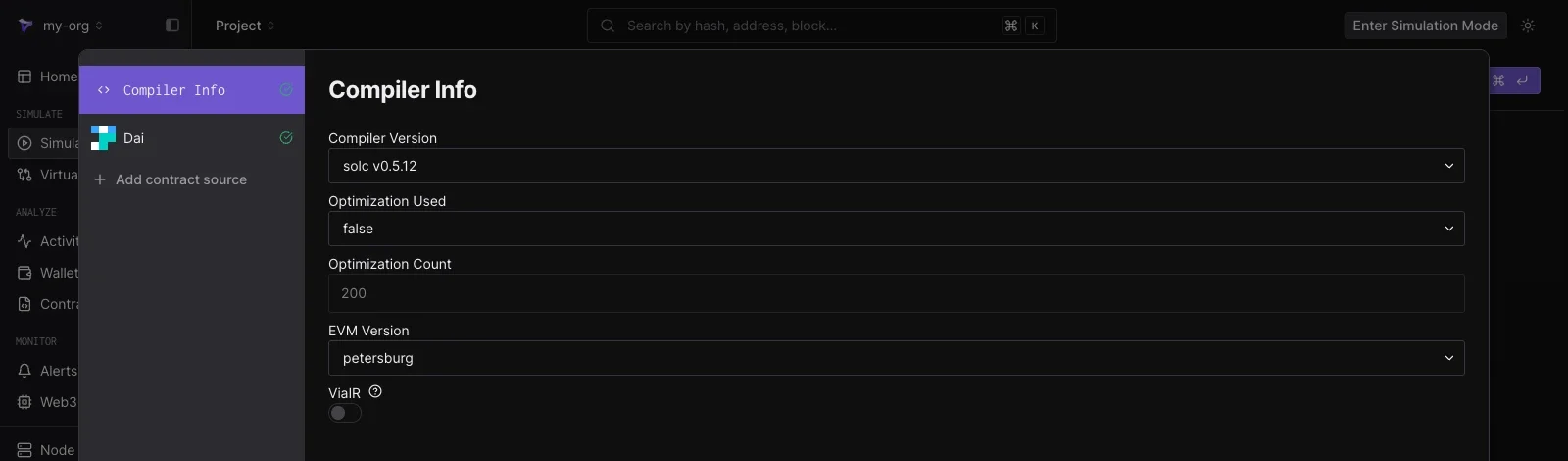 * **Compiler Version**
* **Optimization Used** 和 **Optimization Count**
* **EVM Version**
* **ViaIR**
这些设置从合约的验证元数据加载,因此简单的编辑并运行操作不需要更改编译器设置。
### 添加合约源码
点击左侧面板中的 **Add contract source**,在同一模拟中编辑其他合约。输入任何已部署合约的地址,其源码会作为列表中的另一个条目加载。这允许一次模拟同时运行多个合约的修改代码,例如一个路由器和它调用的资金池。
## Edit ABI
点击 **Edit ABI** 打开一个 JSON 编辑器,用于编辑构建器用来解码函数和编码您输入的 ABI。
* **Compiler Version**
* **Optimization Used** 和 **Optimization Count**
* **EVM Version**
* **ViaIR**
这些设置从合约的验证元数据加载,因此简单的编辑并运行操作不需要更改编译器设置。
### 添加合约源码
点击左侧面板中的 **Add contract source**,在同一模拟中编辑其他合约。输入任何已部署合约的地址,其源码会作为列表中的另一个条目加载。这允许一次模拟同时运行多个合约的修改代码,例如一个路由器和它调用的资金池。
## Edit ABI
点击 **Edit ABI** 打开一个 JSON 编辑器,用于编辑构建器用来解码函数和编码您输入的 ABI。
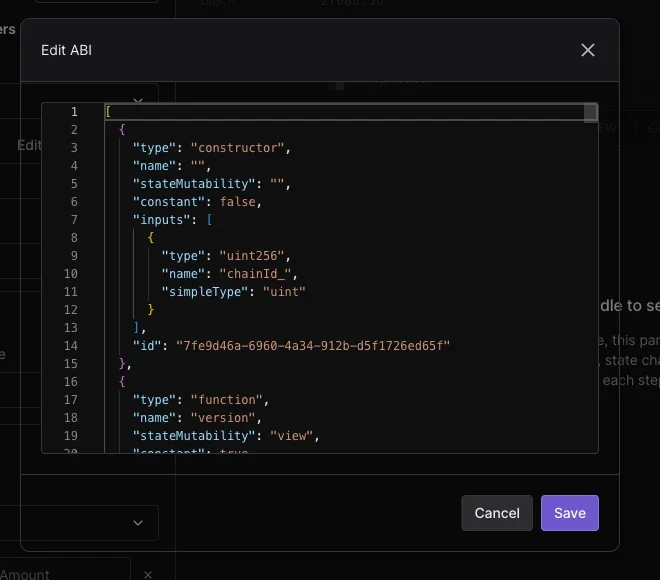 当合约未验证或其接口与已发布的 ABI 不同时,编辑 ABI 会很有用:粘贴或调整 JSON,点击 **Save**,**Function** 下拉菜单和参数字段会遵循更新后的定义。有关这些输入如何映射到模拟,请参阅[模拟参数](/simulator-ui/parameters)。