> ## Documentation Index
> Fetch the complete documentation index at: https://docs.tenderly.co/llms.txt
> Use this file to discover all available pages before exploring further.
# Simulator UI
> 在 Tenderly dashboard 中构建单交易模拟或有状态的 bundle,附带解码追踪、gas 估算、余额变化和 cheatcodes。
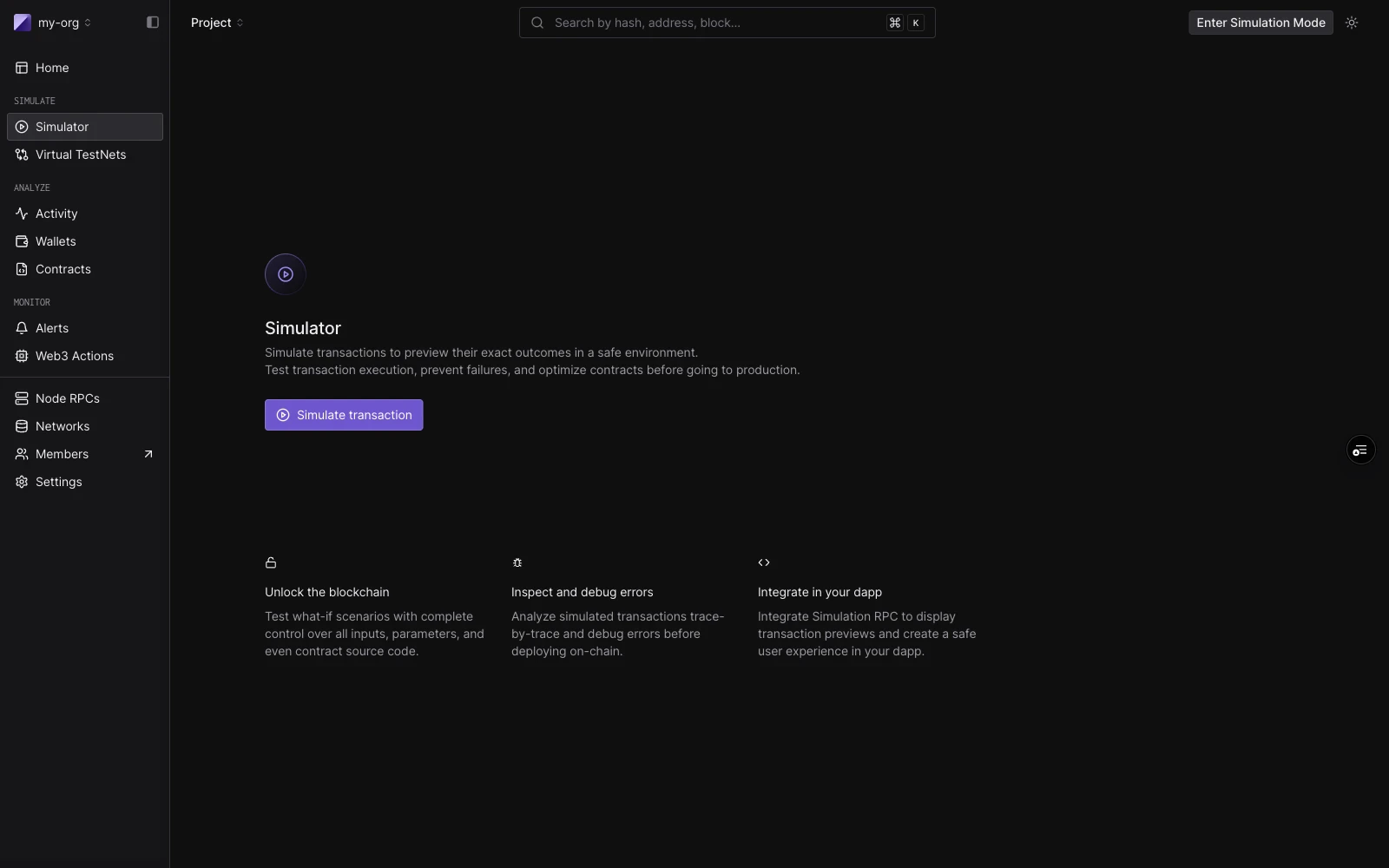 Tenderly Simulator 让您可以针对实时 mainnet 或 testnet 状态运行交易,而无需广播任何内容。您可以作为任何发送方进行模拟、覆盖合约存储、为地址充值、操控区块上下文,一切都通过 dashboard 完成。
无论您运行一笔还是五笔交易,构建器都是相同的。**单次模拟**就是一步的 bundle。**[simulation bundle](/simulator-ui/simulation-bundles)** 是最多五个共享状态的步骤:每一步都能看到前一步所做的状态变更。
## 布局
构建器包含三个区域:
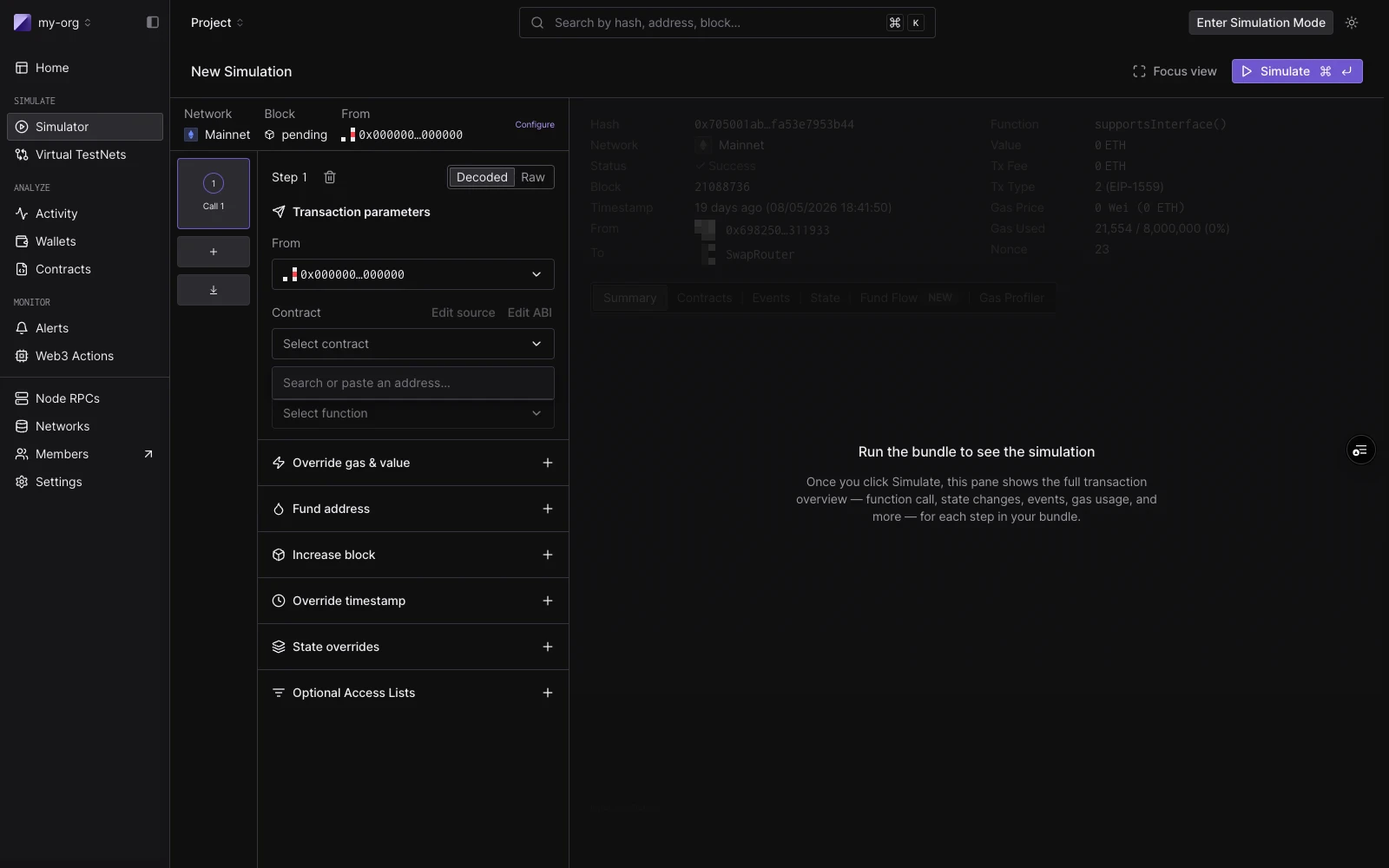
**会话条**贯穿顶部。它保存适用于每一步的默认值:Network、Block(默认为 `Pending`)和默认的 From 地址。点击 **Configure** 可设置默认 gas、gas price 和 value。
**Bundle 栏**是左侧列。每个步骤卡片显示步骤编号、标签(在选择合约前为 `New call`,选择后为 `ContractName · functionName`),以及运行后的状态徽章。点击步骤即可聚焦它。拖动可重新排序。使用 `C` 添加步骤,`J`/`K` 在步骤间移动,`F` 切换聚焦模式。
**聚焦步骤视图**是右侧列。运行前,它显示步骤编辑器。运行后,它显示该步骤的结果:解码输出、已使用的 gas、事件、状态变更和代币转账。
## 单次模拟
要运行单次模拟,请使用默认打开的一个步骤。
**Decoded 模式**允许您按名称选择合约和函数:
| 字段 | 说明 |
| -------------- | ------------------------------- |
| **From** | 默认为会话 From。可按步骤覆盖。 |
| **Contract** | 项目合约优先显示。也按名称、符号或地址匹配公开合约和热门代币。 |
| **Function** | 筛选为非事件、非构造函数的方法。 |
| **Parameters** | 每个 ABI 参数对应一个类型化输入。 |
**Raw 模式**直接接受目标地址和一个 `0x` 前缀的 hex 负载。当您已有来自现有交易的 calldata 或手动编码时,这很有用。
点击 **Simulate**(或按 `⌘↵`)即可运行。右侧面板会填充结果:函数调用摘要、已使用的 gas、解码输出,以及 Events、State Changes、Fund Flow 和 Gas Profiler 标签页。
您也可以从现有交易开始:在任何交易详情页面上点击 **Re-Simulate**,将其输入加载到构建器中。默认情况下,模拟会在原始交易的区块和时间戳上运行。
要分享预填表单(例如来自 CI 或测试报告),请点击页面标题中的 **Copy draft link**,或自己构建链接。参见[使用草稿链接预填 Simulator](/simulator-ui/draft-links)。
## Simulation bundles
一个 bundle 按顺序运行最多**五个步骤**,共享状态。当一笔交易的结果依赖于前一笔时,请使用 bundle,例如允许后续转账的授权。步骤在栏中添加和重新排序,每个步骤都有自己的 From 覆盖和 cheatcodes,整个 bundle 通过一次点击 **Simulate** 执行。
有关构建、重新排序、结果徽章以及 bundle 在模拟历史中如何显示的信息,请参阅 [Simulation Bundles](/simulator-ui/simulation-bundles)。
Tenderly Simulator 让您可以针对实时 mainnet 或 testnet 状态运行交易,而无需广播任何内容。您可以作为任何发送方进行模拟、覆盖合约存储、为地址充值、操控区块上下文,一切都通过 dashboard 完成。
无论您运行一笔还是五笔交易,构建器都是相同的。**单次模拟**就是一步的 bundle。**[simulation bundle](/simulator-ui/simulation-bundles)** 是最多五个共享状态的步骤:每一步都能看到前一步所做的状态变更。
## 布局
构建器包含三个区域:
**会话条**贯穿顶部。它保存适用于每一步的默认值:Network、Block(默认为 `Pending`)和默认的 From 地址。点击 **Configure** 可设置默认 gas、gas price 和 value。
**Bundle 栏**是左侧列。每个步骤卡片显示步骤编号、标签(在选择合约前为 `New call`,选择后为 `ContractName · functionName`),以及运行后的状态徽章。点击步骤即可聚焦它。拖动可重新排序。使用 `C` 添加步骤,`J`/`K` 在步骤间移动,`F` 切换聚焦模式。
**聚焦步骤视图**是右侧列。运行前,它显示步骤编辑器。运行后,它显示该步骤的结果:解码输出、已使用的 gas、事件、状态变更和代币转账。
## 单次模拟
要运行单次模拟,请使用默认打开的一个步骤。
**Decoded 模式**允许您按名称选择合约和函数:
| 字段 | 说明 |
| -------------- | ------------------------------- |
| **From** | 默认为会话 From。可按步骤覆盖。 |
| **Contract** | 项目合约优先显示。也按名称、符号或地址匹配公开合约和热门代币。 |
| **Function** | 筛选为非事件、非构造函数的方法。 |
| **Parameters** | 每个 ABI 参数对应一个类型化输入。 |
**Raw 模式**直接接受目标地址和一个 `0x` 前缀的 hex 负载。当您已有来自现有交易的 calldata 或手动编码时,这很有用。
点击 **Simulate**(或按 `⌘↵`)即可运行。右侧面板会填充结果:函数调用摘要、已使用的 gas、解码输出,以及 Events、State Changes、Fund Flow 和 Gas Profiler 标签页。
您也可以从现有交易开始:在任何交易详情页面上点击 **Re-Simulate**,将其输入加载到构建器中。默认情况下,模拟会在原始交易的区块和时间戳上运行。
要分享预填表单(例如来自 CI 或测试报告),请点击页面标题中的 **Copy draft link**,或自己构建链接。参见[使用草稿链接预填 Simulator](/simulator-ui/draft-links)。
## Simulation bundles
一个 bundle 按顺序运行最多**五个步骤**,共享状态。当一笔交易的结果依赖于前一笔时,请使用 bundle,例如允许后续转账的授权。步骤在栏中添加和重新排序,每个步骤都有自己的 From 覆盖和 cheatcodes,整个 bundle 通过一次点击 **Simulate** 执行。
有关构建、重新排序、结果徽章以及 bundle 在模拟历史中如何显示的信息,请参阅 [Simulation Bundles](/simulator-ui/simulation-bundles)。
 ## Cheatcodes
每个步骤都有一组 cheatcodes(在步骤执行之前立即运行的附加组件)。它们既适用于单次模拟(作为步骤级控件),也适用于 bundle 中的每个步骤。
| Cheatcode | 作用 |
| ------------------------- | ----------------------------------- |
| **Override gas & value** | 为此步骤设置自定义 gas 限制和 ETH 值。 |
| **Fund address** | 在此步骤运行之前为任何地址充值代币余额。每个步骤可添加多个条目。 |
| **Increase block** | 在此步骤之前按固定量提高区块号。 |
| **Override timestamp** | 为此步骤设置自定义区块时间戳。 |
| **State overrides** | 在此步骤运行之前覆盖合约存储槽、余额或字节码。可为多个合约添加覆盖。 |
| **Optional Access Lists** | 附加 EIP-2930 访问列表,以提高跨多合约调用的 gas 效率。 |
## Cheatcodes
每个步骤都有一组 cheatcodes(在步骤执行之前立即运行的附加组件)。它们既适用于单次模拟(作为步骤级控件),也适用于 bundle 中的每个步骤。
| Cheatcode | 作用 |
| ------------------------- | ----------------------------------- |
| **Override gas & value** | 为此步骤设置自定义 gas 限制和 ETH 值。 |
| **Fund address** | 在此步骤运行之前为任何地址充值代币余额。每个步骤可添加多个条目。 |
| **Increase block** | 在此步骤之前按固定量提高区块号。 |
| **Override timestamp** | 为此步骤设置自定义区块时间戳。 |
| **State overrides** | 在此步骤运行之前覆盖合约存储槽、余额或字节码。可为多个合约添加覆盖。 |
| **Optional Access Lists** | 附加 EIP-2930 访问列表,以提高跨多合约调用的 gas 效率。 |
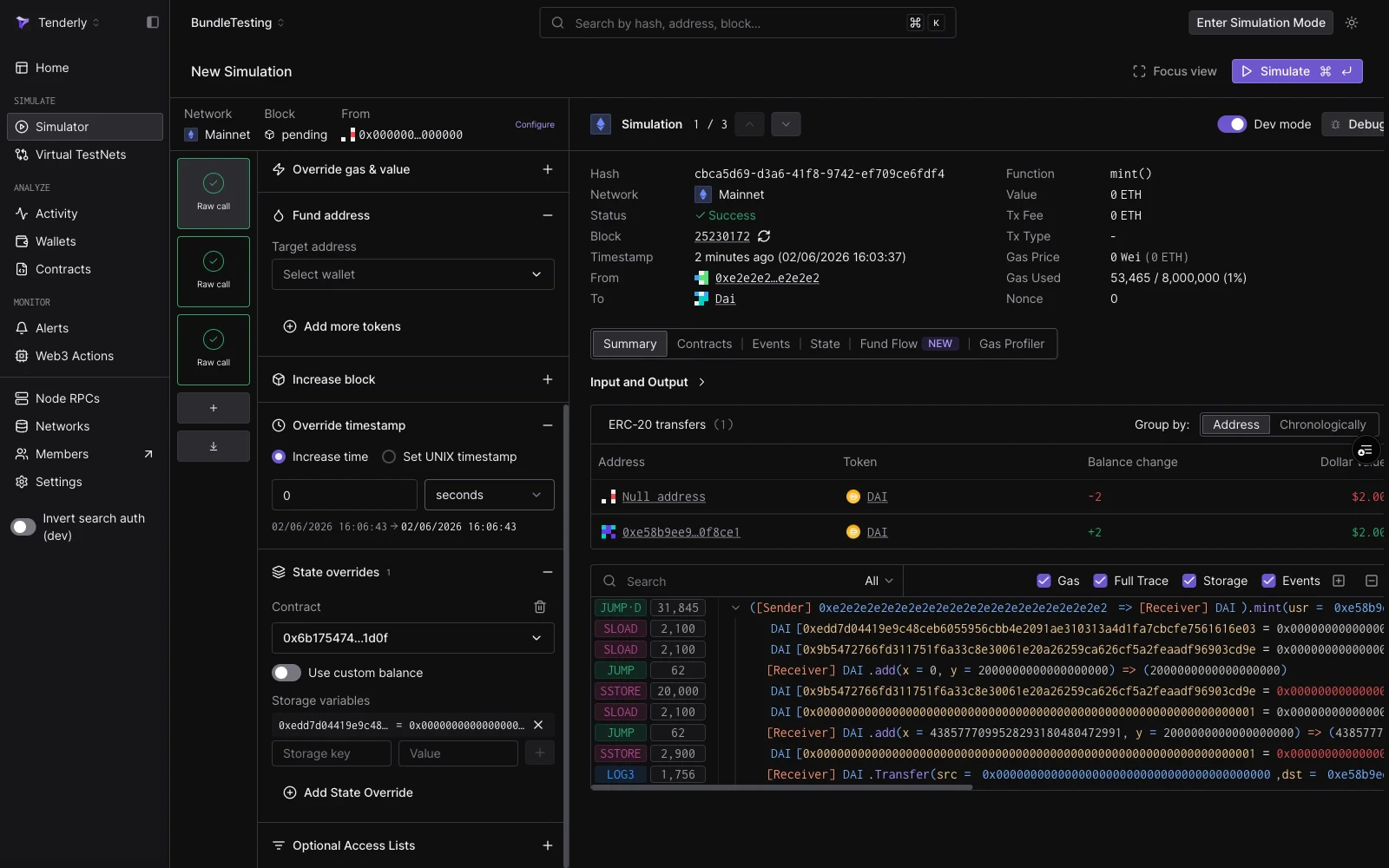 有关状态覆盖的详细步骤,包括存储槽计算,请参阅[使用状态覆盖进行模拟](/simulator-ui/state-overrides)。
## 另请参阅
* [Simulation Bundles](/simulator-ui/simulation-bundles):具有共享状态的多步骤模拟,包括 3 步 DAI mint、approve 和 transferFrom 指南。
* [Simulation Mode](/simulator-ui/simulation-mode):跨 dashboard 的持久钱包模拟,并在运行之间累积状态。
* [使用状态覆盖进行模拟](/simulator-ui/state-overrides):如何覆盖存储、余额和字节码。
* [模拟参数](/simulator-ui/parameters):会话默认值、区块和交易索引选择、From 地址和 cheatcode 字段的完整参考。
* [使用草稿链接预填 Simulator](/simulator-ui/draft-links):构建一个 base64url URL,用于打开带有预填表单的 Simulator,以便从 CI 或工具链共享。
* [编辑合约源码](/simulator-ui/editing-contract-source):通过针对修改后的源码运行模拟来测试 bug 修复。
* [Bundled Simulations(API)](/simulations/bundled-simulations):通过 `simulate-bundle` 端点以编程方式运行 bundle。
* [Virtual Environments](/virtual-environments/overview):当您需要完整的持久 RPC 环境而不是无状态 bundle 时。
有关状态覆盖的详细步骤,包括存储槽计算,请参阅[使用状态覆盖进行模拟](/simulator-ui/state-overrides)。
## 另请参阅
* [Simulation Bundles](/simulator-ui/simulation-bundles):具有共享状态的多步骤模拟,包括 3 步 DAI mint、approve 和 transferFrom 指南。
* [Simulation Mode](/simulator-ui/simulation-mode):跨 dashboard 的持久钱包模拟,并在运行之间累积状态。
* [使用状态覆盖进行模拟](/simulator-ui/state-overrides):如何覆盖存储、余额和字节码。
* [模拟参数](/simulator-ui/parameters):会话默认值、区块和交易索引选择、From 地址和 cheatcode 字段的完整参考。
* [使用草稿链接预填 Simulator](/simulator-ui/draft-links):构建一个 base64url URL,用于打开带有预填表单的 Simulator,以便从 CI 或工具链共享。
* [编辑合约源码](/simulator-ui/editing-contract-source):通过针对修改后的源码运行模拟来测试 bug 修复。
* [Bundled Simulations(API)](/simulations/bundled-simulations):通过 `simulate-bundle` 端点以编程方式运行 bundle。
* [Virtual Environments](/virtual-environments/overview):当您需要完整的持久 RPC 环境而不是无状态 bundle 时。