> ## Documentation Index
> Fetch the complete documentation index at: https://docs.tenderly.co/llms.txt
> Use this file to discover all available pages before exploring further.
# 模拟参数
> 模拟构建器中每一项输入的参考:会话默认值、区块和交易索引、发送方地址、步骤字段以及每步的 cheatcodes。
模拟构建器将其输入分布在三个界面上:
* 顶部条带中的**会话默认值**适用于每个步骤:Network、Block 和默认 From 地址。点击 **Configure** 进行编辑。
* **步骤字段**定义调用本身:发送方、目标合约、函数和参数。
* 步骤字段下方的 **Cheatcodes** 在步骤运行之前立即修改执行环境。
有关构建器的整体布局(会话条带、bundle 栏、聚焦步骤视图),请参阅 [Simulator UI 概览](/simulator-ui/overview#layout)。
## 会话默认值
点击会话条带中的 **Configure** 打开默认值面板。此处设置的值将适用于 bundle 中的每个新步骤。
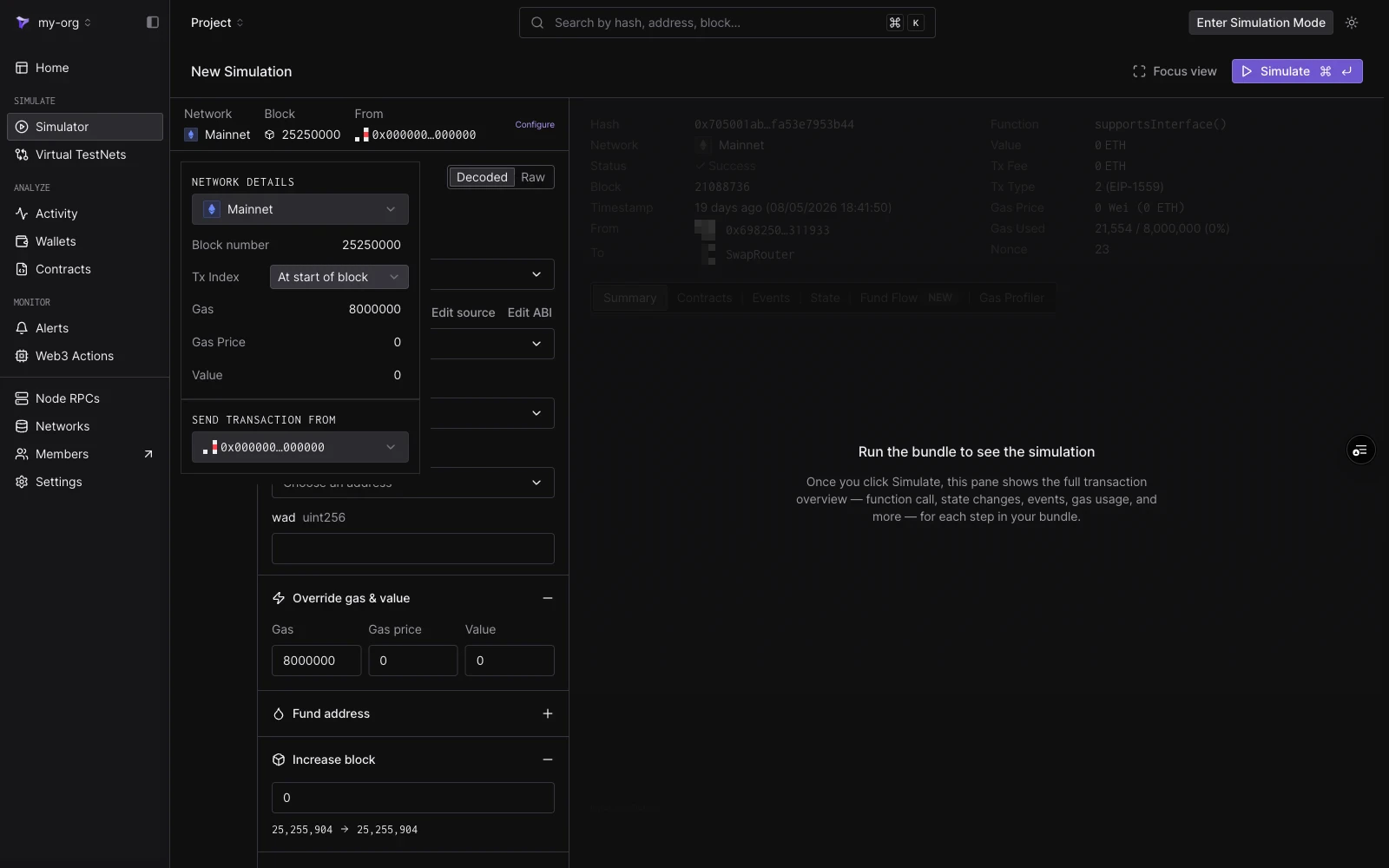 | 字段 | 说明 |
| ------------------------- | --------------------------------- |
| **Network** | 模拟所针对的网络状态。 |
| **Block number** | 默认为 `Pending`。输入一个区块号以将模拟固定到历史区块。 |
| **Tx Index** | 交易在固定区块中的位置。仅在固定区块后可用。 |
| **Gas** | 每个步骤的默认 gas 限制。默认为 `8000000`。 |
| **Gas Price** | 默认 gas price(以 Wei 为单位)。 |
| **Value** | 每个步骤发送的默认 ETH 值。 |
| **Send transaction from** | 新步骤的默认 From 地址。 |
### Pending 与历史区块对比
将 **Block number** 留空以在**待处理区块**上模拟。Tenderly 会针对最新的可用网络状态执行 bundle,就像它被包含在下一个区块中一样。
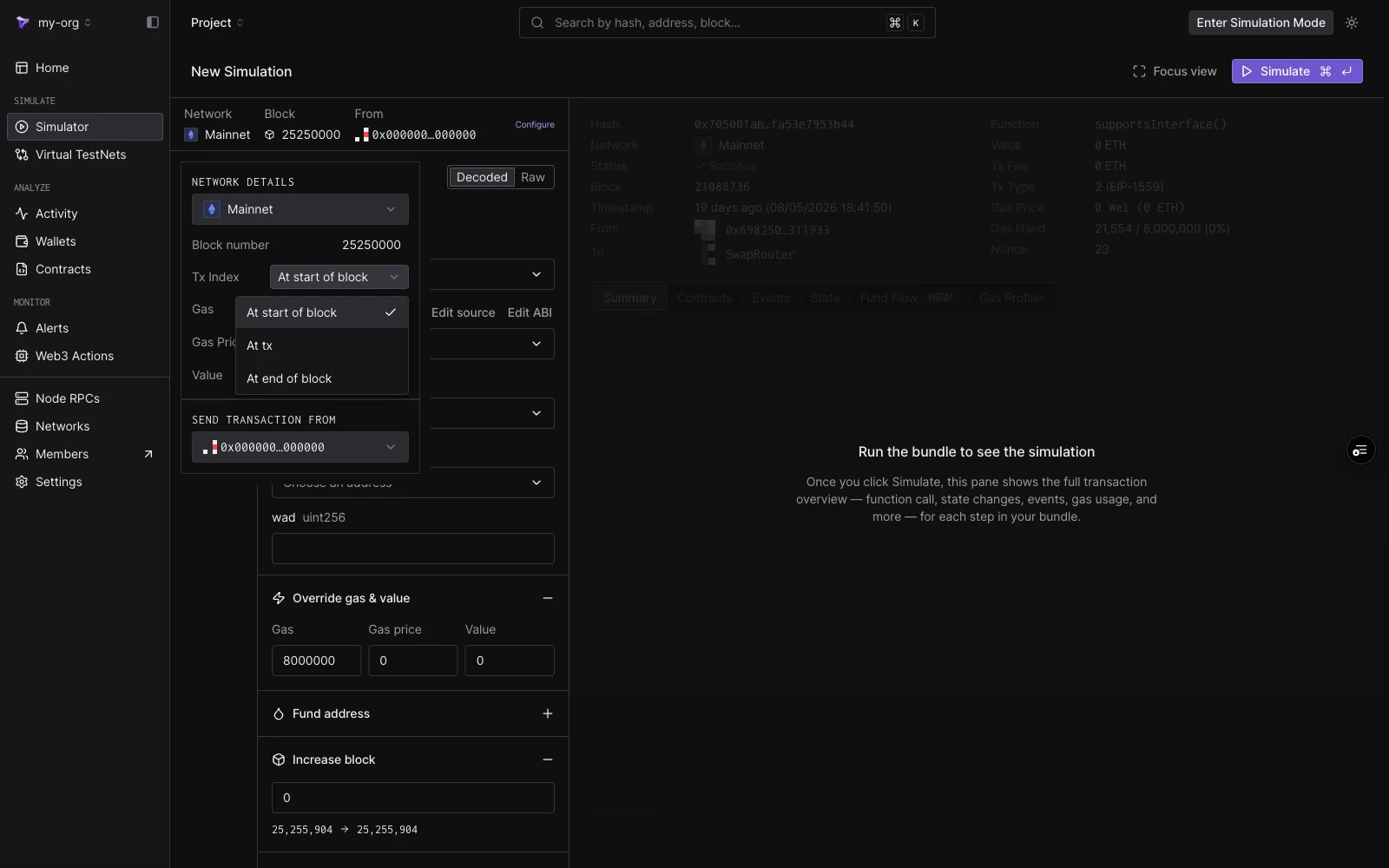
输入区块号以在**历史区块**上模拟。然后,bundle 将针对该区块时的链状态执行,可以追溯到网络开始时的任何区块。固定区块后,**Tx Index** 控制模拟在区块中的哪个位置执行:
| 选项 | 含义 |
| --------------------- | ----------------------------- |
| **At start of block** | 在区块的任何交易之前执行。 |
| **At tx** | 在特定的交易索引处执行。输入项会显示该区块包含多少笔交易。 |
| **At end of block** | 在区块的所有交易之后执行。 |
| 字段 | 说明 |
| ------------------------- | --------------------------------- |
| **Network** | 模拟所针对的网络状态。 |
| **Block number** | 默认为 `Pending`。输入一个区块号以将模拟固定到历史区块。 |
| **Tx Index** | 交易在固定区块中的位置。仅在固定区块后可用。 |
| **Gas** | 每个步骤的默认 gas 限制。默认为 `8000000`。 |
| **Gas Price** | 默认 gas price(以 Wei 为单位)。 |
| **Value** | 每个步骤发送的默认 ETH 值。 |
| **Send transaction from** | 新步骤的默认 From 地址。 |
### Pending 与历史区块对比
将 **Block number** 留空以在**待处理区块**上模拟。Tenderly 会针对最新的可用网络状态执行 bundle,就像它被包含在下一个区块中一样。
输入区块号以在**历史区块**上模拟。然后,bundle 将针对该区块时的链状态执行,可以追溯到网络开始时的任何区块。固定区块后,**Tx Index** 控制模拟在区块中的哪个位置执行:
| 选项 | 含义 |
| --------------------- | ----------------------------- |
| **At start of block** | 在区块的任何交易之前执行。 |
| **At tx** | 在特定的交易索引处执行。输入项会显示该区块包含多少笔交易。 |
| **At end of block** | 在区块的所有交易之后执行。 |
 ## From 地址
模拟不需要私钥或签名,因此任何地址都可以作为发送方。From 下拉菜单提供:
* **零地址**(`0x0000…0000`),默认发送方。
* 所选网络上您的**项目钱包**,归类在"Selected network"下。更改网络会更改显示的钱包。
* 您在下拉菜单顶部输入框中**粘贴或搜索**的任何地址。
## From 地址
模拟不需要私钥或签名,因此任何地址都可以作为发送方。From 下拉菜单提供:
* **零地址**(`0x0000…0000`),默认发送方。
* 所选网络上您的**项目钱包**,归类在"Selected network"下。更改网络会更改显示的钱包。
* 您在下拉菜单顶部输入框中**粘贴或搜索**的任何地址。
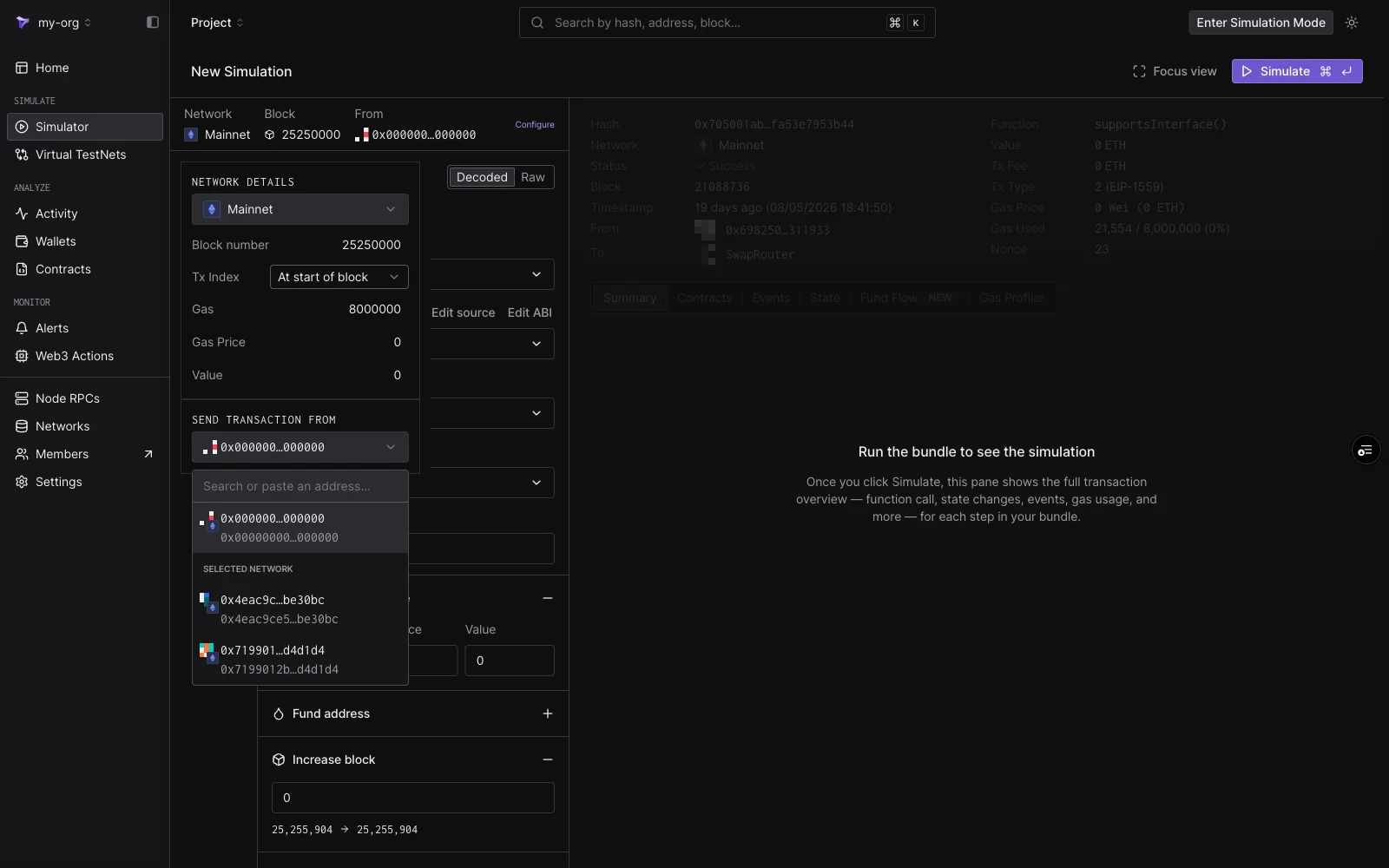 Configure 面板中设置的地址是新步骤的默认值。每个步骤也在步骤编辑器中有自己的 **From** 字段,因此 bundle 中的不同步骤可以使用不同的发送方。
## 步骤字段
每个步骤都在 **Decoded** 或 **Raw** 模式下构建,通过步骤编辑器顶部的切换按钮进行切换。
Configure 面板中设置的地址是新步骤的默认值。每个步骤也在步骤编辑器中有自己的 **From** 字段,因此 bundle 中的不同步骤可以使用不同的发送方。
## 步骤字段
每个步骤都在 **Decoded** 或 **Raw** 模式下构建,通过步骤编辑器顶部的切换按钮进行切换。
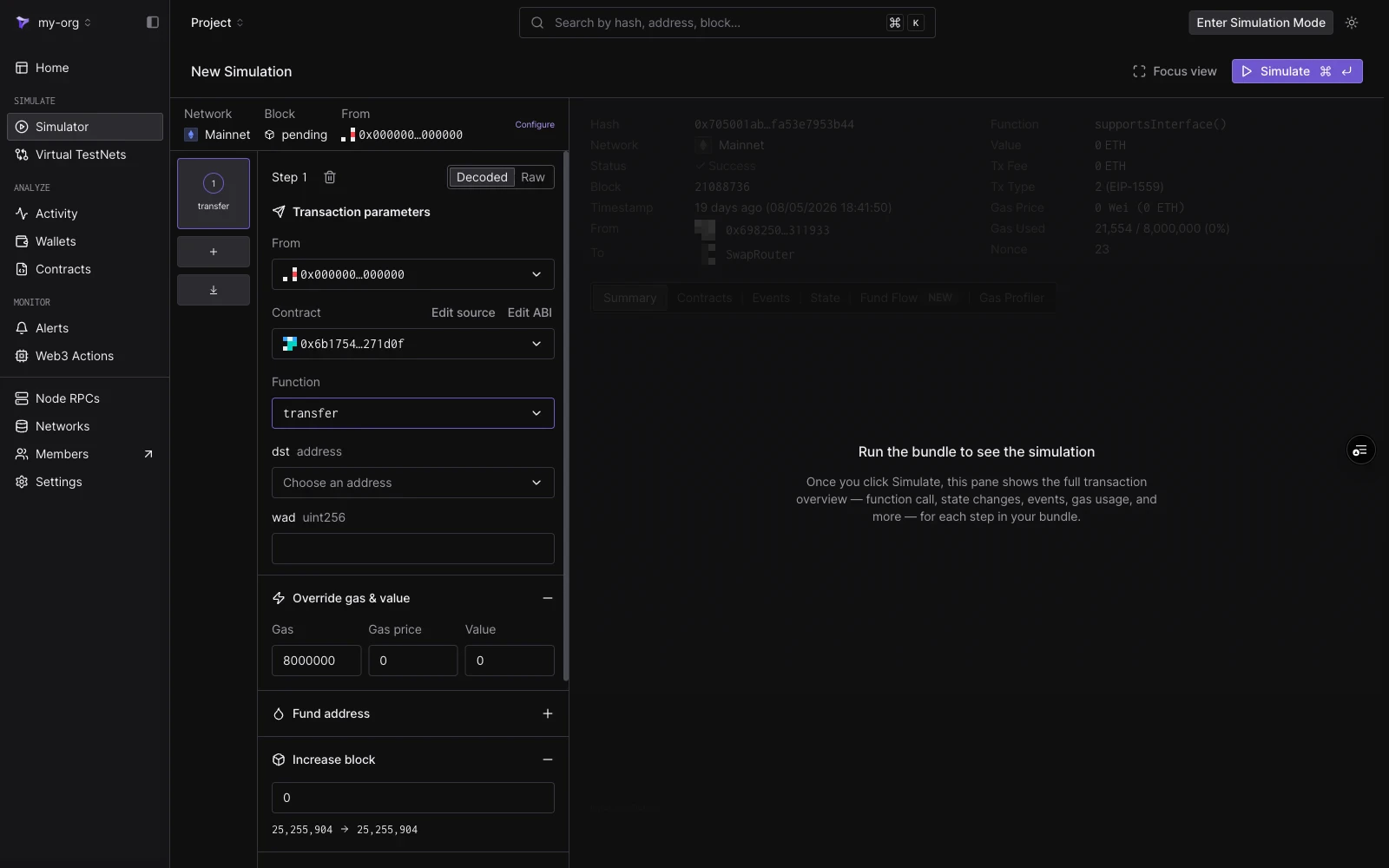 **Decoded 模式**从合约的 ABI 构建调用:
| 字段 | 说明 |
| ------------- | ------------------------------------------------------------------------------------------------------------------------ |
| **From** | 步骤的发送方。默认为会话 From。 |
| **Contract** | 项目合约优先显示;也按名称、符号或地址匹配公开合约和热门代币。选择后,**Edit source** 和 **Edit ABI** 可用(参见[编辑合约源码](/simulator-ui/editing-contract-source))。 |
| **Function** | 筛选为非事件、非构造函数的方法。 |
| **Arguments** | 每个 ABI 参数对应一个类型化输入。地址参数有地址选择器;值参数为普通输入。 |
**Raw 模式**直接接受目标地址和一个 `0x` 前缀的 hex 负载。当您已有来自现有交易的 calldata 或手动编码时使用它。
## Cheatcodes
每个步骤都包含六个 cheatcode 部分。它们在步骤执行之前立即运行,并且仅作用于该步骤。
### Override gas & value
为此步骤设置自定义的 **Gas** 限制、**Gas price** 和 **Value**,覆盖会话默认值。
### Fund address
在步骤运行之前为任何地址充值代币余额。每个条目需要**目标地址**、**代币**(可按符号、名称或地址搜索)和金额。点击 **Add more tokens** 为多个代币充值,并为其他地址添加更多条目。
要设置地址的原生余额,请使用 [State overrides](#state-overrides) 中的自定义余额开关。
### Increase block
在步骤执行之前按偏移量提高区块号。该部分显示当前区块和结果区块。读取 `block.number` 的合约会看到增加后的值。
### Override timestamp
为步骤执行时设置区块时间戳,两种模式之一:
* **Increase time**:按数量和单位(秒、分钟等)推进时钟。
* **Set UNIX timestamp**:跳到绝对时间戳。
该部分预览结果日期和时间。读取 `block.timestamp` 的合约会看到覆盖后的值。
### State overrides
在步骤运行之前覆盖合约状态。每个覆盖针对一个合约(默认为步骤的目标),支持:
* **Use custom balance**:设置合约的原生余额。
* **Storage variables**:单个存储槽的键值对,通过 **Add storage override** 添加更多槽位。
点击 **Add State Override** 在同一步骤中覆盖其他合约。有关包括存储槽计算的详细步骤,请参阅[使用状态覆盖进行模拟](/simulator-ui/state-overrides)。
### Optional Access Lists
为步骤附加一个 [EIP-2930](https://eips.ethereum.org/EIPS/eip-2930) 访问列表。声明交易将访问的合约和存储键,可以降低跨多合约调用的 gas 成本。可以逐个添加地址或以 JSON 格式导入列表。
## 保存起点
模拟是无状态的:每次运行都从配置的区块开始。要将修改后的状态(覆盖、已充值账户、高级时间戳)保留为可持续进行交易的持久环境,请使用 [Virtual Environments](/virtual-environments/overview)。
**Decoded 模式**从合约的 ABI 构建调用:
| 字段 | 说明 |
| ------------- | ------------------------------------------------------------------------------------------------------------------------ |
| **From** | 步骤的发送方。默认为会话 From。 |
| **Contract** | 项目合约优先显示;也按名称、符号或地址匹配公开合约和热门代币。选择后,**Edit source** 和 **Edit ABI** 可用(参见[编辑合约源码](/simulator-ui/editing-contract-source))。 |
| **Function** | 筛选为非事件、非构造函数的方法。 |
| **Arguments** | 每个 ABI 参数对应一个类型化输入。地址参数有地址选择器;值参数为普通输入。 |
**Raw 模式**直接接受目标地址和一个 `0x` 前缀的 hex 负载。当您已有来自现有交易的 calldata 或手动编码时使用它。
## Cheatcodes
每个步骤都包含六个 cheatcode 部分。它们在步骤执行之前立即运行,并且仅作用于该步骤。
### Override gas & value
为此步骤设置自定义的 **Gas** 限制、**Gas price** 和 **Value**,覆盖会话默认值。
### Fund address
在步骤运行之前为任何地址充值代币余额。每个条目需要**目标地址**、**代币**(可按符号、名称或地址搜索)和金额。点击 **Add more tokens** 为多个代币充值,并为其他地址添加更多条目。
要设置地址的原生余额,请使用 [State overrides](#state-overrides) 中的自定义余额开关。
### Increase block
在步骤执行之前按偏移量提高区块号。该部分显示当前区块和结果区块。读取 `block.number` 的合约会看到增加后的值。
### Override timestamp
为步骤执行时设置区块时间戳,两种模式之一:
* **Increase time**:按数量和单位(秒、分钟等)推进时钟。
* **Set UNIX timestamp**:跳到绝对时间戳。
该部分预览结果日期和时间。读取 `block.timestamp` 的合约会看到覆盖后的值。
### State overrides
在步骤运行之前覆盖合约状态。每个覆盖针对一个合约(默认为步骤的目标),支持:
* **Use custom balance**:设置合约的原生余额。
* **Storage variables**:单个存储槽的键值对,通过 **Add storage override** 添加更多槽位。
点击 **Add State Override** 在同一步骤中覆盖其他合约。有关包括存储槽计算的详细步骤,请参阅[使用状态覆盖进行模拟](/simulator-ui/state-overrides)。
### Optional Access Lists
为步骤附加一个 [EIP-2930](https://eips.ethereum.org/EIPS/eip-2930) 访问列表。声明交易将访问的合约和存储键,可以降低跨多合约调用的 gas 成本。可以逐个添加地址或以 JSON 格式导入列表。
## 保存起点
模拟是无状态的:每次运行都从配置的区块开始。要将修改后的状态(覆盖、已充值账户、高级时间戳)保留为可持续进行交易的持久环境,请使用 [Virtual Environments](/virtual-environments/overview)。