> ## Documentation Index
> Fetch the complete documentation index at: https://docs.tenderly.co/llms.txt
> Use this file to discover all available pages before exploring further.
# 使用状态覆盖进行模拟
> 使用模拟构建器中的状态覆盖,在模拟运行前设置合约的自定义状态,以从非 ward 地址铸造 DAI 为例进行演示。
状态覆盖会在模拟执行之前为合约的存储设置自定义值。使用它们可以满足访问控制检查、放置余额或将任何存储槽设置为您场景所需的值,无需在真实网络上拥有相应的密钥或状态。
本页面通过一个完整示例进行讲解。有关 State overrides cheatcode 的字段级参考,请参阅[模拟参数](/simulator-ui/parameters#state-overrides)。
## 示例:铸造 2 DAI
我们将模拟向持有者 `0xe58b9ee93700a616b50509c8292977fa7a0f8ce1` 铸造 2 DAI(`2000000000000000000` wei),由 `0xe2e2e2e2e2e2e2e2e2e2e2e2e2e2e2e2e2e2e2e2` 发送。
DAI 的 `mint` 函数受 `wards` 映射保护:只有注册的 ward 地址才能进行铸造。发送方在 Mainnet 上不是 ward,因此普通模拟会 revert。覆盖 `wards[0xe2e2…e2e2] = 1` 会使其在模拟期间成为 ward。
### 构建 mint 步骤
1. 前往 **Simulator** 并点击 **New Simulation**。
2. 在 **Contract** 字段中粘贴 `0x6b175474e89094c44da98b954eedeac495271d0f` 并选择 **Dai**。
3. 在 **Function** 字段中选择 **mint**。
4. 将 **usr** 设置为 `0xe58b9ee93700a616b50509c8292977fa7a0f8ce1`,将 **wad** 设置为 `2000000000000000000`。
5. 将该步骤的 **From** 设置为 `0xe2e2e2e2e2e2e2e2e2e2e2e2e2e2e2e2e2e2e2e2`。
### 添加状态覆盖
6. 展开步骤字段下方的 **State overrides** 部分,然后点击 **Add State Override**。覆盖的合约默认为步骤的目标(Dai)。
7. 在 **Storage variables** 下,输入键 `wards[0xe2e2e2e2e2e2e2e2e2e2e2e2e2e2e2e2e2e2e2e2]` 和值 `1`。键字段会建议合约的解码存储变量(`wards[]`、`balanceOf[]`、`totalSupply` 等);在括号内填入映射键。
8. 点击值旁边的 **+** 按钮以添加该键值对。已提交的键值对会作为一行显示在 Storage variables 下。Tenderly 会将其存储为计算后的存储槽哈希。
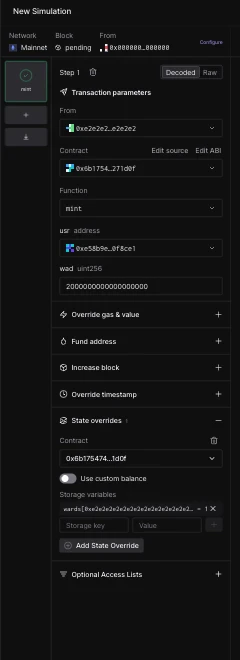 覆盖的键值对必须通过 **+** 按钮提交。未提交的键/值条目会被视为无效,模拟将不会启动。
要覆盖合约的原生余额(而不是或除了存储之外),请在同一部分中切换 **Use custom balance** 开关。
### 运行并检查
9. 点击 **Simulate**。铸造成功执行,因为模拟将发送方视为 ward。
覆盖的键值对必须通过 **+** 按钮提交。未提交的键/值条目会被视为无效,模拟将不会启动。
要覆盖合约的原生余额(而不是或除了存储之外),请在同一部分中切换 **Use custom balance** 开关。
### 运行并检查
9. 点击 **Simulate**。铸造成功执行,因为模拟将发送方视为 ward。
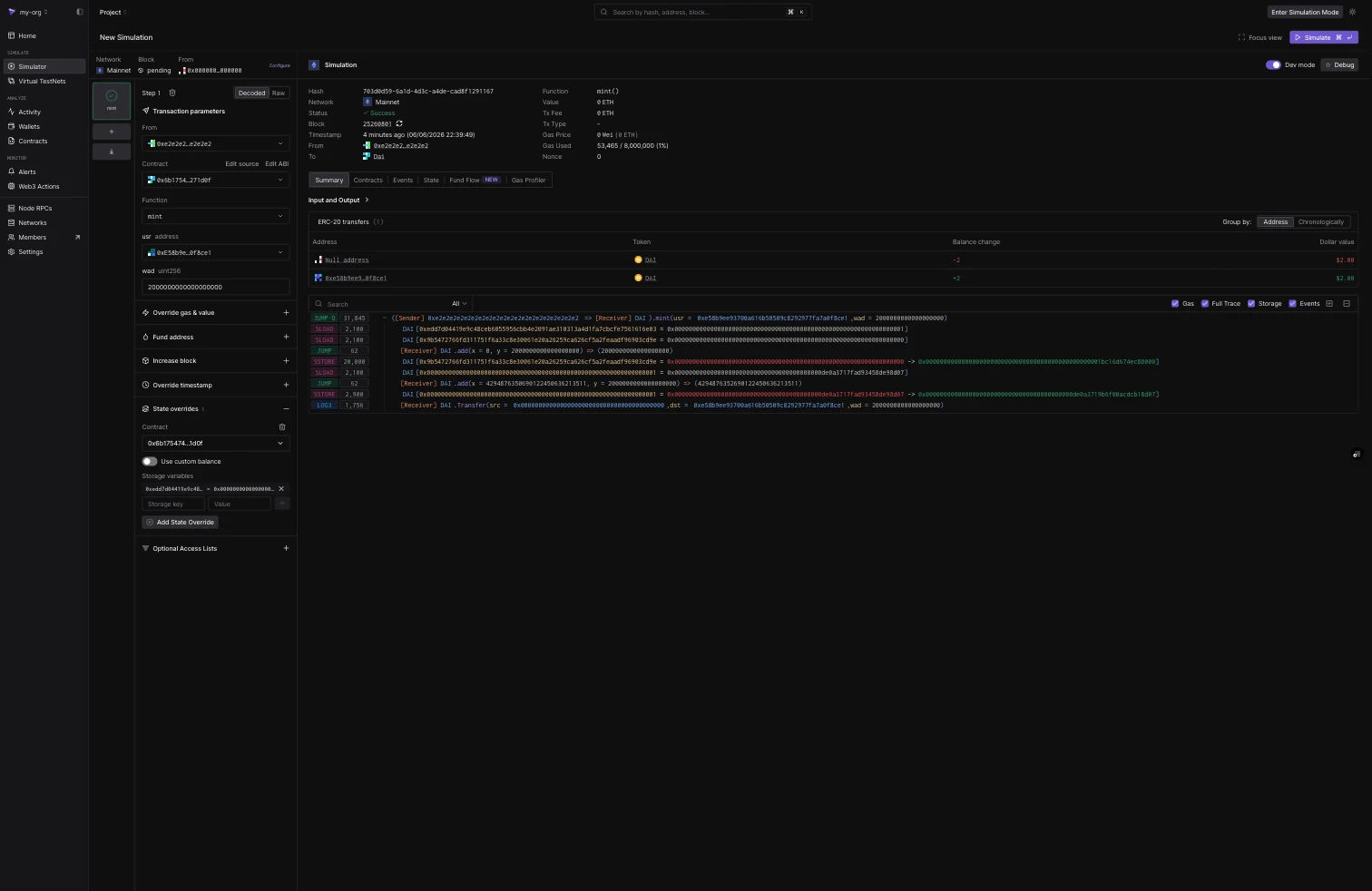 结果标签页确认了覆盖所做的变更:
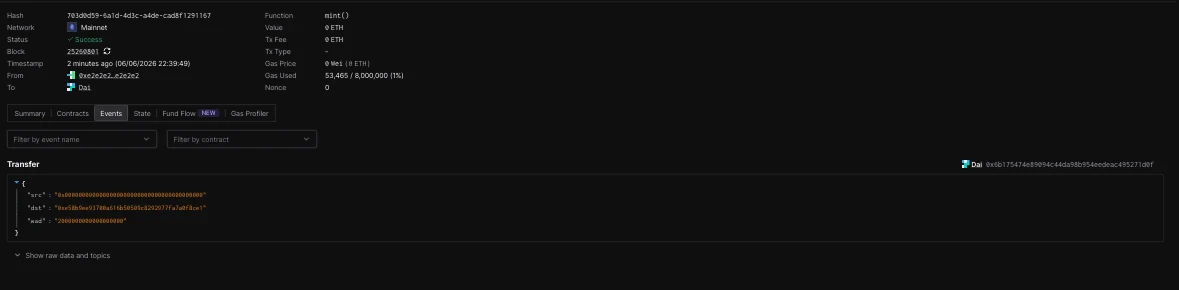
* **Events** 标签页显示从零地址向持有者发出的 `2000000000000000000` wei 的 `Transfer` 事件。
结果标签页确认了覆盖所做的变更:
* **Events** 标签页显示从零地址向持有者发出的 `2000000000000000000` wei 的 `Transfer` 事件。
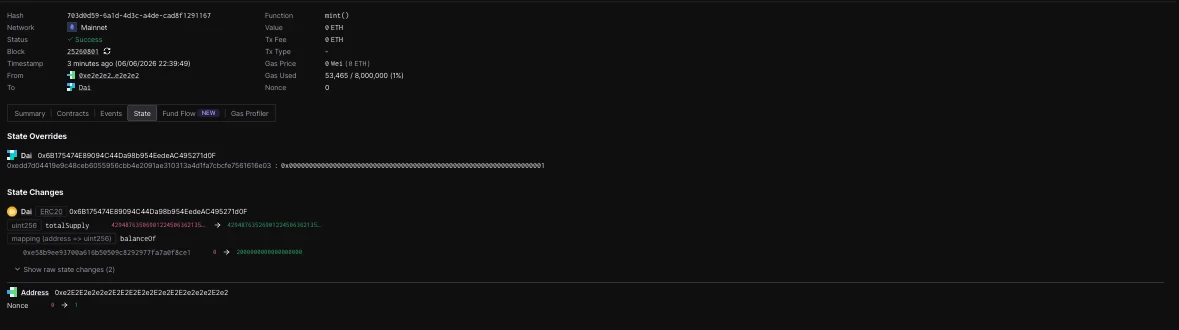
 * **State** 标签页列出了已应用的 **State Overrides**(ward 槽设置为 `1`)以及由此产生的 **State Changes**:持有者的 `balanceOf` 从 `0` 变为 `2000000000000000000`、增加的 `totalSupply` 和发送方的 nonce。
 ## 原始存储键
除了解码后的 `mapping[key]` 形式外,您还可以直接输入原始的 32 字节存储槽。对于位于存储位置 `p` 的 Solidity 映射,`mapping[k]` 的槽位是 `keccak256(abi.encode(k, p))`。上面的 wards 覆盖解析为:
```bash theme={"theme":{"light":"catppuccin-latte","dark":"catppuccin-mocha"}}
0xedd7d04419e9c48ceb6055956cbb4e2091ae310313a4d1fa7cbcfe7561616e03
```
对于没有已验证源码的合约,原始键是唯一的选项,它们与 [Simulation API 的状态覆盖](/simulations/state-overrides)和 [bundle 指南](/simulations/guides/mint-approve-transfer-bundle)使用的格式相匹配。
## 持久化被覆盖的状态
模拟是无状态的:覆盖仅适用于一次运行。要将修改后的状态保留为可以反复交易的持久环境,请使用 [Virtual Environments](/virtual-environments/overview)。
## 原始存储键
除了解码后的 `mapping[key]` 形式外,您还可以直接输入原始的 32 字节存储槽。对于位于存储位置 `p` 的 Solidity 映射,`mapping[k]` 的槽位是 `keccak256(abi.encode(k, p))`。上面的 wards 覆盖解析为:
```bash theme={"theme":{"light":"catppuccin-latte","dark":"catppuccin-mocha"}}
0xedd7d04419e9c48ceb6055956cbb4e2091ae310313a4d1fa7cbcfe7561616e03
```
对于没有已验证源码的合约,原始键是唯一的选项,它们与 [Simulation API 的状态覆盖](/simulations/state-overrides)和 [bundle 指南](/simulations/guides/mint-approve-transfer-bundle)使用的格式相匹配。
## 持久化被覆盖的状态
模拟是无状态的:覆盖仅适用于一次运行。要将修改后的状态保留为可以反复交易的持久环境,请使用 [Virtual Environments](/virtual-environments/overview)。