> ## Documentation Index
> Fetch the complete documentation index at: https://docs.tenderly.co/llms.txt
> Use this file to discover all available pages before exploring further.
# Bridges
> 在 Multichain Virtual Environment 中的网络之间中继 LayerZero、Chainlink CCIP、Across 和 CCTP 消息,具有可配置的中继模式。
Bridge Module 连接 [Multichain Virtual Environment](/virtual-environments/multichain/overview) 中的各个网络。启用后,源链上一笔发出桥事件的交易会触发同一 Virtual Environment 内目标链上的对应投递。中继以您配置的模式(立即或延迟)运行,并且不使用真实资金。
Bridge Module 在包含多链能力的计划中可用。[联系我们](https://tenderly.co/contact-us)以在您的账户上启用。
## 启用 Bridge Module
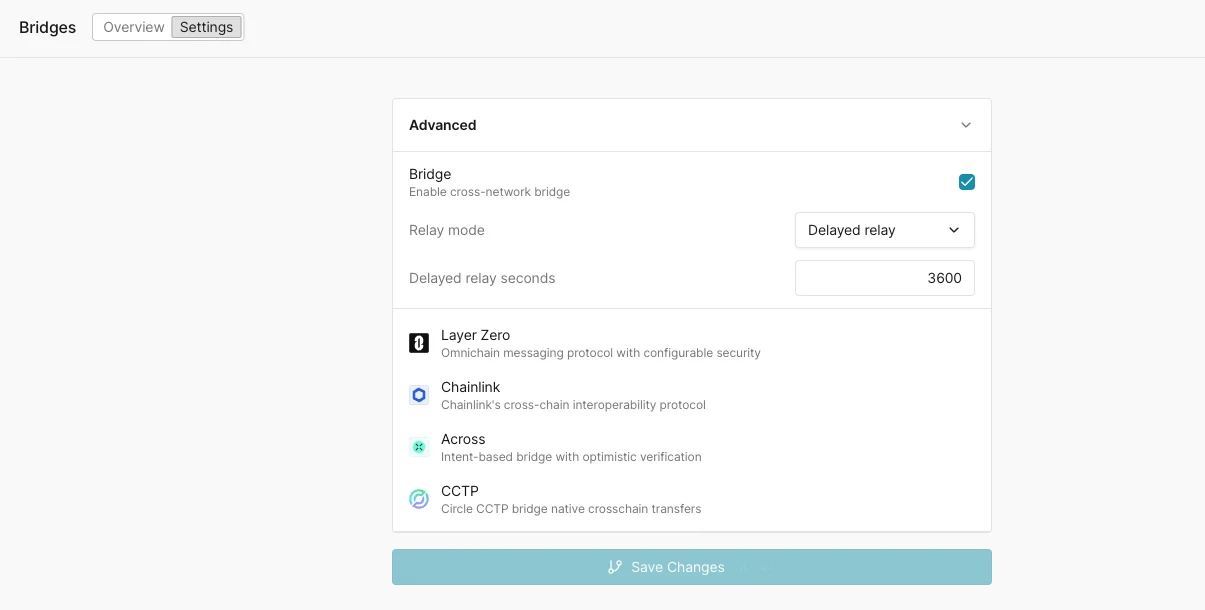
打开您的 Virtual Environment 的 **Settings** 页面并展开 **Advanced** 面板。勾选 **Bridge**(“Enable cross-network bridge”),然后 **Save Changes**。启用后,中继覆盖附加到 Virtual Environment 的网络上所有受支持的协议。
两个设置控制消息中继方式:
* **Relay mode**:`Auto relay` 一旦检测到源事件就立即投递目标交易。`Delayed relay` 将投递延迟一个固定间隔,以便您测试在途时序和目标链延迟。
* **Delayed relay seconds**:`Delayed relay` 模式下应用的延迟(例如 `3600`)。
 该模块只在协议合约已部署的地方中继。如果协议在您 Virtual Environment 的某个网络上不存在,则该路由不可用。[Bridge contracts 面板](#bridge-dashboard)显示每个网络上部署了哪些协议路由合约。
## 支持的协议
| 协议 | 中继内容 |
| ------------------ | ---------------------------------------------------------------------- |
| **LayerZero** | 具有可配置安全性的全链消息协议。源端 `PacketSent` 触发目标端投递(`lzReceive`)。 |
| **Chainlink CCIP** | Chainlink 的跨链互操作协议。源端 `CCIPMessageSent` 触发目标端投递(例如 `manuallyExecute`)。 |
| **Across** | 基于意图、乐观验证的跨链桥。源端 `V3FundsDeposited` 触发目标端 fill。 |
| **CCTP** | Circle 的跨链传输协议(Cross-Chain Transfer Protocol),用于跨链原生 USDC 传输。 |
## 支持的网络
Bridge 协议的可用性比整体网络支持范围要窄,因为 Bridge Module 依赖于给定网络上存在真实的协议合约。初始覆盖:
| 协议 | 初始支持的网络 |
| -------------- | --------------------------------------- |
| LayerZero | Ethereum、Arbitrum、Optimism、Base、Polygon |
| Chainlink CCIP | Ethereum、Arbitrum、Optimism、Base、Polygon |
| Across | Ethereum、Arbitrum、Optimism、Base、Polygon |
| CCTP | Ethereum、Arbitrum、Optimism、Base、Polygon |
覆盖范围会根据客户需求扩展。如果您需要为某个桥协议启用特定网络,请联系您的 Tenderly 联系人。
## Bridge 仪表板
**Overview** 选项卡为您提供对 Virtual Environment 中所有桥活动的运维可见性:
* **Top routes**:每个源到目标的网络对、其协议以及已中继的操作数量。
* **Bridge contracts**:每个网络上部署的协议路由合约,包括网络、合约名称、地址和协议。
* **Bridge transactions**:每笔已中继操作的列表,包含其状态、源网络和交易、目标网络和交易、协议以及相对时间。自动刷新间隔控件让列表保持最新。
该模块只在协议合约已部署的地方中继。如果协议在您 Virtual Environment 的某个网络上不存在,则该路由不可用。[Bridge contracts 面板](#bridge-dashboard)显示每个网络上部署了哪些协议路由合约。
## 支持的协议
| 协议 | 中继内容 |
| ------------------ | ---------------------------------------------------------------------- |
| **LayerZero** | 具有可配置安全性的全链消息协议。源端 `PacketSent` 触发目标端投递(`lzReceive`)。 |
| **Chainlink CCIP** | Chainlink 的跨链互操作协议。源端 `CCIPMessageSent` 触发目标端投递(例如 `manuallyExecute`)。 |
| **Across** | 基于意图、乐观验证的跨链桥。源端 `V3FundsDeposited` 触发目标端 fill。 |
| **CCTP** | Circle 的跨链传输协议(Cross-Chain Transfer Protocol),用于跨链原生 USDC 传输。 |
## 支持的网络
Bridge 协议的可用性比整体网络支持范围要窄,因为 Bridge Module 依赖于给定网络上存在真实的协议合约。初始覆盖:
| 协议 | 初始支持的网络 |
| -------------- | --------------------------------------- |
| LayerZero | Ethereum、Arbitrum、Optimism、Base、Polygon |
| Chainlink CCIP | Ethereum、Arbitrum、Optimism、Base、Polygon |
| Across | Ethereum、Arbitrum、Optimism、Base、Polygon |
| CCTP | Ethereum、Arbitrum、Optimism、Base、Polygon |
覆盖范围会根据客户需求扩展。如果您需要为某个桥协议启用特定网络,请联系您的 Tenderly 联系人。
## Bridge 仪表板
**Overview** 选项卡为您提供对 Virtual Environment 中所有桥活动的运维可见性:
* **Top routes**:每个源到目标的网络对、其协议以及已中继的操作数量。
* **Bridge contracts**:每个网络上部署的协议路由合约,包括网络、合约名称、地址和协议。
* **Bridge transactions**:每笔已中继操作的列表,包含其状态、源网络和交易、目标网络和交易、协议以及相对时间。自动刷新间隔控件让列表保持最新。
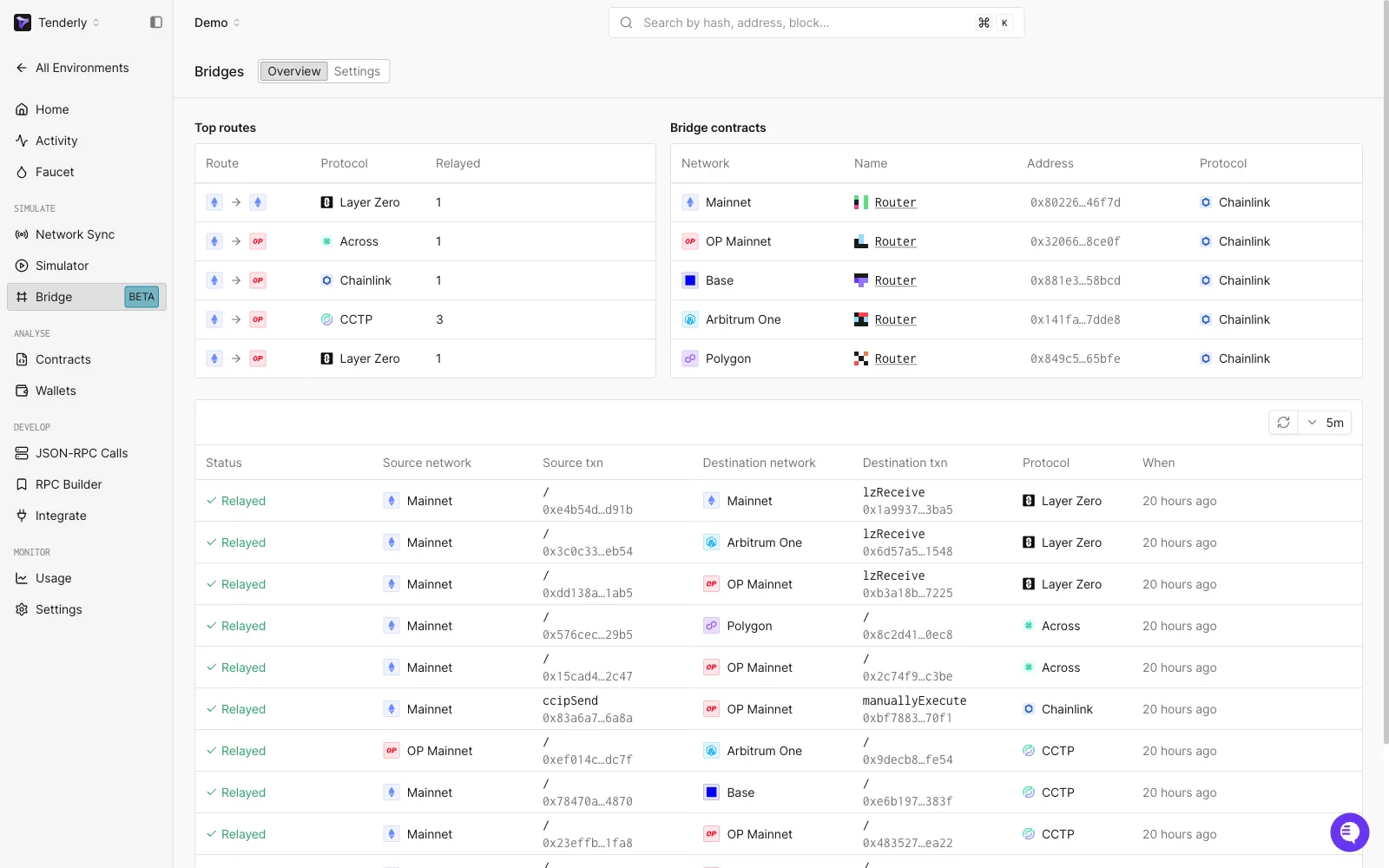 要确认一次往返,找到源交易(例如一次 LayerZero `PacketSent`),并沿着它所在的行找到匹配的目标交易(`lzReceive`)。
### 桥操作详情
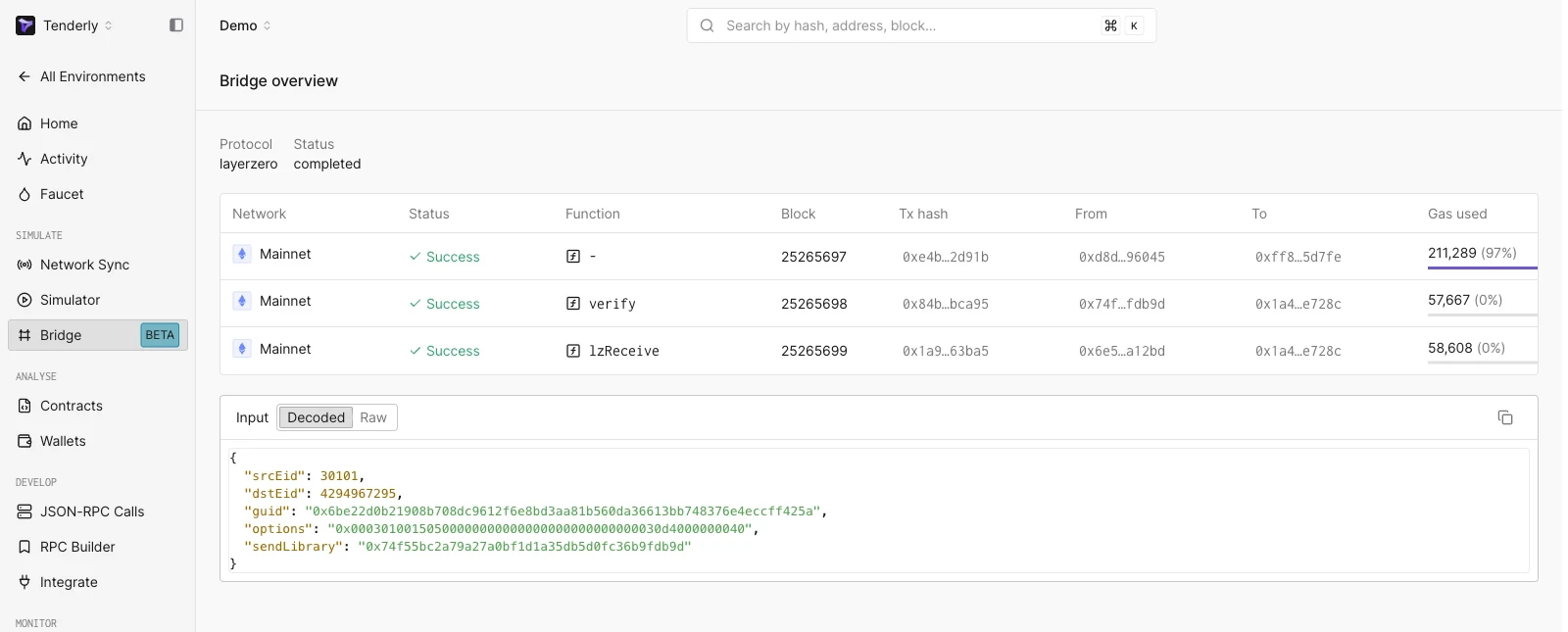
选择某一行会打开桥操作,其中显示协议、总体状态以及构成跨链消息的一系列交易:每一步的网络、状态、函数(例如 `verify`、`lzReceive`)、区块、交易哈希、发送方、接收方和使用的 gas。**Input** 查看器呈现已解码的消息载荷(`srcEid`、`dstEid`、`guid`、`options`、`sendLibrary`),并有 Decoded/Raw 切换。
要确认一次往返,找到源交易(例如一次 LayerZero `PacketSent`),并沿着它所在的行找到匹配的目标交易(`lzReceive`)。
### 桥操作详情
选择某一行会打开桥操作,其中显示协议、总体状态以及构成跨链消息的一系列交易:每一步的网络、状态、函数(例如 `verify`、`lzReceive`)、区块、交易哈希、发送方、接收方和使用的 gas。**Input** 查看器呈现已解码的消息载荷(`srcEid`、`dstEid`、`guid`、`options`、`sendLibrary`),并有 Decoded/Raw 切换。
 ## 何时使用桥接
| 场景 | 使用 |
| ------------------- | --------------------------------------------------------------------------------- |
| 跨链 dApp、桥、治理和多链协议逻辑 | 启用桥接的 [Multichain Virtual Environment](/virtual-environments/multichain/overview) |
| 无桥接需求的单网络开发 | 每个网络一个标准 [Virtual Environment](/virtual-environments/quickstart) |
| 单链上、带可见内存池的实时网络演练 | [Network Mirror Mode](/virtual-environments/network-mirror-mode) |
## 另请参阅
* [Multichain Virtual Environments 概述](/virtual-environments/multichain/overview)
* [Multichain 快速入门](/virtual-environments/multichain/quickstart)
* [Unlimited Faucet](/virtual-environments/unlimited-faucet)
* [Admin RPC](/virtual-environments/admin-rpc)
## 何时使用桥接
| 场景 | 使用 |
| ------------------- | --------------------------------------------------------------------------------- |
| 跨链 dApp、桥、治理和多链协议逻辑 | 启用桥接的 [Multichain Virtual Environment](/virtual-environments/multichain/overview) |
| 无桥接需求的单网络开发 | 每个网络一个标准 [Virtual Environment](/virtual-environments/quickstart) |
| 单链上、带可见内存池的实时网络演练 | [Network Mirror Mode](/virtual-environments/network-mirror-mode) |
## 另请参阅
* [Multichain Virtual Environments 概述](/virtual-environments/multichain/overview)
* [Multichain 快速入门](/virtual-environments/multichain/quickstart)
* [Unlimited Faucet](/virtual-environments/unlimited-faucet)
* [Admin RPC](/virtual-environments/admin-rpc)