

Simulator UI
Simulation RPC
Bundle Simulation RPC
Simulation API on Virtual Environments
从 Dashboard 模拟
要从 Dashboard 模拟交易,请打开您的 Virtual Environment 并单击侧边栏中的 Simulator,或打开标题栏中 Send 旁边的菜单并选择 Simulate。Simulator 有两种模式:- Simulate transaction:针对 Virtual Environment 的当前状态运行交易,不改变状态。
- Send transaction:在 Virtual Environment 上执行交易。其状态变更会被保留,与在 mainnet 上一样。标题栏中的 Send 会以此模式打开 Simulator。
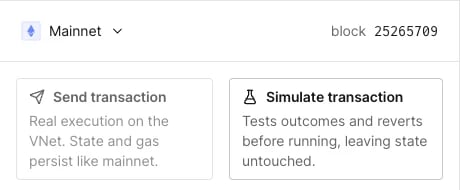
Virtual Environment 中 Simulator 的两种模式。
- 使用 Edit Source 调试智能合约错误以检查您的 bug 修复。
- 调用合约以了解状态,而不将交易持久化到网络。
- 使用 State Overrides 设置期望的合约状态,以评估在链上不存在且不应存在的条件下的执行情况。
- 构建概念验证交易以验证测试场景。
通过 RPC 模拟
Virtual Environments 上的交易也可以使用我们的 RPC 方法tenderly_simulate 和 tenderly_simulateBundle 进行模拟。
我们建议集成 Simulation RPC,但也可以使用 Simulation REST API。
- 发送方地址:
0xe2e2e2e2e2e2e2e2e2e2e2e2e2e2e2e2e2e2e2e2。 - DAI 合约地址:
0x6b175474e89094c44da98b954eedeac495271d0f - 状态覆盖参数:
DAI(0x6b175474e89094c44da98b954eedeac495271d0f).wards[0xe2e2e2e2e2e2e2e2e2e2e2e2e2e2e2e2e2e2e2e2] = 1
showLineNumbers