किसी भी execution trace पर comment करें और priorities सेट करें ताकि आपकी team debugging के दौरान महत्वपूर्ण calls को flag, चर्चा, और jump कर सके।
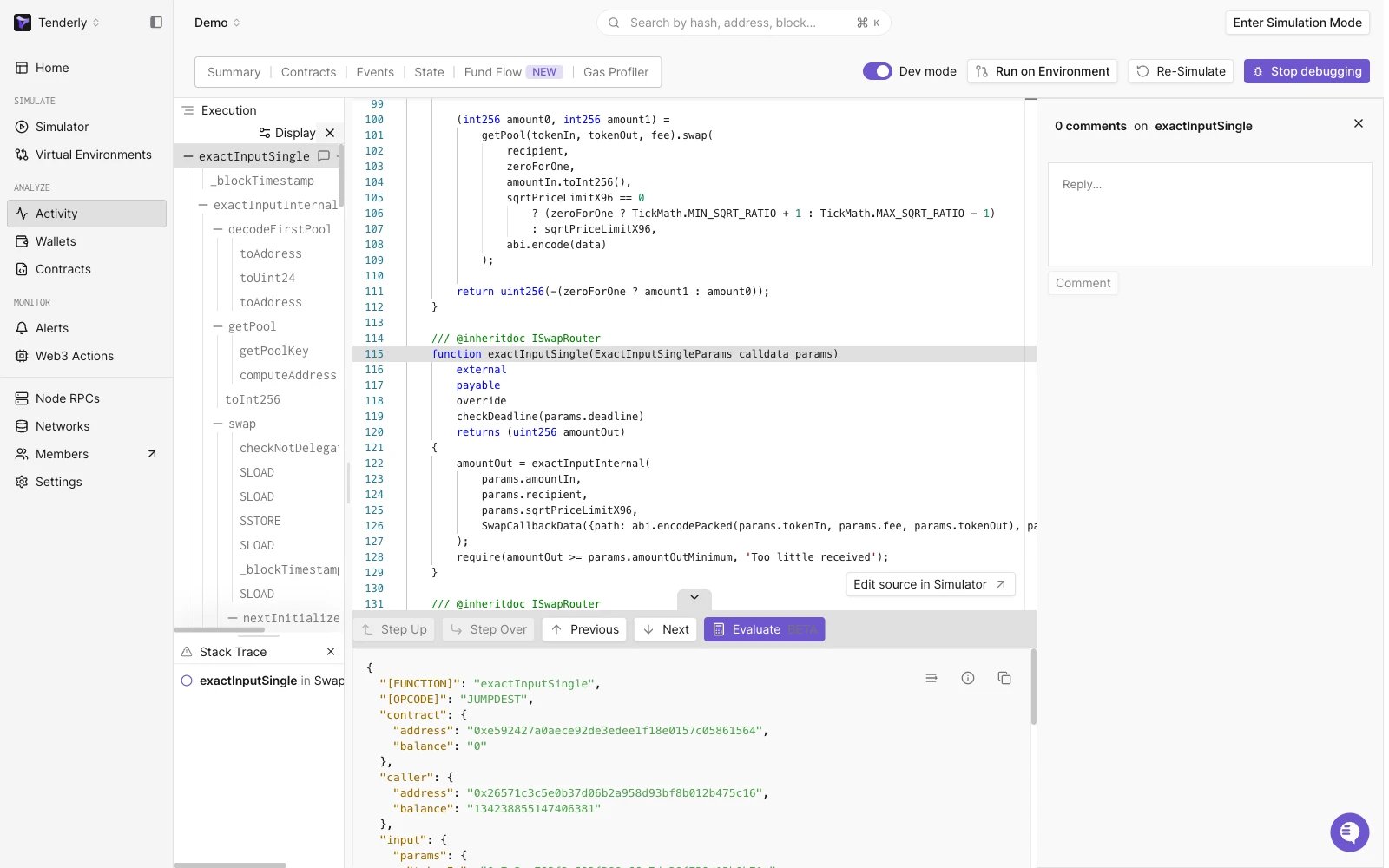
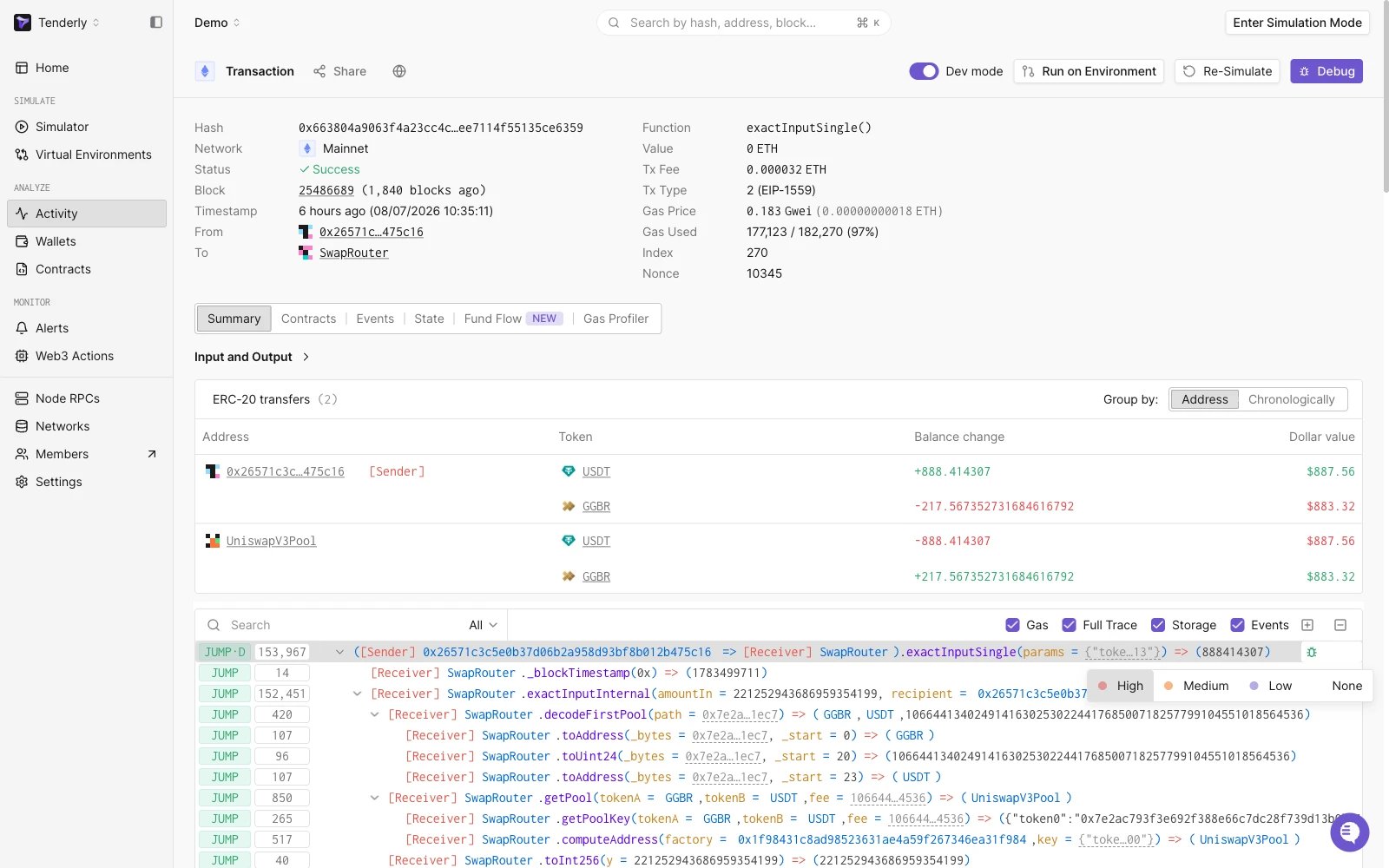
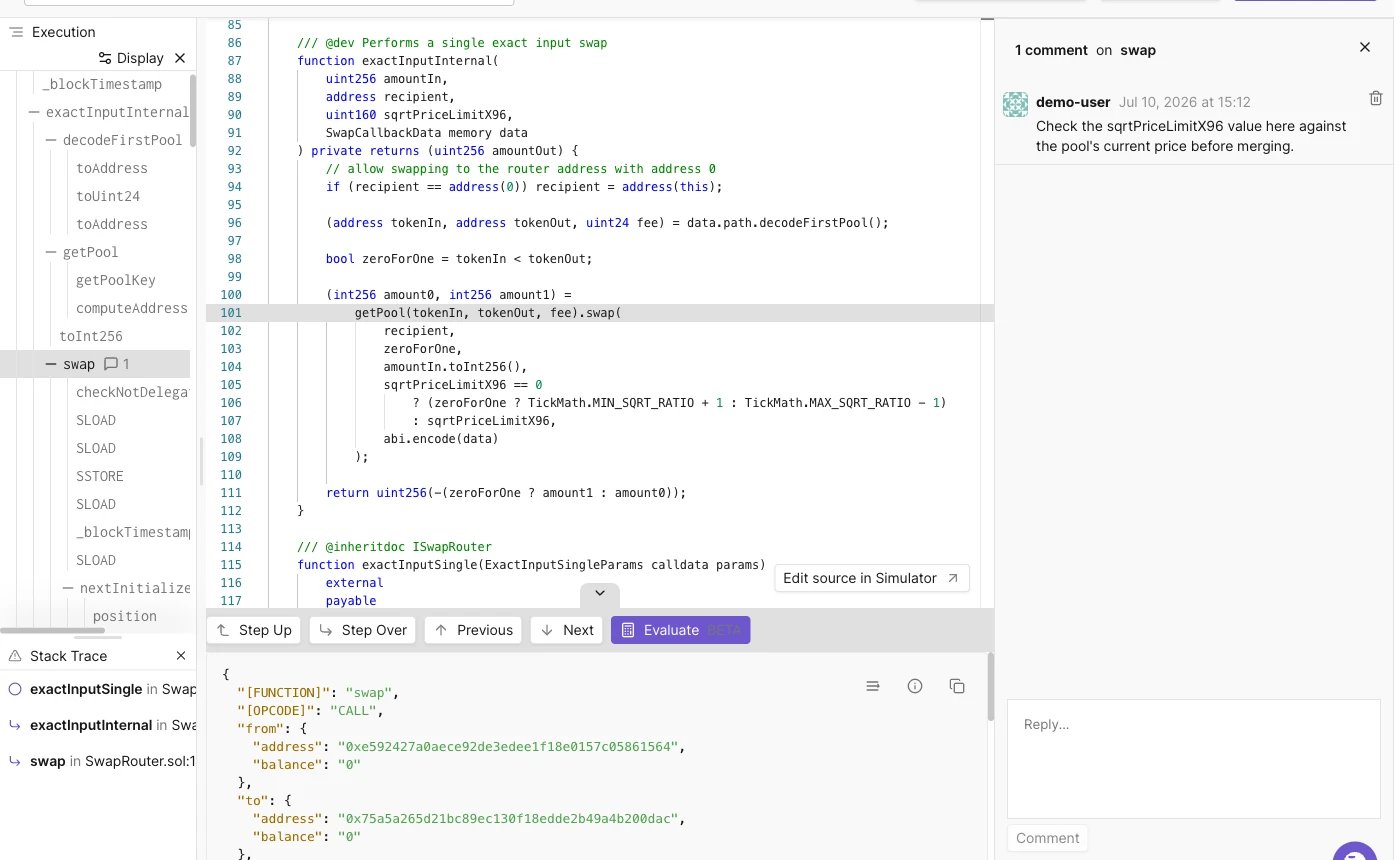
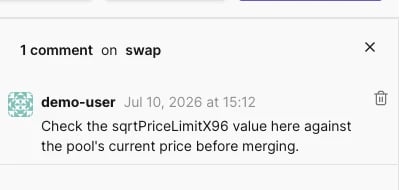
जब आप विभिन्न contracts और Execution Traces (Function Trace और Call Trace) से गुज़रते हैं तो Collaboration जटिल और समय लेने वाली हो सकती है। यही कारण है कि आप किसी भी trace पर comment कर सकते हैं, साथ ही priorities भी सेट कर सकते हैं।जब आप किसी भी trace पर क्लिक करते हैं, तो trace विंडो के नीचे आपके पास comment bar होगा, जिसे आप एक क्लिक पर खोल सकते हैं और फिर से collapse कर सकते हैं, चाहे आप पहला comment पोस्ट कर रहे हों या नहीं। प्रत्येक trace पर comments की संख्या स्पष्ट रूप से प्रदर्शित होती है ताकि आप आसानी से देख सकें कि चर्चा कहाँ हो रही है।जब आप कोई trace चुनते हैं, तो आप उसे स्पष्ट रूप से प्राथमिकता दे सकते हैं (और comments में उस पर विस्तार से बता सकते हैं)। trace विंडो के ऊपरी दाहिने भाग में आप View in Debugger बटन के ठीक बगल में Set priority विकल्प देख सकते हैं - इस पर क्लिक करने से एक dropdown खुलता है जिसमें से आप उस विशेष trace के लिए जो priority चाहते हैं उसे चुन सकते हैं और यह project तक पहुँच रखने वाले सभी उपयोगकर्ताओं के लिए तब तक marked रहेगी जब तक कि manually नहीं बदला जाता। किसी trace की priority के लिए None चुनने से markings हट जाते हैं।अंत में, Set priority के आगे तीन बिंदुओं पर क्लिक करने से एक dropdown खुलता है जहाँ आप contract source देख सकते हैं।जब आप traces को collapse करते हैं, तो केवल parent trace यह दिखाएगा कि उसमें कितने comments हैं, और एक नया बटन (Go to…) दिखाई देगा जो यह चिह्नित करेगा कि क्या child-traces में भी comments हैं। Go to… पर क्लिक करने से comments वाले सभी child-traces का एक dropdown menu खुलेगा ताकि आप आसानी से commented trace पर jump कर सकें। यह set की गई priorities वाले child-traces पर navigate करने के लिए भी उसी तरह काम करता है।सभी comment और priority सुविधाएँ आपके dashboard में Transaction Overview और Debugger views दोनों में बनी रहती हैं।आप किसी भी comment thread को pin कर सकते हैं जबकि आप अन्य traces से गुज़रते हैं। जब आप दूसरे comment thread पर क्लिक करते हैं तो यह unpin हो जाएगा। आप अपने comments को भी हटा सकते हैं।
{"docsConfig":{"theme":"mint","$schema":"https://mintlify.com/docs.json","name":"Tenderly","description":"Tenderly developer documentation — Virtual Environments, Node RPC, Simulation API, Debugger, Monitor, Alerts, Web3 Actions, and more.","colors":{"primary":"#7857FF","light":"#9B83FF","dark":"#7857FF"},"logo":{"light":"https://mintcdn.com/tenderly/OpA99rKrR1G10AGk/logo/tenderly-logo-light-background.svg?fit=max\u0026auto=format\u0026n=OpA99rKrR1G10AGk\u0026q=85\u0026s=8655a53ac5f0fdc1af7c82f4e2e270ef","dark":"https://mintcdn.com/tenderly/OpA99rKrR1G10AGk/logo/tenderly-logo-dark-background.svg?fit=max\u0026auto=format\u0026n=OpA99rKrR1G10AGk\u0026q=85\u0026s=17e892ea6a8bbd3f67e2055373d36609","href":"/introduction"},"favicon":"https://mintcdn.com/tenderly/nRyi0uSIGTr6AMxX/favicon.ico?fit=max\u0026auto=format\u0026n=nRyi0uSIGTr6AMxX\u0026q=85\u0026s=6a58780606747ae9bd8a65444d16422d","api":{"playground":{"display":"interactive","proxy":false},"examples":{"defaults":"required","languages":["curl","javascript","python","go"]}},"appearance":{"default":"dark"},"navbar":{"links":[{"href":"https://blog.tenderly.co","label":"Blog"},{"href":"mailto:support@tenderly.co","label":"Support"}],"primary":{"type":"button","label":"Dashboard","href":"https://dashboard.tenderly.co"}},"footer":{"socials":{"x":"https://x.com/TenderlyApp","github":"https://github.com/Tenderly","linkedin":"https://www.linkedin.com/company/tenderly-co"}},"search":{"prompt":"Search the Tenderly docs..."},"styling":{"codeblocks":{"theme":{"light":"catppuccin-latte","dark":"catppuccin-mocha"}},"latex":true},"contextual":{"options":["copy","view","assistant","claude","chatgpt","perplexity","cursor","vscode","mcp",{"title":"Add to Claude Code","description":"Connect the Tenderly MCP server to Claude Code","icon":"terminal","href":"https://docs.tenderly.co/ai-tools/quickstart"}],"display":"header"},"navigation":{"languages":[{"language":"en","href":"introduction"},{"language":"ru","href":"ru/introduction"},{"language":"zh","href":"zh/introduction"},{"language":"hi","href":"hi/introduction"}]}},"deployment":{"deploymentMetadataValue":{"subdomain":"tenderly","hasAudioNarration":false,"actualSubdomain":"tenderly","customDomains":["docs.tenderly.co"],"gitSource":{"type":"github","owner":"tenderly","repo":"tenderly-mintlify","deployBranch":"main","contentDirectory":"","isPrivate":true,"mountPath":"","label":""},"feedback":{"thumbs":true},"entitlements":{"AI_CHAT":{"status":"ENABLED"}},"buildId":"6afdac79be4a433e33e99d69","clientVersion":"0.0.4248","searchFilterCounts":[{"language":"en","tag":"Documentation","count":172},{"language":"hi","tag":"Documentation","count":164},{"language":"ru","tag":"Documentation","count":164},{"language":"zh","tag":"Documentation","count":164},{"language":"en","tag":"Simulator","count":74},{"language":"hi","tag":"Simulator","count":74},{"language":"ru","tag":"Simulator","count":74},{"language":"zh","tag":"Simulator","count":74},{"language":"default","tag":"API Reference","count":52},{"language":"en","tag":"Virtual Environments","count":42},{"language":"hi","tag":"Virtual Environments","count":42},{"language":"ru","tag":"Virtual Environments","count":42},{"language":"zh","tag":"Virtual Environments","count":42},{"language":"en","tag":"Monitor","count":30},{"language":"hi","tag":"Monitor","count":30},{"language":"ru","tag":"Monitor","count":30},{"language":"zh","tag":"Monitor","count":30},{"language":"en","tag":"How-to guides","count":28},{"language":"hi","tag":"How-to guides","count":28},{"language":"ru","tag":"How-to guides","count":28},{"language":"zh","tag":"How-to guides","count":28},{"language":"en","tag":"Console","count":27},{"language":"hi","tag":"Console","count":27},{"language":"ru","tag":"Console","count":27},{"language":"zh","tag":"Console","count":27},{"language":"en","tag":"Troubleshooting","count":22},{"language":"hi","tag":"Troubleshooting","count":22},{"language":"ru","tag":"Troubleshooting","count":22},{"language":"zh","tag":"Troubleshooting","count":22},{"language":"en","tag":"Web3 Actions","count":21},{"language":"en","tag":"Node RPC","count":21},{"language":"hi","tag":"Web3 Actions","count":21},{"language":"ru","tag":"Web3 Actions","count":21},{"language":"zh","tag":"Web3 Actions","count":21},{"language":"hi","tag":"Node RPC","count":20},{"language":"ru","tag":"Node RPC","count":20},{"language":"zh","tag":"Node RPC","count":20},{"language":"en","tag":"Simulation API","count":15},{"language":"hi","tag":"Simulation API","count":15},{"language":"ru","tag":"Simulation API","count":15},{"language":"zh","tag":"Simulation API","count":15},{"language":"default","tag":"Actions","count":10},{"language":"default","tag":"Simulator","count":9},{"language":"default","tag":"Virtual Environments","count":9},{"language":"default","tag":"Contracts","count":7},{"language":"default","tag":"Alerts","count":6},{"language":"default","tag":"Projects","count":5},{"language":"default","tag":"Wallets","count":3},{"language":"default","tag":"Delivery Channels","count":2},{"language":"default","tag":"Other","count":1}]},"assistantConfig":{"enableAskAiButton":false,"enableStarterQuestions":true,"enableContextualStarterQuestions":true,"enableAskAiSearchBar":true,"deflection":{"enabled":true,"email":"support@tenderly.co","showHelpButton":true}},"basePath":"","hasChatPermissions":true,"hasWebMcpPermissions":false,"toggles":[{"name":"kill-isr","enabled":true,"variant":{"name":"disabled","enabled":false,"feature_enabled":true},"impressionData":false},{"name":"custom-rbac-roles","enabled":true,"variant":{"name":"disabled","enabled":false,"feature_enabled":true},"impressionData":false},{"name":"agent-mintlify-slack","enabled":true,"variant":{"name":"disabled","enabled":false,"feature_enabled":true},"impressionData":false},{"name":"agent-integrations-settings","enabled":true,"variant":{"name":"disabled","enabled":false,"feature_enabled":true},"impressionData":false},{"name":"rbac-expansion","enabled":true,"variant":{"name":"disabled","enabled":false,"feature_enabled":true},"impressionData":false},{"name":"automations-pr-grouping","enabled":true,"variant":{"name":"disabled","enabled":false,"feature_enabled":true},"impressionData":false},{"name":"custom-prefix","enabled":true,"variant":{"name":"disabled","enabled":false,"feature_enabled":true},"impressionData":false},{"name":"analytics-v7","enabled":true,"variant":{"name":"disabled","enabled":false,"feature_enabled":true},"impressionData":false},{"name":"user-flows-analytics","enabled":true,"variant":{"name":"disabled","enabled":false,"feature_enabled":true},"impressionData":false},{"name":"no-publish-flow","enabled":true,"variant":{"name":"disabled","enabled":false,"feature_enabled":true},"impressionData":false},{"name":"workos-onboarding","enabled":true,"variant":{"name":"disabled","enabled":false,"feature_enabled":true},"impressionData":false},{"name":"snapshot-serving-live","enabled":true,"variant":{"name":"disabled","enabled":false,"feature_enabled":true},"impressionData":false},{"name":"stripTemperatureMiddleware","enabled":true,"variant":{"name":"disabled","enabled":false,"feature_enabled":true},"impressionData":false},{"name":"support-platform-pylon-zendesk","enabled":true,"variant":{"name":"disabled","enabled":false,"feature_enabled":true},"impressionData":false},{"name":"snapshot-serving","enabled":true,"variant":{"name":"disabled","enabled":false,"feature_enabled":true},"impressionData":false},{"name":"instant-rollback","enabled":true,"variant":{"name":"disabled","enabled":false,"feature_enabled":true},"impressionData":false},{"name":"granular-notifications-server","enabled":true,"variant":{"name":"disabled","enabled":false,"feature_enabled":true},"impressionData":false},{"name":"granular-notifications","enabled":true,"variant":{"name":"disabled","enabled":false,"feature_enabled":true},"impressionData":false},{"name":"automations-fable","enabled":true,"variant":{"name":"disabled","enabled":false,"feature_enabled":true},"impressionData":false},{"name":"fixed-ai-action-pricing","enabled":true,"variant":{"name":"disabled","enabled":false,"feature_enabled":true},"impressionData":false},{"name":"site-roles","enabled":true,"variant":{"name":"disabled","enabled":false,"feature_enabled":true},"impressionData":false},{"name":"automation-resolve-merge-conflict","enabled":true,"variant":{"name":"disabled","enabled":false,"feature_enabled":true},"impressionData":false},{"name":"scoped-publishing","enabled":true,"variant":{"name":"disabled","enabled":false,"feature_enabled":true},"impressionData":false},{"name":"mintql","enabled":true,"variant":{"name":"disabled","enabled":false,"feature_enabled":true},"impressionData":false},{"name":"page-level-analytics","enabled":true,"variant":{"name":"disabled","enabled":false,"feature_enabled":true},"impressionData":false},{"name":"editor-version-history-v2","enabled":true,"variant":{"name":"disabled","enabled":false,"feature_enabled":true},"impressionData":false},{"name":"billing-page-v2","enabled":true,"variant":{"name":"disabled","enabled":false,"feature_enabled":true},"impressionData":false},{"name":"full-page-search","enabled":true,"variant":{"name":"disabled","enabled":false,"feature_enabled":true},"impressionData":false},{"name":"workspace-projects","enabled":true,"variant":{"name":"disabled","enabled":false,"feature_enabled":true},"impressionData":false},{"name":"assistant-v5","enabled":true,"variant":{"name":"disabled","enabled":false,"feature_enabled":true},"impressionData":false},{"name":"fork-pr-previews","enabled":true,"variant":{"name":"disabled","enabled":false,"feature_enabled":true},"impressionData":false},{"name":"revalidation-jwt","enabled":true,"variant":{"name":"disabled","enabled":false,"feature_enabled":true},"impressionData":false},{"name":"workos-sso-scim","enabled":true,"variant":{"name":"disabled","enabled":false,"feature_enabled":true},"impressionData":false},{"name":"hobby-abuse-scan","enabled":true,"variant":{"name":"disabled","enabled":false,"feature_enabled":true},"impressionData":false},{"name":"dashboard-inbox","enabled":true,"variant":{"name":"disabled","enabled":false,"feature_enabled":true},"impressionData":false},{"name":"workos-signup","enabled":true,"variant":{"name":"disabled","enabled":false,"feature_enabled":true},"impressionData":false},{"name":"turbopuffer-dual-write","enabled":true,"variant":{"name":"disabled","enabled":false,"feature_enabled":true},"impressionData":false},{"name":"workos-enabled","enabled":true,"variant":{"name":"disabled","enabled":false,"feature_enabled":true},"impressionData":false},{"name":"approve-review-flow","enabled":true,"variant":{"name":"disabled","enabled":false,"feature_enabled":true},"impressionData":false},{"name":"editor-metadata","enabled":true,"variant":{"name":"disabled","enabled":false,"feature_enabled":true},"impressionData":false},{"name":"sso-setup-deadline-banner","enabled":true,"variant":{"name":"disabled","enabled":false,"feature_enabled":true},"impressionData":false},{"name":"turbopuffer-serve","enabled":true,"variant":{"name":"disabled","enabled":false,"feature_enabled":true},"impressionData":false},{"name":"live-agents","enabled":true,"variant":{"name":"disabled","enabled":false,"feature_enabled":true},"impressionData":false},{"name":"starter-pricing","enabled":true,"variant":{"name":"treatment","enabled":true,"payload":{"type":"string","value":"treatment"},"feature_enabled":true},"impressionData":false},{"name":"llms-txt-v2","enabled":true,"variant":{"name":"disabled","enabled":false,"feature_enabled":true},"impressionData":false},{"name":"wildcard-email-auth","enabled":true,"variant":{"name":"disabled","enabled":false,"feature_enabled":true},"impressionData":false}],"privacy":{"consentBanner":{"enabled":true}},"googleFontsInlined":false},"customCss":[{"filePath":"custom.css","content":"html.dark .shiki,html.dark .shiki span{color:var(--shiki-dark)!important;background-color:var(--shiki-dark-bg)!important;font-style:var(--shiki-dark-font-style)!important;font-weight:var(--shiki-dark-font-weight)!important;text-decoration:var(--shiki-dark-text-decoration)!important}html.dark .card .primary-text{color:#9B83FF}.card .prose>div>h2,.card .prose>div>h3{color:#7857FF}html.dark .card .prose>div>h2,html.dark .card .prose>div>h3{color:#9B83FF}.card:has(.prose>div>h2) [data-component-part=\"card-content-container\"]{padding:1rem 1.25rem}html.dark .card:hover{border-color:#9B83FF!important;box-shadow:0 0 0 1px rgba(155, 131, 255, 0.25)}html:not(.dark) .card:hover{border-color:#7857FF!important;box-shadow:0 0 0 1px rgba(120, 87, 255, 0.18)}"}]}
{"page":{"pagePath":"hi/debugger/commenting","slug":"/hi/debugger/commenting","pageMetadata":{"title":"Traces पर टिप्पणी और प्राथमिकता निर्धारण","description":"किसी भी execution trace पर comment करें और priorities सेट करें ताकि आपकी team debugging के दौरान महत्वपूर्ण calls को flag, चर्चा, और jump कर सके।","href":"/hi/debugger/commenting"},"description":{"compiledSource":"\"use strict\";\nconst {jsx: _jsx} = arguments[0];\nconst {useMDXComponents: _provideComponents} = arguments[0];\nfunction _createMdxContent(props) {\n const _components = {\n p: \"p\",\n ..._provideComponents(),\n ...props.components\n };\n return _jsx(_components.p, {\n children: \"किसी भी execution trace पर comment करें और priorities सेट करें ताकि आपकी team debugging के दौरान महत्वपूर्ण calls को flag, चर्चा, और jump कर सके।\"\n });\n}\nfunction MDXContent(props = {}) {\n const {wrapper: MDXLayout} = {\n ..._provideComponents(),\n ...props.components\n };\n return MDXLayout ? _jsx(MDXLayout, {\n ...props,\n children: _jsx(_createMdxContent, {\n ...props\n })\n }) : _createMdxContent(props);\n}\nreturn {\n default: MDXContent\n};\n","frontmatter":{},"scope":{}},"pageType":"default","mdx":{"mdxSource":{"compiledSource":"\"use strict\";const{Fragment:_Fragment,jsx:_jsx,jsxs:_jsxs}=arguments[0];const{useMDXComponents:_provideComponents}=arguments[0];function _createMdxContent(props){const _components={a:`a`,em:`em`,p:`p`,strong:`strong`,..._provideComponents(),...props.components},{OptimizedImage}=_components;if(!OptimizedImage)_missingMdxReference(`OptimizedImage`,true);return _jsxs(_Fragment,{children:[_jsxs(_components.p,{children:[`जब आप विभिन्न contracts और Execution Traces (`,_jsx(_components.a,{href:`/debugger/execution-overview`,children:_jsx(_components.strong,{children:`Function Trace और Call Trace`})}),`) से गुज़रते हैं तो Collaboration जटिल और समय लेने वाली हो सकती है। यही कारण है कि आप किसी भी trace पर comment कर सकते हैं, साथ ही priorities भी सेट कर सकते हैं।`]}),`\n`,_jsx(_components.p,{children:`जब आप किसी भी trace पर क्लिक करते हैं, तो trace विंडो के नीचे आपके पास comment bar होगा, जिसे आप एक क्लिक पर खोल सकते हैं और फिर से collapse कर सकते हैं, चाहे आप पहला comment पोस्ट कर रहे हों या नहीं। प्रत्येक trace पर comments की संख्या स्पष्ट रूप से प्रदर्शित होती है ताकि आप आसानी से देख सकें कि चर्चा कहाँ हो रही है।`}),`\n`,_jsx(OptimizedImage,{src:`https://mintcdn.com/tenderly/Aq90dolhrsdO4Ket/images/Screenshot%202022-01-17%20at%2015.14.56.webp?fit=max\u0026auto=format\u0026n=Aq90dolhrsdO4Ket\u0026q=85\u0026s=1b39eef134892fee95da775252ea8427`,alt:``,\"data-og-width\":`1600`,width:`1600`,\"data-og-height\":`1000`,height:`1000`,\"data-path\":`images/Screenshot 2022-01-17 at 15.14.56.webp`,\"data-optimize\":`true`,\"data-opv\":`3`,srcset:`https://mintcdn.com/tenderly/Aq90dolhrsdO4Ket/images/Screenshot%202022-01-17%20at%2015.14.56.webp?w=280\u0026fit=max\u0026auto=format\u0026n=Aq90dolhrsdO4Ket\u0026q=85\u0026s=ba5a3c7858522e969051b1babdcc6684 280w, https://mintcdn.com/tenderly/Aq90dolhrsdO4Ket/images/Screenshot%202022-01-17%20at%2015.14.56.webp?w=560\u0026fit=max\u0026auto=format\u0026n=Aq90dolhrsdO4Ket\u0026q=85\u0026s=883000da0da7d5121f2bbe9676364e10 560w, https://mintcdn.com/tenderly/Aq90dolhrsdO4Ket/images/Screenshot%202022-01-17%20at%2015.14.56.webp?w=840\u0026fit=max\u0026auto=format\u0026n=Aq90dolhrsdO4Ket\u0026q=85\u0026s=e9f9e5b5a1b9bfa97539e4981ce15893 840w, https://mintcdn.com/tenderly/Aq90dolhrsdO4Ket/images/Screenshot%202022-01-17%20at%2015.14.56.webp?w=1100\u0026fit=max\u0026auto=format\u0026n=Aq90dolhrsdO4Ket\u0026q=85\u0026s=f993aee32fe0fc7415147b6a785669f1 1100w, https://mintcdn.com/tenderly/Aq90dolhrsdO4Ket/images/Screenshot%202022-01-17%20at%2015.14.56.webp?w=1650\u0026fit=max\u0026auto=format\u0026n=Aq90dolhrsdO4Ket\u0026q=85\u0026s=57cc6c287b375cd9360282e331ec6d06 1650w, https://mintcdn.com/tenderly/Aq90dolhrsdO4Ket/images/Screenshot%202022-01-17%20at%2015.14.56.webp?w=2500\u0026fit=max\u0026auto=format\u0026n=Aq90dolhrsdO4Ket\u0026q=85\u0026s=4743b3315a7d33ef97a12cdf3a06a9ea 2500w`}),`\n`,_jsxs(_components.p,{children:[`जब आप कोई trace चुनते हैं, तो आप उसे स्पष्ट रूप से प्राथमिकता दे सकते हैं (और comments में उस पर विस्तार से बता सकते हैं)। trace विंडो के ऊपरी दाहिने भाग में आप `,_jsx(_components.a,{href:`/debugger/overview`,children:_jsx(_components.em,{children:`View in Debugger`})}),` बटन के ठीक बगल में `,_jsx(_components.em,{children:_jsx(_components.strong,{children:`Set priority`})}),` विकल्प देख सकते हैं - इस पर क्लिक करने से एक dropdown खुलता है जिसमें से आप उस विशेष trace के लिए जो priority चाहते हैं उसे चुन सकते हैं और यह project तक पहुँच रखने वाले सभी उपयोगकर्ताओं के लिए तब तक marked रहेगी जब तक कि manually नहीं बदला जाता। किसी trace की priority के लिए `,_jsx(_components.em,{children:`None`}),` चुनने से markings हट जाते हैं।`]}),`\n`,_jsxs(_components.p,{children:[`अंत में, `,_jsx(_components.em,{children:`Set priority`}),` के आगे तीन बिंदुओं पर क्लिक करने से एक dropdown खुलता है जहाँ आप `,_jsx(_components.a,{href:`/simulator-ui/editing-contract-source`,children:`contract source देख सकते हैं`}),`।`]}),`\n`,_jsx(OptimizedImage,{src:`https://mintcdn.com/tenderly/Aq90dolhrsdO4Ket/images/Screenshot%202022-01-17%20at%2015.16.29.webp?fit=max\u0026auto=format\u0026n=Aq90dolhrsdO4Ket\u0026q=85\u0026s=64568c66d412576178c4e7af3c21207e`,alt:``,\"data-og-width\":`1600`,width:`1600`,\"data-og-height\":`1000`,height:`1000`,\"data-path\":`images/Screenshot 2022-01-17 at 15.16.29.webp`,\"data-optimize\":`true`,\"data-opv\":`3`,srcset:`https://mintcdn.com/tenderly/Aq90dolhrsdO4Ket/images/Screenshot%202022-01-17%20at%2015.16.29.webp?w=280\u0026fit=max\u0026auto=format\u0026n=Aq90dolhrsdO4Ket\u0026q=85\u0026s=9ec06c3a01fbe1c38745a759fcf664a3 280w, https://mintcdn.com/tenderly/Aq90dolhrsdO4Ket/images/Screenshot%202022-01-17%20at%2015.16.29.webp?w=560\u0026fit=max\u0026auto=format\u0026n=Aq90dolhrsdO4Ket\u0026q=85\u0026s=97f4d2ee5f7af2f212b467726603e671 560w, https://mintcdn.com/tenderly/Aq90dolhrsdO4Ket/images/Screenshot%202022-01-17%20at%2015.16.29.webp?w=840\u0026fit=max\u0026auto=format\u0026n=Aq90dolhrsdO4Ket\u0026q=85\u0026s=26d7d8b6e9c58b582f1e70022d6e984b 840w, https://mintcdn.com/tenderly/Aq90dolhrsdO4Ket/images/Screenshot%202022-01-17%20at%2015.16.29.webp?w=1100\u0026fit=max\u0026auto=format\u0026n=Aq90dolhrsdO4Ket\u0026q=85\u0026s=25412f45280f403de02880cda522f4ef 1100w, https://mintcdn.com/tenderly/Aq90dolhrsdO4Ket/images/Screenshot%202022-01-17%20at%2015.16.29.webp?w=1650\u0026fit=max\u0026auto=format\u0026n=Aq90dolhrsdO4Ket\u0026q=85\u0026s=f18cd59c5f77a52efeceb17f31420ba4 1650w, https://mintcdn.com/tenderly/Aq90dolhrsdO4Ket/images/Screenshot%202022-01-17%20at%2015.16.29.webp?w=2500\u0026fit=max\u0026auto=format\u0026n=Aq90dolhrsdO4Ket\u0026q=85\u0026s=a56965b19a1e08332de6673e92a9ea67 2500w`}),`\n`,_jsxs(_components.p,{children:[`जब आप traces को collapse करते हैं, तो केवल parent trace यह दिखाएगा कि उसमें कितने comments हैं, और एक नया बटन (`,_jsx(_components.em,{children:`Go to…`}),`) दिखाई देगा जो यह चिह्नित करेगा कि क्या child-traces में भी comments हैं। `,_jsx(_components.em,{children:`Go to…`}),` पर क्लिक करने से comments वाले सभी child-traces का एक dropdown menu खुलेगा ताकि आप आसानी से commented trace पर jump कर सकें। यह set की गई priorities वाले child-traces पर navigate करने के लिए भी उसी तरह काम करता है।`]}),`\n`,_jsx(OptimizedImage,{src:`https://mintcdn.com/tenderly/Aq90dolhrsdO4Ket/images/Screenshot%202022-01-17%20at%2015.21.04.webp?fit=max\u0026auto=format\u0026n=Aq90dolhrsdO4Ket\u0026q=85\u0026s=b0bf8ba2eb08080a69841227f7c77ad9`,alt:``,\"data-og-width\":`1400`,width:`1400`,\"data-og-height\":`860`,height:`860`,\"data-path\":`images/Screenshot 2022-01-17 at 15.21.04.webp`,\"data-optimize\":`true`,\"data-opv\":`3`,srcset:`https://mintcdn.com/tenderly/Aq90dolhrsdO4Ket/images/Screenshot%202022-01-17%20at%2015.21.04.webp?w=280\u0026fit=max\u0026auto=format\u0026n=Aq90dolhrsdO4Ket\u0026q=85\u0026s=eede8f8f46c3717c8c430c82ce7115a1 280w, https://mintcdn.com/tenderly/Aq90dolhrsdO4Ket/images/Screenshot%202022-01-17%20at%2015.21.04.webp?w=560\u0026fit=max\u0026auto=format\u0026n=Aq90dolhrsdO4Ket\u0026q=85\u0026s=ccf1f486290e512d9968e0d330a6e445 560w, https://mintcdn.com/tenderly/Aq90dolhrsdO4Ket/images/Screenshot%202022-01-17%20at%2015.21.04.webp?w=840\u0026fit=max\u0026auto=format\u0026n=Aq90dolhrsdO4Ket\u0026q=85\u0026s=265e5a41cd0940bcdeecab5bb12f6dcb 840w, https://mintcdn.com/tenderly/Aq90dolhrsdO4Ket/images/Screenshot%202022-01-17%20at%2015.21.04.webp?w=1100\u0026fit=max\u0026auto=format\u0026n=Aq90dolhrsdO4Ket\u0026q=85\u0026s=192934ea56404857d873e26b7fa21007 1100w, https://mintcdn.com/tenderly/Aq90dolhrsdO4Ket/images/Screenshot%202022-01-17%20at%2015.21.04.webp?w=1650\u0026fit=max\u0026auto=format\u0026n=Aq90dolhrsdO4Ket\u0026q=85\u0026s=9de4ce548c1f93ca219c376a2c2b4d42 1650w, https://mintcdn.com/tenderly/Aq90dolhrsdO4Ket/images/Screenshot%202022-01-17%20at%2015.21.04.webp?w=2500\u0026fit=max\u0026auto=format\u0026n=Aq90dolhrsdO4Ket\u0026q=85\u0026s=63bf7d9cbf783fe5d9f699b3c44f68f3 2500w`}),`\n`,_jsx(_components.p,{children:`सभी comment और priority सुविधाएँ आपके dashboard में Transaction Overview और Debugger views दोनों में बनी रहती हैं।`}),`\n`,_jsx(OptimizedImage,{src:`https://mintcdn.com/tenderly/Aq90dolhrsdO4Ket/images/Screenshot%202022-01-17%20at%2015.21.04.webp?fit=max\u0026auto=format\u0026n=Aq90dolhrsdO4Ket\u0026q=85\u0026s=b0bf8ba2eb08080a69841227f7c77ad9`,alt:``,\"data-og-width\":`1400`,width:`1400`,\"data-og-height\":`860`,height:`860`,\"data-path\":`images/Screenshot 2022-01-17 at 15.21.04.webp`,\"data-optimize\":`true`,\"data-opv\":`3`,srcset:`https://mintcdn.com/tenderly/Aq90dolhrsdO4Ket/images/Screenshot%202022-01-17%20at%2015.21.04.webp?w=280\u0026fit=max\u0026auto=format\u0026n=Aq90dolhrsdO4Ket\u0026q=85\u0026s=eede8f8f46c3717c8c430c82ce7115a1 280w, https://mintcdn.com/tenderly/Aq90dolhrsdO4Ket/images/Screenshot%202022-01-17%20at%2015.21.04.webp?w=560\u0026fit=max\u0026auto=format\u0026n=Aq90dolhrsdO4Ket\u0026q=85\u0026s=ccf1f486290e512d9968e0d330a6e445 560w, https://mintcdn.com/tenderly/Aq90dolhrsdO4Ket/images/Screenshot%202022-01-17%20at%2015.21.04.webp?w=840\u0026fit=max\u0026auto=format\u0026n=Aq90dolhrsdO4Ket\u0026q=85\u0026s=265e5a41cd0940bcdeecab5bb12f6dcb 840w, https://mintcdn.com/tenderly/Aq90dolhrsdO4Ket/images/Screenshot%202022-01-17%20at%2015.21.04.webp?w=1100\u0026fit=max\u0026auto=format\u0026n=Aq90dolhrsdO4Ket\u0026q=85\u0026s=192934ea56404857d873e26b7fa21007 1100w, https://mintcdn.com/tenderly/Aq90dolhrsdO4Ket/images/Screenshot%202022-01-17%20at%2015.21.04.webp?w=1650\u0026fit=max\u0026auto=format\u0026n=Aq90dolhrsdO4Ket\u0026q=85\u0026s=9de4ce548c1f93ca219c376a2c2b4d42 1650w, https://mintcdn.com/tenderly/Aq90dolhrsdO4Ket/images/Screenshot%202022-01-17%20at%2015.21.04.webp?w=2500\u0026fit=max\u0026auto=format\u0026n=Aq90dolhrsdO4Ket\u0026q=85\u0026s=63bf7d9cbf783fe5d9f699b3c44f68f3 2500w`}),`\n`,_jsx(_components.p,{children:`आप किसी भी comment thread को pin कर सकते हैं जबकि आप अन्य traces से गुज़रते हैं। जब आप दूसरे comment thread पर क्लिक करते हैं तो यह unpin हो जाएगा। आप अपने comments को भी हटा सकते हैं।`}),`\n`,_jsx(OptimizedImage,{src:`https://mintcdn.com/tenderly/Aq90dolhrsdO4Ket/images/Screenshot%202022-01-19%20at%2009.08.04.webp?fit=max\u0026auto=format\u0026n=Aq90dolhrsdO4Ket\u0026q=85\u0026s=dc441ca5c6c15e77bf4f1aa29291db89`,alt:``,\"data-og-width\":`405`,width:`405`,\"data-og-height\":`190`,height:`190`,\"data-path\":`images/Screenshot 2022-01-19 at 09.08.04.webp`,\"data-optimize\":`true`,\"data-opv\":`3`,srcset:`https://mintcdn.com/tenderly/Aq90dolhrsdO4Ket/images/Screenshot%202022-01-19%20at%2009.08.04.webp?w=280\u0026fit=max\u0026auto=format\u0026n=Aq90dolhrsdO4Ket\u0026q=85\u0026s=b47e371e95f9241e0e215be898e4cd8a 280w, https://mintcdn.com/tenderly/Aq90dolhrsdO4Ket/images/Screenshot%202022-01-19%20at%2009.08.04.webp?w=560\u0026fit=max\u0026auto=format\u0026n=Aq90dolhrsdO4Ket\u0026q=85\u0026s=a764a66628ce5699c8ee1d450f571786 560w, https://mintcdn.com/tenderly/Aq90dolhrsdO4Ket/images/Screenshot%202022-01-19%20at%2009.08.04.webp?w=840\u0026fit=max\u0026auto=format\u0026n=Aq90dolhrsdO4Ket\u0026q=85\u0026s=c07a672df09b882abb8bb1bc852db188 840w, https://mintcdn.com/tenderly/Aq90dolhrsdO4Ket/images/Screenshot%202022-01-19%20at%2009.08.04.webp?w=1100\u0026fit=max\u0026auto=format\u0026n=Aq90dolhrsdO4Ket\u0026q=85\u0026s=86e311cffcccf0d5cf38dce21d98d07e 1100w, https://mintcdn.com/tenderly/Aq90dolhrsdO4Ket/images/Screenshot%202022-01-19%20at%2009.08.04.webp?w=1650\u0026fit=max\u0026auto=format\u0026n=Aq90dolhrsdO4Ket\u0026q=85\u0026s=b752253dd5fc4187da670437b76d4e0f 1650w, https://mintcdn.com/tenderly/Aq90dolhrsdO4Ket/images/Screenshot%202022-01-19%20at%2009.08.04.webp?w=2500\u0026fit=max\u0026auto=format\u0026n=Aq90dolhrsdO4Ket\u0026q=85\u0026s=6d1928cfaace91adf399e45bc5ab9f07 2500w`})]})}function MDXContent(props={}){const{wrapper:MDXLayout}={..._provideComponents(),...props.components};return MDXLayout?_jsx(MDXLayout,{...props,children:_jsx(_createMdxContent,{...props})}):_createMdxContent(props)}return{default:MDXContent};function _missingMdxReference(id,component){throw new Error(`Expected `+(component?`component`:`object`)+\" `\"+id+\"` to be defined: you likely forgot to import, pass, or provide it.\")}","frontmatter":{},"scope":{"codeStyling":{"theme":{"light":"catppuccin-latte","dark":"catppuccin-mocha"}},"config":{},"pageMetadata":{"title":"Traces पर टिप्पणी और प्राथमिकता निर्धारण","description":"किसी भी execution trace पर comment करें और priorities सेट करें ताकि आपकी team debugging के दौरान महत्वपूर्ण calls को flag, चर्चा, और jump कर सके।","href":"/hi/debugger/commenting"}}},"mdxSourceWithNoJs":null},"mdxExtracts":{"tableOfContents":[],"codeExamples":{}},"jsLinks":["/_mintlify/custom/tenderly/e48e729c569a2535/node-rpc/rpc-explorer.js","/_mintlify/custom/tenderly/5632beced686958d/platform/supported-networks.js","/_mintlify/custom/tenderly/896485a8a0369426/seo-schema.js","/_mintlify/custom/tenderly/072d16806bddf995/matomo.js"],"subdomain":"tenderly","siteName":"Tenderly","title":"Traces पर टिप्पणी और प्राथमिकता निर्धारण - Tenderly","contextualStarterQuestions":[],"navMaps":{"firstHrefInVersion":{},"firstHrefInLanguage":{"en":{"href":"/debugger/commenting","matchLevel":1},"ru":{"href":"/ru/debugger/commenting","matchLevel":1},"zh":{"href":"/zh/debugger/commenting","matchLevel":1},"hi":{"href":"/hi/debugger/commenting","matchLevel":0}}},"lastModified":"2026-07-11T15:23:02.185Z","originalFileLocation":"hi/debugger/commenting.mdx","locale":"hi"},"headHtml":"\u003cscript data-mint-head>(function(){var d=document.documentElement,p=null;if(!p){try{p=localStorage.getItem(\"isDarkMode\")}catch(e){}if(p==='true')p='dark';else if(p==='false')p='light';if(p!=='light'\u0026\u0026p!=='dark'\u0026\u0026p!=='system')p=\"dark\"}var r=p==='system'?(matchMedia(\"(prefers-color-scheme: dark)\").matches?'dark':'light'):p;d.classList.remove(r==='dark'?'light':'dark');d.classList.add(r);d.setAttribute(\"data-theme-preference\",p)})();\u003c/script>\u003cmeta data-mint-head name=\"description\" content=\"किसी भी execution trace पर comment करें और priorities सेट करें ताकि आपकी team debugging के दौरान महत्वपूर्ण calls को flag, चर्चा, और jump कर सके।\">\u003cmeta data-mint-head name=\"application-name\" content=\"Tenderly\">\u003cmeta data-mint-head name=\"generator\" content=\"Mintlify\">\u003clink data-mint-head rel=\"icon\" type=\"image/png\" sizes=\"192x192\" href=\"/mintlify-assets/_mintlify/favicons/tenderly/eQa6_1msdloETVQa/_generated/favicon/android-chrome-192x192.png\" media=\"(prefers-color-scheme: light)\">\u003clink data-mint-head rel=\"apple-touch-icon\" type=\"image/png\" sizes=\"180x180\" href=\"/mintlify-assets/_mintlify/favicons/tenderly/eQa6_1msdloETVQa/_generated/favicon/apple-touch-icon.png\">\u003clink data-mint-head rel=\"icon\" type=\"image/png\" sizes=\"16x16\" href=\"/mintlify-assets/_mintlify/favicons/tenderly/eQa6_1msdloETVQa/_generated/favicon/favicon-16x16.png\" media=\"(prefers-color-scheme: light)\">\u003clink data-mint-head rel=\"icon\" type=\"image/png\" sizes=\"32x32\" href=\"/mintlify-assets/_mintlify/favicons/tenderly/eQa6_1msdloETVQa/_generated/favicon/favicon-32x32.png\" media=\"(prefers-color-scheme: light)\">\u003clink data-mint-head rel=\"shortcut icon\" type=\"image/x-icon\" href=\"/mintlify-assets/_mintlify/favicons/tenderly/eQa6_1msdloETVQa/_generated/favicon/favicon.ico\" media=\"(prefers-color-scheme: light)\">\u003clink data-mint-head rel=\"icon\" type=\"image/png\" sizes=\"192x192\" href=\"/mintlify-assets/_mintlify/favicons/tenderly/eQa6_1msdloETVQa/_generated/favicon-dark/android-chrome-192x192.png\" media=\"(prefers-color-scheme: dark)\">\u003clink data-mint-head rel=\"icon\" type=\"image/png\" sizes=\"16x16\" href=\"/mintlify-assets/_mintlify/favicons/tenderly/eQa6_1msdloETVQa/_generated/favicon-dark/favicon-16x16.png\" media=\"(prefers-color-scheme: dark)\">\u003clink data-mint-head rel=\"icon\" type=\"image/png\" sizes=\"32x32\" href=\"/mintlify-assets/_mintlify/favicons/tenderly/eQa6_1msdloETVQa/_generated/favicon-dark/favicon-32x32.png\" media=\"(prefers-color-scheme: dark)\">\u003clink data-mint-head rel=\"shortcut icon\" type=\"image/x-icon\" href=\"/mintlify-assets/_mintlify/favicons/tenderly/eQa6_1msdloETVQa/_generated/favicon-dark/favicon.ico\" media=\"(prefers-color-scheme: dark)\">\u003cmeta data-mint-head property=\"og:title\" content=\"Traces पर टिप्पणी और प्राथमिकता निर्धारण - Tenderly\">\u003cmeta data-mint-head property=\"og:description\" content=\"किसी भी execution trace पर comment करें और priorities सेट करें ताकि आपकी team debugging के दौरान महत्वपूर्ण calls को flag, चर्चा, और jump कर सके।\">\u003cmeta data-mint-head property=\"og:site_name\" content=\"Tenderly\">\u003cmeta data-mint-head property=\"og:url\" content=\"https://docs.tenderly.co/hi/debugger/commenting\">\u003cmeta data-mint-head property=\"og:type\" content=\"website\">\u003cmeta data-mint-head property=\"og:image\" content=\"https://tenderly.mintlify.site/_mintlify/api/og/v2?division=Debugger\u0026amp;title=Traces+%E0%A4%AA%E0%A4%B0+%E0%A4%9F%E0%A4%BF%E0%A4%AA%E0%A5%8D%E0%A4%AA%E0%A4%A3%E0%A5%80+%E0%A4%94%E0%A4%B0+%E0%A4%AA%E0%A5%8D%E0%A4%B0%E0%A4%BE%E0%A4%A5%E0%A4%AE%E0%A4%BF%E0%A4%95%E0%A4%A4%E0%A4%BE+%E0%A4%A8%E0%A4%BF%E0%A4%B0%E0%A5%8D%E0%A4%A7%E0%A4%BE%E0%A4%B0%E0%A4%A3\u0026amp;description=%E0%A4%95%E0%A4%BF%E0%A4%B8%E0%A5%80+%E0%A4%AD%E0%A5%80+execution+trace+%E0%A4%AA%E0%A4%B0+comment+%E0%A4%95%E0%A4%B0%E0%A5%87%E0%A4%82+%E0%A4%94%E0%A4%B0+priorities+%E0%A4%B8%E0%A5%87%E0%A4%9F+%E0%A4%95%E0%A4%B0%E0%A5%87%E0%A4%82+%E0%A4%A4%E0%A4%BE%E0%A4%95%E0%A4%BF+%E0%A4%86%E0%A4%AA%E0%A4%95%E0%A5%80+team+debugging+%E0%A4%95%E0%A5%87+%E0%A4%A6%E0%A5%8C%E0%A4%B0%E0%A4%BE%E0%A4%A8+%E0%A4%AE%E0%A4%B9%E0%A4%A4%E0%A5%8D%E0%A4%B5%E0%A4%AA%E0%A5%82%E0%A4%B0%E0%A5%8D%E0%A4%A3+calls+%E0%A4%95%E0%A5%8B+flag%2C+%E0%A4%9A%E0%A4%B0%E0%A5%8D%E0%A4%9A%E0%A4%BE%2C+%E0%A4%94%E0%A4%B0+jump+%E0%A4%95%E0%A4%B0+%E0%A4%B8%E0%A4%95%E0%A5%87%E0%A5%A4\u0026amp;theme=d68946a38df58d85d11dd0b0\u0026amp;signature=941cc7bad17b806837391569b8d9d33762160d70f1ccb5ce8dcd097f4c6dfb8f\">\u003cmeta data-mint-head property=\"og:image:width\" content=\"1200\">\u003cmeta data-mint-head property=\"og:image:height\" content=\"630\">\u003cmeta data-mint-head name=\"twitter:card\" content=\"summary_large_image\">\u003cmeta data-mint-head name=\"twitter:title\" content=\"Traces पर टिप्पणी और प्राथमिकता निर्धारण - Tenderly\">\u003cmeta data-mint-head name=\"twitter:description\" content=\"किसी भी execution trace पर comment करें और priorities सेट करें ताकि आपकी team debugging के दौरान महत्वपूर्ण calls को flag, चर्चा, और jump कर सके।\">\u003cmeta data-mint-head name=\"twitter:image\" content=\"https://tenderly.mintlify.site/_mintlify/api/og/v2?division=Debugger\u0026amp;title=Traces+%E0%A4%AA%E0%A4%B0+%E0%A4%9F%E0%A4%BF%E0%A4%AA%E0%A5%8D%E0%A4%AA%E0%A4%A3%E0%A5%80+%E0%A4%94%E0%A4%B0+%E0%A4%AA%E0%A5%8D%E0%A4%B0%E0%A4%BE%E0%A4%A5%E0%A4%AE%E0%A4%BF%E0%A4%95%E0%A4%A4%E0%A4%BE+%E0%A4%A8%E0%A4%BF%E0%A4%B0%E0%A5%8D%E0%A4%A7%E0%A4%BE%E0%A4%B0%E0%A4%A3\u0026amp;description=%E0%A4%95%E0%A4%BF%E0%A4%B8%E0%A5%80+%E0%A4%AD%E0%A5%80+execution+trace+%E0%A4%AA%E0%A4%B0+comment+%E0%A4%95%E0%A4%B0%E0%A5%87%E0%A4%82+%E0%A4%94%E0%A4%B0+priorities+%E0%A4%B8%E0%A5%87%E0%A4%9F+%E0%A4%95%E0%A4%B0%E0%A5%87%E0%A4%82+%E0%A4%A4%E0%A4%BE%E0%A4%95%E0%A4%BF+%E0%A4%86%E0%A4%AA%E0%A4%95%E0%A5%80+team+debugging+%E0%A4%95%E0%A5%87+%E0%A4%A6%E0%A5%8C%E0%A4%B0%E0%A4%BE%E0%A4%A8+%E0%A4%AE%E0%A4%B9%E0%A4%A4%E0%A5%8D%E0%A4%B5%E0%A4%AA%E0%A5%82%E0%A4%B0%E0%A5%8D%E0%A4%A3+calls+%E0%A4%95%E0%A5%8B+flag%2C+%E0%A4%9A%E0%A4%B0%E0%A5%8D%E0%A4%9A%E0%A4%BE%2C+%E0%A4%94%E0%A4%B0+jump+%E0%A4%95%E0%A4%B0+%E0%A4%B8%E0%A4%95%E0%A5%87%E0%A5%A4\u0026amp;theme=d68946a38df58d85d11dd0b0\u0026amp;signature=941cc7bad17b806837391569b8d9d33762160d70f1ccb5ce8dcd097f4c6dfb8f\">\u003cmeta data-mint-head name=\"twitter:image:width\" content=\"1200\">\u003cmeta data-mint-head name=\"twitter:image:height\" content=\"630\">\u003cmeta data-mint-head name=\"msapplication-config\" content=\"/mintlify-assets/_mintlify/favicons/tenderly/eQa6_1msdloETVQa/_generated/favicon/browserconfig.xml\">\u003cmeta data-mint-head name=\"apple-mobile-web-app-title\" content=\"Tenderly\">\u003cmeta data-mint-head name=\"msapplication-TileColor\" content=\"#7857FF\">\u003clink data-mint-head rel=\"canonical\" href=\"https://docs.tenderly.co/hi/debugger/commenting\">\u003clink data-mint-head rel=\"alternate\" type=\"application/xml\" href=\"/sitemap.xml\">\u003clink data-mint-head rel=\"alternate\" type=\"text/markdown\" href=\"/hi/debugger/commenting.md\">\u003clink data-mint-head rel=\"alternate\" hreflang=\"hi\" href=\"https://docs.tenderly.co/hi/debugger/commenting\">\u003clink data-mint-head rel=\"alternate\" hreflang=\"en\" href=\"https://docs.tenderly.co/debugger/commenting\">\u003clink data-mint-head rel=\"alternate\" hreflang=\"ru\" href=\"https://docs.tenderly.co/ru/debugger/commenting\">\u003clink data-mint-head rel=\"alternate\" hreflang=\"zh\" href=\"https://docs.tenderly.co/zh/debugger/commenting\">\u003clink data-mint-head rel=\"alternate\" hreflang=\"x-default\" href=\"https://docs.tenderly.co/debugger/commenting\">\u003cscript data-mint-head type=\"application/ld+json\">{\"@context\":\"https://schema.org\",\"@graph\":[{\"@type\":\"Organization\",\"@id\":\"https://docs.tenderly.co/#organization\",\"name\":\"Tenderly\",\"url\":\"https://docs.tenderly.co\",\"logo\":{\"@type\":\"ImageObject\",\"url\":\"https://mintcdn.com/tenderly/OpA99rKrR1G10AGk/logo/tenderly-logo-light-background.svg?fit=max\u0026auto=format\u0026n=OpA99rKrR1G10AGk\u0026q=85\u0026s=8655a53ac5f0fdc1af7c82f4e2e270ef\"}},{\"@type\":\"WebSite\",\"@id\":\"https://docs.tenderly.co#website\",\"name\":\"Tenderly\",\"url\":\"https://docs.tenderly.co\",\"publisher\":{\"@id\":\"https://docs.tenderly.co/#organization\"}},{\"@type\":\"WebPage\",\"@id\":\"https://docs.tenderly.co/hi/debugger/commenting#webpage\",\"url\":\"https://docs.tenderly.co/hi/debugger/commenting\",\"name\":\"Traces पर टिप्पणी और प्राथमिकता निर्धारण\",\"description\":\"किसी भी execution trace पर comment करें और priorities सेट करें ताकि आपकी team debugging के दौरान महत्वपूर्ण calls को flag, चर्चा, और jump कर सके।\",\"dateModified\":\"2026-07-11T15:23:02.185Z\",\"isPartOf\":{\"@id\":\"https://docs.tenderly.co#website\"},\"breadcrumb\":{\"@id\":\"https://docs.tenderly.co/hi/debugger/commenting#breadcrumb\"}},{\"@type\":\"BreadcrumbList\",\"@id\":\"https://docs.tenderly.co/hi/debugger/commenting#breadcrumb\",\"itemListElement\":[{\"@type\":\"ListItem\",\"position\":1,\"name\":\"Console\",\"item\":\"https://docs.tenderly.co/hi/developer-explorer/overview\"},{\"@type\":\"ListItem\",\"position\":2,\"name\":\"Debugger\",\"item\":\"https://docs.tenderly.co/hi/debugger/overview\"},{\"@type\":\"ListItem\",\"position\":3,\"name\":\"Traces पर टिप्पणी और प्राथमिकता निर्धारण\",\"item\":\"https://docs.tenderly.co/hi/debugger/commenting\"}]},{\"@type\":[\"Article\",\"TechArticle\"],\"@id\":\"https://docs.tenderly.co/hi/debugger/commenting#article\",\"headline\":\"Traces पर टिप्पणी और प्राथमिकता निर्धारण\",\"name\":\"Traces पर टिप्पणी और प्राथमिकता निर्धारण\",\"description\":\"किसी भी execution trace पर comment करें और priorities सेट करें ताकि आपकी team debugging के दौरान महत्वपूर्ण calls को flag, चर्चा, और jump कर सके।\",\"url\":\"https://docs.tenderly.co/hi/debugger/commenting\",\"mainEntityOfPage\":{\"@id\":\"https://docs.tenderly.co/hi/debugger/commenting#webpage\"},\"dateModified\":\"2026-07-11T15:23:02.185Z\",\"publisher\":{\"@id\":\"https://docs.tenderly.co/#organization\"},\"isPartOf\":{\"@id\":\"https://docs.tenderly.co#website\"}}]}\u003c/script>\u003cscript data-mint-head type=\"application/ld+json\">{\"@context\":\"https://schema.org\",\"@type\":\"WebSite\",\"name\":\"Tenderly\",\"publisher\":{\"@type\":\"Organization\",\"name\":\"Tenderly\"},\"provider\":{\"@type\":\"Organization\",\"name\":\"Mintlify\",\"url\":\"https://mintlify.com\"}}\u003c/script>","agentPointerHref":"/hi/debugger/commenting.md","siteName":"Tenderly","nav":{"global":null,"languages":[{"language":"en","pages":[{"title":"en","href":"/debugger/commenting"}]},{"language":"ru","pages":[{"title":"ru","href":"/ru/debugger/commenting"}]},{"language":"zh","pages":[{"title":"zh","href":"/zh/debugger/commenting"}]},{"language":"hi","tabs":[{"tab":"Documentation","groups":[{"group":"Getting Started","public":true,"pages":[{"title":"Tenderly Docs: Simulate, Debug, and Monitor Onchain","sidebarTitle":"Tenderly क्या है?","href":"/hi/introduction"},{"title":"आपको क्या मिलता है","href":"/hi/what-you-get"}]},{"group":"Simulator","public":true,"pages":[{"group":"Virtual Environments","public":true,"pages":[{"title":"Virtual Environments","href":"/hi/virtual-environments/overview"},{"group":"Get started","public":true,"pages":[{"title":"Virtual Environment quickstart","href":"/hi/virtual-environments/quickstart"},{"title":"Multichain quickstart","href":"/hi/virtual-environments/multichain/quickstart"}]},{"group":"How-to guides","public":true,"pages":[{"group":"Setup \u0026 connections","public":true,"pages":[{"title":"Virtual Environments को Wallets में जोड़ना","href":"/hi/virtual-environments/interact/add-to-wallet"},{"title":"Virtual Environments पर WebSocket से कनेक्ट करें","href":"/hi/virtual-environments/interact/websockets"},{"title":"Virtual Environment Integration Guides","href":"/hi/virtual-environments/integrations"},{"group":"Libraries","public":true,"pages":[{"title":"Ethers.js","href":"/hi/virtual-environments/libraries/ethers"},{"title":"Viem","href":"/hi/virtual-environments/libraries/viem"}]},{"group":"Wallet UIs","public":true,"pages":[{"title":"Wagmi","href":"/hi/virtual-environments/dapp-ui/wagmi"},{"title":"Reown AppKit","href":"/hi/virtual-environments/dapp-ui/reown"},{"title":"ConnectKit","href":"/hi/virtual-environments/dapp-ui/connectkit"},{"title":"Dynamic","href":"/hi/virtual-environments/dapp-ui/dynamic"},{"title":"RainbowKit","href":"/hi/virtual-environments/dapp-ui/rainbowkit"}]}]},{"group":"Network \u0026 state","public":true,"pages":[{"title":"Virtual Environment को fork करें","href":"/hi/virtual-environments/develop/fork-testnet"},{"title":"Virtual Environment state को revert करें","href":"/hi/virtual-environments/develop/revert-state"},{"title":"Virtual Environments पर timestamps के साथ काम करना","href":"/hi/virtual-environments/develop/timestamps"},{"title":"Historical blocks पर token position का backtest करें","href":"/hi/virtual-environments/network-mirror-backtest"}]},{"group":"Transactions \u0026 debugging","public":true,"pages":[{"title":"Virtual Environments पर Transactions भेजना","href":"/hi/virtual-environments/interact/send-transactions"},{"title":"Transactions Simulate करें","href":"/hi/virtual-environments/interact/simulate-transactions"},{"title":"Debugging Transactions","href":"/hi/virtual-environments/develop/debug-transactions"}]},{"group":"Smart contracts","public":true,"pages":[{"title":"Contracts deploy और verify करें","href":"/hi/virtual-environments/develop/deploy-contracts"},{"title":"Foundry के साथ proxy contracts verify करें","href":"/hi/virtual-environments/develop/verify-proxy-contracts"},{"title":"Bytecode deployment cheatcode","href":"/hi/virtual-environments/develop/bytecode-deployment"},{"title":"Foundry Cheatcode Tutorial","href":"/hi/virtual-environments/develop/solidity-cheatcodes"},{"title":"The Graph से Virtual Environment को index करें","href":"/hi/virtual-environments/develop/thegraph"},{"title":"Virtual Environment पर Pimlico bundler और paymaster चलाएँ","sidebarTitle":"Pimlico bundler","href":"/hi/virtual-environments/develop/pimlico-bundler"}]},{"group":"CI/CD \u0026 staging","public":true,"pages":[{"title":"Hardhat और Github Actions","href":"/hi/virtual-environments/ci-cd/github-actions-hardhat"},{"title":"Foundry और Github Actions","href":"/hi/virtual-environments/ci-cd/github-actions-foundry"},{"title":"Staging Contracts","href":"/hi/virtual-environments/ci-cd/stage-contracts"},{"title":"Dapp UI को Virtual Environment से कनेक्ट करें","href":"/hi/virtual-environments/ci-cd/stage-dapps"},{"title":"API के माध्यम से Virtual Environments बनाएं","href":"/hi/virtual-environments/develop/create-virtual-environment-via-api"}]}]},{"group":"Concepts","public":true,"pages":[{"title":"Virtual Environment Explorer","href":"/hi/virtual-environments/explorer"},{"title":"Unlimited Faucet","href":"/hi/virtual-environments/unlimited-faucet"},{"title":"State Sync","href":"/hi/virtual-environments/state-sync"},{"title":"Network Mirror Mode","href":"/hi/virtual-environments/network-mirror-mode"},{"title":"Named RPC URLs","href":"/hi/virtual-environments/named-rpc-urls"},{"group":"Multichain","public":true,"pages":[{"title":"Multichain Virtual Environments","href":"/hi/virtual-environments/multichain/overview"},{"title":"Bridges","href":"/hi/virtual-environments/multichain/bridges"}]}]},{"group":"Reference","public":true,"pages":[{"title":"Virtual Environment dashboard संदर्भ","sidebarTitle":"Dashboard संदर्भ","href":"/hi/virtual-environments/dashboard"},{"title":"कस्टम RPC मेथड्स","href":"/hi/virtual-environments/admin-rpc"},{"title":"Solidity Cheatcodes","href":"/hi/virtual-environments/precompiles"},{"title":"REST API","href":"/hi/virtual-environments/rest-api"}]}]},{"group":"Simulator UI Builder","public":true,"pages":[{"group":"Simulator UI","public":true,"pages":[{"title":"Simulator UI","sidebarTitle":"Overview","href":"/hi/simulator-ui/overview"},{"title":"Simulation with State Overrides","href":"/hi/simulator-ui/state-overrides"},{"title":"Simulator draft link साझा करें","href":"/hi/simulator-ui/draft-links"},{"title":"Public link से simulation साझा करें","sidebarTitle":"Simulation साझा करें","href":"/hi/simulator-ui/share-simulation"}]},{"group":"Simulation Bundles","public":true,"pages":[{"title":"Simulation Bundles","sidebarTitle":"Overview","href":"/hi/simulator-ui/simulation-bundles"},{"title":"Mint, Approve, TransferFrom Bundle का Simulation करें","href":"/hi/simulations/guides/mint-approve-transfer-bundle"}]},{"title":"Simulation Parameters","href":"/hi/simulator-ui/parameters"},{"title":"Editing Contract Source","href":"/hi/simulator-ui/editing-contract-source"}]},{"group":"Simulation API","public":true,"pages":[{"title":"Simulations ओवरव्यू","href":"/hi/simulations/overview"},{"title":"Simulations Quickstart","href":"/hi/simulations/quickstart"},{"group":"Features","public":true,"pages":[{"title":"Single Simulations","href":"/hi/simulations/single-simulations"},{"title":"Bundled Simulations","href":"/hi/simulations/bundled-simulations"}]},{"group":"Use Cases","public":true,"pages":[{"title":"Transaction Preview","href":"/hi/simulations/transaction-preview"},{"title":"Asset और Balance परिवर्तन","href":"/hi/simulations/asset-balance-changes"},{"title":"State Overrides के साथ Simulation API","href":"/hi/simulations/state-overrides"},{"title":"Gas अनुमान","href":"/hi/simulations/gas-estimation"}]},{"title":"Simulation मोड","href":"/hi/simulations/simulation-modes"},{"title":"Tenderly TX Preview Snap","href":"/hi/platform/tx-preview-snap"},{"group":"Guides","public":true,"pages":[{"title":"उपयोगकर्ता Transactions का Dry-Run करें","href":"/hi/simulations/guides/dry-run-user-transactions"},{"title":"MetaMask Snap Transaction Preview","href":"/hi/simulations/guides/metamask-snap"},{"title":"Rabby Wallet Transaction Preview","href":"/hi/simulations/guides/rabby-wallet"},{"title":"अपने Tenderly प्रोजेक्ट में Safe{Wallet} simulation करें","sidebarTitle":"Safe{Wallet} simulations","href":"/hi/simulations/guides/safe-wallet"},{"title":"Dapp UI में Simulation RPC का उपयोग","href":"/hi/simulations/guides/simulation-rpc-dapp-ui"}]}]},{"group":"Simulation Mode","public":true,"pages":[{"title":"Simulation Mode","href":"/hi/simulator-ui/simulation-mode"}]},{"group":"Tenderly SDK","public":true,"pages":[{"title":"Intro to Tenderly SDK","href":"/hi/platform/sdk/introduction"},{"title":"Basic Concepts \u0026 FAQs","href":"/hi/platform/sdk/concepts"},{"title":"Simulating Transactions","href":"/hi/platform/sdk/simulating-transactions"},{"title":"Managing Contracts","href":"/hi/platform/sdk/managing-contracts"},{"title":"Managing Wallets","href":"/hi/platform/sdk/managing-wallets"},{"title":"Practical Examples","href":"/hi/platform/sdk/examples"},{"group":"Tutorials","public":true,"pages":[{"title":"Simulate Transactions via SDK","href":"/hi/platform/sdk/tutorials/simulate-transactions"},{"title":"Simulation Bundles with SDK","href":"/hi/platform/sdk/tutorials/simulation-bundles"}]}]}]},{"group":"Console","public":true,"pages":[{"group":"Explorer","public":true,"pages":[{"title":"Developer Explorer","href":"/hi/developer-explorer/overview"},{"title":"Project Home dashboard","sidebarTitle":"Project Home","href":"/hi/developer-explorer/project-home"},{"title":"Transaction Listing","href":"/hi/developer-explorer/transaction-listing"},{"group":"Inspect Transaction","public":true,"pages":[{"title":"Transaction call trace और state changes का निरीक्षण करें","sidebarTitle":"Transactions","href":"/hi/developer-explorer/inspect-transaction/overview"},{"title":"Fund Flow","href":"/hi/developer-explorer/inspect-transaction/fund-flow"}]},{"title":"Smart Contracts","href":"/hi/developer-explorer/contracts"},{"title":"Tenderly project में wallets जोड़ें और ट्रैक करें","sidebarTitle":"Wallets","href":"/hi/developer-explorer/wallets"},{"title":"Simulation Mode in the Explorer","href":"/hi/developer-explorer/simulation-mode"}]},{"group":"DeFi Modules","public":true,"pages":[{"title":"DeFi Modules: protocol-native UI surfaces","sidebarTitle":"DeFi Modules","href":"/hi/defi-modules/overview"},{"title":"Aave V3","href":"/hi/defi-modules/aave"},{"title":"Uniswap V3","href":"/hi/defi-modules/uniswap"},{"title":"Morpho","href":"/hi/defi-modules/morpho"},{"title":"Chainlink और Chronicle price feeds","sidebarTitle":"Oracle price feeds","href":"/hi/defi-modules/oracle-price-feeds"}]},{"group":"Debugger","public":true,"pages":[{"title":"Tenderly Debugger का उपयोग कैसे करें","href":"/hi/debugger/overview"},{"title":"Execution Overview","description":"function trace, call trace, contracts, events, state changes, और gas profiler के साथ एक जगह पर transaction का समग्र दृश्य प्राप्त करें।","href":"/hi/debugger/execution-overview"},{"title":"Traces पर टिप्पणी और प्राथमिकता निर्धारण","href":"/hi/debugger/commenting"},{"title":"Gas Profiler","description":"एक interactive flame chart के साथ प्रति function gas consumption का breakdown करें, सबसे महँगी calls की पहचान करें, और Debugger में gas usage को optimize करें।","href":"/hi/debugger/gas-profiler"},{"title":"Advanced Debugger के साथ Expressions का मूल्यांकन","href":"/hi/debugger/evaluate-expression"},{"title":"War Room Aid Kit","href":"/hi/debugger/war-room-aid-kit"},{"title":"Dev Toolkit Browser Extension","href":"/hi/debugger/dev-toolkit"},{"group":"Guides","public":true,"pages":[{"title":"विफल Transaction की जाँच","href":"/hi/debugger/guides/failed-transaction"},{"title":"एक Hack की जाँच (Cover Protocol)","href":"/hi/debugger/guides/hack-investigation"}]}]},{"group":"Contract Verification","public":true,"pages":[{"title":"Smart Contract सत्यापन","href":"/hi/contract-verification/overview"},{"title":"Dashboard के माध्यम से Contracts सत्यापित करें","href":"/hi/contract-verification/dashboard"},{"title":"Foundry का उपयोग करके Smart Contract सत्यापन","href":"/hi/contract-verification/foundry"},{"title":"Hardhat का उपयोग करके Smart Contract सत्यापन","href":"/hi/contract-verification/hardhat"},{"title":"Proxy Contracts का सत्यापन","href":"/hi/contract-verification/hardhat-proxy"}]}]},{"group":"Monitor","public":true,"pages":[{"group":"Alerts","public":true,"pages":[{"title":"Alerts का परिचय","href":"/hi/monitoring/alerts/introduction"},{"title":"Alert Types, Targets, और Parameters","href":"/hi/monitoring/alerts/types"},{"title":"Alerts API का उपयोग","href":"/hi/monitoring/alerts/api"},{"group":"Destinations","public":true,"pages":[{"title":"Alert Destinations","href":"/hi/monitoring/alerts/destinations/overview"},{"title":"Project-Scoped","href":"/hi/monitoring/alerts/destinations/project-scoped"},{"title":"Account-Scoped","href":"/hi/monitoring/alerts/destinations/account-scoped"},{"title":"Web3Actions के लिए Triggers के रूप में Alerts सेट करना","href":"/hi/monitoring/alerts/destinations/web3-action"}]},{"group":"Tutorials","public":true,"pages":[{"title":"Alerting Quickstart Guide","href":"/hi/monitoring/alerts/tutorials/quickstart"},{"title":"Alerting के लिए Webhooks का उपयोग कैसे करें","href":"/hi/monitoring/alerts/tutorials/webhooks"}]}]},{"group":"Web3 Actions","public":true,"pages":[{"title":"Web3 Actions का परिचय","href":"/hi/monitoring/web3-actions/introduction"},{"title":"Usage Rate Limits","href":"/hi/monitoring/web3-actions/usage-rate-limits"},{"group":"Tutorials","public":true,"pages":[{"title":"Dashboard के माध्यम से Web3 Actions Deploy करें","href":"/hi/monitoring/web3-actions/tutorials/deploy-via-dashboard"},{"title":"CLI के माध्यम से Web3 Action Deploy करें","href":"/hi/monitoring/web3-actions/tutorials/deploy-via-cli"},{"title":"On-Chain Events को कैसे Handle करें","href":"/hi/monitoring/web3-actions/tutorials/on-chain-events"},{"title":"Web3 Actions से Node RPC कैसे access करें","href":"/hi/monitoring/web3-actions/tutorials/node-rpc-access"},{"title":"Custom Oracle कैसे बनाएँ","href":"/hi/monitoring/web3-actions/tutorials/custom-oracle"},{"title":"नए Uniswap Pools के लिए Discord Alerts","href":"/hi/monitoring/web3-actions/tutorials/discord-uniswap-pools"},{"title":"UniswapV3 Pool Creation की निगरानी करें","href":"/hi/monitoring/web3-actions/tutorials/monitor-uniswap-v3-pools"},{"title":"Lido Validator Exit Notifications","href":"/hi/monitoring/web3-actions/tutorials/validators-exits"},{"title":"Web3Actions के साथ Modular Monitoring","href":"/hi/monitoring/web3-actions/tutorials/modular-actions"}]},{"group":"References","public":true,"pages":[{"title":"Node RPC Access","href":"/hi/monitoring/web3-actions/references/node-rpc-access"},{"title":"Action Functions, Events, और Triggers","href":"/hi/monitoring/web3-actions/references/functions-events-triggers"},{"title":"Context: Gateway, Storage, Secrets","href":"/hi/monitoring/web3-actions/references/context"},{"title":"Action Execution","href":"/hi/monitoring/web3-actions/references/execution"},{"title":"Project Structure","href":"/hi/monitoring/web3-actions/references/project-structure"},{"title":"CLI Cheatsheet","href":"/hi/monitoring/web3-actions/references/cli-cheatsheet"},{"title":"Local Development और Testing","href":"/hi/monitoring/web3-actions/references/local-development"},{"title":"Web3 Action failure notifications","sidebarTitle":"Notifications","href":"/hi/monitoring/web3-actions/references/notifications"},{"title":"Web3 Actions Lifecycle प्रबंधित करें","href":"/hi/monitoring/web3-actions/references/lifecycle"},{"title":"Error Reporting","href":"/hi/monitoring/web3-actions/references/error-reporting"}]}]}]},{"group":"Node RPC","public":true,"pages":[{"title":"Node RPC: RPC के माध्यम से 70+ ब्लॉकचेन नेटवर्क्स तक पहुंच","sidebarTitle":"Node RPC","href":"/hi/node-rpc/overview"},{"group":"Simulations \u0026 Gas Estimation","public":true,"pages":[{"title":"Simulate Transactions","href":"/hi/node-rpc/guides/simulate-json-rpc"},{"title":"Simulate Bundles","href":"/hi/node-rpc/guides/simulate-bundle-json-rpc"},{"title":"eth_simulateV1 के साथ Blocks Simulate करें","href":"/hi/node-rpc/guides/eth-simulatev1"},{"title":"Trace Transactions","href":"/hi/node-rpc/guides/trace-json-rpc"}]},{"group":"Integrations","public":true,"pages":[{"title":"Integration Guides","href":"/hi/node-rpc/integrations"},{"group":"Libraries","public":true,"pages":[{"title":"Ethers.js v6 और v5 को Tenderly Node RPC से कनेक्ट करें","href":"/hi/node-rpc/libraries/ethers"},{"title":"viem को Tenderly Node RPC endpoints से कनेक्ट करें","href":"/hi/node-rpc/libraries/viem"},{"title":"go-ethereum से Go apps को Tenderly Node RPC से कनेक्ट करें","href":"/hi/node-rpc/libraries/go"},{"title":"Web3.py Python apps को Tenderly Node RPC से कनेक्ट करें","href":"/hi/node-rpc/libraries/web3-py"}]},{"group":"Frameworks","public":true,"pages":[{"title":"Foundry से Tenderly Node RPC पर contracts deploy करें","href":"/hi/node-rpc/frameworks/foundry"},{"title":"Hardhat projects को Tenderly Node RPC से deploy करें","href":"/hi/node-rpc/frameworks/hardhat"}]},{"group":"Wallet UIs","public":true,"pages":[{"title":"wagmi transports को Tenderly Node RPC से कॉन्फ़िगर करें","href":"/hi/node-rpc/dapp-ui/wagmi"},{"title":"Reown AppKit को Tenderly Node RPC के साथ सेट करें","href":"/hi/node-rpc/dapp-ui/reown"},{"title":"ConnectKit को Tenderly Node RPC से कनेक्ट करें","href":"/hi/node-rpc/dapp-ui/connectkit"},{"title":"Dynamic authentication में Tenderly Node RPC उपयोग करें","href":"/hi/node-rpc/dapp-ui/dynamic"},{"title":"RainbowKit में Tenderly Node RPC transports कॉन्फ़िगर करें","href":"/hi/node-rpc/dapp-ui/rainbowkit"}]},{"group":"Indexers","public":true,"pages":[{"title":"Tenderly Node RPC पर Graph Node चलाएँ","href":"/hi/node-rpc/indexers/graph-node"}]}]},{"group":"Reference","public":true,"pages":[{"title":"JSON-RPC Reference","href":"/hi/node-rpc/rpc-reference"}]},{"title":"Node RPC Pricing","href":"/hi/node-rpc/pricing"}]},{"group":"AI Tools","public":true,"pages":[{"title":"Claude और AI assistants के लिए Tenderly MCP Server","href":"/hi/ai-tools/overview"},{"title":"Claude clients के लिए Tenderly MCP Server quickstart","href":"/hi/ai-tools/quickstart"},{"title":"Tenderly MCP Server tools reference","href":"/hi/ai-tools/tools"},{"title":"Claude के साथ Tenderly MCP Server के उदाहरण","href":"/hi/ai-tools/examples"}]},{"group":"Account \u0026 Settings","public":true,"pages":[{"group":"Account Management","public":true,"pages":[{"title":"Account Management","href":"/hi/platform/account/overview"},{"group":"Projects","public":true,"pages":[{"title":"Create a Tenderly Project","href":"/hi/platform/account/projects/overview"},{"title":"Project Settings","href":"/hi/platform/account/projects/settings"},{"title":"Project Slug and Account Slug","href":"/hi/platform/account/projects/slug"},{"title":"Generate and Manage API Access Tokens","href":"/hi/platform/account/projects/api-tokens"}]},{"group":"Organizations","public":true,"pages":[{"title":"Organizations and Team Members","href":"/hi/platform/account/organizations/overview"},{"title":"Add Member","href":"/hi/platform/account/organizations/members"}]}]}]}]},{"tab":"Supported Networks","pages":[{"title":"Supported Networks","href":"/hi/platform/supported-networks"}]},{"tab":"API Reference","pages":[{"title":"API Reference","href":"/api-reference/projects/list-projects"}]},{"tab":"Troubleshooting","pages":[{"title":"Troubleshooting","href":"/hi/troubleshooting/overview"}]},{"tab":"Changelog","pages":[{"title":"Changelog","href":"/hi/changelog/overview"}]}]}]},"basePath":"","title":"Traces पर टिप्पणी और प्राथमिकता निर्धारण - Tenderly","deploymentId":"dpl_2pTxFtyBudBMYZiCw1MyvoA1wxpd","buildId":"dpl_2pTxFtyBudBMYZiCw1MyvoA1wxpd","dynamics":["a74be98ba7"],"chunks":["zoom-image-lightbox-BXthlMNf.js","lightbox-handle-r17bVUz3.js"]}