Mint, Approve, TransferFrom Bundle का Simulation करें
एक 3-चरण simulation bundle बनाएँ जो DAI mint, spender approve, और transferFrom चलाता है — साझा state वाले multi-transaction प्रवाह के परीक्षण हेतु।
यह गाइड एक 3-चरण simulation bundle बनाता है जो क्लासिक ERC-20 approval प्रवाह का अभ्यास करता है: एक holder को tokens mint करना, एक spender को approve करना, फिर spender को transferFrom कॉल करने देना। प्रत्येक चरण उस state पर निर्भर करता है जिसे पिछला चरण बनाता है, यही कारण है कि यहाँ एक bundle सही उपकरण है।
एक bundle क्यों?
प्रत्येक transaction का isolation में simulation करना असफल हो जाता है:
केवल Mint: आप mint logic को सत्यापित कर सकते हैं, लेकिन holder पते के पास mainnet पर कोई tokens नहीं हैं।
केवल Approve: simulation के लिए holder के पास approve करने के लिए वास्तव में balance होना चाहिए।
केवल TransferFrom: balance और approval दोनों का जगह पर होना आवश्यक है।
एक Sim Bundle तीनों को अनुक्रम में चलाता है, परिणामी state साझा करता है। चरण 2 चरण 1 से minted balance देखता है। चरण 3 चरण 2 से approval देखता है।
तीन transactions
सभी तीन transactions Ethereum mainnet पर DAI contract (0x6b175474e89094c44da98b954eedeac495271d0f) को target करते हैं।
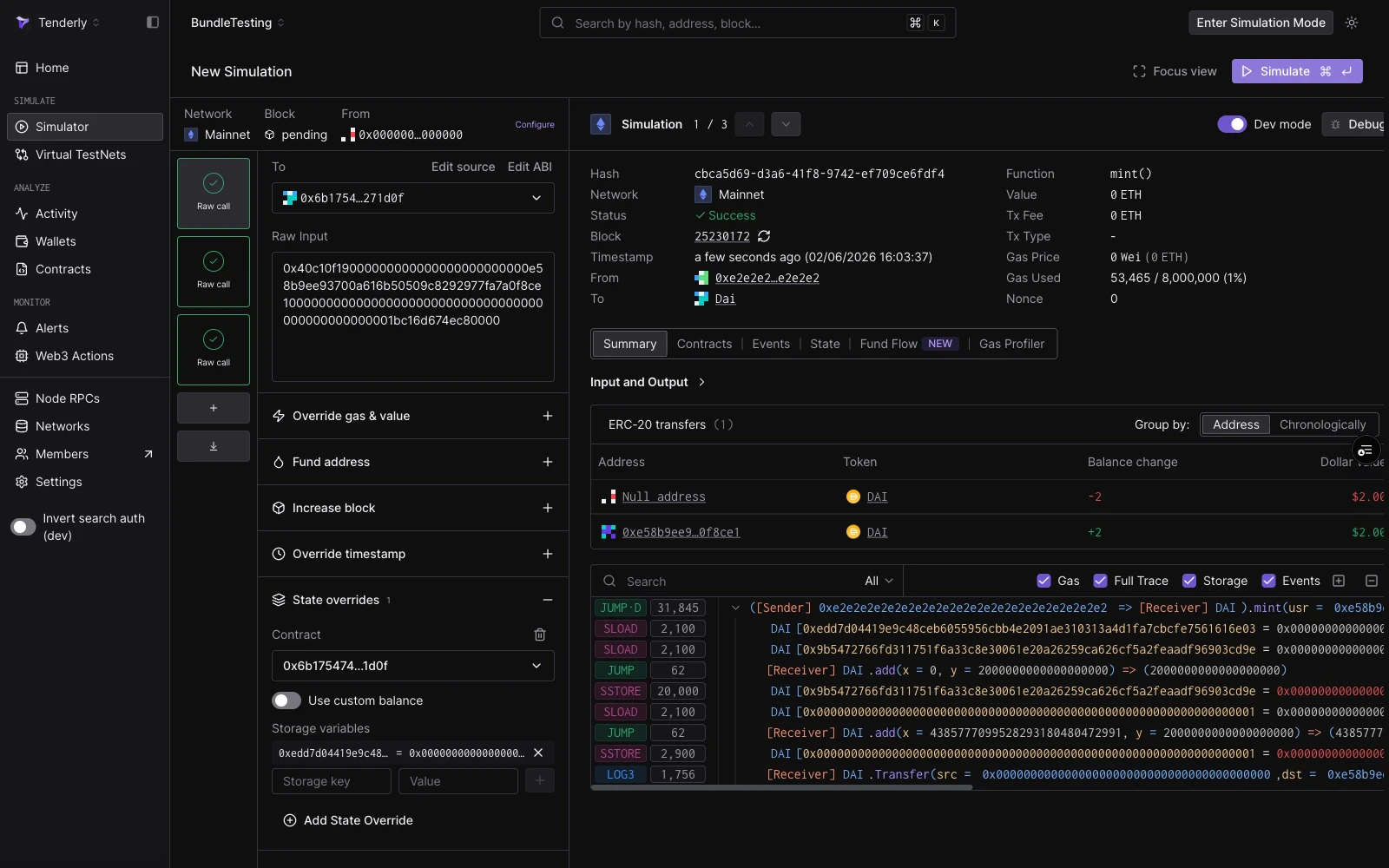
DAI का mint function एक wards mapping द्वारा संरक्षित है: केवल wards के रूप में पंजीकृत पते ही इसे कॉल कर सकते हैं। Fake ward (0xe2e2...e2) mainnet पर ward नहीं है। इस चरण को सफल बनाने के लिए, एक state override जोड़ें जो उस पते के लिए ward स्टोरेज स्लॉट को 1 पर सेट करे:
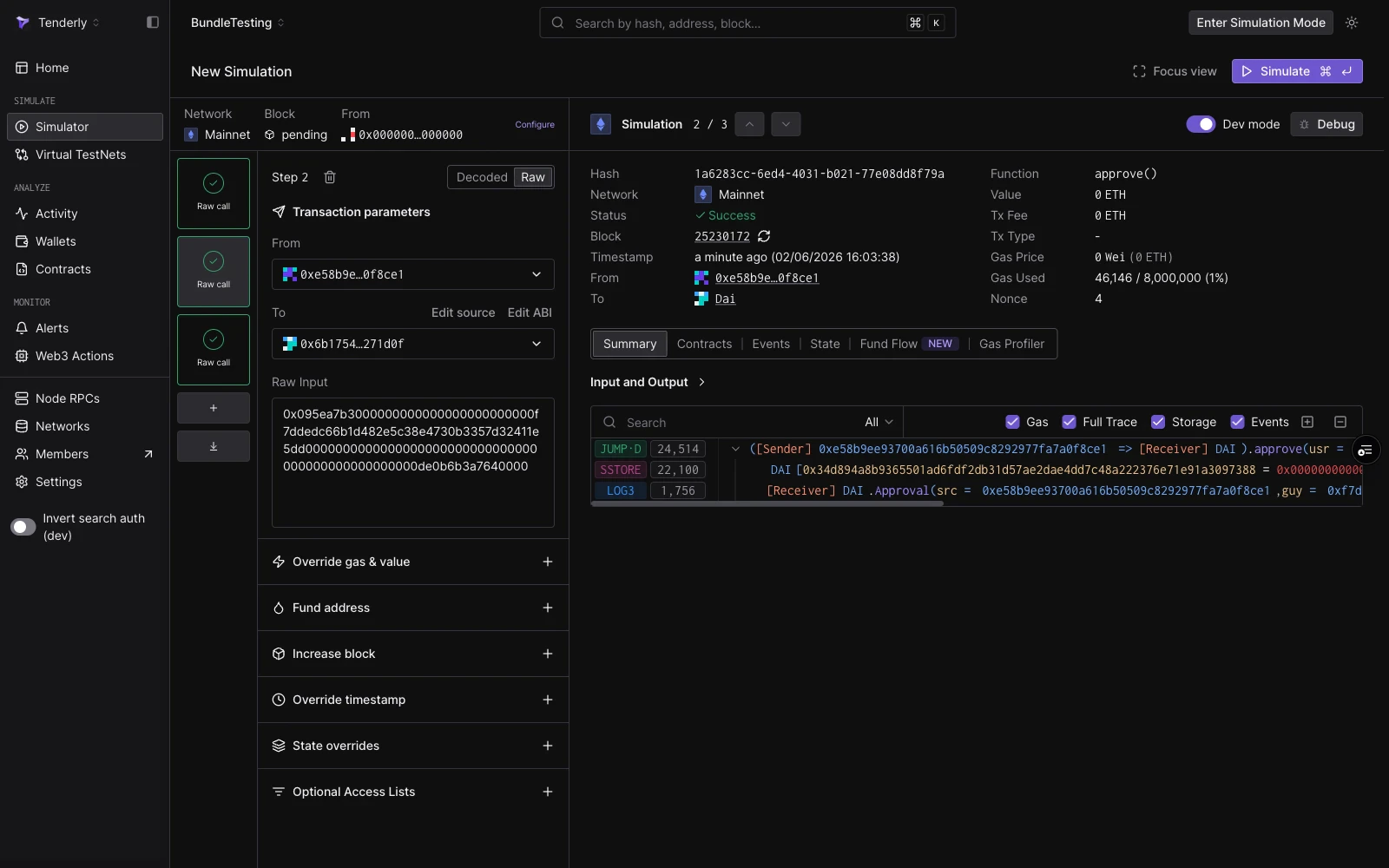
Holder एक spender को 1 DAI तक pull करने के लिए approve करता है। यह चरण काम करता है क्योंकि चरण 1 ने पहले ही साझा state stream में holder के balance में 2 DAI क्रेडिट कर दिए हैं।
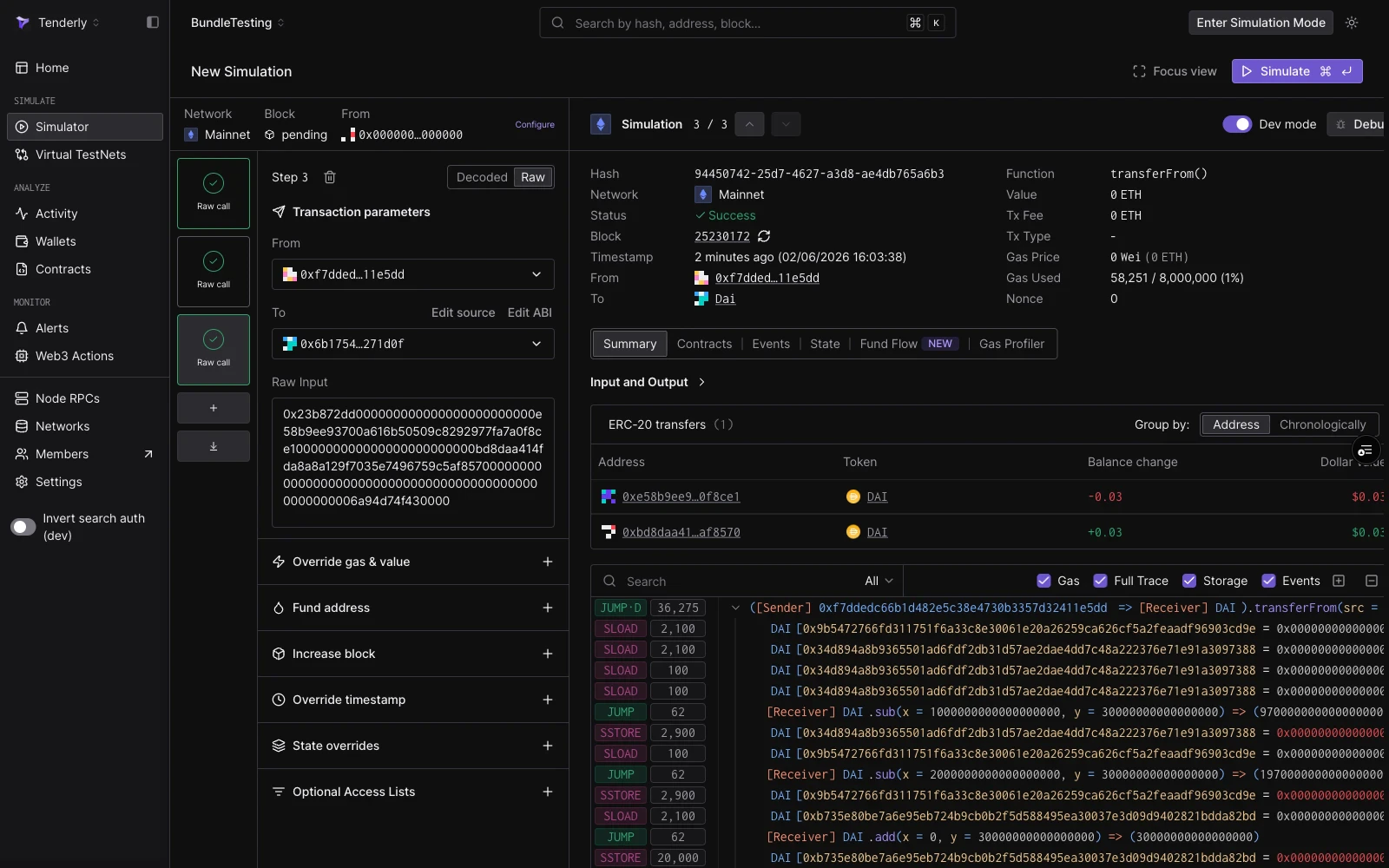
Spender holder से एक recipient को 0.03 DAI ले जाता है। यह काम करता है क्योंकि चरण 2 ने allowance प्रदान किया, जो केवल bundle के state stream के अंदर दिखाई देता है, on-chain नहीं।
Simulator UI के माध्यम से चलाएँ
1
Sim Bundle Builder खोलें
बाएँ नेविगेशन में Simulator पर जाएँ, फिर New Simulation पर क्लिक करें। Bundle builder एक खाली चरण के साथ खुलता है।
2
Session strip कॉन्फ़िगर करें
Session strip शीर्ष पर चलता है। Network को Mainnet पर सेट करें और Block को Pending के रूप में छोड़ दें।
फिर State overrides का विस्तार करें, DAI contract जोड़ें, और ऊपर दी गई तालिका से ward storage स्लॉट और मान दर्ज करें। स्लॉट commit करने के लिए Add storage override पर क्लिक करें।
चरण 1 mint calldata से भरा और ward state override कॉन्फ़िगर किया गया।
4
चरण 2 जोड़ें: Approve
Bundle rail में + Add function call पर क्लिक करें। नए चरण को Raw मोड में switch करें। सेट करें:
Simulate पर क्लिक करें (या ⌘↵ दबाएँ)। सभी तीनों चरण अनुक्रम में निष्पादित होते हैं। इसके decoded आउटपुट, उपयोग किए गए gas, events, और token transfers का निरीक्षण करने के लिए rail में प्रत्येक चरण पर क्लिक करें।
Bundle चलाने के बाद: चरण 2 (approve) पर फ़ोकस है, Approval event और decoded output दिखा रहा है।
चरण 3 (transferFrom) सफल रहा। 0.03 DAI transfer ERC-20 transfers tab में दिखाई दे रहा है।
Simulation API के माध्यम से चलाएँ
समान अनुक्रम को प्रोग्रामेटिक रूप से चलाने के लिए simulate-bundle एंडपॉइंट का उपयोग करें। {accountSlug} और {projectSlug} को अपने मानों से बदलें।
प्रतिक्रिया तीन simulation परिणामों की एक array है, प्रति चरण एक। प्रत्येक entry में status, gasUsed, decoded logs, एक trace, assetChanges, और balanceChanges होता है।एक सफल रन सभी तीनों चरणों के लिए "status": true दिखाता है। यदि कोई चरण revert करता है (उदाहरण के लिए, क्योंकि चरण 1 से state override गायब है), तो API विफल होने वाले चरण तक और उसे सहित सभी परिणाम लौटाता है, और उसके बाद के चरण नहीं चलाए जाते।
परिणामों में क्या देखें
चरण
मुख्य संकेत
Mint
"type": "Mint" के साथ assetChanges entry और holder को क्रेडिट किए गए 2 DAI। zero पते से Transfer event।
Approve
logs में Approval event। कोई asset परिवर्तन नहीं (approvals tokens स्थानांतरित नहीं करते)।
TransferFrom
"type": "Transfer" के साथ assetChanges entry और 0.03 DAI holder से recipient तक जा रहा है। logs में Transfer event। balanceChanges holder के लिए नकारात्मक delta और recipient के लिए सकारात्मक दिखा रहे हैं।
State overrides: simulations में storage, balance, और bytecode को कैसे override करें।
Simulator UI: bundle builder के लिए layout reference और keyboard shortcuts।
{"docsConfig":{"theme":"mint","$schema":"https://mintlify.com/docs.json","name":"Tenderly","description":"Tenderly developer documentation — Virtual Environments, Node RPC, Simulation API, Debugger, Monitor, Alerts, Web3 Actions, and more.","colors":{"primary":"#7857FF","light":"#9B83FF","dark":"#7857FF"},"logo":{"light":"https://mintcdn.com/tenderly/OpA99rKrR1G10AGk/logo/tenderly-logo-light-background.svg?fit=max\u0026auto=format\u0026n=OpA99rKrR1G10AGk\u0026q=85\u0026s=8655a53ac5f0fdc1af7c82f4e2e270ef","dark":"https://mintcdn.com/tenderly/OpA99rKrR1G10AGk/logo/tenderly-logo-dark-background.svg?fit=max\u0026auto=format\u0026n=OpA99rKrR1G10AGk\u0026q=85\u0026s=17e892ea6a8bbd3f67e2055373d36609","href":"/introduction"},"favicon":"https://mintcdn.com/tenderly/nRyi0uSIGTr6AMxX/favicon.ico?fit=max\u0026auto=format\u0026n=nRyi0uSIGTr6AMxX\u0026q=85\u0026s=6a58780606747ae9bd8a65444d16422d","api":{"playground":{"display":"interactive","proxy":false},"examples":{"defaults":"required","languages":["curl","javascript","python","go"]}},"appearance":{"default":"dark"},"navbar":{"links":[{"href":"https://blog.tenderly.co","label":"Blog"},{"href":"mailto:support@tenderly.co","label":"Support"}],"primary":{"type":"button","label":"Dashboard","href":"https://dashboard.tenderly.co"}},"footer":{"socials":{"x":"https://x.com/TenderlyApp","github":"https://github.com/Tenderly","linkedin":"https://www.linkedin.com/company/tenderly-co"}},"search":{"prompt":"Search the Tenderly docs..."},"styling":{"codeblocks":{"theme":{"light":"catppuccin-latte","dark":"catppuccin-mocha"}},"latex":true},"contextual":{"options":["copy","view","assistant","claude","chatgpt","perplexity","cursor","vscode","mcp",{"title":"Add to Claude Code","description":"Connect the Tenderly MCP server to Claude Code","icon":"terminal","href":"https://docs.tenderly.co/ai-tools/quickstart"}],"display":"header"},"navigation":{"languages":[{"language":"en","href":"introduction"},{"language":"ru","href":"ru/introduction"},{"language":"zh","href":"zh/introduction"},{"language":"hi","href":"hi/introduction"}]}},"deployment":{"deploymentMetadataValue":{"subdomain":"tenderly","hasAudioNarration":false,"actualSubdomain":"tenderly","customDomains":["docs.tenderly.co"],"gitSource":{"type":"github","owner":"tenderly","repo":"tenderly-mintlify","deployBranch":"main","contentDirectory":"","isPrivate":true,"mountPath":"","label":""},"feedback":{"thumbs":true},"entitlements":{"AI_CHAT":{"status":"ENABLED"}},"buildId":"6afdac79be4a433e33e99d69","clientVersion":"0.0.4270","searchFilterCounts":[{"language":"en","tag":"Documentation","count":172},{"language":"hi","tag":"Documentation","count":164},{"language":"ru","tag":"Documentation","count":164},{"language":"zh","tag":"Documentation","count":164},{"language":"en","tag":"Simulator","count":74},{"language":"hi","tag":"Simulator","count":74},{"language":"ru","tag":"Simulator","count":74},{"language":"zh","tag":"Simulator","count":74},{"language":"default","tag":"API Reference","count":52},{"language":"en","tag":"Virtual Environments","count":42},{"language":"hi","tag":"Virtual Environments","count":42},{"language":"ru","tag":"Virtual Environments","count":42},{"language":"zh","tag":"Virtual Environments","count":42},{"language":"en","tag":"Monitor","count":30},{"language":"hi","tag":"Monitor","count":30},{"language":"ru","tag":"Monitor","count":30},{"language":"zh","tag":"Monitor","count":30},{"language":"en","tag":"How-to guides","count":28},{"language":"hi","tag":"How-to guides","count":28},{"language":"ru","tag":"How-to guides","count":28},{"language":"zh","tag":"How-to guides","count":28},{"language":"en","tag":"Console","count":27},{"language":"hi","tag":"Console","count":27},{"language":"ru","tag":"Console","count":27},{"language":"zh","tag":"Console","count":27},{"language":"en","tag":"Troubleshooting","count":22},{"language":"hi","tag":"Troubleshooting","count":22},{"language":"ru","tag":"Troubleshooting","count":22},{"language":"zh","tag":"Troubleshooting","count":22},{"language":"en","tag":"Web3 Actions","count":21},{"language":"en","tag":"Node RPC","count":21},{"language":"hi","tag":"Web3 Actions","count":21},{"language":"ru","tag":"Web3 Actions","count":21},{"language":"zh","tag":"Web3 Actions","count":21},{"language":"hi","tag":"Node RPC","count":20},{"language":"ru","tag":"Node RPC","count":20},{"language":"zh","tag":"Node RPC","count":20},{"language":"en","tag":"Simulation API","count":15},{"language":"hi","tag":"Simulation API","count":15},{"language":"ru","tag":"Simulation API","count":15},{"language":"zh","tag":"Simulation API","count":15},{"language":"default","tag":"Actions","count":10},{"language":"default","tag":"Simulator","count":9},{"language":"default","tag":"Virtual Environments","count":9},{"language":"default","tag":"Contracts","count":7},{"language":"default","tag":"Alerts","count":6},{"language":"default","tag":"Projects","count":5},{"language":"default","tag":"Wallets","count":3},{"language":"default","tag":"Delivery Channels","count":2},{"language":"default","tag":"Other","count":1}]},"assistantConfig":{"enableAskAiButton":false,"enableStarterQuestions":true,"enableContextualStarterQuestions":true,"enableAskAiSearchBar":true,"deflection":{"enabled":true,"email":"support@tenderly.co","showHelpButton":true}},"basePath":"","hasChatPermissions":true,"hasWebMcpPermissions":false,"toggles":[{"name":"kill-isr","enabled":true,"variant":{"name":"disabled","enabled":false,"feature_enabled":true},"impressionData":false},{"name":"custom-rbac-roles","enabled":true,"variant":{"name":"disabled","enabled":false,"feature_enabled":true},"impressionData":false},{"name":"agent-mintlify-slack","enabled":true,"variant":{"name":"disabled","enabled":false,"feature_enabled":true},"impressionData":false},{"name":"agent-integrations-settings","enabled":true,"variant":{"name":"disabled","enabled":false,"feature_enabled":true},"impressionData":false},{"name":"rbac-expansion","enabled":true,"variant":{"name":"disabled","enabled":false,"feature_enabled":true},"impressionData":false},{"name":"automations-pr-grouping","enabled":true,"variant":{"name":"disabled","enabled":false,"feature_enabled":true},"impressionData":false},{"name":"custom-prefix","enabled":true,"variant":{"name":"disabled","enabled":false,"feature_enabled":true},"impressionData":false},{"name":"analytics-v7","enabled":true,"variant":{"name":"disabled","enabled":false,"feature_enabled":true},"impressionData":false},{"name":"user-flows-analytics","enabled":true,"variant":{"name":"disabled","enabled":false,"feature_enabled":true},"impressionData":false},{"name":"no-publish-flow","enabled":true,"variant":{"name":"disabled","enabled":false,"feature_enabled":true},"impressionData":false},{"name":"workos-onboarding","enabled":true,"variant":{"name":"disabled","enabled":false,"feature_enabled":true},"impressionData":false},{"name":"snapshot-serving-live","enabled":true,"variant":{"name":"disabled","enabled":false,"feature_enabled":true},"impressionData":false},{"name":"stripTemperatureMiddleware","enabled":true,"variant":{"name":"disabled","enabled":false,"feature_enabled":true},"impressionData":false},{"name":"support-platform-pylon-zendesk","enabled":true,"variant":{"name":"disabled","enabled":false,"feature_enabled":true},"impressionData":false},{"name":"snapshot-serving","enabled":true,"variant":{"name":"disabled","enabled":false,"feature_enabled":true},"impressionData":false},{"name":"instant-rollback","enabled":true,"variant":{"name":"disabled","enabled":false,"feature_enabled":true},"impressionData":false},{"name":"granular-notifications-server","enabled":true,"variant":{"name":"disabled","enabled":false,"feature_enabled":true},"impressionData":false},{"name":"granular-notifications","enabled":true,"variant":{"name":"disabled","enabled":false,"feature_enabled":true},"impressionData":false},{"name":"automations-fable","enabled":true,"variant":{"name":"disabled","enabled":false,"feature_enabled":true},"impressionData":false},{"name":"fixed-ai-action-pricing","enabled":true,"variant":{"name":"disabled","enabled":false,"feature_enabled":true},"impressionData":false},{"name":"site-roles","enabled":true,"variant":{"name":"disabled","enabled":false,"feature_enabled":true},"impressionData":false},{"name":"automation-resolve-merge-conflict","enabled":true,"variant":{"name":"disabled","enabled":false,"feature_enabled":true},"impressionData":false},{"name":"scoped-publishing","enabled":true,"variant":{"name":"disabled","enabled":false,"feature_enabled":true},"impressionData":false},{"name":"mintql","enabled":true,"variant":{"name":"disabled","enabled":false,"feature_enabled":true},"impressionData":false},{"name":"page-level-analytics","enabled":true,"variant":{"name":"disabled","enabled":false,"feature_enabled":true},"impressionData":false},{"name":"editor-version-history-v2","enabled":true,"variant":{"name":"disabled","enabled":false,"feature_enabled":true},"impressionData":false},{"name":"billing-page-v2","enabled":true,"variant":{"name":"disabled","enabled":false,"feature_enabled":true},"impressionData":false},{"name":"full-page-search","enabled":true,"variant":{"name":"disabled","enabled":false,"feature_enabled":true},"impressionData":false},{"name":"workspace-projects","enabled":true,"variant":{"name":"disabled","enabled":false,"feature_enabled":true},"impressionData":false},{"name":"assistant-v5","enabled":true,"variant":{"name":"disabled","enabled":false,"feature_enabled":true},"impressionData":false},{"name":"fork-pr-previews","enabled":true,"variant":{"name":"disabled","enabled":false,"feature_enabled":true},"impressionData":false},{"name":"revalidation-jwt","enabled":true,"variant":{"name":"disabled","enabled":false,"feature_enabled":true},"impressionData":false},{"name":"workos-sso-scim","enabled":true,"variant":{"name":"disabled","enabled":false,"feature_enabled":true},"impressionData":false},{"name":"hobby-abuse-scan","enabled":true,"variant":{"name":"disabled","enabled":false,"feature_enabled":true},"impressionData":false},{"name":"dashboard-inbox","enabled":true,"variant":{"name":"disabled","enabled":false,"feature_enabled":true},"impressionData":false},{"name":"workos-signup","enabled":true,"variant":{"name":"disabled","enabled":false,"feature_enabled":true},"impressionData":false},{"name":"turbopuffer-dual-write","enabled":true,"variant":{"name":"disabled","enabled":false,"feature_enabled":true},"impressionData":false},{"name":"workos-enabled","enabled":true,"variant":{"name":"disabled","enabled":false,"feature_enabled":true},"impressionData":false},{"name":"approve-review-flow","enabled":true,"variant":{"name":"disabled","enabled":false,"feature_enabled":true},"impressionData":false},{"name":"editor-metadata","enabled":true,"variant":{"name":"disabled","enabled":false,"feature_enabled":true},"impressionData":false},{"name":"sso-setup-deadline-banner","enabled":true,"variant":{"name":"disabled","enabled":false,"feature_enabled":true},"impressionData":false},{"name":"turbopuffer-serve","enabled":true,"variant":{"name":"disabled","enabled":false,"feature_enabled":true},"impressionData":false},{"name":"live-agents","enabled":true,"variant":{"name":"disabled","enabled":false,"feature_enabled":true},"impressionData":false},{"name":"starter-pricing","enabled":true,"variant":{"name":"control","enabled":true,"payload":{"type":"string","value":"control"},"feature_enabled":true},"impressionData":false},{"name":"llms-txt-v2","enabled":true,"variant":{"name":"disabled","enabled":false,"feature_enabled":true},"impressionData":false},{"name":"wildcard-email-auth","enabled":true,"variant":{"name":"disabled","enabled":false,"feature_enabled":true},"impressionData":false}],"privacy":{"consentBanner":{"enabled":true}},"googleFontsInlined":false},"customCss":[{"filePath":"custom.css","content":"html.dark .shiki,html.dark .shiki span{color:var(--shiki-dark)!important;background-color:var(--shiki-dark-bg)!important;font-style:var(--shiki-dark-font-style)!important;font-weight:var(--shiki-dark-font-weight)!important;text-decoration:var(--shiki-dark-text-decoration)!important}html.dark .card .primary-text{color:#9B83FF}.card .prose>div>h2,.card .prose>div>h3{color:#7857FF}html.dark .card .prose>div>h2,html.dark .card .prose>div>h3{color:#9B83FF}.card:has(.prose>div>h2) [data-component-part=\"card-content-container\"]{padding:1rem 1.25rem}html.dark .card:hover{border-color:#9B83FF!important;box-shadow:0 0 0 1px rgba(155, 131, 255, 0.25)}html:not(.dark) .card:hover{border-color:#7857FF!important;box-shadow:0 0 0 1px rgba(120, 87, 255, 0.18)}"}]}
{"page":{"pagePath":"hi/simulations/guides/mint-approve-transfer-bundle","slug":"/hi/simulations/guides/mint-approve-transfer-bundle","pageMetadata":{"title":"Mint, Approve, TransferFrom Bundle का Simulation करें","description":"एक 3-चरण simulation bundle बनाएँ जो DAI mint, spender approve, और transferFrom चलाता है — साझा state वाले multi-transaction प्रवाह के परीक्षण हेतु।","href":"/hi/simulations/guides/mint-approve-transfer-bundle"},"description":{"compiledSource":"\"use strict\";\nconst {jsx: _jsx} = arguments[0];\nconst {useMDXComponents: _provideComponents} = arguments[0];\nfunction _createMdxContent(props) {\n const _components = {\n p: \"p\",\n ..._provideComponents(),\n ...props.components\n };\n return _jsx(_components.p, {\n children: \"एक 3-चरण simulation bundle बनाएँ जो DAI mint, spender approve, और transferFrom चलाता है — साझा state वाले multi-transaction प्रवाह के परीक्षण हेतु।\"\n });\n}\nfunction MDXContent(props = {}) {\n const {wrapper: MDXLayout} = {\n ..._provideComponents(),\n ...props.components\n };\n return MDXLayout ? _jsx(MDXLayout, {\n ...props,\n children: _jsx(_createMdxContent, {\n ...props\n })\n }) : _createMdxContent(props);\n}\nreturn {\n default: MDXContent\n};\n","frontmatter":{},"scope":{}},"pageType":"default","mdx":{"mdxSource":{"compiledSource":"\"use strict\";const{Fragment:_Fragment,jsx:_jsx,jsxs:_jsxs}=arguments[0];const{useMDXComponents:_provideComponents}=arguments[0];function _createMdxContent(props){const _components={a:`a`,code:`code`,li:`li`,p:`p`,pre:`pre`,span:`span`,strong:`strong`,tbody:`tbody`,td:`td`,th:`th`,thead:`thead`,tr:`tr`,ul:`ul`,..._provideComponents(),...props.components},{CodeBlock,Frame,Heading,OptimizedImage,Step,Steps,Table}=_components;if(!CodeBlock)_missingMdxReference(`CodeBlock`,true);if(!Frame)_missingMdxReference(`Frame`,true);if(!Heading)_missingMdxReference(`Heading`,true);if(!OptimizedImage)_missingMdxReference(`OptimizedImage`,true);if(!Step)_missingMdxReference(`Step`,true);if(!Steps)_missingMdxReference(`Steps`,true);if(!Table)_missingMdxReference(`Table`,true);return _jsxs(_Fragment,{children:[_jsxs(_components.p,{children:[`यह गाइड एक 3-चरण simulation bundle बनाता है जो क्लासिक ERC-20 approval प्रवाह का अभ्यास करता है: एक holder को tokens mint करना, एक spender को approve करना, फिर spender को `,_jsx(_components.code,{children:`transferFrom`}),` कॉल करने देना। प्रत्येक चरण उस state पर निर्भर करता है जिसे पिछला चरण बनाता है, यही कारण है कि यहाँ एक bundle सही उपकरण है।`]}),`\n`,_jsx(Heading,{level:`2`,id:`एक-bundle-क्यों`,children:`एक bundle क्यों?`}),`\n`,_jsx(_components.p,{children:`प्रत्येक transaction का isolation में simulation करना असफल हो जाता है:`}),`\n`,_jsxs(_components.ul,{children:[`\n`,_jsxs(_components.li,{children:[_jsx(_components.strong,{children:`केवल Mint`}),`: आप mint logic को सत्यापित कर सकते हैं, लेकिन holder पते के पास mainnet पर कोई tokens नहीं हैं।`]}),`\n`,_jsxs(_components.li,{children:[_jsx(_components.strong,{children:`केवल Approve`}),`: simulation के लिए holder के पास approve करने के लिए वास्तव में balance होना चाहिए।`]}),`\n`,_jsxs(_components.li,{children:[_jsx(_components.strong,{children:`केवल TransferFrom`}),`: balance और approval दोनों का जगह पर होना आवश्यक है।`]}),`\n`]}),`\n`,_jsx(_components.p,{children:`एक Sim Bundle तीनों को अनुक्रम में चलाता है, परिणामी state साझा करता है। चरण 2 चरण 1 से minted balance देखता है। चरण 3 चरण 2 से approval देखता है।`}),`\n`,_jsx(Heading,{level:`2`,id:`तीन-transactions`,children:`तीन transactions`}),`\n`,_jsxs(_components.p,{children:[`सभी तीन transactions Ethereum mainnet पर DAI contract (`,_jsx(_components.code,{children:`0x6b175474e89094c44da98b954eedeac495271d0f`}),`) को target करते हैं।`]}),`\n`,_jsx(Heading,{level:`3`,id:`चरण-1-2-dai-mint-करें`,children:`चरण 1: 2 DAI Mint करें`}),`\n`,_jsx(CodeBlock,{filename:``,numberOfLines:`5`,language:`shellscript`,children:_jsx(_components.pre,{className:`shiki shiki-themes catppuccin-latte catppuccin-mocha`,style:{backgroundColor:`#eff1f5`,\"--shiki-dark-bg\":`#1e1e2e`,color:`#4c4f69`,\"--shiki-dark\":`#cdd6f4`},language:`shellscript`,children:_jsxs(_components.code,{language:`shellscript`,numberOfLines:`5`,children:[_jsxs(_components.span,{className:`line`,children:[_jsx(_components.span,{style:{color:`#1E66F5`,\"--shiki-light-font-style\":`italic`,\"--shiki-dark\":`#89B4FA`,\"--shiki-dark-font-style\":`italic`},children:`From:`}),_jsx(_components.span,{style:{color:`#FE640B`,\"--shiki-dark\":`#FAB387`},children:` 0xe2e2e2e2e2e2e2e2e2e2e2e2e2e2e2e2e2e2e2e2`}),_jsx(_components.span,{style:{color:`#4C4F69`,\"--shiki-dark\":`#CDD6F4`},children:` (fake `}),_jsx(_components.span,{style:{color:`#40A02B`,\"--shiki-dark\":`#A6E3A1`},children:`ward`}),_jsx(_components.span,{style:{color:`#4C4F69`,\"--shiki-dark\":`#CDD6F4`},children:`)`})]}),`\n`,_jsxs(_components.span,{className:`line`,children:[_jsx(_components.span,{style:{color:`#1E66F5`,\"--shiki-light-font-style\":`italic`,\"--shiki-dark\":`#89B4FA`,\"--shiki-dark-font-style\":`italic`},children:`To:`}),_jsx(_components.span,{style:{color:`#FE640B`,\"--shiki-dark\":`#FAB387`},children:` 0x6b175474e89094c44da98b954eedeac495271d0f`}),_jsx(_components.span,{style:{color:`#4C4F69`,\"--shiki-dark\":`#CDD6F4`},children:` (DAI)`})]}),`\n`,_jsxs(_components.span,{className:`line`,children:[_jsx(_components.span,{style:{color:`#1E66F5`,\"--shiki-light-font-style\":`italic`,\"--shiki-dark\":`#89B4FA`,\"--shiki-dark-font-style\":`italic`},children:`Input:`}),_jsx(_components.span,{style:{color:`#FE640B`,\"--shiki-dark\":`#FAB387`},children:` 0x40c10f19`})]}),`\n`,_jsxs(_components.span,{className:`line`,children:[_jsx(_components.span,{style:{color:`#1E66F5`,\"--shiki-light-font-style\":`italic`,\"--shiki-dark\":`#89B4FA`,\"--shiki-dark-font-style\":`italic`},children:` 000000000000000000000000e58b9ee93700a616b50509c8292977fa7a0f8ce1`}),_jsx(_components.span,{style:{color:`#4C4F69`,\"--shiki-dark\":`#CDD6F4`},children:` (recipient)`})]}),`\n`,_jsxs(_components.span,{className:`line`,children:[_jsx(_components.span,{style:{color:`#1E66F5`,\"--shiki-light-font-style\":`italic`,\"--shiki-dark\":`#89B4FA`,\"--shiki-dark-font-style\":`italic`},children:` 0000000000000000000000000000000000000000000000001bc16d674ec80000`}),_jsx(_components.span,{style:{color:`#4C4F69`,\"--shiki-dark\":`#CDD6F4`},children:` (2 `}),_jsx(_components.span,{style:{color:`#40A02B`,\"--shiki-dark\":`#A6E3A1`},children:`DAI`}),_jsx(_components.span,{style:{color:`#4C4F69`,\"--shiki-dark\":`#CDD6F4`},children:`)`})]}),`\n`]})})}),`\n`,_jsxs(_components.p,{children:[`DAI का `,_jsx(_components.code,{children:`mint`}),` function एक `,_jsx(_components.code,{children:`wards`}),` mapping द्वारा संरक्षित है: केवल wards के रूप में पंजीकृत पते ही इसे कॉल कर सकते हैं। Fake ward (`,_jsx(_components.code,{children:`0xe2e2...e2`}),`) mainnet पर ward नहीं है। इस चरण को सफल बनाने के लिए, एक `,_jsx(_components.strong,{children:`state override`}),` जोड़ें जो उस पते के लिए ward स्टोरेज स्लॉट को `,_jsx(_components.code,{children:`1`}),` पर सेट करे:`]}),`\n`,_jsxs(Table,{children:[_jsx(_components.thead,{children:_jsxs(_components.tr,{children:[_jsx(_components.th,{children:`फ़ील्ड`}),_jsx(_components.th,{children:`मान`})]})}),_jsxs(_components.tbody,{children:[_jsxs(_components.tr,{children:[_jsx(_components.td,{children:`Contract`}),_jsx(_components.td,{\"data-numeric\":`true`,children:_jsx(_components.code,{children:`0x6b175474e89094c44da98b954eedeac495271d0f`})})]}),_jsxs(_components.tr,{children:[_jsx(_components.td,{children:`Storage key`}),_jsx(_components.td,{\"data-numeric\":`true`,children:_jsx(_components.code,{children:`0xedd7d04419e9c48ceb6055956cbb4e2091ae310313a4d1fa7cbcfe7561616e03`})})]}),_jsxs(_components.tr,{children:[_jsx(_components.td,{children:`मान`}),_jsx(_components.td,{\"data-numeric\":`true`,children:_jsx(_components.code,{children:`0x0000000000000000000000000000000000000000000000000000000000000001`})})]})]})]}),`\n`,_jsxs(_components.p,{children:[`Storage key `,_jsx(_components.code,{children:`keccak256(abi.encode(wardAddress, 0))`}),` है, जो storage स्थिति `,_jsx(_components.code,{children:`0`}),` पर `,_jsx(_components.code,{children:`wards[fakeWardAddress]`}),` के लिए मानक Solidity mapping स्लॉट है।`]}),`\n`,_jsx(Heading,{level:`3`,id:`चरण-2-1-dai-approve-करें`,children:`चरण 2: 1 DAI Approve करें`}),`\n`,_jsx(CodeBlock,{filename:``,numberOfLines:`5`,language:`shellscript`,children:_jsx(_components.pre,{className:`shiki shiki-themes catppuccin-latte catppuccin-mocha`,style:{backgroundColor:`#eff1f5`,\"--shiki-dark-bg\":`#1e1e2e`,color:`#4c4f69`,\"--shiki-dark\":`#cdd6f4`},language:`shellscript`,children:_jsxs(_components.code,{language:`shellscript`,numberOfLines:`5`,children:[_jsxs(_components.span,{className:`line`,children:[_jsx(_components.span,{style:{color:`#1E66F5`,\"--shiki-light-font-style\":`italic`,\"--shiki-dark\":`#89B4FA`,\"--shiki-dark-font-style\":`italic`},children:`From:`}),_jsx(_components.span,{style:{color:`#FE640B`,\"--shiki-dark\":`#FAB387`},children:` 0xe58b9ee93700a616b50509c8292977fa7a0f8ce1`}),_jsx(_components.span,{style:{color:`#4C4F69`,\"--shiki-dark\":`#CDD6F4`},children:` (token `}),_jsx(_components.span,{style:{color:`#40A02B`,\"--shiki-dark\":`#A6E3A1`},children:`holder`}),_jsx(_components.span,{style:{color:`#40A02B`,\"--shiki-dark\":`#A6E3A1`},children:` from`}),_jsx(_components.span,{style:{color:`#40A02B`,\"--shiki-dark\":`#A6E3A1`},children:` step`}),_jsx(_components.span,{style:{color:`#FE640B`,\"--shiki-dark\":`#FAB387`},children:` 1`}),_jsx(_components.span,{style:{color:`#4C4F69`,\"--shiki-dark\":`#CDD6F4`},children:`)`})]}),`\n`,_jsxs(_components.span,{className:`line`,children:[_jsx(_components.span,{style:{color:`#1E66F5`,\"--shiki-light-font-style\":`italic`,\"--shiki-dark\":`#89B4FA`,\"--shiki-dark-font-style\":`italic`},children:`To:`}),_jsx(_components.span,{style:{color:`#FE640B`,\"--shiki-dark\":`#FAB387`},children:` 0x6b175474e89094c44da98b954eedeac495271d0f`}),_jsx(_components.span,{style:{color:`#4C4F69`,\"--shiki-dark\":`#CDD6F4`},children:` (DAI)`})]}),`\n`,_jsxs(_components.span,{className:`line`,children:[_jsx(_components.span,{style:{color:`#1E66F5`,\"--shiki-light-font-style\":`italic`,\"--shiki-dark\":`#89B4FA`,\"--shiki-dark-font-style\":`italic`},children:`Input:`}),_jsx(_components.span,{style:{color:`#FE640B`,\"--shiki-dark\":`#FAB387`},children:` 0x095ea7b3`})]}),`\n`,_jsxs(_components.span,{className:`line`,children:[_jsx(_components.span,{style:{color:`#1E66F5`,\"--shiki-light-font-style\":`italic`,\"--shiki-dark\":`#89B4FA`,\"--shiki-dark-font-style\":`italic`},children:` 000000000000000000000000f7ddedc66b1d482e5c38e4730b3357d32411e5dd`}),_jsx(_components.span,{style:{color:`#4C4F69`,\"--shiki-dark\":`#CDD6F4`},children:` (spender)`})]}),`\n`,_jsxs(_components.span,{className:`line`,children:[_jsx(_components.span,{style:{color:`#1E66F5`,\"--shiki-light-font-style\":`italic`,\"--shiki-dark\":`#89B4FA`,\"--shiki-dark-font-style\":`italic`},children:` 0000000000000000000000000000000000000000000000000de0b6b3a7640000`}),_jsx(_components.span,{style:{color:`#4C4F69`,\"--shiki-dark\":`#CDD6F4`},children:` (1 `}),_jsx(_components.span,{style:{color:`#40A02B`,\"--shiki-dark\":`#A6E3A1`},children:`DAI`}),_jsx(_components.span,{style:{color:`#4C4F69`,\"--shiki-dark\":`#CDD6F4`},children:`)`})]}),`\n`]})})}),`\n`,_jsx(_components.p,{children:`Holder एक spender को 1 DAI तक pull करने के लिए approve करता है। यह चरण काम करता है क्योंकि चरण 1 ने पहले ही साझा state stream में holder के balance में 2 DAI क्रेडिट कर दिए हैं।`}),`\n`,_jsx(Heading,{level:`3`,id:`चरण-3-0-03-dai-transferfrom`,children:`चरण 3: 0.03 DAI TransferFrom`}),`\n`,_jsx(CodeBlock,{filename:``,numberOfLines:`6`,language:`shellscript`,children:_jsx(_components.pre,{className:`shiki shiki-themes catppuccin-latte catppuccin-mocha`,style:{backgroundColor:`#eff1f5`,\"--shiki-dark-bg\":`#1e1e2e`,color:`#4c4f69`,\"--shiki-dark\":`#cdd6f4`},language:`shellscript`,children:_jsxs(_components.code,{language:`shellscript`,numberOfLines:`6`,children:[_jsxs(_components.span,{className:`line`,children:[_jsx(_components.span,{style:{color:`#1E66F5`,\"--shiki-light-font-style\":`italic`,\"--shiki-dark\":`#89B4FA`,\"--shiki-dark-font-style\":`italic`},children:`From:`}),_jsx(_components.span,{style:{color:`#FE640B`,\"--shiki-dark\":`#FAB387`},children:` 0xf7ddedc66b1d482e5c38e4730b3357d32411e5dd`}),_jsx(_components.span,{style:{color:`#4C4F69`,\"--shiki-dark\":`#CDD6F4`},children:` (approved `}),_jsx(_components.span,{style:{color:`#40A02B`,\"--shiki-dark\":`#A6E3A1`},children:`spender`}),_jsx(_components.span,{style:{color:`#4C4F69`,\"--shiki-dark\":`#CDD6F4`},children:`)`})]}),`\n`,_jsxs(_components.span,{className:`line`,children:[_jsx(_components.span,{style:{color:`#1E66F5`,\"--shiki-light-font-style\":`italic`,\"--shiki-dark\":`#89B4FA`,\"--shiki-dark-font-style\":`italic`},children:`To:`}),_jsx(_components.span,{style:{color:`#FE640B`,\"--shiki-dark\":`#FAB387`},children:` 0x6b175474e89094c44da98b954eedeac495271d0f`}),_jsx(_components.span,{style:{color:`#4C4F69`,\"--shiki-dark\":`#CDD6F4`},children:` (DAI)`})]}),`\n`,_jsxs(_components.span,{className:`line`,children:[_jsx(_components.span,{style:{color:`#1E66F5`,\"--shiki-light-font-style\":`italic`,\"--shiki-dark\":`#89B4FA`,\"--shiki-dark-font-style\":`italic`},children:`Input:`}),_jsx(_components.span,{style:{color:`#FE640B`,\"--shiki-dark\":`#FAB387`},children:` 0x23b872dd`})]}),`\n`,_jsxs(_components.span,{className:`line`,children:[_jsx(_components.span,{style:{color:`#1E66F5`,\"--shiki-light-font-style\":`italic`,\"--shiki-dark\":`#89B4FA`,\"--shiki-dark-font-style\":`italic`},children:` 000000000000000000000000e58b9ee93700a616b50509c8292977fa7a0f8ce1`}),_jsx(_components.span,{style:{color:`#4C4F69`,\"--shiki-dark\":`#CDD6F4`},children:` (sender `}),_jsx(_components.span,{style:{color:`#40A02B`,\"--shiki-dark\":`#A6E3A1`},children:`/`}),_jsx(_components.span,{style:{color:`#40A02B`,\"--shiki-dark\":`#A6E3A1`},children:` token`}),_jsx(_components.span,{style:{color:`#40A02B`,\"--shiki-dark\":`#A6E3A1`},children:` holder`}),_jsx(_components.span,{style:{color:`#4C4F69`,\"--shiki-dark\":`#CDD6F4`},children:`)`})]}),`\n`,_jsxs(_components.span,{className:`line`,children:[_jsx(_components.span,{style:{color:`#1E66F5`,\"--shiki-light-font-style\":`italic`,\"--shiki-dark\":`#89B4FA`,\"--shiki-dark-font-style\":`italic`},children:` 000000000000000000000000bd8daa414fda8a8a129f7035e7496759c5af8570`}),_jsx(_components.span,{style:{color:`#4C4F69`,\"--shiki-dark\":`#CDD6F4`},children:` (recipient)`})]}),`\n`,_jsxs(_components.span,{className:`line`,children:[_jsx(_components.span,{style:{color:`#1E66F5`,\"--shiki-light-font-style\":`italic`,\"--shiki-dark\":`#89B4FA`,\"--shiki-dark-font-style\":`italic`},children:` 000000000000000000000000000000000000000000000000006a94d74f430000`}),_jsx(_components.span,{style:{color:`#4C4F69`,\"--shiki-dark\":`#CDD6F4`},children:` (0.03 `}),_jsx(_components.span,{style:{color:`#40A02B`,\"--shiki-dark\":`#A6E3A1`},children:`DAI`}),_jsx(_components.span,{style:{color:`#4C4F69`,\"--shiki-dark\":`#CDD6F4`},children:`)`})]}),`\n`]})})}),`\n`,_jsx(_components.p,{children:`Spender holder से एक recipient को 0.03 DAI ले जाता है। यह काम करता है क्योंकि चरण 2 ने allowance प्रदान किया, जो केवल bundle के state stream के अंदर दिखाई देता है, on-chain नहीं।`}),`\n`,_jsx(Heading,{level:`2`,id:`simulator-ui-के-माध्यम-से-चलाएँ`,children:`Simulator UI के माध्यम से चलाएँ`}),`\n`,_jsxs(Steps,{children:[_jsx(Step,{title:`Sim Bundle Builder खोलें`,children:_jsxs(_components.p,{children:[`बाएँ नेविगेशन में `,_jsx(_components.strong,{children:`Simulator`}),` पर जाएँ, फिर `,_jsx(_components.strong,{children:`New Simulation`}),` पर क्लिक करें। Bundle builder एक खाली चरण के साथ खुलता है।`]})}),_jsx(Step,{title:`Session strip कॉन्फ़िगर करें`,children:_jsxs(_components.p,{children:[`Session strip शीर्ष पर चलता है। `,_jsx(_components.strong,{children:`Network`}),` को `,_jsx(_components.strong,{children:`Mainnet`}),` पर सेट करें और `,_jsx(_components.strong,{children:`Block`}),` को `,_jsx(_components.strong,{children:`Pending`}),` के रूप में छोड़ दें।`]})}),_jsxs(Step,{title:`चरण 1 भरें: Mint`,children:[_jsxs(_components.p,{children:[`चरण को `,_jsx(_components.strong,{children:`Raw`}),` मोड में switch करें। सेट करें:`]}),_jsxs(_components.ul,{children:[`\n`,_jsxs(_components.li,{children:[_jsx(_components.strong,{children:`From`}),`: `,_jsx(_components.code,{children:`0xe2e2e2e2e2e2e2e2e2e2e2e2e2e2e2e2e2e2e2e2`})]}),`\n`,_jsxs(_components.li,{children:[_jsx(_components.strong,{children:`To`}),`: `,_jsx(_components.code,{children:`0x6b175474e89094c44da98b954eedeac495271d0f`})]}),`\n`,_jsxs(_components.li,{children:[_jsx(_components.strong,{children:`Calldata`}),`: `,_jsx(_components.code,{children:`0x40c10f19000000000000000000000000e58b9ee93700a616b50509c8292977fa7a0f8ce10000000000000000000000000000000000000000000000001bc16d674ec80000`})]}),`\n`]}),_jsxs(_components.p,{children:[`फिर `,_jsx(_components.strong,{children:`State overrides`}),` का विस्तार करें, DAI contract जोड़ें, और ऊपर दी गई तालिका से ward storage स्लॉट और मान दर्ज करें। स्लॉट commit करने के लिए `,_jsx(_components.strong,{children:`Add storage override`}),` पर क्लिक करें।`]}),_jsx(Frame,{caption:`चरण 1 mint calldata से भरा और ward state override कॉन्फ़िगर किया गया।`,children:_jsx(OptimizedImage,{src:`https://mintcdn.com/tenderly/XsEZlaGXYskrtN68/images/simulator-ui/sim-bundle-step1-mint-result.webp?fit=max\u0026auto=format\u0026n=XsEZlaGXYskrtN68\u0026q=85\u0026s=7bc42b094c26b08690b3d36992cc2f58`,alt:`Step 1 mint transaction configured with state override`,\"data-og-width\":`1600`,width:`1600`,\"data-og-height\":`1000`,height:`1000`,\"data-path\":`images/simulator-ui/sim-bundle-step1-mint-result.webp`,\"data-optimize\":`true`,\"data-opv\":`3`,srcset:`https://mintcdn.com/tenderly/XsEZlaGXYskrtN68/images/simulator-ui/sim-bundle-step1-mint-result.webp?w=280\u0026fit=max\u0026auto=format\u0026n=XsEZlaGXYskrtN68\u0026q=85\u0026s=b1d8125888010939343873a8f35fb59c 280w, https://mintcdn.com/tenderly/XsEZlaGXYskrtN68/images/simulator-ui/sim-bundle-step1-mint-result.webp?w=560\u0026fit=max\u0026auto=format\u0026n=XsEZlaGXYskrtN68\u0026q=85\u0026s=7a723f73749a729e5754ab94f98c4ac8 560w, https://mintcdn.com/tenderly/XsEZlaGXYskrtN68/images/simulator-ui/sim-bundle-step1-mint-result.webp?w=840\u0026fit=max\u0026auto=format\u0026n=XsEZlaGXYskrtN68\u0026q=85\u0026s=897a334c90f8545af1a083e06c232cb7 840w, https://mintcdn.com/tenderly/XsEZlaGXYskrtN68/images/simulator-ui/sim-bundle-step1-mint-result.webp?w=1100\u0026fit=max\u0026auto=format\u0026n=XsEZlaGXYskrtN68\u0026q=85\u0026s=2af8fcd824e550827c1e0dbd619c385c 1100w, https://mintcdn.com/tenderly/XsEZlaGXYskrtN68/images/simulator-ui/sim-bundle-step1-mint-result.webp?w=1650\u0026fit=max\u0026auto=format\u0026n=XsEZlaGXYskrtN68\u0026q=85\u0026s=8f761f8b78e148b814eec686790bee51 1650w, https://mintcdn.com/tenderly/XsEZlaGXYskrtN68/images/simulator-ui/sim-bundle-step1-mint-result.webp?w=2500\u0026fit=max\u0026auto=format\u0026n=XsEZlaGXYskrtN68\u0026q=85\u0026s=e2022c1ae737daf1e2647f8f26722336 2500w`})})]}),_jsxs(Step,{title:`चरण 2 जोड़ें: Approve`,children:[_jsxs(_components.p,{children:[`Bundle rail में `,_jsx(_components.strong,{children:`+ Add function call`}),` पर क्लिक करें। नए चरण को `,_jsx(_components.strong,{children:`Raw`}),` मोड में switch करें। सेट करें:`]}),_jsxs(_components.ul,{children:[`\n`,_jsxs(_components.li,{children:[_jsx(_components.strong,{children:`From`}),`: `,_jsx(_components.code,{children:`0xe58b9ee93700a616b50509c8292977fa7a0f8ce1`})]}),`\n`,_jsxs(_components.li,{children:[_jsx(_components.strong,{children:`To`}),`: `,_jsx(_components.code,{children:`0x6b175474e89094c44da98b954eedeac495271d0f`})]}),`\n`,_jsxs(_components.li,{children:[_jsx(_components.strong,{children:`Calldata`}),`: `,_jsx(_components.code,{children:`0x095ea7b3000000000000000000000000f7ddedc66b1d482e5c38e4730b3357d32411e5dd0000000000000000000000000000000000000000000000000de0b6b3a7640000`})]}),`\n`]})]}),_jsxs(Step,{title:`चरण 3 जोड़ें: TransferFrom`,children:[_jsxs(_components.p,{children:[`एक और चरण जोड़ें। `,_jsx(_components.strong,{children:`Raw`}),` मोड में switch करें। सेट करें:`]}),_jsxs(_components.ul,{children:[`\n`,_jsxs(_components.li,{children:[_jsx(_components.strong,{children:`From`}),`: `,_jsx(_components.code,{children:`0xf7ddedc66b1d482e5c38e4730b3357d32411e5dd`})]}),`\n`,_jsxs(_components.li,{children:[_jsx(_components.strong,{children:`To`}),`: `,_jsx(_components.code,{children:`0x6b175474e89094c44da98b954eedeac495271d0f`})]}),`\n`,_jsxs(_components.li,{children:[_jsx(_components.strong,{children:`Calldata`}),`: `,_jsx(_components.code,{children:`0x23b872dd000000000000000000000000e58b9ee93700a616b50509c8292977fa7a0f8ce1000000000000000000000000bd8daa414fda8a8a129f7035e7496759c5af8570000000000000000000000000000000000000000000000000006a94d74f430000`})]}),`\n`]})]}),_jsxs(Step,{title:`Bundle चलाएँ`,children:[_jsxs(_components.p,{children:[_jsx(_components.strong,{children:`Simulate`}),` पर क्लिक करें (या `,_jsx(_components.code,{\"data-symbols\":`true`,children:`⌘↵`}),` दबाएँ)। सभी तीनों चरण अनुक्रम में निष्पादित होते हैं। इसके decoded आउटपुट, उपयोग किए गए gas, events, और token transfers का निरीक्षण करने के लिए rail में प्रत्येक चरण पर क्लिक करें।`]}),_jsx(Frame,{caption:`Bundle चलाने के बाद: चरण 2 (approve) पर फ़ोकस है, Approval event और decoded output दिखा रहा है।`,children:_jsx(OptimizedImage,{src:`https://mintcdn.com/tenderly/XsEZlaGXYskrtN68/images/simulator-ui/sim-bundle-step2-approve-result.webp?fit=max\u0026auto=format\u0026n=XsEZlaGXYskrtN68\u0026q=85\u0026s=f5e7d7ea168a4e57c85d8f900b632e53`,alt:`Step 2 approve result showing the Approval event`,\"data-og-width\":`1600`,width:`1600`,\"data-og-height\":`1000`,height:`1000`,\"data-path\":`images/simulator-ui/sim-bundle-step2-approve-result.webp`,\"data-optimize\":`true`,\"data-opv\":`3`,srcset:`https://mintcdn.com/tenderly/XsEZlaGXYskrtN68/images/simulator-ui/sim-bundle-step2-approve-result.webp?w=280\u0026fit=max\u0026auto=format\u0026n=XsEZlaGXYskrtN68\u0026q=85\u0026s=56cacb798c3919121275abecafba05fc 280w, https://mintcdn.com/tenderly/XsEZlaGXYskrtN68/images/simulator-ui/sim-bundle-step2-approve-result.webp?w=560\u0026fit=max\u0026auto=format\u0026n=XsEZlaGXYskrtN68\u0026q=85\u0026s=7b8a9b80e495a2da2b28cfaa2b38da7e 560w, https://mintcdn.com/tenderly/XsEZlaGXYskrtN68/images/simulator-ui/sim-bundle-step2-approve-result.webp?w=840\u0026fit=max\u0026auto=format\u0026n=XsEZlaGXYskrtN68\u0026q=85\u0026s=37d07a160024ea5d82b6c1bd39b889a7 840w, https://mintcdn.com/tenderly/XsEZlaGXYskrtN68/images/simulator-ui/sim-bundle-step2-approve-result.webp?w=1100\u0026fit=max\u0026auto=format\u0026n=XsEZlaGXYskrtN68\u0026q=85\u0026s=c254bb28e69625812d2b6b4f6349c9ee 1100w, https://mintcdn.com/tenderly/XsEZlaGXYskrtN68/images/simulator-ui/sim-bundle-step2-approve-result.webp?w=1650\u0026fit=max\u0026auto=format\u0026n=XsEZlaGXYskrtN68\u0026q=85\u0026s=1e94e0ff586c64344cd38280b3810dfa 1650w, https://mintcdn.com/tenderly/XsEZlaGXYskrtN68/images/simulator-ui/sim-bundle-step2-approve-result.webp?w=2500\u0026fit=max\u0026auto=format\u0026n=XsEZlaGXYskrtN68\u0026q=85\u0026s=8a8b15bd6006072c6a2ac83c72ea1246 2500w`})}),_jsx(Frame,{caption:`चरण 3 (transferFrom) सफल रहा। 0.03 DAI transfer ERC-20 transfers tab में दिखाई दे रहा है।`,children:_jsx(OptimizedImage,{src:`https://mintcdn.com/tenderly/XsEZlaGXYskrtN68/images/simulator-ui/sim-bundle-step3-transfer-result.webp?fit=max\u0026auto=format\u0026n=XsEZlaGXYskrtN68\u0026q=85\u0026s=3880b61afb94b616875f6c3be3d71467`,alt:`Step 3 transferFrom result showing the DAI transfer`,\"data-og-width\":`1600`,width:`1600`,\"data-og-height\":`1000`,height:`1000`,\"data-path\":`images/simulator-ui/sim-bundle-step3-transfer-result.webp`,\"data-optimize\":`true`,\"data-opv\":`3`,srcset:`https://mintcdn.com/tenderly/XsEZlaGXYskrtN68/images/simulator-ui/sim-bundle-step3-transfer-result.webp?w=280\u0026fit=max\u0026auto=format\u0026n=XsEZlaGXYskrtN68\u0026q=85\u0026s=8cbc207873e24388f119e5b0c2789c4a 280w, https://mintcdn.com/tenderly/XsEZlaGXYskrtN68/images/simulator-ui/sim-bundle-step3-transfer-result.webp?w=560\u0026fit=max\u0026auto=format\u0026n=XsEZlaGXYskrtN68\u0026q=85\u0026s=7945be2dd941fe83de0041e3dc02f8dd 560w, https://mintcdn.com/tenderly/XsEZlaGXYskrtN68/images/simulator-ui/sim-bundle-step3-transfer-result.webp?w=840\u0026fit=max\u0026auto=format\u0026n=XsEZlaGXYskrtN68\u0026q=85\u0026s=21f203c31fcad5734fdc5754d9667933 840w, https://mintcdn.com/tenderly/XsEZlaGXYskrtN68/images/simulator-ui/sim-bundle-step3-transfer-result.webp?w=1100\u0026fit=max\u0026auto=format\u0026n=XsEZlaGXYskrtN68\u0026q=85\u0026s=e695e4413a951c0dd964707896d20e85 1100w, https://mintcdn.com/tenderly/XsEZlaGXYskrtN68/images/simulator-ui/sim-bundle-step3-transfer-result.webp?w=1650\u0026fit=max\u0026auto=format\u0026n=XsEZlaGXYskrtN68\u0026q=85\u0026s=6d549c27ea4c90bf79ad486c83f13864 1650w, https://mintcdn.com/tenderly/XsEZlaGXYskrtN68/images/simulator-ui/sim-bundle-step3-transfer-result.webp?w=2500\u0026fit=max\u0026auto=format\u0026n=XsEZlaGXYskrtN68\u0026q=85\u0026s=e6edcf0bc3c59319903ae193724fab6f 2500w`})})]})]}),`\n`,_jsx(Heading,{level:`2`,id:`simulation-api-के-माध्यम-से-चलाएँ`,children:`Simulation API के माध्यम से चलाएँ`}),`\n`,_jsxs(_components.p,{children:[`समान अनुक्रम को प्रोग्रामेटिक रूप से चलाने के लिए `,_jsx(_components.code,{children:`simulate-bundle`}),` एंडपॉइंट का उपयोग करें। `,_jsx(_components.code,{children:`{accountSlug}`}),` और `,_jsx(_components.code,{children:`{projectSlug}`}),` को अपने मानों से बदलें।`]}),`\n`,_jsx(CodeBlock,{filename:``,numberOfLines:`42`,language:`shellscript`,children:_jsx(_components.pre,{className:`shiki shiki-themes catppuccin-latte catppuccin-mocha`,style:{backgroundColor:`#eff1f5`,\"--shiki-dark-bg\":`#1e1e2e`,color:`#4c4f69`,\"--shiki-dark\":`#cdd6f4`},language:`shellscript`,children:_jsxs(_components.code,{language:`shellscript`,numberOfLines:`42`,children:[_jsxs(_components.span,{className:`line`,children:[_jsx(_components.span,{style:{color:`#1E66F5`,\"--shiki-light-font-style\":`italic`,\"--shiki-dark\":`#89B4FA`,\"--shiki-dark-font-style\":`italic`},children:`curl`}),_jsx(_components.span,{style:{color:`#40A02B`,\"--shiki-dark\":`#A6E3A1`},children:` --request`}),_jsx(_components.span,{style:{color:`#40A02B`,\"--shiki-dark\":`#A6E3A1`},children:` POST`}),_jsx(_components.span,{style:{color:`#EA76CB`,\"--shiki-dark\":`#F5C2E7`},children:` \\\\`})]}),`\n`,_jsxs(_components.span,{className:`line`,children:[_jsx(_components.span,{style:{color:`#40A02B`,\"--shiki-dark\":`#A6E3A1`},children:` --url`}),_jsx(_components.span,{style:{color:`#40A02B`,\"--shiki-dark\":`#A6E3A1`},children:` https://api.tenderly.co/api/v1/account/{accountSlug}/project/{projectSlug}/simulate-bundle`}),_jsx(_components.span,{style:{color:`#EA76CB`,\"--shiki-dark\":`#F5C2E7`},children:` \\\\`})]}),`\n`,_jsxs(_components.span,{className:`line`,children:[_jsx(_components.span,{style:{color:`#40A02B`,\"--shiki-dark\":`#A6E3A1`},children:` --header`}),_jsx(_components.span,{style:{color:`#40A02B`,\"--shiki-dark\":`#A6E3A1`},children:` 'Content-Type: application/json'`}),_jsx(_components.span,{style:{color:`#EA76CB`,\"--shiki-dark\":`#F5C2E7`},children:` \\\\`})]}),`\n`,_jsxs(_components.span,{className:`line`,children:[_jsx(_components.span,{style:{color:`#40A02B`,\"--shiki-dark\":`#A6E3A1`},children:` --header`}),_jsx(_components.span,{style:{color:`#40A02B`,\"--shiki-dark\":`#A6E3A1`},children:` 'X-Access-Key: \u003capi-key>'`}),_jsx(_components.span,{style:{color:`#EA76CB`,\"--shiki-dark\":`#F5C2E7`},children:` \\\\`})]}),`\n`,_jsxs(_components.span,{className:`line`,children:[_jsx(_components.span,{style:{color:`#40A02B`,\"--shiki-dark\":`#A6E3A1`},children:` --data`}),_jsx(_components.span,{style:{color:`#40A02B`,\"--shiki-dark\":`#A6E3A1`},children:` '{`})]}),`\n`,_jsx(_components.span,{className:`line`,children:_jsx(_components.span,{style:{color:`#40A02B`,\"--shiki-dark\":`#A6E3A1`},children:` \"simulations\": [`})}),`\n`,_jsx(_components.span,{className:`line`,children:_jsx(_components.span,{style:{color:`#40A02B`,\"--shiki-dark\":`#A6E3A1`},children:` {`})}),`\n`,_jsx(_components.span,{className:`line`,children:_jsx(_components.span,{style:{color:`#40A02B`,\"--shiki-dark\":`#A6E3A1`},children:` \"network_id\": \"1\",`})}),`\n`,_jsx(_components.span,{className:`line`,children:_jsx(_components.span,{style:{color:`#40A02B`,\"--shiki-dark\":`#A6E3A1`},children:` \"save\": true,`})}),`\n`,_jsx(_components.span,{className:`line`,children:_jsx(_components.span,{style:{color:`#40A02B`,\"--shiki-dark\":`#A6E3A1`},children:` \"save_if_fails\": true,`})}),`\n`,_jsx(_components.span,{className:`line`,children:_jsx(_components.span,{style:{color:`#40A02B`,\"--shiki-dark\":`#A6E3A1`},children:` \"simulation_type\": \"full\",`})}),`\n`,_jsx(_components.span,{className:`line`,children:_jsx(_components.span,{style:{color:`#40A02B`,\"--shiki-dark\":`#A6E3A1`},children:` \"from\": \"0xe2e2e2e2e2e2e2e2e2e2e2e2e2e2e2e2e2e2e2e2\",`})}),`\n`,_jsx(_components.span,{className:`line`,children:_jsx(_components.span,{style:{color:`#40A02B`,\"--shiki-dark\":`#A6E3A1`},children:` \"to\": \"0x6b175474e89094c44da98b954eedeac495271d0f\",`})}),`\n`,_jsx(_components.span,{className:`line`,children:_jsx(_components.span,{style:{color:`#40A02B`,\"--shiki-dark\":`#A6E3A1`},children:` \"input\": \"0x40c10f19000000000000000000000000e58b9ee93700a616b50509c8292977fa7a0f8ce10000000000000000000000000000000000000000000000001bc16d674ec80000\",`})}),`\n`,_jsx(_components.span,{className:`line`,children:_jsx(_components.span,{style:{color:`#40A02B`,\"--shiki-dark\":`#A6E3A1`},children:` \"state_objects\": {`})}),`\n`,_jsx(_components.span,{className:`line`,children:_jsx(_components.span,{style:{color:`#40A02B`,\"--shiki-dark\":`#A6E3A1`},children:` \"0x6b175474e89094c44da98b954eedeac495271d0f\": {`})}),`\n`,_jsx(_components.span,{className:`line`,children:_jsx(_components.span,{style:{color:`#40A02B`,\"--shiki-dark\":`#A6E3A1`},children:` \"storage\": {`})}),`\n`,_jsx(_components.span,{className:`line`,children:_jsx(_components.span,{style:{color:`#40A02B`,\"--shiki-dark\":`#A6E3A1`},children:` \"0xedd7d04419e9c48ceb6055956cbb4e2091ae310313a4d1fa7cbcfe7561616e03\": \"0x0000000000000000000000000000000000000000000000000000000000000001\"`})}),`\n`,_jsx(_components.span,{className:`line`,children:_jsx(_components.span,{style:{color:`#40A02B`,\"--shiki-dark\":`#A6E3A1`},children:` }`})}),`\n`,_jsx(_components.span,{className:`line`,children:_jsx(_components.span,{style:{color:`#40A02B`,\"--shiki-dark\":`#A6E3A1`},children:` }`})}),`\n`,_jsx(_components.span,{className:`line`,children:_jsx(_components.span,{style:{color:`#40A02B`,\"--shiki-dark\":`#A6E3A1`},children:` }`})}),`\n`,_jsx(_components.span,{className:`line`,children:_jsx(_components.span,{style:{color:`#40A02B`,\"--shiki-dark\":`#A6E3A1`},children:` },`})}),`\n`,_jsx(_components.span,{className:`line`,children:_jsx(_components.span,{style:{color:`#40A02B`,\"--shiki-dark\":`#A6E3A1`},children:` {`})}),`\n`,_jsx(_components.span,{className:`line`,children:_jsx(_components.span,{style:{color:`#40A02B`,\"--shiki-dark\":`#A6E3A1`},children:` \"network_id\": \"1\",`})}),`\n`,_jsx(_components.span,{className:`line`,children:_jsx(_components.span,{style:{color:`#40A02B`,\"--shiki-dark\":`#A6E3A1`},children:` \"save\": true,`})}),`\n`,_jsx(_components.span,{className:`line`,children:_jsx(_components.span,{style:{color:`#40A02B`,\"--shiki-dark\":`#A6E3A1`},children:` \"save_if_fails\": true,`})}),`\n`,_jsx(_components.span,{className:`line`,children:_jsx(_components.span,{style:{color:`#40A02B`,\"--shiki-dark\":`#A6E3A1`},children:` \"simulation_type\": \"full\",`})}),`\n`,_jsx(_components.span,{className:`line`,children:_jsx(_components.span,{style:{color:`#40A02B`,\"--shiki-dark\":`#A6E3A1`},children:` \"from\": \"0xe58b9ee93700a616b50509c8292977fa7a0f8ce1\",`})}),`\n`,_jsx(_components.span,{className:`line`,children:_jsx(_components.span,{style:{color:`#40A02B`,\"--shiki-dark\":`#A6E3A1`},children:` \"to\": \"0x6b175474e89094c44da98b954eedeac495271d0f\",`})}),`\n`,_jsx(_components.span,{className:`line`,children:_jsx(_components.span,{style:{color:`#40A02B`,\"--shiki-dark\":`#A6E3A1`},children:` \"input\": \"0x095ea7b3000000000000000000000000f7ddedc66b1d482e5c38e4730b3357d32411e5dd0000000000000000000000000000000000000000000000000de0b6b3a7640000\"`})}),`\n`,_jsx(_components.span,{className:`line`,children:_jsx(_components.span,{style:{color:`#40A02B`,\"--shiki-dark\":`#A6E3A1`},children:` },`})}),`\n`,_jsx(_components.span,{className:`line`,children:_jsx(_components.span,{style:{color:`#40A02B`,\"--shiki-dark\":`#A6E3A1`},children:` {`})}),`\n`,_jsx(_components.span,{className:`line`,children:_jsx(_components.span,{style:{color:`#40A02B`,\"--shiki-dark\":`#A6E3A1`},children:` \"network_id\": \"1\",`})}),`\n`,_jsx(_components.span,{className:`line`,children:_jsx(_components.span,{style:{color:`#40A02B`,\"--shiki-dark\":`#A6E3A1`},children:` \"save\": true,`})}),`\n`,_jsx(_components.span,{className:`line`,children:_jsx(_components.span,{style:{color:`#40A02B`,\"--shiki-dark\":`#A6E3A1`},children:` \"save_if_fails\": true,`})}),`\n`,_jsx(_components.span,{className:`line`,children:_jsx(_components.span,{style:{color:`#40A02B`,\"--shiki-dark\":`#A6E3A1`},children:` \"simulation_type\": \"full\",`})}),`\n`,_jsx(_components.span,{className:`line`,children:_jsx(_components.span,{style:{color:`#40A02B`,\"--shiki-dark\":`#A6E3A1`},children:` \"from\": \"0xf7ddedc66b1d482e5c38e4730b3357d32411e5dd\",`})}),`\n`,_jsx(_components.span,{className:`line`,children:_jsx(_components.span,{style:{color:`#40A02B`,\"--shiki-dark\":`#A6E3A1`},children:` \"to\": \"0x6b175474e89094c44da98b954eedeac495271d0f\",`})}),`\n`,_jsx(_components.span,{className:`line`,children:_jsx(_components.span,{style:{color:`#40A02B`,\"--shiki-dark\":`#A6E3A1`},children:` \"input\": \"0x23b872dd000000000000000000000000e58b9ee93700a616b50509c8292977fa7a0f8ce1000000000000000000000000bd8daa414fda8a8a129f7035e7496759c5af8570000000000000000000000000000000000000000000000000006a94d74f430000\"`})}),`\n`,_jsx(_components.span,{className:`line`,children:_jsx(_components.span,{style:{color:`#40A02B`,\"--shiki-dark\":`#A6E3A1`},children:` }`})}),`\n`,_jsx(_components.span,{className:`line`,children:_jsx(_components.span,{style:{color:`#40A02B`,\"--shiki-dark\":`#A6E3A1`},children:` ]`})}),`\n`,_jsx(_components.span,{className:`line`,children:_jsx(_components.span,{style:{color:`#40A02B`,\"--shiki-dark\":`#A6E3A1`},children:`}'`})}),`\n`]})})}),`\n`,_jsxs(_components.p,{children:[`प्रतिक्रिया तीन simulation परिणामों की एक array है, प्रति चरण एक। प्रत्येक entry में `,_jsx(_components.code,{children:`status`}),`, `,_jsx(_components.code,{children:`gasUsed`}),`, decoded `,_jsx(_components.code,{children:`logs`}),`, एक `,_jsx(_components.code,{children:`trace`}),`, `,_jsx(_components.code,{children:`assetChanges`}),`, और `,_jsx(_components.code,{children:`balanceChanges`}),` होता है।`]}),`\n`,_jsxs(_components.p,{children:[`एक सफल रन सभी तीनों चरणों के लिए `,_jsx(_components.code,{children:`\"status\": true`}),` दिखाता है। यदि कोई चरण revert करता है (उदाहरण के लिए, क्योंकि चरण 1 से state override गायब है), तो API विफल होने वाले चरण तक और उसे सहित सभी परिणाम लौटाता है, और उसके बाद के चरण नहीं चलाए जाते।`]}),`\n`,_jsx(Heading,{level:`2`,id:`परिणामों-में-क्या-देखें`,children:`परिणामों में क्या देखें`}),`\n`,_jsxs(Table,{children:[_jsx(_components.thead,{children:_jsxs(_components.tr,{children:[_jsx(_components.th,{children:`चरण`}),_jsx(_components.th,{children:`मुख्य संकेत`})]})}),_jsxs(_components.tbody,{children:[_jsxs(_components.tr,{children:[_jsx(_components.td,{children:`Mint`}),_jsxs(_components.td,{children:[_jsx(_components.code,{children:`\"type\": \"Mint\"`}),` के साथ `,_jsx(_components.code,{children:`assetChanges`}),` entry और holder को क्रेडिट किए गए 2 DAI। zero पते से `,_jsx(_components.code,{children:`Transfer`}),` event।`]})]}),_jsxs(_components.tr,{children:[_jsx(_components.td,{children:`Approve`}),_jsxs(_components.td,{children:[_jsx(_components.code,{children:`logs`}),` में `,_jsx(_components.code,{children:`Approval`}),` event। कोई asset परिवर्तन नहीं (approvals tokens स्थानांतरित नहीं करते)।`]})]}),_jsxs(_components.tr,{children:[_jsx(_components.td,{children:`TransferFrom`}),_jsxs(_components.td,{children:[_jsx(_components.code,{children:`\"type\": \"Transfer\"`}),` के साथ `,_jsx(_components.code,{children:`assetChanges`}),` entry और 0.03 DAI holder से recipient तक जा रहा है। `,_jsx(_components.code,{children:`logs`}),` में `,_jsx(_components.code,{children:`Transfer`}),` event। `,_jsx(_components.code,{children:`balanceChanges`}),` holder के लिए नकारात्मक delta और recipient के लिए सकारात्मक दिखा रहे हैं।`]})]})]})]}),`\n`,_jsx(Heading,{level:`2`,id:`आगे-के-चरण`,children:`आगे के चरण`}),`\n`,_jsxs(_components.ul,{children:[`\n`,_jsxs(_components.li,{children:[_jsx(_components.a,{href:`/simulations/bundled-simulations`,children:`Bundled Simulations (API reference)`}),`: पूर्ण endpoint documentation और response schema।`]}),`\n`,_jsxs(_components.li,{children:[_jsx(_components.a,{href:`/simulations/state-overrides`,children:`State overrides`}),`: simulations में storage, balance, और bytecode को कैसे override करें।`]}),`\n`,_jsxs(_components.li,{children:[_jsx(_components.a,{href:`/simulator-ui/overview`,children:`Simulator UI`}),`: bundle builder के लिए layout reference और keyboard shortcuts।`]}),`\n`]})]})}function MDXContent(props={}){const{wrapper:MDXLayout}={..._provideComponents(),...props.components};return MDXLayout?_jsx(MDXLayout,{...props,children:_jsx(_createMdxContent,{...props})}):_createMdxContent(props)}return{default:MDXContent};function _missingMdxReference(id,component){throw new Error(`Expected `+(component?`component`:`object`)+\" `\"+id+\"` to be defined: you likely forgot to import, pass, or provide it.\")}","frontmatter":{},"scope":{"codeStyling":{"theme":{"light":"catppuccin-latte","dark":"catppuccin-mocha"}},"config":{},"pageMetadata":{"title":"Mint, Approve, TransferFrom Bundle का Simulation करें","description":"एक 3-चरण simulation bundle बनाएँ जो DAI mint, spender approve, और transferFrom चलाता है — साझा state वाले multi-transaction प्रवाह के परीक्षण हेतु।","href":"/hi/simulations/guides/mint-approve-transfer-bundle"}}},"mdxSourceWithNoJs":null},"mdxExtracts":{"tableOfContents":[{"title":"एक bundle क्यों?","slug":"एक-bundle-क्यों","depth":2,"children":[]},{"title":"तीन transactions","slug":"तीन-transactions","depth":2,"children":[{"title":"चरण 1: 2 DAI Mint करें","slug":"चरण-1-2-dai-mint-करें","depth":3,"children":[]},{"title":"चरण 2: 1 DAI Approve करें","slug":"चरण-2-1-dai-approve-करें","depth":3,"children":[]},{"title":"चरण 3: 0.03 DAI TransferFrom","slug":"चरण-3-0-03-dai-transferfrom","depth":3,"children":[]}]},{"title":"Simulator UI के माध्यम से चलाएँ","slug":"simulator-ui-के-माध्यम-से-चलाएँ","depth":2,"children":[]},{"title":"Simulation API के माध्यम से चलाएँ","slug":"simulation-api-के-माध्यम-से-चलाएँ","depth":2,"children":[]},{"title":"परिणामों में क्या देखें","slug":"परिणामों-में-क्या-देखें","depth":2,"children":[]},{"title":"आगे के चरण","slug":"आगे-के-चरण","depth":2,"children":[]}],"codeExamples":{}},"jsLinks":["/_mintlify/custom/tenderly/e48e729c569a2535/node-rpc/rpc-explorer.js","/_mintlify/custom/tenderly/5632beced686958d/platform/supported-networks.js","/_mintlify/custom/tenderly/896485a8a0369426/seo-schema.js","/_mintlify/custom/tenderly/072d16806bddf995/matomo.js"],"subdomain":"tenderly","siteName":"Tenderly","title":"Mint, Approve, TransferFrom Bundle का Simulation करें - Tenderly","contextualStarterQuestions":[],"navMaps":{"firstHrefInVersion":{},"firstHrefInLanguage":{"en":{"href":"/simulations/guides/mint-approve-transfer-bundle","matchLevel":1},"ru":{"href":"/ru/simulations/guides/mint-approve-transfer-bundle","matchLevel":1},"zh":{"href":"/zh/simulations/guides/mint-approve-transfer-bundle","matchLevel":1},"hi":{"href":"/hi/simulations/guides/mint-approve-transfer-bundle","matchLevel":0}}},"lastModified":"2026-08-25T10:18:21.687Z","originalFileLocation":"hi/simulations/guides/mint-approve-transfer-bundle.mdx","locale":"hi"},"headHtml":"\u003cscript data-mint-head>(function(){var d=document.documentElement,p=null;if(!p){try{p=localStorage.getItem(\"isDarkMode\")}catch(e){}if(p==='true')p='dark';else if(p==='false')p='light';if(p!=='light'\u0026\u0026p!=='dark'\u0026\u0026p!=='system')p=\"dark\"}var r=p==='system'?(matchMedia(\"(prefers-color-scheme: dark)\").matches?'dark':'light'):p;d.classList.remove(r==='dark'?'light':'dark');d.classList.add(r);d.setAttribute(\"data-theme-preference\",p)})();\u003c/script>\u003cmeta data-mint-head name=\"description\" content=\"एक 3-चरण simulation bundle बनाएँ जो DAI mint, spender approve, और transferFrom चलाता है — साझा state वाले multi-transaction प्रवाह के परीक्षण हेतु।\">\u003cmeta data-mint-head name=\"application-name\" content=\"Tenderly\">\u003cmeta data-mint-head name=\"generator\" content=\"Mintlify\">\u003clink data-mint-head rel=\"icon\" type=\"image/png\" sizes=\"192x192\" href=\"/mintlify-assets/_mintlify/favicons/tenderly/eQa6_1msdloETVQa/_generated/favicon/android-chrome-192x192.png\" media=\"(prefers-color-scheme: light)\">\u003clink data-mint-head rel=\"apple-touch-icon\" type=\"image/png\" sizes=\"180x180\" href=\"/mintlify-assets/_mintlify/favicons/tenderly/eQa6_1msdloETVQa/_generated/favicon/apple-touch-icon.png\">\u003clink data-mint-head rel=\"icon\" type=\"image/png\" sizes=\"16x16\" href=\"/mintlify-assets/_mintlify/favicons/tenderly/eQa6_1msdloETVQa/_generated/favicon/favicon-16x16.png\" media=\"(prefers-color-scheme: light)\">\u003clink data-mint-head rel=\"icon\" type=\"image/png\" sizes=\"32x32\" href=\"/mintlify-assets/_mintlify/favicons/tenderly/eQa6_1msdloETVQa/_generated/favicon/favicon-32x32.png\" media=\"(prefers-color-scheme: light)\">\u003clink data-mint-head rel=\"shortcut icon\" type=\"image/x-icon\" href=\"/mintlify-assets/_mintlify/favicons/tenderly/eQa6_1msdloETVQa/_generated/favicon/favicon.ico\" media=\"(prefers-color-scheme: light)\">\u003clink data-mint-head rel=\"icon\" type=\"image/png\" sizes=\"192x192\" href=\"/mintlify-assets/_mintlify/favicons/tenderly/eQa6_1msdloETVQa/_generated/favicon-dark/android-chrome-192x192.png\" media=\"(prefers-color-scheme: dark)\">\u003clink data-mint-head rel=\"icon\" type=\"image/png\" sizes=\"16x16\" href=\"/mintlify-assets/_mintlify/favicons/tenderly/eQa6_1msdloETVQa/_generated/favicon-dark/favicon-16x16.png\" media=\"(prefers-color-scheme: dark)\">\u003clink data-mint-head rel=\"icon\" type=\"image/png\" sizes=\"32x32\" href=\"/mintlify-assets/_mintlify/favicons/tenderly/eQa6_1msdloETVQa/_generated/favicon-dark/favicon-32x32.png\" media=\"(prefers-color-scheme: dark)\">\u003clink data-mint-head rel=\"shortcut icon\" type=\"image/x-icon\" href=\"/mintlify-assets/_mintlify/favicons/tenderly/eQa6_1msdloETVQa/_generated/favicon-dark/favicon.ico\" media=\"(prefers-color-scheme: dark)\">\u003cmeta data-mint-head property=\"og:title\" content=\"Mint, Approve, TransferFrom Bundle का Simulation करें - Tenderly\">\u003cmeta data-mint-head property=\"og:description\" content=\"एक 3-चरण simulation bundle बनाएँ जो DAI mint, spender approve, और transferFrom चलाता है — साझा state वाले multi-transaction प्रवाह के परीक्षण हेतु।\">\u003cmeta data-mint-head property=\"og:site_name\" content=\"Tenderly\">\u003cmeta data-mint-head property=\"og:url\" content=\"https://docs.tenderly.co/hi/simulations/guides/mint-approve-transfer-bundle\">\u003cmeta data-mint-head property=\"og:type\" content=\"website\">\u003cmeta data-mint-head property=\"og:image\" content=\"https://tenderly.mintlify.site/_mintlify/api/og/v2?division=Simulation+Bundles\u0026amp;title=Mint%2C+Approve%2C+TransferFrom+Bundle+%E0%A4%95%E0%A4%BE+Simulation+%E0%A4%95%E0%A4%B0%E0%A5%87%E0%A4%82\u0026amp;description=%E0%A4%8F%E0%A4%95+3-%E0%A4%9A%E0%A4%B0%E0%A4%A3+simulation+bundle+%E0%A4%AC%E0%A4%A8%E0%A4%BE%E0%A4%8F%E0%A4%81+%E0%A4%9C%E0%A5%8B+DAI+mint%2C+spender+approve%2C+%E0%A4%94%E0%A4%B0+transferFrom+%E0%A4%9A%E0%A4%B2%E0%A4%BE%E0%A4%A4%E0%A4%BE+%E0%A4%B9%E0%A5%88+%E2%80%94+%E0%A4%B8%E0%A4%BE%E0%A4%9D%E0%A4%BE+state+%E0%A4%B5%E0%A4%BE%E0%A4%B2%E0%A5%87+multi-transaction+%E0%A4%AA%E0%A5%8D%E0%A4%B0%E0%A4%B5%E0%A4%BE%E0%A4%B9+%E0%A4%95%E0%A5%87+%E0%A4%AA%E0%A4%B0%E0%A5%80%E0%A4%95%E0%A5%8D%E0%A4%B7%E0%A4%A3+%E0%A4%B9%E0%A5%87%E0%A4%A4%E0%A5%81%E0%A5%A4\u0026amp;theme=d68946a38df58d85d11dd0b0\u0026amp;signature=24442f0ec164a92efa4eaad6be81904e696c0321e802cf7f090db659b023c677\">\u003cmeta data-mint-head property=\"og:image:width\" content=\"1200\">\u003cmeta data-mint-head property=\"og:image:height\" content=\"630\">\u003cmeta data-mint-head name=\"twitter:card\" content=\"summary_large_image\">\u003cmeta data-mint-head name=\"twitter:title\" content=\"Mint, Approve, TransferFrom Bundle का Simulation करें - Tenderly\">\u003cmeta data-mint-head name=\"twitter:description\" content=\"एक 3-चरण simulation bundle बनाएँ जो DAI mint, spender approve, और transferFrom चलाता है — साझा state वाले multi-transaction प्रवाह के परीक्षण हेतु।\">\u003cmeta data-mint-head name=\"twitter:image\" content=\"https://tenderly.mintlify.site/_mintlify/api/og/v2?division=Simulation+Bundles\u0026amp;title=Mint%2C+Approve%2C+TransferFrom+Bundle+%E0%A4%95%E0%A4%BE+Simulation+%E0%A4%95%E0%A4%B0%E0%A5%87%E0%A4%82\u0026amp;description=%E0%A4%8F%E0%A4%95+3-%E0%A4%9A%E0%A4%B0%E0%A4%A3+simulation+bundle+%E0%A4%AC%E0%A4%A8%E0%A4%BE%E0%A4%8F%E0%A4%81+%E0%A4%9C%E0%A5%8B+DAI+mint%2C+spender+approve%2C+%E0%A4%94%E0%A4%B0+transferFrom+%E0%A4%9A%E0%A4%B2%E0%A4%BE%E0%A4%A4%E0%A4%BE+%E0%A4%B9%E0%A5%88+%E2%80%94+%E0%A4%B8%E0%A4%BE%E0%A4%9D%E0%A4%BE+state+%E0%A4%B5%E0%A4%BE%E0%A4%B2%E0%A5%87+multi-transaction+%E0%A4%AA%E0%A5%8D%E0%A4%B0%E0%A4%B5%E0%A4%BE%E0%A4%B9+%E0%A4%95%E0%A5%87+%E0%A4%AA%E0%A4%B0%E0%A5%80%E0%A4%95%E0%A5%8D%E0%A4%B7%E0%A4%A3+%E0%A4%B9%E0%A5%87%E0%A4%A4%E0%A5%81%E0%A5%A4\u0026amp;theme=d68946a38df58d85d11dd0b0\u0026amp;signature=24442f0ec164a92efa4eaad6be81904e696c0321e802cf7f090db659b023c677\">\u003cmeta data-mint-head name=\"twitter:image:width\" content=\"1200\">\u003cmeta data-mint-head name=\"twitter:image:height\" content=\"630\">\u003cmeta data-mint-head name=\"msapplication-config\" content=\"/mintlify-assets/_mintlify/favicons/tenderly/eQa6_1msdloETVQa/_generated/favicon/browserconfig.xml\">\u003cmeta data-mint-head name=\"apple-mobile-web-app-title\" content=\"Tenderly\">\u003cmeta data-mint-head name=\"msapplication-TileColor\" content=\"#7857FF\">\u003clink data-mint-head rel=\"canonical\" href=\"https://docs.tenderly.co/hi/simulations/guides/mint-approve-transfer-bundle\">\u003clink data-mint-head rel=\"alternate\" type=\"application/xml\" href=\"/sitemap.xml\">\u003clink data-mint-head rel=\"alternate\" type=\"text/markdown\" href=\"/hi/simulations/guides/mint-approve-transfer-bundle.md\">\u003clink data-mint-head rel=\"alternate\" hreflang=\"hi\" href=\"https://docs.tenderly.co/hi/simulations/guides/mint-approve-transfer-bundle\">\u003clink data-mint-head rel=\"alternate\" hreflang=\"en\" href=\"https://docs.tenderly.co/simulations/guides/mint-approve-transfer-bundle\">\u003clink data-mint-head rel=\"alternate\" hreflang=\"ru\" href=\"https://docs.tenderly.co/ru/simulations/guides/mint-approve-transfer-bundle\">\u003clink data-mint-head rel=\"alternate\" hreflang=\"zh\" href=\"https://docs.tenderly.co/zh/simulations/guides/mint-approve-transfer-bundle\">\u003clink data-mint-head rel=\"alternate\" hreflang=\"x-default\" href=\"https://docs.tenderly.co/simulations/guides/mint-approve-transfer-bundle\">\u003cscript data-mint-head type=\"application/ld+json\">{\"@context\":\"https://schema.org\",\"@graph\":[{\"@type\":\"Organization\",\"@id\":\"https://docs.tenderly.co/#organization\",\"name\":\"Tenderly\",\"url\":\"https://docs.tenderly.co\",\"logo\":{\"@type\":\"ImageObject\",\"url\":\"https://mintcdn.com/tenderly/OpA99rKrR1G10AGk/logo/tenderly-logo-light-background.svg?fit=max\u0026auto=format\u0026n=OpA99rKrR1G10AGk\u0026q=85\u0026s=8655a53ac5f0fdc1af7c82f4e2e270ef\"}},{\"@type\":\"WebSite\",\"@id\":\"https://docs.tenderly.co#website\",\"name\":\"Tenderly\",\"url\":\"https://docs.tenderly.co\",\"publisher\":{\"@id\":\"https://docs.tenderly.co/#organization\"}},{\"@type\":\"WebPage\",\"@id\":\"https://docs.tenderly.co/hi/simulations/guides/mint-approve-transfer-bundle#webpage\",\"url\":\"https://docs.tenderly.co/hi/simulations/guides/mint-approve-transfer-bundle\",\"name\":\"Mint, Approve, TransferFrom Bundle का Simulation करें\",\"description\":\"एक 3-चरण simulation bundle बनाएँ जो DAI mint, spender approve, और transferFrom चलाता है — साझा state वाले multi-transaction प्रवाह के परीक्षण हेतु।\",\"dateModified\":\"2026-08-25T10:18:21.687Z\",\"isPartOf\":{\"@id\":\"https://docs.tenderly.co#website\"},\"breadcrumb\":{\"@id\":\"https://docs.tenderly.co/hi/simulations/guides/mint-approve-transfer-bundle#breadcrumb\"}},{\"@type\":\"BreadcrumbList\",\"@id\":\"https://docs.tenderly.co/hi/simulations/guides/mint-approve-transfer-bundle#breadcrumb\",\"itemListElement\":[{\"@type\":\"ListItem\",\"position\":1,\"name\":\"Simulator\",\"item\":\"https://docs.tenderly.co/hi/virtual-environments/overview\"},{\"@type\":\"ListItem\",\"position\":2,\"name\":\"Simulator UI Builder\",\"item\":\"https://docs.tenderly.co/hi/simulator-ui/overview\"},{\"@type\":\"ListItem\",\"position\":3,\"name\":\"Simulation Bundles\",\"item\":\"https://docs.tenderly.co/hi/simulator-ui/simulation-bundles\"},{\"@type\":\"ListItem\",\"position\":4,\"name\":\"Mint, Approve, TransferFrom Bundle का Simulation करें\",\"item\":\"https://docs.tenderly.co/hi/simulations/guides/mint-approve-transfer-bundle\"}]},{\"@type\":[\"Article\",\"TechArticle\"],\"@id\":\"https://docs.tenderly.co/hi/simulations/guides/mint-approve-transfer-bundle#article\",\"headline\":\"Mint, Approve, TransferFrom Bundle का Simulation करें\",\"name\":\"Mint, Approve, TransferFrom Bundle का Simulation करें\",\"description\":\"एक 3-चरण simulation bundle बनाएँ जो DAI mint, spender approve, और transferFrom चलाता है — साझा state वाले multi-transaction प्रवाह के परीक्षण हेतु।\",\"url\":\"https://docs.tenderly.co/hi/simulations/guides/mint-approve-transfer-bundle\",\"mainEntityOfPage\":{\"@id\":\"https://docs.tenderly.co/hi/simulations/guides/mint-approve-transfer-bundle#webpage\"},\"dateModified\":\"2026-08-25T10:18:21.687Z\",\"publisher\":{\"@id\":\"https://docs.tenderly.co/#organization\"},\"isPartOf\":{\"@id\":\"https://docs.tenderly.co#website\"}}]}\u003c/script>\u003cscript data-mint-head type=\"application/ld+json\">{\"@context\":\"https://schema.org\",\"@type\":\"WebSite\",\"name\":\"Tenderly\",\"publisher\":{\"@type\":\"Organization\",\"name\":\"Tenderly\"},\"provider\":{\"@type\":\"Organization\",\"name\":\"Mintlify\",\"url\":\"https://mintlify.com\"}}\u003c/script>","agentPointerHref":"/hi/simulations/guides/mint-approve-transfer-bundle.md","siteName":"Tenderly","nav":{"global":null,"languages":[{"language":"en","pages":[{"title":"en","href":"/simulations/guides/mint-approve-transfer-bundle"}]},{"language":"ru","pages":[{"title":"ru","href":"/ru/simulations/guides/mint-approve-transfer-bundle"}]},{"language":"zh","pages":[{"title":"zh","href":"/zh/simulations/guides/mint-approve-transfer-bundle"}]},{"language":"hi","tabs":[{"tab":"Documentation","groups":[{"group":"Getting Started","public":true,"pages":[{"title":"Tenderly Docs: Simulate, Debug, and Monitor Onchain","sidebarTitle":"Tenderly क्या है?","href":"/hi/introduction"},{"title":"आपको क्या मिलता है","href":"/hi/what-you-get"}]},{"group":"Simulator","public":true,"pages":[{"group":"Virtual Environments","public":true,"pages":[{"title":"Virtual Environments","href":"/hi/virtual-environments/overview"},{"group":"Get started","public":true,"pages":[{"title":"Virtual Environment quickstart","href":"/hi/virtual-environments/quickstart"},{"title":"Multichain quickstart","href":"/hi/virtual-environments/multichain/quickstart"}]},{"group":"How-to guides","public":true,"pages":[{"group":"Setup \u0026 connections","public":true,"pages":[{"title":"Virtual Environments को Wallets में जोड़ना","href":"/hi/virtual-environments/interact/add-to-wallet"},{"title":"Virtual Environments पर WebSocket से कनेक्ट करें","href":"/hi/virtual-environments/interact/websockets"},{"title":"Virtual Environment Integration Guides","href":"/hi/virtual-environments/integrations"},{"group":"Libraries","public":true,"pages":[{"title":"Ethers.js","href":"/hi/virtual-environments/libraries/ethers"},{"title":"Viem","href":"/hi/virtual-environments/libraries/viem"}]},{"group":"Wallet UIs","public":true,"pages":[{"title":"Wagmi","href":"/hi/virtual-environments/dapp-ui/wagmi"},{"title":"Reown AppKit","href":"/hi/virtual-environments/dapp-ui/reown"},{"title":"ConnectKit","href":"/hi/virtual-environments/dapp-ui/connectkit"},{"title":"Dynamic","href":"/hi/virtual-environments/dapp-ui/dynamic"},{"title":"RainbowKit","href":"/hi/virtual-environments/dapp-ui/rainbowkit"}]}]},{"group":"Network \u0026 state","public":true,"pages":[{"title":"Virtual Environment को fork करें","href":"/hi/virtual-environments/develop/fork-testnet"},{"title":"Virtual Environment state को revert करें","href":"/hi/virtual-environments/develop/revert-state"},{"title":"Virtual Environments पर timestamps के साथ काम करना","href":"/hi/virtual-environments/develop/timestamps"},{"title":"Historical blocks पर token position का backtest करें","href":"/hi/virtual-environments/network-mirror-backtest"}]},{"group":"Transactions \u0026 debugging","public":true,"pages":[{"title":"Virtual Environments पर Transactions भेजना","href":"/hi/virtual-environments/interact/send-transactions"},{"title":"Transactions Simulate करें","href":"/hi/virtual-environments/interact/simulate-transactions"},{"title":"Debugging Transactions","href":"/hi/virtual-environments/develop/debug-transactions"}]},{"group":"Smart contracts","public":true,"pages":[{"title":"Contracts deploy और verify करें","href":"/hi/virtual-environments/develop/deploy-contracts"},{"title":"Foundry के साथ proxy contracts verify करें","href":"/hi/virtual-environments/develop/verify-proxy-contracts"},{"title":"Bytecode deployment cheatcode","href":"/hi/virtual-environments/develop/bytecode-deployment"},{"title":"Foundry Cheatcode Tutorial","href":"/hi/virtual-environments/develop/solidity-cheatcodes"},{"title":"The Graph से Virtual Environment को index करें","href":"/hi/virtual-environments/develop/thegraph"},{"title":"Virtual Environment पर Pimlico bundler और paymaster चलाएँ","sidebarTitle":"Pimlico bundler","href":"/hi/virtual-environments/develop/pimlico-bundler"}]},{"group":"CI/CD \u0026 staging","public":true,"pages":[{"title":"Hardhat और Github Actions","href":"/hi/virtual-environments/ci-cd/github-actions-hardhat"},{"title":"Foundry और Github Actions","href":"/hi/virtual-environments/ci-cd/github-actions-foundry"},{"title":"Staging Contracts","href":"/hi/virtual-environments/ci-cd/stage-contracts"},{"title":"Dapp UI को Virtual Environment से कनेक्ट करें","href":"/hi/virtual-environments/ci-cd/stage-dapps"},{"title":"API के माध्यम से Virtual Environments बनाएं","href":"/hi/virtual-environments/develop/create-virtual-environment-via-api"}]}]},{"group":"Concepts","public":true,"pages":[{"title":"Virtual Environment Explorer","href":"/hi/virtual-environments/explorer"},{"title":"Unlimited Faucet","href":"/hi/virtual-environments/unlimited-faucet"},{"title":"State Sync","href":"/hi/virtual-environments/state-sync"},{"title":"Network Mirror Mode","href":"/hi/virtual-environments/network-mirror-mode"},{"title":"Named RPC URLs","href":"/hi/virtual-environments/named-rpc-urls"},{"group":"Multichain","public":true,"pages":[{"title":"Multichain Virtual Environments","href":"/hi/virtual-environments/multichain/overview"},{"title":"Bridges","href":"/hi/virtual-environments/multichain/bridges"}]}]},{"group":"Reference","public":true,"pages":[{"title":"Virtual Environment dashboard संदर्भ","sidebarTitle":"Dashboard संदर्भ","href":"/hi/virtual-environments/dashboard"},{"title":"कस्टम RPC मेथड्स","href":"/hi/virtual-environments/admin-rpc"},{"title":"Solidity Cheatcodes","href":"/hi/virtual-environments/precompiles"},{"title":"REST API","href":"/hi/virtual-environments/rest-api"}]}]},{"group":"Simulator UI Builder","public":true,"pages":[{"group":"Simulator UI","public":true,"pages":[{"title":"Simulator UI","sidebarTitle":"Overview","href":"/hi/simulator-ui/overview"},{"title":"Simulation with State Overrides","href":"/hi/simulator-ui/state-overrides"},{"title":"Simulator draft link साझा करें","href":"/hi/simulator-ui/draft-links"},{"title":"Public link से simulation साझा करें","sidebarTitle":"Simulation साझा करें","href":"/hi/simulator-ui/share-simulation"}]},{"group":"Simulation Bundles","public":true,"pages":[{"title":"Simulation Bundles","sidebarTitle":"Overview","description":"Simulator UI के builder में पाँच तक chained simulations चलाएँ जो state साझा करती हैं — multi-step flows जैसे approve और transferFrom बनाएँ व जाँचें।","href":"/hi/simulator-ui/simulation-bundles"},{"title":"Mint, Approve, TransferFrom Bundle का Simulation करें","href":"/hi/simulations/guides/mint-approve-transfer-bundle"}]},{"title":"Simulation Parameters","description":"simulation builder में प्रत्येक input के लिए reference: session defaults, block और transaction index, sender addresses, step fields, और per-step cheatcodes।","href":"/hi/simulator-ui/parameters"},{"title":"Editing Contract Source","href":"/hi/simulator-ui/editing-contract-source"}]},{"group":"Simulation API","public":true,"pages":[{"title":"Simulations ओवरव्यू","href":"/hi/simulations/overview"},{"title":"Simulations Quickstart","href":"/hi/simulations/quickstart"},{"group":"Features","public":true,"pages":[{"title":"Single Simulations","href":"/hi/simulations/single-simulations"},{"title":"Bundled Simulations","href":"/hi/simulations/bundled-simulations"}]},{"group":"Use Cases","public":true,"pages":[{"title":"Transaction Preview","href":"/hi/simulations/transaction-preview"},{"title":"Asset और Balance परिवर्तन","href":"/hi/simulations/asset-balance-changes"},{"title":"State Overrides के साथ Simulation API","href":"/hi/simulations/state-overrides"},{"title":"Gas अनुमान","href":"/hi/simulations/gas-estimation"}]},{"title":"Simulation मोड","href":"/hi/simulations/simulation-modes"},{"title":"Tenderly TX Preview Snap","href":"/hi/platform/tx-preview-snap"},{"group":"Guides","public":true,"pages":[{"title":"उपयोगकर्ता Transactions का Dry-Run करें","href":"/hi/simulations/guides/dry-run-user-transactions"},{"title":"MetaMask Snap Transaction Preview","href":"/hi/simulations/guides/metamask-snap"},{"title":"Rabby Wallet Transaction Preview","href":"/hi/simulations/guides/rabby-wallet"},{"title":"अपने Tenderly प्रोजेक्ट में Safe{Wallet} simulation करें","sidebarTitle":"Safe{Wallet} simulations","href":"/hi/simulations/guides/safe-wallet"},{"title":"Dapp UI में Simulation RPC का उपयोग","href":"/hi/simulations/guides/simulation-rpc-dapp-ui"}]}]},{"group":"Simulation Mode","public":true,"pages":[{"title":"Simulation Mode","href":"/hi/simulator-ui/simulation-mode"}]},{"group":"Tenderly SDK","public":true,"pages":[{"title":"Intro to Tenderly SDK","href":"/hi/platform/sdk/introduction"},{"title":"Basic Concepts \u0026 FAQs","href":"/hi/platform/sdk/concepts"},{"title":"Simulating Transactions","href":"/hi/platform/sdk/simulating-transactions"},{"title":"Managing Contracts","href":"/hi/platform/sdk/managing-contracts"},{"title":"Managing Wallets","href":"/hi/platform/sdk/managing-wallets"},{"title":"Practical Examples","href":"/hi/platform/sdk/examples"},{"group":"Tutorials","public":true,"pages":[{"title":"Simulate Transactions via SDK","href":"/hi/platform/sdk/tutorials/simulate-transactions"},{"title":"Simulation Bundles with SDK","href":"/hi/platform/sdk/tutorials/simulation-bundles"}]}]}]},{"group":"Console","public":true,"pages":[{"group":"Explorer","public":true,"pages":[{"title":"Developer Explorer","href":"/hi/developer-explorer/overview"},{"title":"Project Home dashboard","sidebarTitle":"Project Home","href":"/hi/developer-explorer/project-home"},{"title":"Transaction Listing","href":"/hi/developer-explorer/transaction-listing"},{"group":"Inspect Transaction","public":true,"pages":[{"title":"Transaction call trace और state changes का निरीक्षण करें","sidebarTitle":"Transactions","href":"/hi/developer-explorer/inspect-transaction/overview"},{"title":"Fund Flow","href":"/hi/developer-explorer/inspect-transaction/fund-flow"}]},{"title":"Smart Contracts","href":"/hi/developer-explorer/contracts"},{"title":"Tenderly project में wallets जोड़ें और ट्रैक करें","sidebarTitle":"Wallets","href":"/hi/developer-explorer/wallets"},{"title":"Simulation Mode in the Explorer","href":"/hi/developer-explorer/simulation-mode"}]},{"group":"DeFi Modules","public":true,"pages":[{"title":"DeFi Modules: protocol-native UI surfaces","sidebarTitle":"DeFi Modules","href":"/hi/defi-modules/overview"},{"title":"Aave V3","href":"/hi/defi-modules/aave"},{"title":"Uniswap V3","href":"/hi/defi-modules/uniswap"},{"title":"Morpho","href":"/hi/defi-modules/morpho"},{"title":"Chainlink और Chronicle price feeds","sidebarTitle":"Oracle price feeds","href":"/hi/defi-modules/oracle-price-feeds"}]},{"group":"Debugger","public":true,"pages":[{"title":"Tenderly Debugger का उपयोग कैसे करें","href":"/hi/debugger/overview"},{"title":"Execution Overview","href":"/hi/debugger/execution-overview"},{"title":"Traces पर टिप्पणी और प्राथमिकता निर्धारण","href":"/hi/debugger/commenting"},{"title":"Gas Profiler","href":"/hi/debugger/gas-profiler"},{"title":"Advanced Debugger के साथ Expressions का मूल्यांकन","href":"/hi/debugger/evaluate-expression"},{"title":"War Room Aid Kit","href":"/hi/debugger/war-room-aid-kit"},{"title":"Dev Toolkit Browser Extension","href":"/hi/debugger/dev-toolkit"},{"group":"Guides","public":true,"pages":[{"title":"विफल Transaction की जाँच","href":"/hi/debugger/guides/failed-transaction"},{"title":"एक Hack की जाँच (Cover Protocol)","href":"/hi/debugger/guides/hack-investigation"}]}]},{"group":"Contract Verification","public":true,"pages":[{"title":"Smart Contract सत्यापन","href":"/hi/contract-verification/overview"},{"title":"Dashboard के माध्यम से Contracts सत्यापित करें","href":"/hi/contract-verification/dashboard"},{"title":"Foundry का उपयोग करके Smart Contract सत्यापन","href":"/hi/contract-verification/foundry"},{"title":"Hardhat का उपयोग करके Smart Contract सत्यापन","href":"/hi/contract-verification/hardhat"},{"title":"Proxy Contracts का सत्यापन","href":"/hi/contract-verification/hardhat-proxy"}]}]},{"group":"Monitor","public":true,"pages":[{"group":"Alerts","public":true,"pages":[{"title":"Alerts का परिचय","href":"/hi/monitoring/alerts/introduction"},{"title":"Alert Types, Targets, और Parameters","href":"/hi/monitoring/alerts/types"},{"title":"Alerts API का उपयोग","href":"/hi/monitoring/alerts/api"},{"group":"Destinations","public":true,"pages":[{"title":"Alert Destinations","href":"/hi/monitoring/alerts/destinations/overview"},{"title":"Project-Scoped","href":"/hi/monitoring/alerts/destinations/project-scoped"},{"title":"Account-Scoped","href":"/hi/monitoring/alerts/destinations/account-scoped"},{"title":"Web3Actions के लिए Triggers के रूप में Alerts सेट करना","href":"/hi/monitoring/alerts/destinations/web3-action"}]},{"group":"Tutorials","public":true,"pages":[{"title":"Alerting Quickstart Guide","href":"/hi/monitoring/alerts/tutorials/quickstart"},{"title":"Alerting के लिए Webhooks का उपयोग कैसे करें","href":"/hi/monitoring/alerts/tutorials/webhooks"}]}]},{"group":"Web3 Actions","public":true,"pages":[{"title":"Web3 Actions का परिचय","href":"/hi/monitoring/web3-actions/introduction"},{"title":"Usage Rate Limits","href":"/hi/monitoring/web3-actions/usage-rate-limits"},{"group":"Tutorials","public":true,"pages":[{"title":"Dashboard के माध्यम से Web3 Actions Deploy करें","href":"/hi/monitoring/web3-actions/tutorials/deploy-via-dashboard"},{"title":"CLI के माध्यम से Web3 Action Deploy करें","href":"/hi/monitoring/web3-actions/tutorials/deploy-via-cli"},{"title":"On-Chain Events को कैसे Handle करें","href":"/hi/monitoring/web3-actions/tutorials/on-chain-events"},{"title":"Web3 Actions से Node RPC कैसे access करें","href":"/hi/monitoring/web3-actions/tutorials/node-rpc-access"},{"title":"Custom Oracle कैसे बनाएँ","href":"/hi/monitoring/web3-actions/tutorials/custom-oracle"},{"title":"नए Uniswap Pools के लिए Discord Alerts","href":"/hi/monitoring/web3-actions/tutorials/discord-uniswap-pools"},{"title":"UniswapV3 Pool Creation की निगरानी करें","href":"/hi/monitoring/web3-actions/tutorials/monitor-uniswap-v3-pools"},{"title":"Lido Validator Exit Notifications","href":"/hi/monitoring/web3-actions/tutorials/validators-exits"},{"title":"Web3Actions के साथ Modular Monitoring","href":"/hi/monitoring/web3-actions/tutorials/modular-actions"}]},{"group":"References","public":true,"pages":[{"title":"Node RPC Access","href":"/hi/monitoring/web3-actions/references/node-rpc-access"},{"title":"Action Functions, Events, और Triggers","href":"/hi/monitoring/web3-actions/references/functions-events-triggers"},{"title":"Context: Gateway, Storage, Secrets","href":"/hi/monitoring/web3-actions/references/context"},{"title":"Action Execution","href":"/hi/monitoring/web3-actions/references/execution"},{"title":"Project Structure","href":"/hi/monitoring/web3-actions/references/project-structure"},{"title":"CLI Cheatsheet","href":"/hi/monitoring/web3-actions/references/cli-cheatsheet"},{"title":"Local Development और Testing","href":"/hi/monitoring/web3-actions/references/local-development"},{"title":"Web3 Action failure notifications","sidebarTitle":"Notifications","href":"/hi/monitoring/web3-actions/references/notifications"},{"title":"Web3 Actions Lifecycle प्रबंधित करें","href":"/hi/monitoring/web3-actions/references/lifecycle"},{"title":"Error Reporting","href":"/hi/monitoring/web3-actions/references/error-reporting"}]}]}]},{"group":"Node RPC","public":true,"pages":[{"title":"Node RPC: RPC के माध्यम से 70+ ब्लॉकचेन नेटवर्क्स तक पहुंच","sidebarTitle":"Node RPC","href":"/hi/node-rpc/overview"},{"group":"Simulations \u0026 Gas Estimation","public":true,"pages":[{"title":"Simulate Transactions","href":"/hi/node-rpc/guides/simulate-json-rpc"},{"title":"Simulate Bundles","href":"/hi/node-rpc/guides/simulate-bundle-json-rpc"},{"title":"eth_simulateV1 के साथ Blocks Simulate करें","href":"/hi/node-rpc/guides/eth-simulatev1"},{"title":"Trace Transactions","href":"/hi/node-rpc/guides/trace-json-rpc"}]},{"group":"Integrations","public":true,"pages":[{"title":"Integration Guides","href":"/hi/node-rpc/integrations"},{"group":"Libraries","public":true,"pages":[{"title":"Ethers.js v6 और v5 को Tenderly Node RPC से कनेक्ट करें","href":"/hi/node-rpc/libraries/ethers"},{"title":"viem को Tenderly Node RPC endpoints से कनेक्ट करें","href":"/hi/node-rpc/libraries/viem"},{"title":"go-ethereum से Go apps को Tenderly Node RPC से कनेक्ट करें","href":"/hi/node-rpc/libraries/go"},{"title":"Web3.py Python apps को Tenderly Node RPC से कनेक्ट करें","href":"/hi/node-rpc/libraries/web3-py"}]},{"group":"Frameworks","public":true,"pages":[{"title":"Foundry से Tenderly Node RPC पर contracts deploy करें","href":"/hi/node-rpc/frameworks/foundry"},{"title":"Hardhat projects को Tenderly Node RPC से deploy करें","href":"/hi/node-rpc/frameworks/hardhat"}]},{"group":"Wallet UIs","public":true,"pages":[{"title":"wagmi transports को Tenderly Node RPC से कॉन्फ़िगर करें","href":"/hi/node-rpc/dapp-ui/wagmi"},{"title":"Reown AppKit को Tenderly Node RPC के साथ सेट करें","href":"/hi/node-rpc/dapp-ui/reown"},{"title":"ConnectKit को Tenderly Node RPC से कनेक्ट करें","href":"/hi/node-rpc/dapp-ui/connectkit"},{"title":"Dynamic authentication में Tenderly Node RPC उपयोग करें","href":"/hi/node-rpc/dapp-ui/dynamic"},{"title":"RainbowKit में Tenderly Node RPC transports कॉन्फ़िगर करें","href":"/hi/node-rpc/dapp-ui/rainbowkit"}]},{"group":"Indexers","public":true,"pages":[{"title":"Tenderly Node RPC पर Graph Node चलाएँ","href":"/hi/node-rpc/indexers/graph-node"}]}]},{"group":"Reference","public":true,"pages":[{"title":"JSON-RPC Reference","href":"/hi/node-rpc/rpc-reference"}]},{"title":"Node RPC Pricing","href":"/hi/node-rpc/pricing"}]},{"group":"AI Tools","public":true,"pages":[{"title":"Claude और AI assistants के लिए Tenderly MCP Server","href":"/hi/ai-tools/overview"},{"title":"Claude clients के लिए Tenderly MCP Server quickstart","href":"/hi/ai-tools/quickstart"},{"title":"Tenderly MCP Server tools reference","href":"/hi/ai-tools/tools"},{"title":"Claude के साथ Tenderly MCP Server के उदाहरण","href":"/hi/ai-tools/examples"}]},{"group":"Account \u0026 Settings","public":true,"pages":[{"group":"Account Management","public":true,"pages":[{"title":"Account Management","href":"/hi/platform/account/overview"},{"group":"Projects","public":true,"pages":[{"title":"Create a Tenderly Project","href":"/hi/platform/account/projects/overview"},{"title":"Project Settings","href":"/hi/platform/account/projects/settings"},{"title":"Project Slug and Account Slug","href":"/hi/platform/account/projects/slug"},{"title":"Generate and Manage API Access Tokens","href":"/hi/platform/account/projects/api-tokens"}]},{"group":"Organizations","public":true,"pages":[{"title":"Organizations and Team Members","href":"/hi/platform/account/organizations/overview"},{"title":"Add Member","href":"/hi/platform/account/organizations/members"}]}]}]}]},{"tab":"Supported Networks","pages":[{"title":"Supported Networks","href":"/hi/platform/supported-networks"}]},{"tab":"API Reference","pages":[{"title":"API Reference","href":"/api-reference/projects/list-projects"}]},{"tab":"Troubleshooting","pages":[{"title":"Troubleshooting","href":"/hi/troubleshooting/overview"}]},{"tab":"Changelog","pages":[{"title":"Changelog","href":"/hi/changelog/overview"}]}]}]},"basePath":"","title":"Mint, Approve, TransferFrom Bundle का Simulation करें - Tenderly","deploymentId":"dpl_DyXGnKeCjZyA3sUdfMJ7FjkdBefg","buildId":"dpl_DyXGnKeCjZyA3sUdfMJ7FjkdBefg","dynamics":["07c022d89b","a74be98ba7"],"chunks":["Frame-D0FT0qQs.js","DynamicMarkdown-CQM9Bhbv.js","zoom-image-lightbox-BQ4tbj_9.js","lightbox-handle-r17bVUz3.js"]}