Build single-transaction simulations or stateful bundles in the Tenderly dashboard with decoded traces, gas estimates, balance changes, and cheatcodes.
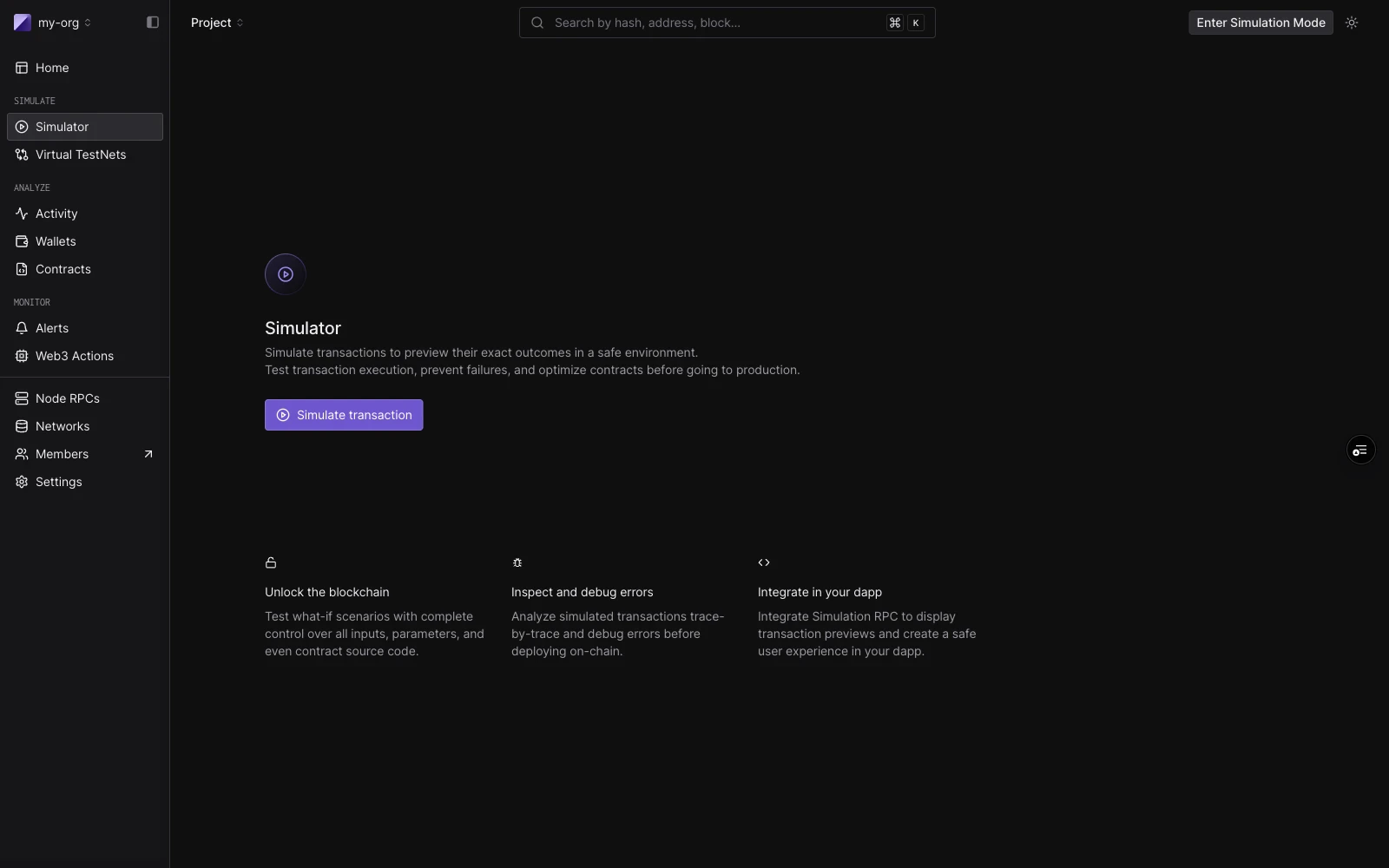
Simulator landing: single-transaction and simulation bundle entry point with feature summary.
The Tenderly Simulator lets you run transactions against live mainnet or testnet state without broadcasting anything. You can simulate as any sender, override contract storage, fund addresses, and manipulate block context, all from the dashboard.The builder is the same whether you run one transaction or five. A single simulation is a one-step bundle. A simulation bundle is up to five steps that share state: each step sees the state changes made by the step before it.
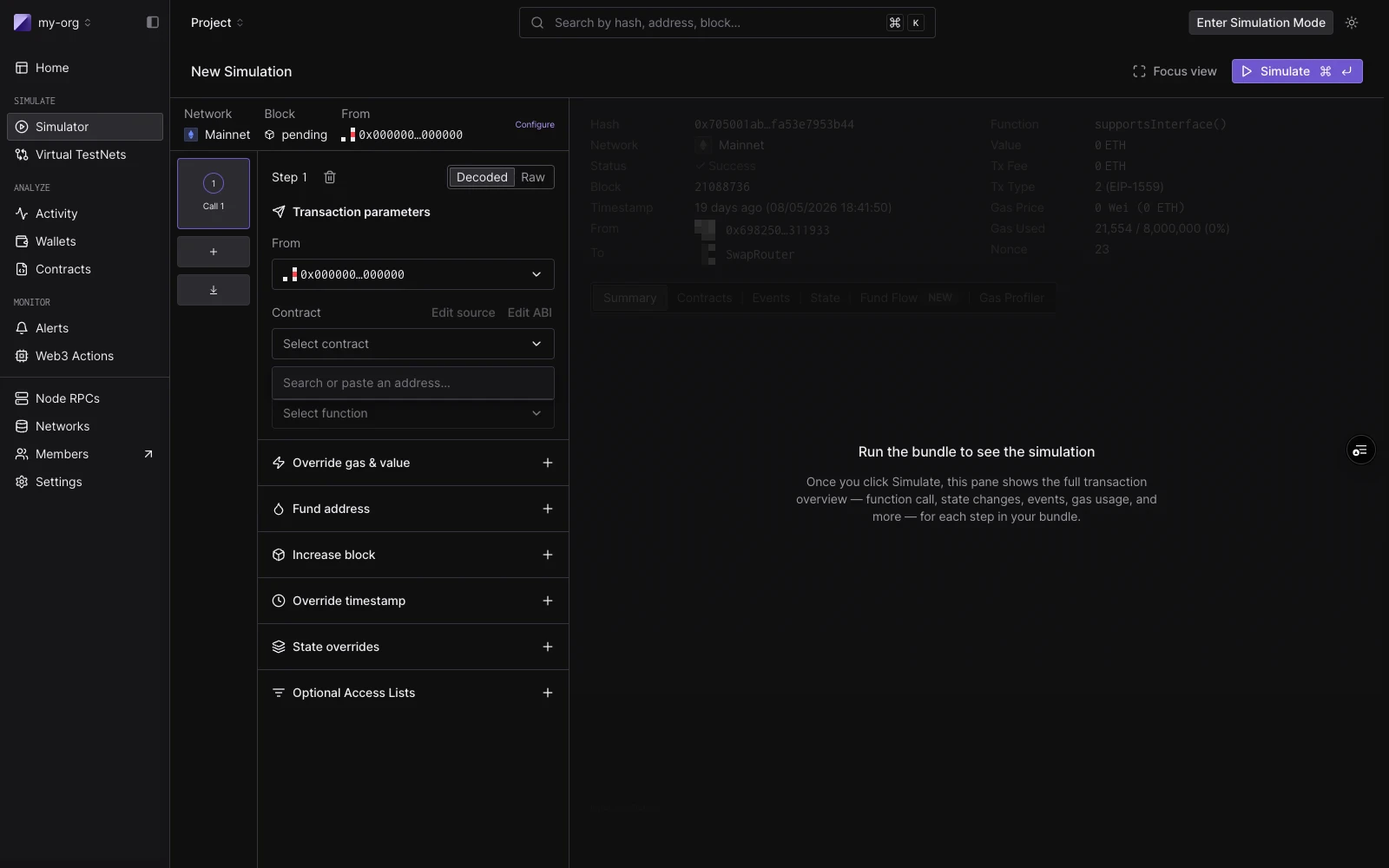
The builder has three regions:Session strip runs across the top. It holds defaults that apply to every step: Network, Block (defaults to Pending), and a default From address. Click Configure to set default gas, gas price, and value.Bundle rail is the left column. Each step card shows a step number, a label (New call until a contract is chosen, then ContractName · functionName), and a status badge after a run. Click a step to focus it. Drag to reorder. Use C to add a step, J/K to move between steps, and F to toggle focus mode.Focused step view is the right column. Before running, it shows the step editor. After running, it shows that step’s result: decoded output, gas used, events, state changes, and token transfers.
To run a single simulation, work with the one step that opens by default.Decoded mode lets you pick a contract and function by name:
Field
Notes
From
Defaults to the session From. Override per step.
Contract
Project contracts surface first. Also matches public contracts and top tokens by name, symbol, or address.
Function
Filtered to non-event, non-constructor methods.
Parameters
One typed input per ABI argument.
Raw mode takes a target address and a 0x-prefixed hex payload directly. This is useful when you have calldata from an existing transaction or a manual encode.Click Simulate (or press ⌘↵) to run. The right panel fills with the result: function call summary, gas used, decoded output, and tabs for Events, State Changes, Fund Flow, and Gas Profiler.You can also start from an existing transaction: click Re-Simulate on any transaction detail page to load its inputs into the builder. The simulation runs on the block and timestamp of the original by default.To share the current setup (a single call or a whole bundle) as a link that prefills the form without running it, click Share draft in the page header. CI and other tooling can create the same links through the drafts API. See Share a Simulator draft link. To share the result of a simulation that already ran, click Share next to the Simulation title on its result page. See Share a simulation with a public link.
On: shows the Summary, Contracts, Events, State, Fund Flow, and Gas Profiler tabs and the call trace. Off: shows only the simulation details and asset transfers.
Run on Environment turns a simulation into a real transaction on a Virtual Environment, where it changes state like any other transaction.
1
Open the dialog
On the simulation result page, click Run on Environment.
2
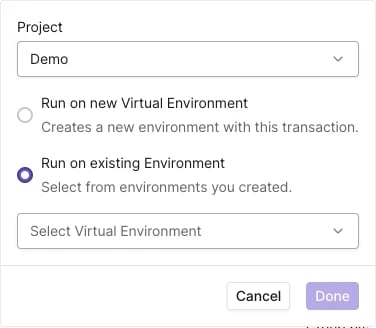
Pick the target
Select the Project, then choose Run on new Virtual Environment to create an environment with this transaction, or Run on existing Environment and select one from the list. The list shows the environments that include the simulation’s network.
Run on Environment dialog.
3
Confirm
Click Done. The dashboard opens the resulting transaction on the Virtual Environment.
The same button is on transaction pages, where it runs an existing transaction on a Virtual Environment.
A bundle runs up to five steps in sequence, sharing state. Use a bundle when the outcome of one transaction depends on a previous one, for example, an approval that enables a later transfer. Steps are added and reordered in the rail, each with its own From override and cheatcodes, and the whole bundle executes with one click of Simulate.See Simulation Bundles for building, reordering, result badges, and how bundles appear in the simulation history.
New Simulation form: session strip at top (Network, Block), transaction parameters on the left, and cheatcode sections below.
Each step has a set of cheatcodes (add-ons that run immediately before the step executes). They apply to both single simulations (as step-level controls) and each step in a bundle.
Cheatcode
What it does
Override gas & value
Set a custom gas limit and ETH value for this step.
Fund address
Credit any address with token balances before this step runs. Add multiple entries per step.
Increase block
Advance the block number by a fixed amount before this step.
Override timestamp
Set a custom block timestamp for this step.
State overrides
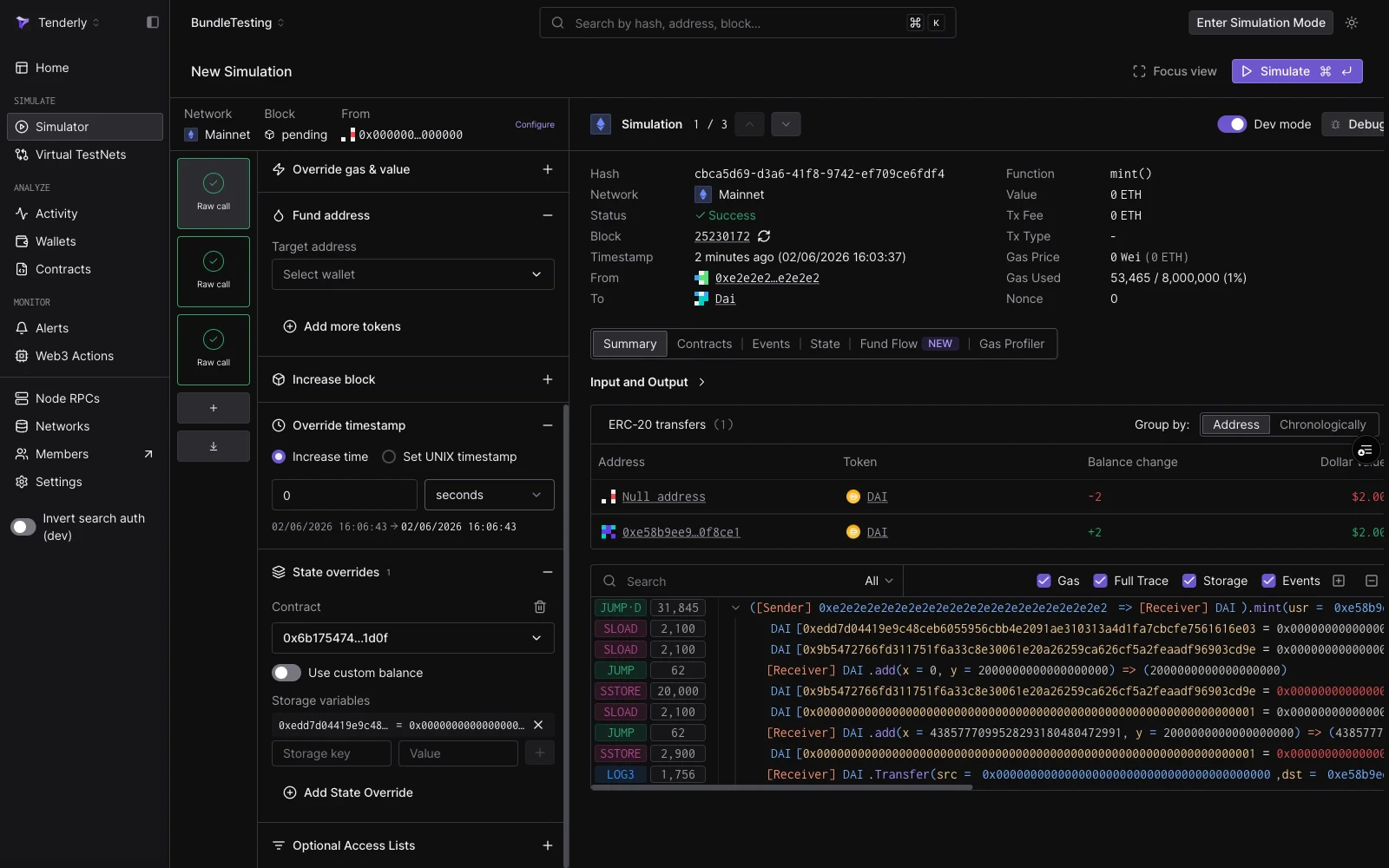
Override contract storage slots, balance, or bytecode before this step. Add overrides for multiple contracts.
Optional Access Lists
Attach an EIP-2930 access list for gas efficiency on multi-contract calls.
A step with Fund address, Override timestamp, and State overrides expanded. State overrides here sets a DAI ward storage slot to let the mint succeed.
Virtual Environments: when you need a full persistent RPC environment instead of a stateless bundle.
{"docsConfig":{"theme":"mint","$schema":"https://mintlify.com/docs.json","name":"Tenderly","description":"Tenderly developer documentation — Virtual Environments, Node RPC, Simulation API, Debugger, Monitor, Alerts, Web3 Actions, and more.","colors":{"primary":"#7857FF","light":"#9B83FF","dark":"#7857FF"},"logo":{"light":"https://mintcdn.com/tenderly/OpA99rKrR1G10AGk/logo/tenderly-logo-light-background.svg?fit=max\u0026auto=format\u0026n=OpA99rKrR1G10AGk\u0026q=85\u0026s=8655a53ac5f0fdc1af7c82f4e2e270ef","dark":"https://mintcdn.com/tenderly/OpA99rKrR1G10AGk/logo/tenderly-logo-dark-background.svg?fit=max\u0026auto=format\u0026n=OpA99rKrR1G10AGk\u0026q=85\u0026s=17e892ea6a8bbd3f67e2055373d36609","href":"/introduction"},"favicon":"https://mintcdn.com/tenderly/nRyi0uSIGTr6AMxX/favicon.ico?fit=max\u0026auto=format\u0026n=nRyi0uSIGTr6AMxX\u0026q=85\u0026s=6a58780606747ae9bd8a65444d16422d","api":{"playground":{"display":"interactive","proxy":false},"examples":{"defaults":"required","languages":["curl","javascript","python","go"]}},"appearance":{"default":"dark"},"navbar":{"links":[{"href":"https://blog.tenderly.co","label":"Blog"},{"href":"mailto:support@tenderly.co","label":"Support"}],"primary":{"type":"button","label":"Dashboard","href":"https://dashboard.tenderly.co"}},"footer":{"socials":{"x":"https://x.com/TenderlyApp","github":"https://github.com/Tenderly","linkedin":"https://www.linkedin.com/company/tenderly-co"}},"search":{"prompt":"Search the Tenderly docs..."},"styling":{"codeblocks":{"theme":{"light":"catppuccin-latte","dark":"catppuccin-mocha"}},"latex":true},"contextual":{"options":["copy","view","assistant","claude","chatgpt","perplexity","cursor","vscode","mcp",{"title":"Add to Claude Code","description":"Connect the Tenderly MCP server to Claude Code","icon":"terminal","href":"https://docs.tenderly.co/ai-tools/quickstart"}],"display":"header"},"navigation":{"languages":[{"language":"en","href":"introduction"},{"language":"ru","href":"ru/introduction"},{"language":"zh","href":"zh/introduction"},{"language":"hi","href":"hi/introduction"}]}},"deployment":{"deploymentMetadataValue":{"subdomain":"tenderly","hasAudioNarration":false,"actualSubdomain":"tenderly","customDomains":["docs.tenderly.co"],"gitSource":{"type":"github","owner":"tenderly","repo":"tenderly-mintlify","deployBranch":"main","contentDirectory":"","isPrivate":true,"mountPath":"","label":""},"chroma":{"liveDeploymentHistoryId":"6ad8a23c182ff03fed6c7814","collectionId":"783aa2e3-7a6e-40cf-8aa6-2bb1545d62fa","schemaVersion":"v3","latestBuiltDeploymentHistoryId":"6ad8a23c182ff03fed6c7814"},"feedback":{"thumbs":true},"entitlements":{"AI_CHAT":{"status":"ENABLED"}},"buildId":"6ad8a23c182ff03fed6c7814","clientVersion":"0.0.3918","searchFilterCounts":[{"language":"en","tag":"Documentation","count":171},{"language":"hi","tag":"Documentation","count":163},{"language":"ru","tag":"Documentation","count":163},{"language":"zh","tag":"Documentation","count":163},{"language":"en","tag":"Simulator","count":73},{"language":"hi","tag":"Simulator","count":73},{"language":"ru","tag":"Simulator","count":73},{"language":"zh","tag":"Simulator","count":73},{"language":"default","tag":"API Reference","count":52},{"language":"en","tag":"Virtual Environments","count":41},{"language":"hi","tag":"Virtual Environments","count":41},{"language":"ru","tag":"Virtual Environments","count":41},{"language":"zh","tag":"Virtual Environments","count":41},{"language":"en","tag":"Monitor","count":30},{"language":"hi","tag":"Monitor","count":30},{"language":"ru","tag":"Monitor","count":30},{"language":"zh","tag":"Monitor","count":30},{"language":"en","tag":"Console","count":27},{"language":"en","tag":"How-to guides","count":27},{"language":"hi","tag":"Console","count":27},{"language":"hi","tag":"How-to guides","count":27},{"language":"ru","tag":"Console","count":27},{"language":"ru","tag":"How-to guides","count":27},{"language":"zh","tag":"Console","count":27},{"language":"zh","tag":"How-to guides","count":27},{"language":"en","tag":"Troubleshooting","count":22},{"language":"hi","tag":"Troubleshooting","count":22},{"language":"ru","tag":"Troubleshooting","count":22},{"language":"zh","tag":"Troubleshooting","count":22},{"language":"en","tag":"Web3 Actions","count":21},{"language":"en","tag":"Node RPC","count":21},{"language":"hi","tag":"Web3 Actions","count":21},{"language":"ru","tag":"Web3 Actions","count":21},{"language":"zh","tag":"Web3 Actions","count":21},{"language":"hi","tag":"Node RPC","count":20},{"language":"ru","tag":"Node RPC","count":20},{"language":"zh","tag":"Node RPC","count":20},{"language":"en","tag":"Simulation API","count":15},{"language":"hi","tag":"Simulation API","count":15},{"language":"ru","tag":"Simulation API","count":15},{"language":"zh","tag":"Simulation API","count":15},{"language":"default","tag":"Actions","count":10},{"language":"default","tag":"Simulator","count":9},{"language":"default","tag":"Virtual Environments","count":9},{"language":"default","tag":"Contracts","count":7},{"language":"default","tag":"Alerts","count":6},{"language":"default","tag":"Projects","count":5},{"language":"default","tag":"Wallets","count":3},{"language":"default","tag":"Delivery Channels","count":2},{"language":"default","tag":"Other","count":1}]},"assistantConfig":{"enableAskAiButton":false,"enableStarterQuestions":true,"enableContextualStarterQuestions":true,"enableAskAiSearchBar":true,"deflection":{"enabled":true,"email":"support@tenderly.co","showHelpButton":true}},"hasChatPermissions":true,"hasWebMcpPermissions":false,"toggles":[{"name":"kill-isr","enabled":true,"variant":{"name":"disabled","enabled":false,"feature_enabled":true},"impressionData":false},{"name":"agent-mintlify-slack","enabled":true,"variant":{"name":"disabled","enabled":false,"feature_enabled":true},"impressionData":false},{"name":"editor-v7-file-tree","enabled":true,"variant":{"name":"disabled","enabled":false,"feature_enabled":true},"impressionData":false},{"name":"agent-integrations-settings","enabled":true,"variant":{"name":"disabled","enabled":false,"feature_enabled":true},"impressionData":false},{"name":"automations-pr-grouping","enabled":true,"variant":{"name":"disabled","enabled":false,"feature_enabled":true},"impressionData":false},{"name":"custom-prefix","enabled":true,"variant":{"name":"disabled","enabled":false,"feature_enabled":true},"impressionData":false},{"name":"analytics-v7","enabled":true,"variant":{"name":"disabled","enabled":false,"feature_enabled":true},"impressionData":false},{"name":"user-flows-analytics","enabled":true,"variant":{"name":"disabled","enabled":false,"feature_enabled":true},"impressionData":false},{"name":"no-publish-flow","enabled":true,"variant":{"name":"disabled","enabled":false,"feature_enabled":true},"impressionData":false},{"name":"workos-onboarding","enabled":true,"variant":{"name":"disabled","enabled":false,"feature_enabled":true},"impressionData":false},{"name":"llms-txt-v2","enabled":true,"variant":{"name":"disabled","enabled":false,"feature_enabled":true},"impressionData":false},{"name":"pause-universal-search-reconcile","enabled":true,"variant":{"name":"disabled","enabled":false,"feature_enabled":true},"impressionData":false},{"name":"snapshot-serving-live","enabled":true,"variant":{"name":"disabled","enabled":false,"feature_enabled":true},"impressionData":false},{"name":"stripTemperatureMiddleware","enabled":true,"variant":{"name":"disabled","enabled":false,"feature_enabled":true},"impressionData":false},{"name":"per-site-search-delta","enabled":true,"variant":{"name":"disabled","enabled":false,"feature_enabled":true},"impressionData":false},{"name":"support-platform-pylon-zendesk","enabled":true,"variant":{"name":"disabled","enabled":false,"feature_enabled":true},"impressionData":false},{"name":"editor-branches-v2-autocommit","enabled":true,"variant":{"name":"disabled","enabled":false,"feature_enabled":true},"impressionData":false},{"name":"editor-branches-v2","enabled":true,"variant":{"name":"disabled","enabled":false,"feature_enabled":true},"impressionData":false},{"name":"snapshot-serving","enabled":true,"variant":{"name":"disabled","enabled":false,"feature_enabled":true},"impressionData":false},{"name":"instant-rollback","enabled":true,"variant":{"name":"disabled","enabled":false,"feature_enabled":true},"impressionData":false},{"name":"granular-notifications-server","enabled":true,"variant":{"name":"disabled","enabled":false,"feature_enabled":true},"impressionData":false},{"name":"granular-notifications","enabled":true,"variant":{"name":"disabled","enabled":false,"feature_enabled":true},"impressionData":false},{"name":"editor-private-page-search","enabled":true,"variant":{"name":"disabled","enabled":false,"feature_enabled":true},"impressionData":false},{"name":"automations-fable","enabled":true,"variant":{"name":"disabled","enabled":false,"feature_enabled":true},"impressionData":false},{"name":"fixed-ai-action-pricing","enabled":true,"variant":{"name":"disabled","enabled":false,"feature_enabled":true},"impressionData":false},{"name":"automation-resolve-merge-conflict","enabled":true,"variant":{"name":"disabled","enabled":false,"feature_enabled":true},"impressionData":false},{"name":"scoped-publishing","enabled":true,"variant":{"name":"disabled","enabled":false,"feature_enabled":true},"impressionData":false},{"name":"mintql","enabled":true,"variant":{"name":"disabled","enabled":false,"feature_enabled":true},"impressionData":false},{"name":"page-level-analytics","enabled":true,"variant":{"name":"disabled","enabled":false,"feature_enabled":true},"impressionData":false},{"name":"teamspace","enabled":true,"variant":{"name":"disabled","enabled":false,"feature_enabled":true},"impressionData":false},{"name":"editor-version-history-v2","enabled":true,"variant":{"name":"disabled","enabled":false,"feature_enabled":true},"impressionData":false},{"name":"editor-nav-generations","enabled":true,"variant":{"name":"disabled","enabled":false,"feature_enabled":true},"impressionData":false},{"name":"billing-page-v2","enabled":true,"variant":{"name":"disabled","enabled":false,"feature_enabled":true},"impressionData":false},{"name":"vite-origin","enabled":true,"variant":{"name":"disabled","enabled":false,"feature_enabled":true},"impressionData":false},{"name":"workspace-projects","enabled":true,"variant":{"name":"disabled","enabled":false,"feature_enabled":true},"impressionData":false},{"name":"assistant-v5","enabled":true,"variant":{"name":"disabled","enabled":false,"feature_enabled":true},"impressionData":false},{"name":"byok-sep-25","enabled":true,"variant":{"name":"disabled","enabled":false,"feature_enabled":true},"impressionData":false},{"name":"fork-pr-previews","enabled":true,"variant":{"name":"disabled","enabled":false,"feature_enabled":true},"impressionData":false},{"name":"revalidation-jwt","enabled":true,"variant":{"name":"disabled","enabled":false,"feature_enabled":true},"impressionData":false},{"name":"editor-agent-model-picker","enabled":true,"variant":{"name":"disabled","enabled":false,"feature_enabled":true},"impressionData":false},{"name":"client-snapshot-docs-config","enabled":true,"variant":{"name":"disabled","enabled":false,"feature_enabled":true},"impressionData":false},{"name":"hobby-abuse-scan","enabled":true,"variant":{"name":"disabled","enabled":false,"feature_enabled":true},"impressionData":false},{"name":"dashboard-inbox","enabled":true,"variant":{"name":"disabled","enabled":false,"feature_enabled":true},"impressionData":false}],"privacy":{"consentBanner":{"enabled":true}},"isAtlas":false,"googleFontsInlined":false},"customCss":[{"filePath":"custom.css","content":"html.dark .shiki,html.dark .shiki span{color:var(--shiki-dark)!important;background-color:var(--shiki-dark-bg)!important;font-style:var(--shiki-dark-font-style)!important;font-weight:var(--shiki-dark-font-weight)!important;text-decoration:var(--shiki-dark-text-decoration)!important}html.dark .card .primary-text,html.dark .card .prose>div>h2,html.dark .card .prose>div>h3{color:#9b83ff}.card .prose>div>h2,.card .prose>div>h3{color:#7857ff}.card:has(.prose>div>h2) [data-component-part=card-content-container]{padding:1rem 1.25rem}html.dark .card:hover{border-color:#9b83ff!important;box-shadow:0 0 0 1px rgba(155,131,255,.25)}html:not(.dark) .card:hover{border-color:#7857ff!important;box-shadow:0 0 0 1px rgba(120,87,255,.18)}"}],"page":{"pagePath":"simulator-ui/overview","slug":"/simulator-ui/overview","pageMetadata":{"title":"Simulator UI","sidebarTitle":"Overview","description":"Build single-transaction simulations or stateful bundles in the Tenderly dashboard with decoded traces, gas estimates, balance changes, and cheatcodes.","href":"/simulator-ui/overview"},"description":{"compiledSource":"\"use strict\";\nconst {jsx: _jsx} = arguments[0];\nconst {useMDXComponents: _provideComponents} = arguments[0];\nfunction _createMdxContent(props) {\n const _components = {\n p: \"p\",\n ..._provideComponents(),\n ...props.components\n };\n return _jsx(_components.p, {\n children: \"Build single-transaction simulations or stateful bundles in the Tenderly dashboard with decoded traces, gas estimates, balance changes, and cheatcodes.\"\n });\n}\nfunction MDXContent(props = {}) {\n const {wrapper: MDXLayout} = {\n ..._provideComponents(),\n ...props.components\n };\n return MDXLayout ? _jsx(MDXLayout, {\n ...props,\n children: _jsx(_createMdxContent, {\n ...props\n })\n }) : _createMdxContent(props);\n}\nreturn {\n default: MDXContent\n};\n","frontmatter":{},"scope":{}},"pageType":"default","mdx":{"mdxSource":{"compiledSource":"\"use strict\";const{Fragment:_Fragment,jsx:_jsx,jsxs:_jsxs}=arguments[0];const{useMDXComponents:_provideComponents}=arguments[0];function _createMdxContent(props){const _components={a:`a`,code:`code`,li:`li`,p:`p`,strong:`strong`,tbody:`tbody`,td:`td`,th:`th`,thead:`thead`,tr:`tr`,ul:`ul`,..._provideComponents(),...props.components},{Frame,Heading,OptimizedImage,Step,Steps,Table}=_components;if(!Frame)_missingMdxReference(`Frame`,true);if(!Heading)_missingMdxReference(`Heading`,true);if(!OptimizedImage)_missingMdxReference(`OptimizedImage`,true);if(!Step)_missingMdxReference(`Step`,true);if(!Steps)_missingMdxReference(`Steps`,true);if(!Table)_missingMdxReference(`Table`,true);return _jsxs(_Fragment,{children:[_jsx(Frame,{caption:`Simulator landing: single-transaction and simulation bundle entry point with feature summary.`,children:_jsx(OptimizedImage,{src:`https://mintcdn.com/tenderly/XsEZlaGXYskrtN68/images/simulator-ui/14-project-simulator.webp?fit=max\u0026auto=format\u0026n=XsEZlaGXYskrtN68\u0026q=85\u0026s=67beaab414cb36050158bf19d0ed9be2`,alt:`Tenderly Simulator landing page showing the Simulate transaction button and three feature cards: Unlock the blockchain, Inspect and debug errors, Integrate in your dapp`,\"data-og-width\":`1600`,width:`1600`,\"data-og-height\":`1000`,height:`1000`,\"data-path\":`images/simulator-ui/14-project-simulator.webp`,\"data-optimize\":`true`,\"data-opv\":`3`,srcset:`https://mintcdn.com/tenderly/XsEZlaGXYskrtN68/images/simulator-ui/14-project-simulator.webp?w=280\u0026fit=max\u0026auto=format\u0026n=XsEZlaGXYskrtN68\u0026q=85\u0026s=bdccf9a85f3311fbccb3bacae94e5f5b 280w, https://mintcdn.com/tenderly/XsEZlaGXYskrtN68/images/simulator-ui/14-project-simulator.webp?w=560\u0026fit=max\u0026auto=format\u0026n=XsEZlaGXYskrtN68\u0026q=85\u0026s=4cb039a85761369790195be2f02e7239 560w, https://mintcdn.com/tenderly/XsEZlaGXYskrtN68/images/simulator-ui/14-project-simulator.webp?w=840\u0026fit=max\u0026auto=format\u0026n=XsEZlaGXYskrtN68\u0026q=85\u0026s=574b6b6b6f249ce609d49439b87d8088 840w, https://mintcdn.com/tenderly/XsEZlaGXYskrtN68/images/simulator-ui/14-project-simulator.webp?w=1100\u0026fit=max\u0026auto=format\u0026n=XsEZlaGXYskrtN68\u0026q=85\u0026s=21116cabc9147875c61d164aadf59c19 1100w, https://mintcdn.com/tenderly/XsEZlaGXYskrtN68/images/simulator-ui/14-project-simulator.webp?w=1650\u0026fit=max\u0026auto=format\u0026n=XsEZlaGXYskrtN68\u0026q=85\u0026s=10e2834748ac7ac5d990cfa07d5042bb 1650w, https://mintcdn.com/tenderly/XsEZlaGXYskrtN68/images/simulator-ui/14-project-simulator.webp?w=2500\u0026fit=max\u0026auto=format\u0026n=XsEZlaGXYskrtN68\u0026q=85\u0026s=da2d92847fd45e116a10cf4c85474b4f 2500w`})}),`\n`,_jsx(_components.p,{children:`The Tenderly Simulator lets you run transactions against live mainnet or testnet state without broadcasting anything. You can simulate as any sender, override contract storage, fund addresses, and manipulate block context, all from the dashboard.`}),`\n`,_jsxs(_components.p,{children:[`The builder is the same whether you run one transaction or five. A `,_jsx(_components.strong,{children:`single simulation`}),` is a one-step bundle. A `,_jsx(_components.strong,{children:_jsx(_components.a,{href:`/simulator-ui/simulation-bundles`,children:`simulation bundle`})}),` is up to five steps that share state: each step sees the state changes made by the step before it.`]}),`\n`,_jsx(Heading,{level:`2`,id:`layout`,children:`Layout`}),`\n`,_jsx(_components.p,{children:`The builder has three regions:`}),`\n`,_jsxs(_components.p,{children:[_jsx(_components.strong,{children:`Session strip`}),` runs across the top. It holds defaults that apply to every step: Network, Block (defaults to `,_jsx(_components.code,{children:`Pending`}),`), and a default From address. Click `,_jsx(_components.strong,{children:`Configure`}),` to set default gas, gas price, and value.`]}),`\n`,_jsxs(_components.p,{children:[_jsx(_components.strong,{children:`Bundle rail`}),` is the left column. Each step card shows a step number, a label (`,_jsx(_components.code,{children:`New call`}),` until a contract is chosen, then `,_jsx(_components.code,{children:`ContractName · functionName`}),`), and a status badge after a run. Click a step to focus it. Drag to reorder. Use `,_jsx(_components.code,{children:`C`}),` to add a step, `,_jsx(_components.code,{children:`J`}),`/`,_jsx(_components.code,{children:`K`}),` to move between steps, and `,_jsx(_components.code,{children:`F`}),` to toggle focus mode.`]}),`\n`,_jsxs(_components.p,{children:[_jsx(_components.strong,{children:`Focused step view`}),` is the right column. Before running, it shows the step editor. After running, it shows that step’s result: decoded output, gas used, events, state changes, and token transfers.`]}),`\n`,_jsx(Heading,{level:`2`,id:`single-simulations`,children:`Single simulations`}),`\n`,_jsx(_components.p,{children:`To run a single simulation, work with the one step that opens by default.`}),`\n`,_jsxs(_components.p,{children:[_jsx(_components.strong,{children:`Decoded mode`}),` lets you pick a contract and function by name:`]}),`\n`,_jsxs(Table,{children:[_jsx(_components.thead,{children:_jsxs(_components.tr,{children:[_jsx(_components.th,{children:`Field`}),_jsx(_components.th,{children:`Notes`})]})}),_jsxs(_components.tbody,{children:[_jsxs(_components.tr,{children:[_jsx(_components.td,{children:_jsx(_components.strong,{children:`From`})}),_jsx(_components.td,{children:`Defaults to the session From. Override per step.`})]}),_jsxs(_components.tr,{children:[_jsx(_components.td,{children:_jsx(_components.strong,{children:`Contract`})}),_jsx(_components.td,{children:`Project contracts surface first. Also matches public contracts and top tokens by name, symbol, or address.`})]}),_jsxs(_components.tr,{children:[_jsx(_components.td,{children:_jsx(_components.strong,{children:`Function`})}),_jsx(_components.td,{children:`Filtered to non-event, non-constructor methods.`})]}),_jsxs(_components.tr,{children:[_jsx(_components.td,{children:_jsx(_components.strong,{children:`Parameters`})}),_jsx(_components.td,{children:`One typed input per ABI argument.`})]})]})]}),`\n`,_jsxs(_components.p,{children:[_jsx(_components.strong,{children:`Raw mode`}),` takes a target address and a `,_jsx(_components.code,{children:`0x`}),`-prefixed hex payload directly. This is useful when you have calldata from an existing transaction or a manual encode.`]}),`\n`,_jsxs(_components.p,{children:[`Click `,_jsx(_components.strong,{children:`Simulate`}),` (or press `,_jsx(_components.code,{\"data-symbols\":`true`,children:`⌘↵`}),`) to run. The right panel fills with the result: function call summary, gas used, decoded output, and tabs for Events, State Changes, Fund Flow, and Gas Profiler.`]}),`\n`,_jsxs(_components.p,{children:[`You can also start from an existing transaction: click `,_jsx(_components.strong,{children:`Re-Simulate`}),` on any transaction detail page to load its inputs into the builder. The simulation runs on the block and timestamp of the original by default.`]}),`\n`,_jsxs(_components.p,{children:[`To share the current setup (a single call or a whole bundle) as a link that prefills the form without running it, click `,_jsx(_components.strong,{children:`Share draft`}),` in the page header. CI and other tooling can create the same links through the drafts API. See `,_jsx(_components.a,{href:`/simulator-ui/draft-links`,children:`Share a Simulator draft link`}),`. To share the result of a simulation that already ran, click `,_jsx(_components.strong,{children:`Share`}),` next to the `,_jsx(_components.strong,{children:`Simulation`}),` title on its result page. See `,_jsx(_components.a,{href:`/simulator-ui/share-simulation`,children:`Share a simulation with a public link`}),`.`]}),`\n`,_jsx(Heading,{level:`2`,id:`simulation-result-actions`,children:`Simulation result actions`}),`\n`,_jsx(_components.p,{children:`A simulation’s result page has these actions in its header.`}),`\n`,_jsx(Frame,{caption:`Actions in the simulation result header.`,children:_jsx(OptimizedImage,{src:`https://mintcdn.com/tenderly/PzoXOFG6RNM2SCxQ/images/simulator-ui/simulation-result-actions.webp?fit=max\u0026auto=format\u0026n=PzoXOFG6RNM2SCxQ\u0026q=85\u0026s=04508af979023bce098434e6827976db`,alt:`Simulation result header with Share next to the Simulation title, and the Dev mode toggle, Run on Environment, Re-Simulate, and Debug buttons, above the details of a WETH deposit simulation`,\"data-og-width\":`1400`,width:`1400`,\"data-og-height\":`250`,height:`250`,\"data-path\":`images/simulator-ui/simulation-result-actions.webp`,\"data-optimize\":`true`,\"data-opv\":`3`,srcset:`https://mintcdn.com/tenderly/PzoXOFG6RNM2SCxQ/images/simulator-ui/simulation-result-actions.webp?w=280\u0026fit=max\u0026auto=format\u0026n=PzoXOFG6RNM2SCxQ\u0026q=85\u0026s=862dad1c357009e22b8daa90c5596f06 280w, https://mintcdn.com/tenderly/PzoXOFG6RNM2SCxQ/images/simulator-ui/simulation-result-actions.webp?w=560\u0026fit=max\u0026auto=format\u0026n=PzoXOFG6RNM2SCxQ\u0026q=85\u0026s=720d86d40c8c46f6125a09d9f9269393 560w, https://mintcdn.com/tenderly/PzoXOFG6RNM2SCxQ/images/simulator-ui/simulation-result-actions.webp?w=840\u0026fit=max\u0026auto=format\u0026n=PzoXOFG6RNM2SCxQ\u0026q=85\u0026s=50f4047d241eaafd7125e3be210a611c 840w, https://mintcdn.com/tenderly/PzoXOFG6RNM2SCxQ/images/simulator-ui/simulation-result-actions.webp?w=1100\u0026fit=max\u0026auto=format\u0026n=PzoXOFG6RNM2SCxQ\u0026q=85\u0026s=d671b7f28f97cb78afb7c5b08f11a94d 1100w, https://mintcdn.com/tenderly/PzoXOFG6RNM2SCxQ/images/simulator-ui/simulation-result-actions.webp?w=1650\u0026fit=max\u0026auto=format\u0026n=PzoXOFG6RNM2SCxQ\u0026q=85\u0026s=853e6a21864824c7d2748aa7af49aa42 1650w, https://mintcdn.com/tenderly/PzoXOFG6RNM2SCxQ/images/simulator-ui/simulation-result-actions.webp?w=2500\u0026fit=max\u0026auto=format\u0026n=PzoXOFG6RNM2SCxQ\u0026q=85\u0026s=cfa60a5b5c63507d65d4e0177956b6a8 2500w`})}),`\n`,_jsxs(Table,{children:[_jsx(_components.thead,{children:_jsxs(_components.tr,{children:[_jsx(_components.th,{children:`Action`}),_jsx(_components.th,{children:`What it does`})]})}),_jsxs(_components.tbody,{children:[_jsxs(_components.tr,{children:[_jsx(_components.td,{children:_jsx(_components.strong,{children:`Share`})}),_jsxs(_components.td,{children:[`Makes the result viewable through a public link. See `,_jsx(_components.a,{href:`/simulator-ui/share-simulation`,children:`Share a simulation with a public link`}),`.`]})]}),_jsxs(_components.tr,{children:[_jsx(_components.td,{children:_jsx(_components.strong,{children:`Dev mode`})}),_jsxs(_components.td,{children:[`On: shows the `,_jsx(_components.strong,{children:`Summary`}),`, `,_jsx(_components.strong,{children:`Contracts`}),`, `,_jsx(_components.strong,{children:`Events`}),`, `,_jsx(_components.strong,{children:`State`}),`, `,_jsx(_components.strong,{children:`Fund Flow`}),`, and `,_jsx(_components.strong,{children:`Gas Profiler`}),` tabs and the call trace. Off: shows only the simulation details and asset transfers.`]})]}),_jsxs(_components.tr,{children:[_jsx(_components.td,{children:_jsx(_components.strong,{children:`Run on Environment`})}),_jsxs(_components.td,{children:[`Executes the simulated transaction on a `,_jsx(_components.a,{href:`/virtual-environments/overview`,children:`Virtual Environment`}),`. See `,_jsx(_components.a,{href:`#run-a-simulation-on-a-virtual-environment`,children:`Run a simulation on a Virtual Environment`}),`.`]})]}),_jsxs(_components.tr,{children:[_jsx(_components.td,{children:_jsx(_components.strong,{children:`Re-Simulate`})}),_jsx(_components.td,{children:`Opens the builder with this simulation’s inputs, so you can change them and run again.`})]}),_jsxs(_components.tr,{children:[_jsx(_components.td,{children:_jsx(_components.strong,{children:`Debug`})}),_jsxs(_components.td,{children:[`Opens the simulation in `,_jsx(_components.a,{href:`/debugger/overview`,children:`Debugger`}),`.`]})]})]})]}),`\n`,_jsx(Heading,{level:`3`,id:`run-a-simulation-on-a-virtual-environment`,children:`Run a simulation on a Virtual Environment`}),`\n`,_jsxs(_components.p,{children:[_jsx(_components.strong,{children:`Run on Environment`}),` turns a simulation into a real transaction on a Virtual Environment, where it changes state like any other transaction.`]}),`\n`,_jsxs(Steps,{children:[_jsx(Step,{title:`Open the dialog`,children:_jsxs(_components.p,{children:[`On the simulation result page, click `,_jsx(_components.strong,{children:`Run on Environment`}),`.`]})}),_jsxs(Step,{title:`Pick the target`,children:[_jsxs(_components.p,{children:[`Select the `,_jsx(_components.strong,{children:`Project`}),`, then choose `,_jsx(_components.strong,{children:`Run on new Virtual Environment`}),` to create an environment with this transaction, or `,_jsx(_components.strong,{children:`Run on existing Environment`}),` and select one from the list. The list shows the environments that include the simulation’s network.`]}),_jsx(Frame,{caption:`Run on Environment dialog.`,children:_jsx(OptimizedImage,{src:`https://mintcdn.com/tenderly/PzoXOFG6RNM2SCxQ/images/simulator-ui/run-on-environment.webp?fit=max\u0026auto=format\u0026n=PzoXOFG6RNM2SCxQ\u0026q=85\u0026s=0109e30978362e2f10bdbd0de39af79a`,alt:`Run on Environment dialog with a Project dropdown set to Demo, the options Run on new Virtual Environment and Run on existing Environment, a Select Virtual Environment dropdown, and Cancel and Done buttons`,\"data-og-width\":`376`,width:`376`,\"data-og-height\":`328`,height:`328`,\"data-path\":`images/simulator-ui/run-on-environment.webp`,\"data-optimize\":`true`,\"data-opv\":`3`,srcset:`https://mintcdn.com/tenderly/PzoXOFG6RNM2SCxQ/images/simulator-ui/run-on-environment.webp?w=280\u0026fit=max\u0026auto=format\u0026n=PzoXOFG6RNM2SCxQ\u0026q=85\u0026s=591120771f5ca64c2494f2e31bd098b0 280w, https://mintcdn.com/tenderly/PzoXOFG6RNM2SCxQ/images/simulator-ui/run-on-environment.webp?w=560\u0026fit=max\u0026auto=format\u0026n=PzoXOFG6RNM2SCxQ\u0026q=85\u0026s=9d99f8d8191f6d1a631d3169b76f4679 560w, https://mintcdn.com/tenderly/PzoXOFG6RNM2SCxQ/images/simulator-ui/run-on-environment.webp?w=840\u0026fit=max\u0026auto=format\u0026n=PzoXOFG6RNM2SCxQ\u0026q=85\u0026s=f7f20cf696da6d5593c7bc87f99c9e26 840w, https://mintcdn.com/tenderly/PzoXOFG6RNM2SCxQ/images/simulator-ui/run-on-environment.webp?w=1100\u0026fit=max\u0026auto=format\u0026n=PzoXOFG6RNM2SCxQ\u0026q=85\u0026s=19e2bb8a97b0ac745046285250393eba 1100w, https://mintcdn.com/tenderly/PzoXOFG6RNM2SCxQ/images/simulator-ui/run-on-environment.webp?w=1650\u0026fit=max\u0026auto=format\u0026n=PzoXOFG6RNM2SCxQ\u0026q=85\u0026s=eb3fad49a6bb2815094bf0acdceb8ebb 1650w, https://mintcdn.com/tenderly/PzoXOFG6RNM2SCxQ/images/simulator-ui/run-on-environment.webp?w=2500\u0026fit=max\u0026auto=format\u0026n=PzoXOFG6RNM2SCxQ\u0026q=85\u0026s=c48c24ac5c7187877e68a7229c6834f4 2500w`})})]}),_jsx(Step,{title:`Confirm`,children:_jsxs(_components.p,{children:[`Click `,_jsx(_components.strong,{children:`Done`}),`. The dashboard opens the resulting transaction on the Virtual Environment.`]})})]}),`\n`,_jsx(_components.p,{children:`The same button is on transaction pages, where it runs an existing transaction on a Virtual Environment.`}),`\n`,_jsx(Heading,{level:`2`,id:`simulation-bundles`,children:`Simulation bundles`}),`\n`,_jsxs(_components.p,{children:[`A bundle runs up to `,_jsx(_components.strong,{children:`five steps`}),` in sequence, sharing state. Use a bundle when the outcome of one transaction depends on a previous one, for example, an approval that enables a later transfer. Steps are added and reordered in the rail, each with its own From override and cheatcodes, and the whole bundle executes with one click of `,_jsx(_components.strong,{children:`Simulate`}),`.`]}),`\n`,_jsxs(_components.p,{children:[`See `,_jsx(_components.a,{href:`/simulator-ui/simulation-bundles`,children:`Simulation Bundles`}),` for building, reordering, result badges, and how bundles appear in the simulation history.`]}),`\n`,_jsx(Frame,{caption:`New Simulation form: session strip at top (Network, Block), transaction parameters on the left, and cheatcode sections below.`,children:_jsx(OptimizedImage,{src:`https://mintcdn.com/tenderly/XsEZlaGXYskrtN68/images/simulator-ui/18-new-simulation-form.webp?fit=max\u0026auto=format\u0026n=XsEZlaGXYskrtN68\u0026q=85\u0026s=45969741ec81c6596930bf3482cc2afb`,alt:`New Simulation builder showing session strip with network and block selectors, transaction parameters (From, Contract, Function), and collapsed cheatcode sections for Override gas, Fund address, Increase block, Override timestamp, State overrides, and Optional Access Lists`,\"data-og-width\":`1600`,width:`1600`,\"data-og-height\":`1000`,height:`1000`,\"data-path\":`images/simulator-ui/18-new-simulation-form.webp`,\"data-optimize\":`true`,\"data-opv\":`3`,srcset:`https://mintcdn.com/tenderly/XsEZlaGXYskrtN68/images/simulator-ui/18-new-simulation-form.webp?w=280\u0026fit=max\u0026auto=format\u0026n=XsEZlaGXYskrtN68\u0026q=85\u0026s=bb079db11cedf737b5bbb8569aa6bb80 280w, https://mintcdn.com/tenderly/XsEZlaGXYskrtN68/images/simulator-ui/18-new-simulation-form.webp?w=560\u0026fit=max\u0026auto=format\u0026n=XsEZlaGXYskrtN68\u0026q=85\u0026s=c955e9a0481996088581342cb4363869 560w, https://mintcdn.com/tenderly/XsEZlaGXYskrtN68/images/simulator-ui/18-new-simulation-form.webp?w=840\u0026fit=max\u0026auto=format\u0026n=XsEZlaGXYskrtN68\u0026q=85\u0026s=d3ba14220d58c348d0734afb752ded29 840w, https://mintcdn.com/tenderly/XsEZlaGXYskrtN68/images/simulator-ui/18-new-simulation-form.webp?w=1100\u0026fit=max\u0026auto=format\u0026n=XsEZlaGXYskrtN68\u0026q=85\u0026s=eea39edc42c116d66229a6b959031580 1100w, https://mintcdn.com/tenderly/XsEZlaGXYskrtN68/images/simulator-ui/18-new-simulation-form.webp?w=1650\u0026fit=max\u0026auto=format\u0026n=XsEZlaGXYskrtN68\u0026q=85\u0026s=3a829150264d36457483576b921cafdb 1650w, https://mintcdn.com/tenderly/XsEZlaGXYskrtN68/images/simulator-ui/18-new-simulation-form.webp?w=2500\u0026fit=max\u0026auto=format\u0026n=XsEZlaGXYskrtN68\u0026q=85\u0026s=6c31d9c047415be51682d902674c0654 2500w`})}),`\n`,_jsx(Heading,{level:`2`,id:`cheatcodes`,children:`Cheatcodes`}),`\n`,_jsx(_components.p,{children:`Each step has a set of cheatcodes (add-ons that run immediately before the step executes). They apply to both single simulations (as step-level controls) and each step in a bundle.`}),`\n`,_jsxs(Table,{children:[_jsx(_components.thead,{children:_jsxs(_components.tr,{children:[_jsx(_components.th,{children:`Cheatcode`}),_jsx(_components.th,{children:`What it does`})]})}),_jsxs(_components.tbody,{children:[_jsxs(_components.tr,{children:[_jsx(_components.td,{children:_jsx(_components.strong,{children:`Override gas \u0026 value`})}),_jsx(_components.td,{children:`Set a custom gas limit and ETH value for this step.`})]}),_jsxs(_components.tr,{children:[_jsx(_components.td,{children:_jsx(_components.strong,{children:`Fund address`})}),_jsx(_components.td,{children:`Credit any address with token balances before this step runs. Add multiple entries per step.`})]}),_jsxs(_components.tr,{children:[_jsx(_components.td,{children:_jsx(_components.strong,{children:`Increase block`})}),_jsx(_components.td,{children:`Advance the block number by a fixed amount before this step.`})]}),_jsxs(_components.tr,{children:[_jsx(_components.td,{children:_jsx(_components.strong,{children:`Override timestamp`})}),_jsx(_components.td,{children:`Set a custom block timestamp for this step.`})]}),_jsxs(_components.tr,{children:[_jsx(_components.td,{children:_jsx(_components.strong,{children:`State overrides`})}),_jsx(_components.td,{children:`Override contract storage slots, balance, or bytecode before this step. Add overrides for multiple contracts.`})]}),_jsxs(_components.tr,{children:[_jsx(_components.td,{children:_jsx(_components.strong,{children:`Optional Access Lists`})}),_jsx(_components.td,{children:`Attach an EIP-2930 access list for gas efficiency on multi-contract calls.`})]})]})]}),`\n`,_jsx(Frame,{caption:`A step with Fund address, Override timestamp, and State overrides expanded. State overrides here sets a DAI ward storage slot to let the mint succeed.`,children:_jsx(OptimizedImage,{src:`https://mintcdn.com/tenderly/XsEZlaGXYskrtN68/images/simulator-ui/sim-bundle-cheatcodes-expanded.webp?fit=max\u0026auto=format\u0026n=XsEZlaGXYskrtN68\u0026q=85\u0026s=79591d61108ff410c2944c9f78adf7d3`,alt:`Step editor showing Fund address, Override timestamp, and State overrides cheatcodes expanded`,\"data-og-width\":`1600`,width:`1600`,\"data-og-height\":`1000`,height:`1000`,\"data-path\":`images/simulator-ui/sim-bundle-cheatcodes-expanded.webp`,\"data-optimize\":`true`,\"data-opv\":`3`,srcset:`https://mintcdn.com/tenderly/XsEZlaGXYskrtN68/images/simulator-ui/sim-bundle-cheatcodes-expanded.webp?w=280\u0026fit=max\u0026auto=format\u0026n=XsEZlaGXYskrtN68\u0026q=85\u0026s=458c83f0dc0106baa7d25b949a4a22f5 280w, https://mintcdn.com/tenderly/XsEZlaGXYskrtN68/images/simulator-ui/sim-bundle-cheatcodes-expanded.webp?w=560\u0026fit=max\u0026auto=format\u0026n=XsEZlaGXYskrtN68\u0026q=85\u0026s=e341887690677c8e14521d447665009d 560w, https://mintcdn.com/tenderly/XsEZlaGXYskrtN68/images/simulator-ui/sim-bundle-cheatcodes-expanded.webp?w=840\u0026fit=max\u0026auto=format\u0026n=XsEZlaGXYskrtN68\u0026q=85\u0026s=e42d65bd8b9e3389b76b5fd957247524 840w, https://mintcdn.com/tenderly/XsEZlaGXYskrtN68/images/simulator-ui/sim-bundle-cheatcodes-expanded.webp?w=1100\u0026fit=max\u0026auto=format\u0026n=XsEZlaGXYskrtN68\u0026q=85\u0026s=17aa533f0e42822bd8ebedee741e5300 1100w, https://mintcdn.com/tenderly/XsEZlaGXYskrtN68/images/simulator-ui/sim-bundle-cheatcodes-expanded.webp?w=1650\u0026fit=max\u0026auto=format\u0026n=XsEZlaGXYskrtN68\u0026q=85\u0026s=5036ee054738faea516566647379d63a 1650w, https://mintcdn.com/tenderly/XsEZlaGXYskrtN68/images/simulator-ui/sim-bundle-cheatcodes-expanded.webp?w=2500\u0026fit=max\u0026auto=format\u0026n=XsEZlaGXYskrtN68\u0026q=85\u0026s=f7cf625f16ab7b94717f3854114eeb3d 2500w`})}),`\n`,_jsxs(_components.p,{children:[`For a detailed walkthrough of state overrides, including storage slot calculation, see `,_jsx(_components.a,{href:`/simulator-ui/state-overrides`,children:`Simulation with State Overrides`}),`.`]}),`\n`,_jsx(Heading,{level:`2`,id:`see-also`,children:`See also`}),`\n`,_jsxs(_components.ul,{children:[`\n`,_jsxs(_components.li,{children:[_jsx(_components.a,{href:`/simulator-ui/simulation-bundles`,children:`Simulation Bundles`}),`: multi-step simulations with shared state, including the 3-step DAI mint, approve, and transferFrom guide.`]}),`\n`,_jsxs(_components.li,{children:[_jsx(_components.a,{href:`/simulator-ui/simulation-mode`,children:`Simulation Mode`}),`: persistent wallet impersonation that follows you across the dashboard and accumulates state across runs.`]}),`\n`,_jsxs(_components.li,{children:[_jsx(_components.a,{href:`/simulator-ui/state-overrides`,children:`Simulation with State Overrides`}),`: how to override storage, balance, and bytecode.`]}),`\n`,_jsxs(_components.li,{children:[_jsx(_components.a,{href:`/simulator-ui/parameters`,children:`Simulation Parameters`}),`: full reference for session defaults, block and transaction index selection, From addresses, and cheatcode fields.`]}),`\n`,_jsxs(_components.li,{children:[_jsx(_components.a,{href:`/simulator-ui/draft-links`,children:`Share a Simulator draft link`}),`: share a single call or a bundle as a link that prefills the form, from the dashboard or the drafts API.`]}),`\n`,_jsxs(_components.li,{children:[_jsx(_components.a,{href:`/simulator-ui/share-simulation`,children:`Share a simulation with a public link`}),`: make an executed simulation’s result viewable by anyone with the link.`]}),`\n`,_jsxs(_components.li,{children:[_jsx(_components.a,{href:`/simulator-ui/editing-contract-source`,children:`Editing Contract Source`}),`: test a bug fix by running a simulation against modified source code.`]}),`\n`,_jsxs(_components.li,{children:[_jsx(_components.a,{href:`/simulations/bundled-simulations`,children:`Bundled Simulations (API)`}),`: run bundles programmatically via the `,_jsx(_components.code,{children:`simulate-bundle`}),` endpoint.`]}),`\n`,_jsxs(_components.li,{children:[_jsx(_components.a,{href:`/virtual-environments/overview`,children:`Virtual Environments`}),`: when you need a full persistent RPC environment instead of a stateless bundle.`]}),`\n`]})]})}function MDXContent(props={}){const{wrapper:MDXLayout}={..._provideComponents(),...props.components};return MDXLayout?_jsx(MDXLayout,{...props,children:_jsx(_createMdxContent,{...props})}):_createMdxContent(props)}return{default:MDXContent};function _missingMdxReference(id,component){throw new Error(`Expected `+(component?`component`:`object`)+\" `\"+id+\"` to be defined: you likely forgot to import, pass, or provide it.\")}","frontmatter":{},"scope":{"codeStyling":{"theme":{"light":"catppuccin-latte","dark":"catppuccin-mocha"}},"config":{},"pageMetadata":{"title":"Simulator UI","sidebarTitle":"Overview","description":"Build single-transaction simulations or stateful bundles in the Tenderly dashboard with decoded traces, gas estimates, balance changes, and cheatcodes.","href":"/simulator-ui/overview"}}},"mdxSourceWithNoJs":null},"mdxExtracts":{"tableOfContents":[{"title":"Layout","slug":"layout","depth":2,"children":[]},{"title":"Single simulations","slug":"single-simulations","depth":2,"children":[]},{"title":"Simulation result actions","slug":"simulation-result-actions","depth":2,"children":[{"title":"Run a simulation on a Virtual Environment","slug":"run-a-simulation-on-a-virtual-environment","depth":3,"children":[]}]},{"title":"Simulation bundles","slug":"simulation-bundles","depth":2,"children":[]},{"title":"Cheatcodes","slug":"cheatcodes","depth":2,"children":[]},{"title":"See also","slug":"see-also","depth":2,"children":[]}],"codeExamples":{}},"jsLinks":["/_mintlify/custom/tenderly/bdc6ff9b2874c3ef/node-rpc/rpc-explorer.js","/_mintlify/custom/tenderly/184f3e34ea3ab109/platform/supported-networks.js","/_mintlify/custom/tenderly/896485a8a0369426/seo-schema.js","/_mintlify/custom/tenderly/072d16806bddf995/matomo.js"],"subdomain":"tenderly","siteName":"Tenderly","title":"Simulator UI - Tenderly","contextualStarterQuestions":[{"_id":"6ad09383ee956c5898cccba9","deploymentId":"6a01e29b70901983f3805261","questionText":"What cheatcodes are available?","status":"active","generatedBy":"contextual","path":"simulator-ui/overview","createdAt":"2026-10-15T08:49:07.703Z","updatedAt":"2026-10-15T08:49:07.703Z","__v":0},{"_id":"6ad09383ee956c5898cccba7","deploymentId":"6a01e29b70901983f3805261","questionText":"How do I run a transaction simulation?","status":"active","generatedBy":"contextual","path":"simulator-ui/overview","createdAt":"2026-10-15T08:49:07.703Z","updatedAt":"2026-10-15T08:49:07.703Z","__v":0},{"_id":"6ad09383ee956c5898cccba8","deploymentId":"6a01e29b70901983f3805261","questionText":"Can I override contract storage?","status":"active","generatedBy":"contextual","path":"simulator-ui/overview","createdAt":"2026-10-15T08:49:07.703Z","updatedAt":"2026-10-15T08:49:07.703Z","__v":0}],"navMaps":{"firstHrefInVersion":{},"firstHrefInLanguage":{"en":{"href":"/simulator-ui/overview","matchLevel":0},"ru":{"href":"/ru/simulator-ui/overview","matchLevel":1},"zh":{"href":"/zh/simulator-ui/overview","matchLevel":1},"hi":{"href":"/hi/simulator-ui/overview","matchLevel":1}}},"lastModified":"2026-10-15T08:48:58.209Z","originalFileLocation":"simulator-ui/overview.mdx","locale":"en"},"headHtml":"\u003cscript data-mint-head>(function(){var d=document.documentElement,p=null;if(!p){try{p=localStorage.getItem(\"isDarkMode\")}catch(e){}if(p==='true')p='dark';else if(p==='false')p='light';if(p!=='light'\u0026\u0026p!=='dark'\u0026\u0026p!=='system')p=\"dark\"}var r=p==='system'?(matchMedia(\"(prefers-color-scheme: dark)\").matches?'dark':'light'):p;d.classList.remove(r==='dark'?'light':'dark');d.classList.add(r);d.setAttribute(\"data-theme-preference\",p)})();\u003c/script>\u003cmeta data-mint-head name=\"description\" content=\"Build single-transaction simulations or stateful bundles in the Tenderly dashboard with decoded traces, gas estimates, balance changes, and cheatcodes.\">\u003cmeta data-mint-head name=\"application-name\" content=\"Tenderly\">\u003cmeta data-mint-head name=\"generator\" content=\"Mintlify\">\u003clink data-mint-head rel=\"icon\" type=\"image/png\" sizes=\"192x192\" href=\"/mintlify-assets/_mintlify/favicons/tenderly/eQa6_1msdloETVQa/_generated/favicon/android-chrome-192x192.png\" media=\"(prefers-color-scheme: light)\">\u003clink data-mint-head rel=\"apple-touch-icon\" type=\"image/png\" sizes=\"180x180\" href=\"/mintlify-assets/_mintlify/favicons/tenderly/eQa6_1msdloETVQa/_generated/favicon/apple-touch-icon.png\">\u003clink data-mint-head rel=\"icon\" type=\"image/png\" sizes=\"16x16\" href=\"/mintlify-assets/_mintlify/favicons/tenderly/eQa6_1msdloETVQa/_generated/favicon/favicon-16x16.png\" media=\"(prefers-color-scheme: light)\">\u003clink data-mint-head rel=\"icon\" type=\"image/png\" sizes=\"32x32\" href=\"/mintlify-assets/_mintlify/favicons/tenderly/eQa6_1msdloETVQa/_generated/favicon/favicon-32x32.png\" media=\"(prefers-color-scheme: light)\">\u003clink data-mint-head rel=\"shortcut icon\" type=\"image/x-icon\" href=\"/mintlify-assets/_mintlify/favicons/tenderly/eQa6_1msdloETVQa/_generated/favicon/favicon.ico\" media=\"(prefers-color-scheme: light)\">\u003clink data-mint-head rel=\"icon\" type=\"image/png\" sizes=\"192x192\" href=\"/mintlify-assets/_mintlify/favicons/tenderly/eQa6_1msdloETVQa/_generated/favicon-dark/android-chrome-192x192.png\" media=\"(prefers-color-scheme: dark)\">\u003clink data-mint-head rel=\"icon\" type=\"image/png\" sizes=\"16x16\" href=\"/mintlify-assets/_mintlify/favicons/tenderly/eQa6_1msdloETVQa/_generated/favicon-dark/favicon-16x16.png\" media=\"(prefers-color-scheme: dark)\">\u003clink data-mint-head rel=\"icon\" type=\"image/png\" sizes=\"32x32\" href=\"/mintlify-assets/_mintlify/favicons/tenderly/eQa6_1msdloETVQa/_generated/favicon-dark/favicon-32x32.png\" media=\"(prefers-color-scheme: dark)\">\u003clink data-mint-head rel=\"shortcut icon\" type=\"image/x-icon\" href=\"/mintlify-assets/_mintlify/favicons/tenderly/eQa6_1msdloETVQa/_generated/favicon-dark/favicon.ico\" media=\"(prefers-color-scheme: dark)\">\u003cmeta data-mint-head property=\"og:title\" content=\"Simulator UI - Tenderly\">\u003cmeta data-mint-head property=\"og:description\" content=\"Build single-transaction simulations or stateful bundles in the Tenderly dashboard with decoded traces, gas estimates, balance changes, and cheatcodes.\">\u003cmeta data-mint-head property=\"og:site_name\" content=\"Tenderly\">\u003cmeta data-mint-head property=\"og:url\" content=\"https://docs.tenderly.co/simulator-ui/overview\">\u003cmeta data-mint-head property=\"og:type\" content=\"website\">\u003cmeta data-mint-head property=\"og:image\" content=\"https://tenderly.mintlify.app/_mintlify/api/og/v2?division=Simulator+UI\u0026amp;title=Simulator+UI\u0026amp;description=Build+single-transaction+simulations+or+stateful+bundles+in+the+Tenderly+dashboard+with+decoded+traces%2C+gas+estimates%2C+balance+changes%2C+and+cheatcodes.\u0026amp;theme=0ab121c12e499690d4555714\u0026amp;signature=b29d4a83a54502fcbfcb7c7d59c646f37ab9120fe279c5bc96a1639e4ae74b4f\">\u003cmeta data-mint-head property=\"og:image:width\" content=\"1200\">\u003cmeta data-mint-head property=\"og:image:height\" content=\"630\">\u003cmeta data-mint-head name=\"twitter:card\" content=\"summary_large_image\">\u003cmeta data-mint-head name=\"twitter:title\" content=\"Simulator UI - Tenderly\">\u003cmeta data-mint-head name=\"twitter:description\" content=\"Build single-transaction simulations or stateful bundles in the Tenderly dashboard with decoded traces, gas estimates, balance changes, and cheatcodes.\">\u003cmeta data-mint-head name=\"twitter:image\" content=\"https://tenderly.mintlify.app/_mintlify/api/og/v2?division=Simulator+UI\u0026amp;title=Simulator+UI\u0026amp;description=Build+single-transaction+simulations+or+stateful+bundles+in+the+Tenderly+dashboard+with+decoded+traces%2C+gas+estimates%2C+balance+changes%2C+and+cheatcodes.\u0026amp;theme=0ab121c12e499690d4555714\u0026amp;signature=b29d4a83a54502fcbfcb7c7d59c646f37ab9120fe279c5bc96a1639e4ae74b4f\">\u003cmeta data-mint-head name=\"twitter:image:width\" content=\"1200\">\u003cmeta data-mint-head name=\"twitter:image:height\" content=\"630\">\u003cmeta data-mint-head name=\"msapplication-config\" content=\"/mintlify-assets/_mintlify/favicons/tenderly/eQa6_1msdloETVQa/_generated/favicon/browserconfig.xml\">\u003cmeta data-mint-head name=\"apple-mobile-web-app-title\" content=\"Tenderly\">\u003cmeta data-mint-head name=\"msapplication-TileColor\" content=\"#7857FF\">\u003clink data-mint-head rel=\"canonical\" href=\"https://docs.tenderly.co/simulator-ui/overview\">\u003clink data-mint-head rel=\"alternate\" type=\"application/xml\" href=\"/sitemap.xml\">\u003clink data-mint-head rel=\"alternate\" type=\"text/markdown\" href=\"/simulator-ui/overview.md\">\u003clink data-mint-head rel=\"alternate\" hreflang=\"en\" href=\"https://docs.tenderly.co/simulator-ui/overview\">\u003clink data-mint-head rel=\"alternate\" hreflang=\"ru\" href=\"https://docs.tenderly.co/ru/simulator-ui/overview\">\u003clink data-mint-head rel=\"alternate\" hreflang=\"zh\" href=\"https://docs.tenderly.co/zh/simulator-ui/overview\">\u003clink data-mint-head rel=\"alternate\" hreflang=\"hi\" href=\"https://docs.tenderly.co/hi/simulator-ui/overview\">\u003clink data-mint-head rel=\"alternate\" hreflang=\"x-default\" href=\"https://docs.tenderly.co/simulator-ui/overview\">\u003cscript data-mint-head type=\"application/ld+json\">{\"@context\":\"https://schema.org\",\"@graph\":[{\"@type\":\"Organization\",\"@id\":\"https://docs.tenderly.co/#organization\",\"name\":\"Tenderly\",\"url\":\"https://docs.tenderly.co\",\"logo\":{\"@type\":\"ImageObject\",\"url\":\"https://mintcdn.com/tenderly/OpA99rKrR1G10AGk/logo/tenderly-logo-light-background.svg?fit=max\u0026auto=format\u0026n=OpA99rKrR1G10AGk\u0026q=85\u0026s=8655a53ac5f0fdc1af7c82f4e2e270ef\"}},{\"@type\":\"WebSite\",\"@id\":\"https://docs.tenderly.co#website\",\"name\":\"Tenderly\",\"url\":\"https://docs.tenderly.co\",\"publisher\":{\"@id\":\"https://docs.tenderly.co/#organization\"}},{\"@type\":\"WebPage\",\"@id\":\"https://docs.tenderly.co/simulator-ui/overview#webpage\",\"url\":\"https://docs.tenderly.co/simulator-ui/overview\",\"name\":\"Simulator UI\",\"description\":\"Build single-transaction simulations or stateful bundles in the Tenderly dashboard with decoded traces, gas estimates, balance changes, and cheatcodes.\",\"dateModified\":\"2026-10-15T08:48:58.209Z\",\"isPartOf\":{\"@id\":\"https://docs.tenderly.co#website\"},\"breadcrumb\":{\"@id\":\"https://docs.tenderly.co/simulator-ui/overview#breadcrumb\"}},{\"@type\":\"BreadcrumbList\",\"@id\":\"https://docs.tenderly.co/simulator-ui/overview#breadcrumb\",\"itemListElement\":[{\"@type\":\"ListItem\",\"position\":1,\"name\":\"Simulator\",\"item\":\"https://docs.tenderly.co/virtual-environments/overview\"},{\"@type\":\"ListItem\",\"position\":2,\"name\":\"Simulator UI\",\"item\":\"https://docs.tenderly.co/simulator-ui/overview\"}]},{\"@type\":[\"Article\",\"TechArticle\"],\"@id\":\"https://docs.tenderly.co/simulator-ui/overview#article\",\"headline\":\"Simulator UI\",\"name\":\"Simulator UI\",\"description\":\"Build single-transaction simulations or stateful bundles in the Tenderly dashboard with decoded traces, gas estimates, balance changes, and cheatcodes.\",\"url\":\"https://docs.tenderly.co/simulator-ui/overview\",\"mainEntityOfPage\":{\"@id\":\"https://docs.tenderly.co/simulator-ui/overview#webpage\"},\"dateModified\":\"2026-10-15T08:48:58.209Z\",\"publisher\":{\"@id\":\"https://docs.tenderly.co/#organization\"},\"isPartOf\":{\"@id\":\"https://docs.tenderly.co#website\"}}]}\u003c/script>\u003cscript data-mint-head type=\"application/ld+json\">{\"@context\":\"https://schema.org\",\"@type\":\"WebSite\",\"name\":\"Tenderly\",\"creator\":{\"@type\":\"Organization\",\"name\":\"Mintlify\",\"url\":\"https://mintlify.com\"}}\u003c/script>","siteName":"Tenderly","nav":{"global":null,"languages":[{"language":"en","tabs":[{"tab":"Documentation","groups":[{"group":"Getting Started","public":true,"pages":[{"title":"Tenderly Docs: Simulate, Debug, and Monitor Onchain","sidebarTitle":"What is Tenderly?","href":"/introduction"},{"title":"What you get","href":"/what-you-get"}]},{"group":"Simulator","public":true,"pages":[{"group":"Virtual Environments","public":true,"pages":[{"title":"Virtual Environments","href":"/virtual-environments/overview"},{"group":"Get started","public":true,"pages":[{"title":"Virtual Environment quickstart","href":"/virtual-environments/quickstart"},{"title":"Multichain quickstart","href":"/virtual-environments/multichain/quickstart"}]},{"group":"How-to guides","public":true,"pages":[{"group":"Setup \u0026 connections","public":true,"pages":[{"title":"Adding Virtual Environments to Wallets","href":"/virtual-environments/interact/add-to-wallet"},{"title":"Connect to a WebSocket on Virtual Environments","href":"/virtual-environments/interact/websockets"},{"title":"Virtual Environment Integration Guides","href":"/virtual-environments/integrations"},{"group":"Libraries","public":true,"pages":[{"title":"Ethers.js","href":"/virtual-environments/libraries/ethers"},{"title":"Viem","href":"/virtual-environments/libraries/viem"}]},{"group":"Wallet UIs","public":true,"pages":[{"title":"Wagmi","href":"/virtual-environments/dapp-ui/wagmi"},{"title":"Reown AppKit","href":"/virtual-environments/dapp-ui/reown"},{"title":"ConnectKit","href":"/virtual-environments/dapp-ui/connectkit"},{"title":"Dynamic","href":"/virtual-environments/dapp-ui/dynamic"},{"title":"RainbowKit","href":"/virtual-environments/dapp-ui/rainbowkit"}]}]},{"group":"Network \u0026 state","public":true,"pages":[{"title":"Fork a Virtual Environment","href":"/virtual-environments/develop/fork-testnet"},{"title":"Revert Virtual Environment state","href":"/virtual-environments/develop/revert-state"},{"title":"Working with timestamps on Virtual Environments","href":"/virtual-environments/develop/timestamps"},{"title":"Backtest a token position by replaying historical blocks","href":"/virtual-environments/network-mirror-backtest"}]},{"group":"Transactions \u0026 debugging","public":true,"pages":[{"title":"Sending Transactions to Virtual Environments","href":"/virtual-environments/interact/send-transactions"},{"title":"Simulate Transactions in Virtual Environments","href":"/virtual-environments/interact/simulate-transactions"},{"title":"Debugging Transactions","href":"/virtual-environments/develop/debug-transactions"}]},{"group":"Smart contracts","public":true,"pages":[{"title":"Deploy and verify contracts","href":"/virtual-environments/develop/deploy-contracts"},{"title":"Verify proxy contracts with Foundry","href":"/virtual-environments/develop/verify-proxy-contracts"},{"title":"Bytecode deployment cheatcode","href":"/virtual-environments/develop/bytecode-deployment"},{"title":"Foundry Cheatcode Tutorial","href":"/virtual-environments/develop/solidity-cheatcodes"},{"title":"Index a Virtual Environment with The Graph","href":"/virtual-environments/develop/thegraph"}]},{"group":"CI/CD \u0026 staging","public":true,"pages":[{"title":"Hardhat and Github Actions","href":"/virtual-environments/ci-cd/github-actions-hardhat"},{"title":"Foundry and Github Actions","href":"/virtual-environments/ci-cd/github-actions-foundry"},{"title":"Staging Contracts","href":"/virtual-environments/ci-cd/stage-contracts"},{"title":"Connect Dapp UI to Virtual Environment","href":"/virtual-environments/ci-cd/stage-dapps"},{"title":"Create Virtual Environments via API","href":"/virtual-environments/develop/create-virtual-environment-via-api"}]}]},{"group":"Concepts","public":true,"pages":[{"title":"Virtual Environment Explorer","href":"/virtual-environments/explorer"},{"title":"Unlimited Faucet","href":"/virtual-environments/unlimited-faucet"},{"title":"State Sync","href":"/virtual-environments/state-sync"},{"title":"Network Mirror Mode","href":"/virtual-environments/network-mirror-mode"},{"title":"Named RPC URLs","href":"/virtual-environments/named-rpc-urls"},{"group":"Multichain","public":true,"pages":[{"title":"Multichain Virtual Environments","href":"/virtual-environments/multichain/overview"},{"title":"Bridges","href":"/virtual-environments/multichain/bridges"}]}]},{"group":"Reference","public":true,"pages":[{"title":"Virtual Environment dashboard reference","sidebarTitle":"Dashboard reference","href":"/virtual-environments/dashboard"},{"title":"Custom RPC Methods","href":"/virtual-environments/admin-rpc"},{"title":"Solidity Cheatcodes","href":"/virtual-environments/precompiles"},{"title":"REST API","description":"Reference for the Tenderly REST API endpoints that create and manage Virtual Environments, including single-network and multi-network environments.","href":"/virtual-environments/rest-api"}]}]},{"group":"Simulator UI Builder","public":true,"pages":[{"group":"Simulator UI","public":true,"pages":[{"title":"Simulator UI","sidebarTitle":"Overview","href":"/simulator-ui/overview"},{"title":"Simulation with State Overrides","description":"Use state overrides in the simulation builder to set custom contract state before a simulation runs, demonstrated by minting DAI from a non-ward address.","href":"/simulator-ui/state-overrides"},{"title":"Share a Simulator draft link","href":"/simulator-ui/draft-links"},{"title":"Share a simulation with a public link","sidebarTitle":"Share a simulation","href":"/simulator-ui/share-simulation"}]},{"group":"Simulation Bundles","public":true,"pages":[{"title":"Simulation Bundles","sidebarTitle":"Overview","href":"/simulator-ui/simulation-bundles"},{"title":"Simulate a Token Mint, Approve, and TransferFrom Bundle","href":"/simulations/guides/mint-approve-transfer-bundle"}]},{"title":"Simulation Parameters","href":"/simulator-ui/parameters"},{"title":"Editing Contract Source","href":"/simulator-ui/editing-contract-source"}]},{"group":"Simulation API","public":true,"pages":[{"title":"Simulations Overview","href":"/simulations/overview"},{"title":"Simulations Quickstart","href":"/simulations/quickstart"},{"group":"Features","public":true,"pages":[{"title":"Single Simulations","href":"/simulations/single-simulations"},{"title":"Bundled Simulations","href":"/simulations/bundled-simulations"}]},{"group":"Use Cases","public":true,"pages":[{"title":"Transaction Preview","href":"/simulations/transaction-preview"},{"title":"Asset and Balance Changes","href":"/simulations/asset-balance-changes"},{"title":"Simulation API With State Overrides","href":"/simulations/state-overrides"},{"title":"Gas Estimation","href":"/simulations/gas-estimation"}]},{"title":"Simulation Modes","href":"/simulations/simulation-modes"},{"title":"Tenderly TX Preview Snap","href":"/platform/tx-preview-snap"},{"group":"Guides","public":true,"pages":[{"title":"Dry-Run User Transactions","href":"/simulations/guides/dry-run-user-transactions"},{"title":"MetaMask Snap Transaction Preview","href":"/simulations/guides/metamask-snap"},{"title":"Rabby Wallet Transaction Preview","href":"/simulations/guides/rabby-wallet"},{"title":"Simulate Safe{Wallet} transactions in your Tenderly project","sidebarTitle":"Safe{Wallet} simulations","href":"/simulations/guides/safe-wallet"},{"title":"Using Simulation RPC in Dapp UI","href":"/simulations/guides/simulation-rpc-dapp-ui"}]}]},{"group":"Simulation Mode","public":true,"pages":[{"title":"Simulation Mode","href":"/simulator-ui/simulation-mode"}]},{"group":"Tenderly SDK","public":true,"pages":[{"title":"Intro to Tenderly SDK","href":"/platform/sdk/introduction"},{"title":"Basic Concepts \u0026 FAQs","href":"/platform/sdk/concepts"},{"title":"Simulating Transactions","href":"/platform/sdk/simulating-transactions"},{"title":"Managing Contracts","href":"/platform/sdk/managing-contracts"},{"title":"Managing Wallets","href":"/platform/sdk/managing-wallets"},{"title":"Practical Examples","href":"/platform/sdk/examples"},{"group":"Tutorials","public":true,"pages":[{"title":"Simulate Transactions via SDK","href":"/platform/sdk/tutorials/simulate-transactions"},{"title":"Simulation Bundles with SDK","href":"/platform/sdk/tutorials/simulation-bundles"}]}]}]},{"group":"Console","public":true,"pages":[{"group":"Explorer","public":true,"pages":[{"title":"Developer Explorer","href":"/developer-explorer/overview"},{"title":"Project Home dashboard","sidebarTitle":"Project Home","href":"/developer-explorer/project-home"},{"title":"Transaction Listing","href":"/developer-explorer/transaction-listing"},{"group":"Inspect Transaction","public":true,"pages":[{"title":"Inspect transaction call traces and state changes","sidebarTitle":"Transactions","href":"/developer-explorer/inspect-transaction/overview"},{"title":"Fund Flow","href":"/developer-explorer/inspect-transaction/fund-flow"}]},{"title":"Smart Contracts","href":"/developer-explorer/contracts"},{"title":"Add and track wallets in a Tenderly project","sidebarTitle":"Wallets","href":"/developer-explorer/wallets"},{"title":"Simulation Mode in the Explorer","href":"/developer-explorer/simulation-mode"}]},{"group":"DeFi Modules","public":true,"pages":[{"title":"DeFi Modules: protocol-native UI surfaces","sidebarTitle":"DeFi Modules","href":"/defi-modules/overview"},{"title":"Aave V3","href":"/defi-modules/aave"},{"title":"Uniswap V3","href":"/defi-modules/uniswap"},{"title":"Morpho","href":"/defi-modules/morpho"},{"title":"Chainlink and Chronicle price feeds","sidebarTitle":"Oracle price feeds","href":"/defi-modules/oracle-price-feeds"}]},{"group":"Debugger","public":true,"pages":[{"title":"How to Use Tenderly Debugger","href":"/debugger/overview"},{"title":"Execution Overview","href":"/debugger/execution-overview"},{"title":"Commenting \u0026 Prioritizing Traces","href":"/debugger/commenting"},{"title":"Gas Profiler","href":"/debugger/gas-profiler"},{"title":"Evaluate Expressions with Advanced Debugger","href":"/debugger/evaluate-expression"},{"title":"War Room Aid Kit","href":"/debugger/war-room-aid-kit"},{"title":"Dev Toolkit Browser Extension","href":"/debugger/dev-toolkit"},{"group":"Guides","public":true,"pages":[{"title":"Investigating a Failed Transaction","href":"/debugger/guides/failed-transaction"},{"title":"Investigating a Hack (Cover Protocol)","href":"/debugger/guides/hack-investigation"}]}]},{"group":"Contract Verification","public":true,"pages":[{"title":"Smart Contract Verification","href":"/contract-verification/overview"},{"title":"Verify Contracts via Dashboard","href":"/contract-verification/dashboard"},{"title":"Smart Contract Verification Using Foundry","href":"/contract-verification/foundry"},{"title":"Smart Contract Verification Using Hardhat","href":"/contract-verification/hardhat"},{"title":"Verifying Proxy Contracts","href":"/contract-verification/hardhat-proxy"}]}]},{"group":"Monitor","public":true,"pages":[{"group":"Alerts","public":true,"pages":[{"title":"Intro to Alerts","href":"/monitoring/alerts/introduction"},{"title":"Alert Types, Targets, and Parameters","href":"/monitoring/alerts/types"},{"title":"Using Alerts API","href":"/monitoring/alerts/api"},{"group":"Destinations","public":true,"pages":[{"title":"Alert Destinations","href":"/monitoring/alerts/destinations/overview"},{"title":"Project-Scoped","href":"/monitoring/alerts/destinations/project-scoped"},{"title":"Account-Scoped","href":"/monitoring/alerts/destinations/account-scoped"},{"title":"Setting Up Alerts as Triggers for Web3Actions","href":"/monitoring/alerts/destinations/web3-action"}]},{"group":"Tutorials","public":true,"pages":[{"title":"Alerting Quickstart Guide","href":"/monitoring/alerts/tutorials/quickstart"},{"title":"How to Use Webhooks for Alerting","href":"/monitoring/alerts/tutorials/webhooks"}]}]},{"group":"Web3 Actions","public":true,"pages":[{"title":"Intro to Web3 Actions","href":"/monitoring/web3-actions/introduction"},{"title":"Usage Rate Limits","href":"/monitoring/web3-actions/usage-rate-limits"},{"group":"Tutorials","public":true,"pages":[{"title":"Deploy Web3 Actions via Dashboard","href":"/monitoring/web3-actions/tutorials/deploy-via-dashboard"},{"title":"Deploy Web3 Action via CLI","href":"/monitoring/web3-actions/tutorials/deploy-via-cli"},{"title":"How to Handle On-Chain Events","href":"/monitoring/web3-actions/tutorials/on-chain-events"},{"title":"How to Access Node RPC from Web3 Actions","href":"/monitoring/web3-actions/tutorials/node-rpc-access"},{"title":"How to Build a Custom Oracle","href":"/monitoring/web3-actions/tutorials/custom-oracle"},{"title":"Discord Alerts for New Uniswap Pools","href":"/monitoring/web3-actions/tutorials/discord-uniswap-pools"},{"title":"Monitor UniswapV3 Pool Creation","href":"/monitoring/web3-actions/tutorials/monitor-uniswap-v3-pools"},{"title":"Lido Validator Exit Notifications","href":"/monitoring/web3-actions/tutorials/validators-exits"},{"title":"Modular Monitoring with Web3Actions","href":"/monitoring/web3-actions/tutorials/modular-actions"}]},{"group":"References","public":true,"pages":[{"title":"Node RPC Access","href":"/monitoring/web3-actions/references/node-rpc-access"},{"title":"Action Functions, Events, and Triggers","href":"/monitoring/web3-actions/references/functions-events-triggers"},{"title":"Context: Gateway, Storage, Secrets","href":"/monitoring/web3-actions/references/context"},{"title":"Action Execution","href":"/monitoring/web3-actions/references/execution"},{"title":"Project Structure","href":"/monitoring/web3-actions/references/project-structure"},{"title":"CLI Cheatsheet","href":"/monitoring/web3-actions/references/cli-cheatsheet"},{"title":"Local Development and Testing","href":"/monitoring/web3-actions/references/local-development"},{"title":"Web3 Action failure notifications","sidebarTitle":"Notifications","href":"/monitoring/web3-actions/references/notifications"},{"title":"Manage Web3 Actions Lifecycle","href":"/monitoring/web3-actions/references/lifecycle"},{"title":"Error Reporting","href":"/monitoring/web3-actions/references/error-reporting"}]}]}]},{"group":"Node RPC","public":true,"pages":[{"title":"Node RPC","href":"/node-rpc/overview"},{"title":"Monitor Node RPC Usage, Errors, and Rate Limits","href":"/node-rpc/usage-and-errors"},{"group":"Simulations \u0026 Gas Estimation","public":true,"pages":[{"title":"Simulate Transactions with JSON-RPC Methods","href":"/node-rpc/guides/simulate-json-rpc"},{"title":"Simulate Bundles","href":"/node-rpc/guides/simulate-bundle-json-rpc"},{"title":"Simulate Blocks with eth_simulateV1","href":"/node-rpc/guides/eth-simulatev1"},{"title":"Trace Transactions","href":"/node-rpc/guides/trace-json-rpc"}]},{"group":"Integrations","public":true,"pages":[{"title":"Integration Guides","href":"/node-rpc/integrations"},{"group":"Libraries","public":true,"pages":[{"title":"Connect Ethers.js v6 and v5 to Tenderly Node RPC","href":"/node-rpc/libraries/ethers"},{"title":"Connect viem clients to Tenderly Node RPC endpoints","href":"/node-rpc/libraries/viem"},{"title":"Connect Go apps to Tenderly Node RPC with go-ethereum","href":"/node-rpc/libraries/go"},{"title":"Connect Web3.py Python apps to Tenderly Node RPC","href":"/node-rpc/libraries/web3-py"}]},{"group":"Frameworks","public":true,"pages":[{"title":"Deploy smart contracts with Foundry via Tenderly Node RPC","href":"/node-rpc/frameworks/foundry"},{"title":"Deploy and test Hardhat projects with Tenderly Node RPC","href":"/node-rpc/frameworks/hardhat"}]},{"group":"Wallet UIs","public":true,"pages":[{"title":"Configure wagmi transports with Tenderly Node RPC","href":"/node-rpc/dapp-ui/wagmi"},{"title":"Set up Reown AppKit with Tenderly Node RPC transports","href":"/node-rpc/dapp-ui/reown"},{"title":"Connect ConnectKit wallet components to Tenderly Node RPC","href":"/node-rpc/dapp-ui/connectkit"},{"title":"Use Tenderly Node RPC with Dynamic Web3 authentication","href":"/node-rpc/dapp-ui/dynamic"},{"title":"Configure RainbowKit with Tenderly Node RPC transports","href":"/node-rpc/dapp-ui/rainbowkit"}]},{"group":"Indexers","public":true,"pages":[{"title":"Run Graph Node on Tenderly Node RPC","href":"/node-rpc/indexers/graph-node"}]}]},{"group":"Reference","public":true,"pages":[{"title":"JSON-RPC Reference","href":"/node-rpc/rpc-reference"}]},{"title":"Node RPC Pricing","href":"/node-rpc/pricing"}]},{"group":"AI Tools","public":true,"pages":[{"title":"Tenderly MCP Server for Claude and AI assistants","href":"/ai-tools/overview"},{"title":"Tenderly MCP Server quickstart for Claude clients","href":"/ai-tools/quickstart"},{"title":"Tenderly MCP Server tools reference","href":"/ai-tools/tools"},{"title":"Tenderly MCP Server examples with Claude","href":"/ai-tools/examples"}]},{"group":"Account \u0026 Settings","public":true,"pages":[{"group":"Account Management","public":true,"pages":[{"title":"Account Management","href":"/platform/account/overview"},{"title":"Manage Security Email Notifications","sidebarTitle":"Email Notifications","href":"/platform/account/email-notifications"},{"group":"Projects","public":true,"pages":[{"title":"Create a Tenderly Project","href":"/platform/account/projects/overview"},{"title":"Restrict Project Access to Invited Members","href":"/platform/account/projects/restricted-projects"},{"title":"Project Settings","href":"/platform/account/projects/settings"},{"title":"Project Slug and Account Slug","href":"/platform/account/projects/slug"},{"title":"Generate and Manage API Access Tokens","href":"/platform/account/projects/api-tokens"}]},{"group":"Organizations","public":true,"pages":[{"title":"Organizations and Team Members","href":"/platform/account/organizations/overview"},{"title":"Add Member","href":"/platform/account/organizations/members"},{"title":"Activity Logs","href":"/platform/account/organizations/activity-logs"}]}]},{"group":"Billing \u0026 Usage","public":true,"pages":[{"title":"Manage Your Plan, Seats, and Billing","href":"/platform/account/billing/overview"},{"title":"Track Usage and Tenderly Units (TUs)","href":"/platform/account/billing/usage"},{"title":"Usage Limits, Rate Limits, and Write Limits: Which One Did I Hit?","href":"/platform/account/billing/limits"},{"title":"Plan Features, Limits, and Restricted Access","href":"/platform/account/billing/plan-restrictions"}]}]}]},{"tab":"Supported Networks","pages":[{"title":"Supported Networks","href":"/platform/supported-networks"}]},{"tab":"API Reference","pages":[{"title":"API Reference","href":"/api-reference/projects/list-projects"}]},{"tab":"Troubleshooting","pages":[{"title":"Troubleshooting","href":"/troubleshooting/overview"}]},{"tab":"Changelog","pages":[{"title":"Changelog","href":"/changelog/overview"}]}]},{"language":"ru","pages":[{"title":"ru","href":"/ru/simulator-ui/overview"}]},{"language":"zh","pages":[{"title":"zh","href":"/zh/simulator-ui/overview"}]},{"language":"hi","pages":[{"title":"hi","href":"/hi/simulator-ui/overview"}]}]},"title":"Simulator UI - Tenderly","buildId":"dpl_22zLaHtK6fmmSqApXTTP5tC7UBZn","deploymentId":"dpl_22zLaHtK6fmmSqApXTTP5tC7UBZn","dynamics":["07c022d89b","a74be98ba7"],"chunks":["Frame-Qhh4ynaL.js","DynamicMarkdown-UgxZIUya.js","zoom-image-lightbox-BxIiCHya.js","PlusIcon-Br4qdG7I.js","lightbox-handle-r17bVUz3.js"]}