

https://dashboard.tenderly.co/simulator/new?draftId=<id>
Share a draft from the dashboard
- Build the simulation in the Simulator: pick the network, add one or more calls, set overrides, apply source edits.
- Click Share draft in the page header. The draft is saved and the link is copied to your clipboard.

Share draft in the Simulator header saves the current setup and copies a link that reopens it.
What happens when a draft link opens
The dashboard makes one request for the draft and then, depending on the response:- Member of the draft’s project. The dashboard redirects into that project’s Simulator with the form prefilled and no prompts.
- Shared draft (created through the API with
shared: true). A Select Project dialog opens first; the draft opens in the project the recipient picks. - Invalid id, expired draft, or no access. All three produce the same response so draft IDs cannot be probed. The recipient sees “This draft link is invalid, has expired, or you don’t have access to it.” and lands on the dashboard home.
- Logged out. The recipient signs in first, then the flow continues with the same link.
- Unsaved edits in the Simulator. Opening a draft replaces the current form, so the dashboard asks for confirmation before discarding the edits.
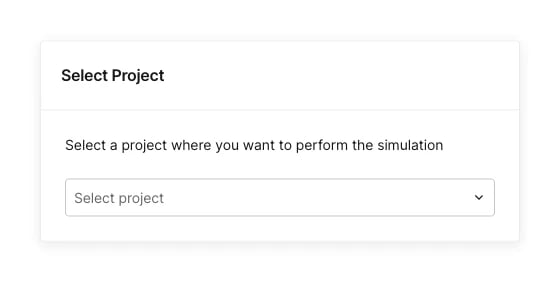
A shared draft is not tied to a project, so the recipient picks where to open it.
Partial restore
Each call in a draft is restored independently, so one problematic call does not reject the whole draft. A dismissible banner lists what did not survive, per call:
No banner means everything was restored. A malformed payload, or a network that is not enabled on the project, rejects the draft wholesale: the recipient sees an error and an empty form.
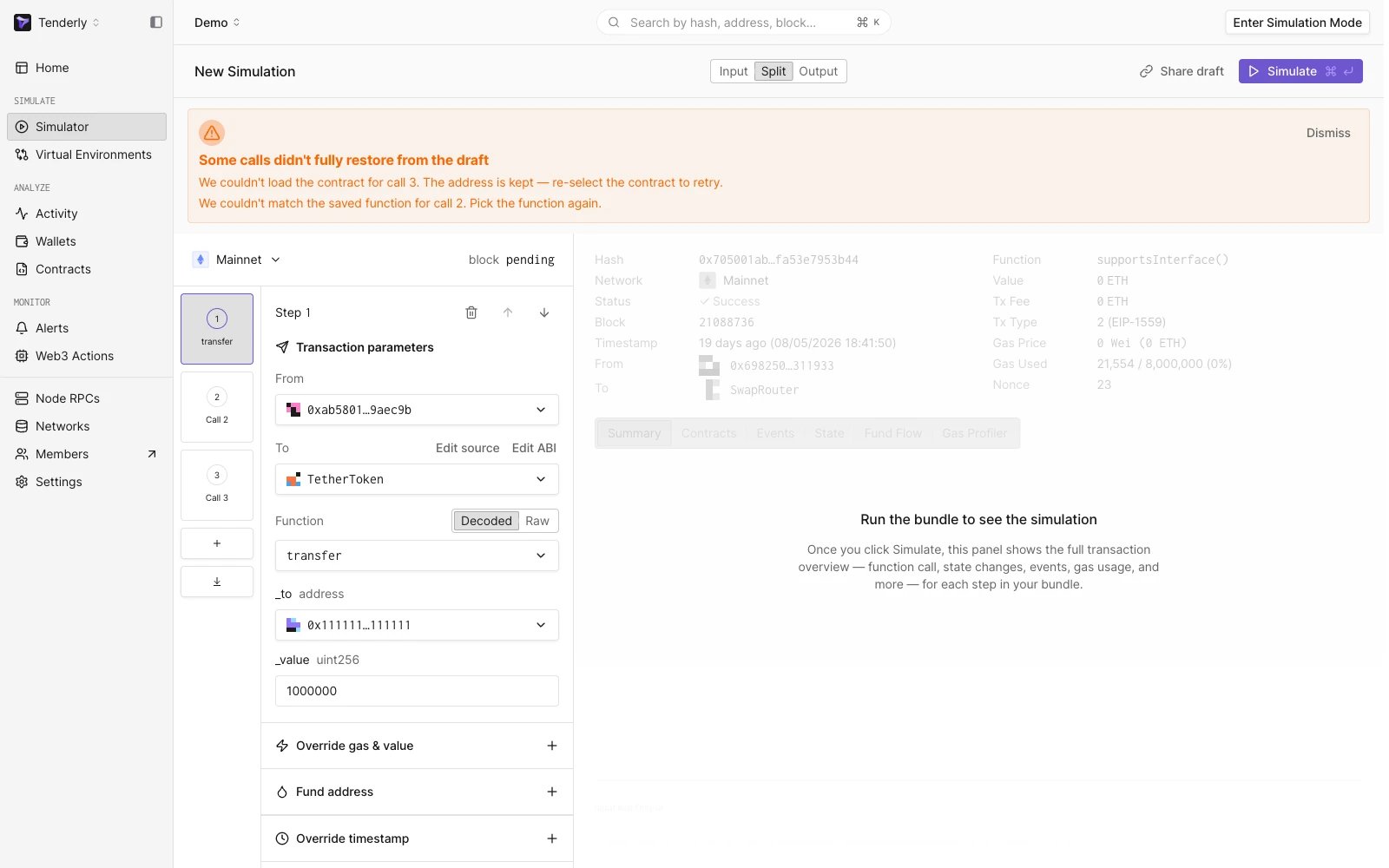
The restore banner names the calls that need attention after a draft opens.
Create a draft link from CI or tooling
Create the draft with the drafts API, then put the returned id in the link. Requests authenticate with an access key; the caller must be a member of the project in the URL.POST https://api.tenderly.co/api/v2/account/{account}/project/{project}/simulation-drafts (API reference)
The response is
{ "resource_id": "<uuid>" }.
Read a draft back
GET https://api.tenderly.co/api/v2/account/{account}/project/{project}/simulation-drafts/{id} (API reference)
The project in the URL is the caller’s own project (any project they can view). The draft’s visibility determines access:
- A project-scoped draft returns
{ "payload": {…}, "account_id": "…", "project_id": "…" }when the caller can view the draft’s origin project. - A shared draft returns
{ "payload": {…} }with no origin information. - Anything else (unknown id, expired draft, no access to the origin project) returns
404with"slug": "resource_not_found".
GET the draft by the id in the copied link. The response is a payload the dashboard accepts, including the stateOverrides, customSource, and fundAddress shapes.
Draft payload
Row fields
OnlycontractAddress is required. Omit anything you do not need. Omitted fields keep the form’s defaults, and unknown extra fields are ignored.
Contract and function
Transaction parameters
Block selection
See Simulation Parameters for how block selection and transaction index behave in the UI.
L2 parameters
These fields apply to OP-stack and Boba networks only.Overrides
Funded balances and edited source
Validation and errors
Creating a draft:
Opening a draft is all-or-nothing at the payload level: a wrong
v, a missing rows entry, a non-string contractAddress, or any wrong-typed row field rejects the whole draft with “This draft link is invalid or corrupted”. Per-call problems that depend on live data (contract fetch, function match, source compile, token slot) degrade individually as described in Partial restore.
Limits
- Payloads are capped at 256 KB per draft, enforced by the API.
- Drafts expire automatically. An expired draft returns
404from the API and the “invalid, has expired, or you don’t have access” message in the dashboard. - Opening a draft link requires a Tenderly account. Shared drafts (
shared: true) are readable by any signed-in user; project-scoped drafts only by members of the origin project. - The contract ABI is fetched when the link opens. If it cannot be resolved (an unverified contract), decoded-mode calls open with the address filled but no function selected. Raw mode is immune to this.
Legacy ?draft= links
Before server-side drafts, the dashboard encoded a single call directly into the URL:
https://dashboard.tenderly.co/<org>/<project>/simulator/new?draft=<value>
<value> is a version-1 payload ({ "v": 1, "network": {…}, "row": {…} }, one row instead of rows) as UTF-8 JSON, then base64url (+ to -, / to _, = padding stripped). Existing links keep opening. The row object accepts the row fields above except fundAddress, customSource, and contractSourceEdited, and the whole URL must stay under about 2000 characters. The dashboard no longer produces this format; use the drafts API for new integrations.
For the form fields a draft populates, see Simulation Parameters. To keep a modified state as a persistent environment instead of a one-shot simulation, use Virtual Environments.