

Virtual Environments are available on the paid plan. To enable them for your account, contact our sales team to schedule a call and discuss upgrading your plan.
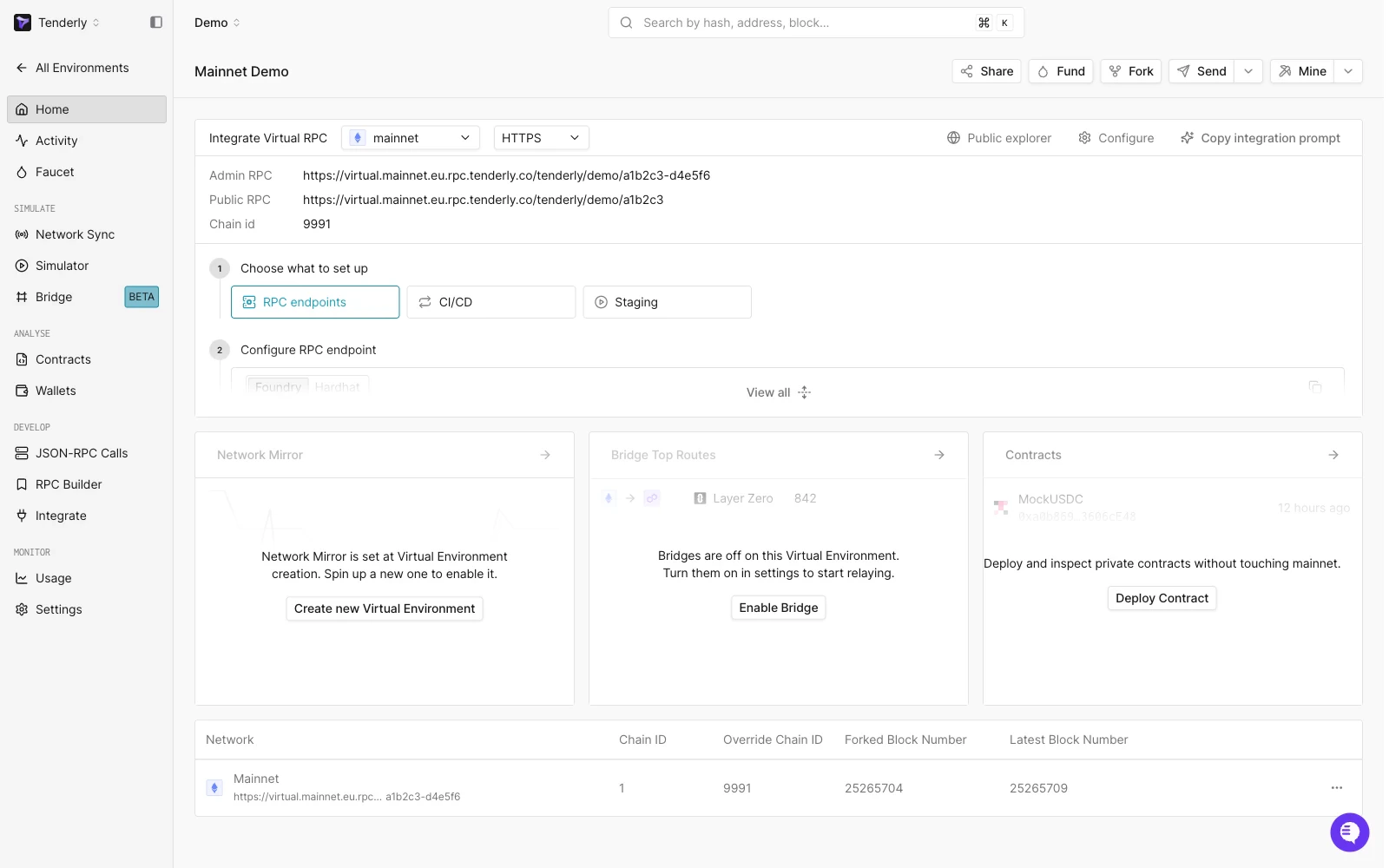
What you can build with them
- A local node replacement. Code, test, and debug every part of your dapp (smart contracts, dapp UI, backend, indexing layer) against a network that mirrors mainnet state.
- CI/CD infrastructure. Provision a fresh Virtual Environment per pull request, deploy your contracts, run your tests, and tear it down. The GitHub Actions guides cover the pattern.
- Staging and demo environments. Run the full dapp against a forked mainnet for manual QA, community testing, contract audits, or sales demos. Reviewers see a real block explorer; you don’t move real funds.
- Cross-chain testing. Attach multiple networks to one Virtual Environment and exercise bridge flows end-to-end. The Multichain Quickstart walks through the setup.
How do Virtual Environments compare to public testnets?
Public testnets like Sepolia and Holesky run their own isolated chain state, so they lack mainnet liquidity, live oracle prices, and the deployed protocols your dapp depends on. A Virtual Environment forks mainnet (or any of 100+ networks) instead, so you test against real production state, with faucet funds that never run out and full control over account balances, block number, and time. Unlike a public testnet, it stays private to your team and can be created and torn down per pull request.Start here
Quickstart
Launch your first Virtual Environment, fund an account, and send a transaction.
Multichain Quickstart
Set up a Virtual Environment that spans multiple networks and run a cross-chain transaction with automatic bridge relay.
Network sync modes
Every Virtual Environment has a network sync mode that controls how it relates to its parent network after creation:- Fork (default): The Virtual Environment stays at the forked block head with no live updates from the parent network. State changes only through your own transactions and cheatcodes.
- State Only Sync: Storage slots keep tracking live parent-network values until your Virtual Environment writes to them. See State Sync.
- Network Mirror: A full block-by-block replay of the parent network onto your Virtual Environment, with a visible mempool and time controls. See Network Mirror Mode.
The building blocks
These pages explain what each piece of a Virtual Environment does and how it relates to the others. Read them before you need to debug something.Explorer
Inspect transactions, contracts, wallets, and RPC calls on your Virtual Environment through a familiar block-explorer UI.
Unlimited Faucet
Top up native currency or ERC-20 balances on any account, with no real funds required.
State Sync
Keep storage slots tracking live mainnet values until your Virtual Environment writes to them.
Network Mirror Mode
Stay block-for-block aligned with the parent network, with a visible mempool and time controls.
Named RPC URLs
Attach a fixed, human-readable name to an environment’s RPC URL so it survives re-forks.
Multichain Virtual Environments
One Virtual Environment, multiple networks, shared identity, unified timeline.
Bridges
Automatic relay for LayerZero, Chainlink CCIP, and Across between networks in a Multichain Virtual Environment.
How you interact with a Virtual Environment
You drive a Virtual Environment through four surfaces:- The Tenderly Dashboard, where you create the Virtual Environment, browse transactions, fund accounts, simulate transactions against the environment’s current state, and configure settings. The dashboard reference lists what each button and tab does.
- The Public RPC, a standard JSON-RPC endpoint that supports the methods any dapp or library already calls. Use this for your dapp UI, backend, and anything you would expose to external testers.
- The Admin RPC, an enriched JSON-RPC endpoint that adds cheatcodes for setting balances, overriding storage, fast-forwarding time, deploying arbitrary bytecode, and synchronising with the live network. Use this from your dev tooling and tests, not from anything externally accessible. The full set of cheatcodes is documented in the Admin RPC reference.
- The REST API, for creating, forking, and deleting Virtual Environments from scripts and CI pipelines. See the REST API reference; the GitHub Actions guides wrap it for pull-request workflows.
Common tasks
Add to a wallet
Connect MetaMask or another wallet to your Virtual Environment.
Connect your tooling
Point Foundry, Hardhat, ethers, viem, or your dapp UI at your Virtual Environment RPC.
Deploy and verify contracts
Deploy with Foundry or Hardhat, with automatic contract verification.
Simulate transactions
Dry-run transactions against the Virtual Environment’s current state before sending them.
Fork a Virtual Environment
Branch an existing Virtual Environment into a new one at its current state.
Revert state
Undo the latest block from the dashboard, or roll back to a snapshot.
Supported networks
Virtual Environments work on 100+ EVM networks. See supported networks for the full list.See also
- Quickstart for your first Virtual Environment, end-to-end.
- Stage contracts to share a Virtual Environment with your team.
- Admin RPC, REST API, and the dashboard reference for reference material.
- Solidity Cheatcodes for manipulating state from inside a transaction via the Virtual Environment precompile.