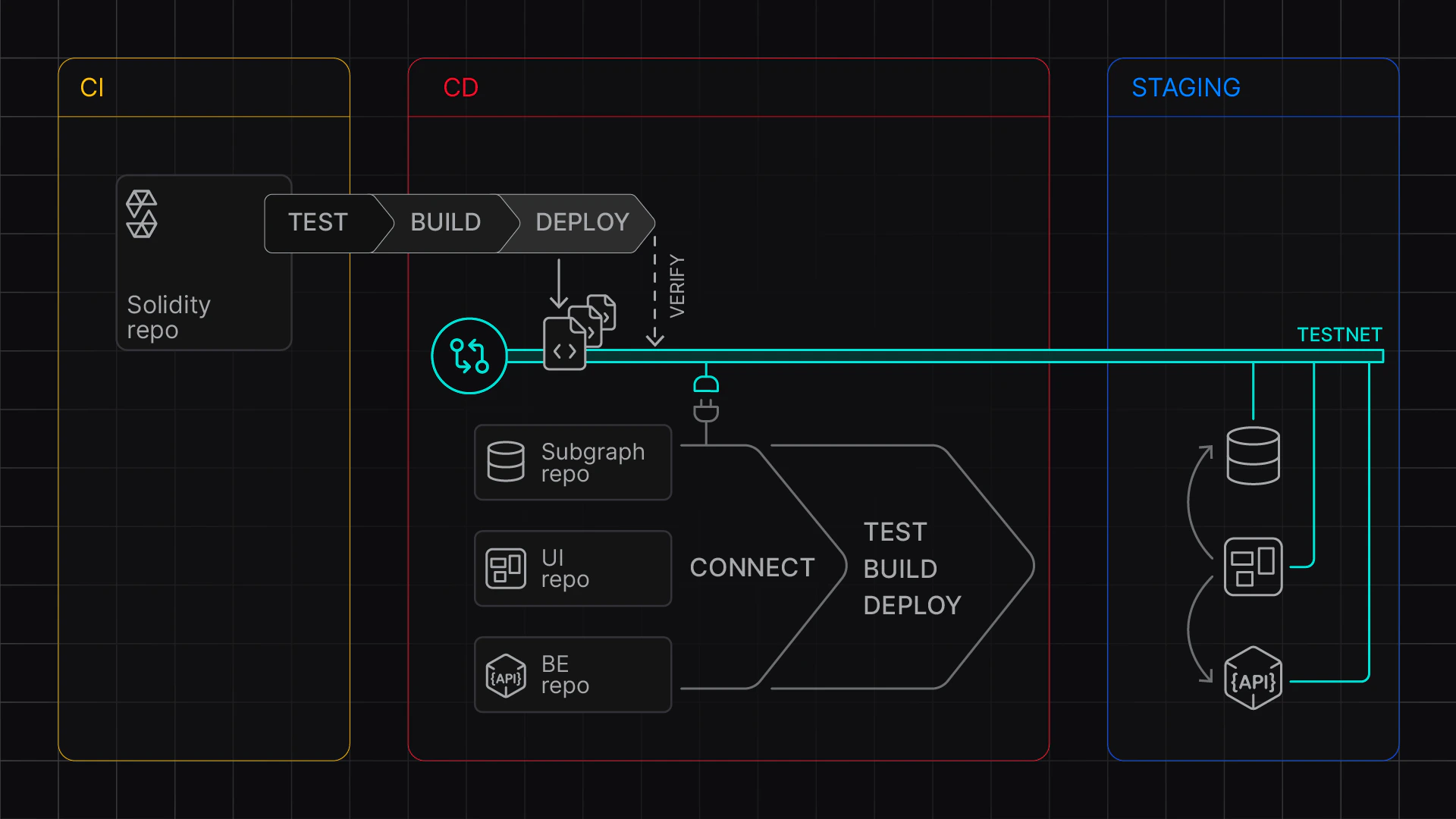
Learn how to configure a GitHub Action to set up a continuous integration and continuous deployment pipeline (CI/CD) with Foundry on Tenderly Virtual Environments. Use the Tenderly Virtual TestNet Setup action to enable automated builds to test and stage your contracts. This approach enables:
  • CI/CD Integration: Run tests against forked networks and set up staging environments
  • Multi-Network Testing: Provision multiple networks in a single step
  • Automated Deployments: Deploy and verify contracts with complete deployment logs
  • Artifact Collection: Track deployments across networks with structured logs
In this guide, you need to complete two stages:
  1. Local setup: Set up Foundry to create and test out the workflow file
  2. GitHub setup: Set up a GitHub Action, configure GitHub secrets and variables, and test the build
For reference, use this example project:

Foundry CI/CD setup

Continuous integration (CI) and continous deployment (CD) with Virtual Environments

Stage 1: Local Setup

First, create a workflow file with the necessary settings.
1
Create the Workflow File
2
In your foundry project, create a new workflows directory and ci-cd.yaml:
3
mkdir -p .github/workflows
touch .github/workflows/ci-cd.yaml
4
Next, paste the following configuration to ci-cd.yaml that sets up two jobs:
5
  • test job to run Foundry tests
  • deploy job to deploy contracts to a staging Virtual Environment
  • 6
    This sample workflow file:
    7
  • Uses tenderly/vnet-github-action to provision Virtual Environments based on a given network_id (Mainnet and Base), with custom chain_id
  • Uses update_foundry_config_and_build to modify foundry.toml with the correct chain ID (especially important if you’re using a custom chain_id), and passes verification information.
  • Funds the DEPLOYER_WALLET_ADDRESS EOA with 100 ETH, using set_wallet_balance
  • Deploys the contracts on the Virtual Environment
  • Collects deployment information to $BUILD_OUTPUT_FILE_1 and $BUILD_OUTPUT_FILE_8453, respectively, using foundry’s --json option
  • Pushes captured deployment information to the repository
  • 8
    The mode argument for Tenderly/vnet-github-action takes values CI and CD.
    • The CD mode keeps the Virtual Environment active and you can work with deployed contracts.
    • The CI mode pauses the Virtual Environment after the step completes. You’ll be able to inspect transactions but won’t be able to send further RPC requests.
    9
    name: Foundry CI/CD
    
    on:
      push:
      pull_request:
    
    env:
      TENDERLY_ACCESS_KEY: ${{ secrets.TENDERLY_ACCESS_KEY }}
      DEPLOYER_WALLET_ADDRESS: ${{ vars.DEPLOYER_WALLET_ADDRESS }}
      DEBUG: tenderly/vnet-github-action@v1.0.14
    jobs:
      deploy:
        runs-on: ubuntu-latest
        defaults:
          run:
            working-directory: ./examples/foundry
        permissions:
          contents: write
        steps:
          - uses: actions/checkout@v4
            with:
              submodules: recursive
    
          - name: Setup Virtual Environment
            uses: tenderly/vnet-github-action@v1.0.14
            with:
              mode: CD
              access_key: ${{ secrets.TENDERLY_ACCESS_KEY }}
              project_name: ${{ vars.TENDERLY_PROJECT_NAME }}
              account_name: ${{ vars.TENDERLY_ACCOUNT_NAME }}
              testnet_name: "Staging"
              network_id: |
                1
                8453
              chain_id_prefix: 7357
              public_explorer: true
              verification_visibility: 'src'
              push_on_complete: true
    
          - name: Install Foundry
            uses: foundry-rs/foundry-toolchain@v1
    
          - name: Fund Deployer Account on Mainnet
            run: |
              source ../../fixtures/load-fixtures.sh
              update_foundry_config_and_build $TENDERLY_ACCESS_KEY $TENDERLY_FOUNDRY_VERIFICATION_URL_1  $TENDERLY_CHAIN_ID_1
              set_wallet_balance $TENDERLY_ADMIN_RPC_URL_1 ${{ vars.DEPLOYER_WALLET_ADDRESS }} $HUNDRED_ETH
    
          - name: Deploy Contracts Mainnet
            run: |
              forge build --sizes
              forge script script/Counter.s.sol \
                --private-key ${{ secrets.DEPLOYER_PRIVATE_KEY }} \
                --rpc-url ${{ env.TENDERLY_PUBLIC_RPC_URL_1 }} \
                --verifier-url ${{ env.TENDERLY_FOUNDRY_VERIFICATION_URL_1 }} \
                --etherscan-api-key $TENDERLY_ACCESS_KEY \
                --slow \
                --broadcast \
                --verify \
                --json > $BUILD_OUTPUT_FILE_1
    
          - name: Fund Deployer Account on Base
            run: |
              source ../../fixtures/load-fixtures.sh
              update_foundry_config_and_build $TENDERLY_ACCESS_KEY $TENDERLY_FOUNDRY_VERIFICATION_URL_8453  $TENDERLY_CHAIN_ID_8453
              set_wallet_balance $TENDERLY_ADMIN_RPC_URL_8453 ${{ vars.DEPLOYER_WALLET_ADDRESS }} $HUNDRED_ETH
    
          - name: Deploy Contracts Base
            working-directory: ./examples/foundry
            run: |
              forge script script/Counter.s.sol \
                --private-key ${{ secrets.DEPLOYER_PRIVATE_KEY }} \
                --rpc-url ${{ env.TENDERLY_PUBLIC_RPC_URL_8453 }} \
                --verifier-url ${{ env.TENDERLY_FOUNDRY_VERIFICATION_URL_8453 }} \
                --etherscan-api-key $TENDERLY_ACCESS_KEY \
                --slow \
                --broadcast \
                --verify \
                --json > $BUILD_OUTPUT_FILE_8453
    
    10
    Configure Foundry
    11
    Create or update your foundry.toml configuration file. To use automatic contract verification, you must have the unknown_chain entry with key, chain, and url.
    12
    When using Virtual Environments from your local machine, replace the `chain = 0` with the chain ID of the Virtual Environment you connected to.
    13
    [profile.default]
    src = "src"
    out = "out"
    libs = ["lib"]
    cbor_metadata = true
    # See more config options https://github.com/foundry-rs/foundry/blob/master/crates/config/README.md#all-options
    
    [etherscan]
    
    ## placeholders must be replaced with key ("string"), chain_id (number, non-quoted), and tenderly_foundry_verification_url ("string")
    unknown_chain = { key = "$TENDERLY_ACCESS_KEY", chain = 0, url = "$TENDERLY_FOUNDRY_VERIFICATION_URL" }
    
    14
    Prepare Environment Variables
    15
    For local testing, set up an .env file with the following variables:
    16
    # Access parameters
    TENDERLY_ACCESS_KEY=...
    TENDERLY_PROJECT_NAME=...
    TENDERLY_ACCOUNT_NAME=...
    
    # Deployment parameters
    DEPLOYER_PRIVATE_KEY=...
    DEPLOYER_WALLET_ADDRESS=...
    
    17
    Required variables:
    18
  • TENDERLY_ACCESS_KEY: Your Tenderly access key
  • TENDERLY_ACCOUNT_NAME and TENDERLY_PROJECT_NAME: Your account and project names
  • DEPLOYER_PRIVATE_KEY: Private key for the deployment wallet
  • DEPLOYER_WALLET_ADDRESS: Address corresponding to the private key
  • 19
    Add fixtures script
    20
    Add the following fixtures.sh to your repository to be able to fund accounts and adapt foundry.toml easily.
    21
    This file exposes:
    22
  • set_wallet_balance function to top up the balance (RPC_URL WALLET_ADDRESS BALANCE_HEX)
  • update_foundry_config_and_build function to replace the placeholders in foundry.toml
  • HUNDRED_ETH the wei value corresponding to 100 ETH
  • 23
    #!/bin/bash
    
    set_wallet_balance() {
        if [ "$#" -ne 3 ]; then
            echo "Usage: set_wallet_balance RPC_URL WALLET_ADDRESS BALANCE_HEX"
            return 1
        fi
    
        local rpc_url="$1"
        local wallet_address="$2"
        local balance_hex="$3"
    
        curl --location "$rpc_url" \
            --header 'Content-Type: application/json' \
            --data "{
                \"jsonrpc\": \"2.0\",
                \"method\": \"tenderly_setBalance\",
                \"params\": [\"$wallet_address\", \"$balance_hex\"],
                \"id\": \"1\"
            }"
    }
    
    update_foundry_config_and_build() {
        if [ "$#" -ne 3 ]; then
            echo "Usage: update_foundry_config_and_build ACCESS_KEY VERIFICATION_URL CHAIN_ID"
            return 1
        fi
    
        local access_key="$1"
        local verification_url="$2"
        local chain_id="$3"
    
        # Create temporary file and update foundry.toml
        sed -e "s|\${TENDERLY_ACCESS_KEY}|$access_key|g" \
            -e "s|\${TENDERLY_FOUNDRY_VERIFICATION_URL}|$verification_url|g" \
            -e "s/\(unknown_chain[[:space:]]*=[[:space:]]*{[^}]*chain[[:space:]]*=[[:space:]]*\)[0-9][0-9]*/\1$chain_id/g" \
            foundry.toml > foundry.toml.tmp && mv foundry.toml.tmp foundry.toml
    }
    
    # Export constant
    HUNDRED_ETH="0xDE0B6B3A7640000"
    export HUNDRED_ETH
    
    24
    The github action exposes RPC links and verification URLs via different environment variables:
    25
    VariableDescriptionTENDERLY_TESTNET_ID_{network_id}Virtual Environment UUID, uniquely identifying it within TenderlyTENDERLY_ADMIN_RPC_URL_{network_id}Admin RPC endpoint with cheatcode methodsTENDERLY_PUBLIC_RPC_URL_{network_id}Public RPC endpointTENDERLY_CHAIN_ID_{network_id}Chain IDTENDERLY_TESTNET_SLUG_{network_id}Unique Virtual Environment slugTENDERLY_FOUNDRY_VERIFICATION_URL_{network_id}Foundry verification URLBUILD_OUTPUT_FILE_{network_id}Build output file path
    26
    Test the Github Action Locally
    27
    You can test your GitHub Action locally using Act without pushing to GitHub.
    28
    Use the .env file to populate GitHub secrets and environment variables as follows:
    29
    act --secret-file .env --var-file .env
    

    Stage 2: Github Setup

    After confirming your local setup works, configure your GitHub repository using the following steps.
    1
    Configure Secrets and Variables
    2
    Set up the following GitHub secrets and variables:
    3
    Secrets:
    4
  • TENDERLY_ACCESS_KEY: the Tenderly Access Key
  • DEPLOYER_PRIVATE_KEY: the private key for the deployer EOA
  • 5
    Variables:
    6
  • TENDERLY_PROJECT_NAME: the Tenderly project name
  • TENDERLY_ACCOUNT_NAME: the project’s owner’s name
  • DEPLOYER_WALLET_ADDRESS: the deployer EOA
  • 7
    You can achieve this via the GitHub UI or using the gh command line:
    8
    # Load environment variables
    source .env
    
    # Set variables
    gh variable set TENDERLY_PROJECT_NAME --body ${TENDERLY_PROJECT_NAME}
    gh variable set TENDERLY_ACCOUNT_NAME --body ${TENDERLY_ACCOUNT_NAME}
    gh variable set DEPLOYER_WALLET_ADDRESS --body ${DEPLOYER_WALLET_ADDRESS}
    
    # Set secrets
    gh secret set TENDERLY_ACCESS_KEY --body ${TENDERLY_ACCESS_KEY}
    gh secret set DEPLOYER_PRIVATE_KEY --body ${DEPLOYER_PRIVATE_KEY}
    
    9
    Push the Updates
    10
    Finally, commit and push your changes:
    11
    git add .
    git commit -m "Add CI/CD workflow for Foundry"
    git push
    
    12
    Check your action
    13
    Go go your Github repository and check Actions tab. Congrats, you ran your CI/CD workflow with Virtual Environments and Foundry. After
    15
    To get the RPC link, go to Tenderly dashboard > Virtual Environments and find your CD Virtual Environment.

    Next steps