

State Sync is available on the paid plan. To enable it for your account, contact our sales team.
The network sync mode is fixed at creation and stays the same for the entire life of the Virtual Environment. It cannot be turned on, off, or switched afterwards, from the dashboard or the API. To run with a different mode, create a new Virtual Environment.
When to activate State Sync
This option is useful in several scenarios:- Virtual Environment contracts and transactions can access current Oracle values that are present on the original chain.
- Access Uniswap pools from the Virtual Environments when testing contracts and building proof-of-concept transactions.
- Read current parent-network values from subgraph mappings (
ethereum.call). Subgraphs still index only events from Virtual Environment transactions. - Test the behavior and performance of your dapps and protocols in one-to-one correspondence with real network conditions
How State Sync resolves write collisions
State sync enables you to access the latest values of storage slots and account balances on mainnet as they update. Upon writing to a particular storage slot on the Virtual Environment, synchronization stops for that slot, but remains active for all unmodified ones. Here’s state sync in more detail:- The initial block number matches the latest block of the original chain at the time of creation.
- Each time you send a transaction to a Virtual Environment via
eth_sendTransactionoreth_sendRawTransaction, a block is mined and block number increases by 1, independently of the original network. - Until writing to a variable on Virtual Environment, the Virtual Environment tracks the current value from the original network.
- After writing to a variable on Virtual Environment of a contract (e.g.,
C.X=100), any subsequent read will yield that value (100). - All unmodified state variables of a contract (
C.Y) will reflect the value from the original network. - Before a new block is mined on a Virtual Environment, the latest virtual block is synchronized with the latest block on the parent chain.
- Virtual Environment mines a block after every state modification (
sendTransaction,setBalance, etc.). - Block numbers on Virtual Environment and the original network will change with different rates.
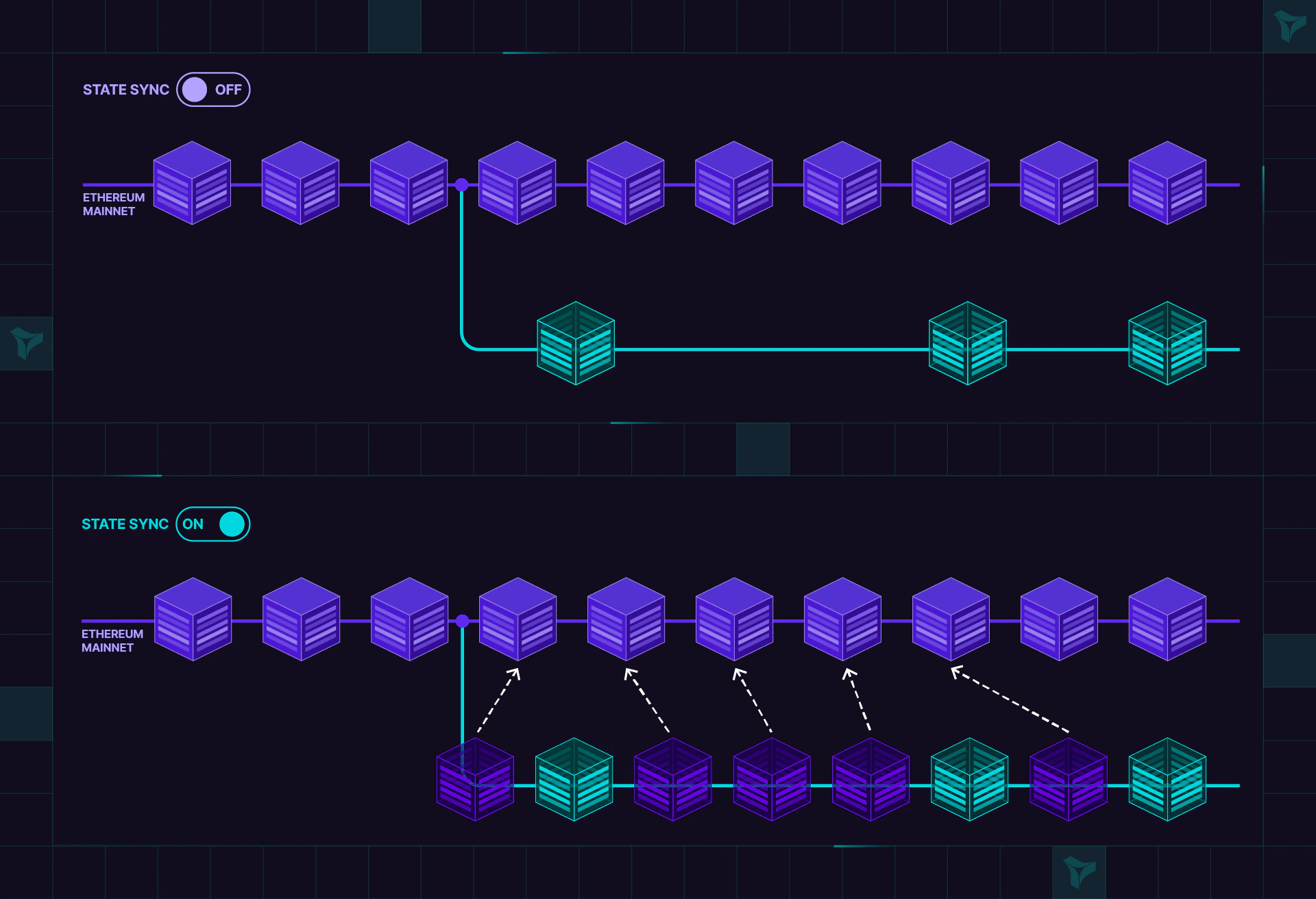
Why did an account stop syncing?
State Sync tracks storage and accounts at different granularity:- Storage syncs per slot. Writing one slot stops syncing only that slot; the contract’s other slots keep tracking the parent network.
- Account fields (ETH balance, nonce, and code) sync as one unit. When any of them changes on the Virtual Environment, all three stop syncing for that address and keep the values they had at that moment.
- Sending a transaction from the account. The nonce increments, so the balance stops syncing too, even when the transaction pays no gas.
- Sending or receiving ETH on the Virtual Environment.
- Setting the account’s balance or code over the Admin RPC, for example with
tenderly_setBalance,tenderly_addBalance, ortenderly_setCode.
tenderly_setBalance on an exchange hot wallet, its nonce on the Virtual Environment stays fixed while the wallet keeps sending transactions on the parent network. Writing storage at an address with tenderly_setStorageAt doesn’t stop its balance, nonce, or code from syncing.
To make an account sync again, revert to a snapshot taken before the change with evm_revert.
Which parent-network state does latest reflect?
On a State Sync Virtual Environment, latest account state (storage, balances, nonces, and contract code) reflects the most recently synced block of the parent network, plus any changes made by your own Virtual Environment transactions. Blocks are synced contiguously, so there are no gaps in the synced state.
The Virtual Environment’s block height is not an indicator of state freshness. Blocks are mined only when the Virtual Environment processes a state modification, so its block number advances independently of the parent chain. A Virtual Environment whose head block is far behind the parent network’s still serves the parent network’s latest synced state at latest. To reason about staleness, compare against the synced parent state, not block numbers.
Synced state includes contract code. A contract deployed on the parent network after the Virtual Environment was created returns bytecode from eth_getCode(address, "latest") on the Virtual Environment, even though no deployment transaction, event logs, or blocks for it exist there. Reads pinned to an earlier block, such as eth_getCode(address, "<creation block>"), still return the state as of that block.
Only state is synced. Parent-network transactions, event logs, and blocks never appear on the Virtual Environment; see Why can’t I see mainnet transactions with State Sync?
For better understanding, let’s explore an example:
Example
The example demonstrates the following:- Virtual Environment (Virtual Sepolia) accesses the latest state from original network (Sepolia).
- After a Virtual Environment
write, the modified variable detaches from its Sepolia counterpart.
State Sync Example
0xd01dF6d2354c5A869265dC9a9561E3544ac53262. The test script will interact with both Sepolia and a Virtual Environment based on
Sepolia - Virtual Sepolia.
The script takes a random entry in the counter map, and then:
- Sets the value on Sepolia, then reads values on both Sepolia and Virtual Sepolia, showing that the same value is read back.
- Sets the value on Virtual Sepolia, then reads values on both Sepolia and Virtual Sepolia, showing that different values are read.
- Again sets the value on Sepolia, then reads values on both Sepolia and Virtual Sepolia, showing that the modification on Sepolia is invisible on its virtual counterpart.