

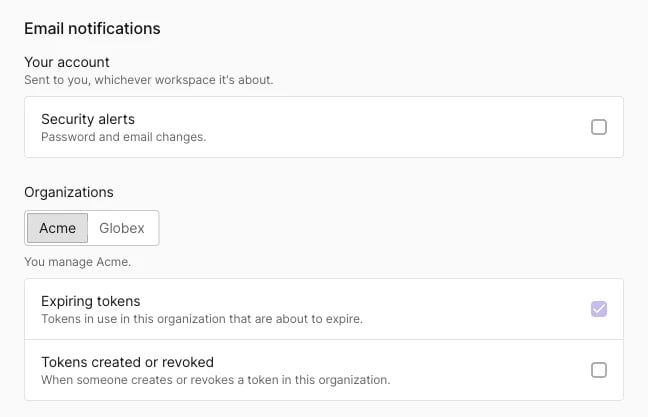
Open the email notification settings
- Click the workspace picker at the top of the sidebar.
- Expand Personal with the arrow next to it and select Account settings. In your personal account, the same page is Settings in the sidebar.
- Scroll to Email notifications.
Turn an email notification on or off
Click a row or its checkbox. Tenderly saves the change immediately and shows a confirmation message.Your account: Security alerts
The Security alerts row under Your account covers emails about your user account. It is one setting that applies in every organization you work in.Organization: Tokens created or revoked
The Tokens created or revoked row sends an email when someone creates or revokes an organization access token. This covers global and project tokens, whether created on the organization’s Access Tokens page or in a project’s settings. The email names the token and the organization. Tokens in your personal account don’t trigger these emails. Each organization has its own setting, so turning it on for one doesn’t change the others.Who gets organization emails
Organization emails go only to people who turned them on for that organization and are either its owner or a member with the Manage access tokens permission. Members who haven’t accepted their invitation yet don’t receive them. Each recipient gets one email per event. The section lists only the organizations you own or hold the Manage access tokens permission in. If you manage none, the section shows only Your account. With one organization, the group is labeled Organization. With two, each organization has a tab. With three or more, pick the organization from a dropdown. The line under the selector names the organization you are editing.Expiring tokens
An organization can also show an Expiring tokens row. The row is checked and disabled because Tenderly always sends reminders before a token expires, so you can replace it before it stops working. You set a token’s expiration date when you create it; see Set a token expiration date.Emails that are always sent
These emails don’t depend on your email notification settings:- Email changed, to the previous address. When your account’s email address changes, Tenderly notifies the previous address even if Security alerts is off. If someone else changes the address, you still hear about it at the address you had before.
- Token expiration reminders for organizations you manage.
- Password reset emails, which carry the reset link as part of the reset flow.