

TenderlyCheatcodes कॉन्ट्रैक्ट के कॉल के रूप में दर्शाया जाता है।
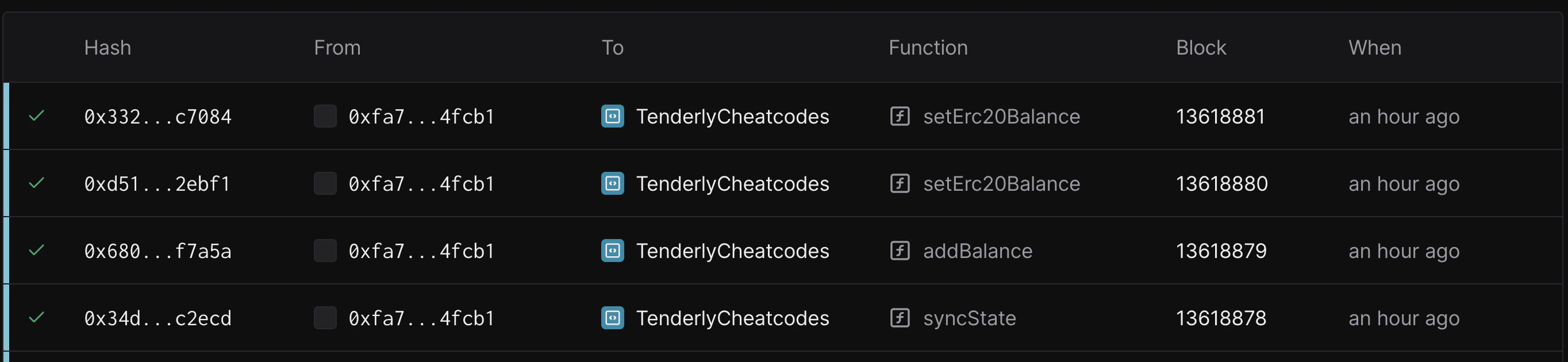
- evm_increaseTime
- evm_setNextBlockTimestamp
- tenderly_setNextBlockTimestamp
- evm_increaseBlocks
- evm_mine
- tenderly_setBalance
- tenderly_addBalance
- tenderly_setErc20Balance
- tenderly_addErc20Balance
- tenderly_setMaxErc20Balance
evm_increaseTime
ब्लॉकचेन के समय को एक निर्दिष्ट मात्रा से आगे बढ़ाता है और नए timestamp के साथ एक खाली block बनाता है।
eth_call और eth_sendRawTransaction को बाद के कॉल्स उनके लक्षित blockNumber के आधार पर अलग-अलग block.timestamp मान प्राप्त करेंगे:
pendingblock के लिए:current_time + time_increaseलौटाता है। यह अगले mine किए जाने वाले block के अपेक्षित timestamp को दर्शाता है।latestblock के लिए:time_of_evm_increaseTimestamp_call + time_increaseलौटाता है। यह उस खाली block का timestamp है जोevm_increaseTimestampको कॉल करते समय बनाया गया था।
QUANTITY- hex-encodedtime_increaseसेकंडों की संख्या जितनी आगे बढ़ना है
DATA- नए बनाए गए block का 32-byte block hash
example.json
example.json
evm_setNextBlockTimestamp
वर्तमान समय को निर्दिष्ट timestamp पर सेट करता है, और दिए गए timestamp के साथ एक खाली block बनाता है।
eth_call और eth_sendRawTransaction को बाद के कॉल्स उनके लक्षित blockNumber के आधार पर अलग-अलग block.timestamp मान लौटाएंगे:
pendingblock के लिए:specified_timestamp + time_since_evmSetNextBlockTimestamp_callलौटाता है। यह सेट किया गया timestamp और मेथड कॉल होने के बाद बीता हुआ समय दर्शाता है।latestblock के लिए:specified_timestampलौटाता है। यह उस खाली block का timestamp है जोevm_setNextBlockTimestampको कॉल करते समय बनाया गया था।
QUANTITY- hex-encodedspecified_timestampजो epoch timestamp (सेकंड में) दर्शाता है
QUANTITY- integer (epoch timestamp) जो अगले block के लिए सेट किया गया है
example.json
example.json
tenderly_setNextBlockTimestamp
एक खाली block बनाए बिना वर्तमान समय को दिए गए timestamp पर सेट करता है।
eth_call और eth_sendRawTransaction को बाद के कॉल्स उनके लक्षित blockNumber के आधार पर अलग-अलग block.timestamp मान लौटाएंगे:
pendingblock के लिए:specified_timestamp + time_since_tenderly_setNextBlockTimestampलौटाता है। यह सेट किया गया timestamp और मेथड कॉल होने के बाद बीता हुआ समय दर्शाता है।latestblock के लिए: सबसे हाल ही में बनाए गए block का timestamp लौटाता है।
QUANTITY- hex-encodedspecified_timestampजो epoch timestamp (सेकंड में) दर्शाता है
QUANTITY- integer (epoch timestamp) जो अगले block के लिए सेट किया गया है
example.json
example.json
evm_increaseBlocks
कई blocks को छोड़ता है और नए block number के साथ एक नया block उत्पन्न करता है।
Parameters
QUANTITY- hex-encoded छोड़े जाने वाले blocks की संख्या
DATA- नए बनाए गए block का 32-byte block hash
example.json
example.json
eth_sendTransaction
एक unsigned transaction सबमिट करता है।
Parameters
- Transaction - transaction object
from:DATA, 20 Bytes - वह address जिससे transaction भेजा जाता है।to:DATA, 20 Bytes - (वैकल्पिक, नया कॉन्ट्रैक्ट बनाते समय छोड़ दिया जाता है) वह address जिस पर transaction भेजा जाता है।gas:QUANTITY- (वैकल्पिक) transaction execution के लिए प्रदान की गई gas का integer। यह अप्रयुक्त gas लौटाएगा।gasPrice:QUANTITY- (वैकल्पिक) प्रत्येक paid gas के लिए उपयोग किए गएgasPriceका integer।value:QUANTITY- (वैकल्पिक) इस transaction के साथ भेजी गई value का integer।data:DATA- (वैकल्पिक) कॉन्ट्रैक्ट का compiled code अथवा invoke की गई method signature और encoded parameters का hash।
example.json
STRING 32 byte hex value
eth_createAccessList
उन access tuples को लौटाता है जिन्हें transaction छूएगा।
Parameters
SendTransactionObject- transaction object (वही जो eth_sendTransaction को प्रदान किया जाता है)BlockNumber- block number parameter
AccessList- transaction द्वारा छुए गए access tuples का एक array
example.json
example.json
evm_getLatest
नेटवर्क Virtual Environment पर नवीनतम transaction ID प्राप्त करता है।
Parameters
Returns
DATA- नवीनतम Virtual Environment transaction का UUID
example.json
example.json
tenderly_setBalance
एक account या accounts के balance को संशोधित करता है।
Parameters
ADDRESS/ADDRESSES- एक string या account addresses का arrayAMOUNT- hex-encoded amount जो wei में हो
DATA- नए बनाए गए transaction का 32-byte block hash
example.json
example.json
example.json
tenderly_addBalance
प्रदान किए गए account या accounts में balance जोड़ता है।
Parameters
ADDRESS/ADDRESSES- एक string या account addresses का arrayAMOUNT- hex-encoded amount जो wei में हो
DATA- नए बनाए गए transaction का 32-byte block hash
example.json
example.json
example.json
tenderly_setErc20Balance
प्रदान किए गए erc20 कॉन्ट्रैक्ट पर wallet के लिए token balance सेट करता है।
tenderly_setErc20Balance नए balance को सीधे token कॉन्ट्रैक्ट के storage में लिखता है और ERC-20 Transfer event उत्सर्जित नहीं करता है। यदि आपका downstream tooling (indexers, subgraphs, accounting) balances ट्रैक करने के लिए Transfer events पर निर्भर है, तो इसके बजाय tenderly_addErc20Balance का उपयोग करें, यह प्रत्येक funded account के लिए एक synthetic Transfer log उत्सर्जित करता है।TOKEN_ADDRESS- ERC20 कॉन्ट्रैक्ट का addressWALLET- उस wallet का address जिसे टॉप-अप किया जाएगाVALUE- 32-byte hash जो tokens के wei मान को दर्शाता है
DATA - नए बनाए गए transaction का 32-byte hash (storage override transaction के माध्यम से commit होता है)
Example request
example.json
example.json
tenderly_addErc20Balance
प्रदान किए गए ERC-20 कॉन्ट्रैक्ट पर एक या अधिक wallets में निर्दिष्ट मात्रा में tokens जोड़ता है। tenderly_setErc20Balance के विपरीत, यह मेथड प्रत्येक funded account के लिए एक synthetic Transfer event उत्सर्जित करता है, जिससे indexers, subgraphs, और logs से balances को मिलाने वाला कोई भी tooling परिणामी state के साथ सिंक में रहता है।
उत्सर्जित log में मानक ERC-20 Transfer(address,address,uint256) topic होता है, transaction sender को from address और funded wallet को to address के रूप में उपयोग करता है, और data field में जोड़ी गई amount वहन करता है।
Parameters
TOKEN_ADDRESS- ERC-20 कॉन्ट्रैक्ट का addressWALLETS- wallet addresses का array जो tokens प्राप्त करेंगेVALUE- 32-byte hash जो प्रत्येक wallet में जोड़ी जाने वाली tokens की wei राशि को दर्शाता है
DATA - नए बनाए गए transaction का 32-byte hash (storage override transaction के माध्यम से commit होता है)
Example request
example.json
example.json
tenderly_setMaxErc20Balance
प्रदान किए गए erc20 कॉन्ट्रैक्ट पर wallet address को अधिकतम संभव token balance से टॉप-अप करता है (मुख्य रूप से उन tokens के लिए जिनमें साधारण balance mapping नहीं होता है)।
tenderly_setErc20Balance की तरह, यह मेथड सीधे storage में लिखता है और ERC-20 Transfer event उत्सर्जित नहीं करता है। जब आपको indexers या log-आधारित tooling को balance परिवर्तन उठाने की आवश्यकता हो, तो tenderly_addErc20Balance का उपयोग करें।YIELD_TOKEN_ADDRESS- ERC20 कॉन्ट्रैक्ट का addressWALLET- उस wallet का address जिसे टॉप-अप किया जाएगा
DATA - नए बनाए गए transaction का 32-byte hash (storage override transaction के माध्यम से commit होता है)
Example request
example.json
example.json
tenderly_setStorageAt
प्रदान किए गए slot पर प्रदान किए गए address का storage सेट करता है।
Parameters
ADDRESS- वह address जहाँ storage को override किया जाएगाSLOT- 32-byte hash जो storage slot key दर्शाता हैVALUE- 32-byte hash जो keyslotपर value दर्शाता है
DATA- नए बनाए गए transaction का 32-byte hash (storage override transaction के माध्यम से commit होता है)
example.json
example.json
tenderly_setCode
प्रदान किए गए address का bytecode बदल देता है। Account का nonce और storage अपरिवर्तित रहते हैं।
Parameters
ADDRESS- वह address जिसका bytecode बदला जाएगाBYTECODE-ADDRESSपर deploy किया जाने वाला runtime bytecode, hex-encoded
DATA- नए बनाए गए transaction का 32-byte hash (code override transaction के माध्यम से commit होता है)
example.json
example.json
evm_snapshot
एक snapshot ID लौटाता है जो आपको Virtual Environment को पिछले बिंदु पर वापस लाने की अनुमति देता है (evm_getLatest से मिले block hash के समान)।
Parameters
Returns
DATA- Virtual Environment द्वारा उत्पादित नवीनतम block का hash (Snapshot ID)
example.json
example.json
evm_revert
Virtual Environment के state को पिछले snapshot पर वापस लाता है।
एकल evm_revert अधिकतम 2000 blocks तक वापस रोल कर सकता है। यदि snapshot उससे भी पीछे है, तो कॉल revert operation is limited to maximum 2000 blocks error के साथ विफल हो जाता है। अतीत में 2000 blocks से अधिक पीछे के बिंदु पर वापस जाने के लिए, इसके बजाय Virtual Environment को लक्षित ऐतिहासिक block पर clone करें।
Parameters
DATA- snapshot का ID
BOOLEAN- operation success flag
example.json
example.json
Network Mirror Mode sync control
निम्नलिखित मेथड्स Network Mirror Mode को नियंत्रित करते हैं, वे Virtual Environment और उसके parent network के बीच continuous sync को शुरू, बंद, step, rewind, और निरीक्षण करते हैं।जब Network Mirror Mode sync सक्रिय होता है, तो अन्य Admin RPC चीटकोड्स (उदाहरण के लिए
tenderly_setBalance, tenderly_setStorageAt, tenderly_sendBlock) अक्षम रहते हैं। यदि आपको उन्हें तुरंत प्रभावी करने की आवश्यकता है, तो पहले tenderly_stopSync से sync को रोकें।tenderly_startSync
Virtual Environment और उसके parent network के बीच continuous sync शुरू करता है। नए parent-network blocks को उत्पादित होते ही अवशोषित कर लिया जाता है, और Virtual Environment के mempool में मौजूद कोई भी transactions (FIFO क्रम में) अगले synced block के आगे जोड़ दिए जाते हैं।
Parameters
कोई नहीं।
Returns
BOOLEAN-trueयदि sync शुरू हुआ
example.json
example.json
tenderly_stopSync
किसी भी चल रहे sync को रोकता है। Virtual Environment अपने वर्तमान block पर रहता है; आप tenderly_startSync के साथ फिर से शुरू कर सकते हैं या tenderly_syncNext के साथ मैन्युअल रूप से आगे बढ़ सकते हैं। जब Mirror Mode सक्रिय हो तो अन्य Admin RPC चीटकोड्स कॉल करने से पहले इसका उपयोग करें।
Parameters
कोई नहीं।
Returns
BOOLEAN-trueयदि sync रुक गया (या पहले से रुका हुआ था)
example.json
example.json
tenderly_syncNext
Virtual Environment पर अगले एकल parent-network block को sync करता है। कोई भी pending Virtual Environment transactions FIFO क्रम में उस block के आगे जोड़ दिए जाते हैं। एक बार में एक block sync करके step करने के लिए उपयोगी।
Parameters
कोई नहीं।
Returns
DATA- नए synced block का 32-byte block hash
example.json
example.json
tenderly_revertSync
Virtual Environment को N synced blocks से पीछे ले जाता है, जिससे उनके Virtual Environment state पर प्रभाव को पूर्ववत किया जाता है। डिफ़ॉल्ट 10 blocks है। Mirror-Mode Virtual Environment को parent network के इतिहास के पहले के बिंदु पर वापस step करने के लिए इसका उपयोग करें।
Parameters
QUANTITY(वैकल्पिक) - hex-encoded blocks की संख्या जिन्हें rewind करना है। डिफ़ॉल्ट0xa(10) है।
DATA- उस block का 32-byte block hash जिस पर Virtual Environment अब स्थित है
example.json
example.json
tenderly_getSyncStatus
Virtual Environment की वर्तमान sync state लौटाता है, जिसमें यह भी शामिल है कि क्या sync सक्रिय है, यह parent network से कितना पीछे है, और नवीनतम synced block कौन-सा है।
Parameters
कोई नहीं।
Returns
OBJECT- निम्न fields के साथ sync status:active-BOOLEAN,trueयदि sync वर्तमान में चल रहा हैlag-QUANTITY, blocks की संख्या जितनी Virtual Environment parent network से पीछे हैlatestSyncedBlock-QUANTITY, Virtual Environment पर synced नवीनतम block का block numberparentLatestBlock-QUANTITY, parent network पर नवीनतम block का block number
example.json
example.json