

TenderlyCheatcodes contract.
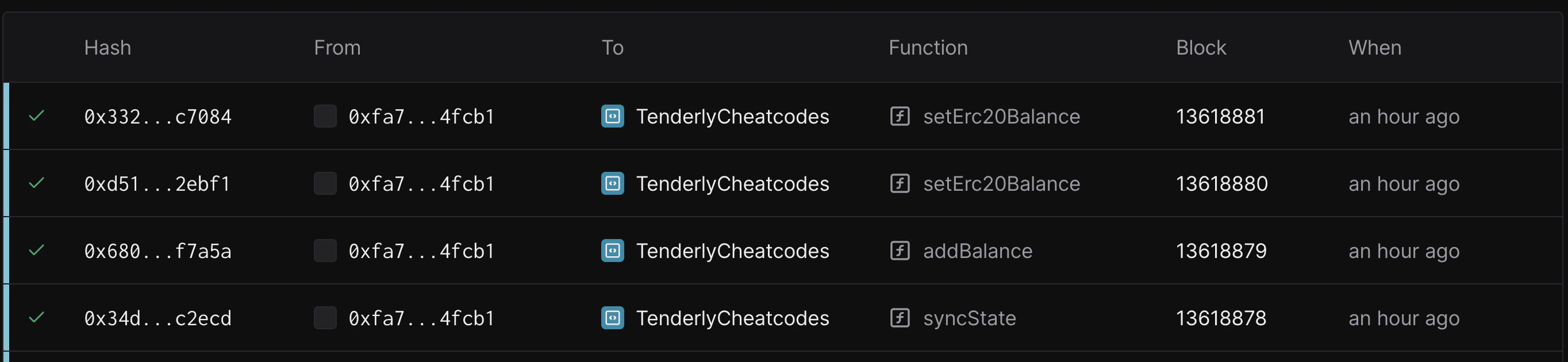
- evm_increaseTime
- evm_setNextBlockTimestamp
- tenderly_setNextBlockTimestamp
- evm_increaseBlocks
- evm_mine
- tenderly_setBalance
- tenderly_addBalance
- tenderly_setErc20Balance
- tenderly_addErc20Balance
- tenderly_setMaxErc20Balance
evm_increaseTime
Advances the blockchain time by a specified amount and creates an empty block with the new timestamp.
Subsequent calls to eth_call and eth_sendRawTransaction will get different block.timestamp values based on the blockNumber they target:
- For
pendingblock: Returnscurrent_time + time_increaseThis represents the expected timestamp of the next block to be mined. - For
latestblock: Returnstime_of_evm_increaseTimestamp_call + time_increase. This is the timestamp of the empty block created whenevm_increaseTimestampwas called.
QUANTITY- hex-encodedtime_increaseof seconds to jump forward by
DATA- 32-byte block hash of the newly generated block
example.json
example.json
evm_setNextBlockTimestamp
Offsets current time to the specified timestamp, and creates an empty block with given timestamp.
Subsequent calls to eth_call and eth_sendRawTransaction will return different block.timestamp values based on the blockNumber they target:
- For
pendingblock: Returnsspecified_timestamp + time_since_evmSetNextBlockTimestamp_call. This represents the set timestamp plus any time elapsed since the method was called. - For
latestblock: Returnsspecified_timestamp. This is the timestamp of the empty block created whenevm_setNextBlockTimestampwas called.
QUANTITY- hex-encodedspecified_timestampthat represents epoch timestamp (in seconds)
QUANTITY- integer (epoch timestamp) that is set for the next block
example.json
example.json
tenderly_setNextBlockTimestamp
Offsets current time to given timestamp without creating an empty block.
Subsequent calls to eth_call and eth_sendRawTransaction will return different block.timestamp values based on the blockNumber they target:
- For
pendingblock: Returnsspecified_timestamp + time_since_tenderly_setNextBlockTimestamp. This represents the set timestamp plus any time elapsed since the method was called. - For
latestblock: Returns the timestamp of the latest created block.
QUANTITY- hex-encodedspecified_timestampthat represents epoch timestamp (in seconds)
QUANTITY- integer (epoch timestamp) that is set for the next block
example.json
example.json
evm_increaseBlocks
Skips a number of blocks and generates a new block with the new block number.
Parameters
QUANTITY- hex-encoded number of blocks to skip
DATA- 32-byte block hash of the newly generated block
example.json
example.json
eth_sendTransaction
Submits an unsigned transaction.
Parameters
- Transaction - The transaction object
from:DATA, 20 Bytes - The address the transaction is sent from.to:DATA, 20 Bytes - (optional, omitted when creating new contract) The address the transaction is directed to.gas:QUANTITY- (optional) Integer of the gas provided for the transaction execution. It will return unused gas.gasPrice:QUANTITY- (optional) Integer of thegasPriceused for each paid gas.value:QUANTITY- (optional) Integer of the value sent with this transaction.data:DATA- (optional) The compiled code of a contract OR the hash of the invoked method signature and encoded parameters.
example.json
STRING 32 byte hex value
eth_createAccessList
Returns the access tuples that would be touched by the transaction.
Parameters
SendTransactionObject- transaction object (same as the one provided to eth_sendTransaction)BlockNumber- block number parameter
AccessList- an array of access tuples touched by the transaction
example.json
example.json
evm_getLatest
Fetches the latest transaction ID on a network Virtual Environment.
Parameters
Returns
DATA- UUID of the latest Virtual Environment transaction
example.json
example.json
tenderly_setBalance
Modifies the balance of an account or accounts.
Parameters
ADDRESS/ADDRESSES- a string or an array of account addressesAMOUNT- hex-encoded number of an amount in wei
DATA- 32-byte block hash of the newly created transaction
example.json
example.json
example.json
tenderly_addBalance
Adds the balance to the provided account or accounts.
Parameters
ADDRESS/ADDRESSES- a string or an array of account addressesAMOUNT- hex-encoded number of an amount in wei
DATA- 32-byte block hash of the newly created transaction
example.json
example.json
example.json
tenderly_setErc20Balance
Sets the token balance for the wallet on the provided erc20 contract.
tenderly_setErc20Balance writes the new balance directly to the token contract’s storage and does not emit an ERC-20 Transfer event. If your downstream tooling (indexers, subgraphs, accounting) relies on Transfer events to track balances, use tenderly_addErc20Balance instead, it emits a synthetic Transfer log for each funded account.TOKEN_ADDRESS- address of the ERC20 contractWALLET- address of the wallet that will get topped upVALUE- 32-byte hash representing the wei value of the tokens
DATA - 32-byte hash of the newly created transaction (storage override is committed via transaction)
Example request
example.json
example.json
tenderly_addErc20Balance
Adds the specified amount of tokens to one or more wallets on the provided ERC-20 contract. Unlike tenderly_setErc20Balance, this method emits a synthetic Transfer event for every funded account, so indexers, subgraphs, and any tooling that reconciles balances from logs stay in sync with the resulting state.
The emitted log has the standard ERC-20 Transfer(address,address,uint256) topic, uses the transaction sender as the from address and the funded wallet as the to address, and carries the added amount in the data field.
Parameters
TOKEN_ADDRESS- address of the ERC-20 contractWALLETS- array of wallet addresses that will receive the tokensVALUE- 32-byte hash representing the wei amount of tokens to add to each wallet
DATA - 32-byte hash of the newly created transaction (storage override is committed via transaction)
Example request
example.json
example.json
tenderly_setMaxErc20Balance
Tops up the wallet address with maximum possible token balance (primarily intended for tokens that don’t have a simple balance mapping) on the provided erc20 contract.
Like
tenderly_setErc20Balance, this method writes directly to storage and does not emit an ERC-20 Transfer event. Use tenderly_addErc20Balance when you need indexers or log-based tooling to pick up the balance change.YIELD_TOKEN_ADDRESS- address of the ERC20 contractWALLET- address of the wallet that would get topped up
DATA - 32-byte hash of the newly created transaction (storage override is committed via transaction)
Example request
example.json
example.json
tenderly_setStorageAt
Sets the storage of the provided address at the provided slot.
Parameters
ADDRESS- the address where the storage will be overriddenSLOT- 32-byte hash representing the storage slot keyVALUE- 32-byte hash representing the value at the keyslot
DATA- 32-byte hash of the newly created transaction (storage override is committed via transaction)
example.json
example.json
tenderly_setCode
Replaces the bytecode of the provided address. The account’s nonce and storage are left unchanged.
Parameters
ADDRESS- the address whose bytecode will be replacedBYTECODE- the runtime bytecode to deploy atADDRESS, hex-encoded
DATA- 32-byte hash of the newly created transaction (the code override is committed via transaction)
example.json
example.json
evm_snapshot
Returns a snapshot ID that allows you to revert a Virtual Environment to a previous point (same as block hash from evm_getLatest).
Parameters
Returns
DATA- hash of the latest block produced by the Virtual Environment (Snapshot ID)
example.json
example.json
evm_revert
Reverts the state of the Virtual Environment to a previous snapshot.
A single evm_revert can roll back at most 2000 blocks. If the snapshot is further back than that, the call fails with a revert operation is limited to maximum 2000 blocks error. To return to a point more than 2000 blocks in the past, fork the Virtual Environment at the target historical block instead.
Parameters
DATA- ID of the snapshot
BOOLEAN- operation success flag
example.json
example.json
Network Mirror Mode sync control
The following methods control sync on a Network Mirror Mode Virtual Environment: they start and stop continuous sync, sync a fixed number of blocks, rewind synced blocks, and report the progress of a sync job. They work only on Network Mirror Mode Virtual Environments.While Network Mirror Mode sync is active, other Admin RPC cheatcodes (for example
tenderly_setBalance, tenderly_setStorageAt, tenderly_sendBlock) are disabled. Pause sync with tenderly_stopSync first if you need them to take effect immediately.tenderly_startSync or tenderly_syncBlocks while a job is running returns the error a block sync is already in progress for this vnet, wait for it to finish before starting a new one. Every sync job stays two blocks behind the parent network’s head, so a shallow reorg on the parent network replaces blocks before they reach the Virtual Environment.
The optional blockTimeSec setting accepted by tenderly_startSync and tenderly_syncBlocks sets how many seconds the job waits between synced blocks. 0 syncs blocks as fast as they can be executed. Defaults and allowed values per network:
tenderly_startSync
Starts continuous sync from the Virtual Environment’s current head. The job syncs parent-network blocks one at a time and keeps following the parent network until you call tenderly_stopSync. Transactions in the Virtual Environment’s mempool are prepended, in FIFO order, to the next synced block.
Parameters
OBJECT(optional) - sync configuration:blockTimeSec-NUMBER, seconds between synced blocks. Defaults to the network’s block time.
OBJECT- the created sync job:syncId-STRING, ID of the sync job. Pass it totenderly_getSyncStatus.startBlock-QUANTITY, first parent-network block the job syncs
example.json
example.json
tenderly_stopSync
Stops the running sync job. The Virtual Environment stays at its current head; resume with tenderly_startSync or advance a fixed number of blocks with tenderly_syncBlocks. If no job is running, the call returns the error no sync currently running for this vnet.
Parameters
None.
Returns
OBJECT- the stopped sync job:syncId-STRING, ID of the stopped sync jobstoppedBlock-QUANTITY, parent-network block the job had reached when it stopped
example.json
example.json
tenderly_syncBlocks
Syncs a fixed number of parent-network blocks, starting with the block after the Virtual Environment’s current head, then stops. Transactions in the Virtual Environment’s mempool are prepended, in FIFO order, to the next synced block. The call returns once the job is created; track its progress with tenderly_getSyncStatus.
Parameters
QUANTITY- number of blocks to sync, as a decimal number or a hex string. Must be greater than zero.OBJECT(optional) - sync configuration:blockTimeSec-NUMBER, seconds between synced blocks. Defaults to the network’s block time.
OBJECT- the created sync job:syncId-STRING, ID of the sync jobstartBlock-QUANTITY, first parent-network block the job syncstargetBlock-QUANTITY, last parent-network block the job syncs
example.json
example.json
tenderly_rewindSync
Reverts the last N synced blocks on the Virtual Environment and drops the state they produced. The next sync job starts from the Virtual Environment’s new head. Stop any running sync first: while a job is running, the call returns the error cannot rewind while a chain sync is running; stop the sync first.
Parameters
QUANTITY- number of blocks to rewind, from 1 to 100, as a decimal number or a hex string.
OBJECT- the rewind result:targetHash-DATA, 32-byte hash of the block the Virtual Environment is positioned at after the rewindblocksReverted-NUMBER, number of blocks reverted
example.json
example.json
tenderly_getSyncStatus
Returns the progress of a sync job started with tenderly_startSync or tenderly_syncBlocks.
Parameters
STRING-syncIdreturned when the job was created
OBJECT- sync job status:startBlock-QUANTITY, first parent-network block the job syncstargetBlock-QUANTITY, last parent-network block the job syncs. Present only for jobs started withtenderly_syncBlocks.currentBlock-QUANTITY, parent-network block the job has reachedstatus-STRING, one ofrunning,paused,completed,stopped,failed, orcanceledstartedAt-STRING, time the job started (RFC 3339). Omitted until the job starts.finishedAt-STRING, time the job finished (RFC 3339). Omitted while the job runs.syncedTransactionCount-NUMBER, number of parent-network transactions synced so far
example.json
example.json