

- Functions: Custom JavaScript or TypeScript code you want to execute when an external event occurs. This is the core of your automation.
- Triggers: Pre-defined external events that your Web3 Action is configured to listen for. When the event occurs, the trigger instructs Tenderly to execute your custom code (function).
- Events (Trigger Types): Pre-defined external events that you can listen for by setting a trigger. When the event occurs, the trigger will call your custom code (functions).
Execution Types
Web3 Actions in Tenderly can be executed in two modes: Sequential and Parallel.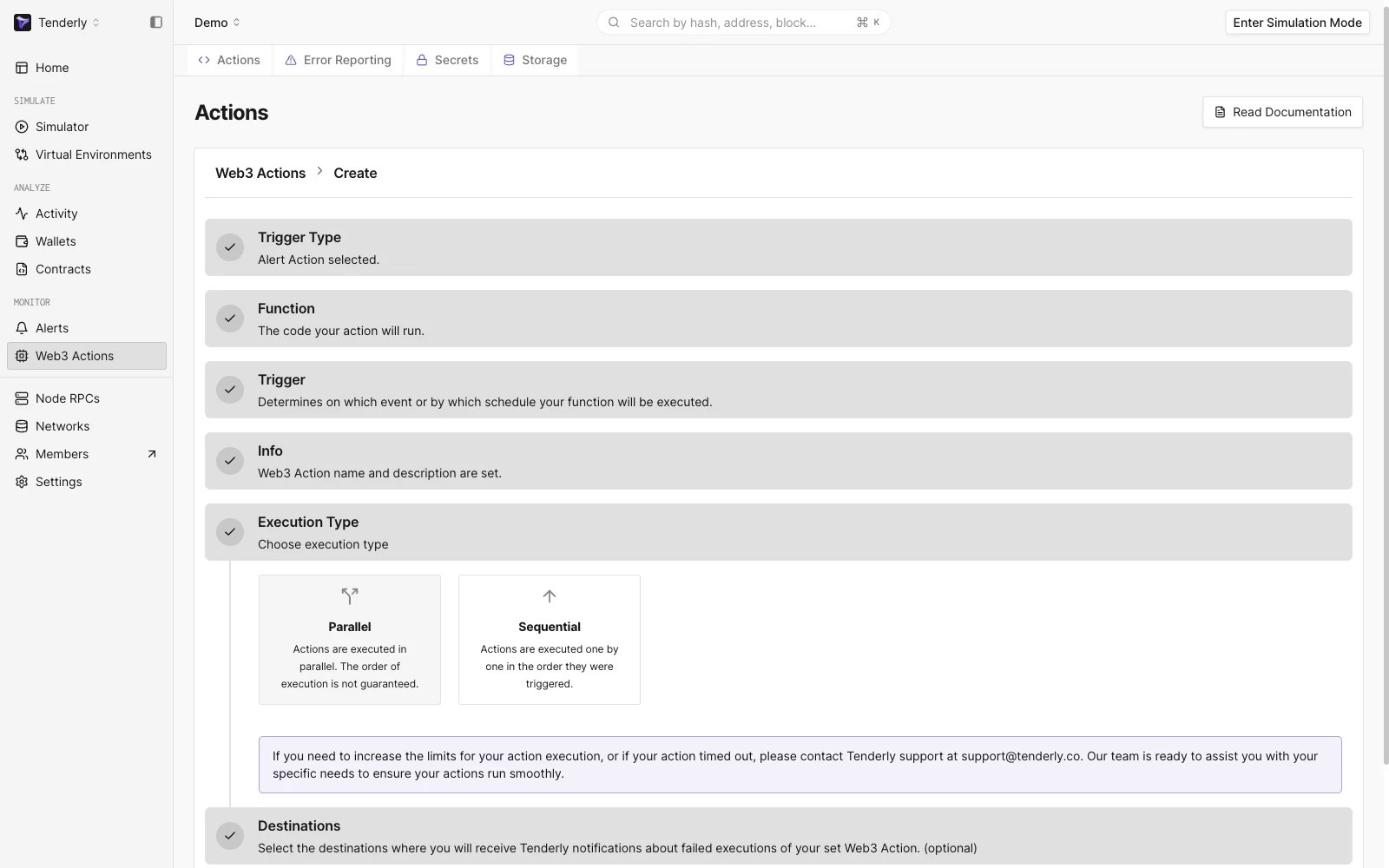
Web3 Action Execution Type step in the Web3 Action UI Builder
Sequential Execution
In sequential execution, actions are executed one by one in the order they were invoked. This is the default mode of execution. In this mode, each action waits for the previous action to complete before it begins execution. Here’s an example of an action configuration for a sequential execution:example
Parallel Execution
In parallel execution, actions are executed in parallel, which leads to higher throughput. In this mode, the order of execution is not guaranteed and there may be possible race conditions with action storage. Here’s an example of an action configuration for a parallel execution:example
Action functions
Web3 Action functions refer to the custom code written as standard JavaScript or TypeScript functions, but they must adhere to some rules.- Functions must be asynchronous, returning
Promise<void> - Functions accept two parameters:
contextandevent - Functions must be a named export from the file
- Functions can be placed in any file under the actions root directory
- The
contextparameter that holds access to Storage and Secrets. - The
eventparameter that is an object with information answering the question “what just happened?”. This parameter contains data specific to the trigger type the Web3 Action function is listening for. The section Specifying triggers for external events goes into detail about external events.
The execution of Web3 Action functions is limited to 30 seconds. If your function takes longer
than 30 seconds to execute, it will be terminated.
event parameter can be any one of the supported trigger types (events).
example.ts
Available libraries for dashboard-based actions
The Tenderly runtime comes pre-bundled with several javascript libraries that you can import when creating Web3 Actions via the Tenderly Dashboard. Available libraries include: To import any of these libraries, use therequire() function as you would with a standard npm-based project (without ES6).
Example import for Axios looks like this:
example.jsx
Using npm libraries for CLI-based Web3 Actions
The project created by Tenderly CLI is in fact an npm module. You can install any npm package from your actions root folder.External events and trigger types
When an external event happens, it triggers the execution of your custom code (functions). You can choose between five external events to listen for:- Block event: A block is mined on a selected network.
- Periodic event: This trigger happens when certain time intervals pass or based on CRON expressions.
- Webhook event: An HTTP request is posted to the webhook URL (the Web3 Action exposes a webhook)
- Transaction event: A transaction matching given filter criteria is executed on a selected network.
- Alert event: One of your Alerts fires with the Web3 Action set as its destination.
You should write separate functions for each trigger type. Using the same function for different
trigger types is not recommended.
Subscribing Web3 Action functions to events
In addition to defining your action function in JavaScript, you also need to provide the trigger configuration, which tells Tenderly what triggers it, the external event your function subscribes to. When creating Web3 Actions via the Tenderly Dashboard, the creation flow in the UI will handle this part for you. Read the Dashboard Quickstart guide. When working with code-based Web3 Actions, functions and their triggers must be defined in thetenderly.yaml file, which is generated by Tenderly CLI. Read the CLI Quickstart guide.
Example
In the example below, we’re declaring a Web3 Action called bestActionEver and referencing the function awesomeActionFunction that is exported from the actions/myCoolTsFile.ts file. This is the function that Tenderly will call when the Web3 Action gets triggered. The execution is controlled via execution_type, in this case it’s set to parallel.
tenderly.yaml
Specifying triggers for external events
In this section, we’ll examine thetrigger declaration. For more information on writing tenderly.yaml file, reference this guide.
The trigger type and corresponding configurations are defined in the tenderly.yaml file. You first must define the trigger object, which has two mandatory properties:
- The
typeproperty, that specifies the trigger type, which can be:periodic | webhook | block | transaction | alert - An object with a configuration specific to the selected trigger type
alert triggers, the action is wired by selecting the Web3 Action as the alert destination; alert-triggered actions always run sequentially.
Below is a detailed explanation of the trigger-specific configurations for each trigger type.
Periodic event
A periodic event is used when you want your Web3 Action to be triggered at specific time intervals. It carries time: the time of invocation.example.ts
periodic type. It can be interval- or cron-based:
trigger.yaml
interval property can take any of the following values: 5m | 10m | 15m | 30m | 1h | 3h | 6h | 12h | 1d
Use the CRON-based periodic trigger if you need more granular control over when your Web3 Action gets executed:
trigger.yaml
cron property can be any valid CRON string.
Webhook event
Webhook-based Web3 Actions expose a custom webhook URL, making it possible to trigger them from external systems using a simple HTTP POST request. The corresponding trigger type holds two properties: the time of invocation and any payload (a JSON object). Tenderly doesn’t perform any validation or inspections on your payload.example.ts
webhook-trigger.yaml
authenticated is set to true, you must include the Tenderly Access Token with your request to be able to run the Web3 Action as the value of x-access-key. You can find the cURL of the exposed webhook in the Web3 Action overview in the Tenderly Dashboard.
example
Block event
The block event is used when you want to listen for the mining of blocks on one or several networks. You can make your Web3 Action “block-periodic” by specifying the number of mined blocks between two consecutive invocations.example.ts
network: a single value or a list of network IDs you’re interested inblocks: the number of mined blocks between two consecutive executions of the Web3 Action. For example, execute the Web3 Action on every 100th block mined.
block-trigger.yaml
Transaction event
The transaction trigger type allows you to listen for specific transactions as they get executed on-chain.To listen for transactions from a smart contract, the smart contract must be added to your project
in the Tenderly Dashboard; publishing fails otherwise. The
function and eventEmitted filters
additionally require the contract to be verified, since they match on ABI-decoded data.event parameter.
example.ts
- Transaction mining status:
mined(the transaction has been mined) orconfirmed10(10 blocks are confirmed since the block that contains the transaction) - Filters: A list of conditions involving transaction payload using the
filterslist. Only transactions that match filters will trigger the execution of your code.
Filtering transactions
Thefilters list allows you to define triggering criteria using transaction properties to match specific transactions.
Each filter in the list is an object where all fields are AND-ed together. Every condition in the filter must be true for it to match. The filters list itself is OR-ed: a transaction matches if it satisfies any single filter in the list.
An example of a transaction on Ethereum mainnet or Base sent to
0x236..fd62.
transaction-trigger.yaml
- Filter 1: network 1 (Ethereum) AND status fail AND to
0x2364...fd62 - Filter 2: network 8453 (Base) AND status fail AND to
0x2364...fd62
Filtering transactions by transaction fields
Among the common transaction fields, you can filter by the following properties having specific values.from- filtering on a specific sender. Can be a single address or a list of addresses (OR-ed). Optional.to- filtering on a specific receiver. Can be a single address or a list of addresses (OR-ed). Optional.status- filtering on transaction status:successorfail. Can be a single value or a list (OR-ed). Optional.network- filtering by network. Can be a single chain ID or a list of chain IDs (OR-ed). Mandatory.contract.address- filtering only transactions involving the contract with this specific address. Optional.
0xf63c48626f874bf5604D3Ba9f4A85d5cE58f8019).
list-fields.yaml
valuegasUsedgasLimitfee
eq, gte, gt, lt, lte. You can also use the not boolean flag to negate a comparison.
Below is an example of a filter demonstrating filters using scalar values in the transaction payload.
numeric-filters.yaml
not flag to negate a comparison:
negated-comparison.yaml
Filtering transactions using emitted EVM Events
Configuring Web3 Actions to listen for EVM events emitted by a transaction execution allows you to respond to significant changes logged by these events. You can achieve this by using theeventEmitted operator, which supports the following nested properties:
contract(mandatory): To specify the origin of the event.contract.address: The address of the contract that emitted the event.contract.invocation: Controls how the contract was called:direct,internal, orany(default). See contract filter for details.
name: The name of the event (requires a verified contract).id: The topic hash of the event signature (alternative toname). For example, theTransfer(address,address,uint256)event has the topic hash0xddf252ad1be2c89b69c2b068fc378daa952ba7f163c4a11628f55a4df523b3ef. Matching byidstill requires the contract’s ABI to decode the log; for contracts without an ABI, uselogEmittedwith the raw topic hash.not: Boolean. Set totrueto negate the entire event match, including parameters (trigger when the event is not emitted with the specified parameters).parameters: A list of conditions on decoded event argument values. All conditions are AND-ed: every condition must match. Each entry supports:name(required): The name of the event argument.string: String comparison. Accepts a plain string for exact match, or an object withexactandnotfields. See StringComparison for details.int: Integer comparison. Supports the same operators as numeric filters (eq,gt,gte,lt,lte). All operators within a singleintblock are AND-ed. Use thenotflag to negate the combined condition. See IntComparison for details.
There is no OR within a single
eventEmitted entry’s parameters. All conditions are AND-ed.
For OR logic on the same parameter, use multiple eventEmitted entries (which are OR-ed in the outer list).TxSubmission or TxConfirmation event is emitted when the smart contract is executed at the address 0x418d..9d45 on Sepolia.
event-emitted-filter.yaml
event-parameters.yaml
negated-parameter.yaml
eventEmitted entries:
event-parameter-or.yaml
not on the event itself to negate the entire match:
negated-event.yaml
Filtering transactions by emitted logs
Another way to listen for EVM events is to query them by the log topic. ThelogEmitted filter can be a single object or a list (entries are OR-ed). It supports the following properties:
startsWith(mandatory): A list of topic values to match against the transaction’s log topics. Each entry is compared by exact equality (case-insensitive) to the corresponding topic. In practice these are full 32-byte topic hashes (0x-prefixed, 64 hex chars), but the field accepts any valid hex string.contract.address(optional): The source of the logs. When specified, only logs from this contract are matched.matchAny: Boolean. Whentrue, matching any single topic fromstartsWithis sufficient. Whenfalse(default), all topics must match.not: Boolean. Set totrueto negate the entire log match (trigger when the log is not emitted).
Using
logEmitted enables you to use the event topic prefix in its raw form to filter for events.
This is useful if you’re setting up a Web3 Action on an unverified contract.log-emitted-filter.yaml
Filtering transactions involving a specific contract
To filter for transactions that call a specific contract during their execution, you can use the optionalcontract filter.
The contract filter supports the following properties:
address: The address of the contract.invocation: Controls how the contract was called. Possible values:direct: the contract was called directly by the transaction sender (EOA). Use this when you only care about top-level calls to the contract.internal: the contract was called internally by another contract during execution (e.g. viaCALL,DELEGATECALL, orSTATICCALLopcodes). Use this to detect when your contract is invoked as part of a multi-contract interaction.any: matches both direct and internal calls. This is the default.
invocation field is available wherever a contract object is used, including inside eventEmitted filters. For eventEmitted contracts, only direct is distinguished: internal behaves the same as any. See Contract for the schema.
In the example below, the first filter matches any successful transaction sent to 0x2364...fd62 on Sepolia. The second filter is more restrictive: only transactions that also involve an internal call to contract 0xad88...80d6 will trigger the Web3 Action.
contract-filter.yaml
Filtering transactions by function call
To filter for transactions that call a specific function, you can use the optionalfunction filter. It requires the address of the contract contract.address and the name of the function.
The function filter supports the following properties:
contract(mandatory): To specify the target contract.contract.address: The address of the contract being called.contract.invocation: Controls how the function must be called:any(default, both direct and internal),direct(EOA-initiated only), orinternal(sub-calls only). See contract filter for details.
name(mandatory): The name of the function (requires a verified contract).not: Boolean. Set totrueto negate the entire function match, including parameters (trigger when the function is not called with the specified parameters).parameters: A list of conditions on decoded function input argument values. All conditions are AND-ed: every condition must match. Each entry supports:name(required): The name of the function argument.string: String comparison. Accepts a plain string for exact match, or an object withexactandnotfields. See StringComparison for details.int: Integer comparison. Supports the same operators as numeric filters (eq,gt,gte,lt,lte). All operators within a singleintblock are AND-ed. Use thenotflag to negate the combined condition. See IntComparison for details.
There is no OR within a single
function entry’s parameters. All conditions are AND-ed.
For OR logic on the same parameter, use multiple function entries (which are OR-ed in the outer list).function as a single object or as a list. When a list is provided, entries are OR-ed. The filter matches if any function in the list is called. For the complete field reference, see FunctionFilter.
Below is an example of a Web3 Action trigger responding to any call (direct or internal) to the verySpecialFunction of the contract deployed at 0xad88...80d6.
function-filter.yaml
function-multi.yaml
function-parameters.yaml
function-negated-string.yaml
function-negated-parameter.yaml
function entries:
function-parameter-or.yaml
transfer triggered by a router or flash-loan provider rather than directly by a user, set invocation: internal. This example triggers only when another contract internally calls transfer on USDC for at least 1,000 USDC:
function-internal-with-params.yaml
Filtering transactions by ETH balance
TheethBalance filter triggers your Web3 Action when a transaction changes an account or contract’s ETH balance and the resulting balance meets a numeric condition. This is useful for monitoring large whale movements, protocol treasury thresholds, or wallet funding events.
The filter is evaluated only when the address’s native balance changes in the transaction; a transaction that leaves the balance untouched never matches, even if the balance already satisfies the condition.
The filter supports the following properties:
address(mandatory): The account or contract address to monitor.balanceCmp(mandatory): A numeric comparison against the balance after the transaction. UsesBigIntComparisonoperators (eq,gt,gte,lt,lte). Values are in wei and can be provided as decimal strings (e.g."1000000000000000000") or0x-prefixed hex (e.g."0xde0b6b3a7640000").not(optional): Set totrueto negate the entire match.
ethBalance object or a list, entries are OR-ed.
For the complete field reference, see EthBalanceFilter.
Example: trigger when a wallet’s balance reaches at least 1 ETH:
eth-balance-filter.yaml
eth-balance-multi.yaml
eth-balance-range.yaml
eth-balance-not.yaml
Filtering transactions by contract state changes
ThestateChanged filter triggers your Web3 Action when a contract’s state variable changes during a transaction. You can match on any combination of: whether the variable changed at all, a specific new value, a percentage change, or a raw storage slot key.
The filter supports the following properties:
address(mandatory unlessmatchAny: true): The contract address to watch.matchAny(optional): Whentrue, matches state changes on any contract in the transaction,addresscan be omitted. Useful for protocol-wide monitoring.params(optional): A list of state variable conditions, one entry per variable name. Entries are OR-ed: the filter matches when any listed variable’s condition is met. Repeating the samenameoverwrites the earlier entry, so combine all conditions for one variable in a single entry. Whenparamsis omitted, the filter matches any state change on the specified address.not(optional): Set totrueto negate the entire match.
params requires:
name(mandatory): The name of the state variable.- At least one condition:
change: true: matches when the variable’s value changed at all.valueCmp(BigIntComparison), matches when the new value meets a numeric condition.percentageCmp(BigIntComparison), matches on the signed percentage change computed as(newValue - oldValue) * 100 / oldValue. Positive values mean an increase, negative values mean a decrease. For example,gte: "10"fires on increases of 10%+;lte: "-10"fires on decreases of 10%+. Note: whenoldValueis 0, the percentage is always 0, usechange: trueorvalueCmpinstead.storageSlotKey: matches by raw storage slot key (useful for unverified contracts).
StateChangedFilter.
To use
name-based state variable matching, the contract must be verified and added to your project
in the Tenderly Dashboard.totalSupply changes at all:
state-changed-basic.yaml
totalSupply reaches a threshold:
state-changed-value.yaml
totalSupply increases by 50% or more:
state-changed-percentage-increase.yaml
totalSupply decreases by 10% or more:
state-changed-percentage-decrease.yaml
params are OR-ed, so this fires when either variable changes:
state-changed-multi-params.yaml
name in separate entries overwrites the earlier one.
Example: watch a specific mapping slot (e.g. balances[bob]) using a raw storage slot key:
For mappings, there is no named variable per entry, use storageSlotKey with the keccak256-derived slot for the key you care about. The slot for mapping(address => uint256) balances at storage slot N and key addr is keccak256(abi.encode(addr, N)).
state-changed-slot.yaml
storageSlotKey approach works for unverified contracts and any storage layout, it does not require the contract to be verified or added to your Tenderly project.
Example: matchAny to monitor any contract in the transaction:
state-changed-match-any.yaml
stateChanged and ethBalance can be combined with any other filter in the same filter object, all fields are AND-ed. The examples below show common real-world combinations.
Example: mint() was called AND totalSupply changed (confirm the call had on-chain effect):
state-changed-with-function.yaml
Transfer event emitted AND paused state changed (ownership or pause flag toggled during a transfer):
state-changed-with-event.yaml
eth-balance-with-to.yaml
togglePause() was called but balances did not change (i.e. the tx affected only the paused flag):
state-changed-not.yaml
Complete transaction trigger reference
The following annotated YAML block shows every available field for transaction triggers in one place. Use it as a quick reference when building your trigger configuration. For type definitions, see the Trigger YAML schema reference below.complete-reference.yaml
Trigger YAML schema reference
The schema below describes the structure and types of every field accepted by the trigger configuration. Use it alongside the annotated example above when building yourtenderly.yaml.
Notation: ? = optional, | = one of, [] = list. Fields marked “single or list” accept either a scalar value or a YAML list.
All trigger types
schema.yaml
TransactionFilter
schema.yaml
The top-level
contract field acts as a shared default for the filter. It is automatically applied to any function or eventEmitted entry that does not specify its own contract, letting you avoid repeating the same address. It does not apply to logEmitted.Shared types
schema.yaml
FunctionFilter
schema.yaml
EventFilter (eventEmitted)
schema.yaml
LogFilter (logEmitted)
schema.yaml
EthBalanceFilter (ethBalance)
schema.yaml
StateChangedFilter (stateChanged)
schema.yaml